Trupeer Blog
Özetle

Most automation programmes start with a list of ideas from a workshop: "automate invoice entry", "add a bot for onboarding", "use AI for the service desk". Some of those ideas work. Many stall, because the process behind them was never properly understood. The bot breaks on the first exception, the savings are smaller than promised, and the team quietly goes back to doing it by hand.
There's a better starting point: your documented processes. When you know exactly how work is done, step by step, the best automation candidates become visible. This guide explains automation opportunity identification from documented processes: the signals that mark a good candidate, a simple scoring framework, how to match each opportunity to the right type of automation, and a step-by-step method you can run on your own SOPs.
What is automation opportunity identification?
Automation opportunity identification is the process of finding the tasks and process steps where automation will deliver the most value with the least risk. It looks at how work is done today, scores each step on factors such as volume, rules and data, and produces a prioritised list of candidates for robotic process automation, workflow, integration, AI or simple system changes.
It's different from process mining, which analyses system event logs. Identifying automation opportunities from documented processes works at the level of individual steps, including the manual work that happens outside systems: copy-pasting between screens, checking spreadsheets, sending emails.
Why use documented processes to identify automation opportunities?
You see the real steps, not the idealised version people describe in a workshop.
Manual work becomes visible, including the lookups, re-keying and spreadsheet steps that system logs never capture.
Exceptions are clear, so you know how often the standard path is actually followed.
Effort can be measured, step by step, which makes business cases credible.
Automation teams get a specification, ready to build from.
You avoid automating a broken process, because problems show up before the build.
If your processes aren't documented yet, start there; see as-is vs to-be process.
What makes a good automation candidate?

Look for steps and tasks with these signals:
High volume: done many times a day, week or month.
Rule-based: clear rules decide what to do, with little judgement.
Structured or semi-structured inputs: forms, fields, standard documents.
Stable: the process and screens don't change often.
Repetitive manual effort: re-keying, copy-pasting, checking one system against another.
Low exception rate: most cases follow the standard path.
Error-prone when done by hand: mistakes are costly or common.
Time-sensitive: delays hurt customers, suppliers or compliance.
Steps that need judgement, negotiation or relationship-building are usually poor candidates for full automation, but may still benefit from AI assistance.
How do you score automation opportunities?

Score each candidate step or task on a simple scale, for example 1 to 5, and weight the factors that matter most to you:
Factor | What to ask | Example weight |
|---|---|---|
Volume and frequency | How often is this done? | High |
Time per transaction | How long does it take by hand? | High |
Rule clarity | Can the decisions be written as rules? | High |
Input structure | Are the inputs structured and digital? | Medium |
Exception rate | How often does it leave the standard path? | Medium |
Process stability | How often do the steps or screens change? | Medium |
Error impact | What does a mistake cost? | Medium |
Systems involved | How many systems are touched, and do they have APIs? | Low |
Multiply each score by its weight and add them up to get a value and feasibility picture. The weights here are illustrative; agree your own with the business and the automation team.
Which type of automation fits each opportunity?

Opportunity pattern | Likely automation type |
|---|---|
Re-keying data between systems with no API | Robotic process automation (RPA) |
Approvals and handoffs between people | Workflow automation |
Systems that can talk directly | Integration or API |
Reading invoices, forms or emails | Document AI or intelligent document processing |
Answering repeated questions | Self-service knowledge base or AI assistant |
Judgement-heavy work with patterns | AI agent with human review |
Steps that exist only because of system gaps | System configuration change |
Sometimes the best "automation" is removing a step entirely, or fixing the configuration that made it necessary.
How do you identify automation opportunities from documented processes, step by step?

Step 1: Choose the processes to review
Start with end-to-end processes that have high volume or high cost, such as accounts payable, order management, onboarding or service desk work. For a worked map of one, see the procure to pay process flow.
Step 2: Document the process at step level
Record experienced team members doing the work with Trupeer's AI screen recorder, including exceptions and the spreadsheets they use. Trupeer turns each recording into a step-by-step document with screenshots, so every click, lookup and copy-paste is visible.

Step 3: Tag each step
Label every step by type: data entry, copy-paste, lookup, check, decision, approval, communication or judgement. Note the system used and the time it takes.
Step 4: Capture volumes and exceptions
Add how often each task runs, how long it takes and how often it hits an exception. Use system reports where you can, and estimates from the team where you can't.
Step 5: Score and prioritise
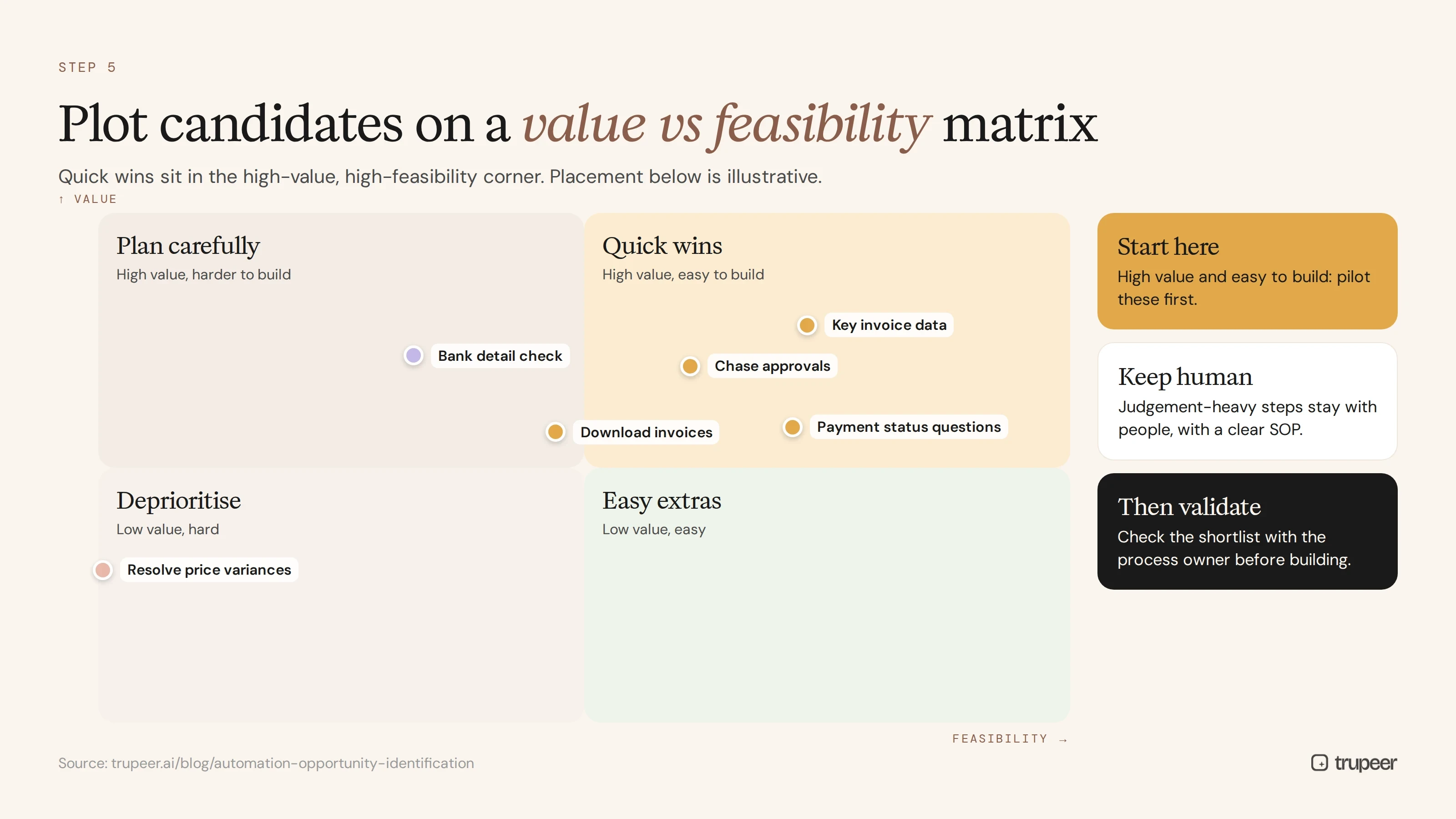
Score each candidate with your framework and plot them on a value-versus-feasibility matrix. Quick wins sit in the high-value, high-feasibility corner.
Step 6: Match the automation type
For each priority candidate, choose the right approach: RPA, workflow, integration, document AI, self-service or a configuration change.
Step 7: Validate with the process owner
Check each candidate with the people who do the work and the process owner. They'll spot exceptions and dependencies the documentation might miss; the process discovery checklist helps structure these conversations.
Step 8: Build the business case and pilot
Estimate hours saved, error reduction and cost, and run a pilot on one candidate before scaling. A process improvement plan template keeps the business case, owners and milestones in one place.
Step 9: Update the documentation after automation
When a step is automated, update the SOP so people know what the automation does and what they still do. See SOP version control.
Example: automation opportunities in accounts payable
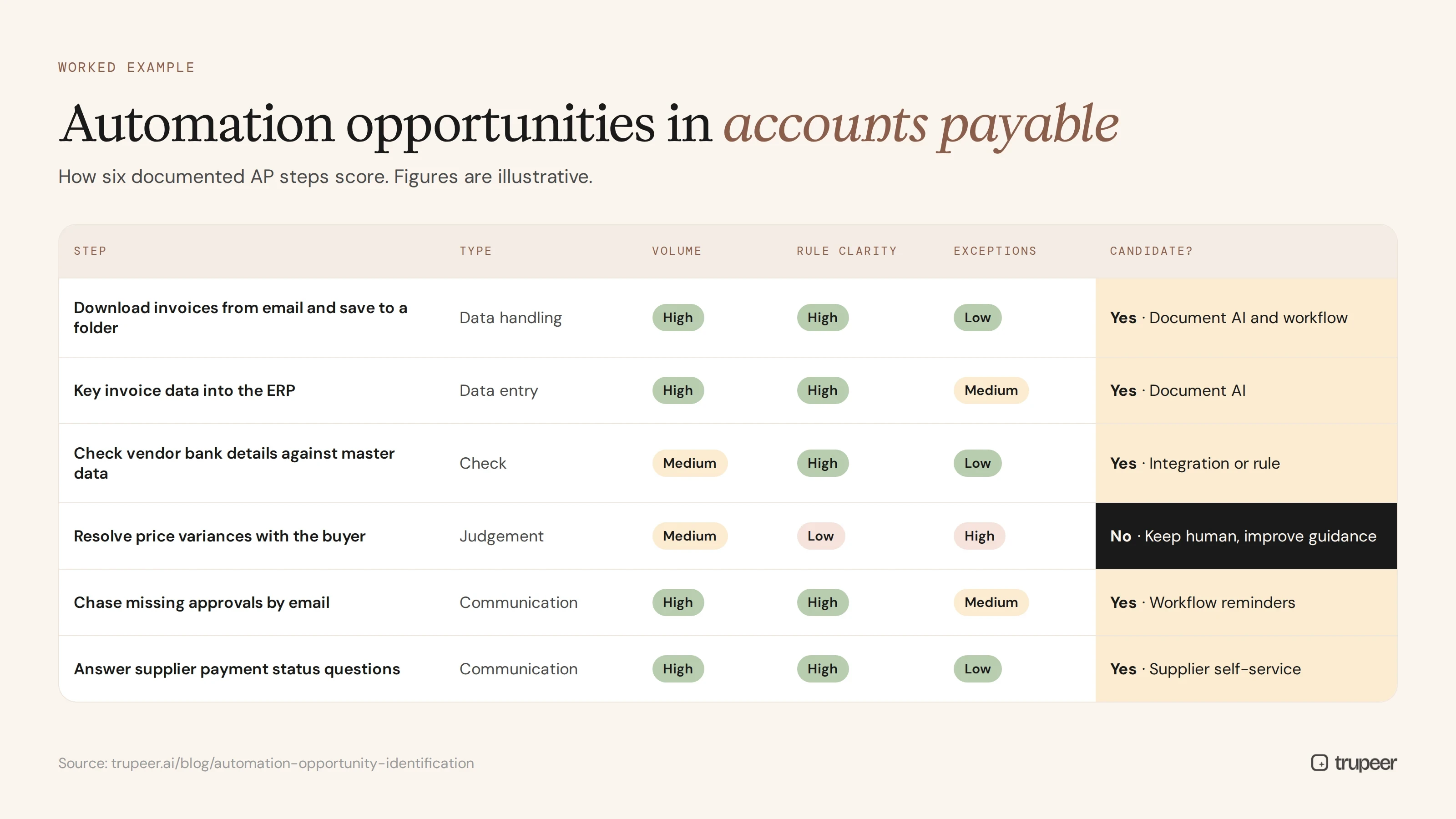
Here's how a documented accounts payable process might score. The figures are illustrative.
Step | Step type | Volume | Rule clarity | Exceptions | Candidate? |
|---|---|---|---|---|---|
Download invoices from email and save to a folder | Data handling | High | High | Low | Yes: document AI and workflow |
Key invoice data into the ERP | Data entry | High | High | Medium | Yes: document AI |
Check vendor bank details against master data | Check | Medium | High | Low | Yes: integration or rule |
Resolve price variances with the buyer | Judgement | Medium | Low | High | No: keep human, improve guidance |
Chase missing approvals by email | Communication | High | High | Medium | Yes: workflow reminders |
Answer supplier payment status questions | Communication | High | High | Low | Yes: supplier self-service |
The judgement-heavy step stays with people, but it still benefits from a clear SOP. For the full AP picture, see accounts payable process documentation.
Common mistakes in automation opportunity identification
Starting with the tool, then looking for processes to fit it.
Automating a broken process, instead of simplifying it first.
Ignoring exceptions, so automations fail on the cases that matter.
Relying on workshop memory instead of documented, observed steps.
Counting only labour savings, and missing quality, speed and compliance benefits.
Forgetting the people side, such as updated SOPs and training for the new way of working.
Automation opportunity identification checklist
Processes are documented at step level, including exceptions.
Each step is tagged by type, system and time.
Volumes and exception rates are captured.
Candidates are scored with an agreed framework.
Each priority candidate has a matched automation type.
Process owners have validated the shortlist.
A pilot and business case are agreed.
SOPs and training are updated after automation.
Find automation opportunities with Trupeer
Trupeer turns recordings of real work into step-by-step process documents, so every manual step, lookup and workaround is visible and ready for automation opportunity identification. Use Trupeer's process documentation software or start free with Trupeer.
Frequently asked questions
What is automation opportunity identification?
It's the process of finding the tasks and steps where automation will deliver the most value with the least risk, by analysing how work is done and scoring candidates on factors such as volume, rules, data and exceptions.
How do you identify automation opportunities in a process?
Document the process at step level, tag each step by type, capture volumes and exceptions, score candidates with a framework, match each to an automation type and validate with the process owner.
What makes a process a good candidate for automation?
High volume, clear rules, structured inputs, stable steps, repetitive manual effort, low exception rates and a high cost of errors.
What's the difference between process mining and documented process analysis?
Process mining analyses system event logs to show how processes flow. Documented process analysis looks at the actual steps people take, including manual work outside systems, which logs don't capture.
Which processes should you automate first?
Those with high value and high feasibility: frequent, rule-based, low-exception tasks with clear time savings or error reduction.
Should you automate a process as it is?
Not always. Simplify or fix the process first, since automating a broken process makes problems faster rather than solving them.
What types of automation are there?
RPA, workflow automation, integration, document AI, self-service knowledge bases, AI agents with human review and system configuration changes.
What happens to documentation after automation?
Update the SOP to show what the automation does, what people still do and how to handle exceptions, and version the change.



