Use este modelo
A documentação técnica é essencial para quem utiliza, dá suporte ou constrói em cima do seu produto. Com a Trupeer, pode poupar horas na criação de conteúdos técnicos densos, começando com um modelo de documentação técnica pronto a usar, personalizando-o com a sua identidade de marca e transformando-o em vídeos de documentação técnica claros e envolventes, mais fáceis de consumir do que paredes de texto.
O que é um modelo de documentação técnica gratuito?
Um modelo de documentação técnica gratuito é uma estrutura reutilizável para descrever como funciona um sistema técnico, produto ou componente, para as pessoas que têm de o construir, manter, integrar, operar ou avaliar.
Diferencia-se da documentação do utilizador num aspeto que muda tudo sobre como deve ser escrita. O seu leitor muitas vezes ainda não está presente. Um manual do utilizador é lido por alguém que usa a funcionalidade hoje, podendo pedir a um colega se algo não estiver claro. A documentação técnica é lida por um engenheiro de manutenção daqui a quatro anos, por um integrador noutra empresa, por um auditor, ou pela pessoa que fica com o trabalho depois de si sair.
Nenhum deles pode perguntar-lhe nada.
O modelo não é a documentação. As listas de secções para isso são amplamente publicadas e, em grande parte, idênticas. O que determina se a sua documentação vale a pena daqui a cinco anos é uma categoria de conteúdo que quase nenhum modelo sugere, abordada abaixo.
O formato segue a utilização. Um documento Word de um modelo de documentação técnica gratuito serve para documentos que são revistos e aprovados, e um ficheiro DOCX de um modelo de documentação técnica é a mesma coisa na sua extensão completa. Uma versão Excel de um modelo de documentação técnica gratuito serve para registos, listas de parâmetros e matrizes de rastreabilidade. Um modelo de documentação técnica gratuito em PDF serve para entregáveis emitidos e versionados, o que importa mais aqui do que na maioria da documentação, porque os documentos técnicos são frequentemente contratuais ou regulamentares.
Que documentação técnica quer dizer?
O termo abrange duas coisas bastante diferentes e vale a pena definir o que precisa antes de adotar qualquer estrutura.
Documentação técnica no sentido geral. Descrever como funciona um sistema, produto ou parte de software, para engenheiros e utilizadores técnicos. Arquitetura, especificações, interfaces, configuração, evidência de testes, procedimentos de manutenção. É isto que a maioria das pessoas quer dizer e é principalmente sobre isto que esta página trata.
Documentação técnica como artefacto regulamentar. Em várias jurisdições, o termo designa um entregável obrigatório específico, com conteúdos prescritos. Produtos colocados no mercado europeu com marcação CE, dispositivos médicos, maquinaria e várias outras categorias regulamentadas exigem todos um ficheiro técnico ou documentação técnica com âmbito definido, períodos de retenção e requisitos de disponibilidade.
Se estiver no segundo caso, nenhum modelo de qualquer website satisfaz o requisito. A regulamentação ou norma aplicável especifica os conteúdos, os organismos de avaliação da conformidade têm expectativas para além do texto e, se estiver errado, impede-o de vender o produto. Trabalhe com base na regulamentação e procure aconselhamento qualificado. Nada nesta página substitui qualquer uma dessas coisas.
As duas abordagens sobrepõem-se na prática, uma vez que o conteúdo de engenharia que faz parte de um ficheiro técnico é documentação que deve ter de qualquer forma. A estrutura abaixo vai ajudá-lo a produzir bons conteúdos técnicos. Não lhe vai dizer o que um regulador exige.
Como personalizar este modelo na Trupeer
Passo 1: Abra a secção Templates
Vá à secção Templates no menu principal.

Passo 2: Selecione e abra um modelo
Clique em qualquer modelo com que queira trabalhar para o abrir.

Passo 3: Expanda a visualização do modelo
Se necessário, expanda a visualização do modelo para ver o layout completo e os detalhes com clareza.

Passo 4: Edite o modelo
Clique em Edit para começar a modificar o modelo selecionado.

No editor, pode:
Adicionar novas secções
Definir ou atualizar regras de formatação
Adicionar um logótipo e ajustar a sua posição e definições relacionadas
Passo 5: Guarde o seu modelo personalizado
Depois de fazer todas as alterações necessárias, clique em Save para guardar o modelo atualizado como seu.

Passo 6: Pré-visualize e ajuste o modelo
Quando quiser ver como fica o seu modelo personalizado, abra a opção Preview.

A partir do ecrã de pré-visualização, pode continuar a fazer ajustes diretamente, se necessário, garantindo que o modelo aparece exatamente como o quer.
Com um modelo de documentação técnica pode:
Poupar horas na escrita: Ignore a página em branco e use uma estrutura criada para conteúdos técnicos.
Uniformizar entre equipas: Use a mesma estrutura em produtos, módulos ou funcionalidades para uma documentação consistente.
Manter a identidade da marca: Aplique o seu logótipo, fontes e cores com o kit de marca da Trupeer - para que a documentação tenha um aspeto consistente com a identidade do seu produto.
Reduzir a carga de suporte: Vídeos e documentação claros ajudam os utilizadores a resolverem-se sozinhos, reduzindo tickets e tempo de suporte.
Localizar para utilizadores globais: Traduza conteúdos técnicos para 65+ idiomas com um único clique.
Atualizar sem complicações: Edite uma vez e a Trupeer regenera o vídeo automaticamente.
Tudo o que não são as razões é recuperável
Aqui está o argumento que deve orientar a forma como gasta o seu esforço de documentação.
Quase tudo na documentação técnica descreve o estado. O que é a arquitetura, quais são os parâmetros, como as interfaces são definidas, o que faz a sequência. Tudo isso é genuinamente útil e pode ser recuperado por alguém suficientemente determinado, porque o próprio sistema é a fonte da verdade. Leia o código, inspecione a configuração, siga as ligações, execute o teste.
Recuperar o estado é caro e lento. Não é impossível.
A lógica é diferente em espécie. Por que razão esta abordagem em vez da óbvia. Por que este valor e não o predefinido. Por que este componente foi escolhido quando existe um mais barato. Por que existe um passo que parece redundante.
Nada disso está no sistema. Existiu numa conversa, na cabeça de alguém, e se não foi escrito, desaparece no momento em que essa pessoa sai, e nenhuma determinação o recupera.
A consequência prática é específica e dispendiosa. Alguém competente olha para um sistema, vê algo que parece desperdiçado ou desnecessário, não tem forma de descobrir por que está lá e remove-o. Está a agir de forma razoável. A documentação descrevia o estado, que eles já conseguiam ver, e não dizia nada sobre a razão, que eles não conseguiam.
Assim, o conteúdo de maior valor na documentação técnica é a parte que quase nenhum modelo pede.
O registo da decisão
O mecanismo é curto e antigo, e funciona.
Sempre que algo é decidido e um leitor futuro não adivinharia, escreva um registo curto. Cinco campos, no máximo meio página.
O que foi decidido. Numa frase.
Porquê. A justificação, incluindo o que foi rejeitado e com base em que critérios. Este é o campo que importa e deve ser o mais longo.
O que acontece se isto for revertido. A consequência que alguém enfrentaria se o desfizesse sem saber. Este campo transforma uma nota histórica num aviso.
Quem decidiu e quando. Para que um leitor futuro possa avaliar se a justificação ainda se aplica.
Estado. Atual, substituído ou desconhecido. O terceiro valor é discutido abaixo e é mais útil do que parece.
Escreva um para cada desvio de uma abordagem padrão, para cada parâmetro não óbvio, para cada alternativa rejeitada que alguém voltará a propor e para cada solução alternativa.
Não escreva um para decisões que um leitor competente tomaria da mesma forma. Um registo para cada escolha gera um volume que ninguém lê, e o ponto é que estas são as entradas que valem a pena encontrar.
Quando a justificação é genuinamente desconhecida, porque a pessoa que decidiu já não está, registe-o explicitamente. Uma nota a dizer que este valor é deliberado, que a razão não é conhecida e que não deve ser alterado sem testes é muito mais útil do que o silêncio. Diz à próxima pessoa que encontrou uma questão real e não uma omissão.
O que um modelo de documentação técnica tem de conter
Nove componentes. Os registos de decisão são o acréscimo.
Componente | O que faz |
|---|---|
Âmbito e público-alvo | O que isto abrange e para quem foi escrito. Mantenedor, integrador, operador ou avaliador. |
Visão geral do sistema | O que faz e como as peças se encaixam, com profundidade suficiente para que as secções de detalhe façam sentido. |
Arquitetura e interfaces | Componentes, dependências e como qualquer elemento externo se liga. |
Configuração e parâmetros | Definições, com os respetivos valores, e uma referência ao registo de decisão para quaisquer que não sejam óbvios. |
Registos de decisão | Por que foram feitas as escolhas não óbvias e o que acontece se forem revertidas. |
Procedimentos de operação e manutenção | O que tem de ser feito, por quem e a que intervalo. |
Evidência de testes e verificação | O que foi testado, quando, com que resultado. Frequentemente um requisito contratual ou regulamentar. |
Limitações conhecidas e questões em aberto | O que não funciona, o que foi adiado, o que é frágil. |
Versão, proprietário e última verificação | Em cada documento, com quando alguém confirmou pela última vez que continua a ser verdade. |
A linha das limitações conhecidas é a segunda mais frequentemente omitida e a segunda mais valiosa. A documentação que descreve apenas o que funciona implica que tudo funciona e a próxima pessoa descobre as limitações ao deparar-se com elas.
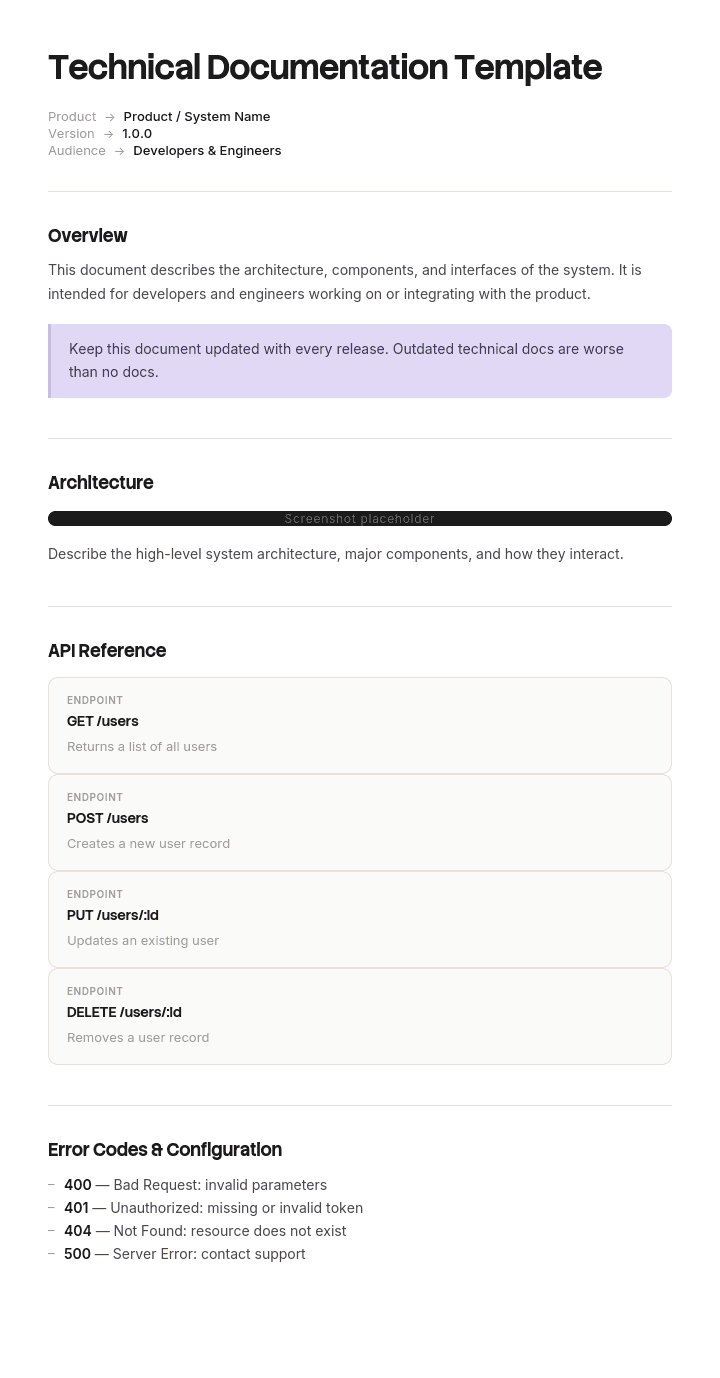
Modelo de documentação técnica gratuito: a estrutura para copiar
Preenchido com um exemplo real em vez de placeholders. O sistema é um sistema de controlo de lotes e pesagem instalado num local de produção alimentar.
Copie daqui.
Âmbito e público-alvo. Sistema de controlo para a linha de dosagem no local do cliente. Escrito para engenheiros de controlo que mantêm ou modificam o sistema e para a equipa de engenharia do cliente. Não abrange a instalação mecânica, que está no ficheiro mecânico, nem os dados da receita, que pertencem ao cliente.
Visão geral do sistema. Dois parágrafos sobre o que faz a linha, a sequência de lotes e como o sistema de controlo, os instrumentos de pesagem e os sistemas da unidade se relacionam.
Arquitetura e interfaces. Modelo do controlador e versão do firmware. Instrumentos de pesagem e respetivos endereços. Interface para o sistema de produção do cliente, protocolo e dados trocados. Interface para o sistema de alarmes do local.
Configuração e parâmetros. Lista completa de parâmetros com valores. Qualquer parâmetro que inclua um registo de decisão é marcado, para que um leitor que altere um valor saiba que deve procurar.
Parâmetro | Valor | Registo de decisão |
|---|---|---|
Valve V3 open delay | 3.0 seconds | DR-014 |
Weigh settle time | 1.2 seconds | Standard |
Batch tolerance | 0.4 percent | DR-007 |
Discharge sequence order | 2, 1, 3 | DR-014 |
Registos de decisão. Um exemplo do formato.
DR-014. O que foi decidido: é aplicado um atraso de três segundos antes de a válvula V3 abrir e a sequência de descarga é executada 2, 1, 3 em vez de 1, 2, 3.
Porquê: durante a comissionação no sexto ano da instalação original, foi observado carryover de produto entre lotes consecutivos de receitas diferentes. A investigação concluiu que a pressão residual na linha 1 não foi totalmente igualizada quando a V3 abriu, transportando material do lote anterior. O atraso permite a igualização e a alteração da sequência garante que a linha 1 descarrega antes de a V3 abrir. Alternativa considerada e rejeitada: uma válvula de retenção de verificação mecânica, rejeitada com base em critérios de limpeza e inspeção num ambiente alimentar.
O que acontece se isto for revertido: carryover de produto entre lotes. Numa unidade que lida com alergénios, isto é um risco de contaminação, não uma questão de eficiência. Não se reproduz num banco de testes de oficina porque a condição depende do comprimento do percurso do tubo e da viscosidade do produto.
Decidido por dois engenheiros com nome, com a data. Estado: atual.
Operação e manutenção. Intervalo e procedimento de calibração. Processo de atualização de firmware. O que verificar após qualquer alteração de receita.
Testes e verificação. Resultados do teste de aceitação em fábrica, resultados do teste de aceitação no local, com datas e assinaturas. Certificados de calibração.
Limitações conhecidas. O sistema não suporta receitas com mais de oito ingredientes. A interface para o sistema de produção do cliente é unidirecional e não recebe confirmação. O histórico de lotes é retido apenas por noventa dias.
Versão, proprietário, última verificação. Versão 7. Propriedade do engenheiro líder de controlo. Conteúdo verificado pela última vez em relação ao sistema instalado em março, por visita ao local.
Copie para aqui.
Exemplo de documentação técnica: três segundos que ninguém tinha anotado
Trenholm Systems, uma empresa com cerca de cento e cinquenta pessoas, concebe e instala sistemas de pesagem e dosagem para unidades de produção alimentar.
A sua documentação técnica era extensa: mais de quatrocentos documentos, incluindo desenhos, especificações, listagens de configuração e relatórios de testes. Descrevia o estado de cada sistema com precisão.
Um sistema instalado tinha um atraso de três segundos antes de uma válvula abrir e uma sequência de descarga que corria numa ordem que parecia errada.
Ambos tinham sido especificados seis anos antes por dois engenheiros após um problema de comissionação, por uma razão que fazia todo o sentido e que não aparecia em nenhum documento. A lista de parâmetros registava o valor. Nada registava o porquê.
Ambos os engenheiros tinham entretanto saído da empresa.
Um engenheiro mais recente, ao rever os tempos de ciclo para encontrar eficiência, identificou o atraso de três segundos como três segundos de nada acontecer em cada lote. Era uma observação correta. Testou a alteração no banco de oficina, onde não fez diferença para nada, porque a condição que produziu o problema original depende do comprimento do percurso do tubo e da viscosidade do produto e não ocorre num banco de testes. Implementou-a.
Na unidade do cliente, produziu carryover entre lotes consecutivos. Como a unidade lida com alergénios, isto não era uma questão de eficiência. Onze toneladas de produto foram colocadas em quarentena e destruídas, a produção foi interrompida durante quatro dias enquanto a causa era encontrada e o cliente realizou a sua própria investigação. O custo total, incluindo a reclamação do cliente, ficou em cerca de trezentas e quarenta mil libras.
Ninguém tinha agido de forma descuidada. O engenheiro tinha revisto a documentação, que lhe dizia qual era o valor, e tinha testado a alteração, o que é mais do que muitos fariam. O que ele não conseguiu fazer foi descobrir por que razão o valor existia, porque isso tinha sido uma conversa numa sala de instalações seis anos antes.
Depois, a Trenholm analisou sessenta desvios de configuração face à sua abordagem padrão na sua base instalada. Nove tinham uma razão escrita.
Introduziram um requisito de registo de decisão. Qualquer desvio face ao padrão recebe cinco campos: o quê, porquê, o que acontece se for revertido, quem decidiu e quando.
Retrospetivamente, reconstruíram quarenta e um dos sessenta encontrando pessoas que se lembravam. Dezanove não puderam ser reconstruídos e foram registados como razão desconhecida, não alterar sem testes no local, o que é uma entrada genuinamente útil.
Três anos depois, não houve mais incidentes de reversão e a lista de razões desconhecidas caiu para seis, à medida que os desvios são testados durante trabalhos planeados e confirmados ou removidos.
Os quatrocentos documentos descreviam tudo sobre o sistema, exceto a única coisa que importava.
Como escrever documentação técnica em seis passos
Identifique o leitor e o que ele não terá. Um mantenedor daqui a quatro anos terá o sistema e não terá colegas que se lembrem. Essa ausência é a restrição de design.
Escreva a visão geral antes do detalhe. As secções de detalhe são incompreensíveis sem um modelo mental e a pessoa que tem o modelo é você.
Documente o estado uma vez e com precisão. Parâmetros, interfaces, arquitetura. Este é o grosso e é a parte fácil.
Escreva um registo de decisão para tudo o que um leitor competente questionaria. Desvios, valores não óbvios, alternativas rejeitadas, soluções alternativas.
Anote as limitações. O que não funciona e o que foi adiado. A documentação que descreve apenas sucessos implica que não há falhas.
Registe quando foi verificado pela última vez face à realidade, não quando foi editado pela última vez.
O passo quatro é o que teria evitado o exemplo acima e o que é ignorado porque parece trabalho extra no momento em que a decisão é óbvia para toda a gente presente.
Tipos de documentação técnica
Quatro categorias amplas, úteis porque têm leitores diferentes e, portanto, regras diferentes.
Documentação de produto e de sistema. Arquitetura, especificações, interfaces, configuração. Escrita para pessoas que vão construir em cima dela ou mantê-la. É aqui que os registos de decisão pertencem.
Documentação de processos e operacional. Como a funcionalidade é executada, mantida e recuperada. Sobrepõe-se aos runbooks e aos procedimentos, e o runbook template cobre a forma executável.
Documentação técnica orientada ao utilizador. Referências de API, guias de integração, guias técnicos do utilizador. Escrita para pessoas fora da sua organização, o que eleva consideravelmente o nível de clareza.
Documentação de conformidade e evidência. Relatórios de testes, certificados, rastreabilidade, material de avaliação da conformidade. Frequentemente é a parte com requisitos de retenção associada e a parte que tem de sobreviver a auditorias anos mais tarde.
A maioria das organizações faz razoavelmente bem a primeira e a terceira e faz mal a segunda e a quarta, normalmente porque a primeira e a terceira têm leitores óbvios que reclamam e a segunda e a quarta têm leitores que chegam anos mais tarde. Assim, o melhor modelo de documentação técnica gratuito para si é o que corresponde à categoria em que é mais fraco, e não ao que já faz bem.
Documentação técnica, documentação de software ou documentação de TI?
Três termos sobrepostos e vale a pena definir os limites, porque a mesma organização frequentemente precisa dos três.
Documentação técnica é o mais abrangente. Cobre qualquer sistema técnico: hardware, software, unidade, instrumentos, produtos integrados. Quando está envolvido um produto físico ou regulamentado, este é o termo certo e a estrutura certa.
Documentação de software cobre especificamente um produto de software e divide-se em começar, referência, guias, arquitetura, documentação operacional e notas de versão. O software documentation template cobre essas divisões e o teste para saber se funcionam.
Documentação de TI cobre a infraestrutura e o parque próprios de uma organização: o que está a correr, onde, quem é o proprietário e como está configurado. O seu problema característico é a desatualização, mais do que a ausência.
Se estiver a documentar um produto que vende, quer documentação técnica ou de software. Se estiver a documentar os sistemas em que a sua própria organização opera, quer documentação de TI. O argumento do registo de decisão nesta página aplica-se aos três e aplica-se com mais força onde existe uma configuração não óbvia.
O que um modelo de documentação técnica gratuito não consegue resolver
Raciocínio que nunca foi capturado. Assim que as pessoas que decidiram saem, nenhum modelo o recupera. A única solução é escrevê-lo enquanto elas ainda estão lá e registar que é desconhecido quando não estão.
Documentação escrita por alguém que não fez o trabalho. Pode descrever o estado com precisão e não consegue fornecer as razões, que é a metade que importa.
Conteúdo que nunca é verificado. Nenhum modelo de documentação técnica gratuito para download vai dizer-lhe se o que afirma continua a ser verdade. Uma data de última verificação e alguém a confirmar é o único mecanismo.
Suficiência regulamentar. Quando a documentação técnica é um requisito legal, a regulamentação define os conteúdos e um modelo geral não o cumpre.
Capture o raciocínio antes de sair
O conteúdo mais difícil de capturar é o raciocínio e a razão não é que as pessoas não queiram. É que explicar é uma conversa e documentar é uma tarefa, e a conversa é fácil enquanto a tarefa não é.
Peça a um engenheiro para escrever por que razão um sistema está configurado de uma determinada forma e terá três linhas. Peça-lhe para o explicar consigo e ele explica o problema de comissionação, a alternativa que rejeitou e os dois outros locais onde a mesma questão poderia surgir. O conhecimento aparece quando estão a falar e não aparece quando estão a escrever.
A Trupeer AI captura-o nessa forma. Alguém percorre o sistema enquanto regista e explica, e o resultado é um walkthrough escrito com screenshots já capturados e colocados, juntamente com o vídeo, na sua própria identidade de marca. O raciocínio chega como fala, que é como existe, e torna-se um documento sem que ninguém tenha de se sentar para o escrever.
Registe-o. Dê-lhe marca. Traduza-o. Faça-o Trupeer.
O momento para o fazer é antes de alguém sair e é o uso mais óbvio com o estímulo menos óbvio. Um engenheiro que se vai embora, com duas semanas de aviso, pode registar os seus sistemas pouco habituais em poucas horas, o que é uma passagem de testemunho muito melhor do que um resumo escrito produzido sob pressão de tempo. Dois engenheiros da Trenholm saíram com seis anos de contexto e ninguém lhes pediu para explicar os três segundos.
Quando as equipas abrangem locais ou idiomas, a mesma gravação produz o mesmo material em cada um, pelo que um sistema mantido num país e construído noutro é compreendido da mesma forma.
O material fica na sua base de conhecimento e funciona também como formação para quem herdar o sistema. O procedimento ao nível da tarefa pertence às instruções de trabalho. A consistência entre os seus documentos é uma questão de definir o kit de marca uma vez e a configuração é abordada no guia de configuração do modelo de documento.
Perguntas Frequentes
Existe um modelo de documentação técnica gratuito em versão Word?
O Word serve para documentos técnicos que são revistos, aprovados e emitidos, o que descreve a maioria deles fora de contextos puramente de software. Um ficheiro Word de um modelo de documentação técnica gratuito é o formato certo para especificações, documentos de design e qualquer coisa contratual.
Há duas definições que vale a pena acertar. Coloque a versão, o proprietário e a data de última verificação no rodapé da página, em vez de apenas na capa, e use estilos de títulos reais para que a página de conteúdos seja gerada e o documento permaneça navegável com cem páginas.
Existe um modelo de documentação técnica gratuito em versão Word doc?
Sim, e um ficheiro Word doc de um modelo de documentação técnica gratuito é a mesma coisa que um ficheiro Word, com a extensão mais antiga.
Mais útil do que a questão do formato é o que adiciona a qualquer modelo que use. Uma secção de registo de decisão e uma secção de limitações conhecidas. Nenhuma aparece em qualquer modelo geral que eu tenha visto e ambas são onde está o valor da documentação técnica ao longo do tempo.
Existe um modelo de documentação técnica em versão DOCX?
DOCX é simplesmente o formato atual do Word, pelo que um ficheiro DOCX de um modelo de documentação técnica e um ficheiro Word são o mesmo documento.
Onde a distinção ocasionalmente importa é em toolchains que geram documentos automaticamente, uma vez que DOCX é um formato estruturado que pode ser produzido programaticamente. Se a sua documentação técnica for gerada a partir de uma fonte de verdade em vez de ser escrita à mão, vale a pena explorar, porque o conteúdo gerado não se desvia do sistema que descreve.
Existe um modelo de documentação técnica gratuito em PDF?
PDF é a versão emitida e importa mais aqui do que na maioria da documentação, porque os documentos técnicos são frequentemente entregáveis contratuais, evidência regulamentar ou ambos. Exporte um modelo de documentação técnica gratuito em PDF em cada emissão, com a versão e a data em todas as páginas.
Mantenha a fonte editável e mantenha as edições substituídas em vez de as sobrescrever. Ser capaz de mostrar qual versão de um documento técnico estava em vigor numa determinada data é muitas vezes o objetivo de o ter.
Existe um modelo de documentação técnica gratuito em versão Excel?
O Excel serve para os registos em vez do texto. Um ficheiro Excel de um modelo de documentação técnica gratuito funciona bem para listas de parâmetros, registos de interfaces, matrizes de rastreabilidade que ligam requisitos a testes e um registo de documentos que regista o que existe e quando foi verificado pela última vez.
Este último vale a pena construir mesmo que não construa mais nada. Uma linha por documento com proprietário, versão e data de última verificação dir-lhe-á mais sobre o estado da sua documentação do que ler qualquer uma das partes.
Existe um modelo de documentação técnica gratuito para download que valha a pena usar?
A lista de secções está bem estabelecida e cada versão publicada oferece aproximadamente a mesma, pelo que um download gratuito de um modelo de documentação técnica gratuito lhe poupa, no máximo, uma tarde.
Avalie qualquer um deles com base numa questão. Existe algum lugar para registar por que razão algo foi feito de uma determinada forma? Essencialmente nenhum tem isso, porque os modelos são construídos em torno da descrição do estado e o estado é a parte que pode ser recuperada sem eles.
Qual é o melhor modelo de documentação técnica gratuito?
O melhor modelo de documentação técnica gratuito é aquele que vai manter verificado, o que normalmente significa o mais simples.
Se estiver a comparar opções, as duas secções a procurar são os registos de decisão e as limitações conhecidas. Um modelo com as duas, mesmo que seja simples, vai produzir documentação que continua a ser útil daqui a cinco anos. Um modelo mais polido sem nenhuma das duas vai produzir uma descrição precisa de um sistema que ninguém se atreve a alterar.
O que deve incluir a documentação técnica que a maioria dos modelos deixa de fora?
Três coisas. O raciocínio por trás de escolhas não óbvias, incluindo o que foi rejeitado e porquê. O que falha se uma decisão for revertida, o que transforma uma nota histórica num aviso. E o que não funciona, ou seja, limitações conhecidas e itens adiados.
As três partilham uma propriedade: não podem ser recuperadas ao inspecionar o sistema. Todo o resto na documentação técnica pode ser, com tempo suficiente, e é por isso que estas são as secções que vale a pena proteger quando o esforço de documentação é reduzido.

