Trupeer Blog
Resumir

Imagine isto: uma equipa de vendas com dificuldades em manter os potenciais clientes envolvidos durante as demonstrações em fase de pré-venda, enquanto as equipas de customer success lutam para fornecer a orientação certa após a venda. Num mundo em que o conteúdo em vídeo é rei, uma estratégia de vídeo de enablement de vendas bem elaborada pode colmatar estas lacunas. Com 82% do tráfego de internet previsto para ser vídeo até 2026, as empresas não podem dar-se ao luxo de ficar para trás.
82% do tráfego de internet é esperado que seja vídeo até 2026.
As equipas de vendas e de customer success muitas vezes trabalham em silos, o que leva a uma comunicação fragmentada com potenciais clientes e clientes. Esta abordagem desarticulada pode resultar em negócios perdidos e clientes insatisfeitos. Ao implementar uma estratégia de vídeo abrangente, as empresas podem garantir uma transição suave das interações de pré-venda para o suporte pós-venda, melhorando a satisfação e a fidelização dos clientes. Esta estratégia não é apenas para gigantes da tecnologia; é essencial para qualquer organização que pretenda melhorar a jornada do cliente. Para quem está a explorar ferramentas de vídeo para customer success, este guia fornece insights acionáveis para alargar a sua estratégia da pré-venda até ao customer success. É exatamente aqui que o vídeo de champion enablement se torna útil e é o tipo de conteúdo que a Trupeer consegue gerar diretamente a partir de uma simples gravação de ecrã.
Porque é que uma estratégia de vídeo de enablement de vendas é importante?
As estratégias de vídeo de enablement de vendas são essenciais para as empresas que pretendem simplificar a comunicação e aumentar o envolvimento do cliente ao longo da jornada do comprador. As equipas de vendas e de customer success muitas vezes enfrentam dificuldades com uma comunicação fragmentada, o que conduz a ineficiências que podem prejudicar as relações com os clientes. Quando as equipas de vendas dependem apenas de métodos tradicionais como e-mails e PDFs estáticos, perdem a oportunidade de envolver potenciais clientes de forma eficaz. Uma estratégia de vídeo bem delineada pode colmatar estas lacunas de comunicação, proporcionando uma mensagem consistente que ressoa em diferentes fases do ciclo de vida do cliente.
Além disso, as apostas são altas. Num mercado altamente competitivo, a capacidade de converter potenciais clientes em clientes fiéis depende de quão eficazmente as suas equipas de vendas e de customer success colaboram. Os vídeos podem oferecer uma forma dinâmica e envolvente de comunicar ideias complexas, facilitando a compreensão das suas ofertas por parte dos potenciais clientes. Um workflow de sales enablement enriquecido com conteúdo em vídeo pode aumentar significativamente as taxas de conversão. Ao apresentar de forma clara e visual o valor do seu produto, pode reduzir o churn e aumentar a retenção. No fim, uma estratégia de vídeo abrangente não é apenas um “nice-to-have”; é um componente crítico de um framework de sales enablement bem-sucedido.
Quais são os benefícios de uma estratégia de vídeo de enablement de vendas?
Implementar uma estratégia de vídeo de enablement de vendas oferece inúmeras vantagens que podem transformar as operações da sua empresa e as interações com os clientes.
Maior envolvimento. Os vídeos são, por natureza, mais envolventes do que o texto, captando a atenção rapidamente e mantendo-a por mais tempo. Este aumento do envolvimento pode levar a taxas de conversão mais elevadas e a compradores mais informados.
Mensagem consistente. Uma única plataforma de vídeo com IA garante que a sua mensagem é consistente em todos os pontos de contacto com o cliente, reduzindo o risco de falhas de comunicação e reforçando a integridade da marca.
Escalabilidade. O conteúdo em vídeo pode ser facilmente escalado para alcançar um público mais vasto sem custos adicionais significativos, tornando-se uma ferramenta eficiente tanto para empresas pequenas como para grandes.
Melhor retenção. Conteúdo em vídeo envolvente pode ajudar a reforçar funcionalidades e benefícios-chave do produto, conduzindo a uma melhor compreensão por parte dos clientes e a taxas de retenção mais elevadas.
Formação eficiente. Materiais de formação baseados em vídeo podem reduzir o tempo e os recursos necessários para integrar novos membros das equipas de vendas e de suporte.
Impacto mensurável. As ferramentas de analítica podem acompanhar o desempenho dos vídeos, fornecendo insights sobre o envolvimento dos espectadores e as áreas a melhorar, o que é crucial para refinar a sua estratégia.
As equipas que avaliam ferramentas muitas vezes começam com uma comparação de alternativas ao Loom antes de se padronizarem num workflow.
Que funcionalidades da Trupeer ajudam a implementar uma estratégia de vídeo de enablement de vendas?
A Trupeer oferece uma série de funcionalidades concebidas para apoiar uma estratégia eficaz de vídeo de enablement de vendas, garantindo uma integração sem complicações nos seus workflows existentes.
Gravação de ecrã com IA com auto-zoom e deteção de cliques
A funcionalidade de gravação de ecrã com IA da Trupeer deteta automaticamente os cliques e dá zoom nas áreas de interesse, tornando as suas demonstrações mais envolventes e informativas. Esta capacidade garante que os espectadores não perdem detalhes cruciais, melhorando a compreensão do seu produto. Quer esteja a fazer uma demonstração em direto ou a criar um tutorial, esta funcionalidade simplifica o processo de gravação ao destacar ações-chave sem intervenção manual. Por ser baseada no browser, não existe um processo de instalação moroso, permitindo que a sua equipa comece a capturar vídeos de alta qualidade imediatamente.
Gravação de ecrã silenciosa com narração automática por IA
Esta funcionalidade permite criar vídeos sem gravar áudio no momento. Em vez disso, a Trupeer gera a narração com IA, oferecendo opções para mais de 65+ vozes naturais. Isto é particularmente útil para criar vídeos bem acabados em que o ruído ambiente possa ser uma preocupação. Ajuste o ritmo e o tom para corresponder à voz da sua marca, garantindo consistência em todo o conteúdo. A gravação silenciosa é ideal para ambientes em que não é viável gravar a voz em direto, oferecendo flexibilidade e profissionalismo na sua apresentação.
Remoção automática de palavras de preenchimento
As capacidades de edição pós-gravação da Trupeer incluem a remoção automática de palavras de preenchimento, que melhora a clareza e a profissionalização dos seus vídeos. Esta funcionalidade elimina distrações como "um" e "ah," garantindo que a sua mensagem é transmitida de forma clara. Isto é especialmente valioso para demonstrações de vendas e vídeos de formação em que a clareza e a precisão são fundamentais. Ao remover fillers desnecessários, os seus vídeos mantêm um tom profissional, permitindo que os espectadores se foquem no conteúdo em vez da forma como é apresentado.
Geração automática de SOPs a partir de qualquer gravação
A capacidade da Trupeer para gerar procedimentos operacionais padrão (SOPs) a partir de gravações é uma grande mudança para as equipas que procuram criar processos consistentes e repetíveis. A documentação gerada automaticamente está pronta para edição e pode ser exportada em vários formatos, incluindo HTML e PDF. Esta funcionalidade é inestimável para formação e onboarding, pois reduz o tempo necessário para criar guias abrangentes. Ao automatizar a criação de SOPs, a sua equipa pode dedicar-se a tarefas mais estratégicas, sabendo que uma documentação correta e atualizada está a apenas uma gravação de distância.
Base de conhecimento pesquisável por IA com ligações profundas por timestamp
A Trupeer melhora a gestão do conhecimento com a sua base de conhecimento pesquisável por IA, permitindo que os utilizadores encontrem informação de forma rápida e eficiente. Cada vídeo é indexado com ligações profundas ao nível do timestamp, permitindo uma navegação precisa para as secções relevantes. Esta funcionalidade é particularmente benéfica para o suporte ao cliente, onde o acesso rápido a informação específica pode reduzir drasticamente os tempos de resolução. Ao integrar esta base de conhecimento em vídeo na sua estratégia de enablement de vendas, permite que a sua equipa dê respostas mais rápidas e mais precisas às dúvidas dos clientes.
Como implementar uma estratégia de vídeo de enablement de vendas passo a passo com a Trupeer?
Passo 1: Capture o ecrã
Comece por abrir o gravador baseado no browser da Trupeer para criar uma gravação de ecrã sem precisar de qualquer instalação. Clique em "Start Recording" e escolha a janela ou o ecrã que pretende capturar. A gravação de ecrã com IA com auto-zoom e deteção de cliques irá acompanhar as suas ações, garantindo que os espectadores não perdem quaisquer detalhes críticos enquanto navega pela sua apresentação. Este processo captura vídeo em alta definição, com zoom automático nos cliques e nas áreas importantes, aumentando o envolvimento dos espectadores. Todo o processo de gravação é fluido e demora apenas o tempo da sua demonstração, oferecendo feedback em tempo real e minimizando edições pós-produção.

Passo 2: Adicione narração por IA
Quando a sua gravação estiver concluída, melhore-a com a narração automática por IA da Trupeer. Selecione entre mais de 65+ vozes naturais para corresponder ao tom da sua marca. Para adicionar narração, basta carregar a sua gravação na Trupeer e selecionar "Add AI Narration". Ajuste o ritmo e o tom para garantir que a narração corresponde ao estilo da sua apresentação. A IA irá então gerar uma narração em voz, fornecendo áudio claro e consistente para complementar o seu vídeo. Este passo normalmente demora alguns minutos, dependendo da duração do seu vídeo, e é perfeito para situações em que não foi possível capturar áudio em direto.

Passo 3: Edite o vídeo
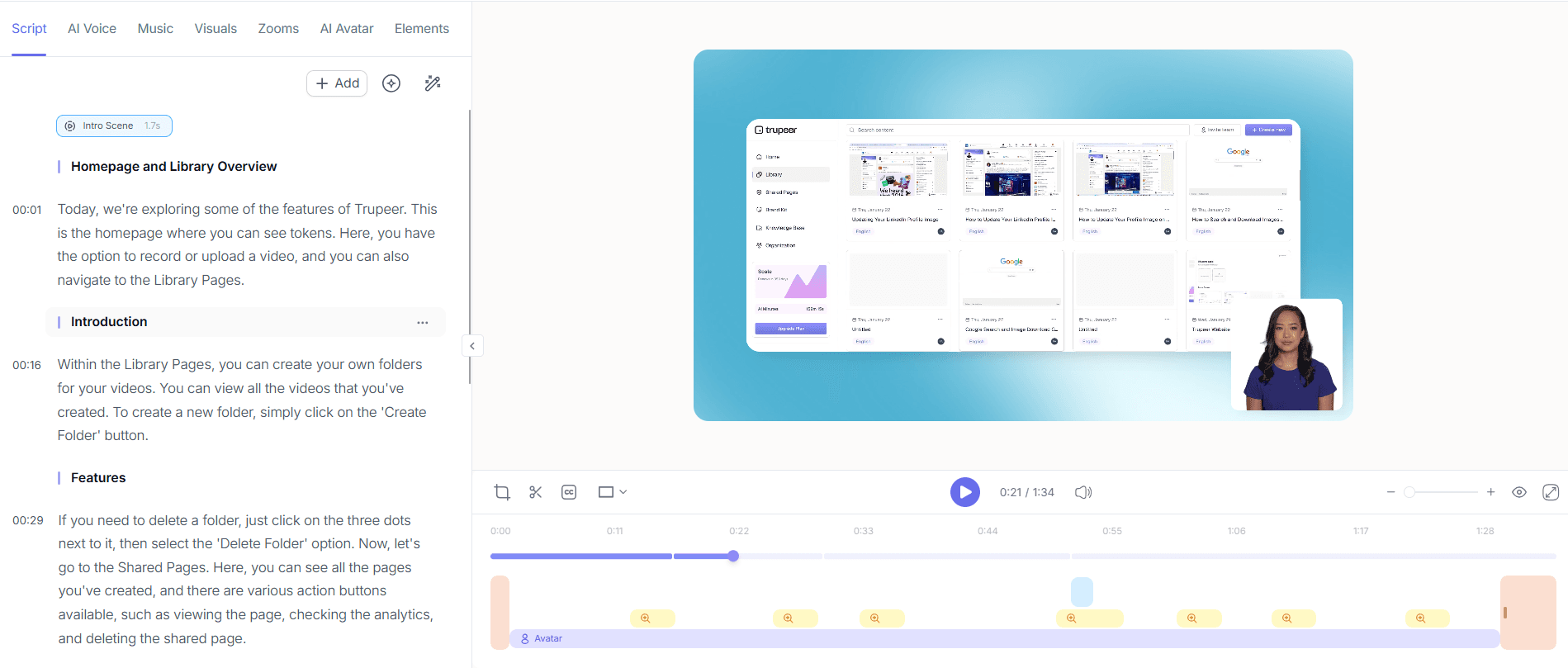
Em seguida, use a remoção automática de palavras de preenchimento da Trupeer para dar polimento ao seu vídeo. Abra a ferramenta de edição e selecione "Remove Filler Words". A IA irá analisar a sua gravação, eliminando distrações como "um" e "ah", resultando numa apresentação mais profissional. Esta funcionalidade é particularmente benéfica para vídeos longos em que manter a atenção dos espectadores é crucial. O processo de edição é rápido, normalmente demorando menos de cinco minutos, e melhora significativamente a clareza e o fluxo do seu conteúdo sem exigir edições manuais.
Passo 4: Gere SOPs
Após a edição, gere procedimentos operacionais padrão (SOPs) a partir da sua gravação usando o gerador de documentação da Trupeer. Clique em "Generate SOP" e veja como a Trupeer converte o seu vídeo num documento pronto para edição. Esta funcionalidade é ideal para criar materiais instrucionais consistentes sem esforço adicional. Pode exportar o SOP em formatos como HTML ou PDF, facilitando a partilha com a sua equipa. Este passo não só poupa tempo como também garante que os seus procedimentos ficam documentados de forma correta e ficam prontamente acessíveis para consulta futura.

Passo 5: Localize o seu conteúdo
Para chegar a um público global, use a funcionalidade de tradução por IA da Trupeer. Selecione "Translate Video" e escolha entre mais de 40 idiomas para a localização. A IA avançada da Trupeer irá traduzir e sincronizar os lábios do seu vídeo, garantindo que a sua mensagem é transmitida com precisão em diferentes idiomas. Esta capacidade é crucial para empresas que operam em mercados diversos, proporcionando uma experiência inclusiva para públicos que não falam inglês. O processo de tradução é eficiente, normalmente concluído em 10-15 minutos, permitindo-lhe adaptar rapidamente o conteúdo para clientes internacionais. Para uma análise mais aprofundada, o nosso guia sobre best customer success video tools aborda o playbook adjacente.

Passo 6: Distribua e analise
Por fim, distribua o seu vídeo usando a base de conhecimento pesquisável por IA da Trupeer. Faça upload do vídeo e ative ligações profundas por timestamp para uma navegação fácil. Esta funcionalidade ajuda os utilizadores a encontrarem informação específica rapidamente, melhorando a experiência de aprendizagem. também, use as análises de envolvimento do visualizador para acompanhar o desempenho, identificar pontos de abandono e refinar o conteúdo futuro. Aceda a estes insights clicando no separador "Analytics" no seu painel de vídeo. Os dados recolhidos são inestimáveis para otimizar a sua estratégia de enablement de vendas, garantindo melhoria contínua e alinhamento com os objetivos do seu negócio.

Que dicas ajudam a maximizar a sua estratégia de vídeo de enablement de vendas?
Implementar uma estratégia de vídeo de enablement de vendas bem-sucedida exige uma execução cuidada e um refinamento contínuo. Aqui ficam algumas dicas para melhorar a sua abordagem usando as capacidades da Trupeer.
Padronize templates de vídeo. Use os brand kits da Trupeer para manter um aspeto e uma sensação consistentes em todos os vídeos, reforçando a identidade da marca.
use IA para eficiência. Utilize o auto video editor da Trupeer para simplificar o processo de edição, poupando tempo e recursos.
Foque-se em métricas-chave. Revise regularmente as análises de envolvimento para compreender como o seu público interage com o seu conteúdo e ajuste as estratégias em conformidade.
use funcionalidades multilingues. Alargue o seu alcance traduzindo vídeos com a tradução por IA da Trupeer, garantindo acessibilidade para um público diverso.
Integre feedback. Use workflows de revisão colaborativa para recolher contributos da equipa, melhorando a qualidade e a eficácia dos seus vídeos.
Mantenha-se atualizado sobre ferramentas. Mantenha-se a par das comparações de alternativas ao Scribe para garantir que está a usar as melhores ferramentas para as suas necessidades.
Experimente formatos. Não hesite em testar diferentes formatos e estilos de vídeo para ver o que melhor ressoa com o seu público.
Perguntas frequentes
Como posso garantir uma qualidade consistente em todos os vídeos de enablement de vendas?
Para garantir uma qualidade consistente, use os brand kits e templates da Trupeer. Estas ferramentas fornecem um formato padronizado para todos os vídeos, mantendo a integridade visual e a profissionalização. também, a funcionalidade de remoção automática de palavras de preenchimento ajuda a manter a clareza e o foco no seu conteúdo. Ao usar estas ferramentas, pode produzir vídeos de alta qualidade que correspondem aos padrões da sua marca, melhorando a experiência geral do cliente e reforçando consistentemente a sua mensagem em todos os pontos de contacto.
Qual é a melhor forma de localizar vídeos de vendas para públicos internacionais?
A melhor forma de localizar vídeos de vendas é usar as funcionalidades de tradução e dobragem por IA da Trupeer. Esta tecnologia permite traduzir o conteúdo do seu vídeo para mais de 40 idiomas, com sincronização labial precisa. Estas capacidades garantem que a sua mensagem é comunicada de forma eficaz a um público global, melhorando a compreensão e a acessibilidade. A localização não só alarga o seu alcance como também demonstra respeito e consideração pelos diferentes contextos culturais, o que pode melhorar significativamente as relações com clientes internacionais.
Porque é que devo usar narração por IA em vez de gravar a minha própria voz?
A narração por IA oferece várias vantagens face à gravação da sua própria voz. Proporciona consistência no tom e na qualidade, o que é crucial para manter a profissionalização nos seus vídeos. Com a Trupeer, pode escolher entre mais de 65+ vozes naturais, ajustando o ritmo e o tom para corresponder à sua marca. Isto elimina a necessidade de equipamento profissional de gravação e reduz os problemas com ruído ambiente. também, a narração por IA pode ser mais eficiente em termos de tempo, permitindo-lhe focar na criação de conteúdo em vez da produção da narração em voz.
As ferramentas da Trupeer podem ajudar a melhorar os processos de onboarding de clientes?
Sim, as ferramentas da Trupeer melhoram significativamente os processos de onboarding de clientes ao automatizar a criação de vídeos informativos e SOPs. Funcionalidades como a gravação de ecrã com IA e a geração automática de SOPs simplificam a produção de conteúdo instrucional detalhado. Isto garante que os novos clientes recebem orientação abrangente e fácil de seguir. Ao simplificar o onboarding com vídeos claros e envolventes, reduz a curva de aprendizagem e melhora a satisfação do cliente, facilitando para os clientes compreenderem e utilizarem totalmente os seus produtos ou serviços.
A Trupeer é adequada para pequenas empresas com recursos limitados?
A Trupeer é altamente adequada para pequenas empresas, oferecendo funcionalidades que maximizam a eficiência sem exigir um investimento substancial. O seu gravador baseado no browser e as ferramentas orientadas por IA eliminam a necessidade de instalações extensas de software ou de configurações de produção dispendiosas. As pequenas empresas podem beneficiar da ferramenta de localização de vídeo, melhorando a capacidade de chegar a mercados diversos. Ao disponibilizar soluções económicas que simplificam a criação e distribuição de vídeo, a Trupeer permite que pequenas empresas concorram de forma mais eficaz no mercado digital.
Artigos relacionados


