Trupeer Blog
Resumir

Imagine que faz parte de uma equipa de vendas numa empresa de software B2B de dimensão média. Tem um potencial cliente “na linha”, mas ele quer ver o seu produto em ação antes de assinar um contrato. Esta situação é demasiado familiar, certo? As apostas são altas porque um vídeo de demonstração bem elaborado pode ser o fator decisivo para fechar uma venda. As estatísticas mostram que
72% dos potenciais clientes preferem saber mais sobre um produto ou serviço através de vídeo
, o que realça a importância de ter uma biblioteca diversificada de vídeos de demonstração. Mas nem todos os vídeos de demonstração servem o mesmo propósito. É crucial ter a combinação certa para responder a diferentes fases do funil de vendas e às necessidades variadas dos clientes. Por exemplo, os portais virados para o cliente podem alojar estes vídeos para acesso fácil. É aqui que entra a criação de uma biblioteca abrangente de demonstrações B2B. Garante que tem tudo coberto, desde apresentações iniciais a demonstrações técnicas aprofundadas, e até materiais de formação após a compra. Se procura reaproveitar vídeos de demonstração para vários pontos de contacto, ter um catálogo diversificado e estratégico pode fazer toda a diferença. Vamos ver por que razão reunir uma biblioteca deste tipo é vital para o sucesso da sua equipa de vendas.
Porque é que ter uma biblioteca diversificada de vídeos de demonstração B2B é importante?
No mundo competitivo das vendas B2B, ter uma variedade de vídeos de demonstração é um fator diferenciador. Estes vídeos funcionam como ferramentas poderosas que envolvem os potenciais clientes em todas as fases do funil de vendas. Desde a criação de consciência até à conversão, o vídeo de demonstração certo pode fazer a diferença entre fechar ou perder um negócio. Para as equipas de vendas, não se trata apenas de mostrar funcionalidades, mas de demonstrar valor e criar confiança através de uma narrativa visual. Uma biblioteca diversificada permite-lhe adaptar a sua abordagem a diferentes perfis de compradores e às fases do processo de tomada de decisão. É por isso que se complementa com o software de demonstração — a demonstração e a documentação vêm da mesma fonte.
Considere as várias partes interessadas numa compra B2B típica. Tem decisores, avaliadores técnicos e utilizadores finais, todos com prioridades e preocupações diferentes. Uma biblioteca de vídeos de demonstração bem equilibrada serve cada um destes grupos, fornecendo a informação de que precisam num formato fácil de consumir. Por exemplo, os avaliadores técnicos podem preferir um walkthrough detalhado que se aprofunda na arquitetura do produto, enquanto os decisores podem preferir uma visão geral mais abrangente que destaque o ROI. O seu caso de uso pré-vendas pode beneficiar muito de ter o tipo certo de vídeo preparado para cada cenário. Isto não só acelera o ciclo de vendas como também aumenta a probabilidade de conversão ao abordar preocupações específicas com precisão.
Quais são os benefícios de ter uma biblioteca diversificada de vídeos de demonstração B2B?
Construir uma biblioteca abrangente de vídeos de demonstração B2B traz uma série de benefícios que podem impactar significativamente o desempenho da sua equipa de vendas. Aqui estão algumas vantagens-chave:. Muitas equipas associam isto a uma plataforma de documentação que gera guias escritos a partir da mesma gravação, para que o pitch e o “como fazer” estejam sempre alinhados.
Maior envolvimento do comprador. Vídeos de demonstração envolventes captam a atenção dos potenciais compradores, mantendo-os interessados e informados, o que pode levar a melhores taxas de conversão. Se a demonstração mudar frequentemente, o software de demonstração de vendas é fácil de manter atualizado, porque é construído a partir da gravação e não escrito manualmente.
Comunicação simplificada. Uma única plataforma de vídeo com IA permite que as equipas de operações façam a entrega de walkthroughs já polidos sem edição, garantindo consistência na mensagem em todos os canais.
Ciclos de vendas mais rápidos. Com vídeos prontos a usar, as equipas de vendas conseguem responder rapidamente a pedidos, reduzindo o tempo necessário para mover os potenciais clientes através do funil.
Melhor educação do cliente. Os vídeos fornecem explicações claras e ajudas visuais, tornando mais fácil para os potenciais clientes compreenderem produtos complexos, o que, em última instância, leva a decisões de compra mais informadas. É a mesma ideia por trás do software de captura de demonstração “click through”: captura-se o vídeo uma vez e reutiliza-se em vez de refazer o trabalho.
Maior escalabilidade. Uma ferramenta de vídeo com IA permite que as equipas de vendas produzam e distribuam facilmente um grande volume de demonstrações, alargando o alcance e o impacto.
Consistência na entrega. Seguir boas práticas de demonstração de vendas garante que cada vídeo está alinhado com as diretrizes da marca, proporcionando uma experiência profissional e coesa para os espectadores.
Que funcionalidades da Trupeer o ajudam a criar uma biblioteca diversificada de vídeos de demonstração B2B?
A Trupeer oferece várias funcionalidades que o ajudam a criar e gerir uma biblioteca versátil de vídeos de demonstração. Veja como capacidades específicas se aplicam à construção da sua biblioteca de demonstração:
Gravação de ecrã com IA com auto-zoom e deteção de cliques
Esta funcionalidade permite-lhe criar vídeos de demonstração envolventes e informativos sem precisar de competências técnicas avançadas. A IA foca automaticamente as áreas-chave e realça os cliques, facilitando o acompanhamento por parte dos espectadores. É ideal para criar walkthroughs de software que demonstram claramente as capacidades do seu produto. Ao capturar interações detalhadas, pode garantir que os seus vídeos são tanto informativos como visualmente apelativos, o que é vital para manter os potenciais clientes envolvidos. Além disso, esta funcionalidade elimina a necessidade de uma edição pós-produção extensa, poupando-lhe tempo e recursos. É uma escolha ideal para equipas que querem produzir rapidamente conteúdos de alta qualidade.
Remoção automática de palavras de preenchimento
A remoção automática de palavras de preenchimento da Trupeer garante que os seus vídeos de demonstração ficam polidos e profissionais. Ao eliminar “um”s e “ah”s desnecessários, a sua mensagem torna-se mais clara e com mais impacto. Esta funcionalidade é particularmente útil em demonstrações gravadas em direto, em que os apresentadores podem tropeçar nas palavras. Melhora a qualidade geral do vídeo, garantindo que os espectadores se mantêm focados no conteúdo em vez de se distraírem com pequenos “solavancos” verbais. Esta abordagem simplificada ajuda a manter o envolvimento do público e a apresentar a sua marca da melhor forma possível.
Narração por IA em 65+ vozes naturais, com ritmo e tom ajustáveis
Com a narração por IA da Trupeer, pode produzir vídeos de demonstração em várias línguas e tons, tornando o seu conteúdo acessível a um público global. Esta funcionalidade permite-lhe personalizar o ritmo e o tom para se adequar ao público-alvo, quer esteja a procurar uma apresentação mais formal ou um walkthrough mais descontraído. Esta flexibilidade é crucial para responder a preferências culturais diferentes e melhorar a experiência do espetador. Quer esteja a apresentar uma nova funcionalidade ou a fornecer um tutorial completo, esta capacidade garante que a sua mensagem é entregue de forma clara e eficaz.
Avatares de IA / vídeo com “talking-head”
Ao usar avatares gerados por IA, pode adicionar um toque humano aos seus vídeos de demonstração sem precisar de talento em câmara. Isto é particularmente útil para criar apresentações ou narrações personalizadas que criam empatia com o seu público. Os avatares podem ser personalizados para refletir a personalidade da sua marca, tornando as suas demonstrações mais relacionáveis e envolventes. Esta funcionalidade oferece uma forma económica de escalar os seus esforços de produção de vídeo, mantendo uma aparência consistente e profissional. É também uma excelente ferramenta para adicionar variedade ao seu conteúdo de vídeo, mantendo os espectadores interessados e envolvidos.
Capítulos automáticos e deteção de segmentos
A funcionalidade de capítulos automáticos e deteção de segmentos da Trupeer facilita a navegação dos seus espectadores em vídeos de demonstração mais longos. Ao dividir automaticamente os vídeos em secções lógicas, esta funcionalidade melhora a experiência do utilizador e permite que os potenciais clientes encontrem rapidamente a informação de que precisam. É particularmente útil para demonstrações complexas que abrangem várias funcionalidades ou processos. Esta funcionalidade não só aumenta o envolvimento do espetador como também ajuda-o a identificar quais partes da sua demonstração são mais impactantes, permitindo refinamentos baseados em dados em vídeos futuros. Ao guardar os resultados numa base de conhecimento pesquisável por IA, cada gravação fica acessível por tema e por timestamp.
Como construir, passo a passo, uma biblioteca diversificada de vídeos de demonstração B2B com a Trupeer?
Passo 1: Configure o ambiente de gravação
Comece por iniciar o gravador da Trupeer baseado no browser. Não é necessária qualquer instalação, pelo que pode começar imediatamente. Garanta que o seu ecrã está livre de separadores ou notificações desnecessárias e, em seguida, clique no botão de gravar. A gravação de ecrã com IA da Trupeer com auto-zoom e deteção de cliques realça automaticamente as interações cruciais. Esta funcionalidade poupa tempo ao focar-se nos detalhes pertinentes sem necessidade de introdução manual. Quando a gravação estiver concluída, a Trupeer processa o vídeo, normalmente em poucos minutos, deixando-o pronto para o passo seguinte. Se estiver a capturar uma sequência complexa, as funções de pausa e retoma permitem-lhe manter o foco sem ter de recomeçar.

Passo 2: Edite a sua gravação
Após a gravação, aceda à interface de edição da Trupeer. Aqui, pode usar a remoção automática de palavras de preenchimento para polir o seu vídeo. Esta funcionalidade elimina “um”s e “ah”s, dando à sua demonstração uma vantagem profissional. A narração por IA em 65+ vozes naturais pode ser ajustada em ritmo e tom, garantindo que a sua narração se adequa ao público. A edição costuma demorar menos de 10 minutos, dependendo da duração do vídeo. Para demonstrações mais longas, use os capítulos automáticos e a deteção de segmentos para organizar rapidamente o conteúdo em secções fáceis de consumir, melhorando a navegação e a compreensão por parte dos espectadores.
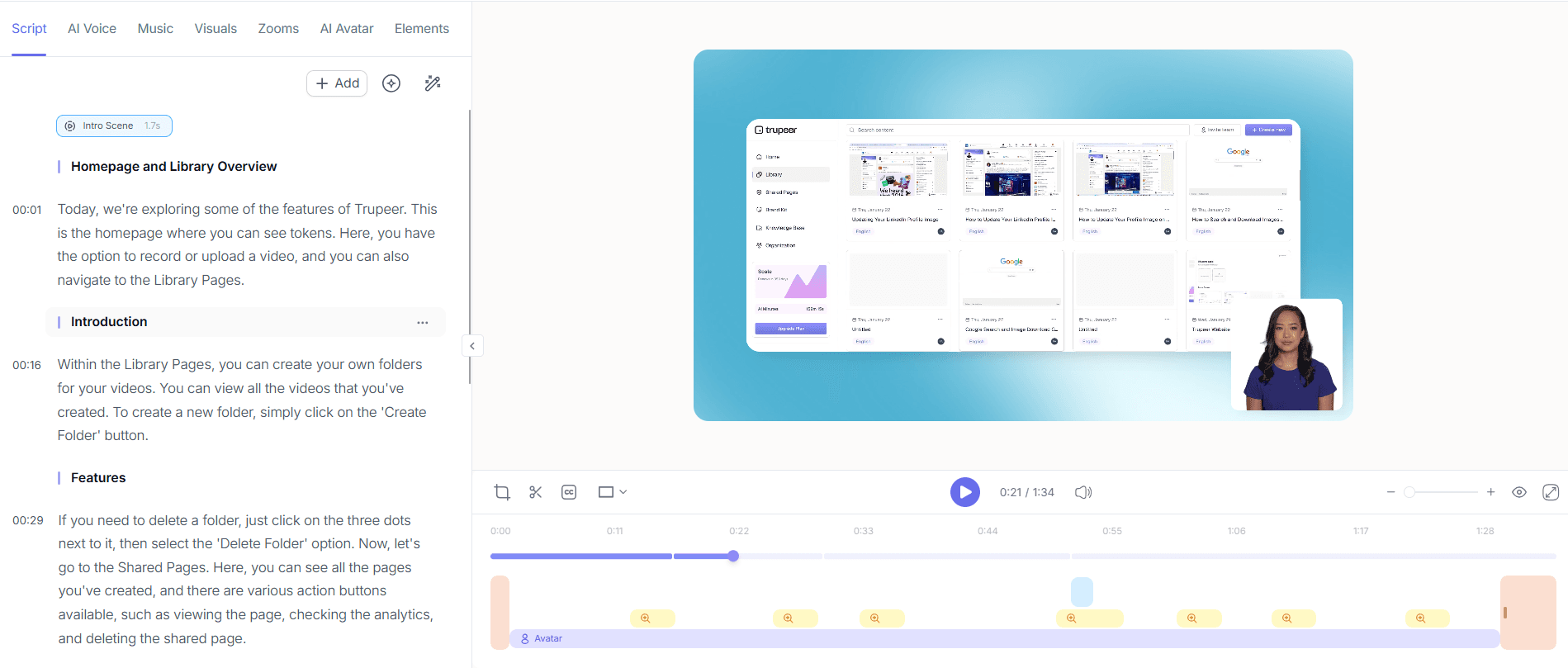
Passo 3: Adicione avatares de IA ou narrações
Para personalizar a sua demonstração, selecione a opção de avatares de IA / vídeo com “talking-head”. Escolha a partir de uma biblioteca de stock ou crie um avatar personalizado para narrar o seu vídeo. Isto adiciona um elemento humano sem exigir aparições em câmara. Em alternativa, aplique uma narração por IA para uma narrativa fluida. Ajustar estes elementos é simples: escolha o seu avatar ou voz, configure as definições e visualize. A Trupeer integra-se com a HeyGen para avatares personalizados, permitindo uma experiência adaptada. Estas adições podem ser concluídas em apenas alguns cliques, normalmente em cerca de 5 minutos.

Passo 4: Localize a sua demonstração
Use a tradução por IA da Trupeer para 40+ línguas para tornar a sua demonstração acessível a nível global. Selecione as línguas pretendidas e a Trupeer fornecerá traduções com opções de lip-sync e dobragem por IA. Esta funcionalidade é essencial para chegar a mercados que não falam inglês, garantindo que a sua mensagem é clara e culturalmente adequada. Cada versão linguística é gerada automaticamente, exigindo uma supervisão mínima, e o processo demora, em geral, menos de 10 minutos por língua. Este passo alarga o seu público, tornando o seu produto mais atrativo para clientes internacionais.

Passo 5: Exporte e disponibilize o seu vídeo
Quando a sua demonstração estiver finalizada, escolha entre vários formatos de exportação como MP4, HTML ou PDF. A exportação em múltiplos formatos da Trupeer garante compatibilidade com várias plataformas e preferências dos clientes. Para disponibilizar, use alojamento com domínio personalizado e SSO para acesso seguro, ou incorpore o vídeo no seu website usando páginas partilhadas ou portais virados para o cliente. Estas opções melhoram a acessibilidade mantendo a consistência da marca. A exportação é rápida, normalmente concluída em menos de 5 minutos, permitindo-lhe partilhar a sua demonstração de forma eficiente.

Passo 6: Analise o envolvimento dos espectadores
Depois de a sua demonstração entrar em funcionamento, use as análises de envolvimento dos espectadores da Trupeer para acompanhar o desempenho. Esta funcionalidade fornece informações sobre interações dos espectadores, pontos de abandono e heatmaps. Revise estas métricas para perceber quais secções cativam o seu público ou onde são necessárias melhorias. Fluxos de trabalho colaborativos de revisão e aprovação permitem que os membros da equipa deem feedback, garantindo refinamentos contínuos. A análise dos dados de envolvimento pode ser feita em tempo real e, normalmente, demora cerca de 15-20 minutos, fornecendo informações acionáveis para melhorar futuras demonstrações.

Que dicas ajudam a construir uma biblioteca diversificada de vídeos de demonstração B2B?
Criar uma biblioteca diversificada de vídeos de demonstração B2B envolve planeamento e execução estratégicos. Aqui ficam algumas dicas para otimizar o seu conteúdo de vídeo para maximizar o impacto:
Padronize o formato do seu vídeo. Use um estilo consistente para gravar demonstrações para manter a identidade da marca e facilitar o reconhecimento em todos os vídeos.
use analytics. Revise regularmente os dados de envolvimento dos espectadores para identificar quais tipos de vídeo ou temas ressoam mais com o seu público e refine a sua estratégia em conformidade.
use avatares de IA de forma eficaz. Escolha avatares que estejam alinhados com a imagem da sua marca para adicionar um toque pessoal sem precisar de atores em direto, aumentando a capacidade de identificação e o envolvimento.
Reaproveite o conteúdo de forma estratégica. Use demonstrações existentes para criar clips mais curtos ou “highlight reels” para campanhas em redes sociais ou e-mail, maximizando o uso do conteúdo em várias plataformas.
Localize para alcançar mais público. Garanta que as suas demonstrações estão disponíveis em várias línguas usando dobragem por IA, o que pode aumentar significativamente a penetração no seu mercado global.
Atualizações regulares. Atualize periodicamente a sua biblioteca de vídeos para refletir alterações do produto ou novas funcionalidades, garantindo que o conteúdo continua relevante e correto.
Integre ciclos de feedback. Incentive o feedback dos clientes sobre os vídeos de demonstração para melhorar continuamente a qualidade do conteúdo e a sua relevância, criando relações com clientes mais fortes.
As equipas que avaliam ferramentas frequentemente começam com uma comparação de alternativas ao Loom antes de padronizarem um fluxo de trabalho.
Perguntas frequentes
Como escolher o tipo certo de vídeo de demonstração para cada potencial cliente?
A escolha do tipo certo de vídeo de demonstração depende da fase do funil de vendas em que o potencial cliente se encontra e das suas necessidades específicas. Os potenciais clientes no início do processo podem beneficiar de vídeos de visão geral que destacam funcionalidades e benefícios-chave, enquanto os que estão mais avançados podem preferir demonstrações técnicas aprofundadas. Adapte a sua abordagem considerando a indústria do potencial cliente, o seu papel e as interações anteriores com o seu conteúdo. Analisar os dados de envolvimento de demonstrações anteriores também pode fornecer informações sobre o que funciona melhor para segmentos de público semelhantes.
O que torna a Trupeer uma boa ferramenta para criar vídeos de demonstração?
A Trupeer destaca-se devido ao seu conjunto abrangente de funcionalidades, concebido para ser fácil de usar e eficiente. As capacidades principais incluem gravação de ecrã com IA, remoção automática de palavras de preenchimento e avatares de IA, que simplificam o processo de produção e melhoram a qualidade do vídeo. A plataforma também suporta tradução de vídeo por IA, garantindo acessibilidade para públicos globais. A sua integração fluida com ferramentas como a HeyGen para avatares personalizados enriquece ainda mais a personalização do conteúdo. Estas funcionalidades, em conjunto, oferecem uma solução sólida para criar rapidamente e de forma eficaz vídeos de demonstração de alta qualidade e envolventes. Quando os SOPs entram na mesma conversa, uma comparação de alternativas ao Scribe ajuda a clarificar o âmbito.
Os vídeos da Trupeer podem ser usados para públicos internacionais?
Sim, os vídeos da Trupeer são ideais para públicos internacionais graças à tradução por IA para 40+ línguas e às capacidades de dobragem por IA. A plataforma garante que o seu conteúdo não é apenas traduzido, mas também adaptado culturalmente com funcionalidades de lip-sync. Isto permite-lhe envolver de forma eficaz mercados que não falam inglês, alargando o seu alcance e a sua base de potenciais clientes. O processo de tradução é eficiente, normalmente demorando menos de 10 minutos por língua, permitindo uma implementação rápida de conteúdos localizados.
Porque é que as análises de envolvimento dos espectadores são importantes em vídeos de demonstração?
As análises de envolvimento dos espectadores são essenciais para compreender como os seus vídeos de demonstração estão a funcionar e onde podem ser melhorados. Estas informações ajudam a identificar quais secções de um vídeo mantêm os espectadores envolvidos e onde ocorrem abandonos. Ao analisar estes dados, pode refinar o seu conteúdo para melhor corresponder às expectativas do público, melhorar a retenção e, em última instância, aumentar as taxas de conversão. As ferramentas de análises da Trupeer fornecem heatmaps detalhados e métricas de envolvimento, facilitando a identificação das áreas a melhorar e do que funciona.
A Trupeer suporta localização de vídeo para públicos que não falam inglês?
Sem dúvida. A Trupeer oferece um suporte alargado para localização de vídeo através das suas funcionalidades de tradução e dobragem por IA. Estas capacidades garantem que o seu conteúdo é acessível e envolvente para públicos que não falam inglês. A plataforma traduz automaticamente e sincroniza os movimentos labiais com o áudio dobrado, proporcionando uma experiência de visualização fluida. Esta funcionalidade é essencial para empresas que procuram expandir a sua presença global e comunicar de forma eficaz com mercados diversos. ai/translation">video translation platform.
Artigos relacionados


