
Gebruik deze sjabloon
Accounts payable looks simple from the outside: an invoice arrives, it's approved and the supplier is paid. Inside the AP team, it's a chain of checks, matches, approvals and cut-offs, and every gap in that chain costs money. Duplicate payments, late fees, missed discounts, fraudulent bank changes and audit findings usually trace back to one thing: people doing the same task in different ways. An accounts payable SOP template gives your team one documented way to do it.
This free accounts payable SOP template covers the full AP cycle, from invoice receipt to payment run and month-end, with an exception-handling table for the cases that cause most errors. Copy the structure below, see a filled-in example, or open it in Trupeer and customize it for your team.
What is an accounts payable SOP template?
An accounts payable SOP template is a ready-made standard operating procedure for the AP process. It sets out who does what, in what order and under which controls, from receiving and validating supplier invoices to matching, approving, posting, paying and reconciling them. A good AP SOP template also covers the exceptions, such as missing purchase orders, price variances, duplicates and bank detail changes, and the controls auditors expect to see.
It works alongside your finance policies: the policy says what must happen, such as approval limits, and the SOP says how the AP team makes it happen, step by step. For a general SOP format you can adapt to any process, see the free SOP template.
Why does accounts payable need an SOP?
AP moves money. Every inconsistency can mean a duplicate payment, a late fee or a payment to the wrong account.
Fraud targets AP. Changed bank details and fake invoices are common attack routes, so controls must be followed every time.
Auditors test AP controls. Approval, matching and segregation of duties need documented, consistent procedures.
Supplier relationships depend on it. Paying accurately and on time protects terms and discounts.
AP teams change. New hires, shared services moves and outsourcing all need a written procedure to learn from.
AP is a common automation target. You can only automate a process that's clearly defined.
Who uses an accounts payable SOP template?
AP clerks and specialists who process invoices and payments every day.
AP team leads and supervisors who handle exceptions and approvals.
Finance controllers and CFOs who own the controls and the month-end close.
Shared services and BPO teams running AP for several entities or clients.
Procurement teams who own purchase orders and supplier relationships.
Internal and external auditors reviewing AP controls.
ERP implementation teams documenting the AP process in a new system.
Preview the accounts payable SOP template
The template opens with document control, purpose and scope, then a roles table for AP, procurement, approvers, treasury and the vendor master team. Policies and reference data follow, such as matching rules, tolerances and approval limits. The procedure covers the AP cycle in eight stages, each with numbered steps, owners and expected results. An exception-handling table sets out what to do when an invoice doesn't fit the standard path. The template closes with controls, KPIs, records and revision history. Every section is editable, so you can add your ERP's transaction names, change tolerances or split stages into separate SOPs.
How to customize this template in Trupeer
Step 1: Open the Templates Section
Go to the Templates section from the main navigation.

Step 2: Select and Open a Template
Click on any template you want to work with to open it.
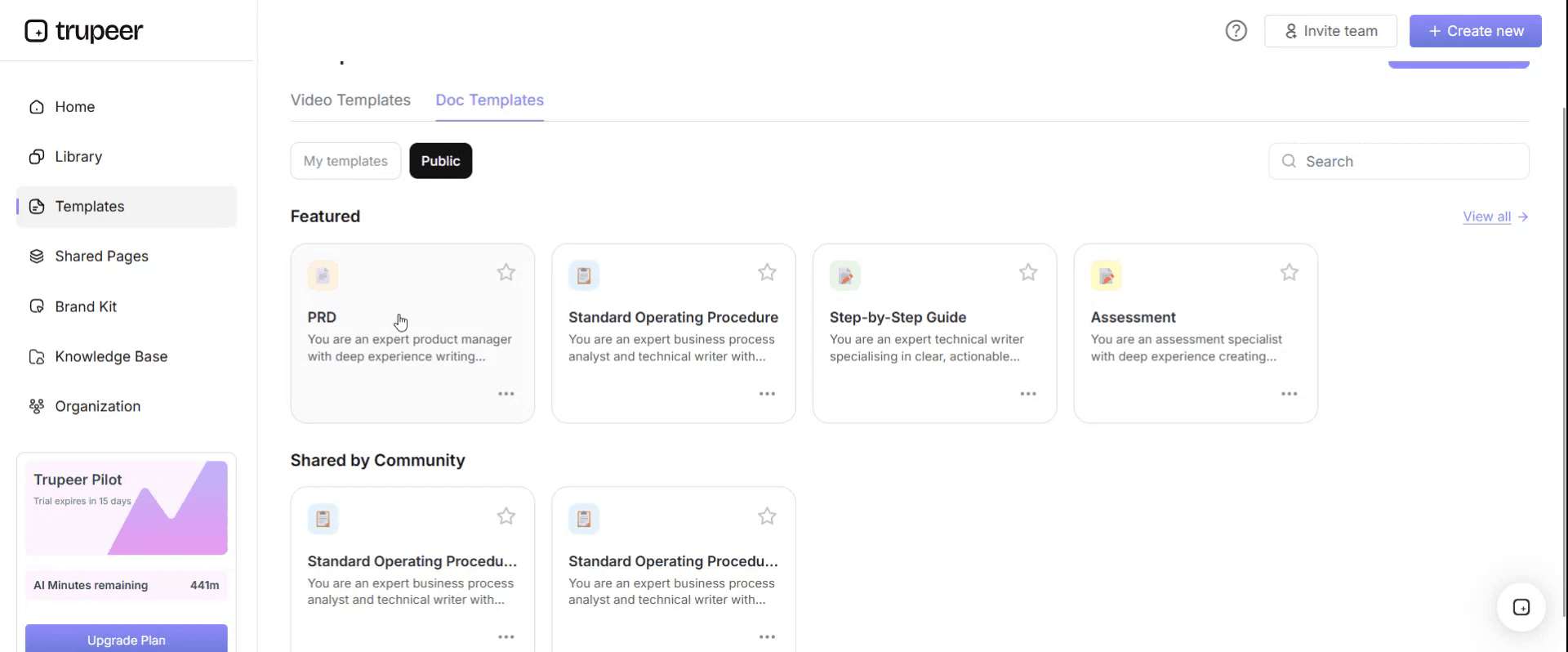
Step 3: Expand the Template View
If needed, expand the template view to see the full layout and details clearly.

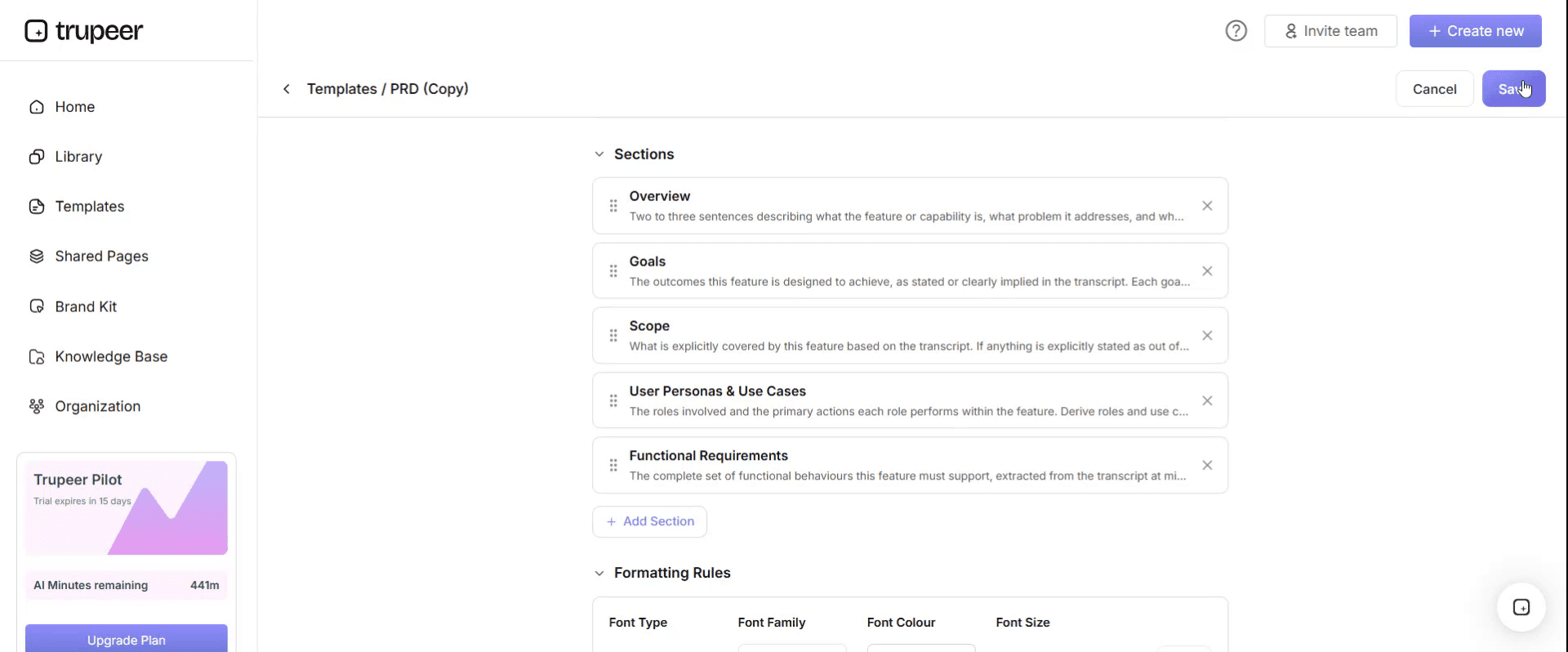
Step 4: Edit the Template
Click on Edit to start modifying the selected template.

Within the editor, you can:
Add new sections
Define or update formatting rules
Add a logo and adjust its position and related settings
Step 5: Save Your Customized Template
After making all necessary changes, click Save to store the updated template as your own.
Step 6: Preview and Fine-Tune the Template
When you want to see how your customized template looks, open the Preview.

From the preview screen, you can continue to make adjustments directly if needed, ensuring the template appears exactly as you want.
With an accounts payable SOP template you can:
Process every invoice the same way: One procedure for every clerk, entity and site.
Prevent duplicate and fraudulent payments: Build duplicate checks and bank detail verification into the steps.
Handle exceptions consistently: Give holds, variances and missing documents clear rules and owners.
Pass audits with less effort: Show documented controls, approvals and segregation of duties.
Onboard AP staff faster: Give new hires a clear procedure and training videos for every task.
What an accounts payable SOP template must contain
Section | What it covers |
|---|---|
Document control | SOP ID, version, owner, approver, effective and review dates |
Purpose and scope | Entities, systems, invoice types and payment methods covered |
Roles and responsibilities | AP clerk, AP lead, buyer, budget approver, treasury, vendor master team |
Policies and reference data | Matching rules, tolerances, approval limits, payment terms, cut-off dates |
Invoice receipt and capture | Channels, scanning or capture, required invoice details |
Validation and duplicate checks | Supplier, invoice number, amounts, tax and duplicate checks |
Matching and approval | Two-way and three-way matching, non-PO invoice coding and approval |
Exceptions and holds | Missing PO or receipt, variances, disputes, bank changes |
Posting | Posting the invoice in the ERP with correct coding |
Payment runs | Payment proposal, review, approval and release |
Vendor master changes | How bank and supplier details are changed and verified |
Period-end | Accruals, reconciliations and vendor statement reviews |
Controls, KPIs and records | Segregation of duties, metrics and documentation retained |
Free accounts payable SOP template: the structure to copy
Copy the structure below into your own document, or open it in Trupeer and customize it.
1. Document control. SOP ID: [AP-001]. Version: [x.x]. Owner: [AP manager]. Approver: [Finance controller]. Effective date: [date]. Next review: [date].
2. Purpose. This SOP defines how [Company]'s accounts payable team receives, validates, matches, approves, posts and pays supplier invoices, so suppliers are paid accurately and on time and financial controls are applied consistently.
3. Scope. Applies to all supplier invoices and credit notes for [entities] processed in [ERP]. Excludes [employee expenses and payroll, covered by separate SOPs].
4. Roles and responsibilities.
Role | Responsibility |
|---|---|
AP clerk | Captures, validates, matches and posts invoices; raises exceptions |
AP lead | Resolves exceptions within authority; reviews payment proposals |
Buyer or requester | Confirms receipt of goods or services; resolves PO and price issues |
Budget approver | Approves non-PO invoices within their delegated limit |
Treasury | Approves and releases payment runs |
Vendor master team | Creates and changes supplier records, including bank details |
Finance controller | Owns AP controls and approves this SOP |
5. Policies and reference data. Matching rule: [three-way match for PO invoices]. Tolerances: [price and quantity tolerances]. Approval limits: [per delegation of authority]. Payment terms: [standard terms]. Payment run schedule: [days]. Period-end cut-off: [date and time].
6. Procedure.
Stage 1: Receive and capture invoices. Receive invoices only through [approved channels, such as the AP mailbox or supplier portal]. Capture invoice data in [ERP or capture tool]. Reject invoices missing [required details, such as PO number, tax ID or invoice date], and ask the supplier to resend.
Stage 2: Validate. Check that the supplier exists and is active in the vendor master. Check invoice number, date, amounts and tax. Run the duplicate check on supplier and invoice number before going further.
Stage 3: Match. For PO invoices, match the invoice to the purchase order and goods receipt. If quantities and prices are within tolerance, continue. If not, follow the exception table.
Stage 4: Code and approve non-PO invoices. Code the invoice to the correct cost centre and account, and route it to the approver whose limit covers the amount.
Stage 5: Post. Post the invoice in [ERP] with the correct coding, payment terms and due date. Attach the invoice image.
Stage 6: Prepare and approve the payment run. On each payment run day, generate the payment proposal, review it for blocked items, duplicates and unusual amounts, and send it to treasury for approval.
Stage 7: Release payments and record them. Treasury releases the approved payments. AP confirms the payments are recorded against the invoices and sends remittance advice where required.
Stage 8: Period-end. Record accruals for goods and services received but not yet invoiced, reconcile the AP sub-ledger to the general ledger, and review vendor statements for missing invoices or credits.
7. Exception handling.
Exception | How to recognise it | Action | Decision owner | Time limit | Escalate to |
|---|---|---|---|---|---|
Duplicate invoice | Same supplier and invoice number already posted | Do not post; reject to supplier | AP clerk | Same day | AP lead |
Missing PO | PO invoice received without a valid PO | Hold; ask the requester to raise or confirm the PO | Requester | [3 working days] | Procurement lead |
No goods receipt | PO exists but receipt not recorded | Hold; ask the buyer to confirm receipt | Buyer | [3 working days] | AP lead |
Price or quantity variance | Outside tolerance | Hold; send to buyer with variance details | Buyer | [2 working days] | AP lead |
Bank details differ | Invoice bank details differ from vendor master | Stop; do not pay; verify through a known supplier contact | Vendor master team | Before next payment run | Finance controller |
Urgent payment request | Request to pay outside the normal run | Follow the urgent payment procedure; requires extra approval | AP lead | Same day | Finance controller |
Not covered above | Case doesn't match any row | Stop and escalate; do not improvise | AP lead | [4 hours] | Finance controller |
8. Controls. No one can both create a supplier and approve its payments. Bank detail changes are verified through a known contact and approved by someone outside AP processing. Payment runs need two approvers. Duplicate checks run on every invoice.
9. KPIs. Invoice cycle time, first-pass match rate, invoices on hold, late payments, duplicate payments prevented, cost per invoice.
10. Records. Invoice images, approvals, exception notes, payment run approvals and reconciliations, retained for [period].
11. Revision history. Version, date, change summary, author and approver.
For a detailed walkthrough of the invoice-processing stages, see the AP invoice processing SOP guide.
Which accounts payable procedures need their own SOP?
The template above covers the core cycle. Larger AP teams often split it into separate SOPs, each with its own steps and exceptions:
AP procedure | What it covers |
|---|---|
Supplier onboarding and vendor master changes | New suppliers, bank detail changes, verification and approval |
PO invoice processing | Capture, validation and three-way matching |
Non-PO invoice processing | Coding, approval routing and limits |
Credit notes | Matching credits to invoices and applying them correctly |
Payment runs | Proposal, review, approval, release and remittance |
Urgent and manual payments | Extra approvals and controls for off-cycle payments |
Vendor statement reconciliation | Finding missing invoices, credits and duplicates |
Month-end AP close | Accruals, cut-off and sub-ledger reconciliation |
For how AP fits into the wider purchasing cycle, see the procure to pay process flow.
Accounts payable controls to build into the SOP
Control | Why it matters |
|---|---|
Segregation of duties | Stops one person from creating a supplier and paying it |
Three-way matching | Confirms you pay only for what was ordered and received |
Duplicate checks | Prevents paying the same invoice twice |
Bank detail verification | Protects against fraudulent change requests |
Approval limits | Keeps spending within delegated authority |
Payment run review and dual approval | Catches errors and unusual payments before money leaves |
Reconciliations | Confirms the AP ledger is complete and accurate |
Accounts payable SOP KPIs
Track a small set of measures to see whether the SOP is working:
Invoice cycle time: from receipt to posting or approval.
First-pass match rate: invoices matched without manual intervention.
Invoices on hold: number and age of invoices waiting on exceptions.
On-time payment rate: payments made by the due date.
Duplicate payments: caught before payment, and any that slipped through.
Cost per invoice: total AP cost divided by invoices processed.
Set your own targets and baseline them before you change the process.
How to create your accounts payable SOP from recordings
Choose a stage, such as PO invoice processing or the payment run.
Record an experienced AP clerk doing the task in your ERP, narrating each check and decision, including at least one exception.
Generate the SOP and video with Trupeer, then review the steps and add your tolerances and approval limits.
Fill in the exception table from the recordings, your hold reasons and audit findings.
Get approval from the AP manager and finance controller.
Publish and train, linking each step to its video, and update the SOP whenever the ERP or policy changes; see SOP version control.
Formats for an accounts payable SOP
Step-by-step with an exception table suits most AP procedures, such as invoice processing and payment runs. This is the format the template above uses.
Checklist suits review tasks, such as the payment run review or month-end close, where completeness matters more than order.
Flowchart suits approval routing, where the next step depends on amount, cost centre or invoice type.
Spreadsheet suits the exception log and KPI tracking, kept alongside the SOP rather than replacing it.
Best practices for accounts payable SOPs
Use your ERP's real screen and transaction names, so people can follow the steps exactly.
Put tolerances and limits in one reference table, not scattered through the steps.
Make fraud controls non-negotiable, with "stop" rules for bank detail changes.
Pair every SOP with short videos of the steps in your system.
Train new AP staff on exceptions, not just the standard path; see accounts payable training for new hires.
Review the SOP after every ERP change and audit.
Common mistakes to avoid
Writing the SOP from memory instead of watching how invoices are really processed.
Leaving out exceptions, so holds and variances are handled differently by each clerk.
Weak bank detail controls, a common route to payment fraud.
One SOP for every entity when local tax or approval rules differ.
Never updating the SOP after a system or policy change.
Accounts payable SOP checklist
Document control is complete, with owner and review date.
Roles cover AP, procurement, approvers, treasury and the vendor master team.
Matching rules, tolerances and approval limits are documented.
Every stage from receipt to period-end has numbered steps.
The exception table covers duplicates, missing POs and receipts, variances and bank changes.
Segregation of duties and payment run approvals are defined.
KPIs and records are specified.
Videos are linked for key steps.
How Trupeer helps you build and maintain your accounts payable SOP
AP SOP challenge | How Trupeer helps |
|---|---|
AP knowledge sits with a few experienced clerks | Record them processing real invoices, and Trupeer's SOP creator turns each recording into a step-by-step SOP and video |
SOPs take weeks to write | One recording becomes a reviewable SOP draft with screenshots in minutes |
Every entity or site needs its own language | Translate SOPs and videos from one source into 65+ languages |
The ERP changes and SOPs go out of date | Update videos by editing the script, and replace a single step instead of re-recording |
New hires need training fast | Publish SOPs and short videos in one searchable knowledge base |
Genpact used this recording-first approach for a company-wide Workday rollout, turning recorded process sessions into more than 500 training collaterals across 20 workstreams in five languages, for 140,000 employees in 40 countries, in 3 months instead of 12. Read the Genpact customer story.
For the full AP documentation set during an ERP implementation, see accounts payable process documentation.
Download the free accounts payable SOP template
Open the template in Trupeer, apply your brand kit, add your ERP steps, tolerances and approval limits, and share it with your AP team. Get the free accounts payable SOP template.
Related templates
Vendor master data SOP template
Frequently Asked Questions
What is an accounts payable SOP template?
It's a ready-made standard operating procedure for the AP process, covering roles, policies, invoice receipt, validation, matching, approval, posting, payment runs, vendor master changes, period-end tasks, exceptions and controls.
What should an accounts payable SOP include?
Document control, purpose and scope, roles, policies and reference data, step-by-step procedures for each AP stage, an exception-handling table, controls, KPIs, records and revision history.
What are the main steps in the accounts payable process?
Receive and capture the invoice, validate it, match it to the purchase order and receipt, approve it, post it, include it in a payment run, release payment and reconcile at period-end.
What is three-way matching in accounts payable?
Three-way matching compares the invoice with the purchase order and the goods receipt, so you pay only for what was ordered and received, at the agreed price.
How do you handle exceptions in an AP SOP?
Use an exception table that lists each exception, how to recognise it, the action, the decision owner, a time limit and where to escalate, plus a catch-all row for anything not listed.
What controls should an accounts payable SOP include?
Segregation of duties, three-way matching, duplicate checks, bank detail verification, approval limits, payment run review with dual approval and regular reconciliations.
Is there an accounts payable SOP template in Word?
Yes. Word suits the AP SOP because it combines tables, such as roles and exceptions, with step-by-step procedures. Open the template in Trupeer, customize it and export it in the format you need.
Is there an accounts payable SOP template in Excel?
The SOP itself works best as a document, but many teams keep the exception log, tolerance table and KPI tracking in Excel alongside it.
Is there an accounts payable SOP template PDF?
Yes. Export the customized SOP as a PDF for read-only distribution, and keep the editable version as the master.
Is the accounts payable SOP template free?
Yes. Sign up free to open the template in Trupeer, customize it and export it.
How often should an AP SOP be reviewed?
At least annually, and whenever your ERP, approval limits, tolerances or payment processes change, or after an audit finding.
Can I create an AP SOP from a screen recording?
Yes. Record an AP clerk processing real invoices, and Trupeer turns the recording into a step-by-step SOP and video you can review, approve and publish.

Understand how work happens.
Carry it into your next transition.
Start Free Trial
Book a Demo
concurrenten

