
이 템플릿 사용
Every supplier payment starts with a vendor record. If that record is wrong, everything downstream goes wrong too: invoices can't be matched, payments go to the wrong bank account, the same supplier is set up three times and fraudsters find an easy way in. Vendor master data is a small part of finance by volume, but it carries a large share of the risk. A vendor master data SOP gives your team one controlled way to create, change, review and block supplier records.
This free vendor master data SOP template covers the full vendor record lifecycle, from the new supplier request and verification to approval, creation, bank detail changes, periodic reviews and deactivation. It includes an exception-handling table and the controls auditors expect. Copy the structure below, see a filled-in example, or open it in Trupeer and customize it for your team.
What is a vendor master data SOP?
A vendor master data SOP is a standard operating procedure for managing supplier records in your ERP or procurement system. It sets out who can request, verify, approve, create, change and block vendor records, which documents and checks are needed at each step, and how changes are recorded. A good vendor master data SOP template puts particular weight on bank detail changes and duplicate prevention, the two areas where poor vendor data does the most damage.
Vendor master data sits at the start of the purchasing and payment cycle, so this SOP works alongside your procure to pay SOP template.
Why do you need a vendor master data SOP?
Payment fraud often starts with vendor data. Fake suppliers and fraudulent bank change requests both depend on weak vendor master controls.
Duplicates cause duplicate payments. The same supplier set up twice makes it easy to pay one invoice twice.
Bad data breaks processes. Wrong tax details, terms or addresses cause matching failures, late payments and compliance issues.
Auditors test vendor master controls. Segregation of duties, approvals and change logs need documented procedures.
Many people touch vendor data. Procurement, AP, tax and compliance all need to follow the same rules.
Clean vendor data supports automation and analytics. Spend analysis and automated matching rely on accurate records.
Who uses a vendor master data SOP template?
Vendor master data teams who create and maintain supplier records.
Procurement teams who request new suppliers and manage supplier relationships.
Accounts payable teams who rely on accurate vendor data to pay invoices.
Tax and compliance teams who check tax registration, sanctions and documentation.
Finance controllers who own vendor data controls.
Shared services, BPO and ERP implementation teams setting up or migrating vendor data.
Internal and external auditors reviewing supplier controls.
Preview the vendor master data SOP template
The template opens with document control, purpose and scope, then a roles table for requesters, procurement, the vendor master team, AP, tax and compliance, and approvers. Data standards follow: required fields, naming conventions, documents and verification checks. The procedure covers the vendor record lifecycle in seven stages, each with numbered steps, owners and expected results. An exception-handling table sets out what to do with duplicates, suspicious change requests, sanctions matches and urgent requests. The template closes with controls, KPIs, records and revision history. Every section is editable, so you can add your ERP's field names, approval levels or country-specific checks.
How to customize this template in Trupeer
Step 1: Open the Templates Section
Go to the Templates section from the main navigation.

Step 2: Select and Open a Template
Click on any template you want to work with to open it.
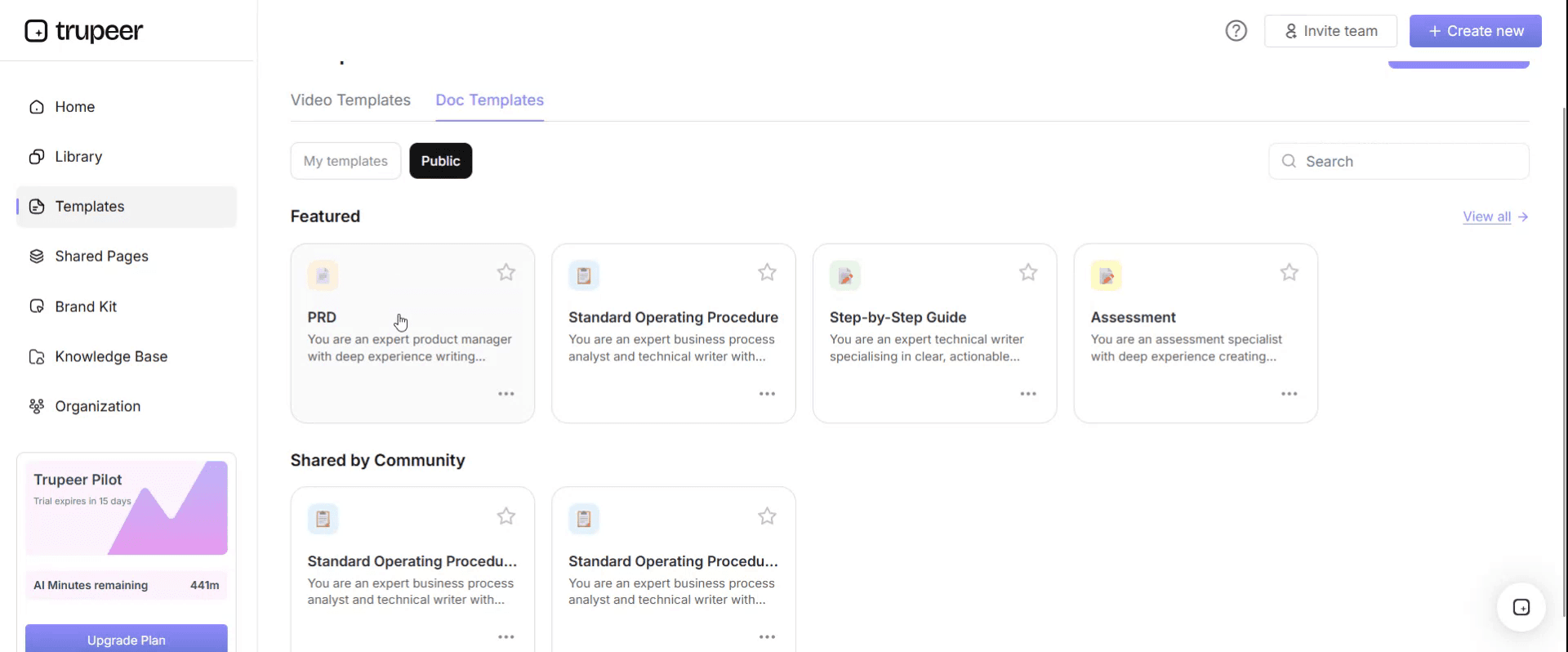
Step 3: Expand the Template View
If needed, expand the template view to see the full layout and details clearly.

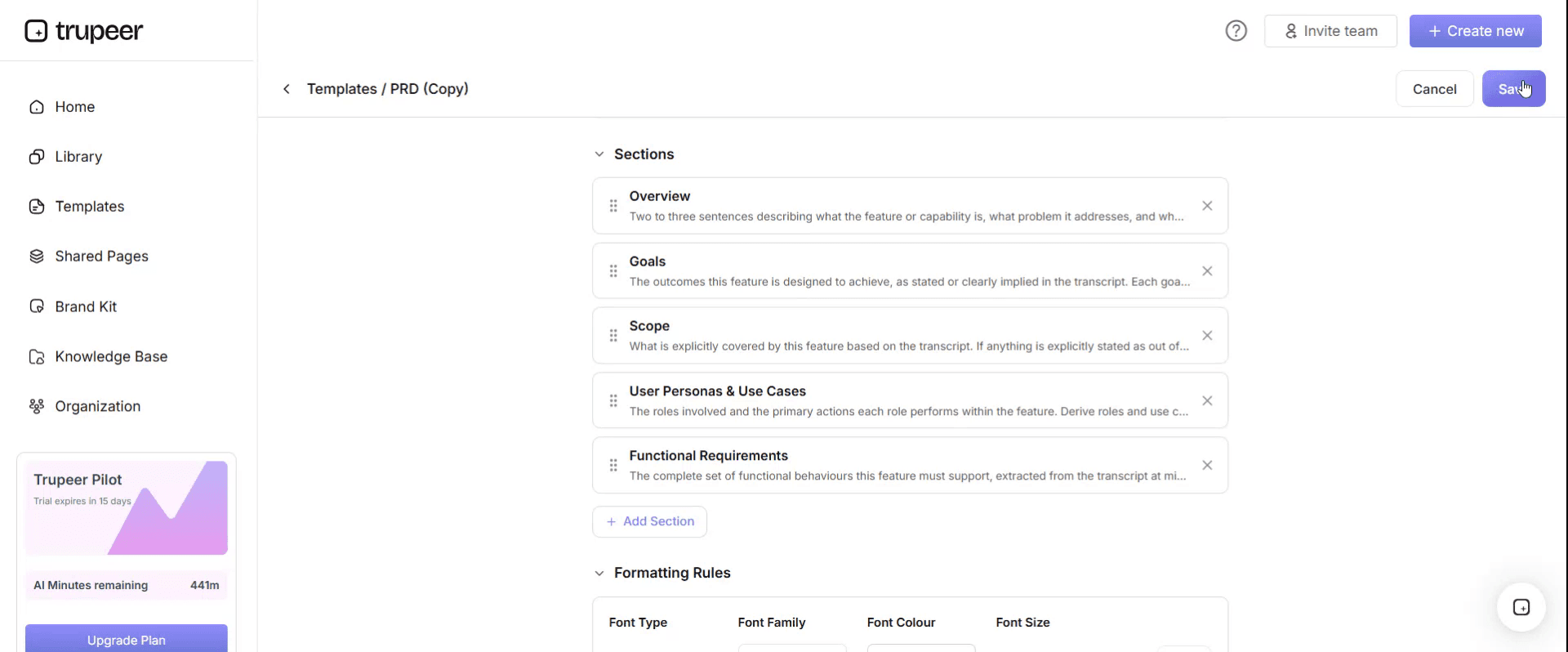
Step 4: Edit the Template
Click on Edit to start modifying the selected template.

Within the editor, you can:
Add new sections
Define or update formatting rules
Add a logo and adjust its position and related settings
Step 5: Save Your Customized Template
After making all necessary changes, click Save to store the updated template as your own.
Step 6: Preview and Fine-Tune the Template
When you want to see how your customized template looks, open the Preview.

From the preview screen, you can continue to make adjustments directly if needed, ensuring the template appears exactly as you want.
With a vendor master data SOP template you can:
Create supplier records the same way every time: One set of required fields, documents and checks.
Prevent payment fraud: Verify every bank detail change through an independent channel.
Stop duplicates at the source: Check for existing records before creating a new one.
Keep vendor data clean: Review and block dormant or incomplete records on a schedule.
Pass audits with less effort: Show approvals, verification evidence and a complete change log.
What a vendor master data SOP template must contain
Section | What it covers |
|---|---|
Document control | SOP ID, version, owner, approver, effective and review dates |
Purpose and scope | Entities, systems, vendor types and data fields covered |
Roles and responsibilities | Requester, procurement, vendor master team, AP, tax and compliance, approver |
Data standards | Required fields, naming conventions, address formats, payment terms |
Required documents | Tax registration, bank confirmation, contracts and certificates |
New vendor request | How suppliers are requested and justified |
Verification and due diligence | Duplicate checks, tax ID checks, sanctions screening, bank verification |
Approval and creation | Who approves and how the record is created |
Changes | Changes to bank details, addresses, terms and contacts |
Periodic review and blocking | Dormant vendors, incomplete records and deactivation |
Exceptions | Duplicates, suspicious requests, sanctions matches, urgent and one-time vendors |
Controls, KPIs and records | Segregation of duties, metrics and evidence retained |
Free vendor master data SOP template: the structure to copy
Copy the structure below into your own document, or open it in Trupeer and customize it.
1. Document control. SOP ID: [VMD-001]. Version: [x.x]. Owner: [Vendor master data lead]. Approver: [Finance controller]. Effective date: [date]. Next review: [date].
2. Purpose. This SOP defines how [Company] requests, verifies, approves, creates, changes, reviews and blocks vendor master records, so supplier data is accurate, complete and protected against fraud and duplication.
3. Scope. Applies to all vendor records for [entities] in [ERP or procurement system], including suppliers, contractors and one-time vendors. Excludes [employee records for expense reimbursement, covered by the expenses SOP].
4. Roles and responsibilities.
Role | Responsibility |
|---|---|
Requester | Requests a new supplier with a business justification |
Procurement | Confirms the supplier is needed and preferred suppliers have been considered |
Vendor master team | Checks, verifies, creates and changes vendor records |
Tax and compliance | Confirms tax registration and screens against sanctions lists |
Approver | Approves new vendors and sensitive changes, such as bank details |
Accounts payable | Uses vendor records; reports errors; cannot create or change vendors |
Finance controller | Owns vendor master controls and approves this SOP |
5. Data standards. Legal name exactly as on tax registration. Standard address format. Mandatory fields: [legal name, tax ID, address, bank details, payment terms, contact]. Naming conventions: [rules]. Required documents: [tax certificate, bank confirmation letter, signed supplier form].
6. Procedure.
Stage 1: Request a new vendor. The requester submits a new vendor request through [form or system] with the supplier's details, required documents and a business reason. Procurement confirms the supplier is needed.
Stage 2: Check for duplicates. The vendor master team searches existing records by legal name, tax ID, bank account and address. If a match exists, the request is rejected or redirected to the existing record.
Stage 3: Verify the supplier. Check the tax ID with [official source], screen the supplier and its owners against sanctions lists, and verify bank details through an independent channel, such as a call to a known contact or a bank confirmation letter.
Stage 4: Approve. The approver reviews the request and verification evidence and approves or rejects it. The approver must not be the person who requested or created the vendor.
Stage 5: Create the record. The vendor master team creates the record with all mandatory fields, attaches the evidence and sets payment terms and payment method.
Stage 6: Change an existing record. Changes are requested through [form or system], never by email alone. Bank detail changes are verified by calling the supplier on a phone number already on file, not one provided in the change request, and approved by someone other than the person making the change.
Stage 7: Review and block. Every [quarter], review vendors with no activity in [12 months], incomplete records and duplicates. Block or deactivate records that are no longer needed.
7. Exception handling.
Exception | How to recognise it | Action | Decision owner | Time limit | Escalate to |
|---|---|---|---|---|---|
Possible duplicate | Same name, tax ID, bank account or address already exists | Stop; confirm with the requester; use or update the existing record | Vendor master team | [1 working day] | Vendor master lead |
Bank change by email only | Change requested without the formal form | Do not change; verify by calling a known contact | Vendor master team | Before next payment run | Finance controller |
Bank change that can't be verified | Supplier can't be reached on the number on file | Do not change; block payments to the vendor until verified | Vendor master lead | Before next payment run | Finance controller |
Sanctions screening match | Supplier or owner matches a sanctions list | Stop; do not create or pay; refer to compliance | Compliance | Same day | Legal or compliance lead |
Missing tax documents | Tax ID or certificate not provided | Hold the request until documents are received | Vendor master team | [5 working days] | Procurement |
Urgent new vendor | Business needs the vendor faster than the standard process | Follow the expedited path; all checks still apply | Vendor master lead | [1 working day] | Finance controller |
One-time vendor | Single payment to a supplier not expected again | Use the one-time vendor process with full bank verification | Vendor master team | [Per policy] | Vendor master lead |
Not covered above | Case doesn't match any row | Stop and escalate; do not improvise | Vendor master lead | [4 hours] | Finance controller |
8. Controls. People who create or change vendors can't approve them, raise purchase orders or approve payments. Bank detail changes need independent verification and a second approver. A report of all vendor changes is reviewed [weekly] by someone outside the vendor master team. Dormant vendors are blocked on a schedule.
9. KPIs. Time to create a vendor, duplicate rate, records with all mandatory fields, bank changes verified before payment, dormant vendors blocked and audit findings.
10. Records. Requests, verification evidence, sanctions screening results, approvals and the change log, retained for [period].
11. Revision history. Version, date, change summary, author and approver.
Vendor master data SOP example: a bank detail change
Here's how the SOP works for one common request. The details are illustrative.
An email arrives from a supplier's "accounts team" asking to update their bank details before the next payment. The vendor master team doesn't change anything based on the email. Instead, they ask the supplier to submit the formal change form, then call the supplier on the phone number already in the vendor record. The supplier's finance contact confirms the request and the new account details. The vendor master team updates the record and attaches the call note and form, and a second person who didn't make the change approves it. The change appears on the weekly vendor change report, which the AP lead reviews.
If the supplier's known contact had said they never asked for a change, the vendor master team would block payments to the vendor, alert the finance controller and report the attempted fraud.
Controls to build into the SOP
Control | Why it matters |
|---|---|
Segregation of duties | Stops one person from creating a fake supplier and paying it |
Duplicate checks before creation | Prevents duplicate records and duplicate payments |
Independent bank verification | Protects against fraudulent bank change requests |
Dual approval for sensitive changes | Ensures no single person can redirect payments |
Change log review | Detects unauthorised or unusual changes |
Sanctions and tax screening | Keeps the business compliant |
Dormant vendor blocking | Removes records that could be misused |
KPIs to track
Time to create a vendor: from complete request to active record.
Duplicate rate: duplicate records found as a share of all records.
Record completeness: share of records with all mandatory fields.
Bank changes verified: share of bank changes independently verified before payment.
Dormant vendors blocked: inactive records blocked at each review.
Audit findings: vendor master issues raised by internal or external audit.
Set your own targets and baseline them before you change the process.
How to build the SOP from recordings
Choose a task, such as creating a vendor, checking for duplicates or processing a bank change.
Record the team member who does it best in your ERP, narrating each check and the evidence they collect.
Generate the SOP and video with Trupeer, then add your required fields, approval levels and verification rules.
Fill in the exception table from real cases, past fraud attempts and audit findings.
Get approval from the vendor master lead and finance controller.
Publish and train, and update the SOP whenever your system or controls change; see SOP version control.
Which format to use
Step-by-step with an exception table suits vendor creation and changes. This is the format the template above uses.
Checklist suits verification, so every required document and check is confirmed before approval.
Request form suits new vendor and change requests, capturing the same information every time.
Spreadsheet or report suits the change log review and periodic cleanup.
Best practices for managing vendor data
Never change bank details based on email alone.
Verify using contact details you already hold, not ones provided in the request.
Check for duplicates by tax ID and bank account, not just name.
Keep vendor creation separate from purchasing and payment.
Review the change log regularly and investigate anything unusual.
Train everyone who touches vendor data, including AP and procurement, on fraud warning signs.
Common mistakes to avoid
Letting AP or procurement create vendors they also order from or pay.
Accepting bank changes on letterhead or email without a call-back.
Searching for duplicates by name only, missing variations and abbreviations.
Never cleaning up dormant vendors.
No evidence attached to records, so auditors can't see what was checked.
Vendor master data SOP checklist
Document control is complete, with owner and review date.
Roles keep vendor creation separate from purchasing and payment.
Data standards and required documents are defined.
Every stage from request to blocking has numbered steps.
Bank changes need independent verification and a second approver.
The exception table covers duplicates, suspicious requests, sanctions matches and urgent or one-time vendors.
The change log is reviewed on a schedule.
KPIs and records are specified.
How Trupeer helps you build and maintain your vendor master data SOP
Vendor master challenge | How Trupeer helps |
|---|---|
Verification steps are known by a few experienced people | Record them processing real requests, and Trupeer's SOP creator turns each recording into a step-by-step SOP and video |
Fraud controls are only followed when people remember them | Short videos show exactly how to verify a bank change, every time |
Teams in several countries maintain vendor data | Translate SOPs and videos from one source into 65+ languages |
The ERP or controls change | Update videos by editing the script, and replace a single step instead of re-recording |
New team members need training fast | Publish SOPs and videos in one searchable knowledge base |
Genpact used this recording-first approach for a company-wide Workday rollout, turning recorded process sessions into more than 500 training collaterals across 20 workstreams in five languages, for 140,000 employees in 40 countries, in 3 months instead of 12. Read the Genpact customer story.
Download the free vendor master data SOP template
Open the template in Trupeer, apply your brand kit, add your required fields, approval levels and verification rules, and share it with everyone who touches vendor data. Get the free vendor master data SOP template.
Related templates
Month-end close checklist template
Frequently Asked Questions
What is a vendor master data SOP?
It's a standard operating procedure for creating, changing, reviewing and blocking supplier records, covering who does each step, the documents and checks needed, approvals, exceptions and controls.
What should a vendor master data SOP include?
Document control, purpose and scope, roles, data standards, required documents, steps for requests, duplicate checks, verification, approval, creation, changes and periodic review, an exception table, controls, KPIs and records.
How do you verify vendor bank detail changes?
Never rely on the email or letter requesting the change. Call the supplier on a phone number already in the vendor record, confirm the change, and have a second person approve it before any payment.
Who should be allowed to create vendors?
A dedicated vendor master team or role that doesn't raise purchase orders or approve payments, so no one person can create a supplier and pay it.
How do you prevent duplicate vendors?
Search for existing records by tax ID, bank account and address as well as name before creating any new vendor, and review records for duplicates regularly.
How often should vendor master data be reviewed?
Review the change log frequently, such as weekly, and review dormant, incomplete and duplicate records on a schedule, such as quarterly.
What's a one-time vendor?
A supplier paid once and not expected again. Many ERPs support one-time vendor records, but they still need full verification, including bank details.
Is there a vendor master data SOP template in Word?
Yes. Word suits the SOP because it combines tables, such as roles and exceptions, with step-by-step procedures. Open the template in Trupeer, customize it and export it in the format you need.
Is there a vendor master data SOP template in Excel?
The SOP works best as a document, but many teams keep the request log, change log and data quality checks in Excel alongside it.
Is there a vendor master data SOP template PDF?
Yes. Export the customized SOP as a PDF for read-only distribution, and keep the editable version as the master.
Is the vendor master data SOP template free?
Yes. Sign up free to open the template in Trupeer, customize it and export it.
Can I create a vendor master data SOP from a screen recording?
Yes. Record your team creating and changing vendor records in your ERP, and Trupeer turns the recordings into step-by-step SOPs and videos you can review, approve and publish.


