4,8/5
Générateur de tutoriels IA gratuit
Créez des tutoriels captivants avec des annotations IA, des voix off et des visuels pour apprendre plus rapidement.
Commencez gratuitement

Démarquez-vous en transformant vos processus et workflows en didacticiels vidéo détaillés qui expliquent chaque étape clairement. Avec le générateur de didacticiels IA de Trupeer, un didacticiel en 5 étapes peut être créé en moins de 5 secondes.
Utilisez le générateur de didacticiels de Trupeer pour :
Créer des didacticiels d’onboarding, des démos de logiciels ou des vidéos de formation.
Générer automatiquement des sous-titres, des points forts et des instructions pour chaque étape.
Enregistrer sur plusieurs applications ou onglets de navigateur.
Utiliser des modèles pour créer des didacticiels de manière cohérente et rapide.
Flouter les données sensibles et mettre en avant les éléments clés.
Collaborer avec les membres de l’équipe pour des supports de formation partagés.
Un seul enregistrement produit à la fois le didacticiel vidéo et une visite guidée écrite avec des captures d’écran et des étapes numérotées intégrées.
Recréez une étape modifiée lorsque le produit est mis à jour. L’IA re-traite ce segment. Le reste du didacticiel reste inchangé.
Traduisez en 65+ langues sur les offres payantes, appliquées à la fois à la voix off de la vidéo et au guide écrit dans le même travail.
Le forfait gratuit couvre le flux de base de l’enregistrement vers le didacticiel. Aucune carte bancaire pour démarrer. Les offres payantes ajoutent des brand kits, le clonage de voix, des avatars IA et la traduction.
Voici ce qui rend cette solution différente de la simple « capture d’écran avec des étapes en plus ». La plupart des créateurs de didacticiels vous donnent un enregistreur d’écran et s’arrêtent là. Vous devez encore écrire les étapes, choisir les moments à mettre en avant, éditer les coupes, ajouter les sous-titres, habiller la sortie avec votre marque et décider quoi flouter. C’est là que se trouve le temps réel de création du didacticiel. Trupeer regroupe tout cela dans le traitement par IA : l’IA observe ce qui s’est passé à l’écran, sélectionne les moments de clic qui comptent, rédige les sous-titres, applique le brand kit et structure les étapes. L’enregistrement s’arrête, le didacticiel existe. Peut-être dix minutes pour une source de 6 minutes. Le travail qui nécessitait auparavant un après-midi ne demande plus qu’une pause café.
Pourquoi utiliser Trupeer comme générateur de didacticiels ?
Que vous soyez enseignant, responsable marketing produit ou spécialiste support, le générateur de didacticiels de Trupeer vous fait gagner des heures de travail manuel en automatisant la création et l’édition des vidéos. Il faut être clair sur à qui c’est destiné. La personne qui ouvre cet outil est généralement un enseignant, un responsable marketing produit, un spécialiste customer success, un responsable d’équipe support ou un expert du sujet dans une entreprise SaaS. Aucun d’entre eux n’est éditeur vidéo. La plupart ne veulent pas devenir éditeurs vidéo. Le didacticiel qui nécessitait auparavant Camtasia et un après-midi se retrouve publié dans le même délai qu’un long message Slack. Résultat : les didacticiels sont créés au lieu d’être repoussés. C’est exactement l’objectif.
Voici pourquoi Trupeer se démarque :
1. Capturer n’importe quel workflow facilement

Trupeer capture les actions de votre écran dans les navigateurs, applications ou outils.
Le générateur de didacticiels IA ajoute ensuite automatiquement :
Un titre clair et des sous-titres.
Des descriptions d’étapes rédigées par IA.
Des points forts annotés pour chaque clic ou défilement clé.
Une narration vocale optionnelle.
La capture se fait dans le navigateur. Aucune installation de logiciel. Aucun assistant de configuration. Choisissez l’écran, choisissez la source audio, lancez l’enregistrement. Parcourez tout ce qui doit devenir un didacticiel : la nouvelle fonctionnalité que vous lancez, le workflow que le support client explique sans cesse, la séquence d’onboarding dans laquelle les nouveaux utilisateurs se perdent. Parlez pendant que vous cliquez, ou restez silencieux et laissez l’IA générer la narration à partir des actions visuelles. L’IA fonctionne à partir de ce qui a été enregistré. La plupart des didacticiels commencent par un enregistrement en une seule prise réalisé entre deux autres réunions.
2. Annoter et éditer instantanément
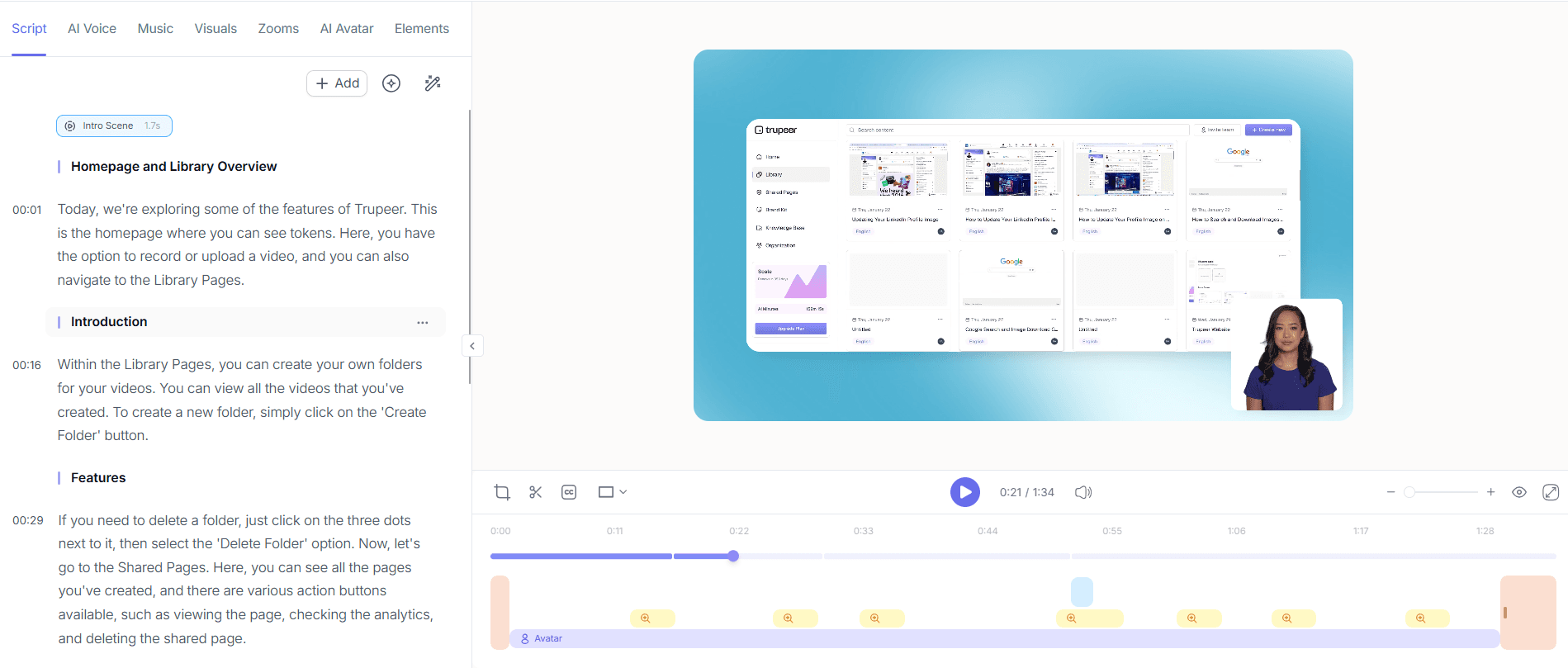
Après la capture, Trupeer annote automatiquement votre vidéo de didacticiel.
Vous pouvez :
Modifier le texte, les sous-titres ou la voix off à l’aide de l’IA.
Fusionner des sections ou des étapes en un seul flux.
Ajouter des conseils, des alertes ou des instructions.
Convertir des captures d’écran en courts GIF.
Ce que signifie « annoter automatiquement » dans la pratique. L’IA comprend que vous avez cliqué dans Paramètres, puis sur Exporter, puis choisi CSV. Ainsi, le didacticiel contient des étapes du type « Ouvrez Paramètres. Cliquez sur Exporter. Choisissez CSV. » avec une capture d’écran à chaque clic. Des effets de zoom s’appliquent à ces moments. Des surlignages du curseur indiquent les boutons qui comptaient. Rien de tout cela ne nécessite une édition de timeline unique. À préciser : si VOUS souhaitez éditer, l’éditeur vous permet de rogner, réordonner, remplacer la voix off ou ajouter des appels personnalisés. Mais pour la plupart des didacticiels, la version générée automatiquement est publiée telle quelle. La couche d’édition est là si vous en avez besoin. Pas obligatoire si vous n’en avez pas.
3. Personnaliser vos didacticiels avec votre identité de marque

Améliorez vos didacticiels avec votre identité de marque :
Ajouter des logos et des couleurs de marque.
Appliquer des arrière-plans ou une typographie personnalisés.
Mettre en avant des boutons ou des actions.
Flouter les données privées et ajouter des icônes ou des formes pour renforcer l’impact.
Le lien Shared Page est ce que la plupart des équipes utilisent au quotidien. Une URL unique avec votre marque héberge à la fois la vidéo et la visite guidée écrite. Les paramètres de visibilité (public, réservé à l’organisation, domaines sélectionnés, sur invitation uniquement) contrôlent qui voit quoi. Pour les didacticiels hébergés dans une base de connaissances (wiki) ou un LMS existant, le code d’intégration insère le lecteur dans Notion, Confluence, SharePoint, GitBook ou toute autre plateforme qui accepte les intégrations iframe. Les téléchargements MP4 et PDF fonctionnent partout ailleurs. Les deux formats sont de vrais fichiers : ils fonctionnent en dehors de Trupeer si l’équipe décide, à terme, d’héberger le contenu ailleurs.
4. Partager et exporter partout

Une fois votre didacticiel prêt :
Générer un lien sécurisé et partageable.
Intégrer directement dans votre site web ou votre LMS.
Exporter en MP4, HTML ou PDF.
Activer l’optimisation SEO pour les didacticiels publics.
Le lien Shared Page est ce que la plupart des équipes utilisent au quotidien. Une URL unique avec votre marque héberge à la fois la vidéo et la visite guidée écrite. Les paramètres de visibilité (public, réservé à l’organisation, domaines sélectionnés, sur invitation uniquement) contrôlent qui voit quoi. Pour les didacticiels hébergés dans une base de connaissances (wiki) ou un LMS existant, le code d’intégration insère le lecteur dans Notion, Confluence, SharePoint, GitBook ou toute autre plateforme qui accepte les intégrations iframe. Les téléchargements MP4 et PDF fonctionnent partout ailleurs. Les deux formats sont de vrais fichiers : ils fonctionnent en dehors de Trupeer si l’équipe décide, à terme, d’héberger le contenu ailleurs.
Où le générateur de didacticiels se situe par rapport à Scribe, Tango, Loom et Camtasia
L’espace de création de didacticiels se regroupe en quelques catégories. Scribe et Tango capturent les clics et produisent automatiquement des didacticiels écrits étape par étape. Ils sont rapides et légers. Le hic : ils ne produisent pas une vidéo correspondante. Donc si le didacticiel doit inclure à la fois une vidéo et un guide écrit (ce que la plupart des équipes souhaitent, car certains apprenants regardent et d’autres parcourent), Scribe ou Tango couvre la moitié du travail. Trupeer et Guidde sont plus proches l’un de l’autre : tous deux produisent une vidéo et un guide écrit à partir d’un seul enregistrement. Les différences se résument à des choix de fonctionnalités spécifiques : traitement du brand kit, gestion de la traduction, expérience de l’éditeur. Autant dire qu’il vaut mieux essayer les deux sur le même workflow avant de s’engager.
Autre catégorie : Loom et Vidyard. Ce sont des enregistreurs d’écran qui n’éditent pas automatiquement. Donc ce que vous enregistrez, c’est ce que vous publiez, avec les « ums » et les « euh ». Pratique pour des vidéos de partage internes rapides, moins utile pour des didacticiels soignés destinés à la base d’aide ou au LMS. Puis il y a les outils « lourds » : Camtasia, Adobe Captivate, Articulate Storyline. Ils produisent des didacticiels de grande qualité quand vous consacrez des heures à l’édition. Les heures sont bien réelles. Trupeer évite la phase d’édition en l’automatisant. Ainsi, même une équipe sans éditeur vidéo dédié publie des didacticiels soignés. Une équipe avec un éditeur vidéo dédié conserve Camtasia pour le didacticiel « hero » de la page d’accueil, une fois par an. La plupart des équipes qui testent Trupeer finissent par l’utiliser pour le volume, tout en gardant Camtasia pour les rares projets nécessitant une production de très haute qualité.
Qu’est-ce qui est réellement gratuit, et à quel moment le forfait payant démarre
Le décompte honnête. Le forfait gratuit de Trupeer couvre le flux principal de création de didacticiels : enregistrer une visite guidée de l’écran, générer la vidéo éditée par IA ainsi que le guide écrit, puis partager via un lien Shared Page. Aucune carte bancaire pour démarrer. Aucun compte à rebours d’essai de 14 jours. La version gratuite n’est pas une simple démo ; c’est une version fonctionnelle du produit. La limite du gratuit concerne la durée d’enregistrement par didacticiel individuel et le nombre total de minutes de traitement IA mensuelles, et non un nombre de sièges qui bloque l’équipe lorsqu’une quatrième personne rejoint.
Quand le payant intervient : brand kits (logo, couleurs, slides d’introduction et de conclusion appliquées automatiquement à chaque didacticiel), clonage de voix personnalisé pour une voix de présentateur cohérente dans toute la bibliothèque de didacticiels, avatars IA issus du catalogue complet et via l’intégration HeyGen, traduction en 65+ langues appliquée à la fois à la voix off de la vidéo et au guide écrit dans le même travail, espaces de travail d’équipe avec plusieurs sièges et contrôles administrateur, limites d’enregistrement plus longues par didacticiel. Aucune de ces options n’est nécessaire pour créer des didacticiels. Elles deviennent importantes lorsque la bibliothèque de didacticiels dépasse le cadre d’une personne qui produit du contenu, ou lorsque les didacticiels doivent être publiés dans plusieurs langues pour des clients internationaux. La plupart des petites équipes restent sur le gratuit indéfiniment. Le forfait payant est là quand l’évolution change les calculs.
Les gens demandent aussi
Free Screenshot Generator
Free SOP Generator
AI-Generated Documents
AI Video Translator
Free Online Course Creator
Avantages d’utiliser le générateur de tutoriels de Trupeer
Détection des marches assistée par l’IA
Extrait automatiquement les actions importantes de votre vidéo et les organise en étapes structurées pour de meilleurs résultats d'apprentissage.
Visuels captivants et voix off
Ajoutez des voix off réalistes et des visuels interactifs pour expliquer clairement chaque étape, en aidant les apprenants à rester concentrés et impliqués.
Tutoriels entièrement personnalisables
Modifiez le contenu, les visuels et les voix off du tutoriel pour qu’ils correspondent aux besoins de votre public, au ton de votre marque et au contexte d’apprentissage.
Comment créer des tutoriels interactifs avec Trupeer
Étape 1
Téléchargez votre vidéo
Étape 2
Générer et personnaliser
Étape 3
Télécharger & partager
Foire aux questions
1. Qu’est-ce que le générateur de tutoriels de Trupeer ?
Le créateur de tutoriels de Trupeer est un outil de création de tutoriels basé sur l’IA qui vous aide à créer des tutoriels vidéo professionnels étape par étape. Il enregistre votre processus, ajoute une narration par IA et met le tout en forme dans un guide cohérent et facile à suivre, parfait pour l’intégration, la formation ou l’éducation produit.
2. Puis-je créer des tutoriels gratuitement avec Trupeer ?
Oui ! Trupeer propose une version gratuite de création de tutoriels où vous pouvez enregistrer de courts tutoriels, ajouter des annotations IA et les partager instantanément. Pour des fonctionnalités avancées comme un temps d’enregistrement plus long, le branding ou les voix off IA, vous pouvez passer à Trupeer Pro.
3. Comment fonctionne l’IA dans le créateur de tutoriels de Trupeer ?
Le générateur de tutoriels IA de Trupeer analyse votre activité à l’écran, identifie les actions importantes et crée automatiquement des légendes, des surlignages et une narration. Il vous fait gagner des heures de montage et garantit que votre tutoriel s’enchaîne de manière logique du début à la fin.
4. Puis-je utiliser Trupeer pour créer des tutoriels SaaS ou des tutoriels de produit ?
Absolument. Trupeer est idéal pour les équipes SaaS, les enseignants et les responsables marketing produit. Le créateur de tutoriels vidéo prend en charge les applications web, les outils de bureau et les flux de travail produit, ce qui facilite la création en quelques minutes de vidéos d’onboarding ou d’explication de fonctionnalités.
5. Comment puis-je partager ou publier des tutoriels créés avec Trupeer ?
Vous pouvez partager des tutoriels directement via un lien, les intégrer dans des sites web ou des centres d'aide, ou les exporter dans plusieurs formats (MP4, PDF, HTML). Trupeer propose également une publication optimisée pour le SEO, rendant vos tutoriels découvrables en ligne pour un meilleur engagement.
Plus d’outils



