4.8/5
أداة مجانية للتوثيق متعدد اللغات
ترجم وحافظ على التوثيق بأكثر من 50 لغة باستخدام التوطين المدعوم بالذكاء الاصطناعي.
جرّب مجانًا

أداة التوثيق متعددة اللغات تُبسّط طريقة عمل الفرق في إنشاء التوثيق وإدارته ومشاركته. إليك أهم النقاط:
ترجمة التوثيق إلى أكثر من 50 لغة باستخدام التوطين المدعوم بالذكاء الاصطناعي
الحفاظ على ذاكرة الترجمة لضمان توحيد المصطلحات عبر جميع المحتوى
مزامنة التحديثات عبر اللغات تلقائيًا عند تغيير محتوى المصدر
دعم لغات من اليمين إلى اليسار بما في ذلك العربية والعبرية والأردية مع عرض أصلي
التعاون مع المترجمين عبر سير عمل مراجعة واعتماد مدمج
ما هي أداة التوثيق متعددة اللغات؟
تُمكّن أداة التوثيق متعددة اللغات الفرق من إنشاء التوثيق وترجمته والحفاظ عليه بلغات متعددة من منصة واحدة. تجمع بين ترجمة الذكاء الاصطناعي وسير عمل مراجعة بشرية لتقديم توثيق دقيق ومناسب ثقافيًا يخدم جمهورًا عالميًا بلغتهم المفضلة. تعرّف على المزيد حول كيفية تعزيز تسجيل الشاشة للتوثيق عبر Trupeer Screen Recorder.
كيف تعمل أداة التوثيق متعددة اللغات؟
البدء سهل ولا يستغرق سوى دقائق قليلة:
الخطوة 1: أنشئ في Trupeer (لغة المصدر لديك)
سجّل سير عملك في Trupeer وأنشئ توثيقًا منظمًا بلغتك الأساسية باستخدام التقاط الشاشة المدعوم بالذكاء الاصطناعي مع التنسيق التلقائي والحفاظ على الوسائط.

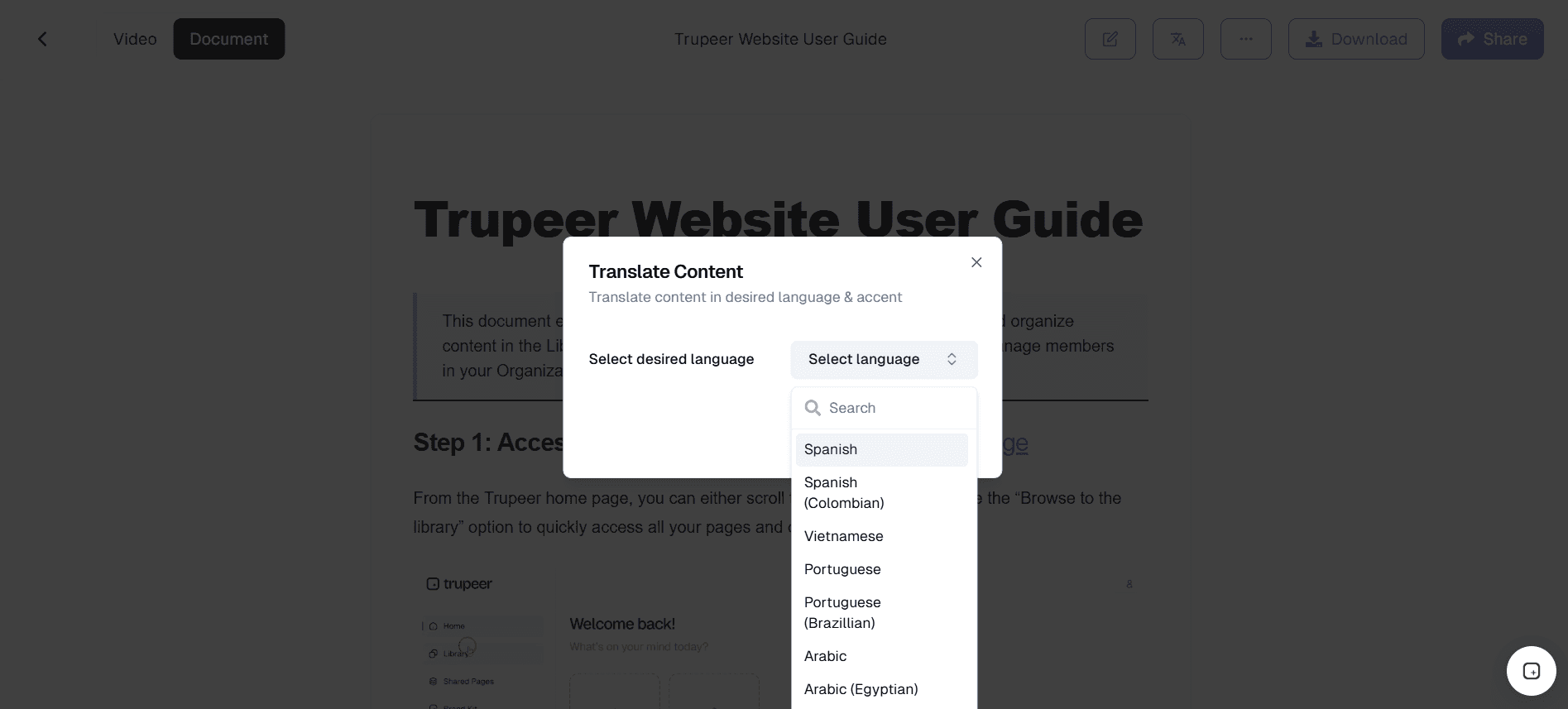
الخطوة 2: ترجمة باستخدام Trupeer AI + المراجعة
بنقرة واحدة، ترجم الفيديو ودليل الكتابة إلى لغات متعددة باستخدام ترجمة Trupeer بالذكاء الاصطناعي، ثم راجع واعتمد مع متعاونين يتحدثون اللغة الأصلية.
الخطوة 3: النشر & المزامنة التلقائية عبر اللغات
انشر أدلة الفيديو متعددة اللغات والتوثيق عبر روابط Trupeer الدائمة، مع إعادة الترجمة والمزامنة تلقائيًا كلما تم تحديث التسجيل الأصلي.

أهم ميزات أداة التوثيق متعددة اللغات
محرك الترجمة العصبية للآلة: استفد من نماذج الترجمة العصبية المتقدمة المصممة بدقة لتناسب التوثيق التقني. يفهم المحرك السياق ويحافظ على التنسيق ويتعامل مع المصطلحات الخاصة بالمجال عبر مسارد قابلة للتكوين. بخلاف خدمات الترجمة العامة، يحافظ على الدقة التقنية والوضوح الإرشادي الذي يتطلبه التوثيق، ليُنتج ترجمات تبدو طبيعية في كل لغة مستهدفة.
نظام ذاكرة الترجمة: أنشئ واحتفظ بذاكرة ترجمة شاملة تخزّن الترجمات المعتمدة سابقًا على مستوى المقاطع. عندما يظهر محتوى مشابه في توثيق جديد، يقترح النظام تلقائيًا ترجمات مطابقة، ما يضمن توحيد المصطلحات عبر مكتبة التوثيق بالكامل ويقلل تكاليف الترجمة حتى 40% مع مرور الوقت.
مزامنة التغييرات تلقائيًا: حافظ على جميع إصدارات اللغات متزامنة عبر اكتشاف تغييرات ذكي يراقب تعديلات محتوى المصدر. عند تحديث فقرة أو خطوة أو قسم، يعلّم النظام تلقائيًا الترجمات المقابلة على أنها غير محدثة، ويبدأ إعادة الترجمة للمقاطع المتأثرة، ويُخطر المراجعين المعينين، ما يلغي التتبع اليدوي الذي يجعل التوثيق متعدد اللغات غير مستدام.
دعم لغات RTL والكتابات المعقدة: اعرض التوثيق أصليًا بلغات من اليمين إلى اليسار بما في ذلك العربية والعبرية والأردية مع التعامل الصحيح مع النص ثنائي الاتجاه، وتخطيطات معكوسة، وتنسيق مناسب ثقافيًا. يضمن الدعم للكتابات المعقدة مثل الديفاناغارية والصينية واليابانية والكورية عرض التوثيق بشكل صحيح لكل جمهور عالمي.
لماذا تختار أداة التوثيق متعددة اللغات؟
مصممة خصيصًا للتوثيق: بخلاف أدوات الترجمة العامة، فهي مصممة تحديدًا للتوثيق التقني مع الحفاظ على التنسيق وإدارة المصطلحات
ذكاء اصطناعي + جودة بشرية: يجمع بين سرعة الترجمة العصبية وسير عمل المراجعة البشرية لتحقيق دقة جاهزة للنشر
مزامنة تلقائية: تتغير محتويات المصدر تلقائيًا لتنتقل إلى جميع الترجمات، ما يلغي اختلاف الإصدارات بين اللغات
أكثر من 50 لغة: يدعم أكثر من 50 لغة بما في ذلك RTL والكتابات المعقدة لضمان وصول عالمي حقيقي
أداة التوثيق متعددة اللغات للفرق الداخلية
ترجم السياسات والإجراءات الداخلية عبر المكاتب العالمية دون الحاجة إلى الحفاظ على نسخ وثائق يدوية منفصلة. يضمن خط عمل التوثيق متعدد اللغات أن التحديثات في لغة المصدر تنعكس تلقائيًا عبر النسخ المترجمة، ما يحافظ على توافق كل منطقة مع المعايير الحالية.
أنشئ مواد تدريب متعددة اللغات للموظفين الموزعين عالميًا من مصدر توثيق واحد. عند تغيير سير العمل أو السياسات، تنتقل التحديثات عبر جميع اللغات المدعومة دون الحاجة إلى تكرار دورات الترجمة اليدوية.
حافظ على توثيق الموارد البشرية بلغات متعددة للامتثال للوائح العمل المحلية ومتطلبات التوظيف. تضمن الترجمات المدارة بالإصدارات أن تحديثات السياسات تبقى متسقة وقابلة للتدقيق ومزامنة عبر الجهات القضائية.
أنشئ قواعد معرفة خاصة بكل لغة لدعم الفرق الإقليمية وفرق العمليات. يصل كل فريق إلى التوثيق بلغته المفضلة مع الرجوع إلى نفس مصدر الحقيقة المركزي، ما يلغي التشتت بين المكاتب الإقليمية.
أداة التوثيق متعددة اللغات لفرق SaaS
قم بتوطين توثيق المنتج للتوسع في أسواق دولية جديدة دون تكرار جهود إنشاء المحتوى. سجّل التوثيق مرة واحدة ثم أنشئ تلقائيًا نسخًا مترجمة لكل سوق مستهدف.
أنشئ مراكز مساعدة متعددة اللغات تخدم المستخدمين بلغتهم المفضلة مع الحفاظ على التحكم المركزي بالمحتوى. تُعيد تحديثات سير عمل المنتج توليد المحتوى عبر جميع اللغات في الوقت نفسه، ما يحافظ على اتساق التوثيق العالمي.
ترجم توثيق API وأدلة المطورين لمجتمعات المطورين العالمية. يُسرّع التوثيق التقني متعدد اللغات التكامل والاعتماد في الأسواق غير الناطقة بالإنجليزية دون الحاجة إلى الحفاظ على مسارات توثيق موازية.
حافظ على ملاحظات الإصدار متعددة اللغات لإبقاء المستخدمين الدوليين على اطلاع في الوقت نفسه. عند إطلاق ميزات جديدة، تُنشر التحديثات عبر جميع اللغات المدعومة مرة واحدة، ما يضمن عدم وصول أي منطقة إلى معلومات غير محدثة.
أداة التوثيق متعددة اللغات للشركات الناشئة
قم بتوطين التوثيق بسرعة لاختبار مدى ملاءمة المنتج للسوق في مناطق جديدة دون الاستثمار بكثافة في وكالات الترجمة. يتيح التوثيق متعدد اللغات الآلي تجربة دولية سريعة.
أنشئ صفحات هبوط وأدلة منتجات متعددة اللغات من أصول التوثيق الحالية. يمكن للشركات الناشئة توسيع نطاق وصولها دون بناء عمليات محتوى منفصلة بالكامل لكل سوق.
ادعم المستخدمين الأوائل الدوليين بتوثيق بلغات مستهدفة رئيسية. يؤدي توفير التهيئة المحلية والأدلة إلى بناء الثقة وتسريع تفعيل المستخدمين في الأسواق الناشئة.
أنشئ مسارات ترجمة قابلة للتوسع قبل التوسع الدولي السريع. من خلال أتمتة التوثيق متعدد اللغات مبكرًا، تتجنب الشركات الناشئة تراكم الترجمة الذي غالبًا ما يبطئ النمو العالمي.
أداة التوثيق متعددة اللغات للمؤسسات
أدر ترجمة التوثيق عبر عشرات اللغات باستخدام الحوكمة والتحكم بالإصدارات من مركز واحد. تحافظ فرق المؤسسة على الإشراف بينما تصل المكاتب الإقليمية إلى محتوى محلي ومحدث.
طبّق معايير جودة الترجمة عبر سير عمل مراجعة واعتماد منظم. يضمن التحقق متعدد المراحل الدقة وتوحيد المصطلحات والامتثال قبل النشر.
حافظ على توثيق الامتثال باللغات المطلوبة لكل جهة تشغيل. تضمن المزامنة الآلية بقاء المستندات التنظيمية متسقة عبر المناطق مع الحفاظ على سجلات التدقيق.
ركّز إدارة المصطلحات عبر فرق التوثيق العالمية. تضمن المسارد الموحدة اتساق نبرة العلامة التجارية والمصطلحات التقنية والرسائل عبر كل أصل مترجم.
أداة التوثيق متعددة اللغات للفرق عن بُعد
قدّم لأعضاء الفريق الموزعين توثيقًا بلغتهم الأقوى، ما يحسن الفهم ويقلل سوء التواصل في التعاون عبر الحدود.
تمكّن أعضاء الفريق غير الناطقين بالإنجليزية من المساهمة في التوثيق بلغتهم الأصلية. يقوم النظام بترجمة المساهمات وتوحيدها تلقائيًا، مع الحفاظ على الشمولية دون التضحية بالاتساق.
أنشئ ملاحظات اجتماعات وتوثيق مشاريع متعدد اللغات ينسجم مع الفرق العالمية. تنتقل التحديثات عبر اللغات، ما يضمن أن كل عضو في الفريق يرجع إلى نفس المعلومات الحالية.
ابنِ قواعد معرفة شاملة تُزيل حواجز المعلومات المرتبطة باللغة. يعزز التوثيق متعدد اللغات التعاون ويمنع عزلة المعرفة داخل الفرق الموزعة عالميًا.
أداة التوثيق متعددة اللغات للمطورين
ترجم التوثيق التقني وشرح الكود والتعليقات المضمنة لفرق التطوير الدولية. يقلل التوثيق الواضح والمُوطّن من وقت الإعداد ويُقلل أخطاء التنفيذ.
أنشئ توثيق SDK متعدد اللغات يسرّع الاعتماد في الأسواق غير الناطقة بالإنجليزية. يندمج المطورون بشكل أسرع عندما تظهر التعليمات والأمثلة بلغتهم المفضلة.
أنشئ بوابات مطورين محلية مع دروس خاصة بكل لغة وجولات إرشادية وأمثلة كود. تُعاد توليد التحديثات على APIs أو سير العمل عبر كل نسخة لغوية في الوقت نفسه.
حافظ على مسارد تقنية متعددة اللغات تُوحّد مصطلحات البرمجة عبر اللغات. يمنع توحيد المصطلحات الغموض ويحافظ على الدقة التقنية عبر التوثيق المترجم.
أداة التوثيق متعددة اللغات لفرق الإعداد & الدعم
أنشئ تسلسلات إعداد متعددة اللغات تُرحّب بالمستخدمين بلغتهم الأصلية منذ اليوم الأول. يزيد الإعداد الموطّن من معدلات التفعيل ويقلل الاحتكاك في المراحل المبكرة.
ابنِ بوابات دعم خاصة بكل لغة لتقليل وقت حل المشكلات للمستخدمين الدوليين. يجد العملاء الإجابات بسرعة أكبر عندما يتطابق التوثيق مع تفضيلهم للغة.
ترجم أدلة استكشاف الأخطاء وإصلاحها لتقليل تذاكر الدعم من العملاء غير الناطقين بالإنجليزية. يقلل محتوى الخدمة الذاتية الواضح والمُوطّن من حجم التذاكر عبر المناطق العالمية.
طوّر ردود روبوت محادثة متعددة اللغات مدعومة بمقالات قاعدة معرفة مترجمة. تضمن المزامنة الآلية بقاء إجابات الروبوت متوافقة مع أحدث تحديثات التوثيق عبر جميع اللغات.
ميزات المنصة
ترجمة الذكاء الاصطناعي
الترجمة الآلية العصبية مضبوطة بدقة لتحقيق دقة في الوثائق التقنية.
ذاكرة الترجمة
أعد استخدام الترجمات المعتمدة لضمان اتساق المصطلحات عبر جميع المحتويات.
المزامنة التلقائية
تقوم تحديثات المصدر تلقائيًا بوضع علامة على المحتوى المتأثر وإعادة ترجمته عبر اللغات.
كيف يعمل
الخطوة 1
توثيق المؤلف بلغتك الأساسية
الخطوة 2
ترجمة إلى اللغات المستهدفة باستخدام الذكاء الاصطناعي
الخطوة 3
نشر المستندات متعددة اللغات
الأسئلة الشائعة
كم عدد اللغات المدعومة؟
تدعم المنصة أكثر من 50 لغة، بما في ذلك اللغات الأوروبية والآسيوية والشرق أوسطية والأفريقية الرئيسية، مع دعم للكتابة من اليمين إلى اليسار والأنظمة الكتابية المعقدة.
هل الترجمة بالذكاء الاصطناعي دقيقة للمحتوى التقني؟
تمت مواءمة محرك الترجمة العصبي للمستندات التقنية، ويستخدم مسارد قابلة للتخصيص لضمان ترجمة المصطلحات الخاصة بالمجال بدقة وبشكل متسق.
كيف يتم إبقاء الترجمات متزامنة مع تغييرات المصدر؟
عندما يتم تعديل المحتوى المصدر، يكتشف النظام الأساسي تلقائيًا الترجمات المتأثرة، ويبدأ إعادة الترجمة للأجزاء التي تم تغييرها، ويخطر المراجعين للموافقة.
هل يمكننا استخدام مترجمينا الخاصين؟
نعم، تدعم المنصة سير العمل التعاوني حيث يمكنك تعيين مترجمين ومراجعين ومعتمدين داخليين أو خارجيين لكل لغة مستهدفة.
هل يدعم اللغات التي تُكتب من اليمين إلى اليسار؟
نعم، يتضمن ذلك دعمًا كاملاً للكتابة من اليمين إلى اليسار (RTL) للغة العربية والعبرية والأردية وغيرها من لغات RTL، مع معالجة صحيحة للنص ثنائي الاتجاه وتخطيطات معكوسة.


