4.8/5
برنامج فيديو لتدريب الموظفين
أنشئ مقاطع فيديو تدريبية جذابة للموظفين تسرّع عملية تأهيل الموظفين الجدد وتطوّر مهارات القوى العاملة لديك، وكل ذلك من دون الحاجة إلى فريق إنتاج.
جرّب مجانًا

يتيح لك برنامج Trupeer لإنشاء فيديوهات تدريب الموظفين إنشاء فيديوهات تدريب احترافية من تسجيلات شاشة بسيطة مع أتمتة مدعومة بالذكاء الاصطناعي. لا حاجة لمهارات التحرير، ولا لبرامج باهظة، ولا لتأخيرات الإنتاج.
أنشئ فيديوهات تدريب مخصصة للأدوار للموظفين في كل قسم
يتولى الذكاء الاصطناعي التحرير والفصول والتعليقات التوضيحية واللمسات الاحترافية تلقائيًا
تتبّع إكمال تدريب الموظفين ومستوى التفاعل باستخدام التحليلات المدمجة
يتكامل مع منصات LMS وHRIS لإدارة تدريب سلسة
وسّع برنامجك التدريبي دون توسيع فريق L&D لديك
ما هو برنامج فيديوهات تدريب الموظفين؟
برنامج فيديوهات تدريب الموظفين هو برنامج فيديوهات تدريب للموظفين يتيح للفرق إنتاج محتوى تدريبي احترافي مباشرة من تسجيلات الشاشة. بدلًا من قضاء ساعات في برامج تحرير الفيديو التقليدية، ما عليك سوى تسجيل شاشتك، ويتولى الذكاء الاصطناعي جميع أعمال ما بعد الإنتاج — إضافة تأثيرات التكبير، والتعليقات التوضيحية، والانتقالات، والترجمات التوضيحية، وهوية العلامة التجارية تلقائيًا. والنتيجة فيديو تدريبي مصقول وجاهز للمشاركة خلال دقائق.
كيف يعمل برنامج فيديوهات تدريب الموظفين؟
تم تصميم العملية لتكون بسيطة قدر الإمكان بحيث يمكن لأي شخص في فريقك إنشاء فيديوهات تدريب احترافية.
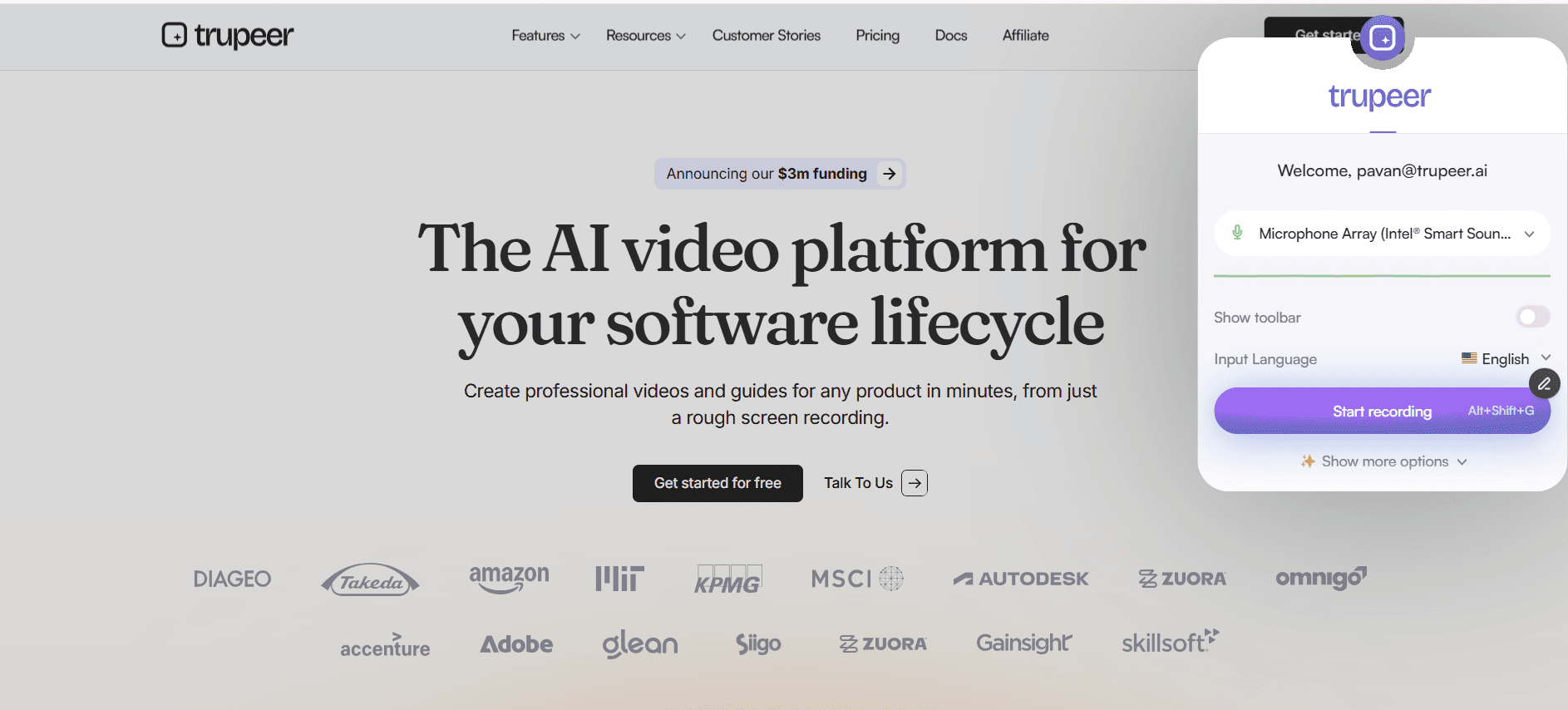
الخطوة 1: سجّل شاشتك
ثبّت إضافة Trupeer لمتصفح Chrome وانقر على تسجيل. التقط أي سير عمل، أو عرضًا توضيحيًا لعملية، أو جولة داخل برنامج مباشرة من متصفحك. أضف تعليقًا صوتيًا أثناء التسجيل أو لاحقًا.
الخطوة 2: يعزز الذكاء الاصطناعي تسجيلك
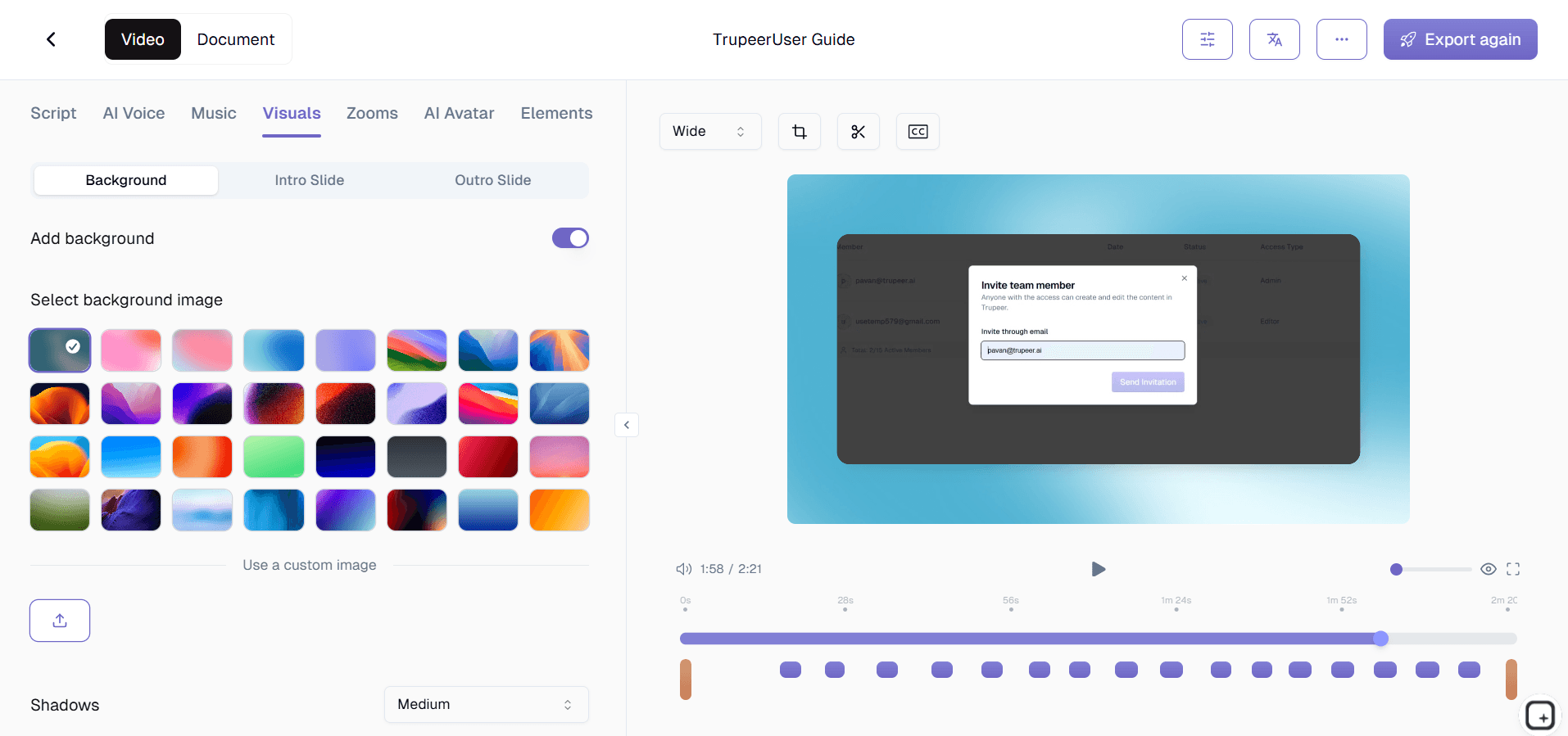
بمجرد أن تتوقف عن التسجيل، يعالج محرك الذكاء الاصطناعي فيديوك تلقائيًا. يطبّق تأثيرات تكبير ذكية، ويضيف تعليقات توضيحية ونداءات، وينشئ فصولًا، ويُنشئ ترجمات، ويزيل الفترات الصامتة، ويطبّق تنسيق علامتك التجارية، وكل ذلك دون أي إدخال يدوي.
الخطوة 3: انشر وشارك
راجع النتيجة المصقولة بالذكاء الاصطناعي، وأجرِ أي تعديلات اختيارية، وشارك عبر رابط أو رمز تضمين أو تصدير. يمكنك أيضًا استخدام منشئ دليل الإجراءات لإنشاء توثيق مكتوب من التسجيل نفسه.

أهم ميزات برنامج فيديوهات تدريب الموظفين
مسارات تدريب قائمة على الدور: أنشئ مسارات تعلم مخصصة لأدوار محددة. سواء كنت تُهيّئ مندوب مبيعات جديدًا، أو تدرب موظف دعم، أو تطوّر مهارات مدير منتج، يمكنك ترتيب الفيديوهات ضمن مناهج منظمة. يحتوي كل دور على فيديوهات مطلوبة وأخرى اختيارية مع تتبع التقدم على مستوى الفرد والفريق، مما يضمن أن يتلقى الموظفون التدريب المناسب فقط.
تسلسلات تهيئة مدعومة بالذكاء الاصطناعي: أتمتة تجربة فيديوهات التهيئة للموظفين الجدد. يتم تعيين فيديوهات التدريب للموظفين الجدد تلقائيًا بناءً على القسم والدور. يتتبع الذكاء الاصطناعي التقدم ويرسل التذكيرات. يرى المديرون لوحات معلومات فورية توضح الموظفين الجدد الذين يسيرون وفق الخطة، مما يقلل جهد التنسيق ويضمن عدم فوات أي تدريب مهم.
اختبارات تفاعلية وفحوصات معرفة: أدرج أسئلة اختبار في نقاط رئيسية داخل فيديوهات التدريب لتقييم الفهم. دعم لتنسيقات الاختيار من متعدد، والصح والخطأ، والإجابات القصيرة. يتم تتبع النتائج لكل موظف وتجميعها على مستوى الفريق بحيث يمكن لمديري التدريب تحديد فجوات المعرفة وتعديل المحتوى وفقًا لذلك.
لوحة تحليلات التفاعل: تتبع معدلات الإكمال، ومتوسط وقت المشاهدة، ونقاط الانسحاب، وأنماط إعادة المشاهدة لكل فيديو تدريبي. صفِّ التحليلات حسب القسم أو الدور أو الموقع أو الموظف الفردي. تساعدك هذه الرؤى على تحسين برنامجك التدريبي وإثبات العائد على الاستثمار للقيادة ببيانات دقيقة.
لماذا تختار Trupeer لبرنامج فيديوهات تدريب الموظفين؟
السرعة: انتقل من التسجيل إلى فيديو تدريبي مصقول خلال دقائق، لا أيام. تلغي أتمتة الذكاء الاصطناعي عنق الزجاجة في الإنتاج الذي يؤخر تسليم محتوى التدريب.
إمكانية الوصول: يمكن لأي شخص في فريقك إنشاء فيديوهات تدريب احترافية بغض النظر عن مهاراته التقنية. لا حاجة لأي خبرة في تحرير الفيديو.
الاتساق: تضمن الأتمتة المدعومة بالذكاء الاصطناعي أن يطابق كل فيديو تدريبي المعايير نفسها من حيث الجودة وهوية العلامة التجارية، بغض النظر عمّن أنشأه في فريقك.
الكفاءة من حيث التكلفة: ألغِ الحاجة إلى محرري فيديو وفرق إنتاج ورخص برمجية باهظة. أداة واحدة تتولى التسجيل والتحرير والتوزيع.
برنامج فيديوهات تدريب الموظفين للفرق الداخلية
1. تستخدم الفرق الداخلية برنامج فيديوهات تدريب الموظفين لتوحيد طريقة شرح العمليات عبر المؤسسة. عندما تتبع كل الفرق محتوى التدريب نفسه، تتحسن الاتساقية وتقل الأخطاء.
2. يمكن لقادة الأقسام إنشاء فيديوهات تدريب خاصة بسير عمل وأدوات فريقهم، ثم تتبع الموظفين الذين أكملوا التدريب المطلوب عبر التحليلات المدمجة.
3. تصبح مبادرات التدريب المتبادل سهلة الإدارة عندما يمكن مشاركة محتوى الفيديو عبر الأقسام. يمكن للموظفين الذين يستكشفون أدوارًا أو مسؤوليات جديدة التعلم ذاتيًا من خلال مكتبة التدريب.
4. تُنقل تحديثات العمليات الدورية بفعالية عبر تحديثات فيديو قصيرة يمكن للموظفين مشاهدتها في الوقت الذي يناسبهم بدلًا من حضور اجتماع آخر.
برنامج فيديوهات تدريب الموظفين لفرق SaaS
1. تستخدم شركات SaaS فيديوهات تدريب الموظفين لمواكبة التطور السريع للمنتج. عندما تُطرح الميزات أسبوعيًا، يجب أن يتحدث محتوى التدريب بنفس الوتيرة.
2. تنشئ فرق الهندسة تدريبًا تقنيًا حول قرارات البنية المعمارية ومعايير البرمجة وتصميم الأنظمة، بحيث يمكن للموظفين الجدد استيعابه أثناء التهيئة بشكل مستقل.
3. تتدرب الفرق المواجهة للعملاء على تحديثات المنتج عبر الفيديو قبل إطلاقها، مما يضمن قدرتها على دعم العملاء من اليوم الأول لأي إطلاق ميزة جديدة.
4. تنتج فرق تمكين المبيعات فيديوهات تدريب على العروض التوضيحية والتعامل مع الاعتراضات يمكن لمؤسسة المبيعات بأكملها الوصول إليها والتدرب عليها بشكل غير متزامن.
برنامج فيديوهات تدريب الموظفين للشركات الناشئة
1. الشركات الناشئة التي تستثمر مبكرًا في فيديوهات تدريب الموظفين تبني نظام تهيئة قابلًا للتوسع ينمو مع الشركة دون زيادة متناسبة في عدد موظفي L&D.
2. تصبح معرفة المؤسس الملتقطة في فيديوهات التدريب أصلًا دائمًا يصمد أمام التغييرات التنظيمية ويضمن عدم فقدان المعرفة المؤسسية أبدًا.
3. تستخدم الشركات الناشئة سريعة الحركة فيديوهات التدريب لإعداد الموظفين الجدد بسرعة على المنتجات والعمليات واحتياجات العملاء المتغيرة باستمرار.
4. تكون الكفاءة من حيث التكلفة في إنشاء فيديوهات التدريب المدعومة بالذكاء الاصطناعي مؤثرة بشكل خاص للشركات الناشئة التي يحتاج فيها كل ريال من ميزانية L&D إلى تعظيم جاهزية الموظفين.
برنامج فيديوهات تدريب الموظفين للمؤسسات الكبرى
1. تستخدم المؤسسات الكبرى برنامج فيديوهات تدريب الموظفين لتقديم تدريب متسق لعشرات الآلاف من الموظفين عبر مواقع ومناطق زمنية متعددة.
2. يتم تتبع التدريب الإلزامي على الامتثال على مستوى الفرد مع سجلات تدقيق تفي بالمتطلبات التنظيمية وتقلل المخاطر المؤسسية.
3. تتكامل المنصة مع أنظمة HRIS وLMS المؤسسية بحيث تنتقل سجلات التدريب تلقائيًا إلى ملفات الموظفين وأنظمة إدارة الأداء.
4. تستفيد المؤسسات العالمية من الترجمات متعددة اللغات والتوطين لتقديم البرنامج التدريبي نفسه للموظفين في جميع أنحاء العالم بلغتهم المفضلة.
برنامج فيديوهات تدريب الموظفين للفرق البعيدة
1. تعتمد الشركات التي تعمل عن بُعد أولًا على فيديوهات تدريب الموظفين بوصفها آلية رئيسية لنقل المعرفة، لتحل محل التعلم غير الرسمي الذي يحدث في المكاتب الفعلية.
2. يراعي التدريب بالفيديو غير المتزامن الفروق الزمنية وجداول الموظفين الموزعين، مما يتيح للجميع التعلم في الوقت الأنسب لهم دون عبء تنسيقي.
3. يستخدم المديرون عن بُعد تحليلات فيديو التدريب لتحديد أعضاء الفريق الذين قد يحتاجون إلى دعم إضافي أو الذين يتأخرون في إكمال التدريب المطلوب.
4. توفر برامج التهيئة الافتراضية المبنية على فيديوهات التدريب للموظفين الجدد عن بُعد تجربة متسقة وشاملة تنافس برامج التهيئة الحضورية.
برنامج فيديوهات تدريب الموظفين للمطورين
1. تستخدم فرق التطوير فيديوهات التدريب لتوثيق بنية النظام وأنماط التصميم واتفاقيات قاعدة الشفرة التي يصعب نقلها عبر التوثيق المكتوب وحده.
2. تساعد فيديوهات تدريب مراجعة الشفرة في ترسيخ معايير البرمجة المشتركة ومشاركة أفضل الممارسات عبر فرق الهندسة ذات مستويات الخبرة المختلفة.
3. تتسارع تهيئة المطورين الجدد عندما تمرّ فيديوهات التدريب بصريًا عبر إعداد البيئة وبنية المستودع وإجراءات النشر وأساليب التصحيح.
4. ينشئ قادة الهندسة فيديوهات تدريب حول موضوعات تقنية معقدة يمكن إعادة مشاهدتها والرجوع إليها، على عكس العروض المباشرة التي تُستهلك مرة واحدة ثم تُنسى.
برنامج فيديوهات تدريب الموظفين لفرق التهيئة والدعم
1. تبني فرق التهيئة مناهج فيديو منظمة تنقل الموظفين الجدد من أساسيات اليوم الأول إلى إتقان الدور عبر مسارات تعلم متسلسلة مع تتبع التقدم.
2. تدرب فرق الدعم الوكلاء على تحديثات المنتج والحلول الشائعة للمشكلات وأفضل ممارسات التواصل مع العملاء عبر وحدات فيديو يتم تحديثها باستمرار.
3. يضمن الجمع بين فيديوهات التدريب والاختبارات المدمجة أن يثبت وكلاء الدعم الجدد كفاءتهم قبل التعامل مع تفاعلات العملاء المباشرة.
4. يراقب مديرو التهيئة تقدم المجموعات عبر لوحات معلومات إكمال التدريب، ويحددون الاختناقات ويعالجونها قبل أن تؤثر في الجداول الزمنية لإنتاجية الموظفين الجدد.
الميزات الرئيسية
الفصول الذكية
يقوم الذكاء الاصطناعي بإنشاء الفصول والأقسام تلقائيًا حتى يتمكن الموظفون من التنقل في محتوى التدريب بسهولة.
جاهز لنظام إدارة التعلم
صدّر مقاطع الفيديو التدريبية بتنسيقات متوافقة مع جميع أنظمة إدارة التعلم الرئيسية.
تحليلات الفريق
تتبّع الموظفين الذين شاهدوا مقاطع الفيديو التدريبية وقياس مستوى التفاعل عبر مؤسستك.
أنشئ مقاطع فيديو لتدريب الموظفين في 3 خطوات
الخطوة 1
سجّل جولةً إرشاديةً على الشاشة
الخطوة 2
يقوم الذكاء الاصطناعي تلقائيًا بتنظيم تسجيلك
الخطوة 3
قم بتوزيعها على الموظفين عبر رابط أو فيديو.
الأسئلة الشائعة
هل يمكنني إنشاء مقاطع فيديو تدريبية خاصة بكل دور لمختلف الأقسام؟
نعم. يمكنك إنشاء وتنظيم مقاطع فيديو تدريبية حسب القسم أو الدور أو مستوى المهارة وتوزيعها على مجموعات الموظفين المناسبة.
هل يتكامل هذا مع نظام إدارة التعلم (LMS) الحالي لدينا؟
نعم. يصدّر Trupeer بتنسيقات متوافقة مع SCORM ويوفّر أكواد تضمين تعمل مع منصات LMS الشائعة مثل Workday وSAP SuccessFactors وغيرها.
هل يمكن لعدة مدربين المساهمة في مكتبة الفيديو؟
بالتأكيد. يمكن لفريقك بأكمله تسجيل ونشر مقاطع فيديو تدريبية. تدعم المنصة التعاون بين عدة مستخدمين مع أذونات قائمة على الأدوار.
كيف أُبقي مقاطع فيديو التدريب محدثة؟
يمكنك إعادة تسجيل أقسام محددة واستبدالها دون الحاجة إلى إعادة بناء الفيديو بالكامل. تساعدك أداة الذكاء الاصطناعي على تنظيم الإصدارات وإدارة مكتبة محتوى التدريب الخاصة بك.
هل توجد طريقة لتقييم فهم الموظفين؟
يمكنك إقران مقاطع الفيديو التدريبية بالاختبارات أو ربطها بأدوات التقييم. كما يتتبع النظام معدلات الإكمال ونسب المشاهدة حتى النهاية.


