4.8/5
برنامج إنشاء فيديوهات تدريب بالذكاء الاصطناعي
دع الذكاء الاصطناعي يحوّل تسجيلات الشاشة إلى مقاطع فيديو تدريبية احترافية ومصقولة تلقائيًا وفي دقائق.
جرّب مجانًا

برنامج إنشاء فيديوهات التدريب بالذكاء الاصطناعي من Trupeer يتيح لك إنشاء فيديوهات تدريب احترافية من تسجيلات الشاشة البسيطة مع أتمتة مدعومة بالذكاء الاصطناعي. لا تحتاج إلى مهارات تحرير، ولا إلى برامج باهظة، ولا إلى تأخيرات إنتاج.
يقوم الذكاء الاصطناعي تلقائيًا بتحرير تسجيلات الشاشة وتحسينها وصقلها إلى فيديوهات تدريب
يكتشف المشاهد بذكاء ليقصّ الفترات الصامتة ويطبّق انتقالات سلسة
تعليقات توضيحية ونصوص ومرافقة صوتية مولدة بالذكاء الاصطناعي بأكثر من 30 لغة
تتبع تأثيرات التكبير السياقية المؤشر وتبرز مناطق الشاشة ذات الصلة
تتيح المعالجة الدفعية إنتاج عشرات فيديوهات التدريب المصقولة في الوقت نفسه
ما هو برنامج إنشاء فيديوهات التدريب بالذكاء الاصطناعي؟
برنامج إنشاء فيديوهات التدريب بالذكاء الاصطناعي هو برنامج يتيح للفرق إنتاج محتوى تدريبي احترافي مباشرةً من تسجيلات الشاشة. بدلاً من قضاء ساعات في برامج تحرير الفيديو التقليدية، ما عليك سوى تسجيل شاشتك ويتولى الذكاء الاصطناعي جميع أعمال ما بعد الإنتاج — بإضافة تأثيرات التكبير، والتعليقات التوضيحية، والانتقالات، والترجمات، والعلامة التجارية تلقائيًا. والنتيجة فيديو تدريبي مصقول وجاهز للمشاركة في دقائق.
كيف يعمل برنامج إنشاء فيديوهات التدريب بالذكاء الاصطناعي؟
تم تصميم العملية لتكون بسيطة قدر الإمكان بحيث يمكن لأي شخص في فريقك إنشاء فيديوهات تدريب احترافية.
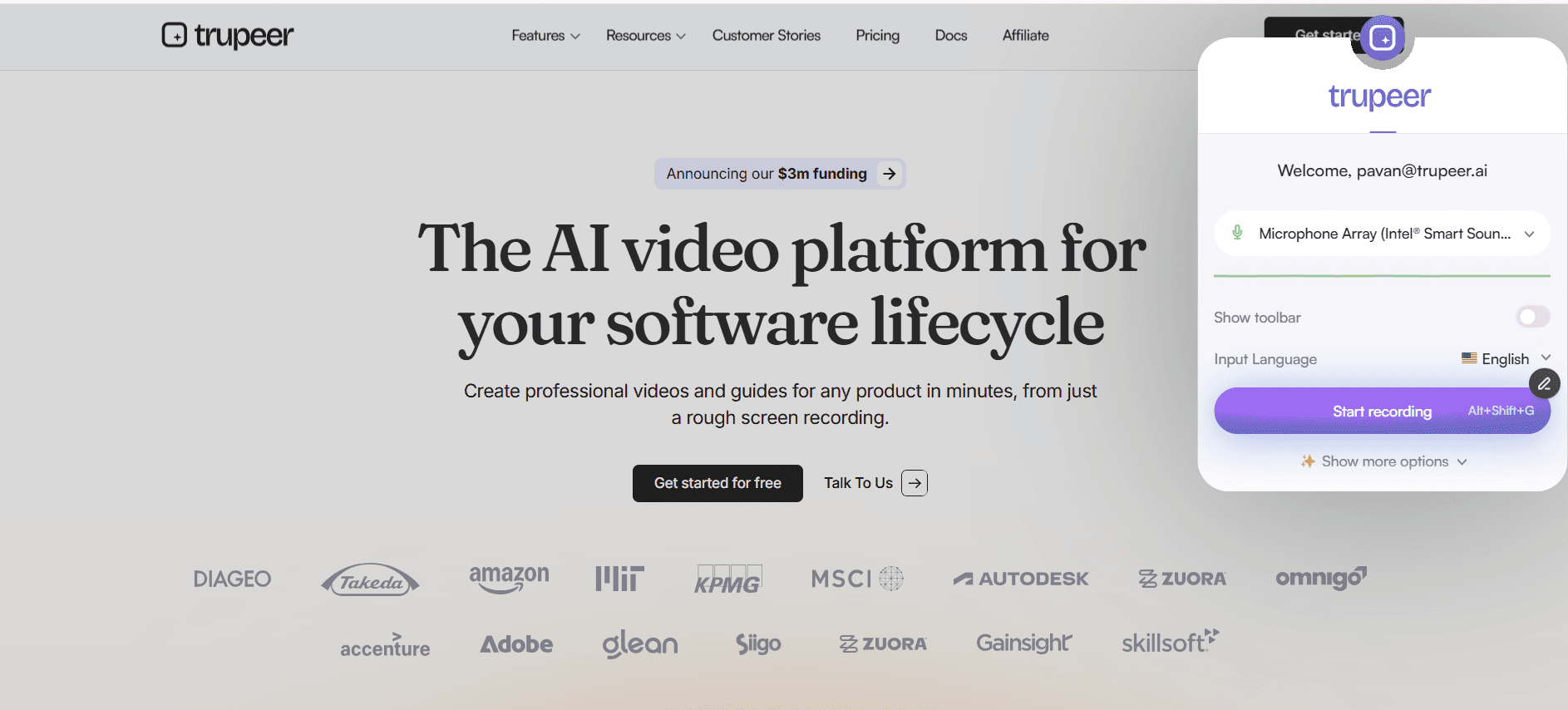
الخطوة 1: سجّل شاشتك
ثبّت إضافة Trupeer لمتصفح Chrome وانقر على تسجيل. التقط أي سير عمل أو عرض توضيحي لعملية أو شرح برمجي مباشرةً من متصفحك. اشرح أثناء العمل أو أضف تعليقًا صوتيًا لاحقًا.
الخطوة 2: يعزّز الذكاء الاصطناعي تسجيلك
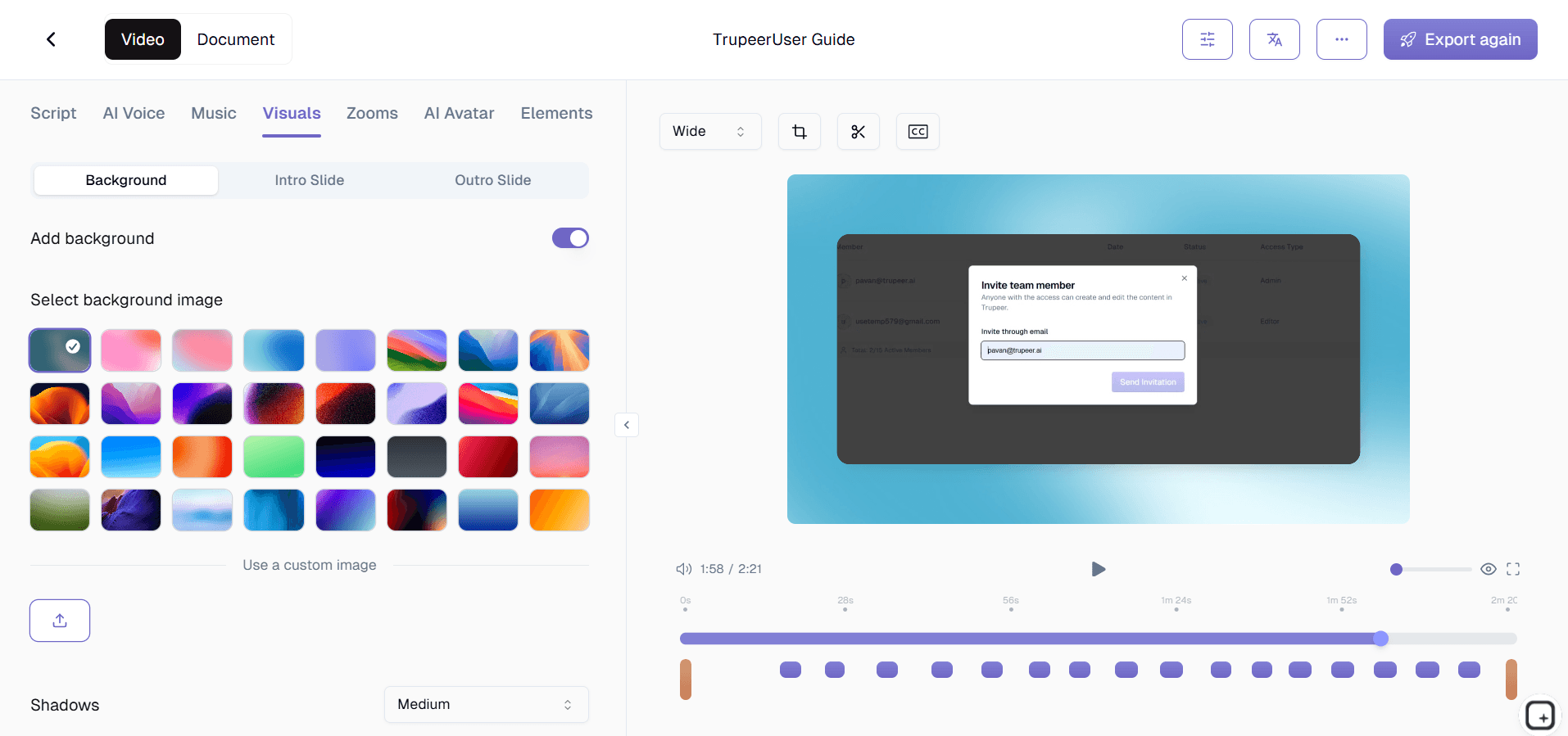
بعد إيقاف التسجيل، يعالج محرك الذكاء الاصطناعي الفيديو تلقائيًا. يطبّق تأثيرات تكبير ذكية، ويضيف تعليقات توضيحية ونداءات، ويولّد فصولًا، وينشئ تسميات توضيحية، ويزيل الفترات الصامتة، ويطبّق تنسيق علامتك التجارية — وكل ذلك من دون أي إدخال يدوي.
الخطوة 3: انشر وشارك
راجع النتيجة المصقولة بالذكاء الاصطناعي، وأجرِ أي تعديلات اختيارية، وشارك عبر رابط أو كود تضمين أو تصدير. يمكنك أيضًا استخدام منشئ دليل الإجراءات لإنشاء وثائق مكتوبة من التسجيل نفسه.

الميزات الرئيسية لبرنامج إنشاء فيديوهات التدريب بالذكاء الاصطناعي
إنشاء النصوص والتسميات التوضيحية تلقائيًا: يحصل كل فيديو على نصوص زمنية على مستوى الكلمات تدعم البحث النصي الكامل عبر مكتبتك. تُنشأ التسميات التوضيحية بلغتك الأساسية وتُترجم تلقائيًا إلى أكثر من 30 لغة. يتعامل الذكاء الاصطناعي مع المصطلحات التقنية والمصطلحات المتخصصة في المجال بدقة عالية، مع خيارات للمراجعة قبل النشر.
وضع التعليقات التوضيحية والتنبيهات الذكي: يراقب الذكاء الاصطناعي حركات المؤشر وتفاعلات الشاشة لوضع التعليقات التوضيحية والتنبيهات والإبرازات في المواضع المثلى. تحصل العمليات متعددة الخطوات على مؤشرات مرقمة، وتحصل عناصر الواجهة على حدود إبراز، وتحصل عمليات تبديل التطبيقات على تسميات سياقية. تتوافق جميع التعليقات مع إرشادات علامتك التجارية.
نقل النمط بنقرة واحدة: حدّد أسلوب التحرير المفضل لديك، وشدة التكبير، وسرعة الانتقال، وتصميم التعليقات التوضيحية، والإيقاع — وطبّقه على كل فيديو مستقبلي. يتعلم الذكاء الاصطناعي تفضيلاتك مع الوقت. حدّث تفضيلات النمط وطبّق التغييرات بأثر رجعي على الفيديوهات الحالية للحصول على مظهر متسق عبر المكتبة بأكملها.
خط أنابيب المعالجة الدفعية: عالج عدة فيديوهات في الوقت نفسه عبر خط تحسين الذكاء الاصطناعي الكامل: اكتشاف المشاهد، والتحرير، والتكبير، والتعليقات التوضيحية، والتسميات التوضيحية، والعلامة التجارية — دون تدخل يدوي. استلم إشعارات عند اكتمال كل فيديو. يمكن لمنشئ واحد إنتاج عشرات فيديوهات التدريب المصقولة أسبوعيًا وعلى نطاق واسع.
لماذا تختار Trupeer لبرنامج إنشاء فيديوهات التدريب بالذكاء الاصطناعي؟
السرعة: انتقل من التسجيل إلى فيديو تدريبي مصقول في دقائق، لا أيام. تُزيل أتمتة الذكاء الاصطناعي عنق الزجاجة الإنتاجي الذي يؤخر تسليم محتوى التدريب.
إمكانية الوصول: يمكن لأي شخص في فريقك إنشاء فيديوهات تدريب احترافية بغض النظر عن مهاراته التقنية. لا حاجة إلى خبرة في تحرير الفيديو.
الاتساق: تضمن الأتمتة المدعومة بالذكاء الاصطناعي أن يلبّي كل فيديو تدريبي معايير الجودة والعلامة التجارية نفسها، بغض النظر عمّن أنشأه في فريقك.
الكفاءة من حيث التكلفة: ألغِ الحاجة إلى محرري فيديو، وفرق إنتاج، وتراخيص برامج باهظة. أداة واحدة تتولى التسجيل والتحرير والتوزيع.
برنامج إنشاء فيديوهات التدريب بالذكاء الاصطناعي للفرق الداخلية
1. تستفيد الفرق الداخلية من إنشاء الفيديو بالذكاء الاصطناعي لإنتاج محتوى تدريبي احترافي دون الاعتماد على موارد التصميم أو الإنتاج المرئي. يمكن لأي شخص يستطيع تسجيل شاشته إنشاء فيديو تدريبي مصقول.
2. يتولى الذكاء الاصطناعي جميع تحسينات ما بعد الإنتاج، ما يعني أن خبراء المجال يقضون وقتهم في عرض العمليات بدلًا من تعلم برامج تحرير الفيديو أو انتظار طوابير الإنتاج.
3. عندما تتغير العمليات، يمكن إنشاء فيديوهات تدريب محدثة ونشرها في اليوم نفسه لأن الذكاء الاصطناعي يزيل عنق الزجاجة الإنتاجي الذي يؤخر تحديثات المحتوى تقليديًا.
4. يضمن الذكاء الاصطناعي جودة متسقة عبر جميع فيديوهات التدريب، بغض النظر عن عضو الفريق الذي أنشأ التسجيل أو مستوى كفاءته التقنية في أدوات الفيديو.
برنامج إنشاء فيديوهات التدريب بالذكاء الاصطناعي لفرق SaaS
1. تستخدم فرق SaaS إنشاء الفيديو بالذكاء الاصطناعي للحفاظ على توافق محتوى التدريب مع دورات تطوير المنتجات السريعة. عندما تُطلق الميزات أسبوعيًا، يجب إنتاج فيديوهات التدريب بالسرعة نفسها.
2. تُنتج فيديوهات العروض التوضيحية للمنتج للعملاء المحتملين، وفيديوهات تدريب العملاء للإعداد، وفيديوهات التدريب الداخلية لفرق الدعم عبر خط الإنتاج نفسه المدعوم بالذكاء الاصطناعي.
3. تتيح قدرة المعالجة الدفعية للذكاء الاصطناعي لفرق SaaS إنتاج عشرات فيديوهات التدريب لإصدار منتج رئيسي في الوقت نفسه، مما يضمن تغطية شاملة عند الإطلاق.
4. تستخدم فرق تثقيف العملاء فيديوهات التدريب المُنشأة بالذكاء الاصطناعي لبناء مكتبات تعلم ذاتية الخدمة تتوسع من دون زيادة فريق إنتاج المحتوى بما يتناسب.
برنامج إنشاء فيديوهات التدريب بالذكاء الاصطناعي للشركات الناشئة
1. تستخدم الشركات الناشئة إنشاء فيديوهات التدريب بالذكاء الاصطناعي لإنتاج محتوى يبدو كما لو أنه صادر عن شركة أكبر بعشر مرات، ما يعكس احترافية دون ميزانية إنتاج مماثلة.
2. تعني سرعة الإنشاء المدعوم بالذكاء الاصطناعي أن الشركات الناشئة يمكنها توثيق العمليات المتطورة والتدريب عليها في الوقت الفعلي، مواكبةً التغييرات السريعة المميزة للشركات في مراحلها المبكرة.
3. تُلتقط معرفة المؤسسين والموظفين الأوائل في فيديوهات تدريب مصقولة بالذكاء الاصطناعي تصبح أصولًا مؤسسية دائمة، وتستمر رغم تغيّر الفرق وتحولات التوسع.
4. تعني الكفاءة من حيث التكلفة في إنشاء الفيديو بالذكاء الاصطناعي أنه حتى الشركات الناشئة قبل تحقيق الإيرادات يمكنها بناء مكتبات تدريب شاملة دون تحويل الميزانية من تطوير المنتج.
برنامج إنشاء فيديوهات التدريب بالذكاء الاصطناعي للمؤسسات
1. تستخدم المؤسسات إنشاء الفيديو بالذكاء الاصطناعي لتوسيع إنتاج محتوى التدريب عبر مئات الإدارات دون توسيع فرق التعلم والتطوير أو ميزانيات الإنتاج بالقدر نفسه.
2. يضمن الذكاء الاصطناعي جودة متسقة وعلامة تجارية موحدة عبر فيديوهات التدريب التي ينتجها آلاف المنشئين في المؤسسة، مع الحفاظ على معايير احترافية على نطاق واسع.
3. يمكن إنشاء فيديوهات تدريب الامتثال التي كانت تستغرق أسابيع لإنتاجها عبر الإنتاج المرئي التقليدي، ومراجعتها، ونشرها خلال أيام باستخدام أتمتة الذكاء الاصطناعي.
4. توفر تكاملات التحليلات المؤسسية رؤية حول سرعة إنشاء الفيديو بالذكاء الاصطناعي، ومقاييس الجودة، وفجوات تغطية محتوى التدريب عبر المؤسسة بأكملها.
برنامج إنشاء فيديوهات التدريب بالذكاء الاصطناعي للفرق البعيدة
1. تعتمد الفرق البعيدة على إنشاء الفيديو بالذكاء الاصطناعي لأنه يتجاوز تحديات الجودة في التسجيل من المكاتب المنزلية. يجعل التحسين بالذكاء الاصطناعي أي بيئة تسجيل تبدو وتُسمع احترافية.
2. يمكن لأعضاء الفرق الموزعين إنشاء فيديوهات تدريب مصقولة بالذكاء الاصطناعي بشكل مستقل دون الحاجة إلى التنسيق مع فريق إنتاج مركزي أو شحن معدات إلى مواقع بعيدة.
3. تُعد قدرات تحسين الصوت وتقليل الضوضاء في الذكاء الاصطناعي ذات قيمة خاصة للعاملين عن بُعد الذين يسجلون في مساحات مشتركة أو شقق أو بيئات صوتية غير مثالية أخرى.
4. يعني إنشاء فيديوهات التدريب غير المتزامن أن أعضاء الفرق البعيدة عبر المناطق الزمنية يساهمون في مكتبة التدريب وفق جداولهم الخاصة مع جودة متسقة مدعومة بالذكاء الاصطناعي.
برنامج إنشاء فيديوهات التدريب بالذكاء الاصطناعي للمطورين
1. تستخدم فرق المطورين إنشاء الفيديو بالذكاء الاصطناعي لإنتاج محتوى تدريبي تقني يشرح بوضوح مفاهيم الشيفرة المعقدة، والمعمارية، وتصميم الأنظمة من خلال عرض بصري محسّن.
2. تُعد ميزة التكبير الذكي في الذكاء الاصطناعي مفيدة بشكل خاص لجولات استعراض الشيفرة، إذ تركز تلقائيًا على الأسطر والملفات ذات الصلة أثناء تنقل المطور عبر قاعدة الشيفرة.
3. تعد فيديوهات التوثيق التقني المنتجة بمساعدة الذكاء الاصطناعي أكثر قابلية للصيانة من تسجيلات الشاشة التقليدية لأن إعادة التسجيل والمعالجة سريعان وسلسان.
4. تساعد فيديوهات تأهيل المطورين المنشأة بالذكاء الاصطناعي المهندسين الجدد على فهم الأنظمة المعقدة بسرعة أكبر من خلال توفير شروحات مرئية احترافية مع تركيز ذكي وإيقاع مناسب.
برنامج إنشاء فيديوهات التدريب بالذكاء الاصطناعي لفرق التأهيل والدعم
1. تستخدم فرق التأهيل إنشاء الفيديو بالذكاء الاصطناعي لبناء برامج تدريب شاملة للموظفين الجدد بسرعة، وهو ما قد يستغرق شهورًا عبر أساليب الإنتاج المرئي التقليدية.
2. تنشئ فرق الدعم فيديوهات استكشاف الأخطاء وإصلاحها المحسّنة بالذكاء الاصطناعي التي ترشد العملاء بوضوح خلال الحلول المعقدة مع تكبير ذكي وتعليقات توضيحية وسرد احترافي.
3. تعني قدرة الذكاء الاصطناعي على إنتاج مخرجات متسقة وعالية الجودة أن فرق التأهيل يمكنها إنشاء مئات الوحدات التدريبية التي تبدو جميعها جزءًا من برنامج متماسك ومنتج احترافيًا.
4. تشهد فيديوهات قاعدة المعرفة للدعم المنشأة بمساعدة الذكاء الاصطناعي معدلات تفاعل وإكمال أعلى لأن الجودة الاحترافية والإرشاد البصري الواضح يحسّنان تجربة المشاهدة.
الميزات الرئيسية
تحسين الذكاء الاصطناعي
يعمل الذكاء الاصطناعي على تحسين تسجيلاتك تلقائيًا باستخدام تأثيرات تحرير احترافية.
التسميات التوضيحية التلقائية
يُنشئ الذكاء الاصطناعي تسميات توضيحية ونصوصًا دقيقة بعدة لغات للامتثال لمتطلبات إمكانية الوصول.
التحرير الذكي
يكتشف الذكاء الاصطناعي الصمت الميت، والأخطاء، والكلمات الحشو من تسجيلاتك ويزيلها تلقائيًا.
أنشئ مقاطع فيديو تدريبية محسّنة بالذكاء الاصطناعي في 3 خطوات
الخطوة 1
سجّل شاشتك
الخطوة 2
الذكاء الاصطناعي يولّد تلقائيًا
الخطوة 3
راجع، خصّصه إذا لزم الأمر، ثم انشره
الأسئلة الشائعة
ما مدى دقة التحرير بالذكاء الاصطناعي؟
يُنتِج الذكاء الاصطناعي نتائج بجودة احترافية في الغالبية العظمى من الحالات. يمكنك دائمًا مراجعة أي تعديلات مُنشأة بواسطة الذكاء الاصطناعي وتحسينها قبل نشر فيديو التدريب الخاص بك.
هل يمكن للذكاء الاصطناعي إنشاء تعليقات صوتية؟
نعم. يمكن للذكاء الاصطناعي إنشاء تعليقات صوتية تبدو طبيعية من النص الخاص بك أو تحسين تسجيلك الصوتي الحالي عبر تقليل الضوضاء وتحسين الوضوح.
هل يدعم الذكاء الاصطناعي عدة لغات؟
نعم. يمكن للذكاء الاصطناعي إنشاء تسميات توضيحية ونصوص مكتوبة وتعليقات صوتية بأكثر من 30 لغة، مما يجعله مثالياً لبرامج التدريب العالمية.
كيف يختلف هذا عن برامج تحرير الفيديو التقليدية؟
يتطلب التحرير التقليدي عملاً يدويًا على الجداول الزمنية والمؤثرات والانتقالات. يقوم الذكاء الاصطناعي من Trupeer بأتمتة كل ذلك، مما يقلل عملية تحرير تستغرق عدة ساعات إلى دقائق دون الحاجة إلى أي مهارة.
هل يمكنني تدريب الذكاء الاصطناعي ليتوافق مع أسلوبنا؟
نعم. يمكنك تعيين تفضيلات لأسلوب التحرير، والإيقاع، وسلوك التكبير، والعلامة التجارية. يتعلّم الذكاء الاصطناعي من إعداداتك ويطبّقها باستمرار على جميع مقاطع الفيديو المستقبلية.


