4.8/5
Înregistrare Zoom gratuită în documentație
Transformă automat orice întâlnire Zoom în documentație cu AI
Transformă acum înregistrarea Zoom

Instrumentul Trupeer pentru înregistrarea Zoom și transformarea ei în documentație vă permite să transformați automat o întâlnire Zoom în documentație, astfel încât cunoștințele despre proces împărtășite în timpul unui apel să nu se piardă după ce toată lumea închide. În loc să cereți cuiva să reurmărească o înregistrare lungă și să scrie totul manual, încărcați înregistrarea Zoom și lăsați AI să convertească întâlnirea Zoom în documentație, completă cu pași structurați și capturi de ecran. Aceasta rezolvă o problemă familiară fiecărei echipe de operațiuni, suport și onboarding: prezentările și instruirea au loc live pe Zoom, dar acea cunoaștere rar ajunge în documente utile. Cu AI screen recorder de la Trupeer și încărcarea video, înregistrarea devine sursa, iar documentația este generată pentru dvs.
Când convertiți o întâlnire Zoom în documentație cu Trupeer, platforma analizează înregistrarea, identifică pașii-cheie, captează capturi de ecran relevante din orice ecran partajat și scrie instrucțiuni clare care se potrivesc. Puteți încărca înregistrări Zoom din cloud sau de pe dispozitivul local sau înregistrări din orice instrument care exportă un fișier video, apoi publicați documentația finală sau un SOP în câteva minute. Aceeași înregistrare poate produce și un videoclip finisat, astfel încât un singur apel Zoom devine un activ de cunoaștere reutilizabil. Pentru echipele care desfășoară instruiri și apeluri de proces frecvent, acesta este cel mai rapid mod de a transforma o întâlnire Zoom în documentație, fără să adăugați munca de scriere în sarcina nimănui.
Cum să Convertiți o Întâlnire Zoom în Documentație cu Trupeer
Procesul de a transforma o întâlnire Zoom în documentație durează doar câteva minute din timpul dvs. screen recorder și fluxul de încărcare de la Trupeer se ocupă de captură, iar AI face structurarea, scrierea și formatarea.
Pasul 1: Încărcați Înregistrarea Zoom
Descărcați înregistrarea din cloud-ul Zoom sau din stocarea locală și încărcați-o în Trupeer. Dacă preferați să capturați o prezentare proaspătă, o puteți înregistra direct. Această încărcare este singurul pas manual necesar pentru a transforma o întâlnire Zoom în documentație.

Pasul 2: AI Convertește Întâlnirea Zoom în Documentație
AI-ul Trupeer procesează înregistrarea automat. Elimină elementele de umplutură și pauzele inutile, identifică secvența pașilor, captează capturi de ecran din orice ecran partajat și scrie instrucțiuni descriptive, convertind întâlnirea Zoom în documentație cu pași ordonați și imagini suport.

Pasul 3: Editați, Personalizați și Partajați
Documentația generată este complet editabilă, astfel încât să puteți rafina formularea, să adăugați sau să înlocuiți imagini și să reordonați pașii până când se potrivește standardelor dvs. Aplicați brand kit pentru logo-uri și formatare consecvente, traduceți-o în alte limbi dacă este necesar, apoi exportați-o sau găzduiți-o într-o knowledge base căutabilă, la care poate avea acces întreaga echipă.
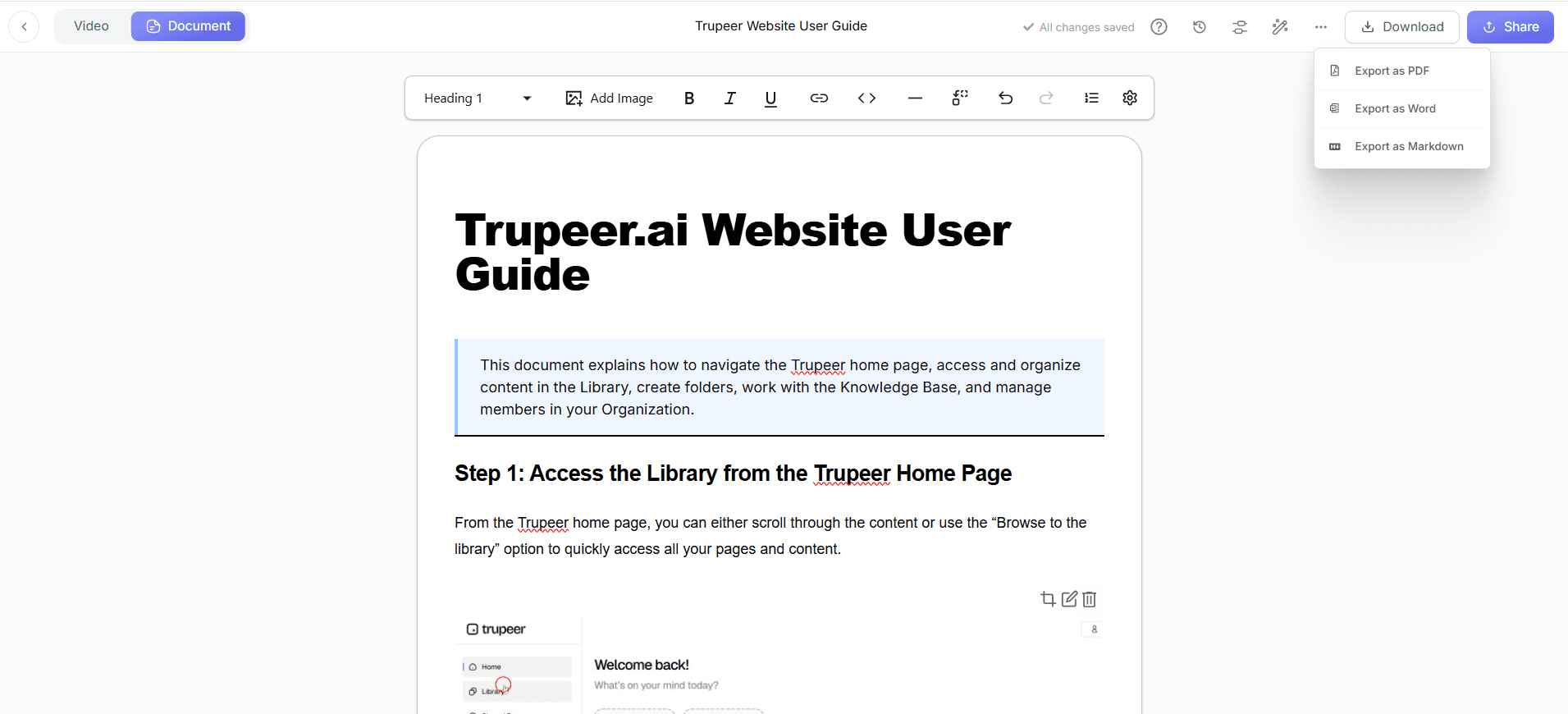
Caracteristici-cheie pentru Conversia unei Întâlniri Zoom în Documentație
Instrumentul pentru a transforma o întâlnire Zoom în documentație aduce captura, scrierea cu AI și publicarea într-o singură platformă, astfel încât munca împărtășită într-un apel devine documentație pe care echipa dvs. chiar o poate folosi, cu controlul pe care îl așteaptă echipele enterprise.
Funcționează cu Înregistrările dvs. Zoom: Încărcați înregistrări Zoom din cloud sau de pe dispozitivul local sau video din orice alt instrument de întâlnire, astfel încât să puteți converti o întâlnire Zoom în documentație indiferent de modul în care a fost înregistrat apelul.
Detectare automată a pașilor: AI-ul împarte înregistrarea în pași clari, ordonați, astfel încât să nu fie nevoie să derulați prin conținut ca să decideți unde se termină o instrucțiune și începe următoarea.
Capturi de ecran capturate automat: Când o întâlnire include partajare de ecran sau o prezentare, capturile de ecran relevante sunt extrase din înregistrare și plasate lângă pasul potrivit, oferind documentației detaliul vizual de care au nevoie cititorii.
Documentație și video dintr-o singură înregistrare: O singură înregistrare Zoom poate genera atât documentație scrisă, cât și un training video cu narare, astfel încât un singur apel livrează mai multe active de cunoaștere.
Suport multi-limbă: Publicați fiecare document în mai multe limbi, astfel încât echipele distribuite și globale să poată urma același proces în limba lor.
Workspace-uri enterprise și roluri: Workspace-urile organizației, rolurile utilizatorilor și controalele de vizibilitate pentru pagini partajate le permit echipelor mari să convertească o întâlnire Zoom în documentație în siguranță și să păstreze conținutul sensibil restricționat la persoanele potrivite.
De ce să Convertiți o Întâlnire Zoom în Documentație cu AI?
Cunoștințele împărtășite pe Zoom se pierd ușor după ce se încheie apelul, iar scrierea manuală îi îndepărtează pe cei cu experiență de la munca cu valoare mai mare. Alegerea de a transforma o întâlnire Zoom în documentație cu AI captează acea cunoaștere instantaneu, îmbunătățind în același timp calitatea și consistența documentației.
Capturați cunoștințele înainte să fie pierdute: Prezentările și deciziile dintr-un apel devin documentație permanentă, astfel încât know-how-ul să nu dispară când se încheie întâlnirea sau când un membru al echipei trece la altceva.
Economii uriașe de timp: Documentația completă este generată dintr-o înregistrare în câteva minute, în loc ca cineva să petreacă ore reurmărind și transcriind întâlnirea Zoom într-un document utilizabil.
Precizie mai mare: Deoarece documentația este construită pe baza înregistrării reale, pașii reflectă exact ce s-a arătat și ce s-a spus, reducând erorile comune în redactările bazate pe memorie.
Consistență între echipe: Când toată lumea folosește același instrument pentru a transforma o întâlnire Zoom în documentație, toate documentele urmează aceeași structură, ton și branding, indiferent de cine le-a creat.
Onboarding mai rapid: Noii angajați învață din documentație clară și vizuală, bazată pe sesiuni reale de lucru, în loc să stea prin înregistrări lungi ca să găsească părțile care contează.
Pregătire pentru audit și conformitate: Documentația detaliată și actuală susține controale interne solide și face auditul mai ușor pentru echipele din industrii reglementate.
Cine ar trebui să Convertească o Întâlnire Zoom în Documentație?
Capacitatea de a transforma o întâlnire Zoom în documentație este valoroasă pentru orice echipă care lucrează prin procese în cadrul apelurilor, de la echipe mici care captează cunoștințe interne până la companii care standardizează procedurile la nivelul întregului grup.
Echipe de operațiuni: Convertiți apelurile de proces și de predare în documentație, astfel încât fluxurile de lucru să rămână clare și repetabile pe măsură ce echipa se schimbă.
IT și administratori de sisteme: Transformați apelurile de depanare și configurare în documentație tehnică care reduce întrebările repetate.
Customer Success și suport: Capturați prezentările de onboarding și rezoluție din apelurile cu clienții și convertiți fiecare întâlnire Zoom în documentație pe care agenții și clienții o pot urma.
Echipe HR și de onboarding: Înregistrați sesiunile de training o singură dată și convertiți-le în documente de onboarding reutilizabile, în loc să repetați aceeași prezentare live pentru fiecare nou angajat.
Leaderi enterprise și de conformitate: Standardizați documentația la nivelul organizației cu workspace-uri sigure și partajare controlată, făcând sigură conversia unei întâlniri Zoom în documentație la scară. Aflați mai multe pe pagina enterprise.
Fondatori și echipe mici: Capturați cum funcționează afacerea din apeluri de lucru de zi cu zi, astfel încât procesele să fie documentate fără să alocați timp dedicat scrierii.
Cele mai bune practici pentru Conversia unei Întâlniri Zoom în Documentație
Puțină structură chiar în timpul apelului face ca documentația să fie mult mai puternică. Aceste practici ajută AI să producă o primă versiune mai curată atunci când transformați o întâlnire Zoom în documentație.
Partajați ecranul în timpul prezentării: AI-ul captează cele mai bune capturi de ecran din ecranele partajate, astfel încât demonstrarea procesului pe ecran produce o documentație mult mai detaliată decât audio-ul singur.
Narați pașii clar: Explicați ce faceți și de ce, pe măsură ce mergeți. AI folosește această narare pentru a scrie instrucțiuni mai bogate și mai utile.
Înregistrați la rezoluție înaltă: O înregistrare Zoom clară, la rezoluție înaltă, produce capturi de ecran mai ascuțite și o documentație mai ușor de citit.
Păstrați apelurile concentrate: Acoperiți un singur proces per înregistrare, acolo unde este posibil. Un apel concentrat devine o documentație concentrată, mai ușor de urmărit și de actualizat.
Standardizați cu șabloane și brand kits: Folosiți șabloane consecvente și brand kit astfel încât fiecare document să arate și să fie citit la fel în toată biblioteca dvs.
Explorați instrumente conexe
De ce să alegi Trupeer pentru a transforma o întâlnire Zoom în documentație
Funcționează cu înregistrările tale Zoom
Încarcă înregistrări Zoom din cloud sau de pe dispozitiv, sau video din orice instrument de întâlnire, fără format special necesar
Documentație creată cu AI
AI descompune înregistrarea în pași ordonați și surprinde capturi de ecran din ecranele partajate pentru a crea o documentație completă, structurată
Editează, personalizează & găzduiește
Perfecționează documentele, aplică kitul tău de brand, traduce în mai multe limbi și găzduiește totul într-o bază de cunoștințe căutabilă
Cum convertești o întâlnire Zoom în documentație
Pasul 1
Încarcă înregistrarea Zoom
Pasul 2
AI convertește întâlnirea Zoom în documentație
Pasul 3
Editează, personalizează și distribuie instant
Întrebări frecvente
Cum convertesc o întâlnire Zoom în documentație?
Încarci înregistrarea Zoom în Trupeer, iar AI convertește automat întâlnirea Zoom în documentație, detectând secvența pașilor, capturând capturi de ecran din orice ecran partajat și scriind instrucțiunile. Apoi o revizuiești, o editezi și o publici; întregul proces durează câteva minute.
Încarc o înregistrare Zoom din cloud sau de pe dispozitiv?
Oricare funcționează. Descarcă înregistrarea din stocarea ta Zoom din cloud sau din folderul de înregistrări locale și încarc-o în Trupeer. Orice fișier video standard de la Zoom sau din alt instrument de întâlnire poate fi convertit în documentație.
Întâlnirea Zoom trebuie să includă un partaj de ecran?
Pentru cea mai detaliată documentație, da: un partaj de ecran sau un walkthrough îi permite AI să captureze capturi de ecran și să documenteze exact pașii. Apelurile fără partaj de ecran pot fi totuși transformate într-un document scris pe baza conținutului vorbit, însă înregistrările cu partaj de ecran oferă cea mai bogată și mai vizuală documentație.
Pot edita documentația după ce este generată?
Da. Documentația generată este complet editabilă, astfel încât poți ajusta textul, adăuga sau înlocui imagini, reordona pașii și aplica kitul tău de brand. AI îți oferă un prim draft complet pe care îl rafinezi pentru a se potrivi standardelor tale.
Instrumentul de la Zoom la documentație este potrivit pentru echipele enterprise?
Da. Trupeer oferă spații de lucru pentru organizații, roluri de utilizator, controale de vizibilitate pentru pagini partajate și găzduire centralizată a bazei de cunoștințe, astfel încât echipele enterprise să poată converti o întâlnire Zoom în documentație păstrând conținutul securizat și standardizat între divizii.
Mai multe instrumente



