4,8/5
Criar um avatar gratuito de texto para voz
Transforme gratuitamente o seu texto num vídeo com um avatar realista, com narrações naturais de IA, sincronização labial e estilos de apresentação personalizáveis.
Comece agora

Os vídeos com avatar falante costumam entrar na conversa depois de alguém decidir que gravar mais uma tomada não compensa.
O vídeo original estava bem quando foi lançado. Depois, um detalhe do produto mudou. Alguém reescreveu o texto de onboarding. A introdução menciona de repente o posicionamento do mês passado. Ninguém quer voltar a ligar uma câmara por pequenas correções e, no entanto, vídeos explicativos de produtos, vídeos de onboarding, guias internos e conteúdos de formação têm o hábito de ficar desatualizados de formas pequenas e irritantes. Uma frase soa estranha. Uma funcionalidade é renomeada. Uma mensagem de lançamento muda após feedback e, de repente, a versão gravada parece mais antiga do que realmente é.
Um avatar gratuito de texto para fala resolve um problema surpreendentemente prático: as pessoas continuam a querer uma presença humana no vídeo, simplesmente não querem a carga de produção associada a isso. Uma voz ajuda a explicação a chegar melhor. Um apresentador torna o onboarding mais claro. Os vídeos de produto são mais fáceis de seguir quando alguém parece estar a guiar a história em vez de apenas colocar texto em diapositivos e esperar que os espectadores continuem interessados. O que a maioria das equipas não quer é voltar a gravar, fazer retomas, lidar com iluminação, montar câmara ou depender daquela única pessoa interna que se sente confortável o suficiente para filmar vídeos.
O Avatar Gratuito de Texto para Fala da Trupeer ajuda as equipas a transformar guiões em vídeos com avatar falante, com narração de IA sincronizada, avatares prontos para apresentações e fluxos de trabalho de vídeo reutilizáveis que permanecem fáceis de atualizar. Guias de produto, explicadores de onboarding, formação interna, anúncios de lançamento, educação de clientes e vídeos de marketing podem começar a partir de texto em vez de calendários de filmagem. Altere a redação, regenere o vídeo, siga em frente.
Porque é necessário criar um Avatar Gratuito de Texto para Fala?
Criar vídeos com porta-voz exige atores caros, estúdios e equipas de edição que as pequenas empresas não conseguem pagar. O software manual de texto para fala não tem avatares realistas nem sincronização labial, produzindo resultados robóticos. As integrações de texto para fala da Google não criam conteúdo visual para marketing ou formação.
As equipas perdem tempo a gravar locuções separadamente da produção de vídeo. As ferramentas de voz não conseguem animar rostos para corresponder naturalmente à fala. Escalar conteúdo de vídeo personalizado entre idiomas torna-se impossível sem orçamentos enormes. Quem não é especialista em vídeo tem dificuldade com fluxos de trabalho complexos de texto para voz.
Vídeos com Avatar Falante Multilingues Deixam de Ser Projetos Separados
A primeira versão de um vídeo é normalmente a mais fácil. Depois, o onboarding pede espanhol. A equipa de vendas quer uma versão para potenciais clientes na Alemanha. A equipa de sucesso do cliente repara que os tickets de suporte estão a aumentar noutra região e, de repente, a localização torna-se urgente.
Os fluxos de trabalho tradicionais de gravação tornam isto confuso porque cada mudança de idioma acaba discretamente por se tornar outra tarefa de produção.
Os vídeos com avatar falante de IA da Trupeer tornam a comunicação multilingue mais fácil de repetir porque a mensagem começa com sincronização de guiões, locução e avatar falante. As equipas podem adaptar guiões, narração e entrega para diferentes regiões sem reconstruir a produção do zero sempre que aparece outro pedido. Isso é importante para onboarding, formação, educação sobre produtos, capacitação interna e comunicação com clientes, onde a consistência é importante mas gravar todas as variações simplesmente não escala bem.
O que faz este Avatar Gratuito de Texto para Fala?
O motor de texto para fala da Trupeer converte guiões em fala natural enquanto anima fotografias carregadas com movimentos faciais realistas, sincronização labial e expressões. Este gerador de apresentadores com IA cria vídeos completos de cabeça falante prontos para formação, marketing ou apresentações em segundos, sem necessidade de gravação.
Funcionalidades Principais
Anima automaticamente fotografias em avatares de cabeça falante
Gera narração natural de criador de voz a partir de qualquer guião
Sincronização labial perfeita para o realismo do software de texto para fala
Exporta vídeos gratuitos de IA de texto para fala com branding
Como funciona o Avatar Gratuito de Texto para Fala da Trupeer
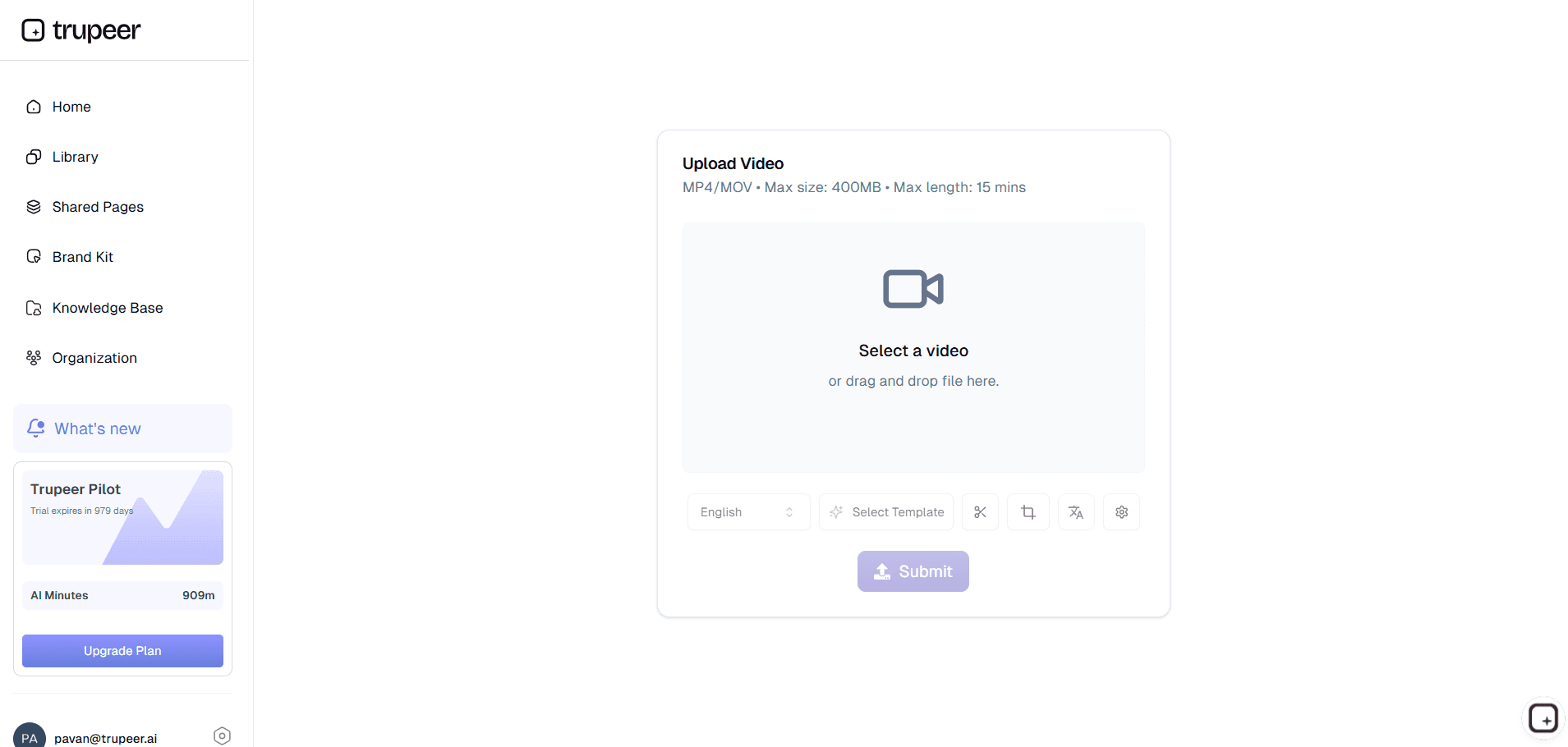
Passo 1: Carregue o seu vídeo
Carregue um vídeo existente ou simplesmente grave o ecrã para começar.
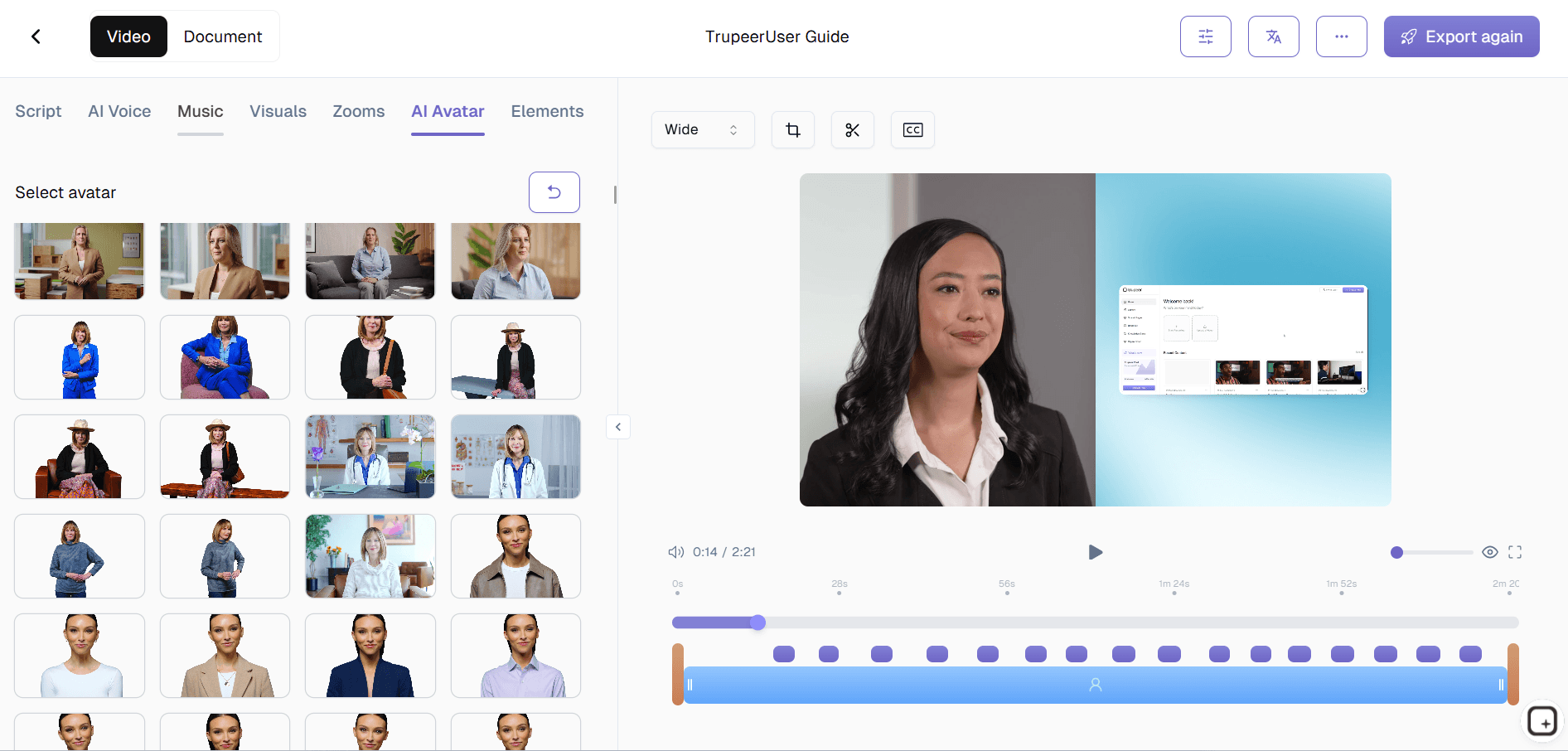
Passo 2: A IA anima
O apresentador com IA gera fala, animação facial e sincronização labial.
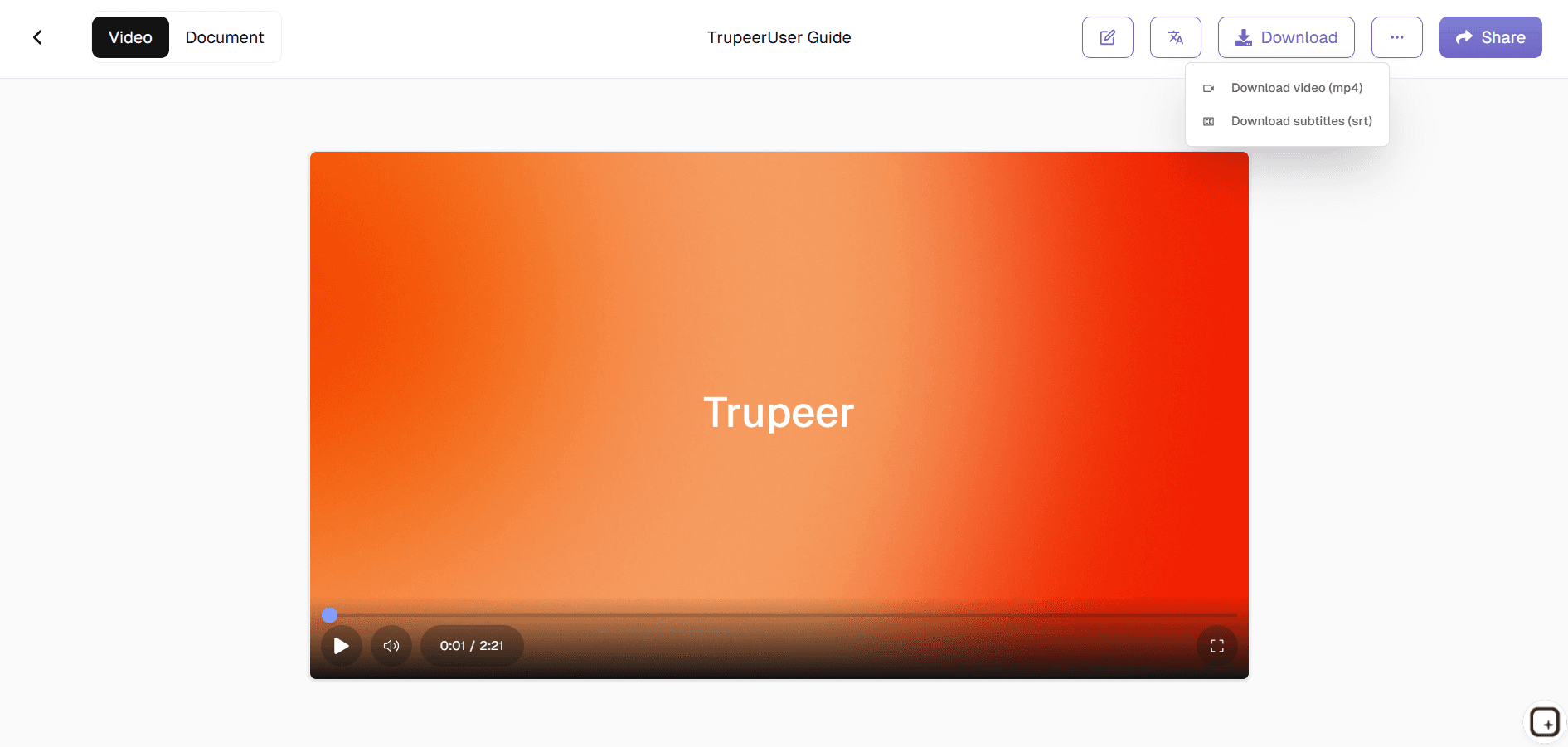
Passo 3: Personalize & Exporte
Adicione branding e depois descarregue o seu vídeo de texto para voz.
Quem usa o Avatar Gratuito de Texto para Fala da Trupeer?
Fundadores de Startups & Equipas de Produto:
Crie explicadores de produto, vídeos de onboarding, atualizações de lançamento, guias de funcionalidades e comunicação com clientes sem voltar a gravar conteúdo sempre que a mensagem muda ou os fluxos do produto evoluem.
Equipas de Marketing:
Transforme guiões de campanhas, mensagens de produto e anúncios em vídeos com avatar falante para sites, conteúdo para redes sociais, campanhas pagas e educação de clientes sem depender de calendários de filmagem.
Equipas de Sucesso do Cliente & Formação:
Crie explicadores de onboarding, vídeos de formação, guias internos e conteúdos de capacitação que pareçam orientados e repetíveis sem repetir a mesma sessão ao vivo vezes sem conta.
Equipas Globais:
Crie vídeos multilingues com avatar falante para colaboradores, clientes e potenciais clientes distribuídos sem gravar apresentadores separados para cada exigência de idioma.
Criadores & Educadores:
Publique explicadores, guias e conteúdo educativo sem voltar a gravar porque uma frase mudou ou o guião evoluiu após revisão.
O que o Avatar Gratuito de Texto para Fala da Trupeer ajuda a criar
Vídeos de Avatar de Guião para Fala:
Transforme guiões escritos em vídeos com avatar falante e narração de IA sincronizada para onboarding, explicadores, tutoriais, comunicação de produto e educação de clientes.
Narração Natural com Voz de IA:
Gere fala que parece conversacional e consistente em vídeos de formação, onboarding, comunicação interna e conteúdo de marketing.
Vídeos com Avatar para Fluxos de Trabalho de Produto, Formação e Marketing:
Crie vídeos de onboarding, demonstrações de produto, atualizações internas, guias educativos e explicadores de lançamento sem depender de filmagem manual.
Conteúdo de Vídeo Localizado:
Adapte vídeos com avatar falante para diferentes idiomas e públicos sem tratar cada novo mercado como um processo de produção separado.
Fluxos de Trabalho de Vídeo Reutilizáveis:
Atualize guiões e regenere vídeos quando a mensagem mudar, em vez de voltar a gravar vídeos inteiros porque uma explicação ficou desatualizada.
Explorar Ferramentas Relacionadas
Benefícios de Utilizar a Ferramenta Gratuita de Avatar de Texto para Voz da Trupeer
Locuções naturais com IA
Converta texto em fala fluida, natural e semelhante à humana, com tom e pronúncia precisos.
Apresentação de avatar realista
A IA adiciona sincronização labial precisa, expressões faciais e gestos para um aspeto realista do orador.
Exportação e Partilha Rápidas
Descarregue o vídeo instantaneamente ou partilhe-o no seu site, apresentações ou redes sociais.
Como Criar um Avatar Gratuito de Texto para Voz com o Trupeer
Passo 1
Carregue o seu vídeo e a IA criará um guião editável.
Passo 2
Edite o script e selecione o seu avatar.
Passo 3
Gere, pré-visualize e exporte o seu vídeo instantaneamente
Perguntas Frequentes
Este Avatar de Texto para Voz é gratuito?
Sim, pode gerar e descarregar gratuitamente um vídeo de avatar de IA de texto para voz, sem qualquer custo inicial.
Que tipos de entrada são suportados por Criar um Avatar Gratuito de Texto para Fala?
Uma imagem de retrato nítida, além do texto do seu guião, que o criador de voz transforma em fala.
Posso escolher vozes diferentes para o Avatar gratuito de conversão de texto em voz?
Sim, estão disponíveis várias vozes, sotaques e idiomas de conversão de texto em fala para o seu altifalante de IA.
Posso reutilizar o mesmo avatar com novos scripts no Free Text to Speech Avatar?
Pode manter a mesma imagem de avatar e regenerar vídeos alterando apenas o guião de texto para voz.
Onde posso usar vídeos de Avatar de Texto para Voz gratuitos?
Os vídeos de avatar podem ser usados em publicações nas redes sociais, módulos de formação, explicações de produtos, apresentações e fluxos de apoio ao cliente.
Mais ferramentas



