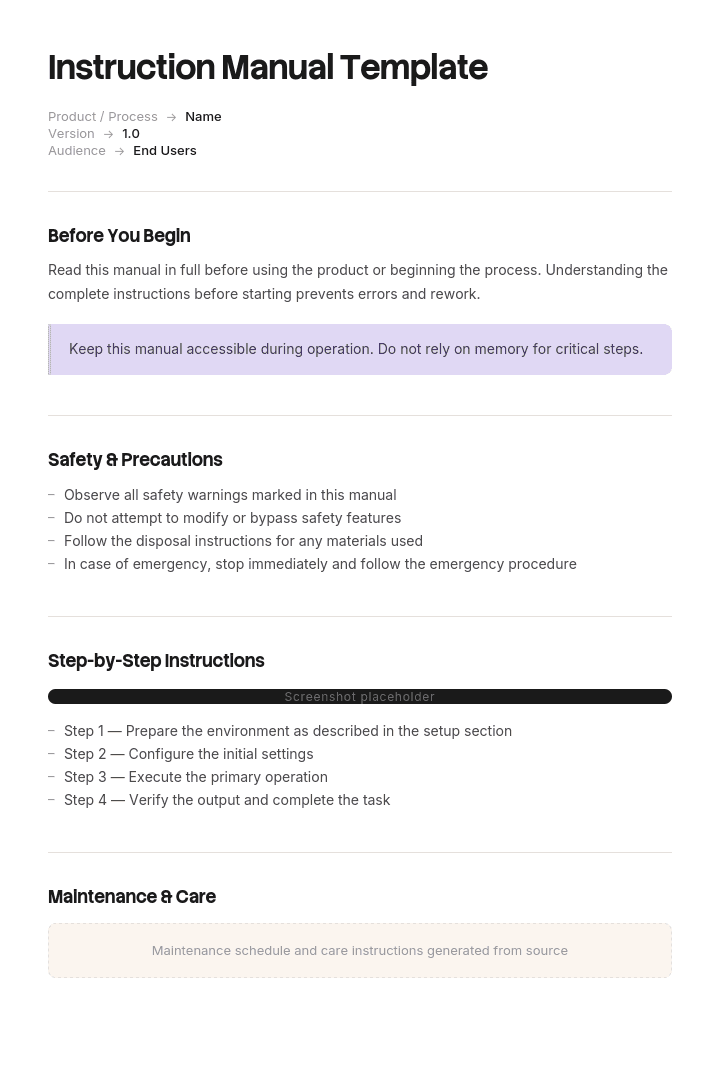
Use este modelo
Um bom manual de instruções é o que ajuda os clientes a passar de comprador novo a utilizador confiante. Com Trupeer, pode poupar horas na escrita de manuais de instruções ao começar com um modelo de manual de instruções gratuito, personalizá-lo com as suas orientações de marca e usar o nosso criador de manuais com IA para transformar demonstrações do produto em manuais de vídeo bem acabados.
Um manual de instruções não é documentação no sentido comum. Acompanha um produto, é frequentemente exigido por lei e, se algo correr mal com esse produto, o manual é uma das primeiras coisas a ser analisada.
Isso muda a forma como deve ser escrito. A clareza é importante pelas mesmas razões de sempre, e a completude da informação de segurança importa por razões que não se aplicam a um artigo de ajuda.
Descarregue o modelo de manual de instruções
Formato | Melhor para |
|---|---|
Word (.docx) | Escrever e rever o manual |
A versão publicada, fornecimento em papel e digital | |
PowerPoint (.pptx) | Guias de arranque rápido e instruções de configuração numa única folha |
Excel (.xlsx) | Listas de peças, tabelas de especificações e a matriz de tradução |
Google Docs | Revisão com engenharia, segurança e jurídico |
Gratuito, editável, sem marca de água.
Que manual precisa?
O documento abrange | Tipo | Modelo |
|---|---|---|
Montar, operar e manter um produto físico | Manual de instruções | Esta página |
Utilizar um produto, muitas vezes software | Manual do utilizador | |
Utilizar especificamente uma aplicação de software | Manual de utilizador de software | |
Ensinar alguém a fazer um trabalho | Manual de formação | |
Como uma empresa ou instalação funciona | Manual de operação | |
Assistência e manutenção de equipamento | Manual de operação e manutenção | |
Uma tarefa, no local de trabalho | Instrução de trabalho |
Como personalizar este modelo no Trupeer
Passo 1: Abra a secção Templates
Vá à secção Templates no menu principal.

Passo 2: Selecione e abra um modelo
Clique em qualquer modelo com que queira trabalhar para o abrir.

Passo 3: Expanda a visualização do modelo
Se necessário, expanda a visualização do modelo para ver o layout completo e os detalhes com clareza.

Passo 4: Edite o modelo
Clique em Edit para começar a modificar o modelo selecionado.

No editor, pode:
Adicionar novas secções
Definir ou atualizar regras de formatação
Adicionar um logótipo e ajustar a sua posição e definições relacionadas
Passo 5: Guarde o seu modelo personalizado
Depois de fazer todas as alterações necessárias, clique em Save para guardar o modelo atualizado como seu.

Passo 6: Pré-visualize e ajuste o modelo
Quando quiser ver como fica o seu modelo personalizado, abra o Preview.

A partir do ecrã de pré-visualização, pode continuar a fazer ajustes diretamente, se necessário, garantindo que o modelo aparece exatamente como o pretende.
Com um modelo de manual de instruções, pode:
Poupar horas na escrita: Ignore a página em branco com uma estrutura de manual completa.
Reduzir pedidos de suporte: Manuais claros ajudam os clientes a resolverem sozinhos, reduzindo pedidos e devoluções.
Manter-se alinhado com a marca: Aplique o seu logótipo, fontes e cores usando o kit de marca da Trupeer.
Melhorar a segurança: Secções integradas para avisos, precauções e instruções de segurança.
Adicionar tutoriais em vídeo: Incorpore vídeo para passos difíceis de explicar apenas com texto.
Atingir clientes globais: Traduza manuais para 65+ idiomas com um clique.
O manual faz parte do produto
Vale a pena dizer de forma clara, porque altera as prioridades.
Em muitas jurisdições, fornecer um produto sem instruções e informação de segurança adequadas é, por si só, uma falha de conformidade, independentemente de o produto ser seguro. As exigências variam consideravelmente consoante a categoria do produto e o mercado, e são mais rigorosas para maquinaria, produtos elétricos, produtos para crianças, dispositivos médicos e tudo o que tenha um risco previsível de utilização indevida.
Quando um produto causa lesões, as instruções são analisadas em conjunto com o design. Surgem repetidamente duas perguntas: o perigo foi avisado e o aviso foi adequado tendo em conta a forma como o produto seria, previsivelmente, utilizado.
Por favor, note: esta página é uma orientação geral e não é aconselhamento jurídico ou de segurança. As exigências diferem consoante o tipo de produto e o mercado, e vários regimes especificam obrigações de conteúdo, formato e idioma. Faça com que os seus manuais sejam revistos face às exigências de cada mercado para o qual vende, por alguém qualificado em conformidade de produto.
Informação de segurança e hierarquia dos avisos
Existe uma convenção estabelecida para as palavras-sinal, definida em normas como a ANSI Z535 e a ISO 3864, e usá-la corretamente é um dos sinais mais claros de um manual produzido com competência.
Palavra-sinal | Significa | Utilize para |
|---|---|---|
PERIGO | Causará morte ou ferimentos graves se não for evitado | Perigos iminentes e específicos. Raros e devem ser |
AVISO | Pode causar morte ou ferimentos graves | Perigos graves potenciais |
ATENÇÃO | Pode causar ferimentos ligeiros ou moderados | Riscos de ferimentos menores |
NOTA | Danos materiais, sem risco de ferimentos | Danos ao produto ou a outros bens |
Três regras que importam.
Não inflacione. Rotular um risco menor como PERIGO desvaloriza a palavra e, quando os leitores percebem que os avisos são exagerados, deixam de os ler todos. Este é um resultado pior do que subestimar o aviso num único item.
Não use ATENÇÃO para danos materiais. É isso que a NOTA serve. Misturá-los torna confusa a distinção entre ferimentos e danos, que a hierarquia existe para transmitir.
Estruture cada aviso de forma consistente. Indique o perigo, a consequência e como evitá-lo. "AVISO: Lâmina rotativa. O contacto causará ferimentos graves. Desligue a alimentação antes de remover a proteção." Não "AVISO: Tenha cuidado."
Onde devem ficar os avisos
A colocação importa tanto quanto a redação.
Espera-se e é necessário ter uma secção geral de segurança no início, mas não é suficiente. Um leitor que siga o passo sete de montagem não se vai lembrar de um aviso da página dois.
Coloque o aviso imediatamente antes do passo a que se aplica, além da secção geral. A repetição aqui está correta de uma forma que não acontece noutros tipos de documentação.
Use um tratamento visual consistente para que os avisos sejam reconhecíveis à primeira vista e nunca divida um aviso numa quebra de página num manual impresso.
Idioma e mercados
Se vende para mais do que um país, a tradução é frequentemente uma exigência legal em vez de um gesto. Muitos mercados exigem instruções e informação de segurança num idioma oficial do país de venda, e isto aplica-se em particular ao conteúdo de segurança.
Implicações práticas para a forma como escreve:
Escreva para tradução desde o início. Frases curtas, terminologia consistente, sem expressões idiomáticas, sem humor. Um manual escrito em inglês simples e repetitivo traduz-se de forma barata e precisa.
Use um termo por conceito. Se for uma "proteção", nunca é um "cobertor" ou uma "blindagem" noutro ponto do manual. Os tradutores não podem saber que é a mesma coisa.
Prefira símbolos e ilustrações quando puderem transmitir significado, já que atravessam idiomas sem custo.
Deixe espaço no layout. O texto traduzido costuma ser mais longo do que o inglês, o que quebra designs de página apertados.
Mantenha uma matriz de tradução para acompanhar quais versões de idioma existem, em que revisão e para que mercados. O ficheiro Excel inclui uma.
A falha mais comum é um manual traduzido na versão 1 e revisto três vezes apenas em inglês, deixando outros mercados com instruções que já não correspondem ao produto.
A estrutura do manual de instruções
Secção | Conteúdo |
|---|---|
Capa | Nome do produto, número do modelo, revisão do manual e data |
Informação de segurança importante | Avisos gerais, utilização prevista, utilização indevida previsível |
Índice | Com referência às páginas |
O que está na caixa | Lista de peças com quantidades e identificadores |
Ferramentas necessárias | Incluindo o que não é fornecido |
Especificações | Dimensões, peso, potência, capacidade, condições de funcionamento |
Montagem ou instalação | Passos numerados com ilustrações |
Operação | Como utilizá-lo, incluindo controlos e indicações normais |
Manutenção | Tarefas de rotina, frequência, consumíveis |
Resolução de problemas | Sintoma, causa provável, ação |
Armazenamento e transporte | Quando relevante |
Eliminação | Fim de vida, reciclagem, componentes perigosos |
Garantia e suporte | Condições, contacto, o que a invalida |
Conformidade | Declarações, certificações, normas cumpridas |
As secções são, em grande medida, fixas por convenção e, em algumas categorias, por regulamentação. Tanto os leitores como os inspetores esperam esta ordem.
Utilização prevista e utilização indevida previsível
Uma secção que a maioria dos manuais escreve demasiado de forma restrita.
Utilização prevista indica para que serve o produto e por quem. Seja específico quanto aos limites: capacidade de carga, ambiente de funcionamento, restrições de idade, competência necessária.
Utilização indevida previsível abrange o que as pessoas irão, previsivelmente, fazer e que não deveriam fazer. Não é toda e qualquer utilização indevida imaginável, mas sim as coisas que é óbvio que vão acontecer: ficar em cima do produto, utilizá-lo no exterior, colocá-lo a funcionar sem a proteção, ligá-lo à alimentação errada.
A previsibilidade é o conceito operativo. "Ninguém devia ter feito isso" é uma posição fraca se o que fizeram era totalmente previsível e o manual não dizia nada sobre isso.
Montagem e instalação
Numere cada passo, uma ação por passo.
Ilustre cada passo quando a orientação, a posição ou a sequência forem importantes. A montagem é a secção de qualquer manual que mais depende de ilustrações.
Identifique as peças pelo mesmo rótulo usado na lista de peças e na embalagem.
Indique as especificações dos fixadores quando isso importa: binário, sequência, encaixe da rosca.
Inclua o ponto de verificação. "O painel deve ficar perfeitamente assente, sem folga" diz ao leitor se fez corretamente.
Alerte no passo, não apenas no início.
Indique quando é necessária ajuda. Elevação por duas pessoas e o peso, para o leitor conseguir avaliar.
Operação
Aborde primeiro a utilização normal, depois as variações e, por fim, o que fazer quando algo parece estar errado.
Inclua como é que a utilização normal deve parecer e soar. Um utilizador que não saiba que a ventoinha deve funcionar durante dois minutos após a paragem vai reportar isso como uma avaria ou, pior, vai desligá-la da tomada.
Descreva os controlos pela ordem em que alguém os encontra, com as etiquetas exatamente como aparecem no produto.
Manutenção
Elemento | Incluir |
|---|---|
Tarefa | O que fazer |
Frequência | Horas, ciclos ou calendário |
Quem | Utilizador ou apenas técnico qualificado |
Peças e consumíveis | Com números de peça |
Segurança | Requisitos de isolamento, arrefecimento e bloqueio |
Consequência de não fazer | O que acontece se não for feito |
A coluna "quem" é importante. Separar claramente as tarefas que o utilizador pode fazer por si das que exigem um técnico qualificado é, em simultâneo, uma medida de segurança e uma medida de garantia.
Resolução de problemas
Sintoma, causa provável, ação. Escrito nas palavras que um utilizador usaria para descrever o problema, e não no vocabulário do mecanismo.
Não arranca. Verifique a ligação à alimentação. Verifique se o interbloqueio de segurança está ativado. Se o indicador piscar duas vezes, o corte térmico disparou e a unidade precisa de 30 minutos para arrefecer.
Inclua o ponto em que o utilizador deve parar e contactar o suporte em vez de continuar a investigar. Esse limite é uma instrução de segurança tanto quanto uma instrução de serviço.
Ilustrações
Aqui são mais importantes do que em qualquer outro tipo de documento, porque montagem e operação são espaciais.
Uma ilustração por passo quando a posição ou a orientação forem importantes.
Vistas explodidas para montagens, com as peças numeradas para corresponderem à lista.
Ângulo de visualização consistente ao longo de uma sequência, para o leitor não ter de se reorientar cada vez.
Legendas com os mesmos números da lista de peças.
Desenhos a linha muitas vezes superam fotografias para montagem, porque eliminam ruído visual e reproduzem-se bem em impressão a baixo custo.
Símbolos segundo convenções ISO quando existirem, já que os utilizadores os reconhecem em diferentes produtos.
A ilustração é normalmente o maior custo na produção de um manual de instruções e o maior fator determinante de se funciona ou não.
Um exemplo prático
Montagem, passo 4 de 9
⚠ ATENÇÃO · Risco de entalamento. A estrutura pode fechar com o seu próprio peso. Mantenha as mãos afastadas da dobradiça enquanto posiciona.
4. Fixe o painel do assento à estrutura.
Peças: painel do assento (A), parafusos M6 × 30 (F) × 4, anilhas (G) × 4.
Ferramentas: chave hexagonal de 5 mm (fornecida).
Posicione o painel A na estrutura com os orifícios pré-perfurados alinhados e a face lisa virada para cima. Insira uma anilha (G) em cada parafuso (F) e, em seguida, encaixe os quatro parafusos de forma solta com a mão antes de apertar qualquer um deles.
Aperte pela sequência indicada, a 8 Nm. Não exceda 10 Nm.
Verifique: o painel deve assentar sem folga e sem oscilar, e não deve existir uma folga superior a 1 mm em nenhum canto. Se oscilar, desapertar os quatro parafusos e repita.
[Ilustração: vista explodida, peças identificadas como A, F, G, sequência de aperto numerada de 1 a 4]
Note os elementos: um aviso no ponto de risco, peças identificadas com os mesmos rótulos da lista, encaixe manual antes de apertar que é o passo que as pessoas fazem mal, um valor de binário com limite superior, uma verificação verificável e uma instrução de recuperação caso a verificação falhe.
Estilo de escrita
Modo imperativo. "Aperte os parafusos" e não "os parafusos devem ser apertados".
Uma instrução por frase.
Presente, voz ativa.
Medidas concretas, nunca "firmemente" ou "de forma segura".
Um termo por conceito, usado de forma consistente ao longo de todo o documento.
Sem expressões idiomáticas nem humor. Ambos traduzem mal e nenhum deles pertence a um documento relevante para segurança.
Frases curtas, com menos de cerca de vinte palavras.
2.ª pessoa, dirigindo-se ao utilizador diretamente.
Testar o manual
Dê-o a alguém que nunca viu o produto, com o produto à frente, e observe.
Não diga nada. Cada hesitação marca um passo pouco claro, cada pergunta é uma falha e cada peça que apanharem e rodarem é um problema de identificação. Note se leram a secção de segurança, porque se a ignorarem os seus avisos têm de estar nos passos.
Teste com alguém que corresponda ao utilizador real; no caso de produtos de consumo, significa alguém sem formação técnica. Os engenheiros que testam um manual de montagem vão concluí-lo com sucesso e não vão aprender nada consigo.
Esta é a hora de maior valor na produção de um manual de instruções e, ainda assim, é frequentemente ignorada.
Versões e revisões
Os manuais de instruções precisam de um controlo de versões mais rigoroso do que a maioria da documentação, porque estão ligados a um produto que também muda.
Registe a revisão do manual na capa e relacione-a com o modelo do produto ou com a gama de números de série a que se aplica. Um manual que não indique qual a versão do produto que descreve causa problemas reais em assistência.
Guarde as revisões ultrapassadas em arquivo em vez de as eliminar. Quando um produto está em serviço durante anos, pode ser necessário produzir as instruções fornecidas no momento da venda.
Atualize as traduções sempre que o conteúdo de origem mudar e acompanhe isso na matriz de tradução. Uma revisão que chegue apenas à versão em inglês é uma lacuna de conformidade em todos os outros mercados.
Boas práticas
Use corretamente a hierarquia das palavras-sinal e não inflacione.
Avisos no passo, bem como na secção de segurança.
Um termo por conceito ao longo de todo o documento.
Ilustre cada passo quando a orientação for importante.
Peças identificadas de forma consistente na lista, nas ilustrações e na embalagem.
Especificações concretas em vez de "firmemente".
Uma verificação de validação após passos que podem dar errado.
Escreva para tradução desde o primeiro rascunho.
Teste com um verdadeiro utilizador iniciante, com o produto em mãos.
Crie versões do manual para o modelo do produto e arquive as revisões ultrapassadas.
Erros comuns
Palavras-sinal inflacionadas, para que os leitores desvalorizem todos os avisos.
ATENÇÃO usada para danos materiais em vez de NOTA.
Informação de segurança apenas no início, nunca no passo relevante.
Instruções vagas: aperte firmemente, assegure o alinhamento correto.
Terminologia diferente entre secções, o que também prejudica a tradução.
Peças com nomes diferentes na lista e nas ilustrações.
Sem verificações de validação, pelo que os utilizadores não conseguem saber se um passo foi bem-sucedido.
Utilização indevida previsível não abordada.
Traduções deixadas numa revisão anterior à do conteúdo de origem.
Testado apenas por pessoas que conceberam o produto.
Sem indicação de qual a versão do produto a que o manual se aplica.
Poucas ilustrações, porque são a parte mais cara.
Registe a montagem uma vez, em cada idioma
Abra o modelo no Trupeer AI, aplique o seu kit de marca para que os manuais correspondam à documentação do seu produto e edite qualquer secção diretamente. A configuração está no guia do modelo.
Duas coisas tornam os manuais de instruções caros. A ilustração, que é o maior custo individual e o maior fator determinante de se o manual funciona. E a tradução, que multiplica cada revisão pelo número de mercados para os quais vende.
O registo resolve ambos. Execute a montagem ou o procedimento de operação uma vez e o Trupeer AI gera os passos escritos com visuais capturados a partir do registo, além de um tour em vídeo narrado. Traduza-o para 65+ idiomas, que é o custo que mais aumenta quando é feito de forma convencional.
Um vídeo não substitui um manual impresso e, para produtos regulamentados, não satisfaz a exigência de fornecer instruções escritas. O que faz é dar-lhe uma versão que os clientes realmente veem, juntamente com o documento que tem de existir. Mantenha ambos na sua base de conhecimento para que o suporte possa enviar a opção certa.
Registe. Marque com a sua marca. Traduza. Trupeer.
Perguntas Frequentes
Existe um modelo de manual de instruções gratuito em Word?
Sim. O Word é o formato principal, com todas as secções estruturadas, incluindo informação de segurança, lista de peças, montagem, operação, manutenção e resolução de problemas. Descarregamento gratuito, sem registo, sem marca de água.
Posso descarregar um modelo de manual de instruções gratuito?
Sim, todos os formatos são descarregamentos gratuitos sem necessidade de conta e sem atribuição.
Existe um modelo de manual de instruções gratuito em PDF?
Sim, tanto em branco como num exemplo completo que mostra o nível de detalhe nas secções de montagem e segurança, que são as duas que mais distinguem um bom manual de um mau.
Existe um modelo de manual de instruções gratuito em PPT ou PowerPoint?
Sim. A versão PowerPoint é adequada para guias de arranque rápido e instruções de configuração numa única folha, o cartão dobrável que é enviado na caixa juntamente com o manual completo. Não é um substituto do próprio manual quando são necessárias instruções escritas.
Existe um modelo de manual de instruções gratuito em Excel?
Sim, mantendo o conteúdo em formato tabular: listas de peças com quantidades e identificadores, tabelas de especificações, o calendário de manutenção e uma matriz de tradução que acompanha quais versões de idioma existem em que revisão.
Existe um modelo de manual do utilizador em Word?
Sim, embora seja um documento diferente. Um manual do utilizador abrange como utilizar um produto, frequentemente software, enquanto um manual de instruções abrange montar, operar e manter um produto físico. Veja o modelo de manual do utilizador ou o modelo de manual de utilizador de software.
Existe um modelo de guia passo a passo em Word, gratuito?
Sim, na página do modelo de guia como fazer, que abrange guias com várias tarefas. Esta página é para manuais que são enviados com um produto físico e incluem conteúdo de segurança, manutenção e conformidade.
Qual é o melhor modelo de manual de instruções gratuito?
O que trata a segurança corretamente. A maioria dos modelos fornece uma estrutura de índice, que é a parte fácil e, em grande medida, convencional. O que distingue um manual competente é o uso correto da hierarquia dos avisos, os avisos colocados no passo relevante em vez de apenas no início e a utilização indevida previsível abordada.
O que é um manual de instruções?
Um documento fornecido com um produto que explica como o montar, instalar, operar, manter e eliminar com segurança, juntamente com a informação de segurança e as especificações de que o utilizador precisa. Em muitos mercados, fornecer um manual é uma exigência legal em vez de uma escolha.
O que deve incluir um manual de instruções?
Capa com modelo e revisão, informação de segurança importante, índice, o que está na caixa, ferramentas necessárias, especificações, montagem ou instalação, operação, manutenção, resolução de problemas, armazenamento e transporte, eliminação, garantia e suporte e declarações de conformidade.
Quais são os níveis de aviso de segurança num manual?
Quatro palavras-sinal por convenção: PERIGO para perigos que causarão morte ou ferimentos graves, AVISO para os que podem causar, ATENÇÃO para ferimentos ligeiros ou moderados e NOTA para danos materiais sem risco de ferimentos. Usá-las com precisão é importante, porque inflacionar os avisos ensina os leitores a ignorarem todos eles.
Onde devem ficar os avisos de segurança num manual?
Tanto numa secção geral de segurança no início como imediatamente antes de cada passo a que se aplicam. Um leitor no passo sete de montagem não se vai lembrar de um aviso da página dois e a repetição aqui está correta, mesmo que noutra documentação fosse uma prática fraca.
Os manuais de instruções têm de ser traduzidos?
Em muitos mercados, sim. As exigências variam consoante a categoria do produto e o país e, em particular, a informação de segurança é frequentemente exigida num idioma oficial do país de venda. Escreva para tradução desde o primeiro rascunho, usando frases curtas e terminologia consistente, e mantenha cada versão de idioma na mesma revisão do conteúdo de origem.
Como testar um manual de instruções?
Dê-o a alguém que nunca viu o produto, com o produto à frente, e observe sem ajudar. Cada hesitação é um passo pouco claro e cada pergunta é uma falha. Teste com alguém que corresponda ao utilizador real, e não com engenheiros, que vão concluir a montagem com sucesso independentemente da forma como o manual é escrito.
Quanto tempo deve ter um manual de instruções?
Tanto quanto a segurança e a completude exigirem e não mais. Produtos simples podem precisar de quatro páginas, equipamento complexo pode exigir várias centenas. O tamanho é determinado pelo número de passos, perigos e tarefas de manutenção, e não por um objetivo, e acrescentar conteúdo a um manual torna o conteúdo importante mais difícil de encontrar.
Posso personalizar este modelo de manual de instruções?
Sim, cada versão é totalmente editável. A ordem das secções é, em grande medida, convencional e vale a pena mantê-la, uma vez que tanto os utilizadores como os inspetores esperam isso. O que tem de ser seu é o conteúdo de segurança, que tem de refletir o seu produto específico e a sua utilização indevida previsível, e deve ser revisto por alguém qualificado em conformidade de produto para os seus mercados.

