Trupeer Blog
Summarise

Sales engineers are the unsung heroes of the enterprise sales process. They bridge the gap between technical knowledge and customer needs, crafting demos that resonate with potential buyers. But with growing demands for personalized demos, scaling these efforts becomes a challenge. This is where video demos come into play. By automating some of the repetitive elements of presales, sales engineers can focus on the high-impact aspects of their roles. A well-executed video demo strategy can significantly boost quota coverage. In fact, companies using video-first demo motions have seen a 30% rise in their quota coverage.
Companies using video-first demo motions have seen a 30% rise in their quota coverage.
With such promising numbers, the stakes are high for organizations to embrace video demos as a cornerstone of their presales strategy. Yet, understanding how to measure the efficiency of these video demos and their impact on quota coverage isn’t straightforward. Sales teams need to master the nuances of AI video editing and distribution. If you’re part of a sales team or manage one, understanding these dynamics can give you a competitive edge. This guide will walk you through the process of effectively measuring and optimizing your team’s presales video efficiency.
Why does measuring SC efficiency through video demos matter?
In enterprise sales, the pressure to meet and exceed quotas is relentless. Sales engineers, or SCs, are tasked with delivering compelling product demonstrations that speak directly to client needs. But as companies grow, the challenge becomes scaling these personalized demos without compromising quality. Here’s where video demos make a significant impact. By incorporating video demos into your pre sales workflow, you create a scalable solution that maintains the high standards expected in enterprise sales.
The business problem is clear: how can SCs cover more leads without burning out? Traditional demos are resource-intensive, requiring time and coordination. When SCs are stretched thin, they can’t focus on crafting tailored solutions, which leads to missed opportunities and unmet quotas. According to industry insights, SCs spend about 30% of their time on repetitive tasks, including demo preparations. By integrating video demos, these repetitive tasks can be automated, allowing SCs to allocate their time to strategic activities. This shift not only increases efficiency but also enhances the quality of client interactions, ultimately driving better sales outcomes. Many teams pair this with a documentation platform that generates written guides from the same recording, so the pitch and the how-to stay in sync.
What are the benefits of using video demos for SC efficiency?
Using video demos in presales offers numerous benefits that directly impact SC efficiency and quota achievement.
Scalable personalization. Video demos allow you to deliver personalized content to multiple prospects without repeated live sessions. This scalability ensures that each prospect receives a tailored experience, increasing engagement and conversion rates.
Consistent messaging. By using a video prospecting approach, you ensure that every prospect receives the exact same high-quality message. This consistency helps in setting clear expectations and reducing misunderstandings in the sales process.
Time efficiency. Reusable video demos save SCs countless hours that would otherwise be spent on repetitive live demos. This time savings allows SCs to focus on more complex sales tasks, so increasing their productivity and quota coverage.
Broad reach. A single AI video platform can reach numerous clients across different time zones, ensuring no opportunity is missed due to scheduling conflicts. This broad reach helps in maximizing the potential client base.
Enhanced analytics. Video analytics provide insights into viewer engagement, showing which parts of the demo are most effective. This data-driven approach helps sales teams refine their strategies and focus on high-impact content.
Cost reduction. With video demos, the need for travel and in-person meetings is reduced, cutting costs significantly. This cost-effectiveness is particularly beneficial for startups and smaller businesses with limited budgets.
Which Trupeer features help you measure SC efficiency through video demos?
Trupeer offers a suite of features designed to simplify the creation and distribution of impactful video demos, boosting SC efficiency and enhancing quota coverage.
AI screen recording with auto-zoom and click detection
This feature allows SCs to capture detailed product demos effortlessly. The auto-zoom ensures that viewers focus on critical parts of the demo, while click detection highlights user interactions. This capability is crucial for creating engaging and informative demos that hold the viewer's attention. By automating these elements, SCs can produce polished demos quickly, freeing them to work on personalized content.
Silent screen recording with automatic AI narration
This feature is a big shift for SCs who need to create demos without background distractions. The AI narration provides clear and professional audio, enhancing the demo’s quality. SCs can focus on content creation while Trupeer handles the audio component. This ensures that each demo is both visually and audibly professional, helping maintain brand consistency.
Automatic filler-word removal
Trupeer’s automatic filler-word removal enhances demo quality by eliminating "um," "ah," and other verbal pauses. This results in a more polished and professional presentation. SCs can produce cleaner, more concise demos without extensive editing. This feature is particularly useful for creating a video trimmer that maintains viewer engagement from start to finish.
AI voiceover in 65+ natural voices, adjustable pace and tone
With this feature, SCs can customize their demos to match the prospect's preferences and cultural nuances. The ability to adjust pace and tone ensures that the demo resonates with diverse audiences. This flexibility is essential for delivering effective demos across different regions and industries, enabling SCs to connect more deeply with prospects.
AI-searchable knowledge base with timestamp deep-links
Trupeer’s AI-searchable knowledge base indexes every recording with timestamp-level deep links. This makes it easy for SCs to retrieve specific segments of demos for reuse or for client queries. By reducing the time spent searching for content, SCs can respond to client needs more swiftly, enhancing the overall sales process.
How do you measure SC efficiency step by step with Trupeer?
Step 1: Record Your Demo
Begin by using Trupeer’s browser-based recorder to capture your demo. This tool requires no installation, making it easy to start recording with just one click. Select the AI screen recording option, which automatically zooms in on important areas and detects clicks, ensuring your viewers can easily follow along. This feature is essential for creating engaging content that holds your prospect's attention. Once your demo is recorded, Trupeer’s platform will automatically generate a high-quality video file, ready for the next steps. This entire process typically takes about 10 minutes, depending on the length of your demo.

Step 2: Enhance Your Video with AI Voiceover
Once your demo is recorded, enhance it using Trupeer’s AI voiceover feature. Choose from over 65+ natural voices and adjust the pace and tone to match your brand's style. This step ensures that your demo sounds professional and resonates with your audience. To apply a voiceover, simply select the desired voice and let Trupeer do the rest. The system will synchronize the narration with your video, producing a polished final product. This process usually takes about 5 minutes, allowing you to focus on other tasks while Trupeer handles the heavy lifting. Teams weighing tools often start with a Loom alternatives comparison before standardizing on a workflow.

Step 3: Edit and Polish Your Demo
Next, use Trupeer’s automatic filler-word removal to clean up your demo. This feature eliminates unnecessary "um"s and "ah"s, resulting in a smoother presentation. To apply this, navigate to the editing panel and activate the filler-word removal option. Trupeer will then process your video and provide a cleaner version, typically within a few minutes. This step is crucial for maintaining professionalism and ensuring your message is clear and concise. also, you can trim any unwanted sections with the built-in video trimmer tool.

Step 4: Add Chapters and Segments
Enhance viewer navigation by using Trupeer’s auto chapters and segment detection feature. This tool automatically divides your demo into sections, allowing viewers to jump to the parts most relevant to them. To enable it, go to the chapters tab and select auto-detect. Trupeer will analyze your video and create a segmented timeline within minutes. This feature is particularly useful for lengthy demos, as it helps maintain viewer engagement by providing easy access to key sections.
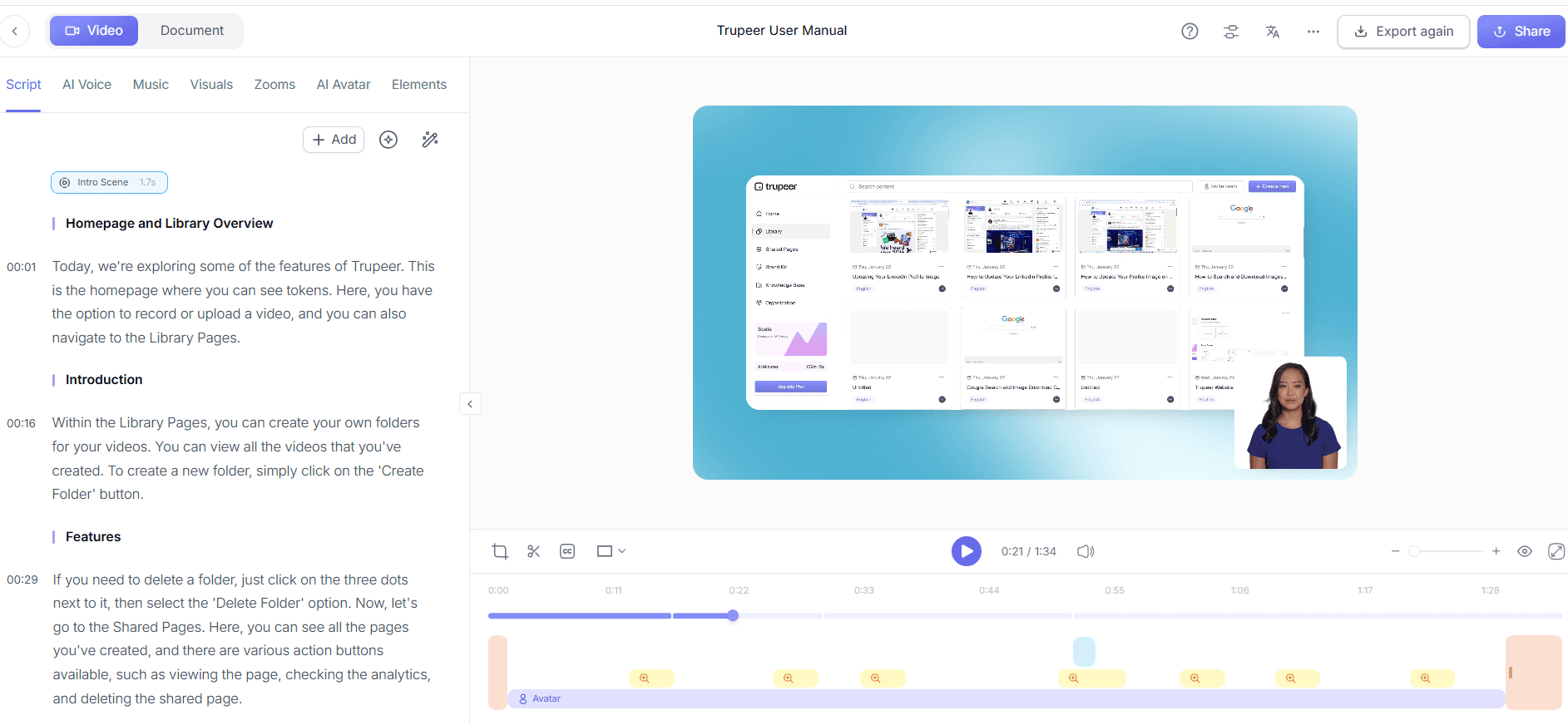
Step 5: Localize Your Demo for Global Audiences
To reach a broader audience, use Trupeer’s AI translation and dubbing capabilities. Translate your demo into over 40 languages with lip-sync accuracy. To do this, choose the translation option, select your target language, and let Trupeer handle the rest. The system will generate a localized version of your demo, complete with synchronized audio. This process takes about 10-15 minutes per language and is essential for expanding your reach to non-English speaking markets.

Step 6: Distribute and Track Engagement
Finally, use Trupeer’s AI-searchable knowledge base to distribute your demo effectively. This feature allows you to host your video on a custom domain with SSO, making it easily accessible to your prospects. also, it provides timestamp deep-links for quick navigation. After distribution, monitor viewer engagement with Trupeer’s analytics tools. These tools offer insights into viewer drop-off rates and engagement heatmaps, helping you refine your demo strategy. This comprehensive approach ensures your demos are not only seen but impactful.

What tips help you measure SC efficiency with video demos?
Implementing video demos effectively requires strategy and precision. Here are some actionable tips to maximize your SC efficiency and quota coverage using video demos.
use AI tools. Use an auto video editor to simplify the editing process, saving time and ensuring consistent quality across all demos.
Standardize demo formats. Create templates using Trupeer’s brand kits to maintain a consistent visual style, which helps in reinforcing brand identity and professionalism.
use analytics. Regularly review engagement analytics to understand how viewers interact with your demos. This data can inform future content adjustments to enhance effectiveness.
Optimize for mobile. Ensure your demos are viewable on mobile devices, as many prospects may access content on the go. This increases accessibility and reach.
Test different voiceovers. Experiment with different AI voiceover settings to find the tone and pace that resonates best with your audience.
Localize thoughtfully. When using translation features, consider cultural nuances to ensure your message is appropriately conveyed across different regions.
Compare alternatives. Review a Scribe alternative comparison to understand the unique benefits Trupeer offers over competitors, ensuring you’re using the best tool for your needs.
Frequently asked questions
How can video demos improve SC quota coverage?
Video demos improve SC quota coverage by allowing sales engineers to reach more prospects efficiently. By automating parts of the demo process, SCs can devote more time to high-impact activities, such as customizing solutions for key clients. Video demos also ensure consistent messaging, reducing errors and misunderstandings that can lead to lost sales. With tools like Trupeer, SCs can easily create, edit, and distribute high-quality demos, so enhancing their ability to meet and exceed quotas.
What is the best way to measure the effectiveness of video demos?
The best way to measure the effectiveness of video demos is through analytics. Tools like Trupeer provide detailed insights into viewer engagement, showing where viewers drop off and which segments capture the most attention. This data allows SCs to refine their content, focusing on elements that resonate most with their audience. also, tracking metrics such as view counts and conversion rates can help assess the overall impact of video demos on sales outcomes.
Why should you use AI voiceover for demos?
AI voiceover enhances demos by providing clear, professional narration that can be easily customized for different audiences. Using AI voiceover ensures consistency in delivery, which is crucial for maintaining brand standards. Trupeer offers over 65+ natural voices, allowing SCs to tailor the tone and pace of their demos to suit specific cultural or industry contexts. This adaptability makes AI voiceover an invaluable tool for creating engaging and effective video content.
Can Trupeer help with multi-language video demos?
Yes, Trupeer can assist with multi-language video demos through its AI translation and dubbing features. By translating content into over 40 languages and ensuring lip-sync accuracy, Trupeer enables SCs to reach a global audience without the need for extensive localization efforts. This capability is crucial for companies looking to expand their market reach and cater to diverse customer bases. Find out more about AI video translation to better understand how it works.
Does AI-driven editing really save time for sales engineers?
Absolutely, AI-driven editing significantly reduces the time SCs spend on polishing demos. Features like automatic filler-word removal and AI narration automate tasks that would typically require manual input, freeing up valuable time for SCs. With Trupeer’s tools, a process that once took hours can now be completed in minutes, allowing SCs to focus on strategic elements of the sales process. This efficiency helps increase overall productivity and quota coverage.
Artigos relacionados


