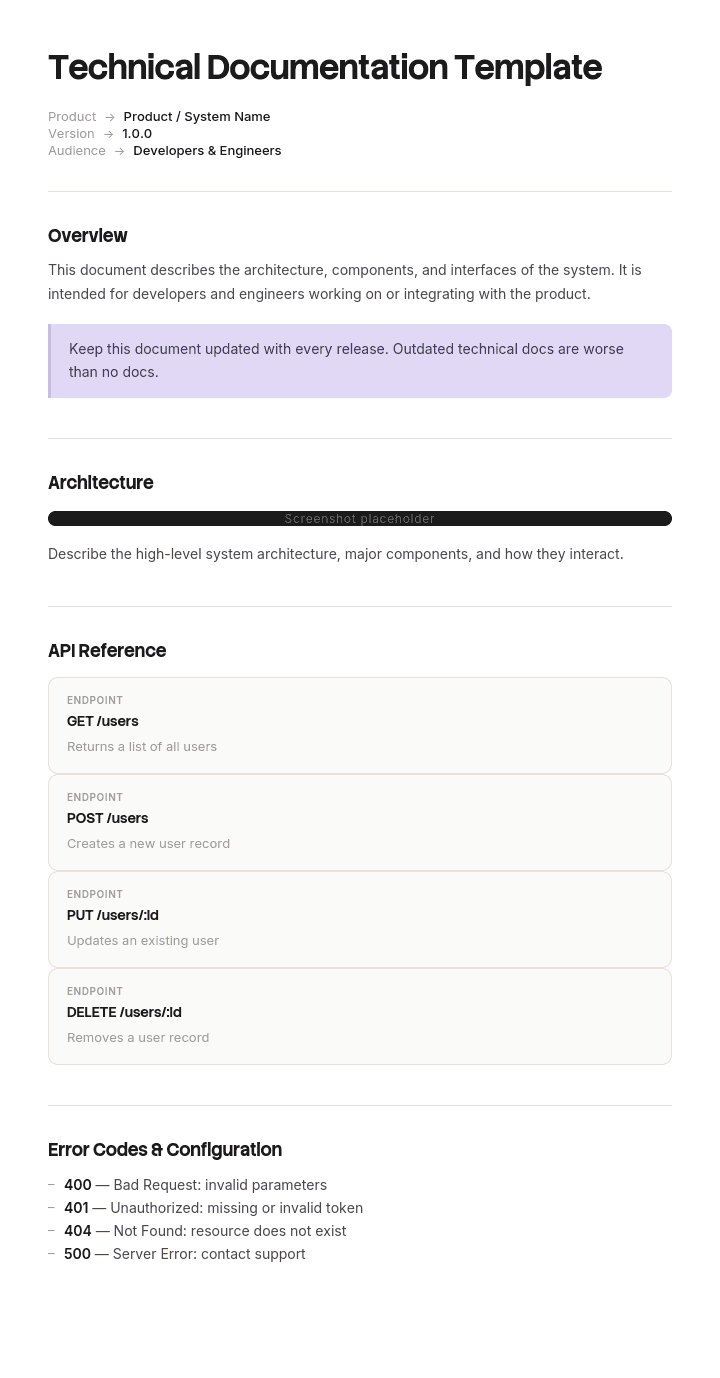
Gebruik deze sjabloon
Technische documentatie is essentieel voor iedereen die je product gebruikt, ondersteunt of erop voortbouwt. Met Trupeer kun je uren besparen op het schrijven van dichte technische content door te starten met een kant-en-klare technische documentatiesjabloon, dit aan te passen met je brand identity en er duidelijke, boeiende video's over technische documentatie van te maken die makkelijker te consumeren zijn dan muren met tekst.
Wat is een gratis technisch documentatiesjabloon?
Een gratis technisch documentatiesjabloon is een herbruikbare structuur om te beschrijven hoe een technisch systeem, product of onderdeel werkt, voor de mensen die het moeten bouwen, onderhouden, integreren met, bedienen of beoordelen.
Het verschilt van gebruikersdocumentatie in één opzicht, en dat verandert alles over hoe het geschreven moet worden. De lezer is vaak nog niet aanwezig. Een gebruikershandleiding wordt gelezen door iemand die het product vandaag gebruikt en die een collega kan vragen als iets onduidelijk is. Technische documentatie wordt gelezen door een onderhoudsengineer over vier jaar, een integrator bij een ander bedrijf, een auditor, of de persoon die de klus overneemt nadat jij vertrekt.
Niemand van hen kan je iets vragen.
Het sjabloon is niet de documentatie. Sectielijsten hiervoor worden breed gepubliceerd en zijn grotendeels identiek. Wat bepaalt of je documentatie over vijf jaar de moeite waard is, is een categorie content waar bijna geen enkel sjabloon om vraagt, hieronder uitgewerkt.
Indeling volgt gebruik. Een gratis technisch documentatiesjabloon Word-doc is geschikt voor documenten die worden beoordeeld en goedgekeurd, en een gratis technisch documentatiesjabloon DOCX-bestand is hetzelfde onder zijn volledige extensie. Een gratis technisch documentatiesjabloon Excel-versie is geschikt voor registers, parameterrijen en traceability-matrices. Een gratis technisch documentatiesjabloon PDF is geschikt voor uitgegeven en versiebeheerde deliverables, wat hier belangrijker is dan bij de meeste documentatie, omdat technische documenten vaak contractueel of regelgevend zijn.
Welke technische documentatie bedoel je?
De term dekt twee behoorlijk verschillende dingen en het is de moeite waard om vast te stellen wat je nodig hebt voordat je een structuur aanneemt.
Technische documentatie in algemene zin. Beschrijven hoe een systeem, product of stuk software werkt, voor engineers en technische gebruikers. Architectuur, specificaties, interfaces, configuratie, testbewijs, onderhoudsprocedures. Dit is wat de meeste mensen bedoelen en waar deze pagina vooral over gaat.
Technische documentatie als regelgevend artefact. In meerdere jurisdicties noemt de term een specifieke verplichte deliverable met voorgeschreven inhoud. Producten die op de Europese markt worden gebracht onder CE-markering, medische hulpmiddelen, machines en diverse andere gereguleerde categorieën vereisen allemaal een technisch dossier of technische documentatie met gedefinieerde scope, bewaartermijnen en eisen voor beschikbaarheid.
Als je in het tweede geval zit, zal geen enkel sjabloon van welke website dan ook voldoen aan de eis. De toepasselijke regelgeving of norm specificeert de inhoud, conformity assessment-bodies hebben verwachtingen buiten de tekst, en het verkeerd doen verhindert dat je het product kunt verkopen. Werk vanuit de regelgeving en neem gekwalificeerd advies. Niets op deze pagina is een vervanging voor een van beide.
De twee overlappen in de praktijk, omdat de engineeringcontent die onderdeel is van een technisch dossier documentatie is die je sowieso al zou moeten hebben. De structuur hieronder helpt je om goede technische content te produceren. Het vertelt je niet wat een regelgever vereist.
Hoe je dit sjabloon aanpast in Trupeer
Stap 1: Open de sectie Templates
Ga naar de sectie Templates via de hoofd navigatie.

Stap 2: Selecteer en open een sjabloon
Klik op een willekeurig sjabloon waarmee je wilt werken om het te openen.

Stap 3: Breid de sjabloonweergave uit
Als dat nodig is, breid je de sjabloonweergave uit om de volledige lay-out en details duidelijk te zien.

Stap 4: Bewerk het sjabloon
Klik op Edit om te beginnen met het aanpassen van het geselecteerde sjabloon.

In de editor kun je:
Nieuwe secties toevoegen
Opmaakregels definiëren of bijwerken
Een logo toevoegen en de positie en gerelateerde instellingen aanpassen
Stap 5: Sla je aangepaste sjabloon op
Nadat je alle noodzakelijke wijzigingen hebt doorgevoerd, klik je op Save om het bijgewerkte sjabloon als je eigen sjabloon op te slaan.

Stap 6: Bekijk en verfijn het sjabloon
Als je wilt zien hoe je aangepaste sjabloon eruitziet, open je de Preview.

Vanaf het preview-scherm kun je indien nodig direct doorgaan met het maken van aanpassingen, zodat het sjabloon precies verschijnt zoals je het wilt.
Met een sjabloon voor technische documentatie kun je:
Uren besparen op schrijven: Sla de lege pagina over en gebruik een structuur die is ontworpen voor technische content.
Standaardiseren over teams: Gebruik dezelfde structuur voor consistente documentatie over producten, modules of features.
In lijn blijven met je merk: Pas je logo, lettertypen en kleuren toe met Trupeer's brand kit - zodat documentatie consistent is met je product identity.
De supportbelasting verlagen: Duidelijke video's en docs helpen gebruikers self-serve, waardoor tickets en supporttijd afnemen.
Lokaliseren voor wereldwijde gebruikers: Vertaal technische content naar 65+ talen met één klik.
Zonder gedoe bijwerken: Bewerk één keer en Trupeer genereert de video automatisch opnieuw.
Alles behalve de redenen is te herstellen
Hier is het argument dat moet bepalen hoe je je inspanning voor documentatie besteedt.
Bijna alles in technische documentatie beschrijft de status. Wat de architectuur is, waar de parameters op staan, hoe de interfaces zijn gedefinieerd, wat de volgorde doet. Al dat is echt nuttig en het kan allemaal worden hersteld door iemand die voldoende vastberaden is, omdat het systeem zelf de bron van waarheid is. Lees de code, inspecteer de configuratie, volg de bekabeling, voer de test uit.
Het herstellen van status is duur en traag. Het is niet onmogelijk.
De redenering is van een andere soort. Waarom deze aanpak in plaats van de voor de hand liggende. Waarom deze waarde en niet de standaard. Waarom dit onderdeel is gekozen terwijl er een goedkopere bestaat. Waarom er een stap is die overbodig lijkt.
Niets daarvan zit in het systeem. Het bestond in een gesprek, in iemands hoofd, en als het niet is opgeschreven, is het weg zodra ze vertrekken. En geen enkele vastberadenheid herstelt het.
Het praktische gevolg is specifiek en duur. Iemand die competent is kijkt naar een systeem, ziet iets dat verspilling of onnodig lijkt, heeft geen manier om te achterhalen waarom het er is, en verwijdert het. Ze handelen redelijk. De documentatie beschreef de status, die ze al konden zien, en zei niets over de reden, die ze niet konden.
Daarom is de hoogste waardecontent in technische documentatie het deel waar bijna geen enkel sjabloon om vraagt.
Het beslisdocument
Het mechanisme is kort en oud, en het werkt.
Schrijf telkens een kort verslag wanneer er iets wordt besloten dat een toekomstige lezer niet zou kunnen raden. Vijf velden, niet meer dan een half pagina.
Wat er is besloten. In één zin.
Waarom. De redenering, inclusief wat is afgewezen en op welke gronden. Dit is het veld dat ertoe doet en het moet het langste zijn.
Wat gebeurt er als dit wordt omgedraaid. Het gevolg waar iemand mee te maken krijgt als ze het terugdraaien zonder het te weten. Dit veld verandert een historische notitie in een waarschuwing.
Wie heeft beslist, en wanneer. Zodat een toekomstige lezer kan beoordelen of de redenering nog steeds geldt.
Status. Actueel, vervallen of onbekend. De derde waarde wordt hieronder besproken en is nuttiger dan het klinkt.
Schrijf er één voor elke afwijking van een standaardaanpak, elke niet voor de hand liggende parameter, elk afgewezen alternatief dat iemand opnieuw zal voorstellen, en elke workaround.
Schrijf er geen voor beslissingen die een competente lezer op dezelfde manier zou nemen. Een record voor elke keuze levert een hoeveelheid op die niemand leest, en het punt is dat dit de entries zijn die de moeite waard zijn om terug te vinden.
Als de redenering echt onbekend is, omdat de persoon die heeft besloten is vertrokken, leg dat dan expliciet vast. Een notitie waarin staat dat deze waarde bewust is, dat de reden niet bekend is en dat het niet moet worden gewijzigd zonder te testen, is veel nuttiger dan stilte. Het vertelt de volgende persoon dat ze een echte vraag hebben gevonden en geen omissie.
Wat een technisch documentatiesjabloon moet bevatten
Negen onderdelen. De beslisdocumenten zijn de toevoeging.
Onderdeel | Wat het doet |
|---|---|
Scope en doelgroep | Wat dit dekt en voor wie het is geschreven. Onderhouder, integrator, operator of beoordelaar. |
Systeemoverzicht | Wat het doet en hoe de onderdelen samenkomen, in voldoende diepte zodat de detailsecties logisch zijn. |
Architectuur en interfaces | Componenten, afhankelijkheden en hoe alles externs aansluit. |
Configuratie en parameters | Instellingen, met hun waarden, en een verwijzing naar het beslisdocument voor alles wat niet voor de hand ligt. |
Beslisdocumenten | Waarom de niet voor de hand liggende keuzes zijn gemaakt en wat er gebeurt als ze worden omgedraaid. |
Operationele en onderhoudsprocedures | Wat er moet worden gedaan, door wie, en met welke interval. |
Test- en verificatiebewijs | Wat er is getest, wanneer, met welk resultaat. Vaak een contractuele of regelgevende eis. |
Bekende beperkingen en open issues | Wat niet werkt, wat is uitgesteld, wat kwetsbaar is. |
Versie, eigenaar en laatst geverifieerd | Op elk document, met wanneer iemand voor het laatst heeft bevestigd dat het nog steeds klopt. |
De rij met bekende beperkingen is het op één na meest weggelaten en het op één na meest waardevolle. Documentatie die alleen beschrijft wat werkt, suggereert dat alles werkt, en de volgende persoon ontdekt de beperkingen door ze tegen te komen.
Gratis technisch documentatiesjabloon: de structuur om over te nemen
Gevuld met een echt voorbeeld in plaats van placeholders. Het systeem is een batching- en weegbesturingssysteem dat is geïnstalleerd op een productielocatie voor voeding.
Kopieer vanaf hier.
Scope en doelgroep. Besturingssysteem voor de batchinglijn op de locatie van de klant. Geschreven voor besturingstechnici die het systeem onderhouden of aanpassen, en voor het engineeringteam van de klant. Dekt niet de mechanische installatie, die in het mechanische dossier zit, of de receptdata, die de klant bezit.
Systeemoverzicht. Twee alinea's over wat de lijn doet, de batchvolgorde en hoe het besturingssysteem, weeginstrumenten en plantsystemen met elkaar samenhangen.
Architectuur en interfaces. Controller-model en firmwareversie. Weeginstrumenten en hun adressen. Interface naar het productiesysteem van de klant, protocol en uitgewisselde data. Interface naar het alarmsysteem van de locatie.
Configuratie en parameters. Volledige parameterrij met waarden. Elke parameter die een beslisdocument draagt, is gemarkeerd, zodat een lezer die een waarde wijzigt weet om te kijken.
Parameter | Waarde | Beslisdocument |
|---|---|---|
Valve V3 open delay | 3.0 seconds | DR-014 |
Weigh settle time | 1.2 seconds | Standard |
Batch tolerance | 0.4 percent | DR-007 |
Discharge sequence order | 2, 1, 3 | DR-014 |
Beslisdocumenten. Eén voorbeeld van het format.
DR-014. Wat er is besloten: er wordt een vertraging van drie seconden toegepast voordat valve V3 opent, en de ontlaadvolgorde draait 2, 1, 3 in plaats van 1, 2, 3.
Waarom: tijdens de commissioning in het zesde jaar van de oorspronkelijke installatie werd product carryover waargenomen tussen opeenvolgende batches van verschillende recepten. Onderzoek wees uit dat de restdruk in lijn 1 niet volledig werd gelijkgemaakt wanneer V3 opende, waardoor materiaal van de vorige batch werd meegenomen. De vertraging maakt gelijk en de volgorde-wijziging zorgt ervoor dat lijn 1 ontlaadt voordat V3 opent. Alternatief overwogen en afgewezen: een mechanische check valve, die is afgewezen op basis van reiniging en inspectie in een food-omgeving.
Wat gebeurt er als dit wordt omgedraaid: product carryover tussen batches. In een plant die allergenen verwerkt is dit een contaminatierisico, geen efficiëntievraag. Het treedt niet opnieuw op in een workshop-testopstelling omdat de conditie afhangt van de lengte van de leiding en de viscositeit van het product.
Besloten door twee genoemde engineers, met de datum. Status: actueel.
Operationele en onderhoudsprocedures. Kalibratie-interval en procedure. Proces voor firmware-updates. Wat je moet controleren na elke wijziging van een recept.
Test en verificatie. Resultaten van factory acceptance test, resultaten van site acceptance test, met datums en handtekeningen. Kalibratiecertificaten.
Bekende beperkingen. Het systeem ondersteunt geen recepten met meer dan acht ingrediënten. De interface naar het productiesysteem van de klant is éénrichtingsverkeer en ontvangt geen bevestiging. Batchgeschiedenis wordt slechts negentig dagen bewaard.
Versie, eigenaar, laatst geverifieerd. Versie 7. Beheerd door de lead control engineer. Content voor het laatst geverifieerd tegen het geïnstalleerde systeem in maart, op basis van een bezoek aan de locatie.
Kopieer naar hier.
Voorbeeld van technische documentatie: drie seconden die niemand had opgeschreven
Trenholm Systems, een bedrijf van ongeveer honderdvijftig mensen, ontwerpt en installeert weeg- en batching-systemen voor productielocaties voor voeding.
De technische documentatie was uitgebreid: meer dan vierhonderd documenten over tekeningen, specificaties, configuratielijsten en testrapporten. Het beschreef de status van elk systeem nauwkeurig.
Eén geïnstalleerd systeem had een vertraging van drie seconden voordat een valve opende, en een ontlaadvolgorde die in een volgorde liep die verkeerd leek.
Beide waren zes jaar eerder gespecificeerd door twee engineers na een commissioning-probleem, om een reden die volledig logisch was en nergens in een document terug te vinden. De parameterrij legde de waarde vast. Niets legde vast waarom.
Beide engineers waren inmiddels vertrokken bij het bedrijf.
Een nieuwere engineer, die cycle times bekeek om efficiëntie te vinden, identificeerde de vertraging van drie seconden als drie seconden waarin er op elke batch niets gebeurde. Dat was een juiste observatie. Hij testte de wijziging op de workshop-rig, waar het geen verschil maakte met iets, omdat de conditie die het oorspronkelijke probleem veroorzaakte afhangt van de lengte van de leiding en de viscositeit van het product en niet voorkomt op een testopstelling. Hij implementeerde het.
Op de klantlocatie veroorzaakte het product carryover tussen opeenvolgende batches. Omdat de plant allergenen verwerkt, was dit geen efficiëntiekwestie. Elf ton product werd in quarantaine geplaatst en vernietigd, de productie stopte vier dagen terwijl de oorzaak werd gevonden, en de klant deed zijn eigen onderzoek. De totale kosten inclusief de claim van de klant kwamen uit op ongeveer driehonderdvijftigduizend pond.
Niemand had roekeloos gehandeld. De engineer had de documentatie bekeken, die hem vertelde wat de waarde was, en hij testte de wijziging, wat meer is dan veel mensen zouden doen. Wat hij niet kon doen, was achterhalen waarom de waarde bestond, omdat dat zes jaar eerder een gesprek in een plant room was.
Daarna beoordeelde Trenholm zestig afwijkingen van hun standaardaanpak over hun geïnstalleerde basis. Negen hadden een opgeschreven reden.
Ze introduceerden een vereiste voor beslisdocumenten. Elke afwijking van de standaard krijgt vijf velden: wat, waarom, wat er gebeurt als het wordt omgedraaid, wie heeft beslist en wanneer.
Achteraf reconstrueerden ze veertig één van de zestig door mensen te vinden die zich het nog herinnerden. Negentien konden niet worden gereconstrueerd en werden vastgelegd als reden onbekend, niet wijzigen zonder te testen op locatie, wat een echt nuttige entry is.
Drie jaar later zijn er geen verdere incidenten met omkeringen geweest en de lijst met onbekende redenen is teruggebracht tot zes, omdat afwijkingen worden getest tijdens gepland werk en ofwel worden bevestigd ofwel verwijderd.
De vierhonderd documenten beschreven alles over het systeem behalve het enige dat ertoe deed.
Hoe je technische documentatie schrijft in zes stappen
Noem de lezer en wat ze niet zullen hebben. Een onderhoudsengineer over vier jaar heeft het systeem en geen collega's die het zich nog herinneren. Dat ontbreken is de ontwerpbepaling.
Schrijf het overzicht vóór de details. Detailsecties zijn onleesbaar zonder een mentaal model, en de persoon die het model heeft, ben jij.
Documenteer status één keer en nauwkeurig. Parameters, interfaces, architectuur. Dit is het grootste deel en het makkelijke stuk.
Schrijf een beslisdocument voor alles waar een competente lezer aan zou twijfelen. Afwijkingen, niet voor de hand liggende waarden, afgewezen alternatieven, workarounds.
Schrijf de beperkingen op. Wat niet werkt en wat is uitgesteld. Documentatie die alleen successen beschrijft, suggereert dat er geen mislukkingen zijn.
Leg vast wanneer het voor het laatst is geverifieerd tegen de werkelijkheid, niet wanneer het voor het laatst is bewerkt.
Stap vier is degene die het voorbeeld hierboven had kunnen voorkomen en die wordt overgeslagen omdat het voelt als extra werk op het moment dat de beslissing voor iedereen aanwezig al duidelijk is.
Soorten technische documentatie
Vier brede categorieën, nuttig omdat ze verschillende lezers hebben en daarom verschillende regels.
Product- en systeemdocumentatie. Architectuur, specificaties, interfaces, configuratie. Geschreven voor mensen die erop voortbouwen of het onderhouden. Dit is waar beslisdocumenten thuishoren.
Proces- en operationele documentatie. Hoe het ding wordt gedraaid, onderhouden en hersteld. Overlap met runbooks en procedures, en de runbook template behandelt de uitvoerbare vorm.
Technische documentatie voor gebruikers. API-referenties, integratiegidsen, technische gebruikershandleidingen. Geschreven voor mensen buiten je organisatie, wat de lat voor duidelijkheid aanzienlijk verhoogt.
Compliance- en bewijsdocumentatie. Testrapporten, certificaten, traceability, conformity assessment-materiaal. Vaak het deel met bewaartermijneisen eraan gekoppeld, en het deel dat jaren later audits moet overleven.
De meeste organisaties doen de eerste en derde redelijk en de tweede en vierde slecht, meestal omdat de eerste en derde duidelijke lezers hebben die klagen en de tweede en vierde lezers hebben die jaren later binnenkomen. De beste gratis technische documentatiesjabloon voor jou is daarom degene die past bij de categorie waarin je het zwakst bent, in plaats van degene die je al goed doet.
Technische documentatie, softwaredocumentatie of IT-documentatie?
Drie overlappende termen, en het is de moeite waard om de grenzen te bepalen, omdat dezelfde organisatie vaak alle drie nodig heeft.
Technische documentatie is de breedste. Het dekt elk technisch systeem: hardware, software, plant, instrumenten, geïntegreerde producten. Als er sprake is van een fysiek of gereguleerd product, is dit de juiste term en de juiste structuur.
Softwaredocumentatie dekt specifiek een softwareproduct en is onderverdeeld in getting started, referentie, handleidingen, architectuur, operationele documentatie en release notes. De software documentation template behandelt die indelingen en de test om te bepalen of ze werken.
IT-documentatie dekt de eigen infrastructuur en het eigen IT-landschap van een organisatie: wat er draait, waar, wie het beheert en hoe het is geconfigureerd. Het kenmerkende probleem is veroudering, niet afwezigheid.
Als je een product documenteert dat je verkoopt, wil je technische of softwaredocumentatie. Als je de systemen documenteert waarop je eigen organisatie draait, wil je IT-documentatie. Het argument over beslisdocumenten op deze pagina geldt voor alle drie en geldt het sterkst waar er een niet voor de hand liggende configuratie bestaat.
Wat een gratis technisch documentatiesjabloon niet kan oplossen
Redenering die nooit is vastgelegd. Zodra de mensen die hebben besloten zijn vertrokken, kan geen enkel sjabloon het terughalen. Het enige alternatief is het opschrijven terwijl ze er nog zijn, en vastleggen dat het onbekend is wanneer ze er niet meer zijn.
Documentatie geschreven door iemand die het werk niet heeft gedaan. Ze kunnen de status nauwkeurig beschrijven en kunnen de redenen niet leveren, en dat is het halve deel dat ertoe doet.
Content die nooit wordt geverifieerd. Geen enkele gratis download van een technisch documentatiesjabloon vertelt je of wat het zegt nog steeds klopt. Een laatst geverifieerde datum en iemand die controleert is het enige mechanisme.
Regelgevende toereikendheid. Als technische documentatie een wettelijke vereiste is, definieert de regelgeving de inhoud en voldoet een algemeen sjabloon daar niet aan.
Leg de redenering vast voordat die vertrekt
De moeilijkste content om vast te leggen is de redenering, en de reden is niet dat mensen niet bereid zijn. Het is dat uitleggen een gesprek is en documenteren een taak, en het gesprek is makkelijk terwijl de taak dat niet is.
Vraag een engineer om op te schrijven waarom een systeem op een bepaalde manier is geconfigureerd en je krijgt drie regels. Vraag ze om je erdoorheen te leiden en ze leggen het commissioning-probleem uit, het alternatief dat ze hebben afgewezen en de twee andere plekken waar dezelfde issue zou kunnen opduiken. Kennis komt naar buiten wanneer ze praten en niet wanneer ze typen.
Trupeer AI legt het vast in die vorm. Iemand loopt door het systeem terwijl ze opnemen en uitleggen, en de output is een geschreven walkthrough met screenshots die al zijn vastgelegd en geplaatst, naast de video, in je eigen branding. De redenering komt aan als gesproken tekst, zoals het bestaat, en wordt een document zonder dat iemand hoeft te gaan zitten om het op te schrijven.
Leg het vast. Maak er een merk van. Vertaal het. Trupeer it.
Het moment om dit te doen is voordat iemand vertrekt, en het is het meest voor de hand liggende gebruik met de minste onduidelijke prompting. Een vertrekkende engineer met twee weken opzegtermijn kan hun ongebruikelijke systemen in een paar uur vastleggen, wat een veel betere overdracht is dan een geschreven samenvatting die onder tijdsdruk wordt geproduceerd. De twee engineers van Trenholm vertrokken met zes jaar context en niemand vroeg hen om de drie seconden uit te leggen.
Waar teams over locaties of talen heen werken, levert dezelfde opname in elk geval hetzelfde materiaal op, zodat een systeem dat in één land wordt onderhouden en in een ander is gebouwd op dezelfde manier wordt begrepen.
Het materiaal staat in je knowledge base en verdubbelt als training voor iedereen die het systeem overneemt. Procedure op taakniveau hoort in de work instructions. Consistentie over je documenten is een kwestie van één keer de brand kit instellen, en de setup wordt behandeld in de document template setup guide.
Veelgestelde vragen
Is er een gratis technisch documentatiesjabloon Word-versie?
Word is geschikt voor technische documenten die worden beoordeeld, goedgekeurd en uitgegeven, wat voor de meeste ervan geldt buiten pure softwarecontexten. Een technisch documentatiesjabloon Word-bestand is het juiste format voor specificaties, ontwerpdocumenten en alles wat contractueel is.
Twee instellingen zijn het waard om goed te krijgen. Zet de versie, eigenaar en laatst geverifieerde datum in de voettekst van de pagina in plaats van alleen op de cover, en gebruik echte heading-stijlen zodat de inhoudspagina wordt gegenereerd en het document navigeerbaar blijft tot op honderd pagina's.
Is er een gratis technisch documentatiesjabloon Word doc-versie?
Ja, en een gratis technisch documentatiesjabloon Word doc-bestand is hetzelfde als een Word-bestand, met de oudere extensie.
Nog nuttiger dan de vraag over het format is wat je toevoegt aan welk sjabloon je ook gebruikt. Een sectie voor beslisdocumenten en een sectie voor bekende beperkingen. Geen van beide verschijnt in een algemeen sjabloon dat ik heb gezien en beide zijn waar de waarde van technische documentatie zich in de loop van de tijd bevindt.
Is er een technisch documentatiesjabloon DOCX-versie?
DOCX is simpelweg het huidige Word-format, dus een technisch documentatiesjabloon DOCX-bestand en een Word-bestand zijn hetzelfde document.
Waar het onderscheid soms wel belangrijk is, is in toolchains die documenten automatisch genereren, omdat DOCX een gestructureerd format is dat programmatisch kan worden geproduceerd. Als je technische documentatie wordt gegenereerd vanuit een bron van waarheid in plaats van met de hand wordt geschreven, is dat het onderzoeken waard, omdat gegenereerde content niet kan afwijken van het systeem dat het beschrijft.
Is er een gratis technisch documentatiesjabloon PDF?
PDF is de uitgegeven versie en het is hier belangrijker dan bij de meeste documentatie, omdat technische documenten vaak contractuele deliverables, regelgevend bewijs of beide zijn. Exporteer een gratis technisch documentatiesjabloon PDF bij elke uitgave met de versie en datum op elke pagina.
Bewaar de bewerkbare bron en bewaar vervallen issues in plaats van ze te overschrijven. In staat zijn om te laten zien welke versie van een technisch document op een bepaalde datum van kracht was, is vaak precies het punt.
Is er een gratis technisch documentatiesjabloon Excel-versie?
Excel is geschikt voor de registers, niet voor de proza. Een gratis technisch documentatiesjabloon Excel-bestand werkt goed voor parameterrijen, interface-registers, traceability-matrices die requirements koppelen aan tests, en een documentregister dat vastlegt wat er bestaat en wanneer het voor het laatst is geverifieerd.
Die laatste is het waard om te bouwen, zelfs als je niets anders bouwt. Eén rij per document met eigenaar, versie en laatst geverifieerde datum vertelt je meer over de status van je documentatie dan het lezen van een van de onderdelen.
Is er een gratis technisch documentatiesjabloon gratis download die de moeite waard is om te gebruiken?
De sectielijst is goed ingeburgerd en elke gepubliceerde versie biedt ongeveer dezelfde, dus een gratis technisch documentatiesjabloon gratis download bespaart je hoogstens een middag.
Beoordeel ze allemaal op één vraag. Is er ergens om vast te leggen waarom iets op een bepaalde manier is gedaan? In essentie heeft geen van alle dat, omdat sjablonen zijn gebouwd rond het beschrijven van status, en status is het onderdeel dat zonder sjablonen kan worden hersteld.
Wat is het beste gratis technisch documentatiesjabloon?
Het beste gratis technisch documentatiesjabloon is degene die je geverifieerd zult blijven houden, wat meestal betekent: de simpelste.
Als je opties vergelijkt, zijn de twee secties waar je op moet letten beslisdocumenten en bekende beperkingen. Een sjabloon met beide, hoe simpel ook, levert documentatie op die over vijf jaar nog steeds nuttig is. Een gepolijst sjabloon zonder beide levert een accurate beschrijving van een systeem op waar niemand durft aan te veranderen.
Wat moet technische documentatie bevatten dat de meeste sjablonen weglaten?
Drie dingen. De redenering achter niet voor de hand liggende keuzes, inclusief wat is afgewezen en waarom. Wat er kapotgaat als een beslissing wordt omgedraaid, waardoor een historische notitie een waarschuwing wordt. En wat niet werkt, oftewel bekende beperkingen en uitgestelde items.
Alle drie delen een eigenschap: ze kunnen niet worden hersteld door het systeem te inspecteren. De rest in technische documentatie kan dat wel, als je genoeg tijd hebt, en daarom zijn dit de secties die je moet beschermen wanneer de inspanning voor documentatie wordt ingekort.

