4.8/5
برنامج إنشاء الفيديوهات التعليمية
أنشئ مقاطع فيديو تعليمية خطوة بخطوة بكل سهولة. سجّل أي عملية ودَع الذكاء الاصطناعي ينشئ شروحات مرئية واضحة.
جرّب مجانًا

يساعدك برنامج إنشاء فيديوهات الدروس التعليمية من Trupeer على إنتاج فيديوهات تعليمية واضحة وجذابة باستخدام تسجيل الشاشة المدعوم بالذكاء الاصطناعي والتحرير التلقائي. سجّل أي سير عمل، وستحوّله Trupeer إلى درس تعليمي منظّم مع تأثيرات التكبير، وتنظيف التعليق الصوتي، وتسلسل خطوة بخطوة.
سجّل شاشتك لإنشاء فيديوهات تعليمية منظّمة تلقائيًا.
يضيف الذكاء الاصطناعي تأثيرات التكبير، وينظّف التعليق الصوتي، وينظّم الخطوات بوضوح.
أنشئ أدلة تعليمية مكتوبة إلى جانب كل فيديو تعليمي.
طبّق هوية العلامة التجارية بشكل متسق عبر كل محتواك التعليمي.
صدّر فيديوهات الدروس التعليمية إلى أي منصة بنقرة واحدة.
ما هو برنامج إنشاء فيديوهات الدروس التعليمية من Trupeer؟
يحوّل برنامج إنشاء فيديوهات الدروس التعليمية من Trupeer تسجيلات الشاشة الخاصة بك إلى فيديوهات تعليمية مصقولة وخطوة بخطوة. سواء كنت تشرح سير عمل برمجيًا، أو تعرض عملية، أو ترشد المستخدمين خلال ميزة جديدة، فإن الذكاء الاصطناعي في Trupeer يتولى جودة الإنتاج. أنت تسجل شاشتك، ويُنشئ البرنامج درسًا تعليميًا واضحًا وجذابًا ومحررًا باحترافية دون أي عمل يدوي لتحرير الفيديو.
كيف يعمل برنامج إنشاء فيديوهات الدروس التعليمية؟
البدء باستخدام برنامج إنشاء فيديوهات الدروس التعليمية لا يستغرق سوى بضع دقائق.
الخطوة 1: التسجيل أو الرفع
ابدأ تسجيل شاشة مباشرة في متصفحك، أو ارفع فيديو موجودًا مسبقًا.

الخطوة 2: المعالجة بالذكاء الاصطناعي
يحلل الذكاء الاصطناعي تسجيلك، ويزيل الكلمات الحشو، ويضيف تأثيرات التكبير، وينشئ الفيديو تلقائيًا.
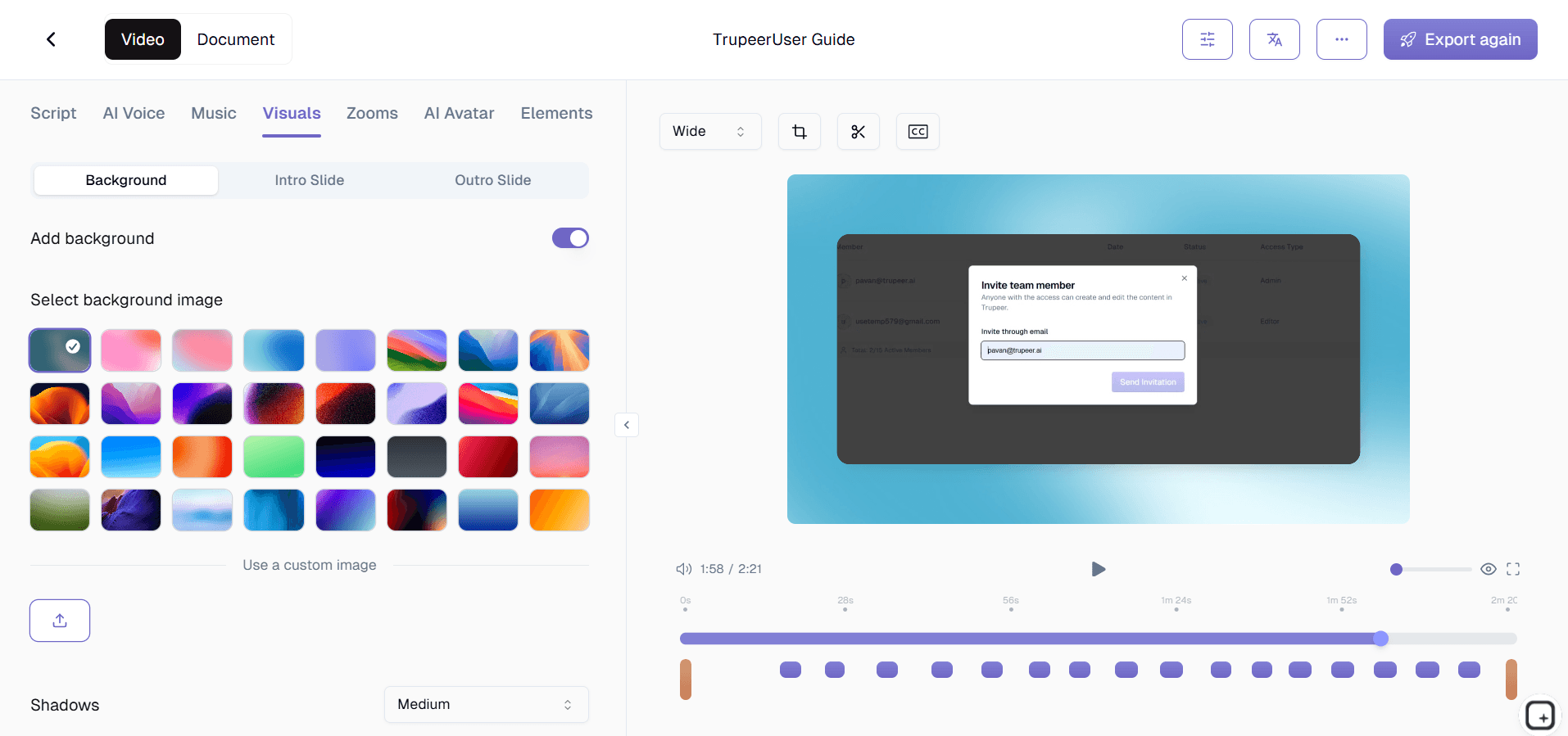
الخطوة 3: التخصيص والمشاركة
حرّر الناتج، وطبّق حزمة العلامة التجارية الخاصة بك، وشاركه عبر رابط أو ضمّنه في موقعك الإلكتروني. كما أن التحديثات سهلة بنفس القدر.

الميزات الرئيسية لبرنامج إنشاء فيديوهات الدروس التعليمية من Trupeer
الهيكلة التلقائية للدروس التعليمية: يتعرّف الذكاء الاصطناعي في Trupeer على التدفق الطبيعي لتسجيل الدرس، ويقسّمه إلى خطوات واضحة مرقمة. يحصل كل انتقال بين الخطوات على مؤشر بصري، ما يخلق تجربة تعلم منظّمة دون تحرير يدوي.
تكبير وإبراز مدرك للسياق: يحدد الذكاء الاصطناعي عناصر الشاشة المهمة لكل خطوة من خطوات الدرس، ويطبّق تأثيرات تكبير تلفت الانتباه بدقة إلى المكان الذي يحتاج المتعلمون للنظر إليه. يتم تمييز الأزرار عندما يلزم النقر عليها، ويتم التركيز على حقول الإدخال عند الحاجة إلى إدخال البيانات، وتُبرز قوائم التنقل أثناء خطوات التوجيه.
تنعيم وتحسين التعليق الصوتي: يحتاج سرد الدرس إلى أن يكون واضحًا وواثقًا حتى يتمكن المتعلمون من المتابعة بفعالية. يزيل Trupeer الترددات اللفظية، ويوحّد مستوى الصوت عبر الدرس بالكامل، ويقلل الضوضاء الخلفية، ويضمن جودة صوت متسقة من البداية إلى النهاية. يحافظ الذكاء الاصطناعي على أسلوبك التعليمي مع إزالة المشتتات التي تجعل المتعلمين يفقدون التركيز.
مقدمات ونهايات قابلة للتخصيص: اضبط تسلسلات افتتاحية وختامية متسقة لفيديوهاتك التعليمية لتحديد السياق وتعزيز الخطوات التالية. تتيح لك القوالب تحديد ما يبدأ وينتهي به كل درس تعليمي، مع الحفاظ على صيغة احترافية ومعروفة عبر كل محتواك التعليمي دون تصميم مقدمات جديدة لكل فيديو.
لماذا تختار برنامج إنشاء فيديوهات الدروس التعليمية من Trupeer؟
ذكاء مخصص للدروس التعليمية: صُممت Trupeer خصيصًا لمحتوى الدروس التعليمية. يفهم الذكاء الاصطناعي سير العمل خطوة بخطوة وينشئ فيديوهات تعليمية تُعلّم بفعالية، وليس مجرد تشغيل تسجيلات الشاشة.
صياغتان من تسجيل واحد: سجّل مرة واحدة واحصل على فيديو تعليمي ودليل تعليمي مكتوب. لبِّ تفضيلات كل متعلم دون إنشاء المحتوى مرتين.
دعم السلاسل والمناهج: أنشئ تسلسلات تعليمية متعددة الأجزاء للموضوعات المعقدة. تدير Trupeer التنظيم بحيث يتبع المتعلمون مسارًا منظّمًا.
رؤى التفاعل: افهم كيف يستخدم المتعلمون دروسك التعليمية من خلال تحليلات تعرض معدلات الإكمال، وأنماط إعادة المشاهدة، ونقاط الانسحاب.
برنامج إنشاء فيديوهات الدروس التعليمية للفرق الداخلية
1. أنشئ فيديوهات تعليمية لكل أداة داخلية وكل عملية يستخدمها فريقك. عندما تتوفر دروس للمهام الشائعة، يحل أعضاء الفريق المشكلات بشكل مستقل بدلًا من مقاطعة الزملاء.
2. ابنِ مكتبة تعليمية قابلة للبحث تصبح المرجع الأساسي لمعرفة كيفية عمل الأشياء. يستبدل المحتوى التعليمي المنظم المستندات المبعثرة والمعرفة المؤسسية المحصورة في أذهان الأشخاص.
3. قلّل التدريب المتكرر من خلال تسجيل الدروس مرة واحدة ومشاركتها بشكل دائم. يتوقف أعضاء الفريق الأقدم عن تكرار الشروحات نفسها لأن الفيديو التعليمي يتولى ذلك.
4. حافظ على تحديث الدروس بسهولة عبر إعادة التسجيل عند تغيّر العمليات. حدّث أقسامًا محددة من درس تعليمي دون إعادة بناء الفيديو بالكامل من الصفر.
برنامج إنشاء فيديوهات الدروس التعليمية لفرق SaaS
1. أنشئ دروسًا تعليمية للمنتج تساعد العملاء على تبني الميزات بسرعة أكبر. عندما يستطيع المستخدمون المتابعة مع فيديو تعليمي واضح، يصلون إلى لحظة الإدراك أسرع ويبقون مع منتجك مدة أطول.
2. ابنِ مكتبة تعليمية شاملة تقلل حجم طلبات دعم العملاء. كل فيديو تعليمي يجيب عن سؤال شائع يمنع عشرات تذاكر الدعم شهريًا.
3. أطلق الميزات الجديدة مع فيديوهات تعليمية جاهزة منذ اليوم الأول. تسجل فرق المنتج سير العمل، وينتج الذكاء الاصطناعي الدرس، ويحصل العملاء على الإرشاد فور توفر الميزة.
4. مكّن فرق نجاح العملاء من إنشاء دروس تعليمية مخصصة للحسابات الاستراتيجية. تُظهر فيديوهات الدروس المخصصة التي تعالج سير عمل محدد لدى العميل القيمة وتعزز العلاقات.
برنامج إنشاء فيديوهات الدروس التعليمية للشركات الناشئة
1. أنتج محتوى تعليميًا احترافيًا يبني المصداقية لدى العملاء. تُظهر فيديوهات الدروس التعليمية الواضحة والمنظمة جيدًا أن منتجك ناضج ومدعوم بشكل جيد، حتى لو كان فريقك صغيرًا.
2. استبدل مكالمات العرض المباشر بمحتوى فيديو تعليمي قابل للتوسع. كل ساعة تقضيها في تسجيل درس تعليمي توفر عشرات الساعات التي كانت ستذهب إلى الشروحات المباشرة المتكررة.
3. أنشئ دروسًا داخلية تمكّن الموظفين الجدد من الانضمام بأنفسهم. توظف الشركات الناشئة على دفعات، وتتيح لهم فيديوهات الدروس التعليمية أن يكتسب عدة أشخاص جدد الخبرة في الوقت نفسه دون إرهاق الفريق.
4. ابنِ محتوى تعليميًا يؤدي دور مادة تسويقية أيضًا. تُبرز الدروس المصنوعة بإتقان قدرات منتجك للعملاء المحتملين، مع مساعدة العملاء الحاليين على النجاح.
برنامج إنشاء فيديوهات الدروس التعليمية للمؤسسات
1. وحّد المحتوى التعليمي عبر المؤسسة باستخدام قوالب وهوية بصرية متسقة. تحافظ الدروس على مستوى الجودة والرسائل نفسها على مستوى المؤسسة بغض النظر عن القسم الذي ينشئها.
2. انشر فيديوهات الدروس عبر بنية نظام إدارة التعلم الحالية لديك. تتكامل صيغ التصدير من Trupeer مع أنظمة إدارة التعلم المؤسسية للتوزيع المركزي وتتبع الدروس.
3. قلّل تكاليف التدريب الصفّي بمحتوى فيديو تعليمي ذاتي الإيقاع. توفر المؤسسات بشكل كبير عندما تحل فيديوهات الدروس التعليمية محل التدريب بقيادة المدرب في موضوعات العمليات والبرمجيات.
4. أنشئ محتوى تعليميًا يلبّي متطلبات الامتثال والتوثيق في التدقيق. تُظهر فيديوهات الدروس المنظّمة أن التدريب شامل وموحّد ويُقدَّم باستمرار.
برنامج إنشاء فيديوهات الدروس التعليمية للفرق البعيدة
1. وفّر وصولًا إلى الدروس التعليمية وفق وتيرة ذاتية عبر جميع المناطق الزمنية. يشاهد أعضاء الفريق البعيدون الدروس متى احتاجوا إليها، دون انتظار توفر زميل لشرح مباشر.
2. ابنِ مكتبة تعليمية مناسبة للعمل عن بُعد تقلل الاعتماد على التواصل المتزامن. عندما تتوفر الإجابات بصيغة دروس تعليمية، يجد الموظفون عن بُعد الحلول دون جدولة اجتماعات.
3. تأكد من جودة تعليمية متسقة من المساهمين الموزعين. يوحّد التحرير بالذكاء الاصطناعي والقوالب الناتج بحيث تفي الدروس من أعضاء الفريق البعيدين حول العالم بنفس مستوى الجودة.
4. استبدل مكالمات الفيديو المتكررة بمحتوى تعليمي قابل لإعادة الاستخدام. تلغي الفرق البعيدة اجتماعات التدريب المتكررة من خلال تسجيل دروس تخدم الغرض نفسه إلى أجل غير مسمى.
برنامج إنشاء فيديوهات الدروس التعليمية للمطورين
1. أنشئ دروسًا تقنية لإعداد واجهات API، ودمج SDK، وضبط أدوات المطورين. تساعد الفيديوهات التعليمية خطوة بخطوة المطورين على التنفيذ الصحيح من المحاولة الأولى، ما يقلل طلبات الدعم.
2. ابنِ سلاسل تعليمية لسير عمل التطوير المعقدة. ترشد الدروس متعددة الأجزاء المطورين بشكل منهجي عبر إعداد البنية، وضبط النشر، وتنفيذ الميزات المتقدمة.
3. وثّق إعداد بيئة المطور باستخدام فيديوهات تعليمية. يضبط أعضاء الفريق الجدد بيئة التطوير الخاصة بهم عبر اتباع درس تعليمي بدلًا من تصحيح دليل إعداد نصي.
4. شارك أفضل ممارسات البرمجة من خلال محتوى تعليمي. يسجل المطورون الكبار التقنيات والأنماط بصيغة دروس تعليمية، ما ينشئ موردًا تعليميًا قابلاً لإعادة الاستخدام لفريق الهندسة بأكمله.
برنامج إنشاء فيديوهات الدروس التعليمية لفرق الإعداد والدعم
1. صمّم تسلسلات تعليمية للإعداد يتبعها الموظفون الجدد في يومهم الأول. توفر فيديوهات الدروس التعليمية المنظّمة مسارًا واضحًا من التعريف وحتى إعداد الأدوات ثم أول المهام المنتجة.
2. أنشئ دروسًا لدعم العملاء تغطي أكثر المشكلات شيوعًا. تُخفف فيديوهات الدروس التعليمية في مركز المساعدة عدد التذاكر من خلال إرشاد العملاء إلى الحلول بشكل مستقل.
3. درّب وكلاء الدعم الجدد باستخدام فيديوهات تعليمية عن المنتجات والأدوات وإجراءات التصعيد. يضمن المحتوى التعليمي المتسق أن يتلقى كل وكيل نفس جودة التدريب.
4. حدّث الدروس بسرعة عندما تتغير المنتجات أو العمليات. أعد تسجيل الخطوات المتأثرة، ودع الذكاء الاصطناعي يحرر الدرس، وانشر التحديث قبل أن يواجه العملاء أو الموظفون محتوى قديمًا.
لماذا تختار الفرق Trupeer لمقاطع الفيديو التعليمية
هيكلة الخطوات
ينظم الذكاء الاصطناعي تسجيلك إلى خطوات تعليمية مرقمة وواضحة
تأثيرات التكبير الذكي
الإرشاد البصري التلقائي يبرز بدقة المكان الذي ينبغي أن ينظر إليه المتعلمون
إدارة السلاسل
أنشئ تسلسلات دروس متعددة الأجزاء للموضوعات المعقدة
كيفية إنشاء مقاطع فيديو تعليمية باستخدام Trupeer
الخطوة 1
سجّل شاشتك أثناء تنفيذ خطوات البرنامج التعليمي
الخطوة 2
ينظم الذكاء الاصطناعي تسجيلك ويحرره ليصبح شرحًا تعليميًا مصقولًا
الخطوة 3
ضع علامتك التجارية عليه وشاركه على أي منصة
الأسئلة الشائعة
ما أنواع الشروحات التي يمكنني إنشاؤها باستخدام Trupeer؟
يُعد Trupeer مثاليًا لدروس البرامج التعليمية، واستعراضات سير العمل، وعروض الميزات، وأدلة الإعداد التقني، وأي شرح تعليمي خطوة بخطوة يلتقط فيه تسجيل الشاشة سير العمل. إذا كان بإمكانك عرضه على شاشتك، فيمكن لـ Trupeer تحويله إلى فيديو تعليمي.
هل ينشئ البرنامج أيضًا دروسًا تعليمية مكتوبة؟
نعم. يُنشئ كل فيديو تعليمي تلقائيًا دليلًا كتابيًا مرافقًا يحتوي على خطوات مرقمة ولقطات شاشة مشروحة. يحصل المتعلمون على الصيغتين المرئية والنصية من تسجيل واحد.
هل يمكنني إنشاء سلسلة من مقاطع الفيديو التعليمية المترابطة؟
نعم. يدعم Trupeer تسلسلات الشروحات متعددة الأجزاء مع ترقيم متسق، والتنقل بين الأجزاء، وإدارة منظمة للسلاسل. أنشئ مناهج دراسية كاملة للشروحات حول الموضوعات المعقدة.
كيف أتابع ما إذا كان الأشخاص يشاهدون الشروحات الخاصة بي؟
يوفّر Trupeer تحليلات للتفاعل توضّح أي الدروس التعليمية تتم مشاهدتها، وأين يعيد المتعلمون المشاهدة أو يتوقفون عن المتابعة، ومعدلات الإكمال. استخدم هذه الرؤى لتحسين محتوى الدروس التعليمية بمرور الوقت.
هل يمكنني تضمين مقاطع فيديو تعليمية في منتجي أو موقعي الإلكتروني؟
نعم. يتضمن مشغل الدروس التعليمية القابل للتضمين من Trupeer التنقل بين الخطوات، وعناصر التحكم في سرعة التشغيل، وعلامات الفصول. قم بتضمين الدروس التعليمية مباشرةً في منتجك أو مركز المساعدة أو موقعك الإلكتروني للتعلّم في السياق.


