4.8/5
برنامج لتحرير مقاطع الفيديو التدريبية المسجلة للشاشة
حوّل تسجيلات الشاشة الخام إلى مقاطع فيديو تدريبية مصقولة باستخدام التحرير المدعوم بالذكاء الاصطناعي. لا تحتاج إلى خبرة في التحرير.
جرّب مجانًا

برنامج Trupeer لتحرير مقاطع الفيديو التدريبية المسجلة للشاشة يحول التسجيلات الخام لـ تسجيلات الشاشة إلى محتوى تدريبي احترافي ومصقول باستخدام الذكاء الاصطناعي. حمّل أو سجّل شاشتك، وسيقوم Trupeer تلقائيًا بتحريرها وتحسينها وإنتاج فيديو تدريبي نهائي جاهز للمشاركة.
حمّل تسجيلات الشاشة الموجودة أو سجّل تسجيلات جديدة مباشرةً في متصفحك.
يزيل الذكاء الاصطناعي تلقائيًا كلمات الحشو، وفترات الصمت، والأخطاء.
تساعد تأثيرات التكبير الذكية في إبراز النقرات والإجراءات الرئيسية للمشاهدين.
أنشئ أدلة مكتوبة خطوة بخطوة إلى جانب الفيديو المعدّل.
صدّر مقاطع فيديو تدريبية مصقولة لأي منصة في دقائق.
ما هو برنامج Trupeer لتحرير مقاطع الفيديو التدريبية المسجلة للشاشة؟
Trupeer هو برنامج مصمم خصيصًا لتحرير مقاطع الفيديو المسجلة للشاشة التدريبية. وعلى عكس برامج تحرير الفيديو العامة، يفهم Trupeer المحتوى التدريبي. فهو يحدد تلقائيًا النقرات وأنماط التنقل وخطوات سير العمل في تسجيل الشاشة لديك، ثم يطبق تحريرًا احترافيًا يشمل تأثيرات التكبير والانتقالات السلسة وإزالة كلمات الحشو. والنتيجة هي فيديو تدريبي نظيف ومركّز من تسجيل خام.
كيف يعمل برنامج تحرير مقاطع الفيديو التدريبية المسجلة للشاشة؟
يستغرق البدء في استخدام برنامج تحرير مقاطع الفيديو التدريبية المسجلة للشاشة بضع دقائق فقط.
الخطوة 1: التسجيل أو الرفع
ابدأ تسجيل شاشة مباشرةً في متصفحك، أو ارفع ملف فيديو موجودًا تريد تحويله.

الخطوة 2: معالجة الذكاء الاصطناعي
يحلّل الذكاء الاصطناعي تسجيلك، ويزيل كلمات الحشو، ويضيف تأثيرات التكبير، وينشئ الفيديو تلقائيًا.
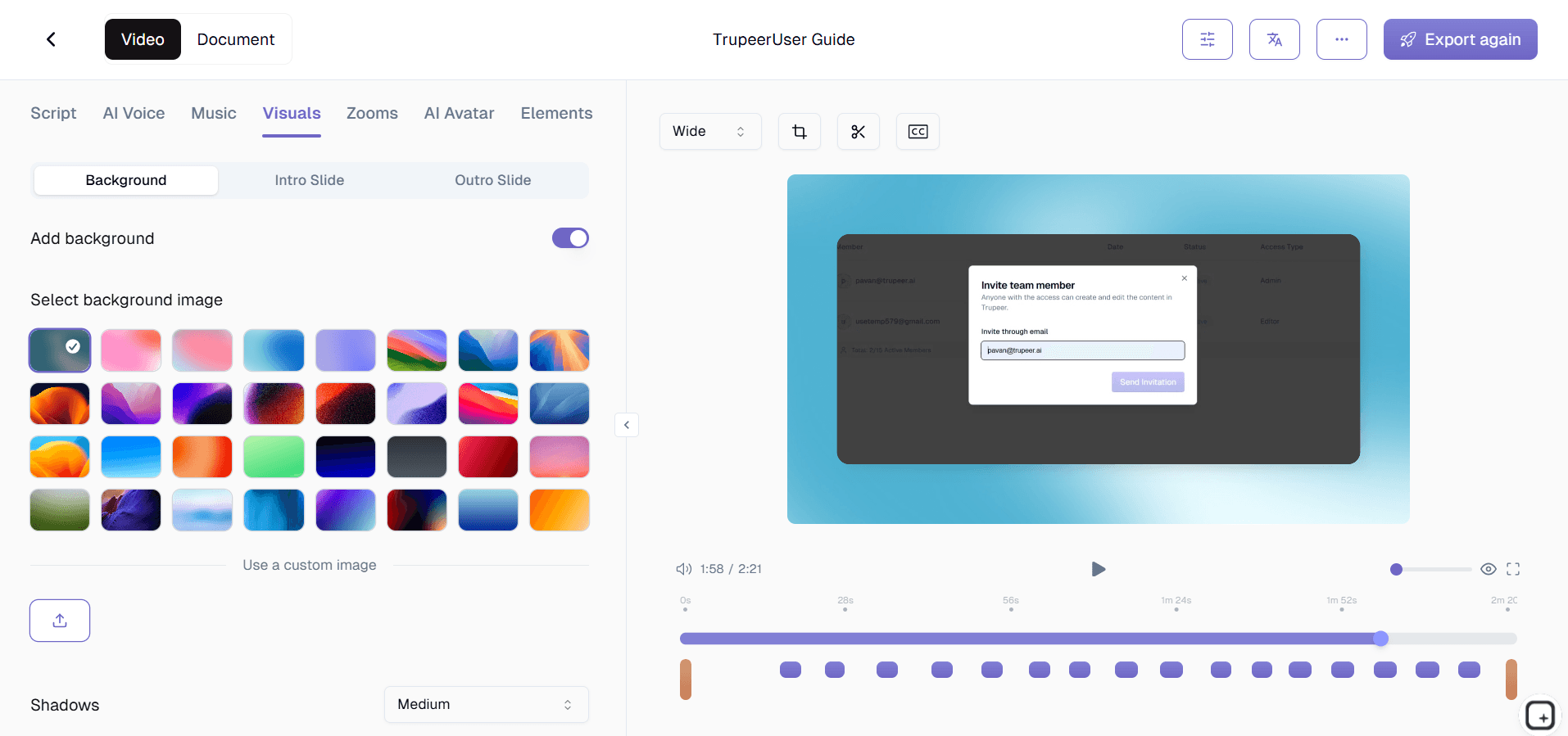
الخطوة 3: التخصيص والمشاركة
عدّل الناتج، وطبّق حزمة العلامة التجارية الخاصة بك، وشاركه عبر رابط أو قم بتضمينه على موقعك الإلكتروني. التحديثات سهلة بالقدر نفسه.

الميزات الرئيسية لبرنامج Trupeer لتحرير مقاطع الفيديو التدريبية المسجلة للشاشة
إزالة ذكية لكلمات الحشو: يكتشف الذكاء الاصطناعي في Trupeer تلقائيًا "um" و"uh" و"like" وغيرها من كلمات الحشو اللفظية ويزيلها من السرد في تسجيل الشاشة. كما يقتطع فترات التوقف المحرجة ومقاطع الصمت التي تجعل مقاطع الفيديو التدريبية تبدو غير احترافية.
تأثيرات تكبير تلقائية لتتبّع النقرات: يحدد البرنامج كل نقرة بالفأرة في تسجيل الشاشة ويطبق رسوم تكبير سلسة توجه عين المشاهد إلى الموقع الدقيق للإجراء. وهذا يزيل المشكلة الشائعة المتمثلة في فقدان المشاهدين أثر المؤشر في التسجيلات بملء الشاشة، مما يجعل العمليات خطوة بخطوة أسهل بكثير في المتابعة.
دعم رفع تسجيلات الشاشة: لديك بالفعل تسجيلات شاشة من OBS أو Loom أو أدوات أخرى؟ ارفعها مباشرةً إلى Trupeer وطبّق نفس سلسلة التحرير بالذكاء الاصطناعي. لست مضطرًا لاستخدام مسجل Trupeer. يمكن استيراد أي تسجيل شاشة بصيغ الفيديو الشائعة، وتحريره، وتحسينه بتأثيرات احترافية.
إعادة ترتيب المقاطع وتهذيبها: أعد ترتيب أجزاء تسجيل الشاشة من دون تحرير معقد للخط الزمني. اسحب المقاطع لإعادة ترتيب الخطوات، واقطع الأخطاء من منتصف التسجيل، أو قسّم تسجيلًا طويلًا واحدًا إلى عدة مقاطع تدريبية مركزة. الواجهة مصممة لمنشئي المحتوى التدريبي، وليس لمحترفي الفيديو.
لماذا تختار برنامج Trupeer لتحرير مقاطع الفيديو التدريبية المسجلة للشاشة؟
مصمم خصيصًا لتسجيلات الشاشة: تتعامل برامج تحرير الفيديو العامة مع تسجيلات الشاشة مثل أي لقطات أخرى. يفهم Trupeer حركات المؤشر وأنماط النقر والتنقل في الواجهة، ويطبق تعديلات تجعل المحتوى التدريبي أكثر فاعلية تحديدًا.
دقائق بدلًا من ساعات: يستغرق تحرير تسجيل شاشة مدته 10 دقائق يدويًا ساعة أو أكثر. يعالج الذكاء الاصطناعي في Trupeer التسجيل نفسه في دقائق، ويقدم نتائج احترافية من دون العمل اليدوي.
ارفع أي تسجيل: لست مقيدًا بمسجل واحد. أحضر تسجيلات الشاشة من أي أداة وسيحسنها Trupeer بنفس سلسلة التحرير بالذكاء الاصطناعي.
فيديو بالإضافة إلى توثيق: احصل على فيديو تدريبي معدّل ودليل مكتوب خطوة بخطوة من تسجيل شاشة واحد. تنسيقان للمحتوى من جلسة تسجيل واحدة.
برنامج تحرير مقاطع الفيديو التدريبية المسجلة للشاشة للفرق الداخلية
1. حوّل تسجيلات الشاشة الخام إلى محتوى تدريبي داخلي احترافي. تسجل الفرق شاشاتها بالفعل بشكل غير رسمي. يحول Trupeer تلك التسجيلات الخام إلى مقاطع فيديو تدريبية مصقولة يمكن لأي شخص متابعتها.
2. قلّل الاعتماد على جلسات التدريب المباشرة عبر تحرير الشروحات المسجلة. بدلًا من جدولة مكالمات تدريب متكررة، سجّل مرة واحدة ودع الذكاء الاصطناعي يحول التسجيل إلى محتوى تدريبي قابل لإعادة الاستخدام.
3. حافظ على مكتبة محدثة من مقاطع الفيديو التدريبية المستندة إلى تسجيلات الشاشة. عندما تتغير العمليات، أعد تسجيل الجزء المعني ودع Trupeer يحرره بسلاسة داخل مكتبة التدريب الحالية.
4. اسمح لأي عضو في الفريق بالمساهمة في المحتوى التدريبي. يمكن للمديرين والقادة والموظفين المخضرمين تسجيل خبراتهم على الشاشة، وتضمن تعديلات Trupeer أن يفي كل فيديو بالمعايير الاحترافية.
برنامج تحرير مقاطع الفيديو التدريبية المسجلة للشاشة لفرق SaaS
1. حرر تسجيلات عرض المنتج إلى مقاطع فيديو تدريبية موجهة للعملاء. يسجل مهندسو المبيعات وفرق المنتج العروض بالفعل. يحول Trupeer تلك التسجيلات الخام إلى محتوى مصقول لمركز المساعدة لديك.
2. حافظ على تحديث مقاطع فيديو شرح الميزات مع كل إصدار للمنتج. عندما تتغير الواجهة، أعد تسجيل الشاشات المتأثرة وحرر التسجيل الجديد لاستبدال المحتوى التدريبي القديم.
3. أنشئ تسلسلات تأهيل بالفيديو من تسجيلات الشاشة الموجودة. أعد استخدام شروحات المنتج الداخلية كمقاطع فيديو تدريبية للعملاء عبر تمريرها من خلال سلسلة التحرير بالذكاء الاصطناعي في Trupeer.
4. قلّل تذاكر دعم العملاء باستخدام دروس تعليمية محررة من تسجيلات الشاشة. تجيب مقاطع الفيديو التدريبية الواضحة والمحررة باحتراف عن الأسئلة الشائعة قبل أن يحتاج العملاء إلى التواصل مع الدعم.
برنامج تحرير مقاطع الفيديو التدريبية المسجلة للشاشة للشركات الناشئة
1. حوّل شروحات المؤسسين المسجلة إلى محتوى تدريبي احترافي. يسجل المؤسسون في المراحل المبكرة العمليات باستمرار. يجعل Trupeer تلك التسجيلات الخام للشاشة جاهزة للعرض أمام العملاء والموظفين الجدد.
2. ابنِ مكتبة مقاطع فيديو تدريبية من دون ميزانية لإنتاج الفيديو. تسجيلات الشاشة مجانية الإنشاء. يحولها تحرير Trupeer بالذكاء الاصطناعي إلى محتوى احترافي بجزء بسيط من تكاليف التحرير التقليدية.
3. طوّر المحتوى التدريبي بالسرعة نفسها التي يتغير بها منتجك. تطلق الشركات الناشئة الإصدارات أسبوعيًا. حرر تسجيلات الشاشة الجديدة في دقائق للحفاظ على توافق مقاطع الفيديو التدريبية مع أحدث إصدار.
4. أنشئ جودة تدريب متسقة حتى مع تسجيل أعضاء فريق مختلفين. يضمن التحرير بالذكاء الاصطناعي توحيد الجودة عبر التسجيلات من أشخاص مختلفين، بما يضمن مكتبة تدريب احترافية وموحدة.
برنامج تحرير مقاطع الفيديو التدريبية المسجلة للشاشة للمؤسسات
1. عالج كميات كبيرة من تسجيلات الشاشة إلى مقاطع فيديو تدريبية موحدة. تنتج فرق المؤسسات مئات تسجيلات الشاشة. تعمل سلسلة Trupeer الملائمة للمعالجة الجماعية على تحريرها بكفاءة وبجودة متسقة.
2. تأكد من أن تسجيلات الشاشة الخاصة بالتدريب على الامتثال تفي بالمعايير المهنية. يتطلب التدريب التنظيمي محتوى فيديو واضحًا ودقيقًا. يزيل التحرير بالذكاء الاصطناعي عوامل التشتيت ويضمن أن يوضح كل تسجيل الإجراءات بفاعلية.
3. قلّل تكاليف إنتاج الفيديو التدريبي على مستوى المؤسسة. عندما تتم أتمتة تحرير تسجيلات الشاشة، توفر المؤسسات في ميزانيات إنتاج الفيديو من دون التضحية بالجودة.
4. مكّن الفرق الموزعة من المساهمة بمحتوى تدريبي محرر. يمكن للموظفين في أنحاء العالم تسجيل شاشاتهم وإنتاج مقاطع فيديو تدريبية احترافية باستخدام أدوات التحرير نفسها بالذكاء الاصطناعي ومعايير العلامة التجارية نفسها.
برنامج تحرير مقاطع الفيديو التدريبية المسجلة للشاشة للفرق البعيدة
1. حرر تسجيلات الشاشة غير المتزامنة إلى محتوى تدريبي عبر المناطق الزمنية. يسجل أعضاء الفريق البعيدون في الوقت الذي يناسبهم، وينتج التحرير بالذكاء الاصطناعي نتائج مصقولة من دون الحاجة إلى تعاون في الوقت الفعلي.
2. استبدل اجتماعات العروض المباشرة بمقاطع فيديو محررة من تسجيلات الشاشة. توقف عن تكرار الشرح نفسه لمناطق زمنية مختلفة. سجّل مرة واحدة، وحرر بالذكاء الاصطناعي، وشارك النسخة المصقولة في كل مكان.
3. ابنِ مكتبة تدريب مهيأة للعمل عن بُعد من تسجيلات الشاشة اليومية. تتواصل الفرق البعيدة بطبيعتها عبر تسجيلات الشاشة. يحول Trupeer تلك اللقطات غير الرسمية إلى قاعدة معرفة احترافية.
4. حافظ على جودة تدريب متسقة بغض النظر عن بيئة التسجيل. تختلف جودة الصوت والخلفيات في المكاتب المنزلية. توحّد عمليات التحرير في Trupeer هذه الاختلافات لإخراج احترافي.
برنامج تحرير مقاطع الفيديو التدريبية المسجلة للشاشة للمطورين
1. حرر تسجيلات شروحات البرمجة إلى تدريب تقني واضح. غالبًا ما تكون تسجيلات جلسات البرمجة الخام طويلة وغير مركزة. يقتطع التحرير بالذكاء الاصطناعي الضوضاء ويبرز الخطوات الرئيسية.
2. أنشئ مقاطع فيديو تدريبية مصقولة للنشر والبنية التحتية. تصبح عمليات DevOps الملتقطة على الشاشة محتوى تدريبيًا واضحًا عندما تُحرّر بتأثيرات التكبير الذكية والتهذيب.
3. حوّل تسجيلات مراجعة الشيفرة إلى مواد تدريبية قابلة لإعادة الاستخدام. يسجل المطورون المخضرمون مراجعات الشيفرة مرة واحدة، ويحوّلها Trupeer إلى مقاطع فيديو تدريبية تهيئ المهندسين الجدد بفاعلية.
4. حافظ على توثيق المطورين بصيغتي الفيديو والنص. تمنح تسجيلات الشاشة المحررة والمقترنة بالتوثيق المُنشأ تلقائيًا المطورين خيارات تعلم مرئية ونصية في الوقت نفسه.
برنامج تحرير مقاطع الفيديو التدريبية المسجلة للشاشة لفرق التأهيل والدعم
1. أنشئ تسلسلات فيديو للتأهيل من شروحات العمليات المسجلة على الشاشة. يسجل مسؤولو الموارد البشرية والتدريب سير عمل الموظفين ويحرر Trupeer ذلك إلى محتوى تأهيل احترافي.
2. ابنِ مكتبة فيديوهات لدعم العملاء من الحلول المسجلة على الشاشة. يسجل موظفو الدعم كيف يحلون المشكلات الشائعة، ويحوّل التحرير بالذكاء الاصطناعي تلك التسجيلات إلى دروس تعليمية مصقولة موجهة للعملاء.
3. حدّث المحتوى التدريبي عبر إعادة تحرير تسجيلات الشاشة عندما تتغير العمليات. بدلًا من إعادة إنشاء الفيديوهات من الصفر، أعد تسجيل الخطوات المتغيرة ودع Trupeer يحررها ضمن المحتوى الحالي.
4. وسّع نطاق التأهيل من دون توسيع فريق التدريب لديك. تُدرّب تسجيلات الشاشة المحررة الموظفين الجدد بفاعلية من دون الحاجة إلى جلسات مباشرة من الموظفين الأقدم لكل موظف جديد.
تستند إضافة كروم مسجل الشاشة هذه إلى Screenity، التي أنشأتها في الأصل Alyssa X ورُخّصت بموجب GNU GPLv3، مع تحسينات طوّرها فريق Trupeer. الشيفرة المصدرية متاحة هنا: https://github.com/trupeer-ai/trupeer-chrome-capture.
لماذا تختار الفرق Trupeer لتحرير تسجيلات الشاشة
تأثيرات التكبير الذكي
تُبرز تقنية الذكاء الاصطناعي كل نقرة وكل إجراء في تسجيل الشاشة الخاص بك
إزالة الكلمات الحشو
تنظيف تلقائي لكلمات الحشو والتوقفات من أجل صوت احترافي
تحميل أي تسجيل
استورد تسجيلات الشاشة من أي أداة للتحرير بالذكاء الاصطناعي
كيفية تحرير مقاطع فيديو التدريب المسجلة على الشاشة
الخطوة 1
سجّل شاشتك أو حمّل تسجيلًا موجودًا
الخطوة 2
دع الذكاء الاصطناعي يزيل كلمات الحشو ويضيف تأثيرات التكبير
الخطوة 3
راجع وشارك فيديو التدريب المصقول الخاص بك
الأسئلة الشائعة
هل يمكنني رفع تسجيلات الشاشة من أدوات أخرى؟
نعم. يقبل Trupeer تسجيلات الشاشة من OBS وLoom وQuickTime وأي أداة أخرى تُصدّر تنسيقات فيديو قياسية. حمّل تسجيلاتك الحالية وطبّق تحرير الذكاء الاصطناعي فورًا.
كيف يقوم الذكاء الاصطناعي بتحرير تسجيلات الشاشة الخاصة بي؟
يحلل الذكاء الاصطناعي لدى Trupeer تسجيل الشاشة لتحديد النقرات والتنقل وخطوات سير العمل. يزيل كلمات الحشو وفترات الصمت، ويضيف تأثيرات تكبير للإجراءات الرئيسية، وينتج تلقائيًا فيديو تدريبيًا مصقولًا.
هل سيُغيّر التعديل السرد أو المحتوى الخاص بي؟
يزيل الذكاء الاصطناعي فقط الكلمات الحشو والتوقفات. يبقى محتوى تعليماتك الفعلي كما هو. يمكنك مراجعة كل تعديل قبل النشر والتراجع عن أي تغييرات لا تريدها.
هل يمكنني إضافة تعليقات توضيحية إلى تسجيلات الشاشة الخاصة بي؟
نعم. يوفر Trupeer طبقات توضيحية، وتعليقات نصية، ومؤشرات خطوات مرقمة، ومربعات تمييز يمكنك إضافتها فوق تسجيل الشاشة الذي قمت بتحريره.
هل يقوم البرنامج أيضًا بإنشاء وثائق مكتوبة؟
نعم. إلى جانب فيديو التدريب الذي حررته، ينشئ Trupeer دليلاً مكتوبًا خطوة بخطوة مع لقطات شاشة مشروحة مستخرجة من تسجيل الشاشة الخاص بك. تحصل على تنسيقي محتوى من تسجيل واحد.


