4.8/5
منصات الفيديو التفاعلية مع التحليلات
حوّل المشاهدين السلبيين إلى مشاركين نشطين باستخدام منصات الفيديو التفاعلية التي تتتبّع كل نقرة، وكل استجابة، وكل مؤشر تفاعل.
جرّب مجانًا

المنصات التفاعلية للفيديو المزودة بالتحليلات تتيح لك إنشاء مقاطع فيديو جذابة وقابلة للنقر تجمع بيانات المشاهدين في الوقت الفعلي. توقف عن التخمين بشأن ما إذا كان جمهورك قد شاهد المحتوى الخاص بك، وابدأ بقياس كيفية تفاعله معه بدقة.
ضمّن الاختبارات، والاستطلاعات، والنقاط التفاعلية القابلة للنقر، والمسارات المتفرعة مباشرة داخل مقاطع الفيديو الخاصة بك
تتبّع تفاعل المشاهدين باستخدام الخرائط الحرارية، ومعدلات الإكمال، وتحليلات النقرات
حدّد نقاط الانسحاب وحسّن المحتوى بناءً على البيانات، لا على الافتراضات
ادمج مع نظام إدارة التعلم (LMS)، أو CRM، أو حزمة التسويق لديك للحصول على تقارير موحّدة
أنشئ تجارب تفاعلية من دون كتابة سطر واحد من التعليمات البرمجية
ما هي المنصات التفاعلية للفيديو المزودة بالتحليلات؟
المنصات التفاعلية للفيديو المزودة بالتحليلات هي أدوات تحوّل المحتوى المرئي القياسي إلى تجارب ثنائية الاتجاه. فبدلاً من مشاهدة الفيديو بشكل سلبي من البداية إلى النهاية، يمكن للمشاهدين النقر على النقاط التفاعلية، والإجابة عن أسئلة الاختبارات، واختيار المسارات المتفرعة، وتقديم ملاحظات في الوقت الفعلي، وكل ذلك داخل مشغّل الفيديو. وفي الخلفية، تلتقط المنصة تحليلات تفصيلية حول كل تفاعل: من شاهد، وإلى أي مدى وصل، وماذا نقر، وكيف أجاب، وأين انسحب. هذا المزيج من التفاعلية والبيانات يحوّل الفيديو من وسيلة بث إلى قناة تفاعل قابلة للقياس والتحسين. وهو قوي بشكل خاص لبرامج التدريب، وتعليم المنتجات، ومسارات التسويق حيث تحتاج إلى إثبات عائد الاستثمار والتحسين المستمر لفعالية المحتوى.
كيف تعمل المنصات التفاعلية للفيديو المزودة بالتحليلات؟
إنشاء فيديوهات تفاعلية مع التحليلات أمر مباشر. إليك العملية المكونة من ثلاث خطوات:
الخطوة 1: ارفع فيديوك أو سجّله
ابدأ بتحميل فيديو موجود أو تسجيل فيديو جديد مباشرة داخل المنصة. يمكنك استخدام تسجيلات الشاشة، أو لقطات الكاميرا، أو العروض التقديمية بالشرائح، أو أي مزيج تدعمه المنصة لجميع صيغ الفيديو القياسية.

الخطوة 2: أضف العناصر التفاعلية
استخدم محرر السحب والإفلات لإضافة عناصر تفاعلية على الخط الزمني للفيديو. أدخل أسئلة اختبارات في نقاط التعلّم الرئيسية، وأضف نقاطًا قابلة للنقر تكشف معلومات إضافية، وأنشئ سيناريوهات متفرعة تتيح للمشاهدين اختيار مسارهم الخاص، أو أدرج استطلاعات تلتقط الآراء في الوقت الفعلي.
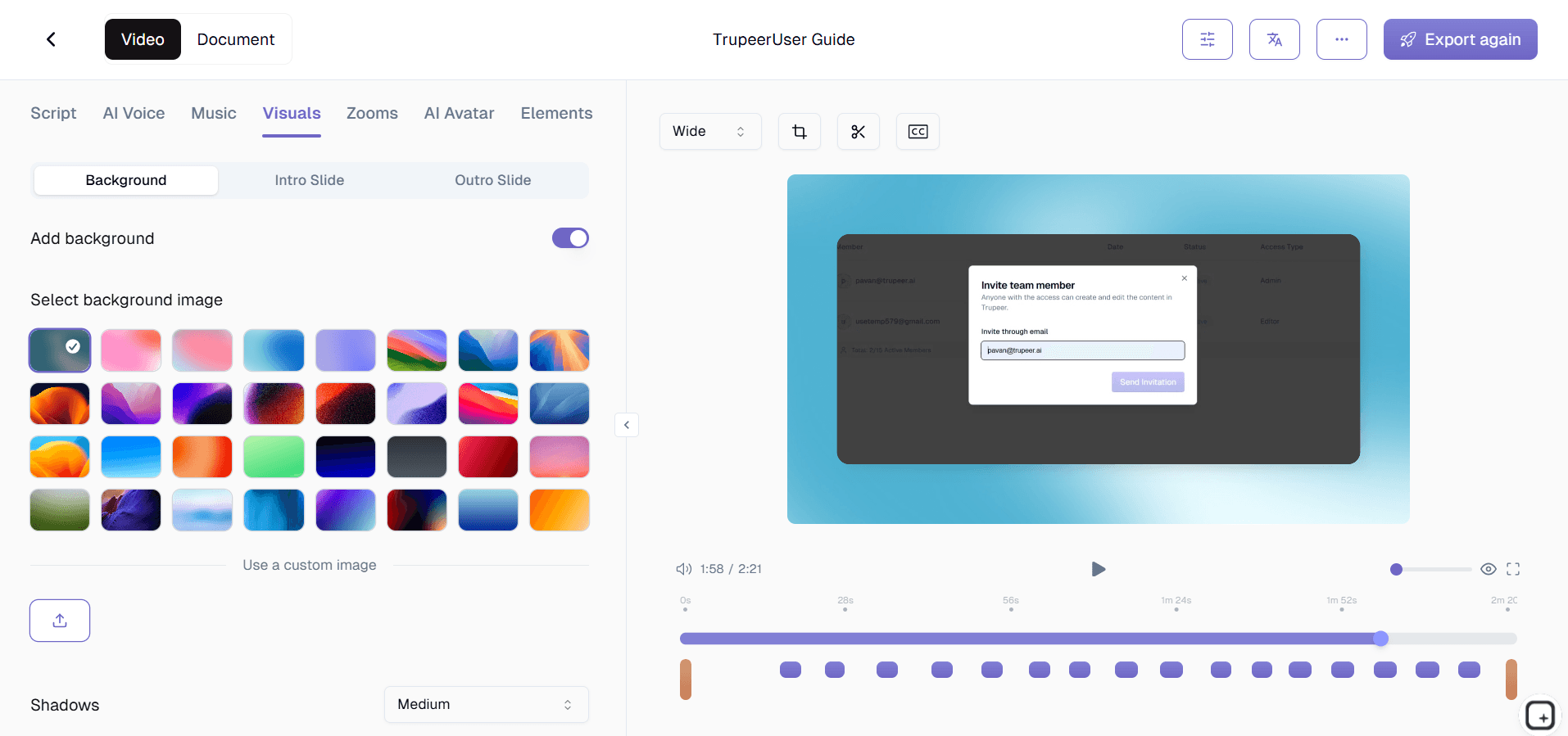
الخطوة 3: انشر وشارك وحلّل
انشر الفيديو التفاعلي الخاص بك ووزّعه عبر كود التضمين، أو رابط قابل للمشاركة، أو تكامل مع نظام إدارة التعلم. ومع تفاعل المشاهدين، تمتلئ لوحة التحليلات بالبيانات في الوقت الفعلي: خرائط حرارية للتفاعل، ودرجات الاختبارات، ومعدلات الإكمال، ورحلات المشاهدين الفردية — مما يمنحك رؤى قابلة للتنفيذ لتحسين محتواك.

الميزات الرئيسية للمنصات التفاعلية للفيديو المزودة بالتحليلات
اختبارات وفحوصات المعرفة داخل الفيديو: أدرج أسئلة متعددة الخيارات، أو صح/خطأ، أو مفتوحة الإجابة في أي نقطة من الخط الزمني للفيديو. قيّم الإجابات تلقائيًا، ووفّر ملاحظات فورية للمشاهدين، واجمع الدرجات في لوحة التحليلات لتحديد الفجوات المعرفية لدى جمهورك.
نقاط تفاعلية قابلة للنقر وعبارات دعوة إلى الإجراء: ضع نقاطًا تفاعلية على أي عنصر داخل إطار الفيديو الخاص بك — ميزة منتج، زر واجهة مستخدم، أو تسمية في مخطط. ينقر المشاهدون لإظهار التلميحات، أو الانتقال إلى روابط خارجية، أو تشغيل الفصل التالي. يتم تتبع كل نقرة، مما يمنحك صورة واضحة عمّا يجذب الانتباه.
سيناريوهات متفرعة وأشجار قرار: أنشئ فيديوهات بأسلوب "اختر مغامرتك" حيث تحدد اختيارات المشاهد المشهد التالي. وهذا مثالي للتدريب على الامتثال، والتعامل مع اعتراضات المبيعات، وتثقيف العملاء حيث تحتاج جماهير مختلفة إلى مسارات مختلفة عبر المحتوى نفسه.
خرائط حرارية للتفاعل في الوقت الفعلي: تصوّر بدقة أين يولي المشاهدون اهتمامهم، أو يعيدون المشاهدة، أو يتخطون، أو ينسحبون، باستخدام خرائط حرارية ملوّنة موضوعة فوق الخط الزمني للفيديو. استخدم هذه الرؤى لإعادة هيكلة المحتوى، وتقصير الأجزاء البطيئة، والتركيز أكثر على المقاطع التي تلقى أكبر صدى.
تحليلات وتقارير على مستوى المشاهد: تجاوز المقاييس المجمعة. تتبّع سلوك كل مشاهد على حدة: من أكمل الفيديو، وكيف أجاب عن كل سؤال، وأي المسارات استكشفها، وكم من الوقت قضاه في كل قسم. صدّر التقارير لعمليات تدقيق الامتثال أو مراجعات الأداء.
لماذا تختار المنصات التفاعلية للفيديو المزودة بالتحليلات؟
أثبت عائد الاستثمار في التدريب: تجاوز شهادات الإكمال. أظهر لأصحاب المصلحة بالضبط كيف تفاعل المتعلمون مع المحتوى، وأين توجد الفجوات المعرفية، وكيف يتحسن أداء الفيديو بمرور الوقت من خلال تطوير تكراري مدعوم بالبيانات.
زيادة احتفاظ المشاهدين: ترفع العناصر التفاعلية متوسط وقت المشاهدة بما يصل إلى 3 أضعاف مقارنة بالفيديو السلبي، لأن المشاهدين يشاركون بنشاط بدلاً من الاستهلاك السلبي.
خصّص تجربة المشاهد: تضمن المسارات المتفرعة والمحتوى التكيفي أن يرى كل مشاهد المواد الأكثر صلة بدوره أو مستوى مهارته أو اهتمامه من دون إنشاء عشرات الفيديوهات المنفصلة.
أزل التخمين: تستبدل التحليلات الافتراضات بالأدلة. اعرف بدقة أي الأقسام تحتاج إلى إعادة عمل، وأي الأسئلة تربك جمهورك، وأي عبارات دعوة إلى الإجراء تدفع إلى التحويلات.
المنصات التفاعلية للفيديو المزودة بالتحليلات للفرق الداخلية
1. تستخدم الفرق الداخلية الفيديوهات التفاعلية لتقديم تدريب الامتثال مع فحوصات معرفة مضمّنة، مما يضمن أن الموظفين لا يكتفون بالمشاهدة، بل يستوعبون معلومات السياسات المهمة فعلاً.
2. ينشئ قادة الفرق فيديوهات سيناريوهات متفرعة لتدريب المهارات الناعمة — حل النزاعات، والتواصل الإداري، والتعاطف مع العملاء — حيث يتدرب الموظفون على اتخاذ القرار في بيئة آمنة.
3. تمنح لوحات تحليلات L&D المديرين رؤية واضحة حول الأقسام التي أكملت التدريب، والموضوعات التي تحتاج إلى تعزيز، وكيف تتغير درجات الاختبارات بمرور الوقت.
4. يستبدل الفيديو التفاعلي عروض الشرائح الثابتة لمراجعات الأعمال الفصلية، مما يتيح لأصحاب المصلحة النقر على نقاط البيانات والمواد الداعمة التي تهمهم أكثر.
المنصات التفاعلية للفيديو المزودة بالتحليلات لفرق SaaS
1. تنشئ فرق منتجات SaaS جولات ميزات تفاعلية ينقر فيها العملاء المحتملون عبر واجهة المستخدم بوتيرتهم الخاصة، وتكشف التحليلات أي الميزات تولّد أكبر قدر من الاهتمام.
2. تدمج فرق نجاح العملاء اختبارات داخل فيديوهات الإعداد للتحقق من أن المستخدمين الجدد يفهمون سير العمل الأساسية قبل الانتقال إلى الميزات المتقدمة، مما يقلل التسرب الناتج عن الالتباس.
3. تستخدم فرق التسويق عبارات دعوة إلى الإجراء داخل الفيديو لزيادة تسجيلات التجربة المجانية مباشرة من فيديوهات العرض التوضيحي للمنتج، مع ربط تحليلات التحويل بكل عنصر تفاعلي.
4. يحلّل مديرو المنتجات خرائط التفاعل الحرارية على فيديوهات إعلان الإصدارات لفهم أي الميزات الجديدة تثير حماس المستخدمين وأيها يحتاج إلى تموضع أفضل. سجّل عروض SaaS التوضيحية الخاصة بك باستخدام مسجل الشاشة الخاص بـ Trupeer.
المنصات التفاعلية للفيديو المزودة بالتحليلات للشركات الناشئة
1. تستخدم الشركات الناشئة فيديوهات الإعداد التفاعلية لتوسيع تثقيف العملاء من دون زيادة عدد الموظفين، من خلال تضمين اختبارات ذاتية وروابط موارد مباشرة داخل المحتوى.
2. تصبح عروض المبيعات التي يقودها المؤسسون أكثر جاذبية عندما يتمكن العملاء المحتملون من النقر على النقاط التفاعلية لاستكشاف مستويات التسعير وخيارات التكامل ودراسات الحالة داخل الفيديو نفسه.
3. تُظهر التحليلات للشركات الناشئة بالضبط أين يفقد العملاء المحتملون اهتمامهم أثناء فيديوهات العرض، مما يتيح التكرار السريع في الرسائل والتموضع قبل جولة التمويل التالية.
4. مع محدودية ميزانيات المحتوى، تستخدم الشركات الناشئة الفيديوهات المتفرعة لخدمة شرائح متعددة من الجمهور — المشترون التقنيون، والمشترون التجاريون، والمستخدمون النهائيون — من إنتاج واحد.
المنصات التفاعلية للفيديو المزودة بالتحليلات للمؤسسات
1. تنشر المؤسسات الفيديو التفاعلي عبر آلاف الموظفين للتدريب الإلزامي على الامتثال، باستخدام تحليلات الاختبارات لإنشاء تقارير جاهزة للتدقيق حول الإكمال والفهم.
2. توطّن المؤسسات العالمية الفيديوهات التفاعلية بمسارات متفرعة خاصة بكل منطقة، مما يضمن دقة المحتوى التنظيمي لكل ولاية قضائية مع الحفاظ على إطار تدريبي موحّد.
3. تستخدم القيادة التنفيذية فيديوهات الاجتماعات العامة التفاعلية مع استطلاعات مضمّنة وأسئلة وأجوبة، لتحويل البث الأحادي الاتجاه إلى محادثات ثنائية الاتجاه قابلة للقياس.
4. تدمج فرق L&D في المؤسسات تحليلات الفيديو التفاعلي مع نظام إدارة التعلم (LMS) لأتمتة سير عمل الشهادات، وتشغيل المحتوى التعويضي لدرجات الاختبارات المنخفضة، وتتبع مخرجات التعلم على نطاق واسع.
المنصات التفاعلية للفيديو المزودة بالتحليلات للفرق البعيدة
1. تستبدل الفرق البعيدة الندوات التدريبية المتزامنة عبر الويب بفيديوهات تفاعلية يُكملها أعضاء الفريق وفق جدولهم الخاص، مع تحليلات تؤكد المشاركة والفهم.
2. يستخدم المديرون بيانات التفاعل لتحديد الموظفين البعيدين الذين قد يواجهون صعوبة مع الأدوات أو العمليات الجديدة، مما يتيح توجيهًا استباقيًا قبل تفاقم المشكلات.
3. تنشئ الفرق الموزعة فيديوهات ثقافية تفاعلية ينقر فيها الموظفون الجدد عبر تعارف الفريق، وجولات المكاتب، ومناقشات القيم — مما يجعل عملية الإعداد تبدو شخصية رغم المسافة.
4. تصبح جلسات الاسترجاع البعيدة أكثر ثراءً عندما تشاهد الفرق فيديوهات تلخيصية تفاعلية مع استطلاعات مضمّنة، وتُصوت على الأولويات وبنود العمل بشكل غير متزامن.
المنصات التفاعلية للفيديو المزودة بالتحليلات للمطورين
1. تنشئ فرق تعليم المطورين دروسًا برمجية تفاعلية يختار فيها المتعلمون لغة البرمجة أو مسار إطار العمل الذي سيتبعونه، مع اختبارات تتحقق من الفهم عند كل نقطة مراجعة.
2. تنبض وثائق واجهات برمجة التطبيقات بالحياة مع تسجيلات شاشة تفاعلية ينقر فيها المطورون على نقاط النهاية لرؤية أمثلة الطلب والاستجابة، مع تحليلات تُظهر أي نقاط النهاية تحظى بأكبر قدر من الاهتمام.
3. يستخدم قادة التقنية خرائط التفاعل الحرارية على فيديوهات استعراض البنية لمعرفة قرارات التصميم التي تولّد أكبر عدد من الإعادات والأسئلة، مما يساعد في تحديد أولويات التوثيق المستقبلية.
4. تنشئ المشاريع مفتوحة المصدر أدلة مساهمة تفاعلية بمسارات متفرعة لأنواع المساهمة المختلفة — إصلاحات الأخطاء، وتطوير الميزات، والتوثيق — مع تتبع تحليلي للمسارات الأكثر شيوعًا. أنشئ أدلتك باستخدام أداة دليل العمليات من Trupeer.
المنصات التفاعلية للفيديو المزودة بالتحليلات لفرق الإعداد والدعم
1. تنشئ فرق الإعداد دورات فيديو تفاعلية يجب على الموظفين الجدد اجتياز اختبارات مضمّنة قبل الانتقال، مما يضمن ترسيخ المعرفة الأساسية قبل بدء مهام اليوم الأول.
2. تبني فرق الدعم فيديوهات استكشاف الأخطاء وإصلاحها التفاعلية حيث يختار العملاء نوع المشكلة ويتم توجيههم عبر مسار الحل المناسب، مما يقلل التذاكر مع جمع بيانات حول المشكلات الشائعة.
3. تكشف التحليلات أي مقاطع فيديو الإعداد لديها أعلى معدلات الانسحاب، مما يتيح لفرق المحتوى إعادة هيكلة تلك الأقسام أو تقصيرها أو إعادة تسجيلها لتحسين الاحتفاظ.
4. تتبّع فرق نجاح العملاء تفاعل كل عميل على حدة مع فيديوهات التدريب التفاعلية، باستخدام بيانات الإكمال والاختبارات لتخصيص محادثات المتابعة وتحديد الحسابات المعرّضة للخطر.
الميزات الرئيسية
التحليلات المتقدمة
تتبّع تفاعل المشاهدين باستخدام الخرائط الحرارية، ودرجات الاختبارات، وتقارير الرحلة الفردية.
الطبقة التفاعلية
أضف اختبارات، ونقاطًا تفاعلية، ومسارات متفرعة، واستطلاعات رأي دون كتابة أي كود.
تكامل نظام إدارة التعلم
مزامنة بيانات الإكمال ودرجات الاختبارات مباشرةً مع نظام إدارة التعلّم الخاص بك.
كيف يعمل
الخطوة 1
حمّل الفيديو الخاص بك أو سجّل
الخطوة 2
إنشاء فيديو تفاعلي بالذكاء الاصطناعي
الخطوة 3
انشر وتتبع التفاعل في الوقت الفعلي
الأسئلة الشائعة
كيف تختلف منصات الفيديو التفاعلية عن استضافة الفيديو العادية؟
تتتبع استضافة الفيديو العادية فقط المقاييس الأساسية مثل عدد المشاهدات ومدة التشغيل. تتيح لك منصات الفيديو التفاعلية تضمين عناصر قابلة للنقر، واختبارات قصيرة، ونقاطًا ساخنة، ومسارات متفرعة، والتقاط تحليلات تفصيلية لكل تفاعل من المشاهدين، مما يمنحك بيانات قابلة للتنفيذ بدلًا من مقاييس الشكل.
هل يمكنني تتبع نشاط كل مشاهد على حدة؟
نعم. توفر المنصة تحليلات على مستوى المشاهدين تُظهر بدقة من شاهد، وإلى أي مدى وصلوا، وكيف أجابوا عن كل سؤال من أسئلة الاختبار، وأي المسارات استكشفوها، وأين توقفوا عن المتابعة، وهو ما يجعلها مثالية لإعداد تقارير الامتثال والمتابعة المخصصة.
هل تعمل العناصر التفاعلية على الأجهزة المحمولة؟
نعم. جميع العناصر التفاعلية مثل الاختبارات، والنقاط الساخنة، ودعوات الإجراء، والمسارات المتفرعة متجاوبة بالكامل ومُحسّنة للتفاعل باللمس على الهواتف والأجهزة اللوحية، مما يضمن تجربة سلسة عبر جميع الأجهزة.
هل يمكنني التكامل مع نظام إدارة التعلم (LMS) أو نظام إدارة علاقات العملاء (CRM) الحالي لدي؟
بالتأكيد. تتكامل المنصة مع أدوات أنظمة إدارة التعلم الشائعة مثل Moodle وCornerstone وTalentLMS، وكذلك أنظمة إدارة علاقات العملاء مثل Salesforce وHubSpot، مما يتيح المزامنة التلقائية لبيانات التفاعل ونتائج الاختبارات.
ما أنواع العناصر التفاعلية التي يمكنني إضافتها؟
يمكنك إضافة اختبارات متعددة الخيارات، وأسئلة صح أو خطأ، ومطالبات مفتوحة النهاية، ونقاط تفاعلية قابلة للنقر، وأشجار قرارات متفرعة، واستطلاعات رأي، ودعوات لاتخاذ إجراء، وتنقل بين الفصول، وروابط موارد مضمّنة، وكلها قابلة للتخصيص عبر محرر السحب والإفلات.


