4.8/5
برنامج مجاني لإنشاء فيديو تعليمي سهل
أنشئ فيديوهات تعليمية احترافية في دقائق باستخدام تسجيل شاشة مدعوم بالذكاء الاصطناعي. لا تحتاج إلى مهارات تحرير أو أدوات باهظة الثمن.
جرّب مجانًا

يتيح لك برنامج Trupeer السهل لإنشاء فيديوهات الشروحات إنتاج فيديوهات احترافية بكل سهولة باستخدام تسجيل الشاشة المدعوم بالذكاء الاصطناعي والتحرير الآلي. مع Trupeer، يمكنك تسجيل شاشتك، ويحوّل الذكاء الاصطناعي اللقطات الخام فورًا إلى محتوى تعليمي مصقول وقابل للمشاركة، يتضمن تأثيرات تكبير، وترجمات، وأدلة مكتوبة خطوة بخطوة.
سجّل شاشتك ودع الذكاء الاصطناعي ينتج فيديوهات الشروحات تلقائيًا.
لا حاجة لأي خبرة في تحرير الفيديو للحصول على نتائج احترافية.
أنشئ فيديوهات تعليمية وأدلة مكتوبة في الوقت نفسه.
طبّق الهوية البصرية وتأثيرات التكبير والترجمات دون أي جهد يدوي.
شارك الشروحات أو أدرجها أو صدّرها عبر أي منصة فورًا.
ما هو برنامج Trupeer السهل لإنشاء فيديوهات الشروحات؟
يزيل برنامج Trupeer السهل لإنشاء فيديوهات الشروحات كل العوائق بينك وبين الحصول على شرح مكتمل. اضغط تسجيل، واستعرض عمليتك، وسيتولى الذكاء الاصطناعي الباقي. فهو يزيل فترات الصمت، ويضيف تكبيرات على النقرات المهمة، وينشئ ترجمات، وينتج فيديو شرح مصقولًا جاهزًا للمشاركة. سواء كنت تدرب الموظفين أو تثقف العملاء أو تبني قاعدة معرفة، فإن برنامج الفيديو التعليمي السهل هذا ينقلك من الفكرة إلى المحتوى المنشور خلال دقائق بدلًا من ساعات.
كيف يعمل برنامج إنشاء فيديوهات الشروحات السهل؟
البدء باستخدام برنامج إنشاء فيديوهات الشروحات السهل لا يستغرق سوى بضع دقائق.
الخطوة 1: التسجيل أو الرفع
ابدأ تسجيل شاشة مباشرة في متصفحك، أو ارفع فيديو موجودًا.

الخطوة 2: معالجة الذكاء الاصطناعي
يحلل الذكاء الاصطناعي تسجيلك، ويزيل الكلمات الحشو، ويضيف تأثيرات التكبير، وينشئ الفيديو تلقائيًا.
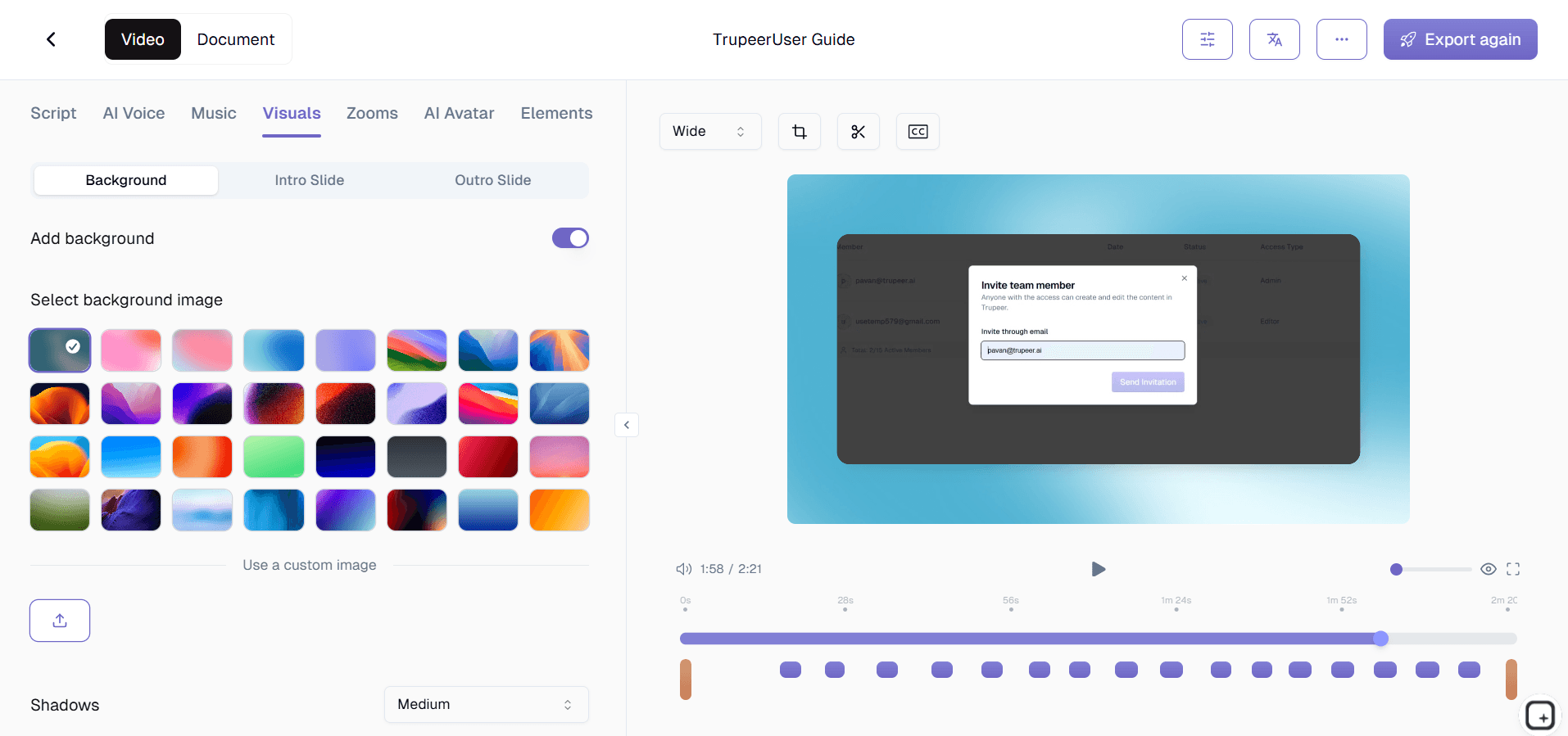
الخطوة 3: التخصيص والمشاركة
حرّر الناتج، وطبّق حزمة علامتك التجارية، وشاركه عبر رابط أو أدرجه في موقعك الإلكتروني. كما أن التحديثات سهلة بنفس القدر.

الميزات الرئيسية لبرنامج Trupeer السهل لإنشاء فيديوهات الشروحات
تسجيل شاشة بدون إعداد مسبق: ابدأ تسجيل الشروحات فورًا من متصفحك باستخدام إضافة Chrome المجانية. لا حاجة لتثبيت برنامج سطح مكتب، ولا لإعداد حسابات، ولا لضبط إعدادات معقدة قبل أن تبدأ بالتقاط شاشتك.
تكبير ذكي وتأثيرات إبراز: يتم تكبير كل نقرة مهمة، وكل اختيار في القائمة، وكل حقل في النموذج تلقائيًا وإبرازه حتى لا يفقد المشاهدون تتبع مكان حدوث الإجراء. يكتشف الذكاء الاصطناعي حركات المؤشر وتفاعلات واجهة المستخدم لتحديد التوقيت والإطار الأمثلين للتكبير.
مخرجات مزدوجة - فيديو ودليل مكتوب: ينتج كل تسجيل فيديو تعليميًا مصقولًا ودليلًا مكتوبًا خطوة بخطوة كاملًا مع لقطات شاشة مشروحة. يختار المتعلمون الصيغة الأنسب لهم، وأنت تنشئ الاثنين دون أي جهد إضافي.
إعادة تسجيل فورية للتحديثات: عندما تتغير التحديثات البرمجية أو العمليات، أعد تسجيل الجزء المتأثر فقط بدلًا من إعادة بناء الشرح كاملًا من البداية. تستبدل المنصة اللقطات الجديدة بسلاسة حتى يظل محتواك محدثًا دون جهد مهدور.
لماذا تختار برنامج Trupeer السهل لإنشاء فيديوهات الشروحات؟
البساطة: يمكن لأي شخص في فريقك إنشاء شروحات احترافية دون مهارات تحرير فيديو أو برامج باهظة أو تدريب. يتولى الذكاء الاصطناعي كل أعمال الإنتاج التقنية.
السرعة: أنشئ فيديوهات شروحات مكتملة في الوقت نفسه الذي يستغرقه عرض العملية مرة واحدة. ما كان يتطلب سابقًا ساعات من التسجيل والتحرير وما بعد الإنتاج أصبح الآن يستغرق دقائق.
الاتساق: تضمن حِزم العلامة التجارية والتحرير بالذكاء الاصطناعي أن يبدو كل شرح احترافيًا وموحدًا، بغض النظر عن عضو الفريق الذي ينشئه.
المرونة: أنشئ فيديوهات تعليمية وأدلة مكتوبة في الوقت نفسه من تسجيل واحد، لتلبية تفضيلات التعلم المختلفة دون مضاعفة عبء العمل.
برنامج سهل لإنشاء فيديوهات الشروحات للفرق الداخلية
1. مكّن أي موظف من إنشاء محتوى تدريبي دون الاعتماد على فريق مخصص لإنتاج الفيديو. يسجل الخبراء في المجال سير أعمالهم مباشرة، لينتجوا شروحات تلتقط المعرفة المؤسسية الحقيقية بدلًا من التفسيرات المنقولة بالواسطة.
2. خفّض وقت تأهيل الموظفين الجدد بشكل كبير من خلال استبدال جلسات التدريب المباشرة بشروحات فيديو ذاتية الوتيرة. يشاهد أعضاء الفريق الجدد عروضًا توضيحية بصرية واضحة وفق سرعتهم الخاصة، مع إمكانية الإرجاع والإعادة حتى يفهموا كل عملية بالكامل.
3. وحّد العمليات عبر الأقسام بإنشاء مصدر واحد للحقيقة بصيغة فيديو. عندما يتبع كل فريق الشرح المسجل نفسه، تختفي التناقضات وتتحسن الجودة عبر المؤسسة.
4. ابنِ مكتبة شروحات قابلة للبحث تقضي على الأسئلة المتكررة. بدلًا من مقاطعة الزملاء الأقدم، يجد أعضاء الفريق الإجابات البصرية فورًا ويعودون إلى العمل المنتج.
برنامج سهل لإنشاء فيديوهات الشروحات لفرق SaaS
1. أنشئ شروحات استعراض للمنتج تقلل صعوبة تأهيل العملاء. عندما يمكن للمستخدمين مشاهدة كيفية استخدام منتجك بدقة، يصلون إلى القيمة أسرع ويقل معدل انسحابهم.
2. حافظ على تحديث محتوى مركز المساعدة مع تطور منتجك. أعد تسجيل الشروحات المحدثة بعد كل إصدار بدلًا من تحديث لقطات الشاشة يدويًا وإعادة كتابة التعليمات عبر عشرات مقالات الدعم.
3. مكّن فرق نجاح العملاء من إنتاج فيديوهات شروحات مخصصة للحسابات الرئيسية. إن الشروحات المخصصة التي تعالج سير عمل العملاء المحدد تبني علاقات أقوى ومعدلات احتفاظ أعلى.
4. خفّض حجم تذاكر الدعم من خلال تزويد المستخدمين بمحتوى بصري للخدمة الذاتية. تجيب فيديوهات الشروحات عن الأسئلة الشائعة بفعالية أكبر من الوثائق النصية، مما يقلل الضغط على فريق الدعم لديك.
برنامج سهل لإنشاء فيديوهات الشروحات للشركات الناشئة
1. أنشئ محتوى تعليميًا احترافيًا بميزانية شركة ناشئة دون توظيف محرري فيديو أو شراء برامج إنتاج باهظة. يتولى الذكاء الاصطناعي كل ما بعد الإنتاج، مع إبقاء التكاليف قريبة من الصفر.
2. وثّق سير العمل قبل أن يتحول إلى معرفة شفوية لا يفهمها إلا المؤسسون. الفرق في المراحل المبكرة التي توثّق العمليات في شروحات تتوسع بسلاسة أكبر عندما يبدأ التوظيف السريع.
3. ابنِ شروحات موجهة للعملاء تجعل منتجك يبدو مصقولًا وجاهزًا للمؤسسات. يشير المحتوى المرئي الاحترافي إلى نضج المنتج لدى العملاء المحتملين الذين يقيمون حلك مقارنة بالمنافسين الراسخين.
4. كرّر على المحتوى التعليمي بنفس سرعة تغير منتجك. تطلق الشركات الناشئة ميزات أسبوعيًا، وإعادة التسجيل السهلة تعني أن شروحاتك تواكب ذلك دون تكوين عبء توثيق متراكم.
برنامج سهل لإنشاء فيديوهات الشروحات للمؤسسات
1. انشر شروحات تدريب موحدة عبر المكاتب العالمية وآلاف الموظفين. يصبح تسجيل واحد هو المرجع القياسي، ما يزيل الاختلافات الإقليمية في كيفية تدريس العمليات وتنفيذها.
2. استوفِ متطلبات التدريب على الامتثال بمحتوى شروحات موثق وقابل للتتبع. يمكن للمدققين التحقق من وجود إجراءات موحدة وأنها تُبلّغ بشكل متسق عبر المؤسسة.
3. خفّض تكاليف التدريب بشكل كبير باستبدال الجلسات بقيادة المدرب بشروحات فيديو قابلة لإعادة الاستخدام. يخدم تسجيل واحد عددًا غير محدود من المشاهدين عبر عدد غير محدود من الجلسات، مما يحقق عائدًا هائلًا من بضع دقائق فقط من وقت التسجيل.
4. سرّع التحول الرقمي بإنشاء محتوى مرئي لإدارة التغيير. عندما يحتاج الموظفون إلى تعلم أنظمة مؤسسية جديدة، تقلل فيديوهات الشروحات المقاومة وتسارع التبني بشكل أكثر فاعلية بكثير من الأدلة النصية.
برنامج سهل لإنشاء فيديوهات الشروحات للفرق عن بُعد
1. اجسر فجوات المناطق الزمنية بإنشاء محتوى تعليمي غير متزامن يمكن لأعضاء الفريق عن بُعد الوصول إليه متى احتاجوا إليه. لا مزيد من جدولة العروض المباشرة عبر جداول متعارضة.
2. التقط السياق الذي يُفقد في التواصل النصي. تُظهر فيديوهات الشروحات النبرة والوتيرة والإشارات البصرية التي لا يمكن لرسائل Slack والبريد الإلكتروني نقلها ببساطة، مما يقلل سوء الفهم بشكل ملحوظ.
3. أزل إرهاق الاجتماعات بتسجيل الشروحات مرة واحدة بدلًا من تكرار العرض نفسه في مكالمات متعددة. يشاهد أعضاء الفريق في الوقت الذي يناسبهم ويتخطون الأجزاء التي يفهمونها بالفعل.
4. أنشئ قاعدة معرفة بصرية مشتركة تحافظ على انسجام الفرق الموزعة. عندما يرجع الجميع إلى مكتبة الشروحات نفسها، لا يخلق العمل عن بُعد جزر معرفة أو ممارسات غير متسقة.
برنامج سهل لإنشاء فيديوهات الشروحات للمطورين
1. وثّق تكاملات واجهات API، وسير عمل تصحيح الأخطاء، وإعدادات بيئة التطوير باستخدام فيديوهات شروحات تعرض العملية الفعلية. يتابع المطورون الجدد التنفيذ في الوقت الحقيقي بدلًا من فك صفحات الويكي القديمة.
2. أنشئ شروحات تقنية داخلية دون مغادرة سير عمل التطوير. سجّل شاشتك أثناء تنفيذ عملية ما، ويتولى الذكاء الاصطناعي التحرير والتوثيق حتى تظل مركزًا على الكود.
3. ابنِ شروحات تأهيل تجعل المطورين الجدد يطلقون الشيفرة أسرع. بدلًا من قضاء أسابيع في قراءة الوثائق، يشاهدون المهندسين الأقدم وهم يعرضون سير عمل حقيقية من قاعدة الشيفرة الفعلية.
4. حافظ على تحديث شروحات أدلة التشغيل لمهندسي المناوبة. عندما تقع الحوادث عند الساعة 3 صباحًا، يساعد العرض التوضيحي الواضح بالفيديو على حل المشكلات أسرع من التمرير عبر وثائق الاستجابة للحوادث المليئة بالنصوص.
برنامج سهل لإنشاء فيديوهات الشروحات لفرق الإعداد والدعم
1. ابنِ مكتبات شروحات تأهيل ذاتية الوتيرة يتبعها الموظفون الجدد بشكل مستقل. يتطلب المحتوى المرئي تدخلًا أقل من المديرين ويجعل الناس منتجين أسرع من حزم التعريف المليئة بالنصوص.
2. أنشئ شروحات تدريب لفرق الدعم توحّد طريقة تعامل الوكلاء مع السيناريوهات الشائعة. ينتج التدريب المرئي المتسق تجارب عملاء متسقة عبر مؤسسة الدعم بأكملها.
3. أنشئ فيديوهات شروحات موجهة للعملاء تقلل تذاكر الدعم قبل إنشائها. عندما يجد المستخدمون إجابات فيديو واضحة في مركز المساعدة، يحلون مشكلاتهم بأنفسهم بدلًا من التواصل مع الدعم.
4. حدّث شروحات الإعداد والدعم بسرعة عندما تتغير العمليات. أعد تسجيل الأجزاء المتأثرة في دقائق حتى يتدرب الموظفون الجدد ووكلاء الدعم دائمًا على الإجراءات الحالية، لا القديمة.
لماذا تختار الفرق Trupeer لمقاطع الفيديو التعليمية
إنشاء سهل
سجّل مرة واحدة واحصل على فيديو تعليمي احترافي فورًا
التحرير التلقائي بالذكاء الاصطناعي
تمت إضافة التسميات التوضيحية والانتقالات الخاصة بالتكبير الذكي تلقائيًا
مخرجات بصيغتين
احصل على دروس فيديو وإرشادات مكتوبة من تسجيل واحد
كيفية إنشاء شروحات باستخدام Trupeer
الخطوة 1
افتح إضافة Chrome وابدأ تسجيل شاشتك
الخطوة 2
يحرر الذكاء الاصطناعي الفيديو الخاص بك ويُنشئ دليلاً مكتوبًا
الخطوة 3
طبّق الهوية التجارية وشارك الدرس التعليمي المصقول
الأسئلة الشائعة
هل أحتاج إلى مهارات تحرير الفيديو لاستخدام هذا البرنامج؟
لا. يتولى برنامج Trupeer السهل لإنشاء فيديوهات الشروحات جميع عمليات التحرير تلقائيًا باستخدام الذكاء الاصطناعي. ما عليك سوى تسجيل شاشتك، وستنتج المنصة شرحًا مصقولًا مع تأثيرات تكبير، وترجمات، وانتقالات، من دون أي تحرير يدوي.
ما أنواع الدروس التعليمية التي يمكنني إنشاؤها؟
يمكنك إنشاء أي نوع من الدروس التعليمية التي تتضمن نشاطًا على الشاشة، بما في ذلك جولات استعراض البرامج، وعروض توضيح العمليات، وأدلة بدء الاستخدام، وجولات المنتجات، ومحتوى الشرح التقني العملي. يتكيف الذكاء الاصطناعي مع أي شيء تسجله.
كم من الوقت يستغرق إنشاء فيديو تعليمي؟
تكون معظم الشروحات جاهزة خلال دقائق من الانتهاء من التسجيل. يعالج الذكاء الاصطناعي لقطاتك، ويضيف تحسينات، ويُنشئ كلاً من الفيديو والوثائق المكتوبة تلقائيًا، لذا فإن إجمالي وقتك يعادل تقريبًا مدة العرض التوضيحي نفسه.
هل يمكنني إضافة علامة شركتي التجارية إلى الدروس التعليمية؟
نعم. تتيح لك ميزة حزمة العلامة التجارية في Trupeer تطبيق شعار شركتك وألوانها وشرائح المقدمة وبطاقات الختام على كل برنامج تعليمي تلقائيًا. يضمن ذلك مظهرًا احترافيًا متسقًا عبر جميع المحتويات.
كيف أُحدّث الشروحات عندما يتغير برنامجي؟
ما عليك سوى إعادة تسجيل القسم الذي تغيّر. يتيح لك Trupeer تحديث أجزاء محددة من الدرس دون إعادة بناء الفيديو بالكامل من الصفر، مع الحفاظ على حداثة محتواك بأقل جهد ممكن.



