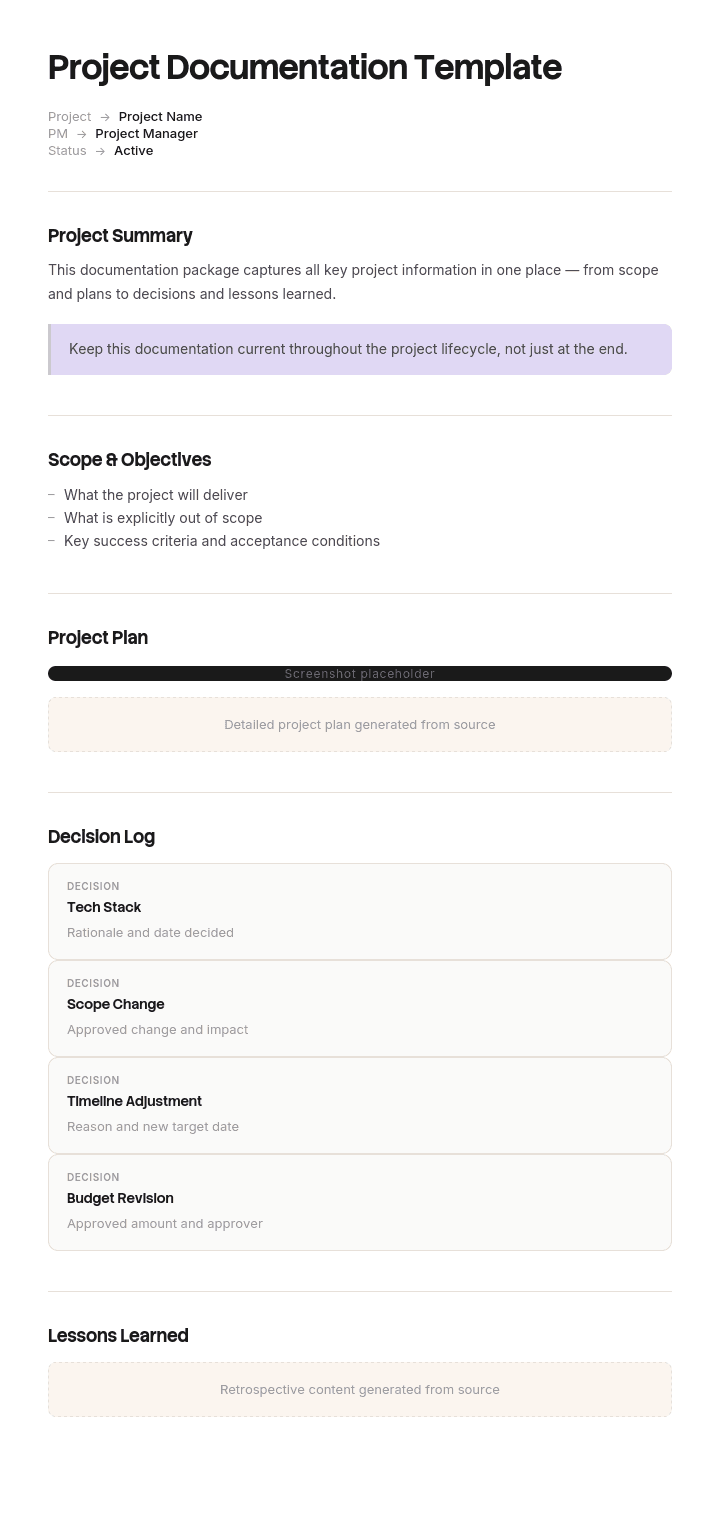
استخدم هذا القالب
توثيق المشاريع الجيد هو ما يمنع المشروع من الانحراف - وهو ما يساعد الفريق التالي على التعلم من توثيقك. باستخدام Trupeer، يمكنك توفير ساعات في كتابة توثيق المشروع عبر البدء بقالب مجاني لتوثيق المشروع، وتخصيصه باستخدام إرشادات العلامة التجارية، ثم تحويل التوثيق إلى دليل فيديو واضح يطلع عليه أصحاب المصلحة فعلاً.
ما هو قالب توثيق المشروع، ومن يقرأه؟
توثيق المشروع هو كل ما يكتبه المشروع: الملخص، والخطة، والمتطلبات، وتقارير الحالة، وسجلات المخاطر والقضايا، وطلبات التغيير، ونتائج الاختبار، ومحتوى التسليم، وتقرير الإغلاق.
يمنحك القالب مجموعة البنية لكل جزء. ابحث عنه وستُعرض عليك إما بنية مجلدات أو مستند واحد يحتوي على أقسام، اعتماداً على ما إذا كان المصدر يرى أن التوثيق مكتبة أم تقريراً.
السؤال الأكثر فائدة هو من يقرأه، لأن هناك جمهورين ويفصل بينهما سنوات.
الجمهور الأول هو المشروع نفسه: الفريق، والجهة الراعية، ومنتدى الحوكمة. يحتاجون إلى الحالة والقرارات والموافقات، ويحتاجونها هذا الأسبوع.
أما الجمهور الثاني فهو أي شخص يشغّل أو يدعم أو يغيّر الشيء بعد ذلك. يصلون بعد 18 شهراً إلى خمس سنوات، عندما لا يكون أي شخص مشارك متاحاً، ويحتاجون إلى معرفة ما تم بناؤه، ولماذا تم بناؤه بهذه الطريقة، وما الذي تم التفكير فيه ورفضه.
يُكتب تقريباً كل توثيق المشروع للجمهور الأول. وتكمن القيمة تقريباً كلها في الجمهور الثاني.
يوجد جمهوران لتوثيق المشروع يفصل بينهما سنوات
احتياجات الجمهور الأول مُلبّاة جيداً، لأن ذلك مفروض. فالحوكمة تتطلب خطة وتقرير حالة وسجل مخاطر وعملية تغيير، لذا يتم إعدادها سواء كان أي شخص يجدها مفيدة أم لا.
أما احتياجات الجمهور الثاني فلا تُفرض إطلاقاً، ويظهر ذلك.
اسأل أي شخص يحافظ على نظام بُني قبل ثلاث سنوات عمّا يتمنى وجوده، وستكون الإجابة متسقة بشكل لافت. لماذا هو هكذا. ما الذي تم التفكير فيه أيضاً. ماذا كان يعرفه الفريق الأصلي ولا نعرفه نحن. ما الذي تم استبعاده عمداً. من وافق على ذلك.
لا تُجيب أي من هذه الأسئلة عن طريق تقرير حالة أو خطة أو سجل RAID. تقارير الحالة تسجل التقدم مقابل خطة تغيّرت. الخطط تسجل النية التي تم تجاوزها. سجلات المخاطر تسجل ما كان يقلق الناس بشأنه، وهو نادراً ما يكون ما حدث.
لذلك يمكن للمشروع إنتاج ثلاثمئة مستند والرد على لا شيء من الأسئلة التي تُطرح عليه لاحقاً.
كيفية تخصيص هذا القالب في Trupeer
الخطوة 1: افتح قسم القوالب
انتقل إلى قسم القوالب من القائمة الرئيسية.

الخطوة 2: اختر قالباً وافتحه
انقر على أي قالب تريد العمل عليه لفتحه.

الخطوة 3: وسّع عرض القالب
إذا لزم الأمر، وسّع عرض القالب لرؤية التخطيط الكامل والتفاصيل بوضوح.

الخطوة 4: عدّل القالب
انقر على Edit لبدء تعديل القالب المحدد.

داخل المحرر، يمكنك:
إضافة أقسام جديدة
تحديد أو تحديث قواعد التنسيق
إضافة شعار وضبط موضعه والإعدادات ذات الصلة
الخطوة 5: احفظ قالبك المخصص
بعد إجراء جميع التغييرات اللازمة، انقر Save لتخزين القالب المحدّث كقالبك الخاص.

الخطوة 6: المعاينة والضبط الدقيق للقالب
عندما تريد معرفة كيف يبدو قالبك المخصص، افتح Preview.

من شاشة المعاينة، يمكنك الاستمرار في إجراء تعديلات مباشرة عند الحاجة، لضمان ظهور القالب تماماً كما تريده.
باستخدام قالب توثيق المشروع يمكنك:
توفير ساعات في الكتابة: تخطَّ الصفحة الفارغة ببنية مصممة لأي نوع من المشاريع.
مواءمة أصحاب المصلحة: أقسام مدمجة للنطاق والأهداف والمخرجات تجعل الجميع على نفس الصفحة.
الالتزام بالهوية البصرية: طبّق شعارك وخطوطك وألوانك باستخدام Trupeer's brand kit - مثالي لتسليمات العملاء.
البدء بسرعة أكبر: يتأقلم أعضاء الفريق الجدد بسرعة عندما يتم التقاط سياق المشروع بوضوح.
تسجيل الدروس المستفادة: أقسام الاسترجاع المدمجة تجعل من السهل التعلم من كل مشروع.
الوصول إلى فرق عالمية: ترجمة توثيق المشروع إلى أكثر من 65 لغة بنقرة واحدة.
المستندات التي لا يفرضها أحد هي التي يحتاجها الناس
رتّب مستندات المشروع حسب ما إذا كان أي شخص يقرأها بعد الإغلاق، وستجد النمط واضحاً.
مفروضة وغير مفيدة لاحقاً: تقارير الحالة، وإصدارات الخطة، وإصدارات RAID log، ومحاضر الاجتماعات، ونماذج طلبات التغيير، وجداول الدوام، والوثائق التوجيهية.
اختيارية ومفيدة لاحقاً: سجل القرار، ووصف ما تم تنفيذه فعلياً، والخيارات المرفوضة، والقيود المعروفة، ومحتوى التسليم، والأسباب وراء أي شيء غير معتاد.
هذا التفاوت ليس صدفة. فالمستندات المفروضة موجودة لإرضاء الحوكمة، وهي عملية تهتم بالتحكم أثناء تنفيذ المشروع. لا شيء في هذه العملية يسأل عمّا سيحتاجه الشخص التالي، لأن الشخص التالي ليس موجوداً في الغرفة ولن يشتكي لمدة سنتين.
الاستجابة العملية هي إضافة مستند واحد إلى المجموعة المفروضة وأن تكون صارماً بشأن ما يتم أرشفته. المستند الذي يجب إضافته هو سجل القرارات، وهو موضوع القسم التالي.
سجل القرارات، ولماذا لا يُعد RAID log واحداً
يعتقد معظم المشاريع أنها تغطي ذلك، لأنها تحتفظ بسجل RAID log. لكنها لا تفعل، والفرق مهم.
يسجل RAID log المخاطر والافتراضات والقضايا والاعتمادات. وهذه الأربعة كلها حالات مستقبلية للقلق. ولا يسجل أي منها خياراً.
يسجل سجل القرارات الخيارات. خمسة حقول لكل إدخال، ولا يوجد أي منها اختياري.
ما الذي تم اتخاذه كقرار، بصياغة واضحة بحيث يفهمه شخص خارج المشروع.
متى، مع تاريخ.
من اتخذ القرار، بالاسم والدور، وليس "مجلس المشروع".
ما الذي تم رفضه، أي الخيارات الأخرى التي كانت مطروحة فعلاً.
لماذا، في جملة أو جملتين.
الحقل الرابع هو ما يجعل السجل يستحق الاحتفاظ به. يمكن لأي شخص في النهاية إعادة بناء ما تم اتخاذه كقرار من خلال النظر إلى ما هو موجود. لكن لا يمكن لأي شخص إعادة بناء ما تم التفكير فيه ورفضه، وهذا بالضبط ما يحتاجه شخص يغيّر النظام بعد ثلاث سنوات، لأن أول غريزة لديه ستكون اقتراح الخيار الذي كنت قد استبعدته بالفعل.
حافظ عليه أسبوعياً، في مكان واحد، مع الإضافة بدلاً من المراجعة. عشر دقائق أسبوعياً تنتج شيئاً يستمر لسنوات بعد انتهاء المشروع، وهو المستند الوحيد في المشروع الذي تتم قراءته بعد الإغلاق بشكل موثوق.
كيفية ترتيب قائمة مستنداتك حسب القيمة بعد الإغلاق
المستند | يُقرأ أثناء المشروع | يُقرأ بعد الإغلاق | هل أرشفه؟ |
|---|---|---|---|
سجل القرارات | أحياناً | بشكل مستمر | دائماً، واجعله قابلاً للعثور عليه |
وصف ما تم تنفيذه فعلياً | نادراً | بشكل مستمر | دائماً |
القيود المعروفة والحلول البديلة | أحياناً | بشكل مستمر | دائماً |
حزمة التسليم | في النهاية | للسنوات | دائماً |
الملخص ومعايير النجاح | غالباً | عند مراجعة الفوائد | نعم، إصدار واحد |
المتطلبات | بشكل مستمر | أحياناً، للسياق | نعم، الإصدار النهائي فقط |
نتائج الاختبار | بشكل مستمر | نادراً، باستثناء الأعمال الخاضعة للتنظيم | مجموعة نهائية فقط |
الخطط | بشكل مستمر | نادراً جداً | الخط أساس النهائي فقط |
تقارير الحالة | أسبوعياً | أبداً | لا |
إصدارات RAID log | بشكل مستمر | نادراً جداً | الإصدار النهائي فقط |
محاضر الاجتماعات | أحياناً | نادراً جداً | لا، استخرج القرارات بدلاً منها |
طلبات التغيير | بشكل مستمر | أحياناً، للأسباب | استخرج القرارات، وتخلّص من النماذج |
نفّذ ذلك على مجموعتك الخاصة عند الإغلاق بدلاً من أرشفة كل شيء، وهي الإعداد الافتراضي، والتي تنتج أرشيفاً لا يبحث عنه أحد لأن الإشارة مدفونـة.
الصف الذي يغيّر السلوك هو محاضر الاجتماعات. فالمحاضر تسجل أن موضوعاً تمت مناقشته. لكنها نادراً ما تسجل ما تم التوصل إليه، ولهذا فإن البحث عن ستين إشارة لموضوع في المحاضر لا يخبرك بشيء. استخرج القرارات إلى السجل كما تحدث، وتتوقف المحاضر عن أن تكون مهمة.
قالب توثيق مشروع مجاني: المجموعة التي تستحق الاحتفاظ بها
انسخ من هنا. سبعة مستندات بدلاً من بنية مجلدات.
واحد. الملخص. المشكلة والقيود ومعايير النجاح، وفقاً لـ قالب ملخص المشروع لدينا. إصدار واحد، مؤرشف.
اثنان. سجل القرارات. الحقول الخمسة أعلاه، مع الإضافة أسبوعياً، دون مراجعة. أكثر عنصر أثريّة قيمة سيُنتجه المشروع.
ثلاثة. الخطة. النطاق والجدول الزمني والموارد والاعتمادات، وفقاً لـ قالب خطة مشروع تقنية المعلومات لدينا. تكون حية أثناء التسليم، ويُؤرشف خط الأساس النهائي.
أربعة. المتطلبات أو المواصفة. ما الذي كان يجب بناؤه. الإصدار النهائي مؤرشف، والمسودات الأقدم يتم التخلص منها.
خمسة. وصف ما تم تنفيذه فعلياً. ما الموجود فعلياً الآن، كتمييز عن ما تم تحديده. يتضمن أي شيء يختلف عن المتطلبات ولماذا. هذا هو المستند الذي لا يُكتب عادةً، وهو الذي تطلبه فرق العمليات أولاً.
ستة. القيود المعروفة. ما الذي لا يفعله الشيء، وما الذي يسبب تعطلـه، وأي حلول بديلة مستخدمة جاهزة عند التسليم. مختصر وصادق، وقيمته كبيرة جداً.
سبعة. حزمة التسليم. من يملكها الآن، وما الذي استلموه، ومحتوى التشغيل والصيانة، وترتيبات الدعم. عندما يسلّم المشروع أصلاً مادياً، فإن قالب دليل التشغيل والصيانة لدينا يغطي ذلك بشكل صحيح.
وثائق الحوكمة، أي تقارير الحالة والوثائق التوجيهية وإصدارات RAID، موجودة أثناء المشروع ولا تدخل الأرشيف إلا إذا تطلب معيار قياسي ذلك.
انسخ إلى هنا.
جمعية الادخار التي لم تستطع شرح نظامها الخاص
قامت Calderbank، وهي جمعية ادخار تضم حوالي ألف وأربعمئة موظف، باستبدال منصة إصدار القروض العقارية في 2022. استغرق ذلك أربعة عشر شهراً، تقريباً ثلاثة ملايين وواحد وثلاثين ألف جنيه إسترليني.
أنتج المشروع حوالي ثلاثمئة وأربعين مستنداً: ثمانية وخمسون تقرير حالة أسبوعياً، وأحد وأربعون إصداراً من سجل RAID، وسبعة وسبعون طلب تغيير، ومئة واثنا عشر مجموعة من محاضر الاجتماعات، وثلاثة وعشرون إصداراً من الخطة، بالإضافة إلى المتطلبات وسكربتات الاختبار ومادة التدريب. وانتهى بإقرار تسليم توثيق كامل.
في 2025، تطلب تغيير تنظيمي تعديل طريقة تعامل أحد حسابات القدرة على تحمل التكاليف مع فئة معينة من الدخل. استبعدها النظام الحالي، ولم يستطع أحد تحديد السبب. هل كان قراراً سياسياً متعمداً، أم قيداً في منتج المورد، أم خطأ لم يلاحظه أحد؟
كانت الإجابة مهمة، لأن الاستبعاد المتعمد الموثق لسبب مختلف هو موقف تنظيمي مختلف عن الاستبعاد العرضي.
بحثوا في جميع المستندات الثلاثمئة والأربعين. ظهرت المتطلبات كسطر واحد في مستند المتطلبات. لم يذكر أي طلب تغيير ذلك. ظهرت كلمة القدرة على تحمل التكاليف 61 مرة عبر المحاضر، دائماً كموضوع نقاش وليس كقرار.
تم العثور على الإجابة في النهاية ضمن سلسلة بريد إلكتروني شخصية، أُعيد توجيهها من مقاول كان قد غادر في 2023، ولم يحدث ذلك إلا لأن شخصاً تذكر أنه كان مشاركاً.
مرّت سبعة أسابيع قبل أن يتمكنوا من تحديد نطاق التغيير. استغرق التغيير نفسه أربعة أسابيع. تم إشراك مستشارين قانونيين خارجيين لتأكيد الموقف التنظيمي، لأنهم لم يتمكنوا من إثبات المبرر الأصلي، بتكلفة تقارب 28 ألف جنيه إسترليني. وبما أنه لم يمكن إثبات المبرر، تم تحديد نطاق التغيير بشكل محافظ، وتم إعادة بناء المزيد مما كان ضرورياً، وهو ما وضعه البرنامج لاحقاً بحوالي 140 ألف جنيه إسترليني من أعمال يمكن تجنبها.
من بين المستندات الثلاثمئة والأربعين، لم يكن أي منها سجلاً للقرارات. تم اتخاذ كل قرار مهم في اجتماع، وتم تدوينه كمناقشة، وتم تنفيذه.
في البرنامج التالي، وهو استبدال منصة توفير مدتها 11 شهراً، تم الاحتفاظ بسجل قرارات منذ الأسبوع الأول. خمسة حقول، مع الإضافة أسبوعياً، 74 إدخالاً حتى الإغلاق. وقد أنتج 190 مستنداً إجمالاً وأرشف 31 منها.
بعد 18 شهراً من إغلاق ذلك البرنامج، ظهرت ثلاث أسئلة منفصلة عن سبب كون النظام على هذا النحو. تمت الإجابة عن الثلاثة من السجل خلال يوم واحد.
كيفية إنشاء توثيق المشروع خطوة بخطوة
قرر في البداية ما هي المستندات التي ستوجد وما الذي سيتم أرشفته. إن القيام بذلك عند الإغلاق يعني أرشفة كل شيء، وأرشيف كل شيء لا يمكن البحث فيه.
ابدأ سجل القرارات في الأسبوع الأول، قبل أن توجد قرارات تستحق التوثيق، لأن السجل الذي يبدأ لاحقاً لن يتم ملؤه بأثر رجعي.
اكتب الملخص ومعايير النجاح قبل الخطة، بحيث تخدم الخطة المشكلة وليس العكس.
استخرج القرارات من الاجتماعات إلى السجل كما تحدث، أثناء الاجتماع. عشر دقائق أسبوعياً. الاعتماد على المحاضر يعني الاعتماد على شخص لاحقاً يقرأ 60 إشارة لموضوع ويستنتج نتيجة.
أنشئ وصف ما تم تنفيذه فعلياً أثناء التسليم وليس في النهاية، مع تحديثه كلما تغيرت الأمور. إذا كُتب عند الإغلاق فسيُكتب من الذاكرة، وهو المستند الأكثر احتمالاً لأن يكون غير صحيح بهدوء.
اكتب القيود المعروفة بصدق. توجد رغبة في حذفها عند التسليم، لكن ذلك يضر بثقة فريق الاستلام بكل ما تبقى في الحزمة.
عند الإغلاق، رتّب المجموعة باستخدام الجدول أعلاه، وأرشف ما يستحق مكانه، وتخلّص من الباقي.
توثيق المشروع للبرمجيات ومشاريع الطلاب
تتعلق نسبة كبيرة من عمليات البحث عن هذا المصطلح بطلاب يوثقون مشروع برمجيات أو موقع إلكتروني للتقديم، كما أن المتطلبات تختلف فعلاً، لذا من الأفضل معالجتها مباشرة بدلاً من التظاهر بغير ذلك.
عادةً يتبع توثيق المشروع الأكاديمي دورة حياة تطوير البرمجيات ويتوقع مجموعة محددة: مقدمة وبيان المشكلة، مراجعة الأدبيات أو النظام الحالي، تحليل المتطلبات، تصميم النظام مع مخططات، ملاحظات التنفيذ، الاختبار مع النتائج، والاستنتاجات مع الأعمال المستقبلية. مواصفة مؤسستك هي المرجع وستختلف عن أي قالب ستجده على الإنترنت، لذا ابدأ بمعايير التقييم بدلاً من نموذج.
هناك نقطتان من الجانب الاحترافي تنتقلان بشكل مفيد.
سجل القرارات. تكافئ مخططات التقييم الاختيارات المبررة، وسجل ما تم رفضه ولماذا هو الدليل الذي يميّز التصميم المدروس عن التصميم العشوائي. معظم توثيق الطلاب يذكر اختيارات دون تبريرها.
قسم القيود المعروفة. إن ذكر ما لا يفعله نظامك ولماذا يُقرأ ككفاءة وليس كضعف، وهو المكان الذي تأتي منه فقرة الأعمال المستقبلية.
ما لا ينتقل هو مادة الحوكمة. تقارير الحالة وسجلات RAID ليست ما يحتاجه التقديم الأكاديمي.
ماذا أرشف عند الإغلاق، وماذا أحذف
أرشفة كل شيء هي الافتراضي، وهي قرار بعدم اتخاذ قرار. والنتيجة هي مجلد لا يبحث عنه أحد، لأن البحث يعيد مئة واثنا عشر مجموعة من محاضر الاجتماعات وأحد وأربعين إصداراً من سجل مخاطر.
الأرشفة: سجل القرارات، ووصف ما تم تنفيذه فعلياً، والقيود المعروفة، وحزمة التسليم، والملخص، والمتطلبات النهائية، وخط أساس الخطة النهائي، وأي التزامات تنظيمية أو تعاقدية تحددها.
الإلغاء: تقارير الحالة، وإصدارات الخطة التي تم تجاوزها وإصدارات RAID، ومحاضر الاجتماعات مرة واحدة بعد استخراج القرارات، ونماذج طلبات التغيير بعد تسجيل القرارات الموجودة فيها، ومسودات أي شيء.
عندما يتطلب معيار أو جهة تنظيمية أو عقد الاحتفاظ بمادة الحوكمة، احتفظ بها بشكل منفصل عن الأرشيف الذي يُتوقع من الناس البحث فيه. فالغرض من الاحتفاظ بالامتثال يختلف عن الغرض من توثيق قابل للاستخدام، وخلطهما يُفشل الغرض الثاني.
ضع الأرشيف في مكان يمكن للفريق الذي يرث العمل العثور عليه، وليس في مكتب المشروع، وهو المكان الذي تودع فيه المشاريع عادةً الملفات ولا ينظر إليه أحد بعد سنتين. يغطي قالب توثيق تقنية المعلومات لدينا الموطن المستمر لمادة ما تم تنفيذه فعلياً.
توثيق المشروع أم توثيق العملية؟
مستندان مختلفان بأسماء متشابهة، والفرق يتعلق بما إذا كانت الجهة المعنية ستنتهي.
توثيق المشروع يصف عملاً له بداية ونهاية. يُكتب مرة واحدة، ويُؤرشف عند الإغلاق، ويُقرأ لاحقاً من قِبل الأشخاص الذين يرثون المخرجات. قيمته تاريخية: ما الذي تم بناؤه، ولماذا، وما الذي تم رفضه.
توثيق العملية يصف عملاً يتكرر. تتم صيانته باستمرار، ويقرأه من ينفذ العمل، وتكمن قيمته في الحاضر. يغطي قالب توثيق العملية لدينا ذلك، بما في ذلك لماذا تكون الاستثناءات أكثر أهمية من الخطوات.
غالباً ما ينتج المشروع توثيق العملية كمخرجات. يوثق المشروع كيفية بناء النظام الجديد؛ وتوثيق العملية يوضح كيفية تشغيله الآن. وهذان مستندان مختلفان مع مالكين مختلفين وأعمار مختلفة، ودمجهما يعني أن النصف التشغيلي يُؤرشف مع المشروع، وهذا هو سبب وصف العملية الحية فقط داخل مجلد مشروع مغلق.
عندما يتم تسليم مخرجات المشروع إلى فريق آخر بالكامل، يغطي إجراء نقل المعرفة SOP لدينا عملية التسليم التي لا يمكن أن يحققها التوثيق وحده.
هل يمكنني الحصول على قالب توثيق مشروع في Word أو Excel؟
بالنسبة للمستندات السردية: Word أو Google Docs للملخص ووصف ما تم تنفيذه فعلياً والقيود المعروفة وحزمة التسليم. هذه نصوص وتُقرأ بدلاً من فرزها.
أما Excel فيناسب شيئين. سجل القرارات، وهو جدول ويحتاج إلى أن يكون قابلاً للبحث والتصفية والإضافة دون أن يقوم أي شخص بإعادة تنسيقه. وكذلك سجل المستندات، الذي يسرد كل مستند مع مالكه وإصداره وما إذا كان مؤرشفاً عند الإغلاق أو تم التخلص منه.
يستحق الإصرار على أن يكون سجل القرارات في جدول بيانات وليس في مستند، لأن القيمة كاملة في القدرة على البحث فيه لاحقاً، وسجل القرارات في مستند يتحول إلى جدار من النص خلال ثلاثة أشهر.
PDF للمجموعة المؤرشفة عند الإغلاق، يتم تصديره من المصادر، مع ختم التاريخ والإصدار.
كيفية التقاط ما تم بناؤه كما يتم بناؤه
المستند ذو أعلى قيمة بعد الإغلاق وأدنى معدل إكمال هو وصف ما تم تنفيذه فعلياً، والسبب بسيط. كتابة هذا الوصف تعني أن يصف شخص إعدادات وشاشات قضى للتو شهوراً في بنائها وهو متعب منها تماماً، في الوقت الذي لا يتبقى فيه أي وقت للمشروع.
لذلك يتم كتابته من الذاكرة عند الإغلاق، أو يتم وضع علامة عليه دون كتابته.
تغيّر Trupeer AI ذلك عبر جعل عملية الالتقاط تحدث أثناء التسليم. من يقوم بتكوين أو بناء شيء ما يسجله مرة واحدة أثناء التنفيذ، ويكون الناتج وصفاً مكتوباً بالخطوات والشاشات التي تم التقاطها مسبقاً. يتراكم مستند ما تم تنفيذه فعلياً بدلاً من تصنيعه في النهاية، وهو دقيق لأنه تم تسجيله في وقت حدوثه وليس استعادته لاحقاً.
سجّله. اجعله بعلامتك. ترجمّه. اجعله Trupeer.
تخدم نفس التسجيلات حزمة التسليم ومادة التشغيل، والتي غالباً ما تكون مطلوبة في نفس اللحظة ونادراً ما تكون جاهزة. يغطي التوثيق التقني السجل الداخلي، وتعيش المادة في قاعدة المعرفة لديك مع هوية بصرية متسقة. توجد تعليمات الإعداد في دليل إعداد قالب المستند.
الأسئلة الشائعة
هل يوجد قالب توثيق مشروع مجاني في Word؟
تعمل مجموعة المستندات السبعة أعلاه في Word أو Google Docs، وتنتمي المستندات السردية إلى هناك. لا يوجد تنزيل مقيد ولا نموذج. احتفظ بسجل القرارات في جدول بيانات بدلاً من مستند، لأن قيمته كاملة في كونه قابلاً للبحث بعد سنتين.
هل يوجد قالب توثيق مشروع مجاني في Excel؟
يتناسب Excel مع سجل القرارات وسجل المستندات. يحتاج السجل إلى خمس أعمدة: القرار، التاريخ، من اتخذ القرار، الخيارات المرفوضة، والسبب. يحتاج سجل المستندات إلى المستند والمالك والإصدار وما إذا كان مؤرشفاً أو تم التخلص منه عند الإغلاق. كلاهما أكثر فائدة من أي قالب سردي.
أين يمكنني العثور على نموذج توثيق مشروع في PDF؟
تسهل العثور على النماذج المنشورة وتختلف بشكل كبير في الجودة، لأن معايير توثيق المشروع تختلف حسب المؤسسة والمنهج. اقرأها لقائمة المستندات وليس للمحتوى، وتحقق مما إذا كان أي منها يتضمن سجل قرار، لأن معظمها لا يفعل، وغياب ذلك هو جوهر هذه الصفحة.
هل يوجد نموذج توثيق مشروع موقع إلكتروني في PDF؟
إذا كان هذا لمقرر دراسي أو مشروع السنة النهائية، فاعمل وفقاً لمعايير التقييم في مؤسستك بدلاً من نموذج، لأن الأقسام المطلوبة تختلف والمعايير هي ما سيتم تقييمك عليه. يغطي قسم البرمجيات ومشاريع الطلاب أعلاه ما ينتقل بشكل مفيد من الممارسة الاحترافية، وبشكل أساسي سجل القرارات وقسم القيود الصادقة.
كم مقدار توثيق المشروع الكافي؟
مستندات أقل من معظم المشاريع، ونوع واحد إضافي أكثر من معظم المشاريع. سبعة مستندات هي مجموعة عملية لمشروع كبير. الاختبار ليس الحجم بل ما إذا كان شخص يصل بعد سنتين يمكنه الإجابة عن سبب كون الأمر على هذا النحو، ويتم الإجابة عن هذا السؤال بمستند واحد وليس بثلاثمئة.
من يجب أن يكتب توثيق المشروع؟
يتولى مدير المشروع المجموعة وسجل القرارات تحديداً، لأنهما موجودان في كل اجتماع تُتخذ فيه القرارات. يجب أن يُكتب وصف ما تم تنفيذه فعلياً بواسطة من قام ببنائه، أثناء التسليم. التوثيق المكتوب بالكامل بواسطة مكتب المشروع عند الإغلاق يصف أوراق المشروع أكثر من وصف مخرجاته.
كم مدة الاحتفاظ بتوثيق المشروع؟
احتفظ بسجل القرارات ووصف ما تم تنفيذه فعلياً والقيود المعروفة طالما أن الشيء موجود، وهو عادةً أطول بكثير من أي سياسة احتفاظ تفترضها. احتفظ بمادة الحوكمة لأي معايير أو عقود أو متطلبات من الجهة التنظيمية لديك، مخزنة بشكل منفصل عن المادة التي يُتوقع من الناس البحث فيها.
توثيق المشروع أم خطة المشروع: ما الذي يختلف؟
الخطة هي مستند واحد ضمن توثيق المشروع، وتغطي كيفية تسليم العمل. توثيق المشروع هو المجموعة كاملة، بما في ذلك ما تم قراره وما تم بناؤه وما تم تسليمه. مشروع لديه خطة ممتازة دون سجل قرارات يُدار بشكل جيد، لكنه غير قابل للشرح لاحقاً، وهذه هي الفشل الأكثر شيوعاً.

