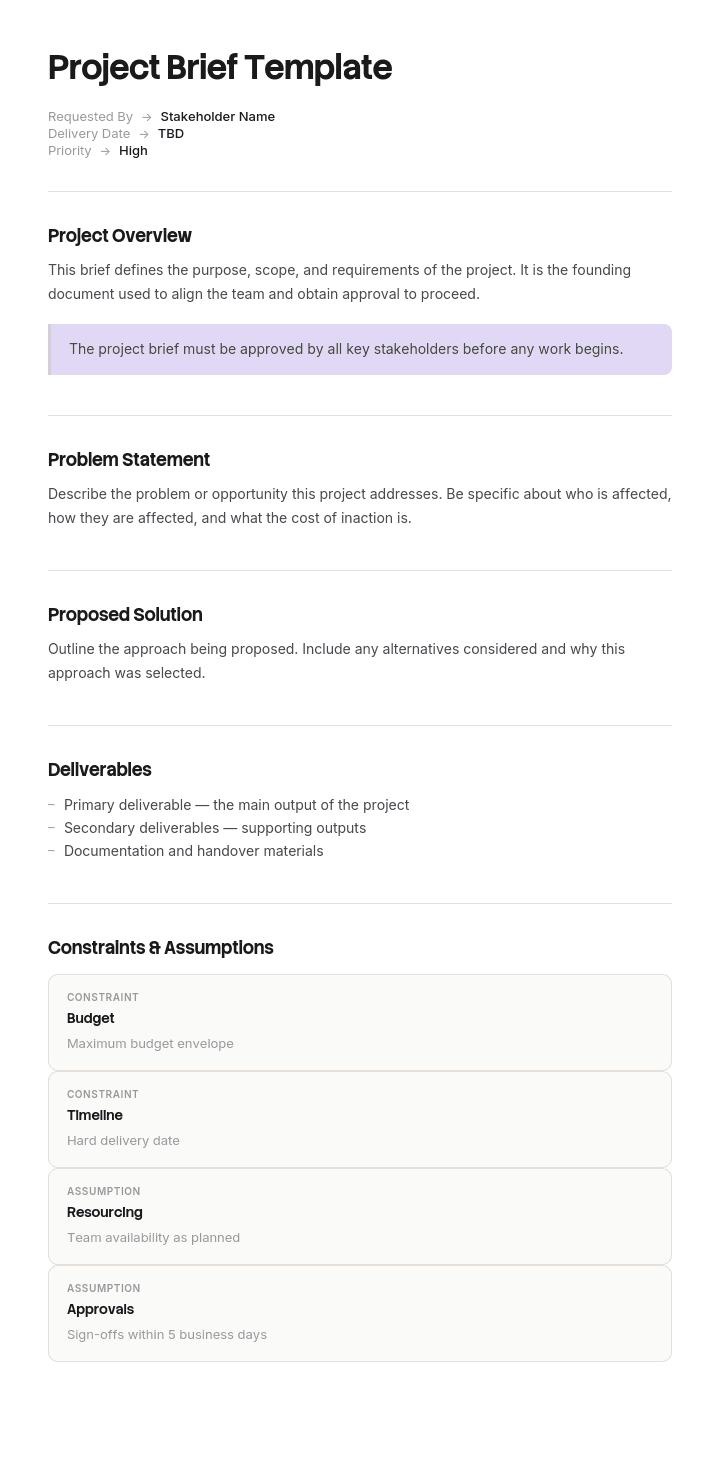
استخدم هذا القالب
يُعدّ موجز المشروع الرائع طريقة ممتازة لتوحيد الجميع على نفس الصفحة قبل بدء المشروع - ما الذي سيتم بناؤه، ولماذا يهم، ومن هم المعنيون، وكيف سيتم قياس النجاح. باستخدام Trupeer، يمكنك توفير ساعات في كتابة موجزات المشروع عبر البدء بقالب موجز مشروع مجاني، وتخصيصه باستخدام هوية العلامة التجارية الخاصة بك، وتحويل الموجز إلى ملخص فيديو قصير يمكن لأصحاب المصلحة مشاهدته خلال 3 دقائق.
ما هو قالب موجز المشروع، ومتى يتم كتابته؟
يُعدّ موجز المشروع المستند القصير الذي يُكتب في بداية المشروع مباشرةً، قبل وجود الخطة، ويحدد ما الغرض من المشروع، ولماذا يهم الآن، ومن يتأثر به، وكيف يبدو النجاح، وما القيود التي تحكمه.
إنه المستند الذي يوقّعه الناس لتفويض العمل، ويصبح نقطة المرجع التي يجادل الجميع ضدها بعد ستة أشهر. وهو قصير عمدًا، عادةً صفحة أو صفحتين، لأنه يُكتب في لحظة توفر أقل قدر من المعلومات.
يمنحك القالب الأقسام: الخلفية، الأهداف، النطاق، المخرجات، الجدول الزمني، الميزانية، أصحاب المصلحة، ومعايير النجاح. ستجد كل نسخة تقريبًا تقدم تلك العناصر، ولا يوجد ما يعيبها.
المشكلة في الموجزات نادرًا ما تكون في الأقسام نفسها. المشكلة فيما يتم إدراجه داخلها.
معظم الموجزات تذكر حلاً، لا مشكلة
هذه هي الشكوى التي يصنعها كل فريق تسليم، وكل وكالة، وكل مجموعة هندسية حول الموجزات، بصياغة واحدة تقريبًا في كل صناعة: تم إبلاغنا بالحل.
"أنشئ بوابة عملاء." "أنشئ شبكة داخلية جديدة." "سلّم تطبيقًا جوالًا." "أعد تصميم تدفق الإعداد." كل واحدة من هذه تُعدّ شيئًا يجب بناؤه، وتصل وكأنها متطلب، بينما هي في الحقيقة إجابة عن سؤال لم يذكره الموجز أصلًا.
يحدث ذلك لسبب منطقي. عادةً من يكلّف المشروع يكون قد فكر فيه لأسابيع ووصل إلى نتيجة. كتابة النتيجة تبدو كوضوح، وكتابة المشكلة تبدو كغموض.
تكمن التكلفة في أن أرخص الحلول تُستبعد قبل أن ينظر إليها أحد. بمجرد أن يقول الموجز بوابة، يصبح المشروع مشروع بوابة، ولا يتم تقييم الخيار الذي كان سيحل 80% من المشكلة مقابل 5% من المال، لأن أحدًا لم يُطلب منه تقييم أي شيء.
موجز يذكر مشكلة يدعو إلى الإجابات. وموجز يذكر حلاً يدعو إلى التقديرات.
كيفية تخصيص هذا القالب في Trupeer
الخطوة 1: افتح قسم القوالب
انتقل إلى قسم القوالب من القائمة الرئيسية.

الخطوة 2: اختر قالبًا وافتحه
انقر على أي قالب تريد العمل عليه لفتحه.

الخطوة 3: وسّع عرض القالب
إذا لزم الأمر، وسّع عرض القالب لرؤية التخطيط الكامل والتفاصيل بوضوح.

الخطوة 4: عدّل القالب
انقر على "Edit" لبدء تعديل القالب المحدد.

داخل المحرر، يمكنك:
إضافة أقسام جديدة
تحديد أو تحديث قواعد التنسيق
إضافة شعار وضبط موضعه والإعدادات ذات الصلة
الخطوة 5: احفظ قالبك المخصص
بعد إجراء جميع التغييرات اللازمة، انقر على "Save" لتخزين القالب المحدّث باعتباره قالبك الخاص.

الخطوة 6: المعاينة وضبط القالب بدقة
عندما تريد معرفة كيف يبدو قالبك المخصص، افتح "Preview".

من شاشة المعاينة، يمكنك الاستمرار في إجراء التعديلات مباشرةً عند الحاجة، لضمان ظهور القالب تمامًا كما تريد.
باستخدام قالب موجز المشروع يمكنك:
توفير ساعات في الكتابة: تخطَّ الصفحة الفارغة مع بنية موجز مثبتة.
مواءمة أصحاب المصلحة بسرعة: تجعل موجزات صفحة واحدة الموافقات والتوافق أسرع.
الالتزام بالعلامة التجارية: طبّق شعارك وخطوطك وألوانك باستخدام Trupeer's brand kit - مثالي لموجزات الوكالة والعميل.
تقديم عرض بتأثير: حوّل الموجز إلى ملخص فيديو - رائع لـ تمكين المبيعات وعروض أصحاب المصلحة.
توحيد العمل عبر المشاريع: استخدم نفس تنسيق الموجز لكل مبادرة.
الوصول إلى فرق عالمية: ترجم الموجزات إلى 65+ لغة بنقرة واحدة.
اختبار الإجابات الثلاث لأي موجز مشروع
دقيقتان، وهو اختبار الموجز الوحيد الذي يستحق إجراؤه.
اقرأ الموجز واذكر ثلاث أشياء مختلفة حقًا يمكن أن تلبي ما فيه.
ليس ثلاث تباينات لنفس الشيء. بل ثلاث مقاربات مختلفة: بناء شيء، تغيير عملية، شراء شيء، إزالة خطوة، التواصل بطريقة مختلفة، القيام بأقل.
إذا استطعت ذكر ثلاث، فإن الموجز يصف مشكلة، ولدى المشروع قرار حقيقي أمامه.
إذا استطعت ذكر واحدة فقط، فإن الموجز يصف حلاً. وهذا ليس خطأ تلقائيًا، لأن بعض القرارات تكون قد اتُّخذت فعلًا لأسباب جيدة، وفي هذه الحالة يكون الصواب هو قول ذلك بصدق وتسميّة المستند بمواصفة بدلًا من كونه موجزًا. غير الصادق هو تقديم نتيجة محسومة كسؤال مفتوح ثم الاستغراب من أن أحدًا لم يناقشها.
أجرِ هذا الاختبار على الموجز قبل تعميمه، مع شخص لم يشارك في كتابته. الشخص الذي كتبه يمكنه دائمًا ذكر ثلاث إجابات، لأنه يعرف ما الذي رفضه. أما أي شخص آخر فلا يستطيع، لأن الموجز لا يحتوي ذلك.
كيفية كتابة المشكلة بدلًا من كتابة المخرجات
أربع عادات، ولا واحدة منها تستغرق وقتًا أطول من كتابة الحل.
ابدأ بملاحظة ورقم. ليس "يجد العملاء صعوبة في التحقق من طلباتهم" بل "تواصل معنا العملاء ستة آلاف وسبعمائة مرة الشهر الماضي لمعرفة أين طلبهم". يقوم الرقم بأمرين: يثبت أن المشكلة حقيقية، ويحدد قيمة الحل.
اذكر ما يحدث الآن. كيف تتم معالجة المشكلة حاليًا بشكل سيئ، بما في ذلك الحل البديل الذي ابتكره الناس. وصف الحالة الحالية هو ما يسمح لشخص ما باقتراح إجابة أرخص.
افصل القيود عن المتطلبات. الميزانية قيد. الموعد النهائي قيد. يجب أن يتكامل مع نظام المستودع الحالي قيد. "يجب أن يكون هناك تسجيل دخول" متطلب مُقنّع كقيد، وغالبًا يأتي من الصورة الذهنية للحل لدى شخص ما.
عرّف النجاح كتغيير في الرقم، لا كوجود مخرجات. تقليل تلك الاتصالات إلى النصف خلال ستة أشهر هو معيار نجاح. إطلاق بوابة هو معلم.
عندما يكون لديك حل في ذهنك فعلًا، ضعه في قسم مُسمّى بوضوح يذكر ذلك، كمرشح واحد وليس كالموجز نفسه.
قالب موجز مشروع مجاني: البنية التي تنسخها
انسخ من هنا. صفحة أو صفحتان، وقاوم التوسّع.
العنوان. اسم المشروع، الجهة الراعية، المؤلف، التاريخ، الإصدار، والقرار المطلوب.
المشكلة. ملاحظة مع رقم، وكم مرة تحدث، وما تكلفته. جملتان إلى ثلاث.
كيف تتم معالجتها الآن. العملية الحالية، بما في ذلك الحل البديل، ولماذا لا تكفي.
لماذا الآن. ما الذي تغيّر ويجعل تنفيذ ذلك يستحق هذا الربع بدلًا من العام القادم.
من هم المتأثرون. الأشخاص أو العملاء المعنيون، وبشكل تقريبي كم عددهم.
معايير النجاح. ما الرقم الذي سيتغير، وبكم، ومتى. واحدة أو اثنتان، بصياغة نتائج.
القيود. الميزانية، الموعد النهائي، الأنظمة التي لا يمكن تغييرها، الالتزامات التنظيمية أو التعاقدية، الأشخاص غير المتاحين. كل شيء ثابت فعلًا، ولا شيء هو تفضيل.
خارج النطاق. ما لن يعالجه هذا المشروع، مذكورًا بدقة كافية ليكون مثيرًا للجدل.
مقاربات مرشحة، إن وجدت. حلول تم التفكير فيها مسبقًا، مُعنونة بوضوح كمرشحات وليس كموجز، مع سبب وجود كل حل في القائمة.
القرار المطلوب ومن سيصدره. ما الذي تطلبه ومن يفوضه.
انسخ إلى هنا. إذا تجاوز الموجز صفحتين فغالبًا السبب هو الخلفية، والتي تنتمي إلى ملحق لن يقرأه أحد، وهذا أمر جيد.
تاجر التجزئة الذي بنى بوابة لم يسجل لها أحد
تُعدّ Ashfold Group متجرًا متخصصًا للتجزئة يضم حوالي تسعين متجرًا، إلى جانب أعمال إلكترونية كبيرة.
كان الموجز صفحتين، مكتوبًا جيدًا، وتمت الموافقة عليه دون صعوبة. وقد ذكر: بناء بوابة خدمة ذاتية للعملاء حيث يمكن للعملاء تسجيل الدخول لعرض حالة الطلب، وتنزيل الفواتير، وطرح الاستفسارات. ميزانية 340 ألف جنيه إسترليني. تسعة أشهر.
تم تسليمه في الوقت المحدد وبقرب من الميزانية، عند 371 ألف جنيه إسترليني.
بعد ستة أشهر من الإطلاق، كانت هناك ثلاثة آلاف ومائة حساب مسجل مقابل نحو 46 ألف عميل نشط، أي أقل من 7%. لم يتغير حجم التواصل مع مركز الخدمة.
طلبت مراجعة ما بعد التنفيذ سؤالًا بسيطًا: ما المشكلة التي بُنيت هذه من أجل حلها؟ لم يستطع أحد الإشارة إليها في الموجز، لأن الموجز كان قد وصف حلًا.
لذلك ذهب شخص ما للعثور على المشكلة. كان مركز الخدمة يتعامل مع حوالي 11 ألف تواصل شهريًا. أظهر عيّنة من 500 أن 61% كانت من نوع "أين طلبي؟"، وهو ما يعادل حوالي 6700 تواصل شهريًا.
ومن بين هؤلاء العملاء، كان 84% قد تلقوا بالفعل بريدًا إلكترونيًا للإرسال يتضمن رابط تتبع. إما أنهم لم يلاحظوه، أو عادوا إليه بعد انتهاء صلاحية الرابط عند 14 يومًا.
كانت المشكلة الأساسية إذن ليست أن العملاء لا توجد لديهم طريقة للتحقق. بل أن الطريقة التي لديهم بالفعل لم تكن تعمل.
لم يتم تقييم ثلاث مقاربات أرخص مطلقًا، لأن الموجز لم يدعُ إلى أي منها. تمديد صلاحية رابط التتبع. إعادة إرسال الرابط وفق جدول حتى التسليم. إضافة حالة الطلب إلى قسم الحساب الموجود بالفعل، وقدرت لاحقًا بحوالي 18 ألف جنيه إسترليني.
كانت البوابة حلًا مشروعًا لمشكلة حقيقية. لكنها لم تكن أكبر مشكلة، كما أنها تطلب التسجيل، وهو ما لم يفعله 93% من العملاء.
تمت كتابة موجز المشروع اللاحق بشكل مختلف. يتواصل معنا العملاء 6700 مرة شهريًا لمعرفة أين طلبهم. كان 84% منهم قد تلقوا بالفعل رابط تتبع. قلّل هذه الاتصالات إلى النصف خلال ستة أشهر. القيود: عدم تغيير تكامل شركة الشحن، 150 ألف جنيه إسترليني، ويجب أن يعمل دون الحاجة إلى تسجيل العملاء.
قدمت ثلاث فرق ثلاث إجابات مختلفة حقًا. كان الحل المختار بتكلفة 62 ألف جنيه إسترليني، وخفّض تلك الاتصالات بنسبة 58% خلال خمسة أشهر.
الفرق بين الموجزين هو أن الموجز الثاني يمكن الإجابة عنه بثلاث طرق. أما الأول فيمكن الإجابة عنه بطريقة واحدة، وكانت تلك الطريقة قد تم اختيارها بالفعل.
العناصر الأساسية التي يحتاجها أي موجز مشروع
العنصر | ما يجب أن يتضمنه | الفشل الشائع |
|---|---|---|
المشكلة | ملاحظة مع رقم وتكرار | حل مُوصَف كأنه حاجة |
الحالة الحالية | كيف تتم معالجتها اليوم، بما في ذلك الحلول البديلة | يتم إغفالها، فتظل الإصلاحات الرخيصة غير مرئية |
لماذا الآن | ما الذي تغيّر ليجعل هذا أمرًا عاجلًا | غائب، لذلك لا توجد حجة أولوية للمشروع |
معايير النجاح | رقم يتحرك بمقدار بحلول تاريخ | مخرجات موجودة |
القيود | الأشياء الثابتة فعلًا فقط | تفضيلات مُدخلة على أنها قيود |
خارج النطاق | مذكور تحديدًا، بما في ذلك الأشياء التي طلبها الناس | فارغ، أو "مراحل مستقبلية" |
القرار المطلوب | ما الذي يتم تفويضه، ومن يفوضه | مُضمَّن، لذلك لا يتم اتخاذ أي قرار |
الصفحتان اللتان تحملان أكبر قدر من الوزن هما الحالة الحالية والقيود، وكلاهما عادةً يكونان رقيقين. الحالة الحالية هي ما يسمح لشخص ما باقتراح الحل الرخيص. أما القيود، إذا تم فصلها بصدق عن التفضيلات، فهي ما يمنع الموجز من أن يتحول إلى مواصفة بالخطأ.
كيفية كتابة موجز مشروع في خمس خطوات
واحد. اكتب المشكلة برقم. إذا لم تستطع الحصول على رقم، خصص بعد الظهر للحصول عليه. موجز بدون رقم هو تفضيل.
اثنان. صف الحالة الحالية، بما في ذلك كيف يتعامل الناس معها اليوم عبر حلول بديلة.
ثلاثة. اجعل النجاح تغييرًا في ذلك الرقم، مع تاريخ.
أربعة. اذكر القيود وناقش كل واحدة منها. لكل عنصر، اسأل من الذي وضع هذا القيد وهل يمكن أن يتغير. غالبًا يمكن تغيير ثلث تقريبًا، وكل قيد يتغير يوسع نطاق الإجابات الممكنة.
خمسة. أجرِ اختبار الإجابات الثلاث مع شخص لم يكتبها. إذا فشل، فإما أن تفتح الموجز أو تسمّي المستند بصدق.
بعد ذلك عَمِّمه، وتوقع أن تتضمن الإجابات التي ستحصل عليها على الأقل إجابة واحدة لم تكن في بالك. إذا لم يفاجئك أي منها، فمن المحتمل أن الموجز كان مواصفة.
القيود، وكيف يتم إدخالها على أنها متطلبات
هنا تتحول معظم الموجزات بهدوء إلى مواصفات، ويحدث ذلك دون أن يقصد أحد ذلك.
القيد الحقيقي هو شيء خارج نطاق سيطرة المشروع. الميزانية هي كما هي. الموعد التنظيمي النهائي ثابت. نظام المستودع لن يتم استبداله هذا العام. لدى الفريق أربعة أشخاص.
التفضيل الذي يرتدي زي قيد يبدو متطابقًا. يجب أن يكون تطبيقًا جوالًا. يحتاج إلى لوحة تحكم. يجب أن يكون لدى المستخدمين تسجيل دخول. كل واحدة من هذه هي صورة ذهنية للحل لدى شخص ما، وبمجرد إدراجها في قسم القيود، تُعامل على أنها غير قابلة للتغيير من قبل الجميع لاحقًا.
الاختبار هو أن تسأل، لكل عنصر، من الذي قرر ذلك وما الذي يحدث إذا تغيّر. القيد الحقيقي له مالك خارج المشروع وله تبعة إذا تم خرقه. أما التفضيل فلا يملك أيًا من ذلك، وغالبًا الشخص الذي كتبه سيتخلى عنه بكل بساطة إذا طُلب منه ذلك مباشرةً.
أجرِ هذا الحوار قبل تعميم الموجز. يستغرق عشرين دقيقة، وغالبًا ما تكون أعلى قيمة لتلك الدقائق العشرين في المشروع كله، لأن كل قيد يتم إزالته يضيف إجابة ممكنة.
موجز المشروع أم ورقة العمل (business case) أم خطة المشروع؟
ثلاثة مستندات في بداية المشروع، بالتسلسل، ولكل واحد منها مهمة مختلفة.
يحدد الموجز المشكلة والقيود ومعايير النجاح. يُكتب أولًا، وهو قصير، ويفوض إجراء التحقيق أو التنفيذ.
تُبرر ورقة العمل (business case) الإنفاق. تتضمن خيارات مع التكاليف والفوائد، وهي ما توافق عليه جهة مالية أو مجلس استثمار. الموجز الذي أصبح طويلًا ومليئًا بالأرقام غالبًا ما يكون ورقة عمل مرتدية اسمًا خاطئًا.
تغطي خطة المشروع كيفية تسليم النهج المختار: النطاق، الجدول الزمني، الموارد، الاعتمادات، والمخاطر. يغطي قالب خطة مشروع تقنية المعلومات لدينا هذه الطبقة.
التسلسل مهم. موجز، ثم خيارات، ثم ورقة العمل، ثم الخطة. كتابة الخطة قبل الموجز، وهو ما يحدث أكثر مما يعترف به أي شخص، يعني أن النهج تم اختياره قبل صياغة المشكلة.
بمجرد وجود الخطة، يجب أن يتم إلغاء الموجز رسميًا بشكل صريح وتحديده على أنه تم تجاوزه، بدلًا من تركه كملف ثانٍ لمصدر النطاق المتفق عليه. وجود مستندين يدّعيان السلطة هو ما يجعل نزاعات النطاق غير قابلة للحل.
أنواع موجز المشروع: إبداعي وتصميم وبرمجيات وإنشاءات
تظل البنية ثابتة عبر الأنواع، ويتغير التركيز.
موجزات الإبداع والتسويق تحتاج إلى الجمهور والرسالة، وهي الأكثر عرضة لأسلوب "موجز الحل"، لأن العميل يأتي بصيغة في ذهنه. المشكلة هنا عادةً تكون سلوكًا تريد تغييره أكثر من كونها شيئًا تريد صنعه.
موجزات التصميم تحتاج إلى المستخدم وسياق الاستخدام وقيود النظام القائم. تستفيد شبه كل موجزات هذا النوع من اختبار الإجابات الثلاث، لأن موجز التصميم الذي يحدد تخطيطًا يكون قد أزال عنصر التصميم.
موجزات مشاريع البرمجيات تحتاج إلى المشكلة والحل البديل الحالي أكثر من أي شيء آخر، ويجب أن تبقى خالية تمامًا من الميزات. بمجرد إدراج الميزات ضمن النطاق، فأنت تكتب مستند متطلبات، وهو ما يغطيه قالب lean PRD لدينا.
موجزات الإنشاء والتصميم تحمل قيودًا تكون فعلًا قيودًا: الموقع، التخطيط، التنظيم، الميزانية. هنا يكون قسم القيود هو جوهر الأمر وليس المخاطرة.
المشاريع الثقيلة في المشتريات تحتاج إلى أن يذكر الموجز ما الذي يتم شراؤه كنتاج وليس كمواصفة، لأن قرار نضج المواصفة يأتي لاحقًا، ويغطي قالب خطة إدارة المشتريات لدينا ذلك.
هل يمكنني الحصول على قالب موجز مشروع في Word أو Excel؟
Word أو Google Docs. الموجز نص نثري، وهو صفحة أو صفحتان، ويتم التعليق عليه قبل الموافقة. لا يوجد فيه ما يحتاج إلى جدول بيانات.
يستحق Excel مكانه فقط إذا كنت تدير العديد من المشاريع وتريد سجلًا: مشروع، جهة راعية، المشكلة في سطر واحد، معيار نجاح، قيد على الميزانية، الحالة وتاريخ الموافقة. هذا السجل مفيد فعلًا لاكتشاف النمط الذي لا يراه أحد بطريقة أخرى، وهو أن العديد من مشاريعك يكون فيها معيار النجاح معبرًا عنه كمخرجات بدلًا من كونه رقمًا.
PDF للإصدار المعتمد، بعد التصدير عند التوقيع. وبما أن الموجز هو نقطة المرجع للنزاعات اللاحقة، فإن تجميد الإصدار المعتمد مع تاريخ هنا أهم من معظم المستندات.
PowerPoint وعاء ضعيف. عندما يُعرض الموجز كشرائح، فإنه يميل إلى فقد بيان المشكلة والاحتفاظ بالحل، لنفس السبب المذكور طوال هذه الصفحة.
كيفية إظهار المشكلة بدلًا من وصفها
أصعب جزء في أي موجز جيد هو جعل المشكلة تبدو حقيقية للأشخاص الذين لا يعيشونها. الرقم يساعد. الفقرة نادرًا ما تفعل ذلك.
هناك بديل رخيص يستخدمه شبه لا أحد: سجّل المشكلة وهي تحدث.
دقيقتان من وكيل خدمة يتعامل مع اتصال "أين طلبي؟"، أو من شخص يعمل حول خطوة معطلة باستخدام ثلاث علامات تبويب للمتصفح وجداول بيانات، تنقلان أكثر من صفحة وصف، ومن الصعب جدًا الجدال معها. أرفق ذلك بالموجز.
يجعل Trupeer AI ذلك أمرًا مباشرًا، لأن تسجيل الشاشة يصبح في الوقت نفسه فيديو ودليلًا مكتوبًا يشرح العملية الحالية خطوة بخطوة، وهو بالضبط ما يحتاجه قسم الحالة الحالية في الموجز. كما يمنح فريق التسليم شيئًا يعود إليه عند اتخاذ قرار بين المقاربات، بدلًا من الاعتماد على صياغة الموجز بعد أشهر.
سجّلها. اجعلها بعلامتك. ترجمها. اجعلها Trupeer.
يكون التسجيل نفسه مفيدًا لاحقًا كحالة قبل القياس عند تقييم ما إذا كان المشروع قد نجح. تبقى المواد في قاعدة المعرفة الخاصة بك مع هوية متسقة، وتوجد تعليمات الإعداد في دليل إعداد قالب المستند.
الأسئلة الشائعة
هل يوجد قالب موجز مشروع مجاني في Word؟
يتم لصق البنية أعلاه مباشرةً في Word أو Google Docs. لا يوجد تنزيل مقفل ولا نموذج. القسمان اللذان يجب كتابتهما أولًا هما المشكلة مع رقمها والقيود، لأن كل شيء آخر يتبع منهما، وهما أضعف ما تتعامل معه القوالب عادةً.
هل يوجد قالب موجز مشروع مجاني في Excel؟
يناسب Excel سجل موجزات عبر مجموعة مشاريع بدلًا من موجز فردي. أعمدة المشروع والجهة الراعية والمشكلة في سطر واحد ومعيار النجاح وقيد الميزانية والحالة وتاريخ الموافقة. مسح هذا السجل بحثًا عن معايير نجاح معبر عنها كمخرجات هو طريقة سريعة لمعرفة أي المشاريع لا تملك نتيجة قابلة للقياس.
أين يمكنني العثور على نموذج موجز مشروع في PDF؟
تسهل العثور على نماذج منشورة، بما في ذلك من جهات القطاع العام ومنظمات الصحة، وهي تستحق القراءة من حيث ترتيب الأقسام. اقرأها بانتقاد، لأن نسبة كبيرة من الموجزات المنشورة تكون موجزات حلول، والقراءة دون نقد تعزز عادةً أن هذه الصفحة تتحدث عنها.
كم يجب أن يكون طول موجز المشروع؟
صفحة أو صفحتان. عادةً ما تحمل الموجزات الأطول خلفية تنتمي إلى ملحق، أو تكون قد استوعبت ورقة العمل. إذا تعذر قراءة الموجز خلال خمس دقائق من قبل الجهة الراعية، فسيتم الاكتفاء بتصفحه، وسيكون بيان المشكلة هو القسم الذي يتم تصفحه أولًا.
من يجب أن يكتب موجز المشروع؟
الجهة الراعية أو الشخص الذي يمتلك المشكلة، مع شخص من فريق التسليم يقرأه قبل تعميمه. القارئ الثاني هو ما يلتقط أسلوب "موجز الحل"، لأنه الشخص الذي كان سيقضي تسعة أشهر في بناء الإجابة الخاطئة لولا ذلك.
ما الفرق بين موجز المشروع والموجز الإبداعي؟
يكمن الفرق غالبًا في المجال أكثر من البنية. يضيف الموجز الإبداعي الجمهور والرسالة ونبرة الصوت والقناة، وغالبًا ما يكتبه العميل لوكالة. يعاني كلاهما من مشكلة "موجز الحل" بالطريقة نفسها، وينطبق اختبار الإجابات الثلاث على كليهما دون تعديل.
متى يجب اعتماد موجز المشروع؟
قبل بدء أي تخطيط أو تقدير، وبالتحديد قبل أن يلتزم أي شخص بنهج معين. إن كان الموجز معتمدًا بعد اختيار النهج، فهو إجراء شكلي، ولن يساعد عند حدوث نزاع حول النطاق لاحقًا، لأن الجميع سيتذكر النهج بدلًا من المستند.
ماذا يحدث للموجز بعد ظهور خطة المشروع؟
يجب أن يتم تجاوزه رسميًا ووضع علامة على ذلك، بحيث تصبح الخطة المصدر الوحيد للنطاق المتفق عليه. ترك الموجز حيًا كمصدر سلطة ثانٍ هو ما يجعل نزاعات النطاق غير قابلة للحل، لأن كلا الطرفين يمكنه الاستشهاد بمستند. احتفظ بالموجز كسجل لما كانت المشكلة التي يتم حلها، وهو أمر مفيد فعلًا عند الإغلاق.

