Trupeer Blog

Сводка с помощью:
Claude
ChatGPT
Gemini
Perplexity
Grok
Imagine you manage a library of over 500 videos. Each one holds valuable insights, training sessions, or critical product information. But sifting through this vast collection to find a specific video or even a particular segment within a video can be a daunting task. This is where a semantic video search system becomes essential. Instead of relying on basic keyword searches that often return irrelevant results, a semantic search system understands the context and intent behind your queries. This technology uses AI to provide accurate retrieval, allowing you to find precisely what you're looking for quickly and effortlessly.
Keyword search falls short at scale; 63% of users struggle with finding accurate results in large video libraries.
For businesses that depend on video content for training, marketing, or customer support, implementing an effective semantic video search system isn't just beneficial, it's crucial. This guide is designed for content managers, digital marketers, and IT professionals who want to enhance their video library's accessibility and usability. With the right tools and strategies, you can transform your video library into a powerful resource that drives engagement and efficiency. To start optimizing your video content, you might first want to create instructional video content that aligns with your semantic search capabilities.
Why does creating a semantic video search system matter?
Video content is a cornerstone of modern communication strategies. But as the volume of video content grows, so does the complexity of managing and retrieving this data. For businesses with extensive video libraries, the challenge is not just about storing videos but making them accessible in meaningful ways. Traditional keyword search methods often fail because they don't understand the nuances of language, leading to irrelevant results and frustrating user experiences. This is particularly problematic for stakeholders such as customer support teams, who need to quickly locate training materials or product demos to assist clients.
Also, the inability to efficiently find video content can lead to duplicated efforts, where teams recreate existing content simply because they can't find it. This inefficiency is costly and time-consuming. In high-stakes environments, like healthcare training or legal depositions, the ability to retrieve specific video segments accurately can impact decision-making and compliance. For example, a customer success workflow that incorporates semantic search ensures that support teams can quickly access the right resources, improving response times and customer satisfaction.
Implementing a semantic video search system also enhances collaboration across departments. When everyone can effortlessly locate and share video content, it builds a more informed and agile workforce. This capability transforms video libraries from static repositories into dynamic tools that drive learning, innovation, and competitive advantage.
What are the benefits of creating a semantic video search system?
A semantic video search system offers several compelling benefits that enhance the utility and efficiency of large video libraries.
Enhanced Search Accuracy. By understanding the context of queries, a semantic search system delivers more relevant results, reducing the time spent sifting through irrelevant content.
Improved User Experience. Users enjoy a smoother search process, which can lead to higher engagement and satisfaction levels, making the video library a more valuable resource.
Increased Productivity. Teams spend less time searching for content and more time using it, driving efficiency across the organization with tools like an create effective video sops.
Better Resource Management. By using AI, your system can automatically tag and categorize videos, reducing the need for manual input and ensuring consistent metadata across your library.
Scalability. As your video library grows, a semantic search system scales effortlessly, maintaining performance and accuracy even with thousands of videos through platforms such as an AI video platform.
Integration with AI Tools. Semantic video search systems can integrate with AI agents, enabling automated insights and deeper analysis of video content, enhancing decision-making processes.
Which Trupeer features help you create a semantic video search system?
Trupeer offers several features that can significantly enhance your video library's searchability and efficiency. Here's how they can be applied to develop a solid semantic video search system.
AI-searchable Knowledge Base
Trupeer's AI-searchable knowledge base is designed to make every recording accessible with timestamp-level deep links. This feature is critical for semantic video search because it allows users to jump directly to the most relevant parts of a video based on their query. By indexing videos with AI, the system understands the context and nuances of user queries, providing highly accurate search results. This capability ensures that your team can find the exact information they need without wading through hours of footage.
Auto Chapters and Segment Detection
With Trupeer's auto chapters and segment detection, videos are automatically divided into logical sections. This feature not only aids in navigation but also enhances searchability by allowing users to locate specific segments of interest quickly. The system's ability to identify and tag these segments means that your video library becomes more organized and easier to manage. This automatic structuring of content is particularly beneficial for large video libraries, where manual tagging would be impractical.
AI Voiceover and Translation
Trupeer's AI voiceover capability, which offers over 65+ natural voices, plays a significant role in enhancing video accessibility. Coupled with AI video translation, this feature ensures that content is accessible to a global audience. The AI dubbing and translation capabilities allow videos to be searched in multiple languages, expanding the reach and utility of your content. This is crucial for businesses operating in international markets or those with diverse workforces.
AI-generated Documentation
The AI documentation platform from Trupeer automatically generates SOPs and other documents from video recordings. This feature allows for a smooth integration of video content into your organization's documentation processes. By having video content directly tied to documentation, users can search text and video simultaneously, enhancing the efficiency of information retrieval. This integration supports a more comprehensive approach to managing and using video content.
AI Avatars and Customization
Trupeer's ability to create your own custom ai avatar video adds a layer of personalization to your video content. Customizable AI avatars can be used to introduce video content, provide summaries, or guide users through complex topics. This feature not only makes videos more engaging but also aids in semantic search by providing additional context and cues that enhance the AI’s ability to understand and categorize content accurately.
How do you create a semantic video search system step by step with Trupeer?
Step 1: Capture Video Content
Begin by capturing your video content using Trupeer’s AI screen recording feature. You can choose between the browser-based recorder or the desktop app, both of which require no installation. The AI screen recording with auto-zoom and click detection captures high-quality visuals and highlights user interactions, making your content more engaging and easier to navigate. Once you start recording, Trupeer automatically adjusts the zoom to focus on active areas, ensuring clarity. This step typically takes the duration of your presentation or demonstration, and the AI ensures that the recording is smooth and professional without manual intervention.

Step 2: Edit and Enhance Recordings
Post-capture, enhance your videos with Trupeer's AI editing tools. Use the automatic filler-word removal feature to eliminate unnecessary "um" and "ah" sounds and long pauses, making your content more concise and polished. To add a professional touch, apply the AI voiceover in one of 65+ natural voices, adjusting pace and tone to match your audience's preferences. These enhancements are applied quickly, often within just a few minutes per video, allowing you to maintain a consistent quality level across your library.

Step 3: Generate Auto Chapters
Next, use Trupeer’s auto chapters and segment detection to automatically divide your videos into logical sections. This feature identifies key points in the video and creates chapters, enabling users to jump directly to the content of interest. This step is critical for enhancing searchability as it provides structure and metadata that the semantic search system uses to index content accurately. Generating auto chapters typically takes a few minutes per video, depending on its length and complexity.
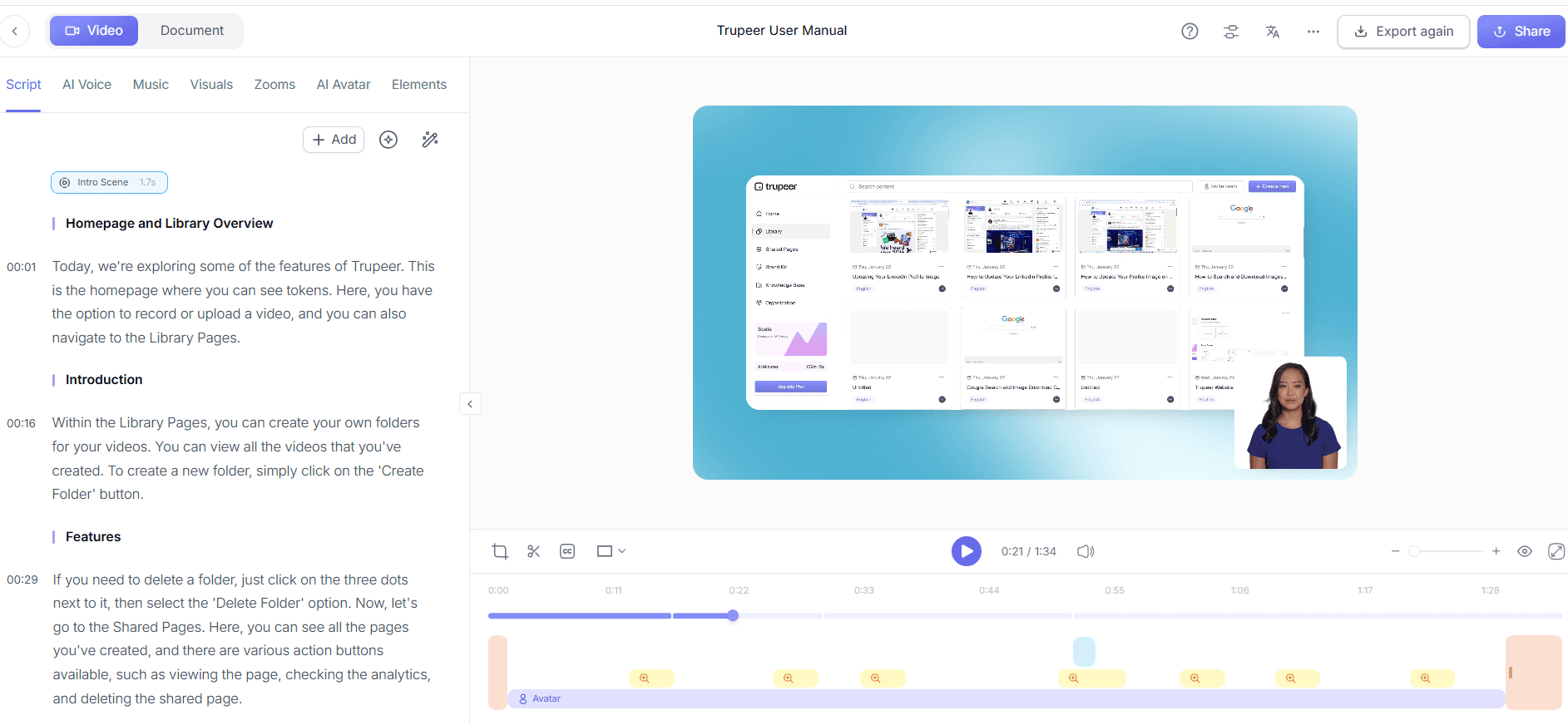
Step 4: Integrate with Knowledge Base
Integrate your enhanced videos into Trupeer's AI-searchable knowledge base. This integration allows the system to index each video with timestamp-level deep links, making it easy for users to find and navigate to specific segments. The integration process involves uploading your videos to the knowledge base, where the AI automatically analyzes and indexes the content. This setup can take a variable amount of time depending on the number of videos, but each video is usually ready for enhanced searchability within an hour.

Step 5: Localize Content for Global Reach
If your audience is international, use Trupeer’s AI translation and dubbing features. Translate your video content into 40+ languages with lip-sync, ensuring that your message is clear and culturally relevant in each market. This step involves selecting the languages needed and allowing the AI to process the translations, which usually completes within an hour per video. The AI dubbing replaces the original audio with translated voiceovers, maintaining the video’s original tone and context. Teams weighing tools often start with a Loom alternatives comparison before standardizing on a workflow.

Step 6: Distribute and Analyze Engagement
Finally, distribute your videos through Trupeer's custom-domain hosting with SSO and shared pages for client-facing portals. This ensures secure and easy access to your video library. Monitor viewer engagement with Trupeer's analytics, which provide insights into drop-off rates and heatmaps. These metrics help you understand how users interact with your content, informing future video production and search system adjustments. Analyzing engagement data is ongoing, but initial insights can be gathered shortly after deployment.

What tips help you create a semantic video search system?
Implementing a semantic video search system can be complex, but these practical tips will simplify the process and enhance the system's effectiveness.
Standardize Video Formats. Ensure all videos are in a consistent format for uniform indexing and playback. This reduces processing time and enhances compatibility with various platforms.
Use Descriptive Titles and Tags. Incorporate clear, descriptive titles and tags for each video. This aids the AI in categorizing and retrieving content effectively.
Regularly Update Content. Keep your video library fresh by updating and adding new content regularly. This not only improves user engagement but also ensures the search system remains relevant.
use AI Avatars. Use AI avatars complex videos. This can improve user comprehension and aid in search by providing clear, concise overviews of content.
Optimize for Mobile Viewing. Ensure your videos are optimized for mobile devices, as many users access content on the go. This involves making sure videos are responsive and load quickly.
Encourage User Feedback. Collect feedback from users about the search system's effectiveness. This data is invaluable for refining the search algorithms and improving user satisfaction.
Benchmark Against Competitors. Regularly compare your system’s performance with others in the market. Use resources like Scribe alternative comparison to identify areas for improvement.
Frequently asked questions
How does semantic video search differ from keyword search?
Semantic video search goes beyond simple keyword matching by understanding the context and meaning of search queries. Unlike keyword search, which can return irrelevant results if the exact term isn't present, semantic search interprets the user's intent and retrieves content that aligns with their inquiry. This results in more precise and relevant search outcomes, reducing time spent sorting through non-pertinent videos. By using advanced AI algorithms, semantic search can understand synonyms, related concepts, and even the nuances of language, making it a more powerful tool for large video libraries.
What are the requirements for implementing a semantic video search system?
Implementing a semantic video search system requires a few key components: a solid video library platform like Trupeer, AI capabilities for content indexing, and a system for managing metadata effectively. also, the system should support AI integration to enhance search functionality with features like auto chapters and AI voiceover. It's also beneficial to have a team familiar with AI technology to oversee the system's setup and maintenance. Adequate server capacity and fast network connections are essential to ensure smooth processing and retrieval of video content.
Can Trupeer handle large video libraries efficiently?
Yes, Trupeer is designed to efficiently manage large video libraries. Its AI-powered features, such as the AI-searchable knowledge base and auto chapters, allow it to index and categorize extensive video collections effectively. The platform supports scaling, meaning it can handle thousands of videos without compromising search speed or accuracy. also, Trupeer's video trimmer tool helps maintain library organization by allowing easy editing and updating of content, ensuring that the library remains simplified and relevant.
Does Trupeer support multiple languages for video content?
Yes, Trupeer supports multiple languages through its AI translation and dubbing features. It can translate video content into over 40 languages, complete with lip-sync, making it accessible to a global audience. This feature is particularly useful for companies with international reach, allowing them to provide content that's culturally and linguistically appropriate. The translation process is efficient, typically completing within an hour per video, and the AI ensures that the tone and context of the original content are preserved.
Why should businesses consider a semantic video search system?
Businesses should consider a semantic video search system because it enhances the accessibility and usability of their video libraries. By understanding the context of search queries, semantic search provides more accurate and relevant results, improving user satisfaction and engagement. This capability is particularly valuable in environments where quick access to specific information is critical, such as customer support or training. also, a semantic search system can boost productivity by reducing the time employees spend searching for content, allowing them to focus on more strategic tasks. It also supports video localization tool features, making it ideal for businesses with diverse or global audiences.
Похожие блоги


