Trupeer Blog
Резюмировать

Six weeks after go-live, the steering committee asks a simple question: "Are people using the new system?" The project team shows a login chart that's trending up and calls it a success. Meanwhile, half the finance team still runs approvals by email, sales managers forecast from a spreadsheet and the support desk is busier than ever. Logins went up. Adoption didn't.
End user adoption metrics tell you whether people are actually using a new system the way it was designed, and whether that's delivering the value you expected. This guide explains which end user adoption metrics matter, how to calculate them, which to focus on at each stage of a rollout, how to build a simple adoption dashboard and how to turn the numbers into action.
What are end user adoption metrics?
End user adoption metrics measure how fully and how well the people who should use a system are using it. They go beyond access and logins to cover whether users are ready, how much they use the system, whether they follow the intended processes, how proficient they are, how much help they need and how they feel about it, and finally whether the business outcomes are improving.
They apply to any enterprise rollout: ERP, CRM, HR systems, ITSM platforms and internal tools. For the wider topic of measuring adoption in products, see how to measure product adoption.
Why aren't logins enough to measure adoption?
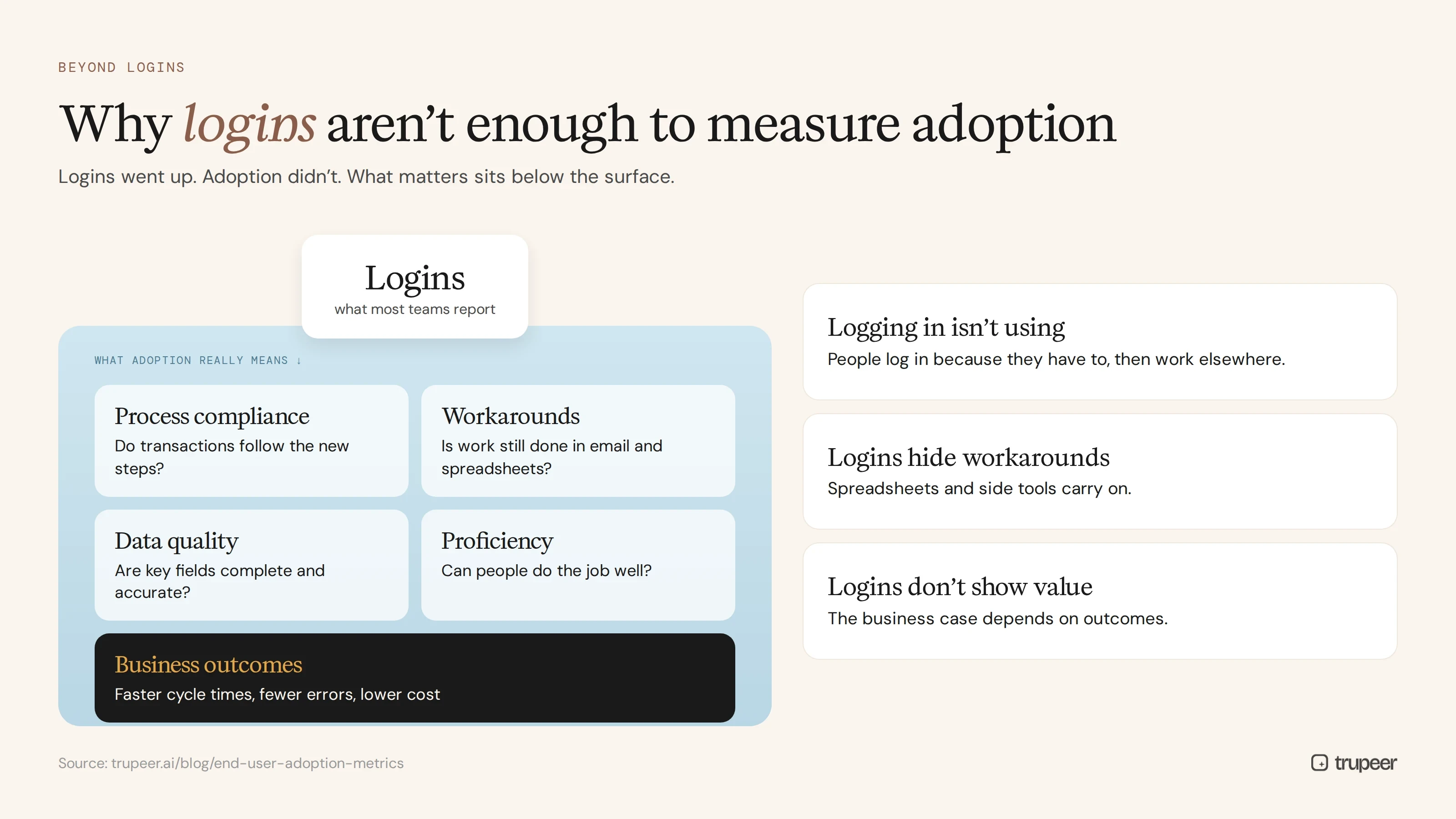
Logging in isn't using. People may log in because they have to, then do the real work elsewhere.
Logins don't show quality. Someone can use the system every day and still enter bad data or skip steps.
Logins hide workarounds. Spreadsheets, emails and side tools carry on alongside the new system.
Logins don't connect to value. The business case depends on outcomes, such as faster cycle times or fewer errors, not on how often people sign in.
Logins are a starting point. Meaningful end user adoption metrics measure behaviour, proficiency and outcomes too.
Which end user adoption metrics matter?
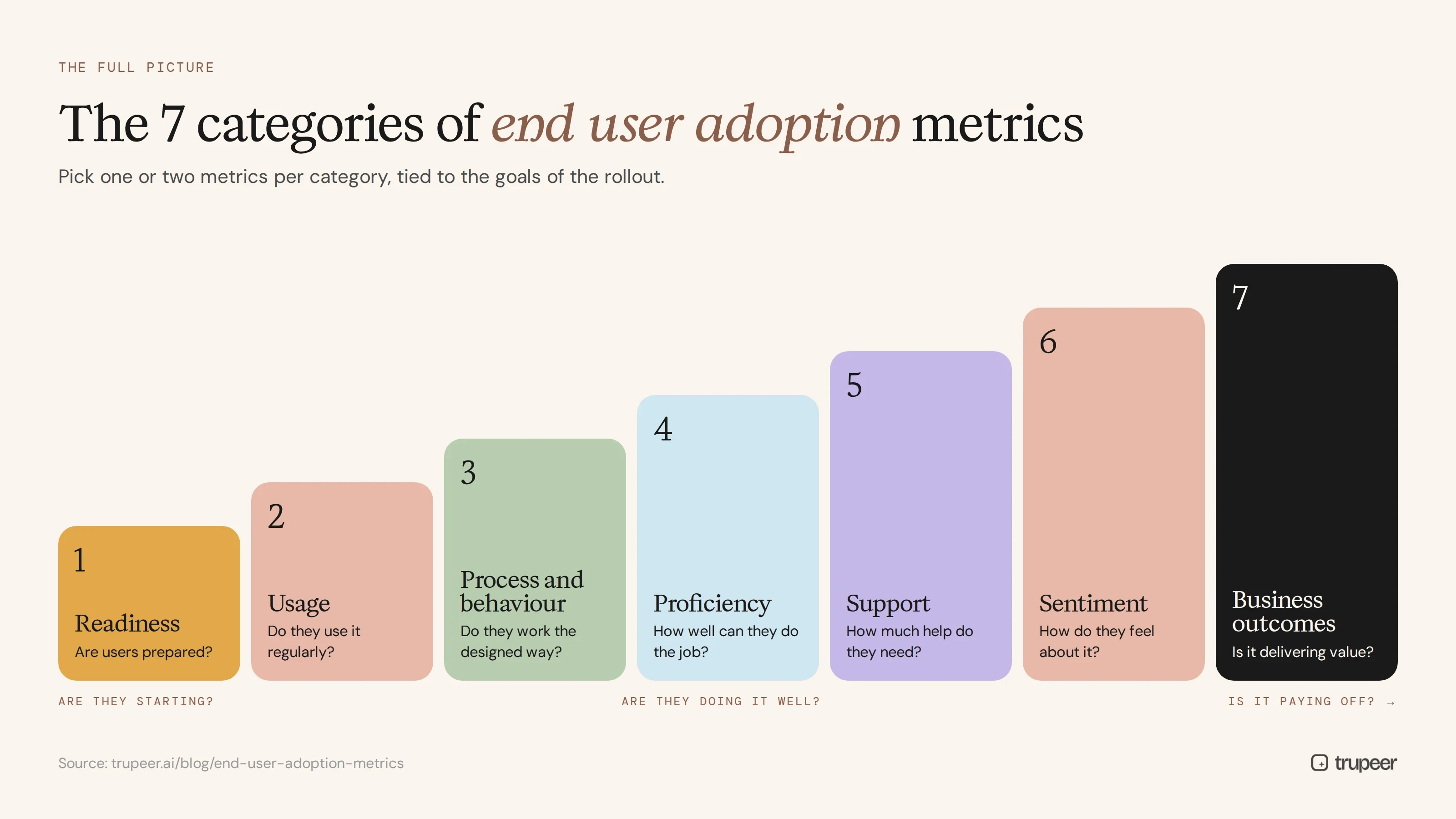
1. Readiness metrics
Are users prepared before and at launch?
Training completion rate: users who completed required training ÷ users who need it.
Proficiency check pass rate: users who pass a short task-based check ÷ users tested.
2. Usage metrics
Are people using the system regularly?
Activation rate: users who have logged in and completed a first key task ÷ users with access.
Active usage rate: users active in a period (for example, weekly) ÷ users expected to use the system.
Feature adoption rate: users who use a key feature ÷ users who should use it.
Usage frequency: how often users perform their key tasks in the system.
3. Process and behaviour metrics
Are people working the way the system was designed?
In-system transaction rate: transactions processed in the new system ÷ all transactions of that type.
Process compliance rate: transactions that follow the defined steps and approvals ÷ all transactions.
Workaround rate: cases still handled by email, spreadsheets or old tools.
Data quality: completeness and accuracy of key fields.
4. Proficiency metrics
How well can people do their jobs in the system?
Time to proficiency: time from start or go-live until a user meets the role's standard; see time to proficiency.
Task completion time: how long key tasks take, compared with the target.
Error rate: rework, corrections or rejected transactions per user or per volume.
5. Support metrics
How much help do people need?
Tickets per user: support requests about the system ÷ active users.
Repeat question rate: share of tickets about topics already covered in guides.
Self-service rate: questions resolved through guides, videos or the knowledge base without a ticket.
6. Sentiment metrics
How do people feel about the system?
Ease-of-use rating from short pulse surveys.
Confidence rating: how confident users feel doing their key tasks.
Open comments about friction and suggestions.
7. Business outcome metrics
Is the system delivering the value in the business case?
Process cycle time, such as invoice processing time or case resolution time.
Cost per transaction.
Quality and compliance outcomes, such as fewer audit findings.
Productivity measures specific to the system, such as pipeline accuracy or close timeline.
End user adoption metrics at a glance
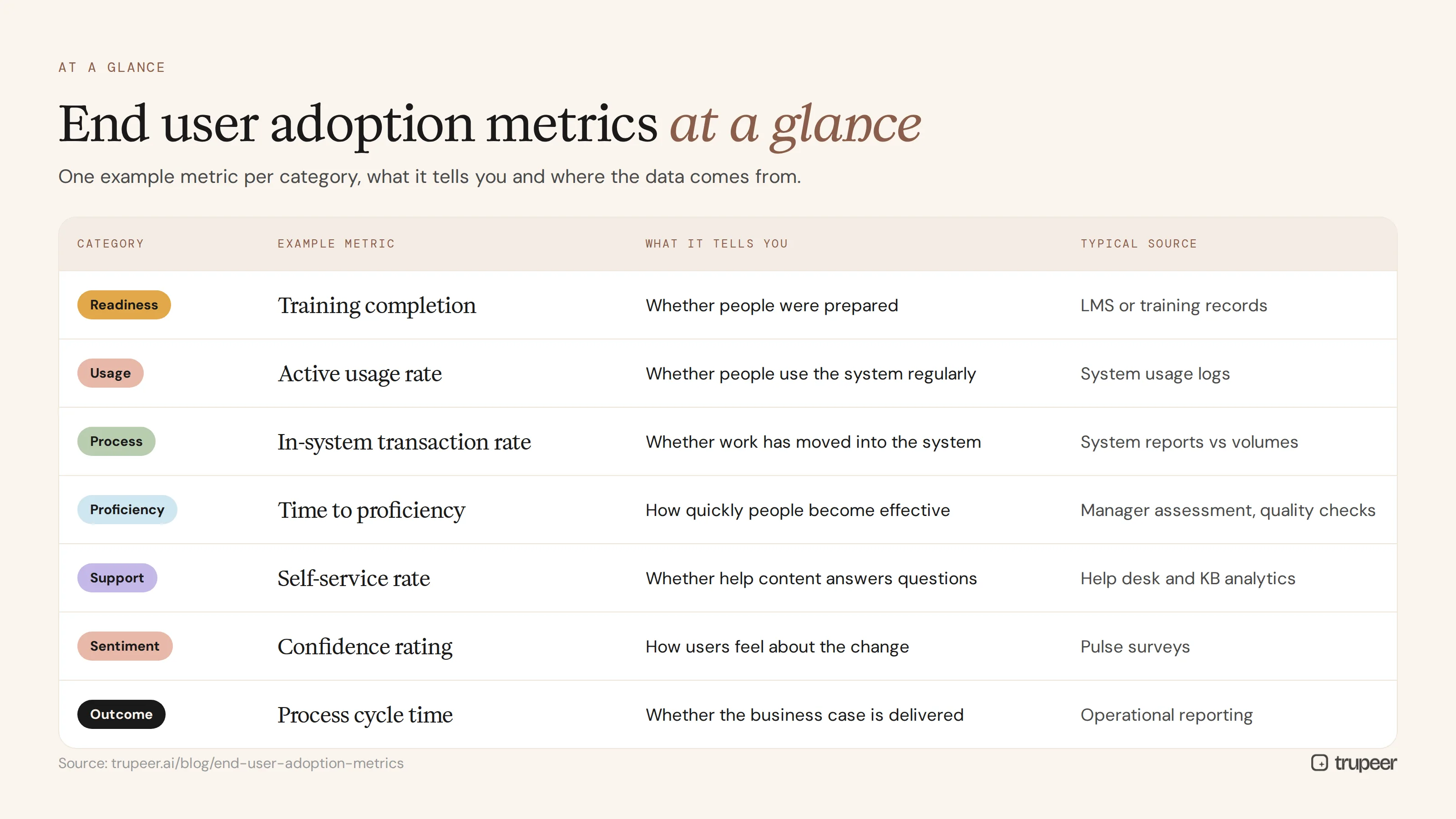
Category | Example metric | What it tells you | Typical source |
|---|---|---|---|
Readiness | Training completion | Whether people were prepared | LMS or training records |
Usage | Active usage rate | Whether people use the system regularly | System usage logs |
Process | In-system transaction rate | Whether work has moved into the system | System reports vs volumes |
Proficiency | Time to proficiency | How quickly people become effective | Manager assessment, quality checks |
Support | Self-service rate | Whether help content answers questions | Help desk and knowledge base analytics |
Sentiment | Confidence rating | How users feel about the change | Pulse surveys |
Outcome | Process cycle time | Whether the business case is delivered | Operational reporting |
Which adoption metrics should you track at each stage?
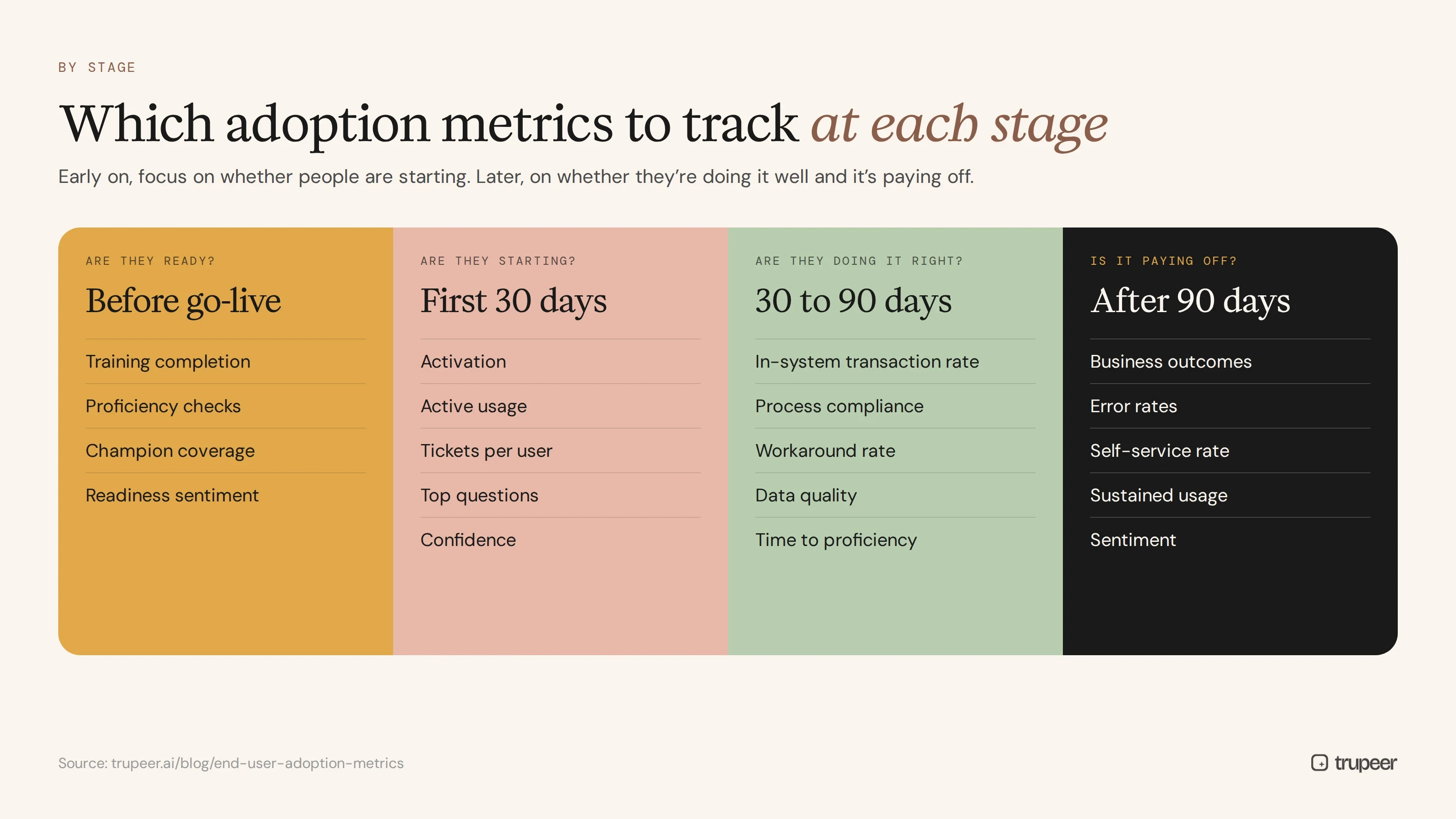
Stage | Focus metrics |
|---|---|
Before go-live | Training completion, proficiency checks, champion coverage, readiness sentiment |
First 30 days | Activation, active usage, tickets per user, top questions, confidence |
30 to 90 days | In-system transaction rate, process compliance, workaround rate, data quality, time to proficiency |
After 90 days | Business outcomes, error rates, self-service rate, sustained usage, sentiment |
Early on, focus on whether people are starting. Later, focus on whether they're doing it well and whether it's paying off.
How do you build an end user adoption dashboard?
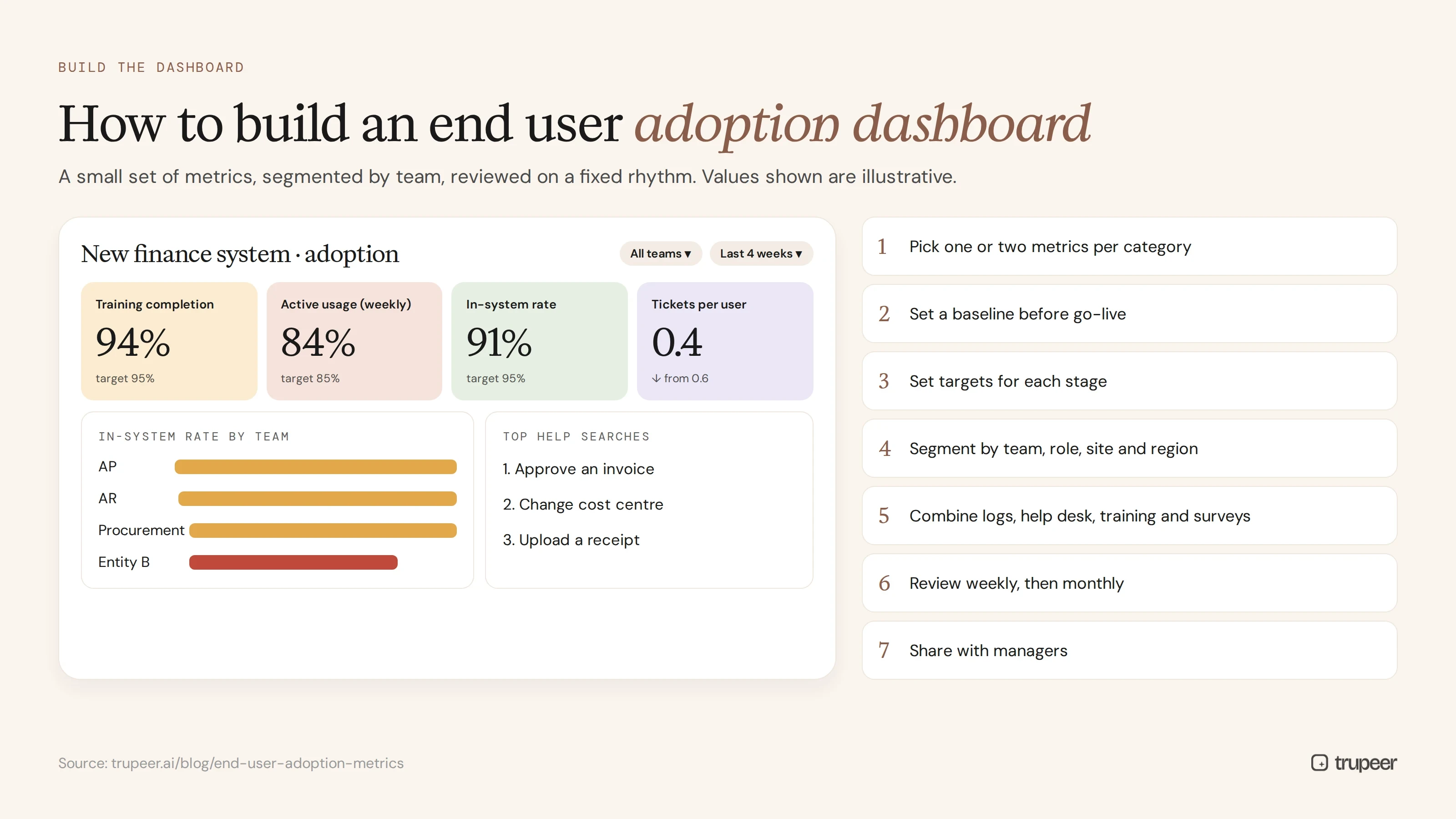
Pick a small set of metrics, one or two per category, tied to the goals of the rollout.
Set a baseline before go-live, using the old process where possible.
Set targets for each metric and each stage.
Segment the data by team, role, site and region, since averages hide problem areas.
Combine sources: system logs, help desk data, training records, surveys and operational reports.
Review it on a fixed rhythm, weekly in the first months and monthly after that.
Share it with managers, so they can act on their own team's numbers.
How do you turn adoption metrics into action?
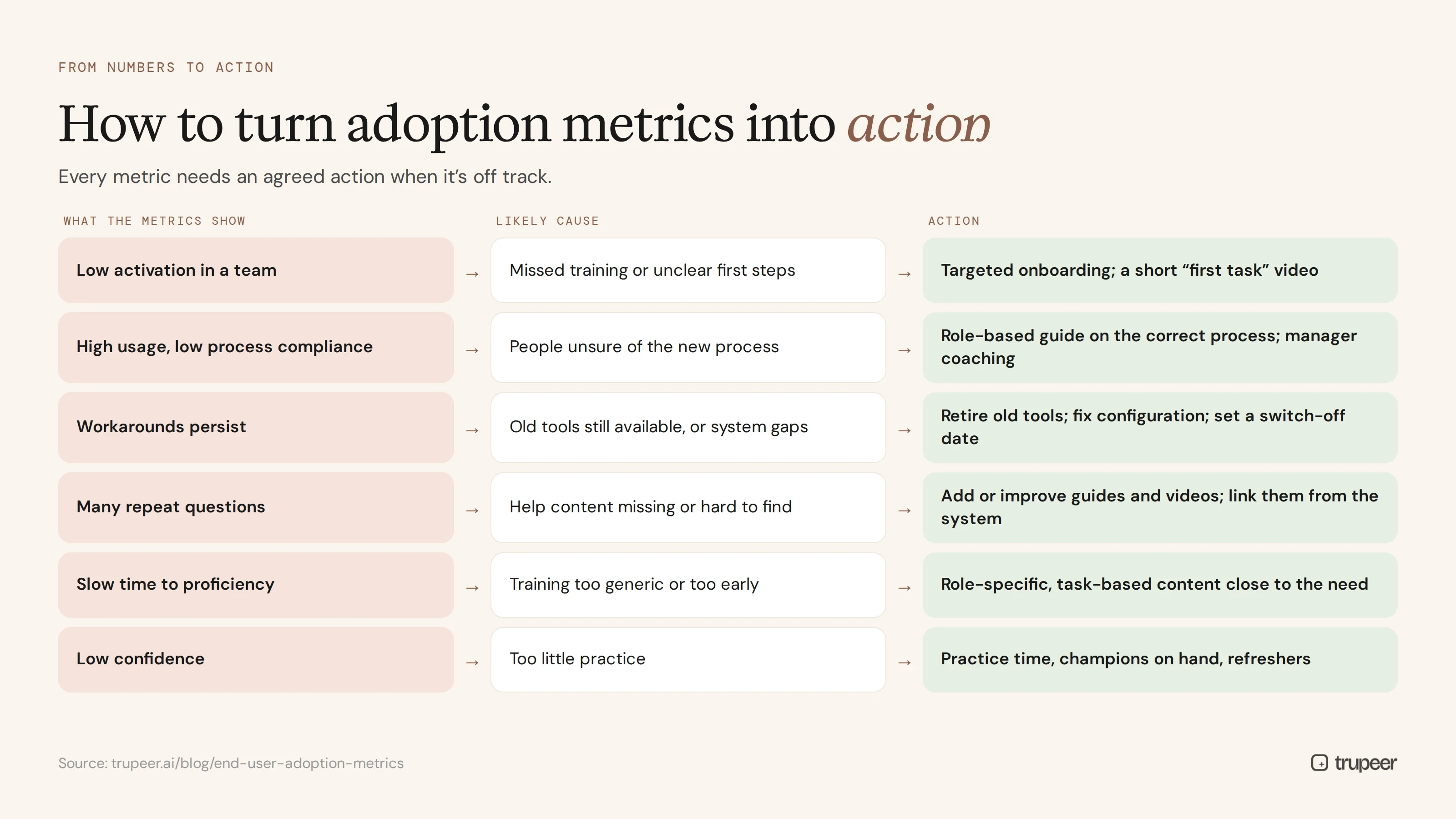
What the metrics show | Likely cause | Action |
|---|---|---|
Low activation in a team | Missed training or unclear first steps | Targeted onboarding session; short "first task" video |
High usage but low process compliance | People unsure of the new process | Role-based guide on the correct process; manager coaching |
Workarounds persist | Old tools still available or system gaps | Retire old tools; fix configuration; communicate the switch-off date |
Many repeat questions | Help content missing or hard to find | Add or improve guides and videos; link them from the system |
Slow time to proficiency | Training too generic or too early | Role-specific, task-based content close to when people need it |
Low confidence | Too little practice | Practice time, champions on hand, refresher sessions |
Super users and champions are often the fastest way to act on what the metrics reveal; see how to run a super user training program.
How does training content affect adoption metrics?
Many adoption problems are content problems: people can't find how to do a task, the guide is out of date or the training was generic. Watching how help content is used gives you a leading indicator of adoption:
Which guides and videos are viewed most shows where people struggle.
Searches with no good result show what content is missing.
Drop-off points in videos show where explanations are unclear.
A rising self-service rate usually comes with falling tickets per user.
To benchmark self-service, see what a good knowledge base deflection score looks like. Trupeer turns recordings of your configured system into role-based guides and videos, with viewer analytics showing which content people use, so you can close gaps quickly.

Adoption metrics by system
The categories are the same for every system, but the specific measures differ:
ERP: in-system transaction rate, process compliance, period-end timeline and data quality.
CRM: opportunity update freshness, activity logging, pipeline accuracy and dashboard use by managers; see our Salesforce user adoption strategy.
ITSM: portal share of tickets, self-service resolution and agent workflow compliance; see the ServiceNow user adoption strategy.
HR systems: self-service adoption, approval turnaround and HR ticket volume.
Example: an end user adoption scorecard
Here's what a simple monthly scorecard might look like for a new finance system, 60 days after go-live. The targets and statuses are illustrative.
Metric | Target | Status | Next action |
|---|---|---|---|
Active usage rate (weekly) | Most expected users active every week | On track | Keep weekly tips going |
In-system transaction rate | Nearly all invoices processed in the new system | Behind in one entity | Retire the old spreadsheet in that entity |
Process compliance | Approvals follow the new workflow | On track | Spot-check monthly |
Tickets per active user | Falling month on month | Falling | Publish guides for the top three questions |
Time to proficiency for new clerks | Within the agreed onboarding period | Slightly behind | Add role-based videos to onboarding |
Confidence rating | Most users feel confident | Improving | Champion drop-in sessions for low-scoring teams |
A scorecard like this keeps the conversation on actions, not just numbers.
Who should own end user adoption metrics?
Adoption measurement works best with clear ownership:
The system or product owner owns the adoption targets and the overall dashboard.
The change or enablement lead owns readiness, training and content metrics, and the actions that follow.
Managers own their team's numbers and coach where adoption is lagging.
The support team shares ticket themes and repeat questions.
The executive sponsor reviews progress against the business case and removes blockers.
Agree ownership before go-live, and keep it in place after the project team moves on, so end user adoption metrics stay part of how the system is run rather than a one-off project report.
Common end user adoption metric mistakes
Measuring logins only and calling it adoption.
Reporting averages that hide struggling teams or sites.
No baseline, so improvements can't be shown.
Too many metrics, so nobody acts on any of them.
Measuring only at go-live, when adoption problems often appear months later.
Not connecting metrics to action, so dashboards are reviewed but nothing changes.
End user adoption metrics checklist
Rollout goals are defined, with one or two metrics per category.
Baselines are captured before go-live.
Targets are set for each stage.
Data is segmented by team, role and site.
Sources include usage logs, help desk data, training records and surveys.
Metrics are reviewed weekly early on, then monthly.
Managers see their own team's numbers.
Every metric has an agreed action when it's off track.
For the tools that help capture these metrics, see our guide to user adoption software.
How Trupeer improves your end user adoption metrics

Many adoption metrics move only when people can quickly find out how to do their jobs in the new system. Trupeer targets the metrics that depend on good guidance:
Adoption metric | How Trupeer helps move it |
|---|---|
Training completion and readiness | Role-based videos and guides recorded in your configured system, ready before go-live |
Activation and active usage | Short "first task" videos that get people started in minutes |
Process compliance | Step-by-step guides that show the correct process, including exceptions |
Time to proficiency | Task-based content people can return to whenever they're unsure |
Tickets per user and self-service rate | One searchable knowledge base with answers to the questions people actually ask |
Content gaps | Viewer analytics show which guides people use and where they drop off |
Genpact used this approach to train 140,000 employees across 40 countries on a new system, producing more than 500 training collaterals in five languages in 3 months instead of 12. Read the Genpact customer story.
If your adoption dashboard shows high logins but low process compliance, or tickets that won't fall, the gap is usually guidance. Trupeer closes it by turning recordings into the guides and videos people need, when they need them, with the AI screen recorder at the start of every guide.
Frequently asked questions
What are end user adoption metrics?
They're measures of how fully and how well people use a new system, covering readiness, usage, process compliance, proficiency, support needs, sentiment and business outcomes.
What is the most important user adoption metric?
There's no single one. Active usage shows whether people use the system, but in-system transaction rate, process compliance and business outcomes show whether adoption is real and valuable.
How do you calculate active usage rate?
Divide the number of users active in a period, such as a week, by the number of users expected to use the system in that period.
How do you measure process adoption, not just system usage?
Track the share of transactions processed in the new system, the share that follow the defined steps and approvals, and how often work still happens through workarounds.
When should you start measuring user adoption?
Before go-live, with readiness metrics and baselines, then continue through the first months and on a regular schedule afterwards.
How do training and help content affect adoption?
Clear, role-based training and searchable guides speed up proficiency and reduce repeat questions, and content analytics act as an early warning of where users struggle.
What's a good self-service rate?
It depends on the system and audience. Track your own baseline and trend, and compare with benchmarks for similar knowledge bases.
How often should adoption metrics be reviewed?
Weekly in the first months after go-live, then monthly, with segmentation by team, role and site.
Measure adoption that actually delivers value
Logins tell you people showed up. End user adoption metrics tell you whether they're working the new way and whether it's paying off. Track the metrics that matter, act on what they show and give people the guides they need to succeed. See Trupeer's product adoption software or start free with Trupeer.
Похожие блоги



