Trupeer Blog
Podsumuj

Imagine an IT operations team in the middle of a major network outage. Systems are down, customers are frustrated, and every minute counts. The team scrambles to find the right text-based runbook, flipping through pages of outdated procedures. But what if there was a faster, more efficient way to guide them through the crisis? Video-based runbooks might be the answer. They offer a dynamic and intuitive way to visualize complex IT procedures, helping teams respond faster and more accurately. A recent survey indicates that
90% of IT professionals find videos more effective than text for troubleshooting
. This is because videos can incorporate step-by-step visuals and real-time demonstrations that text cannot. If your team is drowning in documentation or struggling with slow response times, it's time to explore creating instructional video materials to simplify your operations. Whether you're a team lead looking to improve incident response or an IT manager aiming to reduce downtime, video runbooks can transform your workflow. When SOPs come into the same conversation, a Scribe alternatives comparison helps clarify the scope.
Why does creating video-based IT runbooks matter?
The stakes are high IT operations. A single system failure can lead to significant downtime, potentially costing businesses thousands of dollars per hour. Traditional text-based runbooks often fall short in high-pressure situations. They're cumbersome to navigate and can contain outdated information, leading to costly delays. Video-based runbooks, however, provide a visual and interactive way to guide teams through complex procedures. By incorporating real-time demonstrations, these videos can drastically reduce the time it takes to resolve issues. In environments where speed and accuracy are paramount, the ability to quickly access and understand procedures is critical. Video content, with its capacity to show rather than tell, enhances clarity and comprehension, enabling faster decision-making.
The advantages don't stop there. Video-based documentation also supports a broader range of learning styles. While some team members might excel with written instructions, others might benefit more from visual demonstrations. By catering to different preferences, video runbooks ensure everyone on the team can engage with the material effectively. This inclusive approach not only facilitates quicker comprehension but also aids in knowledge retention. When IT professionals can recall procedures more easily, they're better equipped to handle unexpected challenges. This, in turn, improves overall team performance and contributes to a smooth customer success workflow. As businesses increasingly rely on technology, the ability to create and maintain effective video runbooks is becoming an indispensable skill for IT teams.
What are the benefits of video-based IT runbooks?
Transitioning to video-based runbooks offers numerous advantages that can enhance the efficiency and effectiveness of IT operations.
Accelerated Problem Resolution. Video-based runbooks reduce the time needed to diagnose and fix issues by providing clear, visual guidance. This accelerates problem resolution and minimizes downtime.
Improved Knowledge Retention. Videos engage multiple senses, making it easier for team members to remember procedures. As a result, operations teams can recall steps more effectively during high-pressure situations.
Enhanced Accessibility. With a create effective video SOPs approach, runbooks become accessible to a wider range of team members, regardless of their learning style preferences. This inclusivity builds a more cohesive team environment.
Consistent Procedure Updates. AI-powered tools can update video content automatically to reflect changes in procedures. This ensures that team members always have access to the most current information without sifting through outdated documents.
Visual Clarity. Videos eliminate ambiguity by showing exactly how tasks should be performed. This clarity reduces the likelihood of errors and increases operational accuracy.
Reduced Training Time. By using a AI-powered video tool, new team members can quickly get up to speed with minimal supervision, reducing the training burden on senior staff and accelerating onboarding.
Which Trupeer features help you create video-based IT runbooks?
Trupeer offers a suite of features specifically designed to enhance video-based IT runbooks. These capabilities simplify the creation, editing, and distribution of video content, ensuring your team has the tools they need to succeed.
AI screen recording with auto-zoom and click detection
This feature allows you to capture detailed screen recordings that automatically zoom in on areas of interest and highlight clicks. This is particularly useful when demonstrating software interfaces or complex procedures. The automated zoom ensures that viewers can easily follow along with the action, while click detection provides clear visual cues for each step. By eliminating the need for manual editing, this feature saves time and enhances the clarity of your runbooks.
Automatic filler-word removal
When creating video content, filler words like "um" and "ah" can distract viewers and detract from the professionalism of your runbooks. Trupeer automatically detects and removes these filler words, resulting in polished, concise videos. This feature not only improves the overall quality of your content but also ensures that your videos maintain a professional tone. By simplifying your recordings, Trupeer helps you create content that's both informative and engaging.
AI voiceover in 65+ natural voices
Trupeer's AI voiceover capabilities allow you to add narration to your videos in over 50 natural-sounding voices. This feature is ideal for creating consistent, high-quality audio across your runbooks. You can adjust the pace and tone of the voiceover to suit your audience, ensuring that your content is accessible to all team members. By providing a professional and engaging auditory component, this feature enhances the overall impact of your runbooks.
AI-searchable knowledge base
Trupeer's AI-searchable knowledge base indexes every recording with timestamp-level deep links, making it easy for team members to find and reference specific sections of your runbooks. This feature enhances accessibility and ensures that your team can quickly locate the information they need to resolve issues. By integrating your videos into a searchable database, Trupeer helps you maintain efficient and organized documentation.
Automatic SOP generation from any recording
Trupeer's ability to automatically generate Standard Operating Procedures (SOPs) from video recordings is a big shift for IT teams. This feature transforms your videos into edit-ready, exportable documents, simplifying the documentation process. As procedures evolve, Trupeer can update your SOPs to reflect these changes, ensuring that your team always has access to the most current information. By simplifying the creation and maintenance of SOPs, Trupeer enables your team to focus on what matters most: resolving issues quickly and efficiently.
How do you create video-based IT runbooks step by step with Trupeer?
Step 1: Record Your Screen
Begin by launching the Trupeer desktop app or using the browser-based recorder. Select the "AI screen recording with auto-zoom and click detection" feature. This feature will automatically focus on areas of interest and highlight mouse clicks, making your video more engaging and informative. Click "Start Recording" to capture your screen as you navigate through the IT procedure you wish to document. The automatic zoom and highlighting help ensure that viewers don't miss critical steps, particularly in complex interfaces. Once done, click "Stop Recording" to save your video, which typically takes only a few seconds to process.

Step 2: Edit Your Recording
After recording, move on to editing. Trupeer offers "automatic filler-word removal" to clean up your audio. Go to the editing panel and enable this feature to automatically remove any "um" or "ah" sounds from your recording. This capability is invaluable for maintaining a professional tone and keeps your audience focused on the content. The editing process is quick, usually completing within minutes, depending on the video's length. This allows you to produce a polished video without manual intervention.
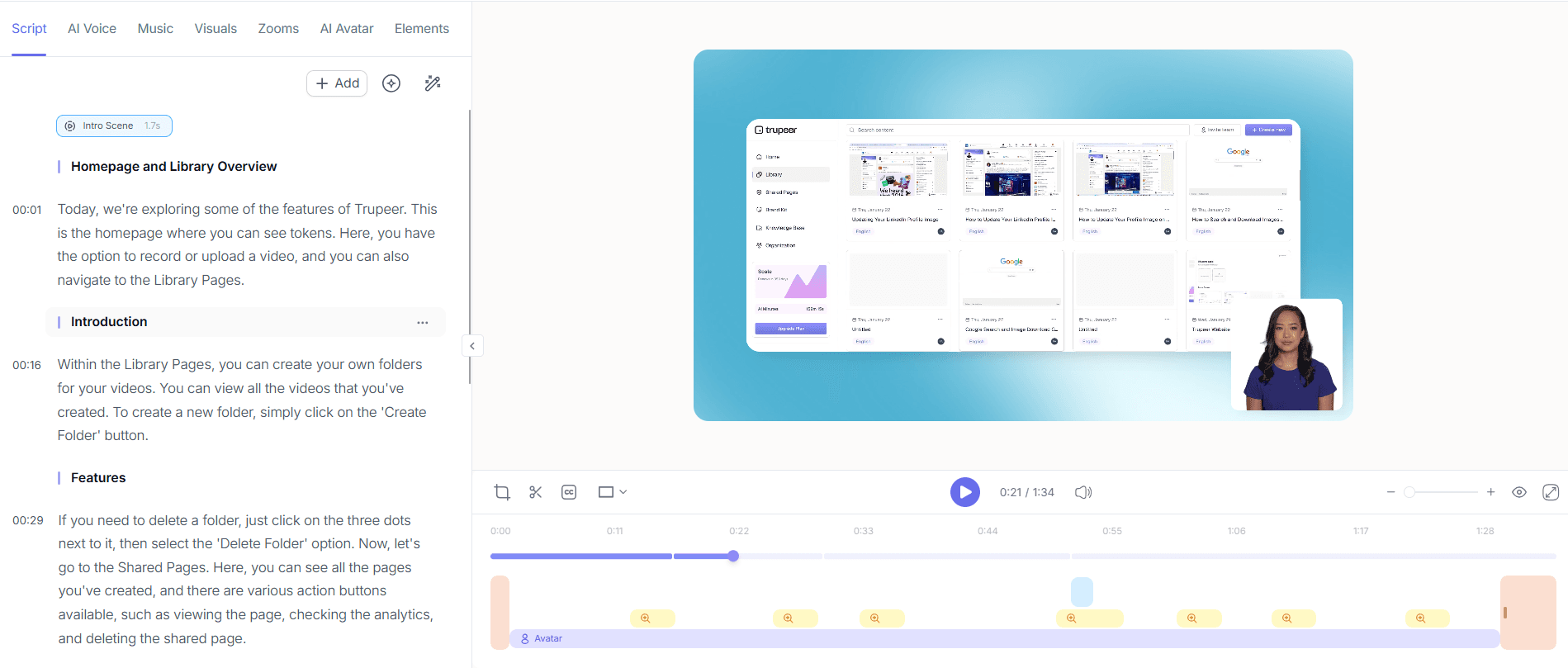
Step 3: Add AI Voiceover
Next, enhance your video with the "AI voiceover in 65+ natural voices" feature. Go to the voiceover section and choose a voice that suits your audience. You can adjust the pace and tone to match the video's mood. Click "Apply" to integrate the selected voiceover into your recording. This step ensures your runbooks are accessible to team members who prefer auditory learning. The AI voiceover is added smoothly, taking just a few moments to finalize.

Step 4: Create Automatic SOPs
Now, generate documentation by selecting the "automatic SOP generation from any recording" feature. Navigate to the documentation tab, select your video, and click "Generate SOP". Trupeer will automatically create an editable document outlining the steps in your video. This feature is particularly useful for teams needing quick, accurate documentation. The SOP is ready for export in various formats, such as MP4 and PDF, within minutes, ensuring your team always has access to up-to-date procedures.

Step 5: Implement AI Translation
For global teams, translate your video using Trupeer's "AI translation into 40+ languages with lip-sync". Select the translation option, choose your target language, and click "Translate". The system will create a dubbed version of your video with synchronized lip movements. This is essential for teams with non-English speakers, ensuring everyone can understand and follow the procedures. The translation process is efficient, typically taking less than an hour, depending on the video's length.

Step 6: Distribute via Knowledge Base
Finally, distribute your video using the "AI-searchable knowledge base". Upload your video to Trupeer's knowledge base, where it becomes indexed and searchable with timestamp-level deep links. This feature allows team members to quickly locate and reference specific sections of your runbooks. It also facilitates collaborative review and approval workflows, making it easy to maintain accurate and up-to-date documentation. The knowledge base integration is smooth and can be completed in just a few clicks, ensuring your team can access essential materials anytime. Teams weighing tools often start with a Loom alternatives comparison before standardizing on a workflow.

What tips help you create video-based IT runbooks?
Creating effective video-based runbooks requires more than just recording and editing. Here are several tips to ensure your content is both useful and engaging for your IT operations team. These tips will help you enhance the quality and effectiveness of your video documentation.
Plan Your Content. Outline your video and key points before recording to ensure a smooth flow.
Keep It Concise. Focus on essential steps to maintain viewer engagement. Use Trupeer's automatic filler-word removal to simplify content.
Use Clear Visuals. Highlight important areas with Trupeer's auto-zoom to avoid viewer confusion.
Engage with Voiceovers. A professional voiceover adds clarity and aids in comprehension. Choose a voice that resonates with your team.
use AI Translation. For teams with diverse languages, translating videos ensures everyone can follow along effectively.
Regularly Update Content. Use Trupeer's automatic SOP updates to keep your documentation current as procedures change.
Standardize with Templates. use branded templates to maintain a consistent look across all runbooks, reinforcing your brand identity.
For a deeper look, our guide on create instructional video covers the adjacent playbook.
For global audiences, adding AI video translation extends the same workflow across 40+ languages with lip-sync.
Frequently asked questions
How do video-based runbooks improve IT operations efficiency?
Video-based runbooks enhance efficiency by providing clear, visual instructions that reduce troubleshooting time. Traditional text documents can be overwhelming, especially during high-pressure situations. Videos guide users through each step with visual cues and real-time demonstrations, making it easier to understand complex processes. This reduces the likelihood of errors and speeds up issue resolution. also, by catering to different learning styles, video runbooks ensure all team members can quickly grasp the procedures, contributing to a more efficient and cohesive operation.
What challenges might I face when implementing video runbooks?
Implementing video runbooks can come with challenges such as ensuring consistent quality and managing updates. Creating high-quality videos requires planning and possibly new skills in video editing. also, procedures may change frequently, necessitating regular updates to keep the runbooks current. However, using tools like Trupeer can mitigate these challenges by automating many aspects of video production and documentation updates. By using these capabilities, you can maintain high-quality, up-to-date video content with minimal effort.
Can video-based runbooks be accessed on mobile devices?
Yes, video-based runbooks can be accessed on mobile devices, provided they are hosted on a mobile-friendly platform like Trupeer. This accessibility is crucial for IT teams that need to troubleshoot issues on the go. By ensuring your videos are optimized for mobile viewing, you enable team members to access critical documentation wherever they are. This flexibility can significantly enhance responsiveness and efficiency, as team members aren't tied to their desks to resolve issues.
Does Trupeer support multi-language video runbooks?
Yes, Trupeer supports multi-language video runbooks through its "AI translation into 40+ languages" feature. This capability allows you to translate your video content into various languages, making it accessible to a global team. The AI translation includes lip-sync, ensuring that the dubbed videos are synchronized with the original visuals. This feature is invaluable for organizations with diverse teams, as it ensures that all members can understand and follow the procedures regardless of their native language.
Is it possible to track engagement with video runbooks?
Yes, with Trupeer's viewer engagement analytics, you can track how users interact with your video runbooks. This feature provides insights into viewer behavior, such as completion rates and drop-off points, allowing you to assess the effectiveness of your content. Understanding how your team engages with the videos can help you identify areas for improvement and ensure that your runbooks are as effective as possible. By using these analytics, you can continuously refine your video content to better meet the needs of your IT operations team.
Powiązane blogi


