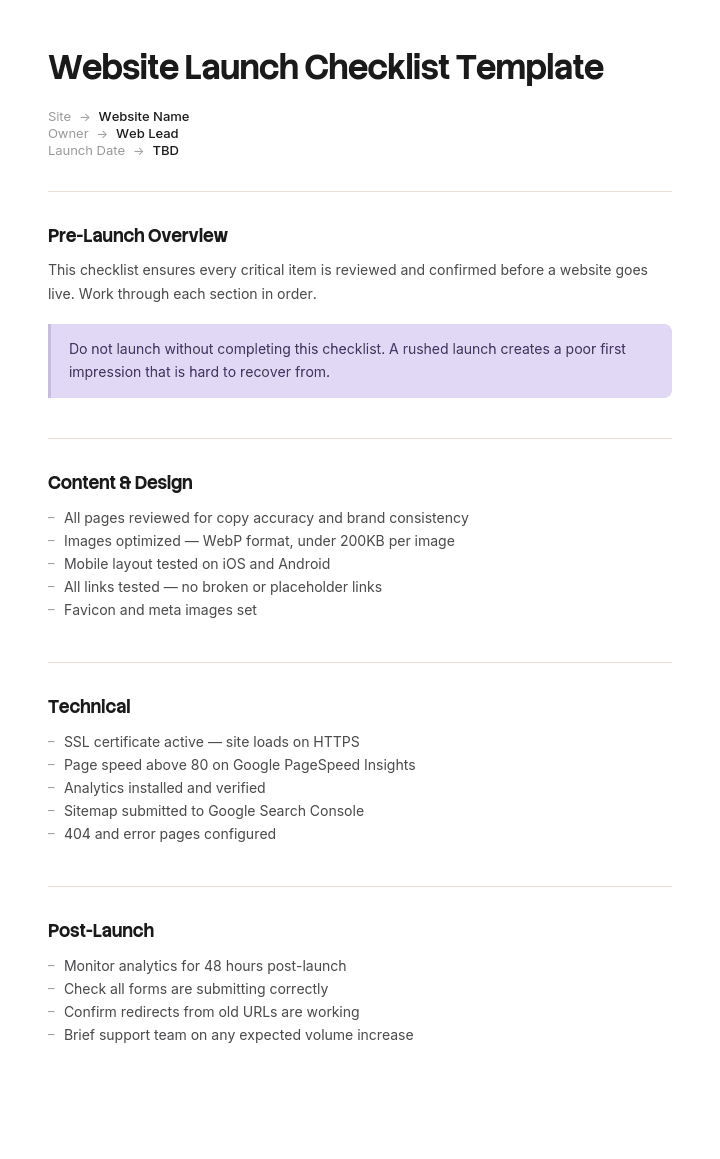
Gebruik deze sjabloon
Een website-lancering is een van de meest risicovolle momenten voor elk marketingteam. Met Trupeer kun je uren besparen op de coördinatie van de lancering door te beginnen met een gratis sjabloon voor een website-lanceringschecklist, dit aan te passen met je brand guidelines en de checklist om te zetten in een video-walkthrough die design, dev, SEO en contentteams op één lijn brengt.
Wat is een gratis sjabloon voor een website-lanceringschecklist?
Een gratis sjabloon voor een website-lanceringschecklist is een lijst met alles wat waar moet zijn vóór, tijdens en na het moment waarop een website live gaat.
Er is geen tekort aan. De gepubliceerde versies lopen uiteen van vijftien, zeventien, tot achtenvijftig items, gegroepeerd per onderdeel: content, design, SEO, technisch, juridisch, analytics. Ze zijn grotendeels correct en samen dekken ze bijna alles wat er mis kan gaan.
Het probleem zit niet in de dekking. Het probleem is dat elk item op de lijst even zwaar lijkt te wegen.
Het controleren van alt-tekst voor afbeeldingen staat naast het configureren van redirects. Het nalezen van de about-pagina staat naast het verifiëren dat de production robots.txt niet die van de staging-omgeving is. Onder tijdsdruk, iets waar elke lancering mee te maken heeft, werkt iemand de lijst af en komt door het grootste deel heen, en welke items worden overgeslagen hangt ervan af waar ze toevallig stonden.
Het sjabloon is niet het probleem. Wat bepaalt of een lancering slecht verloopt, is weten welke negen van je zestig items de lancering echt blokkeren.
Vorm volgt gebruik. Een gratis sjabloon voor een website-lanceringschecklist in Excel is de natuurlijke plek, omdat een checklist een lijst is met eigenaren, statussen en bewijs. Een gratis sjabloon voor een website-lanceringschecklist in Word past bij een geprinte versie voor een lanceringsoverleg, en een gratis sjabloon voor een website-lanceringschecklist in PDF past bij het ondertekende overzicht van wat is geverifieerd.
Achtenvijftig items, allemaal even zwaar gewogen
Een lanceringchecklist groeperen op onderdeel is de standaardaanpak en verbergt het enige verschil dat ertoe doet.
Bekijk vier items die op bijna elke gepubliceerde lijst staan.
Een spelfout op een productpagina. Een ontbrekende alt-attribuut voor een afbeelding. Een niet-gemapte redirect van een oude URL. Een staging robots.txt die met een globale disallow naar production is uitgerold.
Gegroepeerd per onderdeel zijn de eerste twee content, de derde is SEO en de vierde is technisch. Drie verschillende secties, zonder indicatie van relatieve impact.
In de praktijk zijn ze niet eens in de buurt vergelijkbaar. De typfout wordt binnen een dag opgemerkt en in vijf minuten opgelost. Het ontbrekende alt-attribuut is een klein toegankelijkheids- en SEO-probleem zonder urgentie. De niet-gemapte redirect verliest stilletjes alle autoriteit die die URL had; dat is nog maanden te herstellen als iemand het opmerkt. En de robots.txt haalt de hele site uit de zoekresultaten, geeft geen foutmelding, breekt niets wat een menselijke bezoeker zou zien, en kan weken blijven draaien.
Twee eigenschappen scheiden ze, en geen van beide staat op een gepubliceerde checklist.
Kun je het ongedaan maken? Sommige fouten zijn volledig omkeerbaar zodra ze zijn gevonden. Andere kosten tijd die je niet kunt terugwinnen, omdat rankings en indexering hun eigen planning volgen in plaats van die van jou.
Zou je het opmerken? Sommige problemen kondigen zichzelf aan. Andere blijven stil, en de stille zijn gevaarlijk in verhouding tot hoe lang ze kunnen blijven bestaan.
Zo pas je dit sjabloon aan in Trupeer
Stap 1: Open de sectie Templates
Ga in het hoofdmenu naar de sectie Templates.

Stap 2: Selecteer en open een template
Klik op een template waarmee je wilt werken om deze te openen.

Stap 3: Breid de templateweergave uit
Als dat nodig is, breid je de templateweergave uit om de volledige indeling en details duidelijk te zien.

Stap 4: Bewerk de template
Klik op Bewerken om te starten met het aanpassen van de geselecteerde template.

In de editor kun je:
Nieuwe secties toevoegen
Opmaakregels definiëren of bijwerken
Een logo toevoegen en de positie en bijbehorende instellingen aanpassen
Stap 5: Sla je aangepaste template op
Nadat je alle noodzakelijke wijzigingen hebt doorgevoerd, klik je op Opslaan om de bijgewerkte template als je eigen template op te slaan.

Stap 6: Bekijk en verfijn de template
Als je wilt zien hoe je aangepaste template eruitziet, open je de Voorbeeldweergave.

Vanaf het scherm met de voorbeeldweergave kun je indien nodig direct doorgaan met het maken van aanpassingen, zodat de template precies verschijnt zoals je wilt.
Met een sjabloon voor een website-lanceringschecklist kun je:
Uren besparen op coördinatie: Sla de blanco pagina over met een structuur die is gebouwd voor lanceringen.
Problemen vroegtijdig opvangen: Ingebouwde checks dekken content, design, tech, SEO en analytics.
In lijn blijven met je merk: Pas je logo, fonts en kleuren toe met Trupeer's brand kit.
Vermijden van gênante situaties: Uitgebreide checklists voorkomen kapotte links, ontbrekende tracking en SEO-rampen.
Lanceringen standaardiseren: Gebruik hetzelfde template voor elke site, microsite en redesign.
Werken met internationale teams: Vertaal lanceringchecklists naar 65+ talen met één klik.
Sorteren op omkeerbaarheid en detecteerbaarheid
Neem je checklist, hoe lang die ook is, en zet elk item in één van vier vakken.
Onomkeerbaar en onzichtbaar. De gate. Deze moeten vóór de lancering worden geverifieerd door iemand anders dan degene die het werk heeft gedaan, met bewijs erbij. Meestal zijn het er minder dan tien, en dat is de reden om überhaupt een checklist te gebruiken.
Onomkeerbaar en zichtbaar. Belangrijk en kondigt zichzelf aan. Een mislukte DNS-cutover of een verwijderde oude site is binnen minuten duidelijk, dus het risico zit in het herstelplan en niet in de detectie. Zorg voor een rollback en weet wie die kan activeren.
Omkeerbaar en onzichtbaar. Controleer binnen achtenveertig uur in plaats van ze als gate te gebruiken. Gestructureerde data, sitemap-indiening, tag firing bij secundaire events. Als je ze mist, kost dat een beetje en is het volledig te herstellen.
Omkeerbaar en zichtbaar. Los op na de lancering. Typfouten, spatiëring, afbeeldingscompressie, alt-tekst. Het is echt de moeite waard om te doen, maar niet om een lancering voor uit te stellen; en ze behandelen als launch blockers is hoe de eerste categorie wordt gehaast.
De waarde van dit soort indeling zit niet in de taxonomie. Het zorgt ervoor dat er een korte lijst ontstaat die iemand senior ook echt zal lezen, en een veel langere lijst die rustig kan worden afgewerkt in de week erna.
De items die meestal de gate vormen
Het eerste kwadrant is kleiner dan mensen verwachten en redelijk consistent over lanceringen heen. Bij een rebuild zijn dit de items die steeds terugkomen.
De production robots.txt. Niet alleen dat het bestand bestaat en geldig is, maar dat de inhoud de production-inhoud is. Staging disallow-regels die naar production worden uitgerold, is de meest voorkomende onzichtbare catastrofale fout bij een lancering.
Noindex meta tags. Dezelfde fout op een andere plek, en die blijft bestaan, zelfs als robots.txt correct is.
De redirect map, gecontroleerd tegen een crawl van de oude site. Niet tegen de lijst met URL's die iemand zich herinnert. Een crawl, of serverlogs, of een export uit de oude XML-sitemap. URL's met een lange staart zijn waar de kloof altijd zit.
Canonical tags die naar production wijzen. Canonicals die nog steeds naar het staging-domein verwijzen, worden gerespecteerd.
Analytics en tag firing op de pagina's die ertoe doen. Niet alleen de homepage. Als conversietracking kapot is, verlies je de data permanent en kun je die niet reconstrueren.
Formulierinzendingen die aankomen waar een mens ze leest. Formulieren die lijken te verzenden en nergens aankomen zijn stil en kunnen weken blijven draaien. Test de daadwerkelijke levering, niet alleen het succesbericht.
Transactionele e-mails verzenden vanuit production. Dezelfde fout, en nog erger op een e-commerce site.
SSL voor elke hostname, inclusief de www- en non-www-varianten en elke subdomein die in gebruik is.
DNS TTL verlaagd vóór de cutover. Niet verifieerbaar achteraf, en dat is precies waarom het een gate-item is in plaats van een check.
Dat zijn er negen, en bij de meeste lanceringen ligt dat dicht bij je eigen lijst. Alles anders op je checklist met zestig items hoort in één van de andere drie kwadranten.
Wat een checklist voor een website-lancering moet bevatten
Zeven onderdelen. De kolommen kwadrant en bewijs zijn de toevoegingen.
Component | Wat het doet |
|---|---|
Item | Wat waar moet zijn, als een checkbare voorwaarde en niet als een activiteit. |
Kwadrant | Welk van de vier. Bepaalt of het de lancering blokkeert. |
Eigenaar | Eén naam. Geen team. |
Geverifieerd door | Voor gate-items: iemand anders dan de eigenaar. |
Bewijs | Voor gate-items: wat is toegevoegd. Een screenshot van het live bestand, een crawlvergelijking, een ontvangen test-e-mail. |
Fase | Pre-launch, launch day of post-launch, waarbij post-launch is opgesplitst in achtenveertig uur en twee weken. |
Rollback-trigger | Voor de onomkeerbare en zichtbare items: wat zou ervoor zorgen dat je terugdraait en wie beslist. |
De bewijs-kolom is wat een checklist onderscheidt van een afvinklijst. Een typfout wordt door iedereen gevonden. Of de production robots.txt daadwerkelijk is gecontroleerd, door wie, en wat ze zagen, is een vraag die pas wordt gesteld na een slechte lancering en meestal niet te beantwoorden is.
Gratis sjabloon voor een website-lanceringschecklist: de structuur om over te nemen
Gevuld met een echt voorbeeld in plaats van placeholders. De lancering is een rebuild van een e-commerce- en contentsite.
Kopieer vanaf hier.
Gate-items. Onomkeerbaar en onzichtbaar. Allemaal moeten ze vóór de cutover worden geverifieerd door een tweede persoon met bewijs erbij, voordat de cutover doorgaat.
Item | Eigenaar | Geverifieerd door | Bewijs vereist |
|---|---|---|---|
Production robots.txt-inhoud correct, geen disallow van site | Dev lead | Marketing lead | Screenshot van live bestand op production-URL, na cutover, vóór aankondiging |
Geen noindex meta tags op een van de indexeerbare templates | Dev lead | SEO-consultant | Crawl van staging met production-config, nul noindex op indexeerbare pagina's |
Redirect map dekt elke URL in een crawl van de oude site | SEO-consultant | Dev lead | Crawl van oude site geëxporteerd, gematcht tegen redirect map, nul unmapped 200-status-URL's |
Canonical tags verwijzen naar het production-domein | Dev lead | SEO-consultant | Voorbeeld van twintig pagina's gecontroleerd, screenshot |
Analytics en conversietracking firing op product, winkelwagen, checkout, bevestiging | Analytics-eigenaar | Marketing lead | Realtime rapport dat elk event toont, screenshot |
Alle formulieren leveren aan een gemonitorde inbox of CRM | Marketing lead | Dev lead | Testinzending ontvangen en weergegeven |
Transactionele e-mails verzenden vanuit production | Dev lead | Marketing lead | Test orderbevestiging ontvangen |
SSL geldig voor www, non-www en alle subdomeinen in gebruik | Dev lead | Externe check | SSL-rapport voor elke hostname |
DNS TTL verlaagd tot 300 seconden minstens 48 uur vóór cutover | Dev lead | Dev lead | DNS-query output, gedateerd |
Onomkeerbaar en zichtbaar. Het rollbackplan is van toepassing.
DNS-cutover. Het decommissionen van de oude site, wat niet gebeurt gedurende dertig dagen. De payment gateway is omgeschakeld naar live keys. Elk onderdeel heeft een aangewezen persoon die een rollback kan triggeren zonder goedkeuring te vragen.
Omkeerbaar en onzichtbaar. Binnen achtenveertig uur gecontroleerd.
Sitemap gegenereerd en ingediend. Gestructureerde data geldig. Search Console en Bing Webmaster geverifieerd voor de nieuwe property. Tracking van secundaire events. Baseline voor pagespeed vastgelegd. Interne link-audit voor links naar oude URL's.
Omkeerbaar en zichtbaar. Afgewerkt in de daaropvolgende twee weken.
Naleesronde voor alle pagina's. Alt-attributen voor afbeeldingen. Afbeeldingscompressie. Print stylesheet. Cosmetische issues in verschillende browsers. Inhoud van 404-pagina's. Tekst van cookiebanner.
Rollback. DNS kan worden teruggedraaid binnen het TTL-venster. De oude site blijft dertig dagen live en ongewijzigd op de oorspronkelijke host. De beslissing om terug te draaien ligt bij de dev lead zonder goedkeuring nodig te hebben.
Monitoring na de lancering. Organische sessies vergeleken met dezelfde periode vorig jaar, niet met vorige week. Aantal geïndexeerde pagina's dagelijks gecontroleerd voor de eerste twee weken. Formulierinzendingen dagelijks geteld ten opzichte van het gemiddelde van de vorige maand.
Kopieer naar hier.
Die laatste zin over vergelijking jaar-op-jaar bestaat vanwege het voorbeeld hieronder.
Voorbeeld van een website-lanceringschecklist: negentien dagen
Merrowdale Garden Centres beheert elf sites met een e-commerce- en contentwebsite die online ongeveer veertien miljoen pond omzet draait.
De rebuild ging live met een checklist van eenenzestig items, gegroepeerd per onderdeel, en elk item is afgevinkt.
Twee van de eenenzestig items waren onjuist afgevinkt.
De staging robots.txt, met een globale disallow, is naar production uitgerold. Het checklistitem luidde: "check robots.txt". Een developer controleerde dat het bestand bestond en syntactisch geldig was, wat ook zo was, en vinkte het af. Niets in het item gaf aan dat je moest controleren wat erin stond, of dat je het op het production-domein moest controleren na de cutover.
Daarnaast luidde het redirect-item: "set up redirects". Er zijn honderdvijfennegentig geconfigureerd, die elke URL de marketingteams kon noemen afdekken. Driehonderdvijftig URL's met een lange staart voor content, vooral oudere groei-gidsen en seizoensadviesartikelen, hadden geen redirect. Niemand had de oude site gecrawld, dus niemand wist dat die URL's bestonden.
Er gingen negentien dagen voorbij voordat iemand het opmerkte.
De reden was monitoring, niet de fout. Er werd verkeer vergeleken met de vorige week, die de pre-launch content freeze en een bewuste pauze op betaalde activiteiten bevatte, waardoor een daling logisch leek. Organische sessies waren zevenenzeventig procent lager en dat werd gelezen als launch noise.
Het werd gevonden toen een seizoenscampagne ondermaats presteerde en iemand naar een jaar-op-jaar-overzicht keek.
Het herstel duurde ongeveer vier maanden om terug te keren naar het vorige niveau van organisch verkeer. De geschatte verloren omzet over die periode was ongeveer tweehonderdvijftigduizend pond, en het grootste afzonderlijke onderdeel waren de content-URL's, die jarenlang stilletjes verkeer verdienden en waarvan niemand wist dat ze bestonden.
De rebuild van de checklist veranderde geen items en veranderde alleen hoe ze werden gesorteerd.
Eenenenzestig items werden beoordeeld op twee vragen: kunnen we dit ongedaan maken, en zouden we het opmerken. Negen kwamen in het vak onomkeerbaar en onzichtbaar. Die negen werden een gate die verificatie door een tweede persoon vereiste, van wie er één buiten het team moest staan dat het werk had gedaan, met bewijs erbij.
Het robots.txt-item is herschreven van "check robots.txt" naar "screenshot the live production robots.txt after cutover and confirm no disallow of the site". Het redirect-item is herschreven zodat er een crawl van de oude site nodig is die wordt gematcht tegen de redirect map, met nul unmapped URL's die een 200-status teruggeven.
En de monitoring is aangepast naar een vergelijking jaar-op-jaar, wat de enige weergave is waarin een daling van zevenenzeventig procent onmiskenbaar is.
Zes maanden later lanceerden ze een zustermerk. De crawlvergelijking vond twee dagen vóór go-live eenenzeenveertig unmapped URL's, wat een uur kostte om te fixen en anders in een kwartaalrapport was gevonden.
Zo bouw je de checklist in zes stappen
Begin met elke gepubliceerde lijst. De versies met vijftien, zeventien of achtenvijftig items zijn echt uitgebreid en er is geen waarde in om ze opnieuw uit te vinden. Ook theme- en page builder-vendors publiceren goede versies, daarom levert een zoektocht naar een launch checklist vaak resultaten op over Astra templates voor Elementor naast die versies.
Sorteer elk item op omkeerbaarheid en detecteerbaarheid. Vier vakken. Dit kost ongeveer een half uur voor zestig items en is de enige ingreep.
Herschrijf de gate-items als voorwaarden met bewijs. Niet "check robots.txt", maar wat er specifiek moet worden gezien, waar en wanneer.
Wijs een tweede verifier toe voor gate-items, van buiten het team dat het werk heeft gedaan. Niet als verwijt, maar omdat de persoon die iets heeft geconfigureerd de slechtste persoon is om het te bevestigen.
Zet de monitoring klaar voordat je lanceert, inclusief de vergelijkingsperiode. Jaar-op-jaar, niet week-op-week.
Houd de oude site dertig dagen live. Het kost bijna niets en het is het verschil tussen een rollback en een rebuild.
Stap twee is de hele methode en stap drie is wat het laat werken. Een gate-item dat als activiteit is geformuleerd, wordt afgevinkt wanneer de activiteit plaatsvindt, wat niet hetzelfde is als de voorwaarde die waar is.
Pre-launch, launch day en post-launch
De fase-structuur die elke gepubliceerde checklist gebruikt, en het is een nuttige tweede as in plaats van een vervanging voor de eerste.
Pre-launch, weken van tevoren. Content compleet, redirect map gebouwd op basis van een crawl, tracking geconfigureerd op staging, SSL ingericht, DNS TTL verlaagd, rollbackplan afgesproken, retentie van oude site geregeld.
Launch day. Cutover, daarna de gate-verificaties in volgorde, en vervolgens de aankondiging. De aankondiging gaat als laatste, nadat de gate-items zijn bevestigd. Dat klinkt logisch en wordt vaak teruggedraaid omdat marketingplanningen weken van tevoren worden vastgelegd.
De eerste achtenveertig uur. Sitemap ingediend, indexering gecontroleerd, formulieren geteld, de omkeerbare en onzichtbare items afgewerkt en dagelijkse monitoring tegen jaar-op-jaar.
De eerste twee weken. De lijst met omkeerbare en zichtbare items. Cosmetische issues, nalezen, verbeteringen voor toegankelijkheid, performance tuning.
Het eerste kwartaal. Indexeringherstel gevolgd, 404-rapporten bekeken voor URL's die de crawl heeft gemist, en interne links naar oude URL's opgeschoond.
Eén volgorde-punt is het vermelden waard. Plan de aankondiging van de lancering niet automatisch in. Als een gate-item faalt, moet de aankondiging worden uitgesteld, en een e-mail die al is verstuurd kun je niet terugroepen.
Wat een gratis sjabloon voor een website-lanceringschecklist niet kan oplossen
Items die als activiteiten zijn geformuleerd. "Check redirects" wordt afgevinkt wanneer iemand naar redirects kijkt. Alleen een voorwaarde met bewijs wordt afgevinkt wanneer die waar is.
Een lanceringdatum die niet kan verschuiven. Waar de datum vastligt ongeacht wat, documenteert de checklist wat is overgeslagen. Dat is af en toe de juiste zakelijke keuze en moet worden uitgesproken in plaats van verborgen achter een afgevinkte check.
Monitoring tegen de verkeerde baseline. Geen enkele gratis download van een gratis sjabloon voor een website-lanceringschecklist stelt je vergelijkingsperiode in, en de negentien dagen van Merrowdale kwamen daar niet uit de checklist, maar daaruit.
URL's waar niemand van weet. Alleen een crawl of serverlogs vinden deze. Een lijst met URL's die uit het geheugen wordt samengesteld, zal altijd kort zijn, en hij zal precies kort zijn in de lange staart waar de opgebouwde waarde zit.
Maak verificatie herhaalbaar
De gate-items hangen af van iemand die iets correct controleert, en dat is een smallere vaardigheid dan het lijkt.
De developer van Merrowdale controleerde robots.txt en vinkte het af. Hij was niet slordig. Hij controleerde het onderdeel dat hij begreep dat het item betekende: dat het bestand aanwezig was en geldig. Wat "gecontroleerd" betekende, was nooit opgeschreven, dus het betekende wat elke persoon aannam.
De oplossing is om de check te definiëren in plaats van de taak, en de goedkoopste manier om een check te definiëren is door te laten zien dat die wordt uitgevoerd.
Trupeer AI dekt dat. Wie weet hoe je elk gate-item verifieert, voert het één keer uit terwijl je het vastlegt, en de output is een geschreven walkthrough met screenshots die al zijn gemaakt en geplaatst, naast een video, in je eigen branding. De persoon die het doet op launch night volgt elke keer dezelfde negen procedures, en de eis voor bewijs wordt duidelijk in plaats van interpretatief.
Leg het vast. Maak er een merk van. Vertaal het. Trupeer het.
Twee punten volgen. Lanceringen komen niet vaak voor, en dat is precies het geval waarin de geschreven procedure het slechtst werkt, omdat niemand het recent genoeg heeft gedaan om het zich te herinneren. En wanneer een agency en een klant allebei delen van de checklist beheren, betekent een opgenomen verificatie dat beide partijen hetzelfde controleren volgens dezelfde standaard, in plaats van dat elke partij aanneemt dat de ander het heeft.
De volgorde van de cutover zelf hoort in een runbook, waarin staat hoe je een lancering afhandelt die een wisseling van shift overspant. Het materiaal staat in je knowledge base en verdubbelt als training voor wie de volgende uitvoert. Consistentie tussen je documenten is een kwestie van de brand kit één keer instellen, en de setup wordt behandeld in de document template setup guide.
Veelgestelde vragen
Is er een gratis sjabloon voor een website-lanceringschecklist in Excel?
Excel is het natuurlijke formaat, omdat een lanceringchecklist een lijst is met eigenaren, statussen, verifiers en bewijs, en je die wilt kunnen filteren. Een gratis sjabloon voor een website-lanceringschecklist in Excel-bestand regelt dat goed.
Voeg twee kolommen toe aan wat je ook downloadt. Een kolom met het kwadrant waarin wordt vastgelegd of het item omkeerbaar is en of een fout zichtbaar zou zijn, en een bewijs-kolom voor de gate-items. Sorteren op de eerste kolom levert de korte lijst op die de lancering echt blokkeert.
Is er een gratis sjabloon voor een website-lanceringschecklist in Word?
Word past bij de geprinte versie voor een lanceringsoverleg en bij het document dat wordt ondertekend. Een gratis sjabloon voor een website-lanceringschecklist in Word-bestand werkt daarvoor.
Houd de werkversie in een spreadsheet. Op launch day worden items door meerdere mensen tegelijk bijgewerkt, en een document dat via e-mail wordt rondgestuurd levert drie versies op met verschillende afvinkingen.
Is er een gratis sjabloon voor een website-lanceringschecklist in PDF?
PDF past bij het overzicht van wat is geverifieerd. Exporteer één keer een gratis sjabloon voor een website-lanceringschecklist in PDF zodra de gate-items zijn bevestigd, met de namen van zowel de eigenaar als de verifier bij elk item en de datum.
Dat overzicht is het waard om minstens een jaar te bewaren. Wanneer er vier maanden na een lancering een rankingprobleem opduikt, is de eerste nuttige vraag wat er daadwerkelijk is gecontroleerd, en een PDF met namen bij negen gate-items geeft daarop antwoord.
Is er een gratis download van een sjabloon voor een website-lanceringschecklist die de moeite waard is om te gebruiken?
Ja, en dit is een van de weinige documenttypes waarbij de gepubliceerde lijsten echt goed zijn. Een gratis download van een sjabloon voor een website-lanceringschecklist van een gerenommeerde agency of SEO-bron is uitgebreid en opnieuw uitvinden voegt niets toe.
Wat geen van hen doet, is onderscheid maken tussen de items die een lancering blokkeren en de items die volgende week kunnen worden opgelost. Neem een goede lijst en besteed er een half uur aan om die te sorteren; daar zit de waarde.
Wat zijn de belangrijkste items op een website-lanceringschecklist?
De items die je niet ongedaan kunt maken en die je niet zou opmerken. De production robots.txt-inhoud, noindex-tags, de redirect map die is gecontroleerd tegen een crawl van de oude site, canonical tags die naar production wijzen, analytics en conversietracking, formulierlevering, transactionele e-mail, SSL over alle hostnames en DNS TTL verlaagd vóór de cutover.
Negen items, en bij de meeste lanceringen vormen ze het volledige risico. Alles anders op een lijst van zestig items is de moeite waard om te doen en kost je geen vier maanden.
Hoe controleer ik redirects goed vóór een lancering?
Crawl de oude site en exporteer elke URL die een 200-status teruggeeft. Vergelijk die export met je redirect map en bevestig dat er nul unmapped URL's zijn. Serverlogs en de oude XML-sitemap zijn nuttige aanvullingen.
De methode die faalt is vragen aan het team welke URL's ertoe doen. Dat levert de pagina's op waar mensen aan denken, en de kloof zit altijd in de lange staart van oudere content, waar meestal jaren aan opgebouwde autoriteit zitten.
Zijn Astra templates voor Elementor relevant voor een lanceringchecklist?
Niet echt, en deze zoekopdracht verschijnt naast vragen over launch checklists omdat één van de pagina's die voor die term rankt van een WordPress-thema-bedrijf is dat beide publiceert.
Astra templates voor Elementor zijn startontwerpen voor het bouwen van WordPress-sites, wat een andere taak is dan het verifiëren ervan voordat ze live gaan. Als je op die stack bouwt, geldt de checklist hierboven nog steeds ongewijzigd, omdat robots.txt, redirects en tracking hetzelfde gedrag vertonen, ongeacht wie de pagina's heeft gebouwd.
Hoe lang moet de oude site live blijven na de lancering?
Dertig dagen op de oorspronkelijke host, ongewijzigd. Het kost heel weinig en het is het verschil tussen een DNS-record terugdraaien en iets opnieuw opbouwen.
Het geeft je ook een referentie voor alles wat later blijkt te ontbreken. De driehonderdvijfenveertig unmapped URL's van Merrowdale waren alleen te reconstrueren omdat de oude site er nog was om te crawlen.

