Trupeer Blog
Samenvatten

Picture this: You've just partnered with a new reseller, and the clock's ticking. They need to be up to speed on your product quickly to start selling effectively. Traditional training methods are time-consuming, and hosting live sessions can be a logistical nightmare. That's why many companies are turning to training videos to accelerate the onboarding process. A well-crafted training video not only educates but also enables your resellers to hit the ground running. According to a recent survey, companies using educational video content see a 30% increase in the speed of reseller onboarding. This approach is especially beneficial for businesses with a large reseller network or those launching complex products. By investing in recorded product training videos, you're setting the stage for a scalable, efficient, and effective onboarding process that aligns with your business goals.
Why does onboarding resellers with recorded product training videos matter?
In the competitive landscape of 2026, businesses are constantly seeking ways to enhance their pre sales use case strategies. Onboarding resellers with recorded product training videos addresses a critical gap in the sales enablement process. Resellers are often geographically dispersed, and coordinating live training sessions can be both challenging and costly. More importantly, live sessions don't offer the flexibility that recorded videos do. With recorded videos, resellers can learn at their own pace, revisit complex topics, and ensure they fully understand the product before reaching out to potential customers.
The stakes are high. When resellers aren't adequately trained, it can lead to misrepresentation of the product, lost sales opportunities, and damage to brand reputation. The use of training videos allows companies to maintain control over the content and quality of the information conveyed. This ensures resellers have a consistent understanding of the product, resulting in a more cohesive brand message. also, training videos serve as a valuable resource for continuous learning and refreshment of knowledge, which is vital for keeping up with product updates and market changes.
What are the benefits of reseller onboarding with recorded product training videos?
Onboarding resellers with recorded product training videos offers several tangible benefits that contribute to a more efficient and effective sales process.
Consistency in Training. Recorded videos ensure that every reseller receives the same high-quality training, reducing the risk of misinformation. This leads to a more consistent brand message and product understanding across your reseller network.
Scalability. As your business grows, so does the need to onboard more resellers. Training videos can be reused, allowing you to scale your training efforts without additional resources. This is a significant advantage for businesses with ambitious expansion plans.
Cost-Effectiveness. By replacing live training sessions with videos, companies save on travel, accommodation, and other logistical expenses. This makes training videos a cost-effective solution for large-scale reseller onboarding.
Enhanced Learning Retention. Videos can be paused and replayed, enabling resellers to learn at their own pace and revisit complex topics. This leads to better retention of information and more knowledgeable resellers.
Faster Onboarding. With instant access to recorded training, resellers can start learning immediately, reducing the time it takes to get them selling. This is particularly beneficial for businesses looking to accelerate their go-to-market strategy.
Improved Engagement. Videos are more engaging than traditional text-based materials, leading to higher participation and completion rates among resellers. A well-produced product video creation can captivate and educate simultaneously.
When SOPs come into the same conversation, a Scribe alternatives comparison helps clarify the scope.
Which Trupeer features help you create effective reseller onboarding videos?
Trupeer offers a variety of features designed to simplify the creation and distribution of effective reseller onboarding videos. Each capability is crafted to solve specific challenges faced during the training video production process.
AI screen recording with auto-zoom and click detection
Trupeer's AI screen recording feature is a big shift for creating high-quality training videos. It automatically zooms in on areas of the screen that require attention, such as buttons or key information, ensuring that viewers don't miss any crucial details. Click detection further enhances the learning experience by highlighting interactions that guide resellers through the product interface. This feature is particularly useful for software demonstrations, where precise navigation is essential for understanding functionality. With no need for manual adjustments, you can produce polished and professional content quickly.
Automatic filler-word removal
When creating training videos, clarity is key. Trupeer's automatic filler-word removal capability simplifies the editing process by eliminating verbal clutter like "um" and "ah". This results in a more concise and professional video, making it easier for resellers to follow along without distractions. With this feature, you save time on editing and deliver a cleaner, more engaging learning experience. By focusing on the core message, your videos become a powerful tool for effective reseller training.
AI voiceover in 65+ natural voices
Enhance your training videos with Trupeer's AI voiceover feature, which offers over 65+ natural voices with adjustable pace and tone. This allows you to tailor the narration to match the subject matter and your brand's voice. Whether you need a formal or conversational tone, this feature ensures that your videos resonate with resellers across various markets. The ability to choose from multiple voices also supports international audiences by providing options that suit different languages and cultural preferences, thus broadening the reach of your training materials.
AI-searchable knowledge base
Trupeer's AI-searchable knowledge base is a powerful tool for organizing and distributing your training videos. Each recording is indexed with timestamp-level deep links, making it easy for resellers to find specific information quickly. This feature transforms your video library into an interactive resource that supports ongoing learning and reference. By integrating this capability, you ensure that your resellers have access to the right information at the right time, improving their ability to sell effectively.
Automatic SOP generation from any recording
Transform your training videos into comprehensive learning materials with Trupeer's automatic SOP generation. This feature converts recordings into edit-ready standard operating procedures, which can be exported in various formats like MP4, HTML, PDF, and SCORM. By providing resellers with both video and text-based resources, you cater to different learning preferences and reinforce key concepts. also, auto-generated documentation tied to the underlying recording ensures that your training materials remain up-to-date with product changes, offering a reliable source of information that grows with your business.
How do you onboard resellers with recorded product training videos step by step with Trupeer?
Step 1: Record Your Screen
Begin by using Trupeer's browser-based recorder to capture your screen. This tool requires no installation, making it accessible and user-friendly. Simply navigate to the Trupeer dashboard, select the screen recording option, and choose the area of your screen you want to capture. Enable auto-zoom and click detection to ensure the recording highlights important actions and areas. This feature automatically focuses on interactive parts of the interface, ensuring viewers can easily follow along. A typical screen recording session takes about 15 to 20 minutes, depending on the complexity of the product. Once completed, the recording is instantly available for review. Teams weighing tools often start with a Loom alternatives comparison before standardizing on a workflow.

Step 2: Enhance Your Video
After recording, use Trupeer's AI capabilities to enhance your training video. Begin with the automatic filler-word removal tool to clean up the audio, eliminating unnecessary "ums" and "ahs." This feature helps create a clear and professional narrative. Next, apply AI voiceover options to add natural-sounding narration. Choose from over 65+ natural voices and adjust pace and tone to match your brand's style. This step typically takes around 10 minutes, and the result is a polished video that maintains viewer engagement.
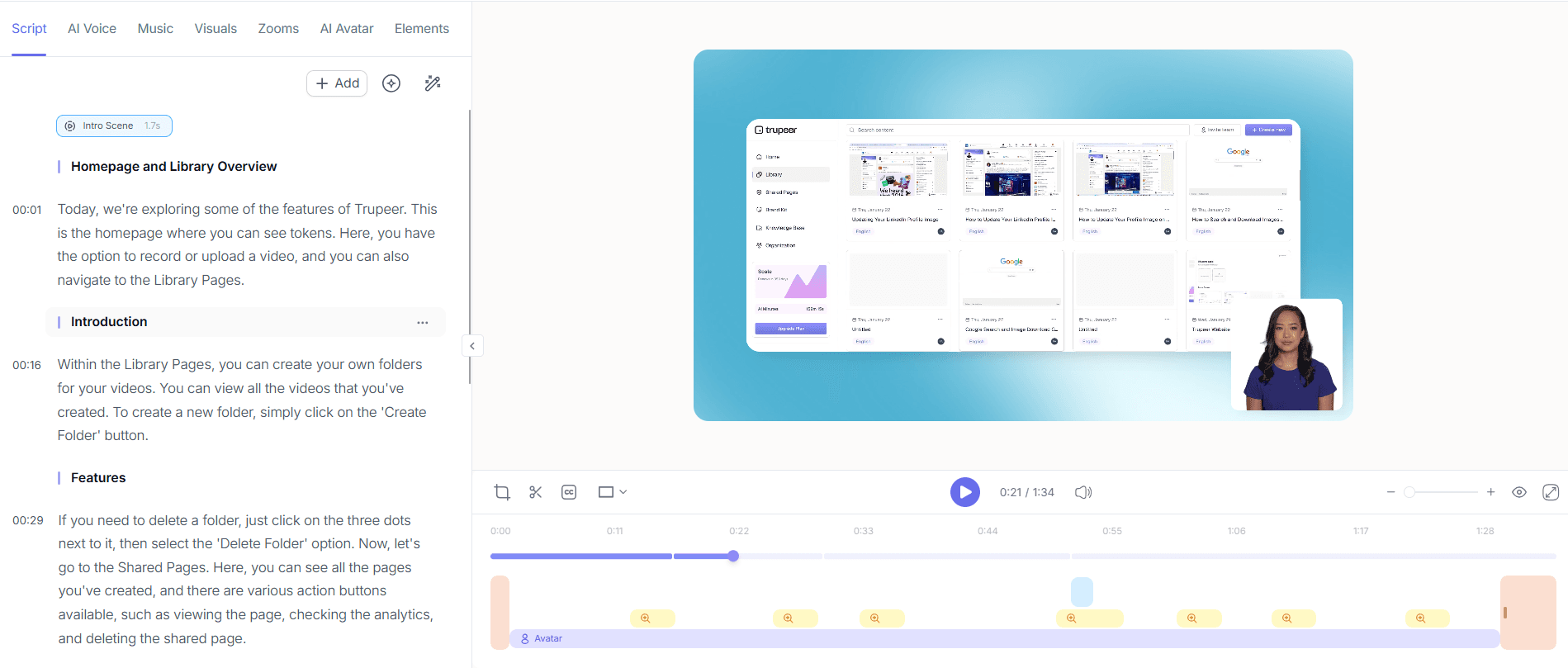
Step 3: Add AI Avatars
Incorporate AI avatars to make your training videos more engaging. Trupeer offers a selection of stock avatars and the option to create custom ones through HeyGen integration. These avatars can serve as virtual presenters, guiding resellers through the training process. To add an avatar, open the editing interface, select an avatar from the library, and position it within the video timeline. The avatar can be synced with the voiceover, ensuring a smooth presentation. This step adds a dynamic element to your videos, enhancing viewer interest and retention.

Step 4: Generate Supporting Documentation
Use Trupeer's automatic SOP generation to create comprehensive documentation from your video. This feature converts your recording into an edit-ready standard operating procedure, exportable in multiple formats such as HTML and PDF. To generate an SOP, select the video in your library, choose the SOP option, and follow the prompts to customize the document. This process takes about 5 minutes and ensures that resellers have access to both video and text-based learning materials, catering to different learning preferences.

Step 5: Localize Your Video
To reach an international audience, use Trupeer's AI translation capabilities. Translate your video into over 40 languages, complete with lip-sync and dubbing options. Access the localization tools from the video editing dashboard, select the desired languages, and initiate the translation process. This step typically takes between 10 and 20 minutes, depending on the video's length. The result is a localized training resource that effectively communicates your product's value proposition to diverse reseller groups, enhancing global reach and understanding.

Step 6: Distribute and Analyze
Finally, distribute your training video using Trupeer's solid distribution features. Host the video on a custom-domain with single sign-on (SSO) for secure access, or embed it in client-facing portals for easy viewing. use the AI-searchable knowledge base to enable resellers to quickly find specific topics within the video. After distribution, monitor viewer engagement through analytics tools that provide insights into drop-off rates and heatmaps. This data helps you refine future training content and ensure it meets reseller needs. Review and distribution processes can be completed within an hour, offering a simplified end-to-end solution.

What tips help you onboard resellers with recorded product training videos?
Creating effective reseller onboarding videos requires strategic planning and execution. Here are some tips to ensure your training content is impactful and resonates with your audience.
Keep It Concise. Aim for videos that are 5-10 minutes long. This length maintains reseller attention and facilitates easier information retention.
Use Visual Aids. Incorporate visuals like charts and screenshots to complement the narration. Visual aids help clarify complex concepts and enhance understanding.
Standardize Formats. Consistent video formats create a cohesive learning experience. Use Trupeer's software to edit screen recorded training videos to ensure uniformity.
Engage With Interactive Elements. Include quizzes or interactive questions within the video to keep resellers engaged and test their understanding.
Ensure Accessibility. Provide subtitles and transcripts for all videos. This not only aids non-native speakers but also supports those with hearing impairments.
Solicit Feedback. After resellers complete the training, gather feedback to identify areas for improvement. Use this to refine future video content.
Regularly Update Content. Ensure your training videos reflect the latest product updates and features. This keeps your reseller network informed and aligned with current offerings.
Teams ship this workflow end-to-end using Trupeer's AI video platform, which turns raw recordings into polished output without an editor.
Frequently asked questions
How can I ensure my training videos are effective for resellers?
To ensure your training videos are effective, focus on clarity, engagement, and accessibility. Use Trupeer's AI capabilities to enhance video quality and make content accessible through subtitles and translations. Regularly update the material to reflect product changes and solicit feedback from resellers to continuously improve the content. By incorporating interactive elements, you can maintain engagement and test comprehension, ensuring that resellers are well-prepared to represent your product accurately.
What is the best way to distribute training videos to resellers?
The best way to distribute training videos is through a secure online platform that offers easy access and tracking capabilities. Trupeer's custom-domain hosting with SSO provides a secure and centralized location for your videos. also, embedding videos within client-facing portals or a searchable knowledge base can enhance accessibility. Monitoring viewer engagement through analytics helps you understand how the videos are being used and allows for strategic adjustments to improve effectiveness.
Can training videos be translated for international resellers?
Yes, training videos can be translated for international audiences using Trupeer's AI video translation feature. This tool allows for translation into over 40 languages, ensuring that resellers worldwide can access and understand the content. The translation process includes lip-sync and dubbing options, making the localized videos as engaging as the original. This capability broadens your reach and ensures that your training materials are inclusive and effective across different markets.
Why should I use AI avatars in training videos?
AI avatars add a dynamic and engaging element to training videos, making content more relatable and easier to follow. By incorporating avatars, you create a virtual presenter that guides viewers through the material, which can be especially beneficial for complex topics. Avatars also add a human touch that enhances viewer connection, leading to better engagement and retention. Trupeer's integration with HeyGen allows for custom avatar creation, offering flexibility to tailor the experience to your brand and audience needs.
Does Trupeer support collaborative review and approval of training videos?
Yes, Trupeer offers collaborative review and approval workflows for training videos. This feature enables teams to provide feedback and make necessary edits before finalizing the content. The collaborative process ensures that the videos meet organizational standards and effectively communicate the intended message. By involving multiple stakeholders, you can produce higher quality and more comprehensive training materials. This approach also builds a sense of ownership among team members, leading to better alignment and support for the training program.
How do you onboard hundreds of hires when procedures keep changing?
Use living guides you can re-record in minutes so training reflects current procedures, standardized with a checklist. Trupeer supports this with an employee onboarding guide that turns recordings into AI guides and videos in 65+ languages.
Gerelateerde blogs


