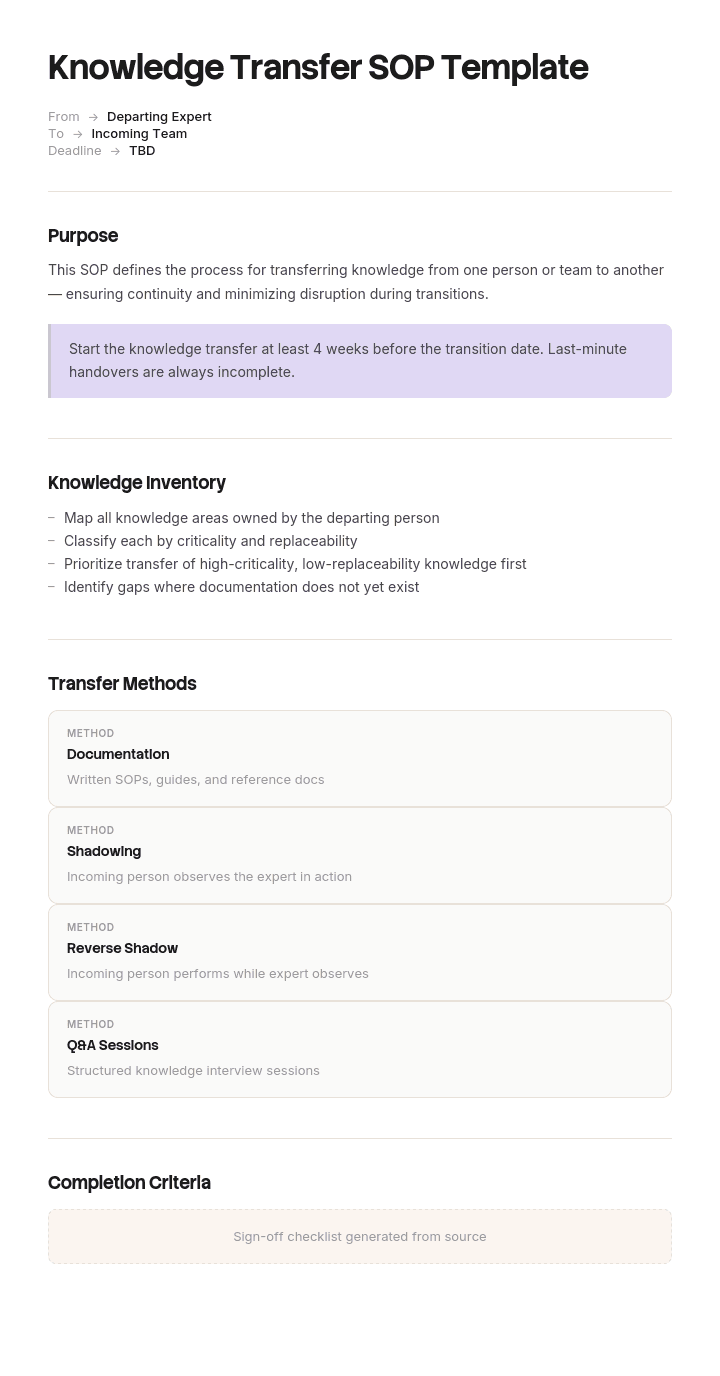
Use this template
Knowledge transfer is what keeps an organisation resilient when people and work move on. With Trupeer, you can save hours on knowledge transfer planning by starting with a free knowledge transfer plan template, customizing it with your brand guidelines, and turning every KT session into a video walkthrough the next person can actually use. In a hurry? Our free knowledge transfer plan generator builds a first draft from your processes and team in minutes.
What is a knowledge transfer plan template?
A knowledge transfer plan template is a ready-made structure for planning how knowledge moves from the people who hold it to the people who need it, before the holders become unavailable. It sets out what knowledge is in scope, who is involved, the sessions and schedule, how the transfer will be run and recorded, and the exit criteria that prove it worked. It's also called a KT plan template, a knowledge transition plan or a knowledge handover plan.
A KT plan is written for a specific transfer: one person leaving a role, a team handing work to another team, or a process moving to an outsourcing provider or GCC. That's what separates it from a knowledge transfer SOP, which is the standing procedure your organisation follows every time. The SOP says how you do knowledge transfer; the plan says how you'll do this one, with names, dates and sessions.
When do you need a knowledge transfer plan?
You need a KT plan whenever knowledge that isn't written down, or isn't held by anyone else, is about to move. The common triggers are:
Resignations and retirements, especially for anyone who has held a role for several years.
Internal moves, when someone changes team or role but stays in the organisation.
Extended leave, such as parental leave or a sabbatical of more than a few months.
Single-person roles, where only one person can do the work, even if nobody is leaving yet.
Team and process transitions, such as outsourcing to a BPO, switching providers, setting up a GCC or rolling out a new system.
The test is simple: if this person, or this team, were unavailable tomorrow, what would stop, and how long before anyone noticed?
Preview the knowledge transfer plan template
The template opens with an overview of the transfer: who is handing over, who is receiving and the key dates. It then covers the knowledge in scope, roles, a session-by-session KT schedule, the transfer method, an interruption log, the documentation plan, exit criteria, access and relationships, a known gaps register and sign-off. Every section is editable, so it works for a single departure or a multi-team transition.
How to customize this template in Trupeer
Step 1: Open the Templates Section
Go to the Templates section from the main navigation.

Step 2: Select and Open a Template
Click on any template you want to work with to open it.
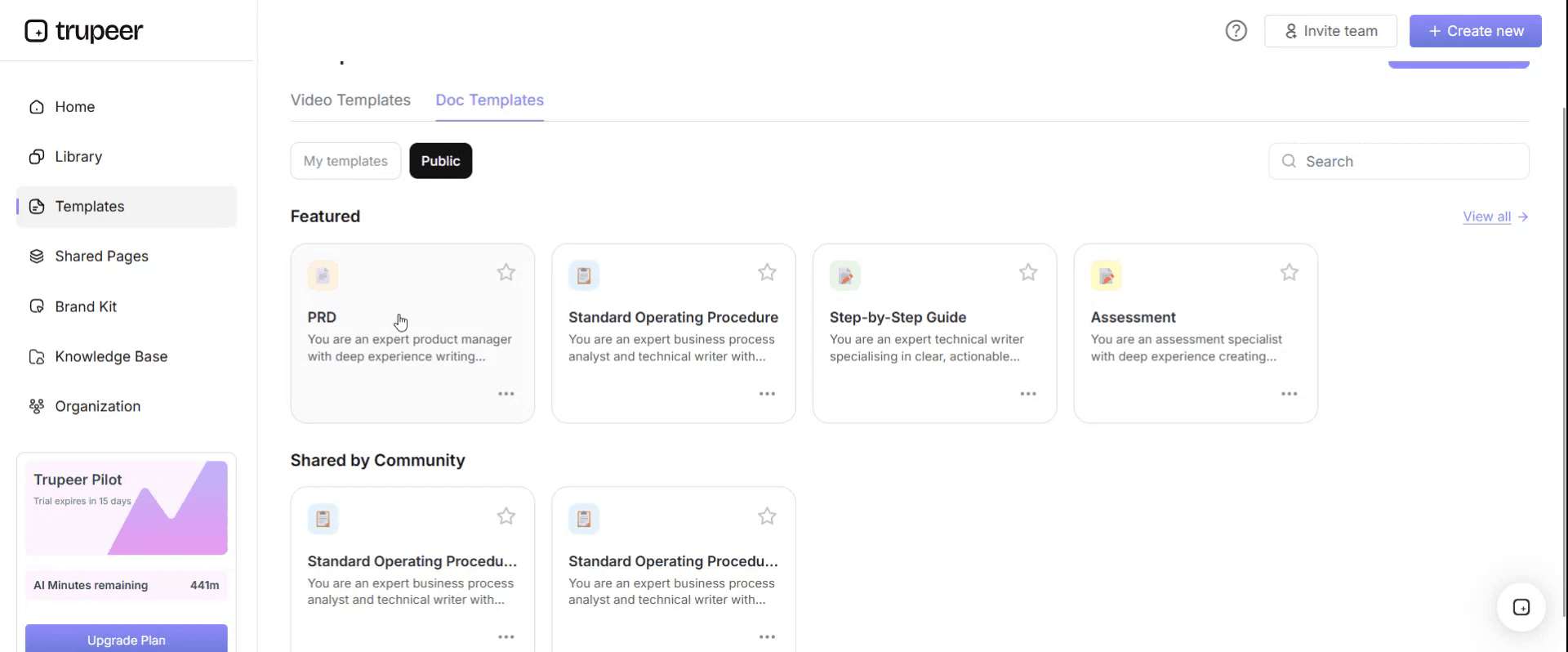
Step 3: Expand the Template View
If needed, expand the template view to see the full layout and details clearly.

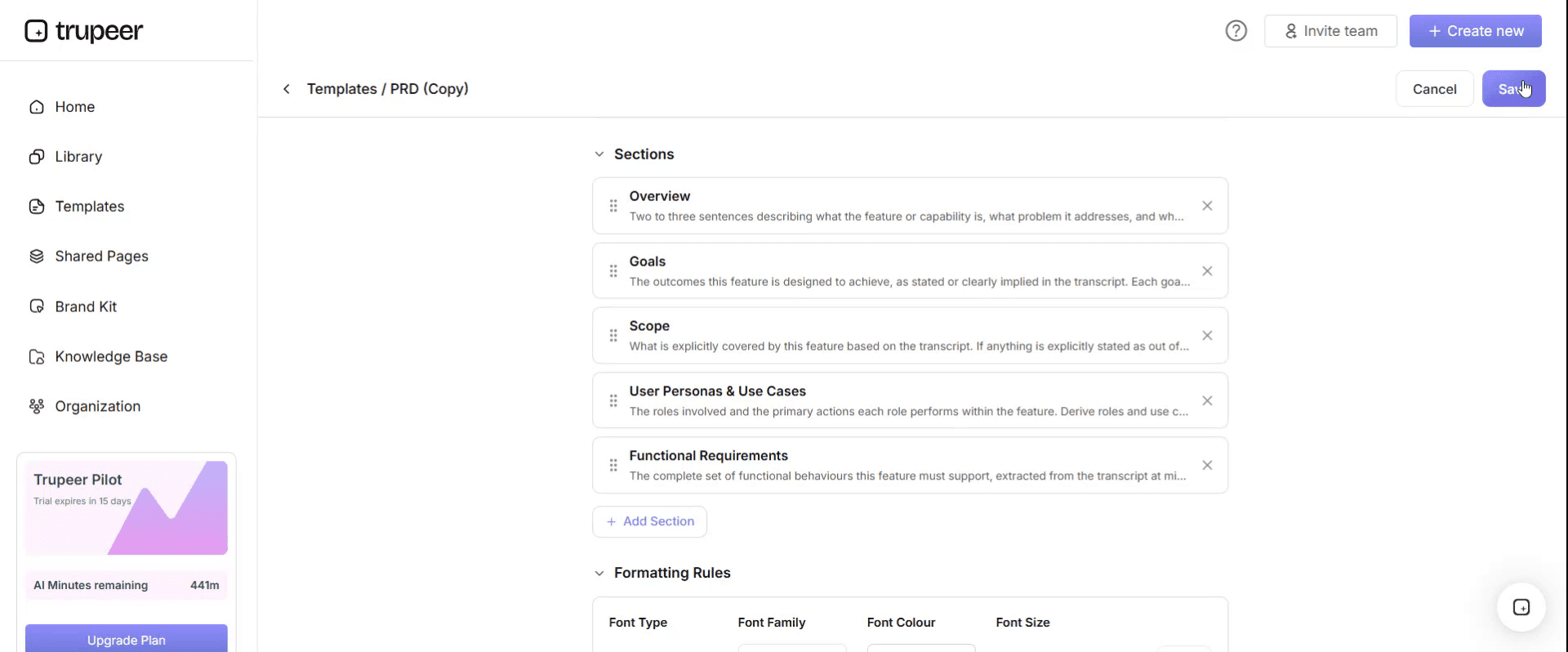
Step 4: Edit the Template
Click on Edit to start modifying the selected template.

Within the editor, you can:
Add new sections
Define or update formatting rules
Add a logo and adjust its position and related settings
Step 5: Save Your Customized Template
After making all necessary changes, click Save to store the updated template as your own.
Step 6: Preview and Fine-Tune the Template
When you want to see how your customized template looks, open the Preview.

From the preview screen, you can continue to make adjustments directly if needed, ensuring the template appears exactly as you want.
With a knowledge transfer plan template you can:
Plan the transfer before it's urgent: Start with a structure built for handovers instead of a blank page.
Capture tacit and explicit knowledge: Built-in sections cover the routine, the exceptions and the relationships.
Make completion measurable: Exit criteria replace "the handover is done" with evidence.
Stay on-brand: Apply your logo, fonts and colors with Trupeer's brand kit.
Onboard the successor faster: Pair the plan with video walkthroughs recorded during KT.
Reach global teams: Translate KT documentation into 65+ languages with one click.
What a knowledge transfer plan must contain
A complete KT plan covers these sections. The template below follows the same order.
Overview: what is being transferred, from whom, to whom, and by when.
Scope and knowledge areas: the tasks, processes, systems and relationships in scope.
Roles: who hands over, who receives, who observes and who signs off.
KT schedule: each session or activity, with owner, date and output.
Transfer method: how knowledge will move, including recording and reverse shadowing.
Interruption log: the live record of what the receiver didn't know.
Documentation plan: what will be written or recorded, and in what priority.
Exit criteria: the evidence that the transfer is complete.
Access, credentials and relationships: what transfers separately from working sessions.
Known gaps register: what didn't transfer, with an owner and a date.
Sign-off: who confirms the transfer is complete, and when.
Free knowledge transfer plan template: the structure to copy
Copy the structure below into your own document. Replace anything in square brackets.
1. Overview. Transfer: [role, team or process]. Handing over: [name or team]. Receiving: [name or team]. Observer and sign-off: [line manager or transition lead]. Trigger: [resignation, move, leave, transition]. Last day or go-live: [date].
2. Scope and knowledge areas.
Area | Examples | In scope? | Risk if missed |
|---|---|---|---|
Recurring tasks | [Daily, weekly, monthly, period-end tasks] | [Yes / No] | [Cosmetic / Rework / Incident] |
Systems and access | [Applications, scripts, credentials] | [Yes / No] | [Cosmetic / Rework / Incident] |
Exceptions and failure history | [What goes wrong and what was done] | [Yes / No] | [Cosmetic / Rework / Incident] |
Relationships | [Internal contacts, suppliers, clients] | [Yes / No] | [Cosmetic / Rework / Incident] |
3. Roles. The person handing over observes and intervenes. The receiver performs the work. The observer, usually the line manager or transition lead, keeps the interruption log and holds sign-off. [Role] provides cover so the receiver is genuinely released from their previous duties.
4. KT schedule.
Week | Activity | Owner | Output |
|---|---|---|---|
1 | Recorded walkthroughs of every recurring task; receiver starts doing the work with the holder observing | Holder and receiver | Recordings, interruption log |
2 to 3 | Documentation written from the log, highest consequence first; structured interview on failure history and relationships | Receiver, reviewed by holder | SOPs and videos, contacts list |
4 | Silent cycle: receiver runs a full cycle of the work with no intervention | Receiver, observed | Exit evidence, known gaps register |
5. Transfer method. Every KT session is recorded. From week one, the receiver does the work while the holder observes and only speaks to prevent a mistake (reverse shadowing). Recordings are turned into SOPs and videos within [2] working days.
6. Interruption log.
Task | What the holder said | Would this have been on a list? | Consequence if missed | Written up |
|---|---|---|---|---|
[Task] | [In the holder's words] | [Yes / No] | [Cosmetic / Rework / Incident] | [Link] |
7. Documentation plan. Write up log entries rated rework or incident first. Entries rated cosmetic can stay in the log. Store everything in [knowledge base].
8. Exit criteria.
Criterion | Evidence |
|---|---|
Every recurring task recorded | Recordings linked in the plan |
Documentation for every rework or incident item | SOP and video links |
Silent cycle completed | Observer's note with date |
Known gaps owned | Register with owner and date for each entry |
9. Access, credentials and relationships. Access transfers through [access request process] to role-based accounts. Relationships transfer by introduction, with a named handover in writing.
10. Known gaps register. Gap, owner, due date, status.
11. Sign-off. The observer signs when the silent cycle is complete and every known gap has an owner. Not before the holder's last day, and not on it.
Generate your knowledge transfer plan in minutes
If you'd rather not start from a blank copy, the free knowledge transfer plan generator builds the plan for you. List the processes to transfer, describe the team on each side and choose a KT window, and it lays out the phases, sessions, owners and exit criteria. Export the full plan with a free account, then record your first KT session in Trupeer.
Why inventory-only KT plans miss what matters
Almost every knowledge transfer plan starts the same way: ask the person leaving to list what they know or own, turn the list into documents, tick the items off and sign a form.
The method has one fatal assumption, which is that people can see their own knowledge. They can't, and the more experienced they are, the less they can. Six years into a role, the checks you run without thinking, the person you call instead of the official queue, the file that arrives late one month in four: none of these feel like knowledge. They feel like Tuesday.
So an inventory produces a faithful record of responsibilities and almost none of the habits. The plan looks thorough, the checklist is complete, and the things that break in month one are the items nobody thought to list, including the person who left. The fix isn't a better list. It's to stop asking and start watching.
Reverse shadowing and the interruption log
Standard shadowing has the receiver watching the holder. It feels productive and teaches very little, because a fluent person performing a familiar task skips the decisions.
Invert it. From the first week, the receiver does the work while the holder sits alongside and says nothing unless something is about to go wrong. This is reverse shadowing, and every time the holder has to speak, they've revealed a piece of knowledge no list would have surfaced.
Those interventions go into the interruption log, filled in live by the observer rather than either of the two people doing the work. Count them weekly. A healthy transfer shows a steep fall, often something like twenty-five in week one to under five by week four. A flat line usually means the receiver isn't being given real control, which is the most common failure of this method.
The silent cycle: how a knowledge transfer plan ends
The transfer is finished when a full cycle of the work passes and the holder says nothing at all. Not when a checklist is complete, and not when the documents are written.
Define the cycle as the longest period the work naturally runs on. For most operational roles that's a month, because it has to include period-end, the monthly report and the supplier who invoices late. Choosing a shorter cycle to fit a notice period is the single most common way KT plans get quietly broken. If notice is too short for a full cycle, run it after the holder has gone with a named fallback, and record it as a known gap rather than pretending it happened.
Knowledge transfer plan example: one role, two transfers
Here's how the approach plays out, using an illustrative example. A mid-sized energy company, Nordvale Energy, lost the data engineer who had owned its nightly reporting pipeline for six years.
The first transfer used an inventory. She listed thirty-one items she owned, wrote fourteen documents and recorded four walkthrough videos. Her manager signed off on her last day. In the following month there were nine incidents on the pipeline, and six traced to things that never appeared on the list: a manual step she ran every Tuesday, a supplier file that arrives late one month in four, a contact in Finance she called instead of the official queue, and a script with a date that needed changing each April.
The second transfer used this plan. Eight months later, another engineer left the same team. The successor ran the pipeline from week one with the leaver observing. The interruption log recorded twenty-seven interventions in week one, eleven in week two, four in week three and one in week four: forty-three items, nineteen of which would never have appeared on a list. Documentation was written from the log, prioritised by consequence. The month after that departure produced two incidents.
The second transfer took no more calendar time than the first. It produced fewer words and far less breakage. The details in this example are illustrative.
Knowledge transfer plan for a team or process transition
The same plan scales from one person to a whole team. When a process moves to an outsourcing provider, a GCC or a new vendor, the structure stays the same, with three changes:
Scope by process, not person. List every process in the transition and the SMEs who know each one.
Schedule by wave. Plan recorded KT sessions per process, then playback, shadowing and reverse shadowing for the receiving team.
Exit criteria per person. Clear each member of the receiving team for cutover individually, using a transition readiness assessment.
For the full transition method, see the transition SOP template and the transition handover sign-off checklist.
Knowledge transfer methods compared
Method | What it is | Works when | Fails when |
|---|---|---|---|
Documentation first | The holder writes everything up before handover | The work is procedural and stable | Tenure is long, because habit is invisible to the writer |
Shadowing | The receiver watches the holder work | Notice is very short, or the receiver is new to the domain | Used alone, because fluent people skip the reasoning |
Reverse shadowing | The holder watches the receiver work | There are at least three or four weeks of overlap | The receiver isn't released from previous duties |
Structured interview | A third party questions the holder | Extracting failure history and relationships | Used to extract routine, which the holder can't articulate |
Recorded walkthrough | The holder records themselves doing tasks | Building reference material fast | Treated as the whole transfer rather than an input |
Known gaps register | Recording what didn't transfer | Always, as the closing step | Treated as a failure rather than an honest output |
The practical combination for a four-week window is reverse shadowing for the routine, a structured interview for failure history and relationships, and recorded walkthroughs to make documentation cheap.
Knowledge transfer plan variants
IT and systems-heavy roles
Run the transfer against the real environment, include at least one on-call rotation or period-end run in the overlap, and treat undocumented dependencies as a first-class output. Record them in your IT documentation.
No successor or no overlap
If there's no named successor, transfer to the manager or whoever will hold the work temporarily. If there's no overlap, spend the time you have on failure history and dependencies, since routine can be rediscovered slowly and dependencies can't, and treat the known gaps register as a live risk list.
Vendor-to-vendor and outsourcing transitions
Add the client and both providers as signatories, record every session as part of the contract's KT obligations and keep everything in a client-owned knowledge base. See our guide to vendor-to-vendor transition knowledge transfer.
Government and regulated roles
For roles with a named responsible person, a controlled function or delegated authorities, involve compliance at the start. The vacancy may need reporting and the successor may need approval before they can act.
Record every KT session with Trupeer
The documentation step is where transfers stall, because a receiver who has just taken on a full role doesn't have time to write. Trupeer removes most of that cost. The receiver performs a task with the holder watching, records it once with the AI screen recorder, and Trupeer turns it into a step-by-step SOP with screenshots and a narrated video. Editing a draft that already exists is a different job from writing from a blank page at the end of a long week.
Because the interruption log is prioritised by consequence, you record the ten items that matter rather than the forty that don't. Publish everything to a searchable knowledge base, and translate it for teams in other locations.
The same recording-first approach works at scale. Genpact recorded existing MS Teams process sessions and SME walkthroughs, uploaded them to Trupeer and got back SOPs and demo videos in five languages: more than 500 training collaterals for 140,000 employees in 40 countries, delivered in 3 months instead of 12. Read the Genpact customer story.
KT plan vs KT SOP vs handover document vs transition plan
Document | What it covers | When it's written |
|---|---|---|
Knowledge transfer plan | How one specific transfer will run: scope, sessions, owners, exit criteria | For each transfer |
Knowledge transfer SOP | The standing procedure your organisation follows for every transfer | Once, then revised |
Handover document | What is being handed over at a point in time | At the handover |
Transition plan | The wider move of a role, team or process, of which KT is one part | For each transition |
See the handover document template, transition plan template and knowledge management template.
Knowledge transfer plan checklist
The trigger, people and dates are recorded in the overview.
Every recurring task, system, exception area and relationship is in scope or explicitly excluded.
The receiver is released from previous duties for the overlap.
Every KT session is recorded.
Reverse shadowing starts in week one, with an interruption log kept by the observer.
Documentation is written from the log, highest consequence first.
A full silent cycle is completed, including period-end work.
Access and relationships transfer separately, in writing.
Every known gap has an owner and a date.
Sign-off happens after the silent cycle, not on the last day.
Common mistakes to avoid
Planning from an inventory alone. Lists capture responsibilities, not habits.
Not releasing the receiver. If they're still doing their old job, reverse shadowing never really happens.
Shortening the cycle to fit the notice period. Record it as a gap instead.
Asking the holder to write the documentation. The receiver remembers what wasn't obvious.
Signing off on the last day. By then, nobody can fix what's missing.
Download the free knowledge transfer plan template
Open the template in Trupeer, apply your brand kit and record your KT sessions as you go, or let the knowledge transfer plan generator draft the plan for you. Get the free knowledge transfer plan template.
Frequently Asked Questions
What is a knowledge transfer plan?
A knowledge transfer plan sets out how knowledge will move from the people who hold it to the people who need it, for a specific departure, role change or transition. It covers scope, roles, sessions and schedule, the transfer method, documentation, exit criteria and sign-off.
What is the full form of KT plan?
KT stands for knowledge transfer, so a KT plan is a knowledge transfer plan. The term is most common in IT services and outsourcing, where transitions between teams and vendors happen often.
What should a knowledge transfer plan include?
An overview, scope and knowledge areas, roles, a KT schedule, the transfer method, an interruption log, a documentation plan, exit criteria, access and relationships, a known gaps register and sign-off.
How long should a knowledge transfer take?
Long enough to include one full cycle of the work with no intervention, which is a month for most operational roles because of period-end tasks. Four weeks of overlap is a practical target; two weeks can work for narrow roles.
Who should own the knowledge transfer plan?
The line manager or transition lead, as observer and sign-off. Not the person leaving, who has the least visibility of their own knowledge, and not HR, who can own the trigger but can't judge whether the receiver can do the work.
What is the difference between a KT plan and a KT SOP?
The KT SOP is the standing procedure your organisation follows for every transfer. The KT plan applies it to one specific transfer, with names, sessions, dates and exit criteria.
How can I create a knowledge transfer plan quickly?
Use the free knowledge transfer plan generator. Enter your processes and team, choose a KT window and export a plan with sessions, owners and exit criteria.
What is a knowledge transfer plan example?
The Nordvale Energy example on this page compares two transfers of the same role: one based on an inventory, which led to nine incidents, and one based on reverse shadowing and an interruption log, which led to two.
Is there a knowledge transfer plan template in Word?
The structure above pastes straight into Word or Google Docs. Open the template in Trupeer to apply your brand kit and export it, and save your version with your own triggers and roles.
Is there a knowledge transfer plan template in Excel?
Excel is the right home for the KT schedule and the interruption log: one row per session or intervention, with a weekly count so the fall in interruptions is visible while the transfer is still running.
Is there a knowledge transfer plan template in PPT?
Use slides for the case rather than the plan: the roles at risk, the overlap you're requesting, the interruption count from the last transfer and its known gaps register.
Is there a knowledge transfer plan template in PDF?
Export your own PDF once the bracketed fields carry your triggers, dates and names. A generic PDF can't hold those, and a plan that still says [Role] won't be followed.
What is the difference between knowledge transfer and handover?
A handover is the document and the moment: here is what you're picking up. Knowledge transfer is the process that makes the handover survivable, and it takes weeks rather than an afternoon.


