Use this template
A process map shows how work moves from start to finish: the steps, who does each one, the decisions and the handoffs between teams and systems. Starting from a template saves time and keeps every map in your organisation consistent. This page gives you seven free process map templates and five worked process mapping examples by department, with every template previewed below so you can see exactly what you are getting.
Download the full bundle in Excel, PowerPoint, Visio and PDF, or skip the blank template and generate a process map from a recording of the real work with Trupeer.
What is a process map template?
A process map template is a ready-made layout for drawing a process: standard shapes for start and end points, steps and decisions, lanes for each role or team, and space for inputs, outputs and systems. You fill in your own steps instead of designing the diagram from scratch.

Templates matter most when several people map processes. They make every map use the same symbols, level of detail and layout, so maps are easy to compare, review and keep in a shared library.
Standard process map symbols
Symbol | Shape | Meaning |
|---|---|---|
Start or end | Oval | Where the process begins or finishes |
Step | Rectangle | An activity someone or something performs |
Decision | Diamond | A yes or no question that splits the flow |
Document or data | Wavy-bottom rectangle | A document, form or record produced or used |
Arrow | Line with arrowhead | The direction the work flows |
Lane | Horizontal band | The role, team or system responsible for the steps in it |
Process map template gallery
Each template below includes a preview of its structure. All seven are included in the bundle in Excel, PowerPoint, Visio and PDF.

1. Basic process flowchart template
Best for: simple, linear processes owned by one team, and a first draft of any process.
Start | Step 1 | Step 2 | Decision | Step 3 | End |
|---|---|---|---|---|---|
[Trigger] | [Action] | [Action] | [Yes / No question] | [Action] | [Outcome] |
2. Swimlane process map template
Best for: processes that cross several teams, where you need to see handoffs. Each lane is a role, team or system.
Lane | Steps in this lane |
|---|---|
[Requester] | [Submit request] → [Receive outcome] |
[Team A] | [Review] → [Approve or reject] |
[Team B] | [Process] → [Notify requester] |
[System] | [Record created] → [Status updated] |
For a deeper guide, see our process flow template.
3. SIPOC template
Best for: scoping a process at a high level before you map it in detail.
Suppliers | Inputs | Process (5 to 7 steps) | Outputs | Customers |
|---|---|---|---|---|
[Who provides inputs] | [What they provide] | [High-level steps] | [What the process produces] | [Who receives it] |
See the full SIPOC analysis template.
4. Value stream map template
Best for: finding delays and waste across an end-to-end flow.
Stage | Process time | Wait time before next stage | People | Issues |
|---|---|---|---|---|
[Stage 1] | [Hours or days] | [Hours or days] | [Number] | [Rework, errors, bottlenecks] |
Total | [Sum of process time] | [Sum of wait time] | Lead time = process time + wait time |
Not sure which to use? Read value stream mapping vs process mapping.
5. Approval workflow template
Best for: requests that need one or more approvals, such as purchases, expenses or access.
Step | Owner | Rule |
|---|---|---|
Submit request | Requester | Required fields complete |
Check policy or budget | Reviewer | Within policy? If no, return with reason |
Approve | Manager | Amount within limit? If no, escalate |
Escalated approval | Director | Approve or reject |
Action and notify | Operations | Record decision and notify requester |
6. Employee onboarding process map template
Best for: HR, IT and managers coordinating a new starter's first weeks.
Stage | HR | IT | Manager | New hire |
|---|---|---|---|---|
Before day 1 | Issue contract, set up payroll | Create accounts, order equipment | Plan first week | Complete forms |
Day 1 | Induction | Hand over equipment and access | Welcome, introductions | Attend induction |
Weeks 1 to 4 | Policy training | Support | Set goals, check-ins | Role training |
7. Order to cash process map template
Best for: mapping the revenue cycle from order to payment.
Stage | Owner | Key steps |
|---|---|---|
Order | Sales | Receive order, check credit, create sales order |
Fulfilment | Operations | Pick, pack, ship, confirm delivery |
Billing | Finance | Create and send invoice |
Collection | Accounts receivable | Receive and apply payment, chase overdue invoices |
Reporting | Finance | Reconcile and report |
See the full order to cash process flow.
Process mapping examples by department
These five worked examples show what a finished process map captures. The details are illustrative.
Finance: invoice approval
Step | Lane | What happens | Decision or rule |
|---|---|---|---|
1 | Accounts payable | Receive invoice and match it to the purchase order and goods receipt | Match within tolerance? |
2 | Accounts payable | If matched, post for payment | |
3 | Budget holder | If not matched, review the difference | Approve, reject or ask the supplier |
4 | Accounts payable | Hold, correct or post the invoice | |
5 | Treasury | Include in the next payment run | Payment terms met? |
What the map shows: most delay sits in step 3, waiting for budget holders. See the full procure to pay process flow.
HR: employee onboarding
Step | Lane | What happens |
|---|---|---|
1 | Recruiter | Offer accepted; trigger onboarding |
2 | HR | Issue contract and payroll set-up |
3 | IT | Create accounts and ship equipment |
4 | Manager | Plan the first week and assign a buddy |
5 | New hire | Complete induction and role training |
What the map shows: IT set-up starts only after the contract is signed, so new hires often wait for access on day one. See the hire to retire process flow.
IT: access request
Step | Lane | What happens | Decision or rule |
|---|---|---|---|
1 | Employee | Raise an access request | |
2 | Service desk | Check the role against the access policy | Standard access for this role? |
3 | Manager | Approve non-standard access | Approve or reject |
4 | IT | Provision access | |
5 | Service desk | Confirm and close the ticket |
What the map shows: standard requests could skip manager approval entirely.
Customer service: refund request
Step | Lane | What happens | Decision or rule |
|---|---|---|---|
1 | Customer | Request a refund | |
2 | Support agent | Check order, delivery and return window | Within policy? |
3 | Support agent | Issue refund up to the limit | Above the limit? |
4 | Team lead | Approve refunds above the limit | |
5 | Finance | Process the refund |
What the map shows: clear rules let agents resolve most refunds without escalation.
Sales: lead to order
Step | Lane | What happens | Decision or rule |
|---|---|---|---|
1 | Marketing | Capture and score the lead | Score above threshold? |
2 | Sales development | Qualify the lead | Qualified? |
3 | Account executive | Run discovery and propose | |
4 | Deal desk | Approve pricing and terms | Discount within limit? |
5 | Sales operations | Create the order in the ERP |
What the map shows: deal desk approvals are where quotes stall at quarter end.
How to customize these templates in Trupeer
Step 1: Open the Templates Section
Go to the Templates section from the main navigation.

Step 2: Select and Open a Template
Click on any template you want to work with to open it.
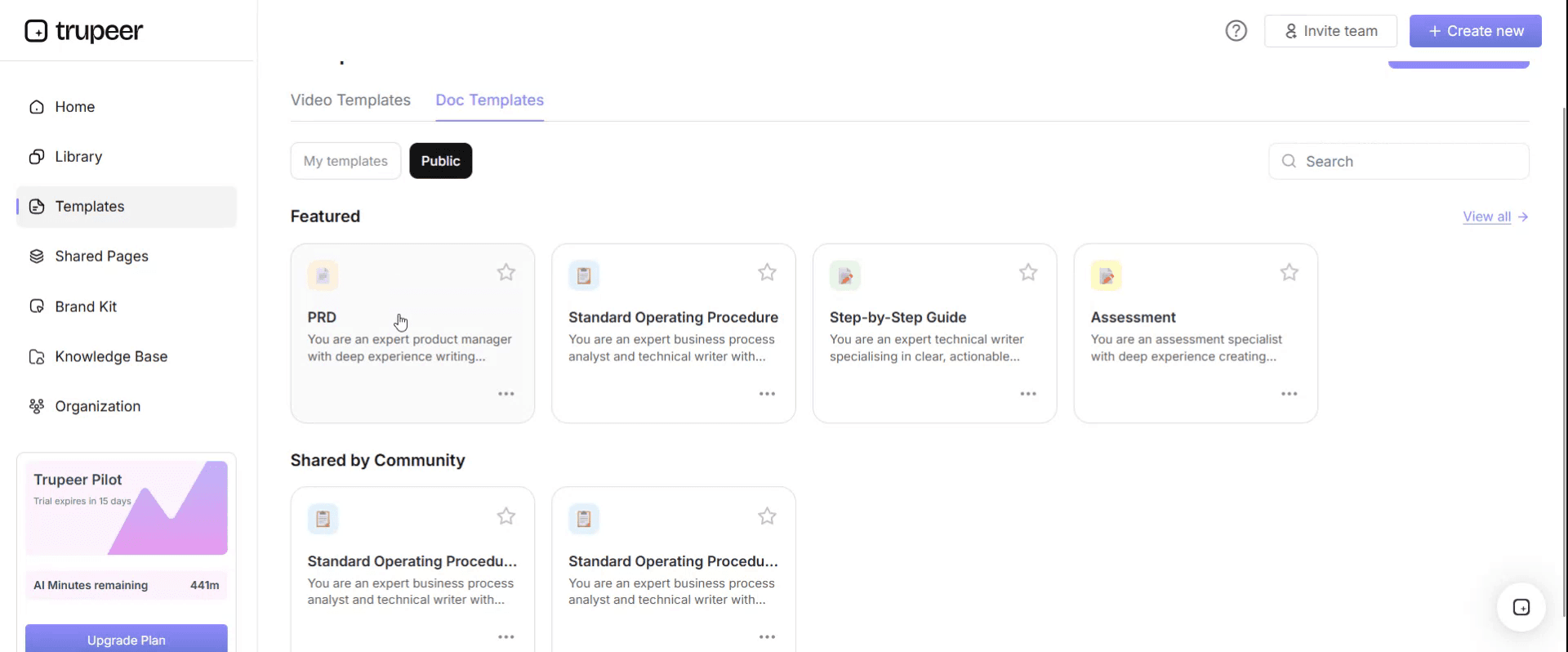
Step 3: Expand the Template View
If needed, expand the template view to see the full layout and details clearly.

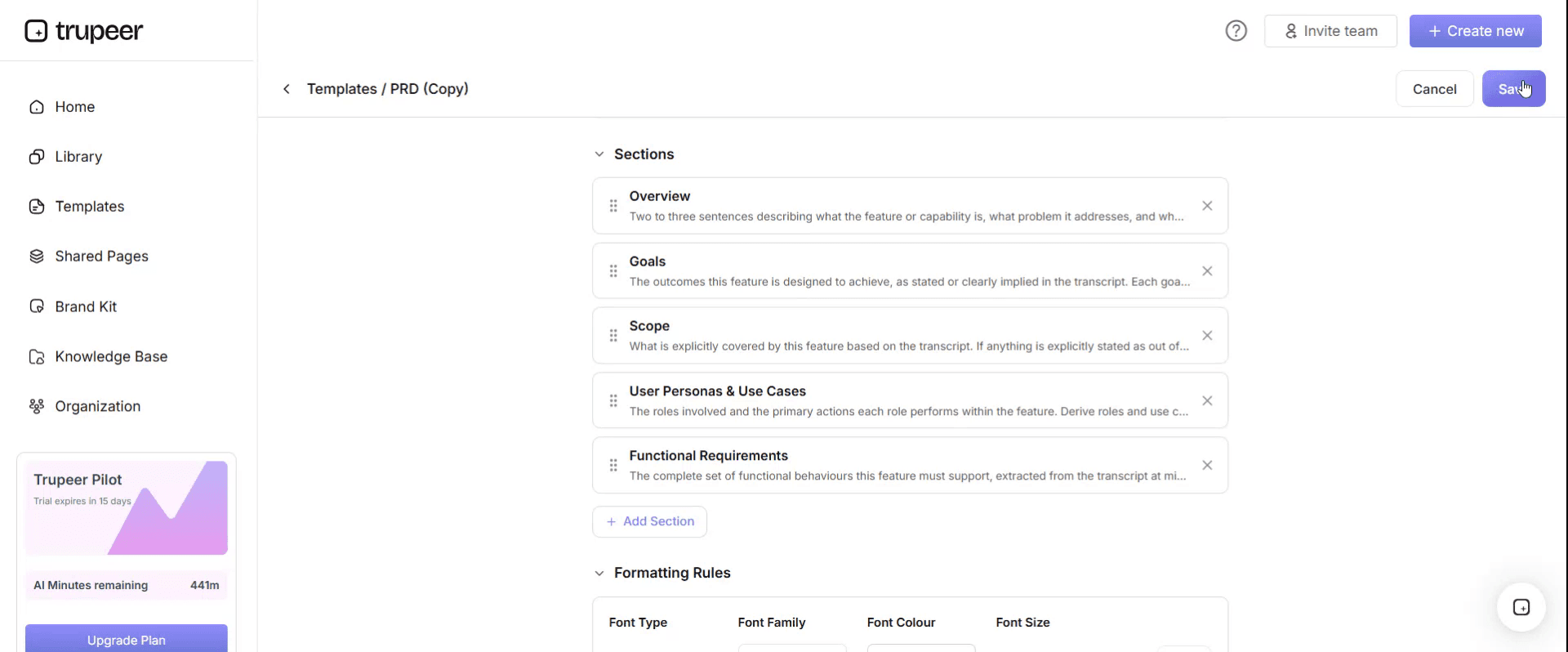
Step 4: Edit the Template
Click on Edit to start modifying the selected template.

Within the editor, you can:
Add new sections
Define or update formatting rules
Add a logo and adjust its position and related settings
Step 5: Save Your Customized Template
After making all necessary changes, click Save to store the updated template as your own.
Step 6: Preview and Fine-Tune the Template
When you want to see how your customized template looks, open the Preview.

From the preview screen, you can continue to make adjustments directly if needed, ensuring the template appears exactly as you want.
How to use a process map template
Choose the right template. A basic flowchart for simple processes, a swimlane map for cross-team work, SIPOC for scoping, value stream for delays.
Define the start and end. Agree what triggers the process and what outcome ends it.
List the roles. Each role, team or system becomes a lane.
Map the main path first. Add the most common route before the exceptions.
Add decisions and exceptions. Use diamonds for decisions and note what happens on each branch.
Validate with the people who do the work. Walk through the map with them, using real recent cases.
Publish and keep it current. Store the map with an owner and review it when the process or system changes.
For tool options, see the best process mapping tools.
Skip the template: generate a process map from real work
Templates still depend on someone remembering every step. Trupeer starts from the work itself: record the process as you do it, in any application, and Trupeer generates a process map from the recording, along with a step-by-step SOP and a training video. Edit the map to add decisions and exceptions, then export it as PNG, SVG or Mermaid. When the process changes, update one step and the map, SOP and video change together.
Download the free process map templates
Get the process map template bundle: all seven templates in Excel, PowerPoint, Visio and PDF, plus the five worked examples.
Or open the templates in Trupeer to apply your brand kit and generate maps from real recordings.
Frequently Asked Questions
What is a process map template?
A process map template is a ready-made layout for drawing a process, with standard shapes for steps, decisions and start and end points, and lanes for each role or team, so you fill in your process instead of designing the diagram.
What are examples of process maps?
Common examples include invoice approval, employee onboarding, IT access requests, customer refunds, lead to order and order to cash. Each shows the steps, owners, decisions and handoffs in one view.
Is there a process map template in Excel?
Yes. The bundle includes every template in Excel, with shapes and swimlanes laid out on a grid you can edit, as well as PowerPoint, Visio and PDF versions.
Is there a process map template in PowerPoint?
Yes. The PowerPoint versions use editable shapes and connectors, which suit maps you will present or share in slides.
What is the difference between a process map and a flowchart?
A flowchart shows the sequence of steps and decisions. A process map usually adds who does each step, often in swimlanes, along with inputs, outputs and systems. Every process map is a kind of flowchart, but not every flowchart is a process map.
What are the main types of process maps?
The most common are basic flowcharts, swimlane maps, SIPOC diagrams, value stream maps and detailed process maps, often drawn in BPMN.
How do I create a process map quickly?
Start from a template, map the main path before the exceptions, and validate it with the people who do the work. Or record the process once in Trupeer and generate the map automatically.


