4,8/5
Outil gratuit de création de vidéos de formation assisté par IA
Laissez l’IA gérer le montage pendant que vous vous concentrez sur l’enseignement. Créez des vidéos de formation à l’aspect professionnel.
Essayez gratuitement

L’outil de création de vidéos de formation alimenté par l’IA de Trupeer automatise l’ensemble du pipeline de production de vidéos de formation, de l’enregistrement d’écran à la livraison finale. Enregistrez n’importe quel flux de travail, et l’IA crée une vidéo de formation avec des modifications intelligentes, des annotations, une amélioration de la voix off et un guide écrit étape par étape d’accompagnement.
Enregistrez des flux de travail et laissez l’IA créer des vidéos de formation prêtes à la production.
Montage automatisé incluant des effets de zoom, des sous-titres et la suppression des tics de langage.
L’IA génère une documentation écrite d’accompagnement en parallèle de chaque vidéo.
L’intégration du kit de marque garantit une cohérence visuelle de toutes les vidéos de formation.
Partagez via un lien, intégrez-la dans votre LMS ou téléchargez les fichiers vidéo finaux.
Qu’est-ce que l’outil de création de vidéos de formation alimenté par l’IA de Trupeer ?
L’outil de création de vidéos de formation alimenté par l’IA de Trupeer est une plateforme complète pour produire des vidéos de formation professionnelles sans aucun montage manuel. L’IA regarde votre enregistrement d’écran, comprend le flux de travail démontré et applique automatiquement des techniques de production de niveau professionnel. Elle détecte où zoomer, quand couper, quoi sous-titrer et comment structurer le contenu pour un impact d’apprentissage maximal. Le résultat est un outil de création de vidéos de formation qui transforme n’importe quel expert métier en producteur de contenu de formation, quelle que soit son expérience en production vidéo.
Comment fonctionne l’outil de création de vidéos de formation alimenté par l’IA ?
Commencer avec l’outil de création de vidéos de formation alimenté par l’IA ne prend que quelques minutes.
Étape 1 : Enregistrer ou téléverser
Démarrez un enregistrement d’écran directement dans votre navigateur, ou téléversez une vidéo existante.

Étape 2 : Traitement par l’IA
L’IA analyse votre enregistrement, supprime les tics de langage, ajoute des effets de zoom et génère automatiquement la vidéo.
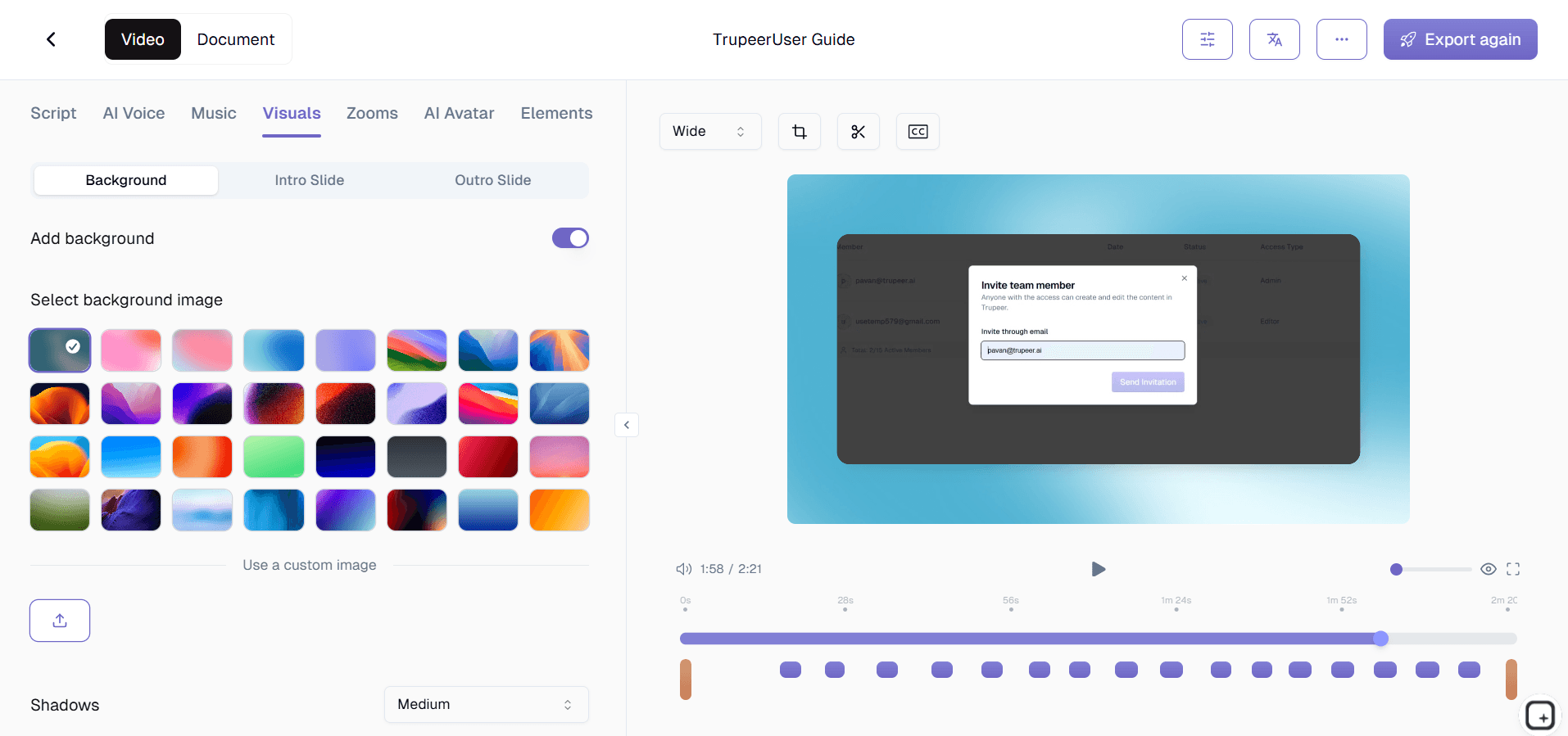
Étape 3 : Personnaliser et partager
Modifiez le résultat, appliquez votre kit de marque et partagez via un lien ou intégrez-le sur votre site web. Les mises à jour sont tout aussi simples.

Fonctionnalités clés de l’outil de création de vidéos de formation alimenté par l’IA de Trupeer
Pipeline de traitement IA en plusieurs étapes : Votre enregistrement passe par un pipeline d’IA sophistiqué qui gère successivement la détection des scènes, le nettoyage audio, l’amélioration visuelle et la structuration du contenu. Chaque étape s’appuie sur la précédente, produisant un résultat équivalent à ce qu’un monteur vidéo professionnel livrerait après des heures de travail manuel.
Structuration intelligente du contenu : L’IA identifie la structure logique de votre flux de travail de formation et organise la vidéo en segments clairs et faciles à assimiler. Elle ajoute des marqueurs de chapitre, des transitions entre les différentes étapes et des repères visuels qui aident les apprenants à naviguer dans le contenu et à comprendre où un concept se termine et où le suivant commence.
Moteur de zoom et d’annotation adaptatif : Plutôt que d’appliquer des effets de zoom génériques, l’IA comprend les éléments d’interface avec lesquels vous interagissez et applique des niveaux de zoom, des encadrés de surlignage et un suivi du curseur adaptés au contexte. Lorsque vous cliquez sur un petit bouton dans une interface complexe, l’IA zoome exactement au bon niveau pour garantir la clarté.
Amélioration audio professionnelle : Au-delà de la suppression des tics de langage, l’IA normalise les niveaux audio, réduit le bruit de fond et garantit un volume constant tout au long de la vidéo de formation. Le résultat est une narration propre et professionnelle qui sonne comme en studio, quel que soit votre environnement d’enregistrement ou la configuration de votre microphone.
Pourquoi choisir l’outil de création de vidéos de formation alimenté par l’IA de Trupeer ?
Automatisation de bout en bout : De l’enregistrement brut de l’écran à la vidéo de formation publiée, chaque étape de production est prise en charge par l’IA. Aucun outil intermédiaire, aucun logiciel de montage manuel, aucun goulot d’étranglement de post-production.
Accessible aux experts : Les experts métier créent directement du contenu de formation sans avoir besoin de compétences en production vidéo. La meilleure personne pour enseigner un processus est celle qui le pratique au quotidien, et cet outil supprime toutes les barrières techniques.
Résultat de niveau entreprise : Les vidéos de formation produites par l’IA répondent aux standards de production exigés par les services L&D des grandes entreprises. Un son professionnel, une image de marque cohérente et une livraison de contenu structurée sont automatiques, pas seulement un objectif.
Production de contenu à l’échelle : Une petite équipe produit des bibliothèques de vidéos de formation qui auraient auparavant nécessité du personnel de production dédié. L’IA augmente votre capacité de création de contenu sans augmenter vos effectifs.
Outil de création de vidéos de formation alimenté par l’IA pour les équipes internes
1. Démocratisez la création de contenu de formation dans toute votre organisation. N’importe quel membre de l’équipe peut produire des vidéos de formation professionnelles, supprimant ainsi le goulot d’étranglement consistant à dépendre des équipes L&D ou de production vidéo pour chaque contenu de formation.
2. Capturez et préservez les connaissances des experts avant qu’ils ne quittent l’entreprise. Lorsque des employés expérimentés enregistrent leurs flux de travail, l’IA transforme leur expertise en ressources de formation permanentes qui bénéficient à chaque futur recrutement.
3. Maintenez une bibliothèque de formation vivante qui évolue avec votre organisation. À mesure que les processus changent, mettez à jour des vidéos de formation individuelles en quelques minutes au lieu de planifier de nouveaux tournages ou d’embaucher des monteurs pour les révisions.
4. Réduisez les incohérences de formation entre les services. Lorsque le marketing, les ventes, l’ingénierie et les opérations s’appuient tous sur des vidéos de formation produites par l’IA à partir de la même plateforme, tout le monde fonctionne à partir d’un savoir procédural identique.
Outil de création de vidéos de formation alimenté par l’IA pour les équipes SaaS
1. Produisez des vidéos de formation spécifiques aux fonctionnalités, publiées en même temps que les mises à jour produit. Lorsque l’ingénierie déploie une nouvelle fonctionnalité, l’IA génère du contenu de formation destiné aux clients au cours du même cycle de sprint.
2. Développez votre programme de formation client sans faire grandir votre équipe contenu. La production alimentée par l’IA permet à une petite équipe de réussite client de maintenir une bibliothèque complète de vidéos de formation couvrant l’ensemble de votre produit.
3. Créez du contenu de formation à plusieurs niveaux pour différents profils d’utilisateurs. Générez des vidéos de formation débutant, intermédiaire et avancé à partir de différentes sessions d’enregistrement, avec une qualité de production et une image de marque cohérentes.
4. Gardez la formation interne à jour avec les évolutions du produit. Lorsque les fonctionnalités évoluent, régénérez les vidéos de formation de l’équipe support afin que les agents soient toujours prêts à répondre aux questions des clients sur la version la plus récente.
Outil de création de vidéos de formation alimenté par l’IA pour les startups
1. Faites mieux que votre taille grâce à un contenu de formation qui rivalise avec celui des grandes entreprises concurrentes. La production alimentée par l’IA offre aux startups des vidéos de formation professionnelles sans budget pour des équipes de production vidéo ou des logiciels de montage coûteux.
2. Construisez un onboarding évolutif dès le premier jour. Les startups qui investissent tôt dans des vidéos de formation produites par l’IA évitent le chaos de la gestion des connaissances qui fait dérailler les entreprises à forte croissance lorsqu’elles passent de 10 à 100 employés.
3. Créez des vidéos de démonstration produit prêtes pour les investisseurs en utilisant les mêmes outils d’IA. Affinez votre pitch avec des démonstrations produit professionnelles qui présentent votre solution de manière claire et convaincante.
4. Donnez à chaque membre de l’équipe les moyens de contribuer au contenu de formation. Dans une startup, tout le monde porte plusieurs casquettes, et la création vidéo alimentée par l’IA permet à chacun de produire du matériel de formation sans devenir un spécialiste du montage vidéo.
Outil de création de vidéos de formation alimenté par l’IA pour les entreprises
1. Standardisez la diffusion des formations à l’échelle d’une main-d’œuvre mondiale. Les vidéos de formation produites par l’IA garantissent que les employés de chaque région reçoivent les mêmes instructions, éliminant les variations de qualité inhérentes aux formations en direct dispensées localement.
2. Obtenez un retour sur investissement mesurable sur les formations. Remplacez les sessions coûteuses en présentiel par des vidéos de formation réutilisables générées par l’IA, réduisant les coûts de formation par employé tout en améliorant la rétention des connaissances grâce à la relecture à la demande.
3. Soutenez la conformité réglementaire avec du contenu de formation documenté et versionné. Les vidéos de formation produites par l’IA créent des enregistrements auditables indiquant quelle formation a été fournie, quand elle a été mise à jour et comment elle a été distribuée dans l’organisation.
4. Accélérez les délais d’intégration lors des fusions et acquisitions. Lorsque des organisations fusionnent, les vidéos de formation produites par l’IA alignent rapidement des équipes disparates sur des processus unifiés, réduisant les frictions culturelles et opérationnelles de l’intégration.
Outil de création de vidéos de formation alimenté par l’IA pour les équipes à distance
1. Offrez des expériences de formation qui rivalisent avec l’enseignement en présentiel. Les vidéos de formation enrichies par l’IA, avec effets de zoom, sous-titres et contenu structuré, fournissent la clarté visuelle qui manque aux travailleurs à distance lorsqu’ils ne peuvent pas suivre leurs collègues en personne.
2. Créez du contenu de formation indépendant des fuseaux horaires. Enregistrez une fois, et chaque membre d’une équipe à distance accède à la même vidéo de formation produite par l’IA dès que son emploi du temps le permet, sans coordination entre les différents fuseaux horaires internationaux.
3. Construisez une culture d’équipe à distance grâce à un savoir partagé cohérent. Lorsque les employés répartis apprennent tous à partir de la même bibliothèque de formation, ils développent un langage et des attentes communs qui renforcent la cohésion de l’équipe à distance.
4. Remplacez les appels de formation synchrones par des alternatives asynchrones de meilleure qualité. Les vidéos de formation produites par l’IA sont mieux structurées, plus soignées visuellement et plus faciles à consulter que les appels de formation en direct que les participants oublient en quelques jours.
Outil de création de vidéos de formation alimenté par l’IA pour les développeurs
1. Produisez des vidéos de formation techniques qui capturent en détail des workflows de développement complexes. L’IA zoome sur les éditeurs de code, les commandes terminal et les outils de développement du navigateur exactement au bon moment, créant un contenu de formation pour développeurs réellement utile.
2. Maintenez à jour les vidéos d’onboarding des ingénieurs à mesure que votre stack technologique évolue. Lorsque les frameworks, les outils ou les processus de déploiement changent, réenregistrez les sections concernées et laissez l’IA mettre à jour la vidéo de formation de façon fluide.
3. Créez des vidéos de formation sur l’architecture et les décisions de conception qui préservent le contexte technique. Au-delà du simple « comment faire », capturez pourquoi certaines décisions techniques ont été prises afin que les futurs développeurs comprennent la logique derrière la conception du système.
4. Construisez des vidéos de formation à la réponse aux incidents à partir de résolutions d’incidents réels. Après avoir résolu des problèmes de production, enregistrez le processus de débogage et de résolution, puis laissez l’IA le transformer en ressource de formation pour la rotation d’astreinte.
Outil de création de vidéos de formation alimenté par l’IA pour les équipes d’onboarding & de support
1. Créez des parcours d’onboarding structurés avec des vidéos de formation produites par l’IA pour chaque rôle et chaque service. Les nouvelles recrues suivent un parcours d’apprentissage clair basé sur la vidéo qui garantit une couverture complète sans les submerger.
2. Standardisez la formation du support client avec des démonstrations de scénarios produites par l’IA. Chaque agent de support se forme sur le même contenu vidéo de haute qualité, offrant des expériences client cohérentes, quel que soit l’agent qui traite un ticket.
3. Générez des vidéos de formation destinées aux clients qui réduisent proactivement le volume de support. Les démonstrations produit produites par l’IA dans votre centre d’aide répondent aux questions avant qu’elles ne deviennent des tickets de support, libérant votre équipe pour les cas complexes.
4. Gardez le contenu de formation à jour avec un minimum d’effort. Lorsque les procédures d’onboarding ou les workflows de support changent, l’IA régénère en quelques minutes les vidéos de formation concernées, garantissant que votre équipe se forme toujours sur des processus à jour.
Pourquoi les équipes choisissent Trupeer pour les vidéos de formation sur l’IA
Automatisation complète
L’IA gère chaque étape, de l’enregistrement à la vidéo de formation finale
Annotations intelligentes
Les zooms contextuels, les surlignages et les légendes ajoutés intelligemment
Compagnon écrit
Guide automatique étape par étape généré avec chaque vidéo
Comment créer des vidéos de formation alimentées par l’IA
Étape 1
Enregistrez votre flux de travail de formation à l’aide de l’enregistreur basé sur le navigateur
Étape 2
L’IA traite et produit automatiquement une vidéo de formation soignée
Étape 3
Appliquez votre kit de marque et publiez-le à votre équipe ou sur votre LMS
Foire aux questions
Qu'est-ce qui rend cet outil alimenté par l'IA différent d’un simple enregistrement d’écran ?
Les enregistreurs d'écran classiques capturent des séquences brutes qui nécessitent une édition manuelle. L'IA de Trupeer analyse votre enregistrement et applique automatiquement un montage professionnel, notamment des effets de zoom, la suppression des passages superflus, des sous-titres et la structuration du contenu, pour fournir une vidéo de formation finalisée sans post-production manuelle.
Puis-je utiliser les vidéos existantes ou dois-je tout réenregistrer ?
Vous pouvez téléverser des fichiers vidéo existants pour un traitement par IA. Trupeer améliore les enregistrements téléversés avec le même montage automatisé, les mêmes effets de zoom et la même génération de documentation qu’il applique aux nouveaux enregistrements d’écran.
Comment l’IA sait-elle où zoomer dans ma vidéo d’entraînement ?
L’IA suit les mouvements de votre curseur, détecte les éléments de l’interface utilisateur tels que les boutons, les champs de formulaire et les menus, et applique des niveaux de zoom adaptés au contexte. Elle se concentre sur la zone de l’écran où l’action se déroule, garantissant que les spectateurs voient exactement ce qui compte à chaque étape.
La qualité de la vidéo produite par l’IA convient-elle à un usage en entreprise ?
Oui. L’IA de Trupeer produit des vidéos de formation avec un nettoyage audio professionnel, une image de marque cohérente grâce aux kits de marque, des chapitres structurés et une sortie en haute résolution qui répond aux normes L&D des entreprises en matière de qualité de production.
Puis-je mettre à jour uniquement une partie d’une vidéo de formation ?
Oui. Trupeer prend en charge des mises à jour granulaires, où vous réenregistrez uniquement la section modifiée d'un flux de travail. L'IA intègre les nouvelles séquences au contenu existant, en maintenant la continuité de la production sans nécessiter un réenregistrement complet.
Plus d’outils


