4,8/5
Kostenlosen Text-zu-Sprache-Avatar erstellen
Verwandle deinen Text kostenlos in ein lebensechtes Avatar-Video mit natürlicher KI-Sprachausgabe, Lippensynchronisation und anpassbaren Präsentationsstilen.
Jetzt starten

Sprachavatar-Videos kommen meist dann ins Gespräch, wenn jemand entscheidet, dass eine weitere Aufnahme den Aufwand nicht wert ist.
Das ursprüngliche Video war in Ordnung, als es veröffentlicht wurde. Dann änderte sich ein Produktdetail. Jemand schrieb den Onboarding-Text neu. Die Einleitung erwähnt plötzlich die Positionierung vom letzten Monat. Niemand möchte für winzige Korrekturen erneut eine Kamera aufbauen, und doch haben Produkt-Erklärvideos, Onboarding-Videos, interne Rundgänge und Schulungsinhalte die Angewohnheit, auf kleine, nervige Weise aus der Zeit zu fallen. Ein Satz wirkt nicht ganz passend. Eine Funktion wird umbenannt. Eine Launch-Botschaft ändert sich nach Feedback, und plötzlich wirkt die aufgezeichnete Version irgendwie älter, als sie ist.
Ein kostenloser Text-zu-Sprache-Avatar löst ein überraschend praktisches Problem: Menschen wollen im Video weiterhin eine menschliche Präsenz, sie wollen nur nicht den damit verbundenen Produktionsaufwand. Eine Stimme hilft dabei, Erklärungen besser zu vermitteln. Ein Moderator macht das Onboarding klarer. Produktvideos lassen sich leichter verfolgen, wenn jemand die Geschichte zu begleiten scheint, statt nur Text auf Folien zu setzen und zu hoffen, dass die Zuschauer interessiert bleiben. Was die meisten Teams nicht wollen, sind Neuaufnahmen, Wiederholungen, Beleuchtung, Kamera-Setups oder das Warten auf die eine Person im Unternehmen, die sich gerade genug mit dem Filmen von Videos auskennt.
Trupeers kostenloser Text-zu-Sprache-Avatar hilft Teams dabei, Skripte in Sprachavatar-Videos mit synchronisiertem KI-Voiceover, präsentationsreifen Avataren und wiederverwendbaren Video-Workflows umzuwandeln, die sich leicht aktualisieren lassen. Produkt-Rundgänge, Onboarding-Erklärungen, interne Schulungen, Launch-Ankündigungen, Kundenaufklärung und Marketingvideos können direkt mit Text statt mit Drehplänen beginnen. Formulierung ändern, Video neu generieren, weitergehen.
Warum ist das Erstellen eines kostenlosen Text-zu-Sprache-Avatars erforderlich?
Die Erstellung von Sprecher-Videos erfordert teure Schauspieler, Studios und Schnittteams, die sich kleine Unternehmen nicht leisten können. Manuelle Text-zu-Sprache-Software verfügt nicht über realistische Avatare und Lip-Sync und erzeugt dadurch roboterhafte Ergebnisse. Google-Text-zu-Sprache-Integrationen erstellen keine visuellen Inhalte für Marketing oder Schulungen.
Teams verschwenden Zeit damit, Sprachaufnahmen getrennt von der Videoproduktion aufzunehmen. Voice-Maker-Tools können Gesichter nicht natürlich an die Sprache anpassen. Personalisierte Videoinhalte über mehrere Sprachen hinweg zu skalieren wird ohne riesige Budgets unmöglich. Nicht-Videoprofis haben Schwierigkeiten mit komplexen Workflows von Wort zu Stimme.
Mehrsprachige Speech-Avatar-Videos werden nicht mehr zu separaten Projekten
Die erste Version eines Videos ist normalerweise die einfachste. Dann wird für das Onboarding Spanisch benötigt. Der Vertrieb möchte eine Version für Interessenten in Deutschland. Der Kundenservice bemerkt steigende Support-Tickets in einer anderen Region, und plötzlich wird Lokalisierung dringend.
Traditionelle Aufnahme-Workflows machen das unübersichtlich, weil jede Sprachänderung still und leise zu einer weiteren Produktionsaufgabe wird.
Trupeers KI-Speech-Avatar-Videos machen mehrsprachige Kommunikation leichter wiederholbar, weil die Botschaft mit skriptbasiertem Voiceover und Speech-Avatar beginnt. Teams können Skripte, Erzählung und Auslieferung für verschiedene Regionen anpassen, ohne die Produktion jedes Mal von Grund auf neu aufzubauen, wenn eine weitere Anfrage auftaucht. Das ist wichtig für Onboarding, Schulungen, Produktaufklärung, interne Befähigung und kundennahe Kommunikation, bei denen Konsistenz zählt, das Aufnehmen jeder Variante aber einfach nicht gut skaliert.
Was macht dieser kostenlose Text-zu-Sprache-Avatar?
Trupeers Text-zu-Sprache-Engine wandelt Skripte in natürliche Sprache um, während hochgeladene Fotos mit lebensechten Gesichtsbewegungen, Lip-Sync und Ausdrücken animiert werden. Dieser KI-Sprecher-Generator erstellt vollständige Talking-Head-Videos für Schulungen, Marketing oder Präsentationen in Sekundenschnelle, ohne dass eine Aufnahme erforderlich ist.
Kernfunktionen
Fotos automatisch in Talking-Head-Avatare animieren
Natürliche Voice-Maker-Erzählung aus jedem Skript generieren
Perfekter Lip-Sync für den Realismus von Text-zu-Sprache-Software
Kostenlose KI-Videos aus Text-zu-Sprache mit Branding exportieren
Wie Trupeers kostenloser Text-zu-Sprache-Avatar funktioniert
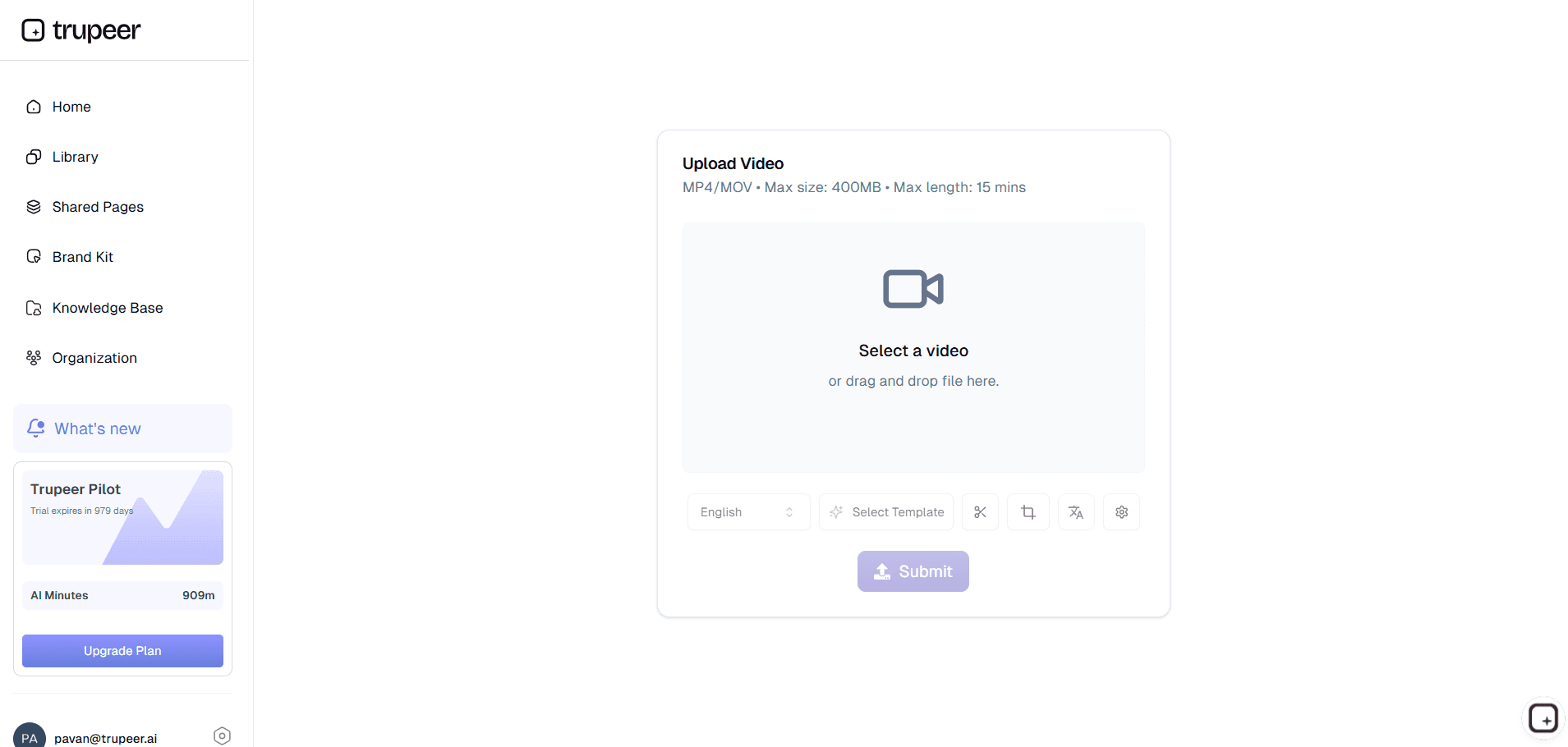
Schritt 1: Laden Sie Ihr Video hoch
Laden Sie ein vorhandenes Video hoch oder zeichnen Sie einfach Ihren Bildschirm auf, um loszulegen.
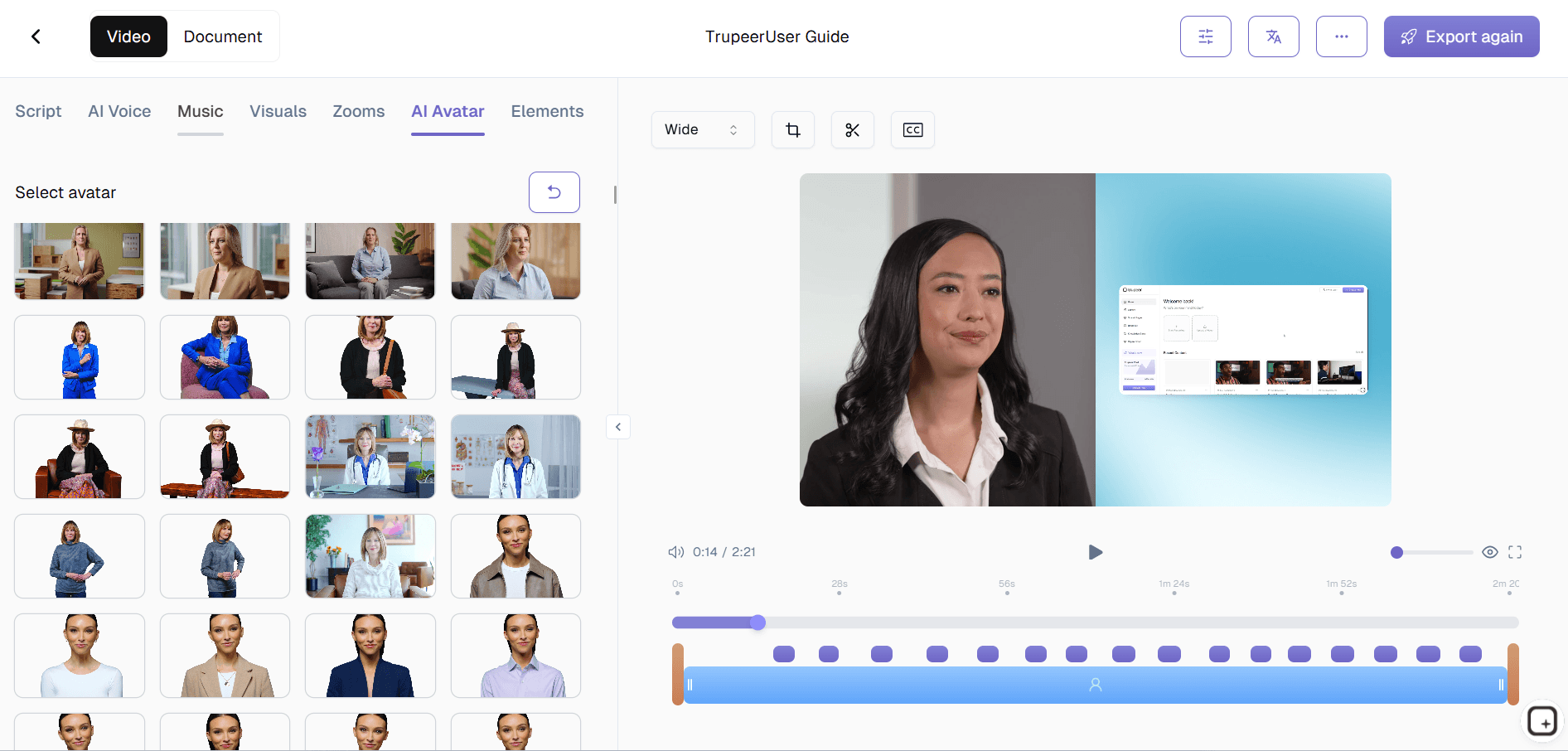
Schritt 2: KI animiert
Der KI-Sprecher erzeugt Sprache, Gesichtsanimation und Lip-Sync.
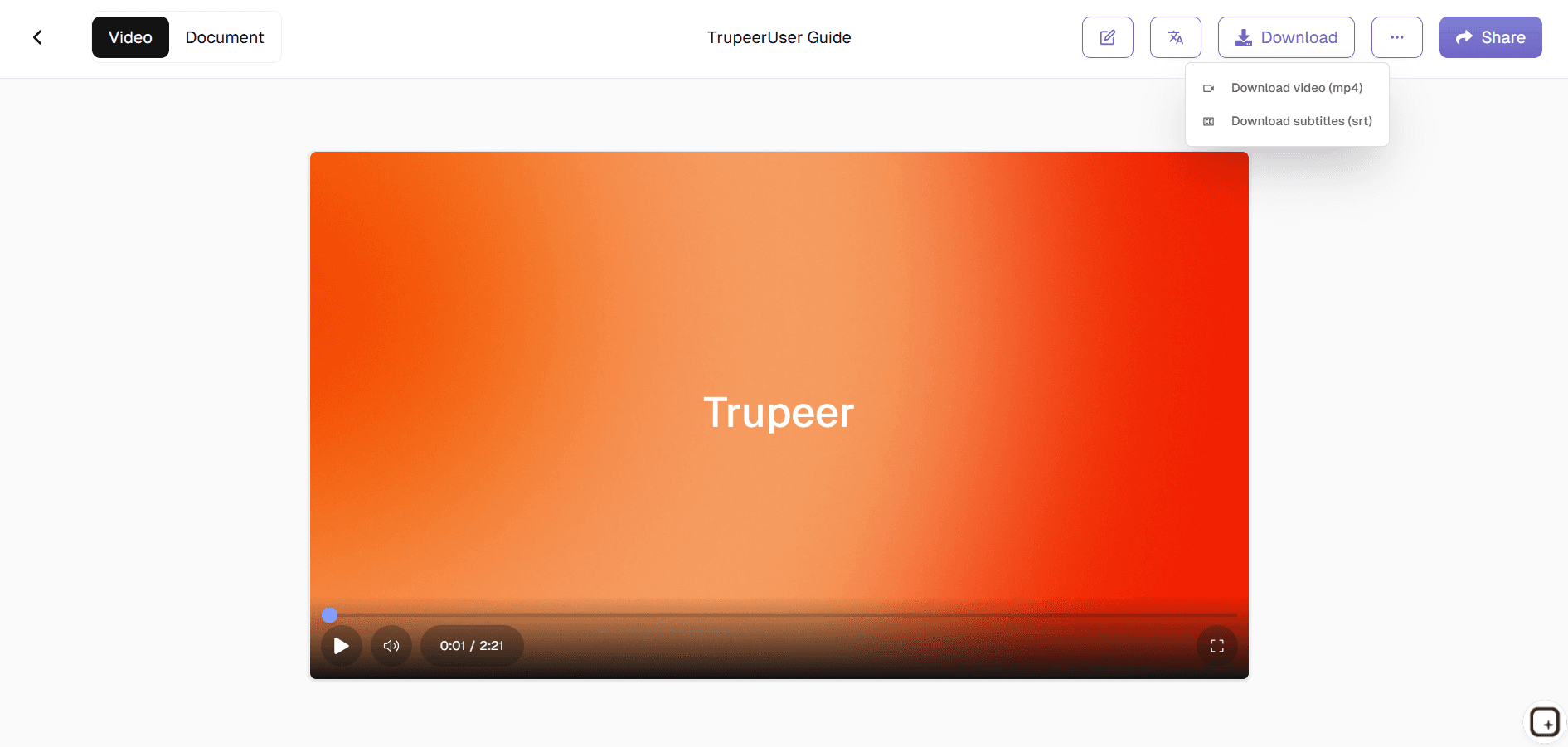
Schritt 3: Anpassen & exportieren
Fügen Sie Ihr Branding hinzu und laden Sie dann Ihr Text-zu-Sprache-Video herunter.
Wer nutzt Trupeers kostenlosen Text-zu-Sprache-Avatar?
Gründer von Startups & Produktteams:
Erstellen Sie Produkt-Erklärungen, Onboarding-Videos, Launch-Updates, Funktions-Rundgänge und kundennahe Kommunikation, ohne Inhalte jedes Mal neu aufzunehmen, wenn sich die Botschaft ändert oder Produktabläufe weiterentwickeln.
Marketing-Teams:
Verwandeln Sie Kampagnenskripte, Produktbotschaften und Ankündigungen in Speech-Avatar-Videos für Websites, Social Content, bezahlte Kampagnen und Kundenaufklärung, ohne auf Drehpläne warten zu müssen.
Customer-Success- und Training-Teams:
Erstellen Sie Onboarding-Erklärungen, Schulungsvideos, interne Rundgänge und Enablement-Inhalte, die geführt und wiederholbar wirken, ohne immer wieder dieselbe Live-Session durchzuführen.
Globale Teams:
Erstellen Sie mehrsprachige Text-zu-Sprache-Avatar-Videos für verteilte Mitarbeitende, Kunden und Interessenten, ohne für jede Sprachanforderung separate Sprecher aufzunehmen.
Creator & Pädagogen:
Veröffentlichen Sie Erklärungen, Rundgänge und Bildungsinhalte, ohne neu aufnehmen zu müssen, nur weil sich ein Satz geändert hat oder das Skript nach einer Überprüfung weiterentwickelt wurde.
Was Sie mit Trupeers kostenlosem Text-zu-Sprache-Avatar erstellen können
Skript-zu-Sprache-Avatar-Videos:
Verwandeln Sie schriftliche Skripte in Avatar-Videos mit synchronisiertem KI-Voiceover für Onboarding, Erklärungen, Tutorials, Produktkommunikation und Kundenaufklärung.
Natürliche KI-Sprachnarration:
Erzeugen Sie Sprache, die sich in Schulungsvideos, Onboarding, interner Kommunikation und Marketinginhalten natürlich und konsistent anfühlt.
Avatar-Videos für Produkt-, Schulungs- und Marketing-Workflows:
Erstellen Sie Onboarding-Videos, Produktdemos, interne Updates, Bildungsrundgänge und Launch-Erklärungen, ohne sich auf manuelle Aufnahmen verlassen zu müssen.
Lokalisierte Videoinhalte:
Passen Sie Speech-Avatar-Videos an verschiedene Sprachen und Zielgruppen an, ohne jeden neuen Markt als separaten Produktionsprozess zu behandeln.
Wiederverwendbare Video-Workflows:
Aktualisieren Sie Skripte und generieren Sie Videos neu, wenn sich Botschaften ändern, statt ganze Videos neu aufzunehmen, nur weil sich eine Erklärung veraltet anfühlt.
Ähnliche Tools entdecken
Vorteile der Nutzung von Trupeers kostenlosem Text-zu-Sprache-Avatar-Tool
Natürliche KI-Voiceovers
Wandeln Sie Text in flüssige, menschlich klingende Sprache mit präzisem Tonfall und korrekter Aussprache um.
Lebensechte Avatar-Präsentation
KI fügt präzise Lippensynchronisation, Gesichtsausdrücke und Gesten für ein realistisches Aussehen des Sprechers hinzu.
Schneller Export und Freigabe
Laden Sie das Video sofort herunter oder teilen Sie es auf Ihrer Website, in Präsentationen oder in sozialen Medien.
So erstellen Sie mit Trupeer einen kostenlosen Text-to-Speech-Avatar
Schritt 1
Lade dein Video hoch und die KI erstellt ein bearbeitbares Skript.
Schritt 2
Bearbeiten Sie das Skript und wählen Sie Ihren Avatar aus.
Schritt 3
Erstellen, in der Vorschau anzeigen und Ihr Video sofort exportieren
Häufig gestellte Fragen
Ist dieser kostenlose Text-zu-Sprache-Avatar kostenlos?
Ja, Sie können kostenlos und ohne Vorabkosten ein Text-to-Speech-KI-Avatar-Video generieren und herunterladen.
Welche Eingaben unterstützt „Create a Free Text to Speech Avatar“?
Ein klares Porträtbild plus Ihr Skripttext, den der Voice Maker in Sprache umwandelt.
Kann ich für den Free Text to Speech Avatar unterschiedliche Stimmen auswählen?
Ja, für Ihren KI-Lautsprecher stehen mehrere Text-zu-Sprache-Stimmen, Akzente und Sprachen zur Verfügung.
Kann ich denselben Avatar mit neuen Skripten im Free Text to Speech Avatar wiederverwenden?
Sie können dasselbe Avatarbild beibehalten und Videos neu generieren, indem Sie nur das Wort-zu-Stimme-Skript ändern.
Wo kann ich kostenlose Text-to-Speech-Avatar-Videos verwenden?
Avatar-Videos können in Social-Media-Posts, Schulungsmodulen, Produkt-Erklärvideos, Präsentationen und Kundensupport-Abläufen verwendet werden.
Weitere Tools



