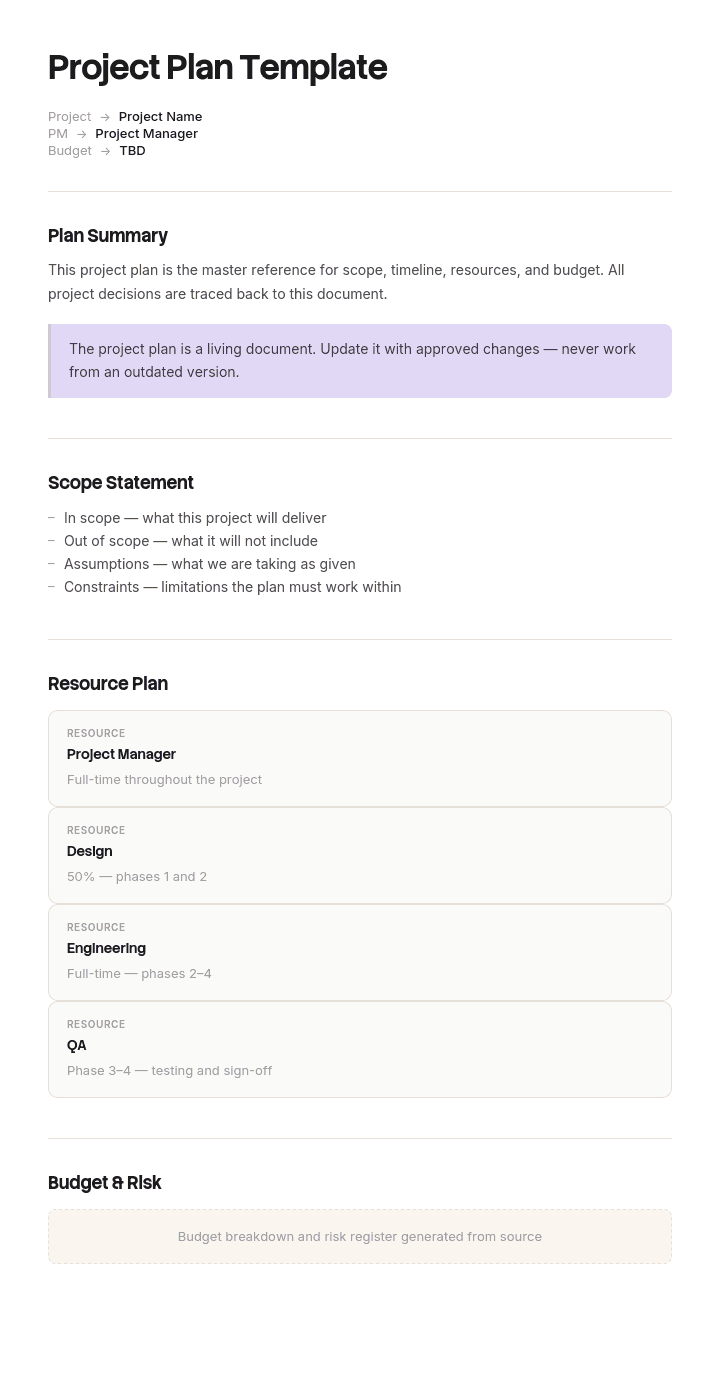
Verwenden Sie diese Vorlage
Ein Projektplan ist das zentrale Dokument, das eine Idee in die Realität umsetzt – er hält alles fest, von Umfang und Zeitplan bis hin zu Budget und Risiko. Mit Trupeer können Sie Stunden bei der Planung sparen, indem Sie mit einer kostenlosen Projektplan-Vorlage starten, sie mit Ihrer Brand Identity anpassen und den Plan in eine Video-Durchführung verwandeln, die Stakeholder schnell aufeinander ausrichtet.
Was ist eine Projektplan-Vorlage – und was nicht?
Ein Projektplan legt fest, was geliefert wird, in welcher Reihenfolge, von wem, bis wann und worauf es angewiesen ist. Er wird einmal zu Beginn erstellt, abgestimmt und dann als Grundlage genutzt, mit der die Realität verglichen wird.
Ein Tracker zeigt, wo die Dinge aktuell stehen. Er ändert sich jede Woche, spiegelt die neueste Position wider und seine Aufgabe ist es, den Status darzustellen – nicht die Absicht zu dokumentieren.
Wenn Sie nach einer Projektplan-Vorlage suchen, finden Sie in den meisten Fällen einen Tracker. Das ist keine Kritik an den Vorlagen, sondern ein Spiegel dessen, was Menschen tatsächlich brauchen: Der Großteil der zugehörigen Suchanfragen zu diesem Begriff nennt Excel, Google Sheets oder explizit einen Tracker.
Das Problem ist, dass beides zu einer einzigen Tabelle zusammengeführt wird – und diese Kombination zerstört genau das, wofür ein Plan da ist. Sobald Sie ein Datum direkt bearbeiten, ist das ursprüngliche Commitment weg, und die Frage „Sind wir im Verzug?“ lässt sich nicht mehr beantworten.
Die meisten Menschen, die nach einem Plan suchen, brauchen einen Tracker
Es lohnt sich, das klar auszusprechen, denn davon hängt ab, was Sie bauen sollten.
Wenn Ihre Frage lautet, was passieren muss, in welcher Reihenfolge, und worauf was angewiesen ist, brauchen Sie einen Plan. Er wird einmal erstellt, dann diskutiert und abgestimmt, und er beinhaltet Reihenfolge und Abhängigkeiten. Unsere IT-Projektplan-Vorlage deckt das Erstellen eines Plans unter den externen Rahmenbedingungen ab, die die meisten Vorlagen ignorieren.
Wenn Ihre Frage lautet, wie der Status für jedes einzelne Element ist und was im Verzug ist, brauchen Sie einen Tracker. Er wird wöchentlich gepflegt und sollte deutlich kürzer sein als der Plan.
Die meisten Teams brauchen beides, und die meisten Teams erstellen eine einzige Tabelle und nennen sie „den Plan“. Diese Tabelle enthält Aufgaben, Verantwortliche, Startdatum, Enddatum und den Fertigstellungsgrad – und sie wird fortlaufend bearbeitet. Das ist ein Tracker ohne Gedächtnis.
Der Rest dieser Seite geht darum, die beiden innerhalb einer Datei getrennt zu halten – die praktische Antwort für fast alle.
So passen Sie diese Vorlage in Trupeer an
Schritt 1: Öffnen Sie den Bereich „Vorlagen“
Gehen Sie im Hauptmenü zum Bereich „Vorlagen“.

Schritt 2: Wählen und öffnen Sie eine Vorlage
Klicken Sie auf eine beliebige Vorlage, mit der Sie arbeiten möchten, um sie zu öffnen.

Schritt 3: Ansicht der Vorlage erweitern
Falls nötig, erweitern Sie die Vorlagenansicht, um das vollständige Layout und die Details klar zu sehen.

Schritt 4: Vorlage bearbeiten
Klicken Sie auf „Bearbeiten“, um mit der Änderung der ausgewählten Vorlage zu beginnen.

Im Editor können Sie:
Neue Abschnitte hinzufügen
Formatierungsregeln definieren oder aktualisieren
Ein Logo hinzufügen und Position sowie zugehörige Einstellungen anpassen
Schritt 5: Speichern Sie Ihre angepasste Vorlage
Nachdem Sie alle notwendigen Änderungen vorgenommen haben, klicken Sie auf „Speichern“, um die aktualisierte Vorlage als Ihre eigene zu speichern.

Schritt 6: Vorschau ansehen und Vorlage feinjustieren
Wenn Sie sehen möchten, wie Ihre angepasste Vorlage aussieht, öffnen Sie die Vorschau.

Ausgehend vom Vorschau-Bildschirm können Sie bei Bedarf weiterhin direkt Anpassungen vornehmen – so stellen Sie sicher, dass die Vorlage genau so erscheint, wie Sie es möchten.
Mit einer Projektplan-Vorlage können Sie:
Stunden bei der Planung sparen: Überspringen Sie die leere Seite mit einer umfassenden Projektplan-Struktur.
Jeden Aspekt abdecken: Integrierte Abschnitte für Umfang, Zeitplan, Budget, Risiko und Kommunikation.
Markenkonform bleiben: Nutzen Sie Ihr Logo, Ihre Schriftarten und Farben mit Trupeer’s Brand Kit.
Stakeholder ausrichten: Verdichten Sie komplexe Pläne in Video-Zusammenfassungen, die alle in 5 Minuten ansehen können.
Projekte standardisieren: Verwenden Sie für jede Initiative dieselbe Planvorlage.
Globale Teams erreichen: Übersetzen Sie Projektpläne mit einem Klick in 65+ Sprachen.
Ein Projektplan ohne Baseline ist ein Tracker
Hier ist das gesamte Argument in einem Satz: Wenn die Daten in Ihrem Plan dieselben Zellen sind, die Sie jede Woche aktualisieren, dann haben Sie keinen Plan.
Eine Baseline ist die vereinbarte Menge an Daten, eingefroren. Sie wird nie bearbeitet. Wenn sich ein Datum verschiebt, ändert sich die Prognose – aber die Baseline nicht.
Diese eine Disziplin gibt Ihnen drei Dinge, die Sie sonst nicht haben können.
Ob Sie im Verzug sind – und um wie viel. Kein Gefühl, keine Zahl „pro Aufgabe“ und insgesamt.
Wo die Verzögerung ihren Ursprung hatte. Die meiste Verzögerung in einem Projekt lässt sich auf eine kleine Anzahl von Ursachen zurückführen – und alles, was danach kommt, erbt sie. Ohne Baseline sehen Sie nur, dass viele Aufgaben verschoben wurden, nicht aber, dass davon vierzig deshalb verschoben wurden, weil eine einzige Entscheidung neun Wochen gedauert hat.
Ob Ihre Schätzungen überhaupt gut sind. Eine Baseline, verglichen mit den Ist-Werten über mehrere Projekte hinweg, ist die einzige Feedback-Schleife, die eine Organisation darüber hat, ob sie realistisch plant. Teams, die direkt in der Tabelle bearbeiten, erfahren das nie.
Übrigens: Eine Neufestlegung der Baseline ist legitim, aber es sollte eine Entscheidung mit Datum und Grund sein – statt eine Nebenwirkung des Aktualisierens einer Tabelle. Bewahren Sie außerdem die ursprüngliche Baseline auf.
So halten Sie Baseline und Prognose getrennt
Zwei Sätze von Datums-Spalten in derselben Zeile – und eine Regel.
Spalte | Was sie enthält | Wer sie bearbeitet | Wann |
|---|---|---|---|
Baseline Start | Vereinbartes Startdatum | Niemand, nach der Freigabe | Einmal festlegen bei der Baseline |
Baseline Ende | Vereinbartes Enddatum | Niemand, nach der Freigabe | Einmal festlegen bei der Baseline |
Prognose Start | Aktuell erwarteter Start | Aufgabenverantwortliche:r | Wöchentlich |
Prognose Ende | Aktuell erwartetes Ende | Aufgabenverantwortliche:r | Wöchentlich |
Ist Start | Wann es tatsächlich begonnen hat | Aufgabenverantwortliche:r | Beim Start |
Ist Abschluss | Wann es tatsächlich fertiggestellt wurde | Aufgabenverantwortliche:r | Beim Abschluss |
Varianz | Prognose Ende minus Baseline Ende, in Tagen | Berechnet | Automatisch |
Ursache | Warum es sich verschoben hat, in wenigen Worten | Aufgabenverantwortliche:r | Wenn die Varianz zum ersten Mal auftritt |
Die Spalte „Ursache“ ist die, die Menschen weglassen – und die, die einen Varianzbericht in etwas umsetzbares verwandelt. Ohne sie wissen Sie, dass vierzig Aufgaben verschoben wurden. Mit ihr wissen Sie, dass dreißig davon sich wegen derselben vorgelagerten Entscheidung verschoben haben – und das ist ein völlig anderes Gespräch.
Schützen Sie die Baseline-Spalten, sodass sie nicht aus Versehen bearbeitet werden können. In einer Tabelle bedeutet das: sperren. In Projektsoftware bedeutet es meist: eine explizite Baseline-Funktion, von der die Leute nicht wissen, dass es sie gibt.
Warum der Tracker weniger Zeilen braucht als der Plan
Der zweite Ausfall ist das Volumen – und genau das führt dazu, dass der Tracker aufgegeben wird, statt dass er einfach nur falsch wäre.
Ein Plan enthält vernünftigerweise jede Aufgabe. Ein Tracker braucht nur die Zeilen, bei denen die Verzögerung relevant ist – das heißt den kritischen Pfad und jede Abhängigkeit von jemandem außerhalb des Projekts.
Drei hundert Zeilen, die wöchentlich von einer Person aktualisiert werden, dauern neunzig Minuten und hören etwa im vierten Monat auf. Vierzig Zeilen dauern zwanzig Minuten und bleiben bestehen.
Die Aufgaben, die vom Tracker verschwinden, sind nicht ungemanagt. Sie werden von der Person verwaltet, die für diesen Arbeitspaket-Stream zuständig ist – in ihrer eigenen Liste. Im Tracker tauchen sie nur dann auf, wenn sie etwas Gefährdendes auf dem Tracker bedrohen.
Der Test, ob eine Zeile in den Tracker gehört: Wenn sie um zwei Wochen rutscht – bewegt sich dann das Enddatum des Projekts, oder muss jemand außerhalb des Projekts informiert werden? Wenn beides nicht zutrifft, gehört sie in den Plan und nicht in das wöchentliche Update.
Kostenlose Projektplan-Vorlage: die Spalten zum Kopieren
Kopieren Sie von hier. Eine Tabelle für Plan und Tracker zusammen – plus eine zweite Tabelle für die narrative Beschreibung.
Tabelle eins, Aufgaben. Task-ID. Aufgabename, Verb zuerst. Arbeitspaket. Verantwortliche:r, eine namentliche Person. Vorgänger-Aufgaben-IDs. Baseline Start. Baseline Ende. Prognose Start. Prognose Ende. Ist Start. Ist Abschluss. Varianz in Tagen, berechnet. Ursache der Varianz. Status: nicht begonnen, in Bearbeitung, abgeschlossen, blockiert. Im Tracker: ja oder nein. Notizen.
Tabelle zwei, Plan-Narrativ. Ziel und Erfolgskriterien, mit Bezug auf die Projekt-brief-Vorlage. Umfang rein und raus. Annahmen, jeweils nummeriert, damit eine Varianz-Ursache darauf verweisen kann. Externe Abhängigkeiten, mit der Partei und dem Datum, das mit ihnen vereinbart wurde. Ressourcen. Wichtige Risiken mit Auslösern statt mit Scores. Baseline-Datum und wer es genehmigt hat.
Tabelle drei, Varianz-Log. Wird aus der Spalte „Ursache“ befüllt: eine Zeile pro Hauptursache, mit wie vielen Aufgaben sie betroffen hat und wie vielen Tagen sie hinzugefügt hat. Das ist die Tabelle, die in einem Steering-Meeting gelesen wird.
Kopieren Sie bis hierher. Das Varianz-Log ist der Ort, an dem der Wert konzentriert ist – und es kostet nichts, weil es aus Daten abgeleitet wird, die Sie bereits erfassen.
Das ERP-Projekt, das nicht sagen konnte, ob es im Verzug war
Netherfield Foods, ein Lebensmittelhersteller, hat ein neues Enterprise-System eingeführt. Der Plan war eine Tabelle mit dreihundertvierzig Zeilen: Aufgabe, Verantwortliche:r, Start, Ende und Fertigstellungsgrad. Er wurde wöchentlich aktualisiert – direkt in der Tabelle.
Nach vierzehn Monaten stellte der Sponsor eine naheliegende Frage. Sind wir im Verzug – und wenn ja, um wie viel?
Das konnte niemand beantworten. Die Tabelle zeigte die aktuelle Prognose, die Go-live etwa fünf Monate über dem ursprünglichen Zeitpunkt lag. Allerdings waren die ursprünglichen Daten rund sechzig Mal überschrieben worden, und es gab keine Aufzeichnung davon in der Datei.
Sie rekonstruierten die Baseline aus einem PDF des Plans, das im ersten Monat per E-Mail verschickt worden war und sich noch im Posteingang des Sponsors befand. Das dauerte drei Tage.
Die Rekonstruktion war nützlicher als irgendjemand erwartet hatte. Der ursprüngliche Plan hatte elf Monate vorgesehen, und die Prognose lag nun bei sechzehn. Von den dreihundertvierzig Aufgaben waren einundsechzig um mehr als vier Wochen verschoben. Vierundvierzig dieser einundsechzig lagen downstream von nur drei Verzögerungen: einer Abhängigkeit bei der Datenmigration, einer Integration mit einem Drittanbieter und einer Entscheidung zur Kontenübersicht (Chart of Accounts), die neun Wochen dauerte.
Drei Hauptursachen machten ungefähr zweiundsiebzig Prozent der Bewegung aus – und davon war nichts sichtbar, weil jedes Datum direkt bearbeitet worden war und die Tabelle immer nur die Gegenwart zeigte.
Es gab ein zweites Problem mit derselben Ursache. Dreihundertvierzig Zeilen bedeuteten, dass das wöchentliche Update etwa neunzig Minuten dauerte und von einer Person erledigt wurde. Bis zum neunten Monat wurde es zweiwöchentlich gemacht, und der Fertigstellungsgrad in etwa hundertneunzig Zeilen hatte sich seit drei Monaten nicht verändert.
Die fünf Monate Verzögerung kosteten ungefähr vierhundertachtzigtausend Pfund in externen Auftragnehmern und internen Ressourcen. Die vermeidbarere Kostenposition war die Entscheidung zur Kontenübersicht, die sechs Wochen lang nicht eskaliert wurde, während sie zweiundzwanzig nachgelagerte Aufgaben blockierte – denn im Tracker wurde nichts als blockierend angezeigt.
Die nächste Phase änderte zwei Dinge. Baseline-Daten wurden in eigenen Spalten eingefroren und gesperrt. Prognose-Daten lagen daneben mit einer berechneten Varianz und einer Spalte „Ursache“. Und der Tracker wurde von dreihundertvierzig Zeilen auf siebenundvierzig gekürzt: der kritische Pfad plus jede externe Abhängigkeit. Die verbleibenden Aufgaben blieben im Plan und wurden von den Leads der Arbeitspaket-Streams gemanagt.
Das wöchentliche Update ging von neunzig Minuten auf etwa zwanzig zurück. Die Phase war auf sieben Monate geplant und wurde in sieben Monaten und drei Wochen geliefert. Beide Verzögerungen, die auftraten, wurden innerhalb einer Woche markiert, weil eine zweiwöchige Varianz in einer Zeile des kritischen Pfads automatisch auffiel – statt eine einzige geänderte Zelle unter dreihundert zu sein.
Die wichtigsten Elemente, die jeder Projektplan braucht
Ziel und Erfolgskriterien. Wofür das Projekt da ist – und woran Sie erkennen, dass es funktioniert hat. Aus dem Brief übernommen, statt hier erfunden.
Umfang rein und raus. Die „raus“-Liste verhindert Streitigkeiten.
Aufgaben mit Verantwortlichen. Benannte Einzelpersonen, nicht Teams.
Reihenfolge und Abhängigkeiten. Welche Aufgaben von welchen abhängen – denn nur so bekommt ein Datum überhaupt Bedeutung.
Externe Abhängigkeiten. Alles, was von einer Partei außerhalb des Projekts abhängt – mit einem Datum, das diese Partei vereinbart hat, statt mit einem Datum, das Sie angenommen haben.
Baseline-Daten. Vereinbart, eingefroren und von jemandem genehmigt.
Annahmen, nummeriert. Damit, wenn etwas rutscht, die Ursache auf die Annahme zeigen kann, die nicht funktioniert hat.
Ressourcen. Wer verfügbar ist, wie viel Zeit dafür eingeplant ist und was diese Person stattdessen nicht tut.
Risiken mit Auslösern. Eine beobachtbare Bedingung und eine Aktion – statt einer Wahrscheinlichkeit als Score.
Die beiden häufigsten Dinge, die fehlen, sind nummerierte Annahmen und externe Abhängigkeiten mit vereinbarten Daten mit der anderen Partei. Beides ist in der Planungsphase günstig – und beides ist das, was eine Varianz-Analyse sechs Monate später braucht.
So planen Sie ein Projekt von Anfang bis Ende
Starten Sie beim Brief – nicht bei einer Aufgabenliste. Wenn Sie das Problem und die Erfolgskriterien nicht benennen können, wird der Plan zu einer Liste von Aktivitäten.
Listen Sie die Deliverables auf, bevor Sie die Aufgaben auflisten. Aufgaben, die aus Deliverables abgeleitet werden, sind vollständig; Aufgaben, die direkt brainstormed werden, lassen häufig ganze Bereiche aus.
Bringen Sie sie in Reihenfolge und finden Sie die Abhängigkeiten – insbesondere die zu anderen Teams und Lieferanten. Unsere Vorlage für den Procurement-Management-Plan deckt die Beschaffungs-Leitzeiten ab, die häufig unbemerkt auf dem kritischen Pfad liegen.
Schätzen Sie mit den Personen, die die Arbeit tatsächlich ausführen, und halten Sie die Schätzung als Spanne fest, wenn sie wirklich unsicher ist.
Leggen Sie sie jetzt als Baseline fest. Lassen Sie jemanden zustimmen, erfassen Sie das Datum und sperren Sie die Spalten.
Entscheiden Sie, welche Zeilen in den wöchentlichen Tracker kommen – anhand des Zwei-Wochen-Tests oben.
Legen Sie dann den Rhythmus fest: wöchentliche Prognose-Updates durch die Aufgabenverantwortlichen, monatliche Varianz-Reviews mit den Ursachen und eine Neufestlegung der Baseline nur als explizite Entscheidung.
Projektplan-Varianten: Gantt, Dokument und Agile
Gantt-Chart-Plan. Die gleichen Aufgabendaten als Balken entlang einer Zeitleiste. Hervorragend, um Abhängigkeiten und Puffer zu sehen – und es ist eine Ansicht, kein anderes Dokument. Bauen Sie zuerst die Tabelle und generieren Sie daraus den Chart.
Plan-Dokument. Die narrative Version: Ziele, Umfang, Vorgehen, Annahmen, Risiken und Ressourcen – mit angehängtem Zeitplan statt eingebettet. Das ist das, was genehmigt wird, und unsere Vorlage für die Projektübersicht deckt die kürzere Version ab, die Sie Personen außerhalb des Projekts zeigen.
Agiler Plan. Sprints oder Inkremente statt eines Zeitplans auf Aufgabenebene, mit Umfang als variablem Element und fixierten Daten. Eine Baseline gilt weiterhin, wird aber gegen Ergebnisse und Release-Daten festgelegt – statt gegen Aufgaben.
Einfacher oder One-Page-Plan. Nur Meilensteine, Verantwortliche und Daten. Für kleine Projekte wirklich ausreichend und deutlich besser als eine ungepflegte Tabelle mit dreihundert Zeilen.
Programmplan. Mehrere Projekte mit Querverbindungen. Die Baseline-Disziplin ist hier sogar noch wichtiger, nicht weniger, weil die interessante Varianz immer an den Schnittstellen entsteht.
Projektplan, Brief oder Übersicht: Was brauchen Sie?
Drei Dokumente, die oft verwechselt werden, weil alle drei den Sponsoren gezeigt werden.
Der Brief beschreibt das Problem und ermächtigt zur Arbeit. Wird zuerst erstellt, eingefroren und vom Plan abgelöst. Unsere Projekt-brief-Vorlage deckt das ab.
Der Plan beschreibt, wie die Arbeit geliefert wird. Baseline-festgelegt und dann dagegen getrackt – das ist diese Seite.
Die Übersicht fasst die aktuelle Lage für Personen außerhalb des Projekts zusammen, und sie wird monatlich neu geschrieben. Unsere Vorlage für die Projektübersicht deckt das ab, einschließlich warum eine Statusfarbe für Leser nichts aussagt.
Wenn Sie Gate-Bedingungen statt eines Zeitplans brauchen, deckt unsere Vorlage für die Projekt-Checkliste ab, wann jedes Element tatsächlich umsetzbar ist – und für was das Projekt überleben soll, deckt unsere Vorlage für die Projektdokumentation die Menge an Inhalten ab, die es wert ist, beizubehalten.
Kann ich eine Projektplan-Vorlage in Excel oder Google Sheets bekommen?
Excel oder Google Sheets – und für die meisten Projekte ist das die richtige Antwort, nicht ein Kompromiss. Das Aufgabenblatt ist eine Tabelle mit berechneten Spalten und es braucht Formeln.
Drei Dinge müssen Sie einmal einrichten. Sperren Sie die Baseline-Spalten, sodass sie nicht bearbeitet werden können. Fügen Sie eine Varianzformel und eine bedingte Formatierung hinzu, die alles jenseits eines Schwellenwerts markiert – zwei Wochen sind als Standard eine sinnvolle Wahl. Und fügen Sie einen Filter in der Spalte „Im Tracker“ hinzu, sodass die wöchentliche Update-Ansicht vierzig Zeilen statt dreihundert umfasst.
Google Sheets hat einen Vorteil, den man erwähnen sollte: Die Versionshistorie ist automatisch – das bedeutet, dass selbst ein Team, das direkt in der Tabelle bearbeitet, eine Baseline wiederherstellen kann. Das ist kein guter Ersatz für das Sperren der Spalten, aber es hat Projekte gerettet.
Word oder Google Docs für das Plan-Narrativ: Prosa, die genehmigt wird.
PowerPoint für den Plan, den Sie präsentieren – der aus Meilensteinen und Abhängigkeiten bestehen sollte, nicht aus der Aufgabenliste.
PDF für die Baseline-Version bei der Freigabe, datiert. Genau auf dieser einen Datei basiert die Rekonstruktion im obigen Beispiel.
Wann sollten Sie aufhören, eine Tabelle zu verwenden, und stattdessen Software nutzen?
Eine Tabelle hört an einem ziemlich vorhersehbaren Punkt auf, das richtige Werkzeug zu sein – und sie ist später als Softwareanbieter es vorschlagen.
Drei Bedingungen zusammen sind das Signal: mehr als ungefähr hundert getrackte Aufgaben, mehr als vier oder fünf Personen, die dieselbe Datei aktualisieren, und Abhängigkeiten, die sich oft genug ändern, dass das Neuberechnen der Reihenfolge per Hand fehleranfällig ist.
Darunter schlägt eine gut eingerichtete Tabelle mit gesperrten Baselines Projektsoftware, in die niemand einloggt.
Darüber sind die konkreten Dinge, die Software Ihnen bietet, automatisch: Abhängigkeits-Neuberechnung, eine echte Baseline-Funktion, Ressourcen-Glättung über Projekte hinweg und eine Audit-Trail. Das, was sie konkret wegnimmt, ist: Personen außerhalb des Projekts können sie nicht mehr öffnen – deshalb pflegen viele Organisationen am Ende beides und sollten das nicht tun.
Wenn Sie dennoch wechseln: exportieren Sie bei jeder Neufestlegung der Baseline eine baselined Kopie in eine Tabelle, denn die Fähigkeit, den Plan in fünf Jahren zu lesen, sollte nicht von einer Lizenz abhängen.
So halten Sie den Plan mit dem verbunden, was das Team tatsächlich tut
Ein Plan beschreibt Aufgaben. Ob diese Aufgaben so umgesetzt werden, wie der Plan es angenommen hat, ist im Zeitplan unsichtbar – und die Lücke zeigt sich meist als eine Aufgabe, die einen Monat lang bei achtzig Prozent Fertigstellung stehen bleibt.
Der häufigste Grund ist, dass sich herausstellt, dass eine Aufgabe Arbeit beinhaltet, die niemand beschrieben hatte, und die Person, die sie ausführt, erfindet jetzt einen Prozess – während sie gleichzeitig gegen ein Datum getrackt wird.
Trupeer AI hilft genau an dieser Stelle. Wer die Arbeit ausführt, dokumentiert den Prozess einmal, und das Ergebnis ist ein schriftlicher Leitfaden mit den Schritten und Screens, die erfasst wurden. Das bedeutet: Beim nächsten Mal geht es schneller, und die Schätzung dafür ist real. Außerdem erhalten Sie etwas Konkretes, das Sie an eine Varianz-Ursache anhängen können: Das dauerte dreimal so lange, weil der Schritt vier Systeme betraf statt nur eines.
Dokumentieren Sie es. Geben Sie es in Ihrer Marke wieder. Übersetzen Sie es. Trupeer it.
Diese Aufzeichnungen werden später zur Übergabe- und Trainingsmaterialbasis, sodass der Aufwand nicht nur für das reine Reporting entsteht. Das Material lebt in Ihrer Knowledge Base mit konsistenter Markenführung. Und wenn das Projekt am Ende etwas übergibt, deckt unsere Vorlage für die Projektübergabe ab, was das empfangende Team tatsächlich braucht. Setup-Anleitungen finden Sie im Dokumentvorlagen-Setup-Guide.
Häufig gestellte Fragen
Gibt es eine kostenlose Projektplan-Vorlage in Excel?
Excel ist für die meisten Projekte das richtige Format, und das Spaltenset oben wird in eine einzige Tabelle übernommen. Es gibt keinen „Gated Download“ und kein Formular. Die zwei Änderungen, die sich lohnen, egal welche Vorlage Sie bereits nutzen, sind: das Sperren einer Reihe von Baseline-Datums-Spalten und das Hinzufügen einer Ursache-Spalte neben der Varianz.
Gibt es eine kostenlose Projektplan-Vorlage in Word?
Word eignet sich für das Plan-Narrativ: Ziele, Umfang, Annahmen, Abhängigkeiten, Risiken und Ressourcen. Halten Sie den Zeitplan in einer Tabelle und referenzieren Sie ihn, denn eine Aufgaben-Tabelle in Word kann keine Varianz berechnen und wird nach etwa dreißig Zeilen schnell unhandlich.
Gibt es eine kostenlose Projektplan-Vorlage in Google Sheets?
Ja, und Google Sheets hat hier einen echten Vorteil gegenüber Excel: die automatische Versionshistorie. Das bedeutet, dass eine Baseline auch dann wiederhergestellt werden kann, wenn jemand direkt in der Tabelle bearbeitet hat. Nutzen Sie das als Sicherheitsnetz statt als Mechanismus – und sperren Sie die Baseline-Spalten ohnehin.
Gibt es eine kostenlose Projektplan-Vorlage in PowerPoint?
Verwenden Sie Folien für den Plan, den Sie präsentieren – nicht für den Plan, den Sie ausführen. Meilensteine, externe Abhängigkeiten und der kritische Pfad. Eine dreihundert Zeilen lange Aufgabenliste zu präsentieren ist eine verlässliche Methode, um eine Stunde damit zu verbringen, über Zeile siebenundvierzig zu diskutieren.
Gibt es eine kostenlose Projektplan-Vorlage in PDF?
Exportieren Sie die baselined Version bei der Freigabe, datiert, und behalten Sie diese Datei. Im obigen Beispiel war ein per E-Mail versendetes PDF des ursprünglichen Plans der einzige überlebende Datensatz der Baseline – und es dauerte drei Tage, um daraus zu rekonstruieren.
Wo finde ich eine Projekt-Tracker-Vorlage in Excel?
Der Tracker ist dieselbe Tabelle, gefiltert auf die Zeilen, die wirklich zählen: kritischer Pfad plus externe Abhängigkeiten. Für die meisten Projekte sind das vierzig bis sechzig Zeilen statt dreihundert. Erstellen Sie zuerst den Plan und leiten Sie daraus den Tracker mit einem Filter ab – statt zwei Dateien zu pflegen, die sich innerhalb von zwei Wochen widersprechen.
Wie viele Zeilen sollte ein Projekt-Tracker haben?
Vierzig bis sechzig für ein substantielles Projekt. Der Test für jede Zeile ist, ob eine zweiwöchige Verzögerung das Enddatum des Projekts verschieben würde oder ob jemand außerhalb des Projekts informiert werden müsste. Wenn beides nicht zutrifft, gehört sie in den Plan und nicht in das wöchentliche Update – und genau das hält das Update auf zwanzig Minuten statt neunzig.
Was ist der Unterschied zwischen einem Projektplan und einem Zeitplan?
Der Zeitplan sind die Daten und die Reihenfolge. Der Plan ist der Zeitplan plus alles, was ihn sinnvoll macht: Ziele, Umfang, Annahmen, Abhängigkeiten, Ressourcen und Risiken. Ein Zeitplan ohne dokumentierte Annahmen kann nicht erklären, warum es gerutscht ist – und genau dafür gibt es die Baseline- und Ursache-Spalten, um das zu schließen.

