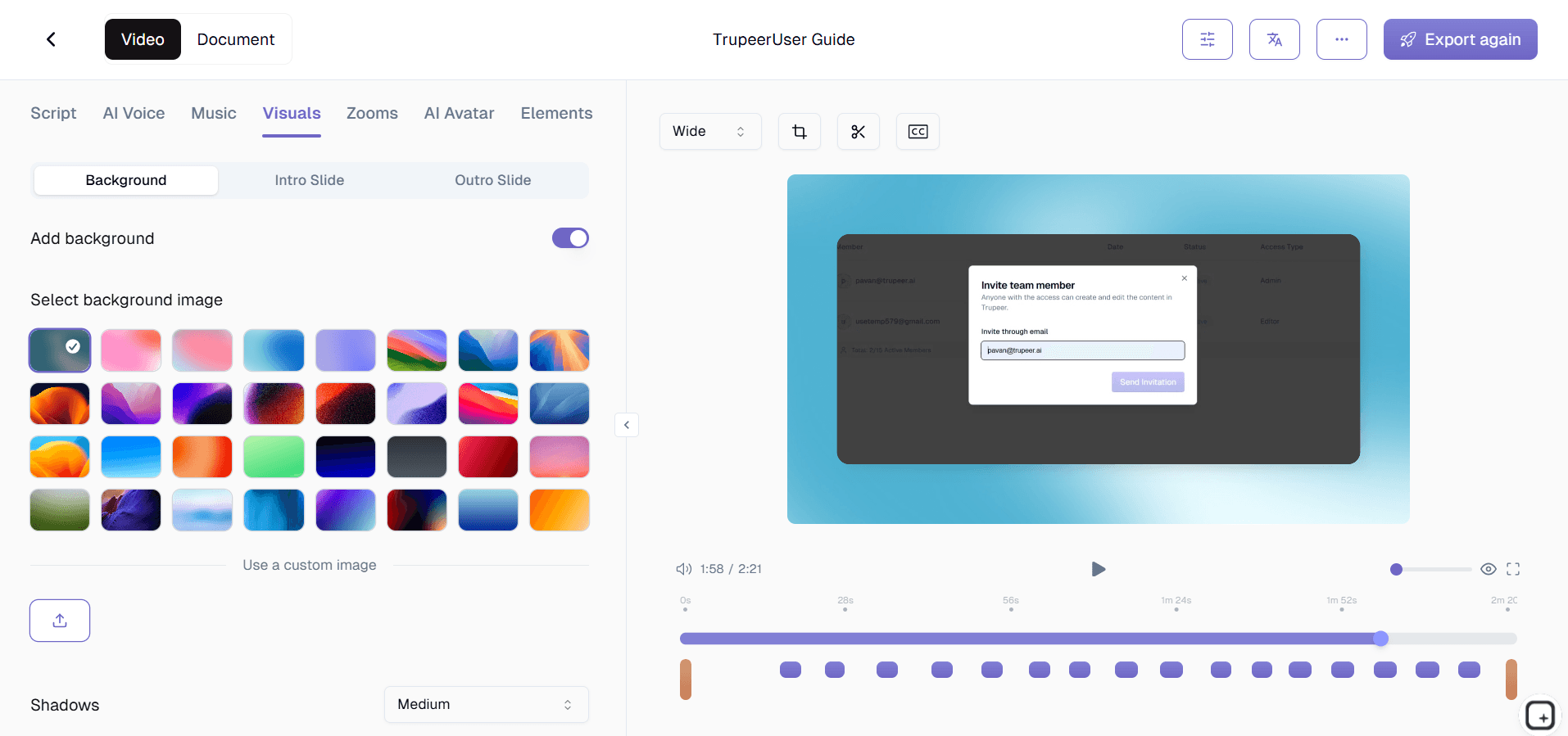
Software Tutorial Video Creator

Software Tutorial Video Creator

Software Tutorial Video Creator

Create clear software tutorial videos by recording your screen. AI turns your walkthrough into a polished step-by-step guide.

Create clear software tutorial videos by recording your screen. AI turns your walkthrough into a polished step-by-step guide.

Create clear software tutorial videos by recording your screen. AI turns your walkthrough into a polished step-by-step guide.

Create Software Tutorials

免费开始

无需信用卡

无需信用卡

Software Tutorial Video Creator TL;DR

Software Tutorial Video Creator TL;DR

Trupeer's software tutorial video creator helps you produce clear, effective software tutorials using AI-powered screen recording and automatic editing. Record any software workflow and Trupeer creates a professional tutorial video with UI-aware zoom effects, clean narration, and structured steps.

  • Record any software workflow to create a tutorial video automatically.

  • AI detects UI elements and adds smart zoom effects to buttons, menus, and fields.

  • Generate written software guides with annotated screenshots from the same recording.

  • Brand your software tutorials with consistent logos, colors, and intros.

  • Export and embed software tutorial videos anywhere users need them.

What Is Trupeer's Software Tutorial Video Creator?

Trupeer's software tutorial video creator is a specialized tool for creating tutorial videos about software products and applications. It understands software interfaces: the AI detects button clicks, menu navigation, form inputs, and page transitions in your screen recording and applies targeted zoom effects and highlights that guide users through the software step by step. The result is a tutorial video that teaches software effectively, not just replays a screen recording.

How Does Software Tutorial Video Creator Work?

Getting started with Software Tutorial Video Creator takes just a few minutes.


Step 1: Record or Upload

Start a screen recording directly in your browser, or upload an existing video.


Step 2: AI Processing

The AI analyzes your recording, removes filler words, adds zoom effects, and generates video automatically.


Step 3: Customize and Share

Edit the output, apply your brand kit, and share via link or embed on your website. Updates are just as easy.


Key Features of Trupeer's Software Tutorial Video Creator

  • UI-Aware Click Detection: Trupeer's AI specifically recognizes software interface interactions: button clicks, dropdown selections, menu navigation, form field inputs, and dialog box interactions. Each UI action triggers an intelligent zoom effect that shows users exactly where to click and what to expect.

  • Software Workflow Step Segmentation: The AI identifies natural breakpoints in your software walkthrough and creates distinct tutorial steps. Each page transition, major action, or workflow phase becomes a clearly marked segment. Users see step numbers, can navigate directly to any step, and always understand where they are in the tutorial.

  • Multi-Application Tutorial Support: Many software tutorials involve switching between multiple applications, browser tabs, or system windows. Trupeer handles multi-app workflows seamlessly, maintaining clear context as you move between tools. Each application transition is handled gracefully with appropriate zoom adjustments and context indicators so users never lose track of which software they should be looking at.

  • Screenshot-Based Written Guide Generation: Every software tutorial video automatically generates a companion written guide with annotated screenshots captured at each UI interaction point. The screenshots include visual callouts highlighting the exact buttons, fields, and menus users need to interact with.

Why Choose Trupeer's Software Tutorial Video Creator?

  • Built for Software Tutorials Specifically: Trupeer understands software interfaces. The AI detects UI elements and creates tutorials that guide users through software effectively, not just generic screen recordings.

  • Video Plus Written Documentation: Get both a software tutorial video and an annotated screenshot guide from one recording. Users choose the format that works best for them.

  • In-Product Delivery: Embed tutorials directly in your software so users learn in context. No tab switching or help center navigation required.

  • Version Management: Keep tutorials current as your software evolves. Track which tutorials need updates and publish changes quickly.

Software Tutorial Video Creator for Internal Teams

1. Create software tutorials for every internal tool your team uses. From CRM workflows to HR systems, tutorial videos help team members use internal software correctly without asking IT for help.

2. Reduce IT support tickets with self-service software tutorials. When employees can watch a tutorial showing exactly how to complete a task in your enterprise software, they stop submitting tickets for basic how-to questions.

3. Document software-specific processes that differ between departments. The sales team uses the CRM differently than the support team. Department-specific software tutorials address each team's unique workflows.

4. Keep software tutorials updated when enterprise tools get upgraded. Internal software updates break existing documentation. Re-record affected tutorials quickly so employees always have current guidance.

Software Tutorial Video Creator for SaaS Teams

1. Build a comprehensive software tutorial library that helps users master your product. Clear tutorial videos for every feature and workflow reduce churn by helping users realize the full value of your software.

2. Create software tutorials that are embedded directly in your product interface. Users access help right where they need it, increasing feature discovery and reducing the friction of learning new functionality.

3. Reduce customer support load with software tutorials that answer common questions. When users can see exactly how to accomplish a task through a video tutorial, they resolve issues independently.

4. Track software tutorial engagement to identify UX improvement opportunities. When many users watch a tutorial about a specific feature, it might indicate that the feature's interface needs simplification.

Software Tutorial Video Creator for Startups

1. Create professional software tutorials that establish product credibility. Well-produced tutorial videos signal to customers that your software is mature, supported, and designed for success.

2. Scale customer onboarding with software tutorial sequences. Instead of personal walkthroughs for every new customer, build a tutorial video library that handles onboarding at scale.

3. Let your product team create software tutorials directly. The people who build the software create the most accurate tutorials, and Trupeer handles the production quality automatically.

4. Iterate on tutorials as fast as your product changes. Startups ship rapidly, and software tutorials need to keep pace. Record, edit, and publish updated tutorials in minutes.

Software Tutorial Video Creator for Enterprises

1. Deploy standardized software tutorials across the entire organization. When thousands of employees use the same enterprise software, consistent tutorials ensure everyone learns it correctly.

2. Support enterprise software rollouts with comprehensive tutorial content. Major software deployments succeed when employees have clear, step-by-step video tutorials for every workflow they need to learn.

3. Manage software tutorials across multiple versions and configurations. Enterprise software often has different configurations per department. Trupeer's version management keeps the right tutorials matched to the right configurations.

4. Reduce enterprise software training costs with reusable tutorial content. Video tutorials replace expensive instructor-led software training sessions while maintaining consistent quality.

Software Tutorial Video Creator for Remote Teams

1. Provide software tutorials that remote employees access anytime. When team members in any time zone can watch a tutorial showing exactly how to use a tool, they stop waiting for IT or colleagues to come online.

2. Onboard remote employees on internal software with video tutorials. New remote hires set up and learn internal tools independently by following software tutorial videos at their own pace.

3. Create software tutorials that compensate for the lack of over-the-shoulder help. Remote workers cannot lean over to ask a neighbor how something works. Software tutorials fill that gap with clear visual guidance.

4. Maintain consistent software proficiency across distributed teams. When every team member has access to the same software tutorials, skill levels stay uniform regardless of location.

Software Tutorial Video Creator for Developers

1. Create software tutorials for developer tools, IDEs, and development environments. Help new developers set up their tools correctly with video tutorials that show exactly which settings to configure and where.

2. Build API and SDK integration tutorials that developers follow along with. Step-by-step software tutorials for technical implementations reduce the time developers spend debugging setup issues.

3. Document internal developer tools with software tutorials. Custom build systems, deployment tools, and monitoring dashboards need tutorials that only your team can create accurately.

4. Create software testing and debugging tutorials for the engineering team. Show junior developers how to use debugging tools, write tests, and navigate complex codebases through clear video tutorials.

Software Tutorial Video Creator for Onboarding & Support Teams

1. Build new hire software training programs with structured tutorial sequences. Each tutorial covers one tool or workflow, creating a progressive learning path from basic setup to advanced usage.

2. Create customer support tutorials for the software issues customers encounter most. Tutorial videos showing step-by-step solutions deflect tickets and improve customer satisfaction simultaneously.

3. Train support agents on your software product with internal tutorials. Agents who watch software tutorials before handling tickets provide faster, more accurate assistance to customers.

4. Update software tutorials immediately when product changes affect customer-facing workflows. Stay ahead of support ticket spikes by publishing updated tutorials before customers encounter confusion.

Why Teams Choose Trupeer for Software Tutorials

Why Teams Choose Trupeer for Software Tutorials

Create Software Tutorials

免费开始

UI-Aware Editing

AI detects buttons and menus and highlights them automatically

Written Guides Too

Get annotated screenshot documentation alongside every video

In-Product Embedding

Embed tutorials directly inside your software application

How to Create Software Tutorial Videos

How to Create Software Tutorial Videos

Create Software Tutorials

免费开始

步骤 1

Record your screen while using the software you want to teach

第二步

AI detects UI interactions and creates a structured tutorial

步骤 3

Brand it and publish to your help center or product

常见问题

Can the AI detect which buttons and menus I click?

Can the AI detect which buttons and menus I click?

Yes. Trupeer's AI specifically recognizes software UI interactions including button clicks, dropdown selections, menu navigation, and form inputs. It applies targeted zoom effects to each interaction so viewers see exactly where to click.

Yes. Trupeer's AI specifically recognizes software UI interactions including button clicks, dropdown selections, menu navigation, and form inputs. It applies targeted zoom effects to each interaction so viewers see exactly where to click.

Does it work for tutorials involving multiple applications?

Does it work for tutorials involving multiple applications?

Yes. Trupeer handles multi-application workflows seamlessly. Whether your tutorial involves switching between browser tabs, desktop applications, or system windows, the AI maintains clear context throughout.

Yes. Trupeer handles multi-application workflows seamlessly. Whether your tutorial involves switching between browser tabs, desktop applications, or system windows, the AI maintains clear context throughout.

Can I embed software tutorials inside my product?

Can I embed software tutorials inside my product?

Yes. Trupeer provides a lightweight embeddable player that you can integrate directly into your software interface. Users access tutorials in context without navigating to a separate help center.

Yes. Trupeer provides a lightweight embeddable player that you can integrate directly into your software interface. Users access tutorials in context without navigating to a separate help center.

How do I keep tutorials updated when my software changes?

How do I keep tutorials updated when my software changes?

Trupeer's version management helps you identify which tutorials need updating when your UI changes. Re-record the affected sections and publish updates quickly so tutorials always match your current software version.

Trupeer's version management helps you identify which tutorials need updating when your UI changes. Re-record the affected sections and publish updates quickly so tutorials always match your current software version.

Does the software also create written documentation?

Does the software also create written documentation?

Yes. Every software tutorial video automatically generates a written guide with annotated screenshots showing exactly which UI elements to interact with. Users get both video and text tutorial formats from one recording.

Experience the new & faster way of creating product videos.

Instant AI Product Videos and Docs from Rough Screen Recordings.

Get started for free

免费开始

Experience the new & faster way of creating product videos.

Instant AI Product Videos and Docs from Rough Screen Recordings.

Get started for free

免费开始

Experience the new & faster way of creating product videos.

Instant AI Product Videos and Docs from Rough Screen Recordings.

Get started for free

免费开始