4.8/5
在线免费文档协作
借助 AI 驱动的协作,简化您团队的文档流程
立即开始协作

Trupeer 的在线文档协作平台改变团队创建、分享和维护文档的方式:通过将屏幕录制转换为专业文档和视频。与传统协作工具需要手动编写和排版不同,Trupeer 让你只需录制一次屏幕,即可自动生成精美视频和完整的书面文档,供整个团队随时访问、编辑并无缝协作。
Trupeer 相较于传统在线文档协作工具的独特之处在于我们的双输出方案。其他平台往往只专注于基于文本的协作,而我们认识到现代团队要有效传达复杂想法,既需要视觉内容,也需要书面内容。我们的 AI 屏幕录制器 会实时捕捉你的工作流程,然后我们的智能系统会自动生成专业文档:包含截图、逐步说明以及可自定义的排版格式,团队可立即开始协作。
在线文档协作如何运作?
Trupeer 的在线文档协作流程旨在实现最高效率与无缝的团队融入。整个工作流只需几分钟即可完成:将你的屏幕录制转化为协作文档,团队可立即开始使用并共同改进。
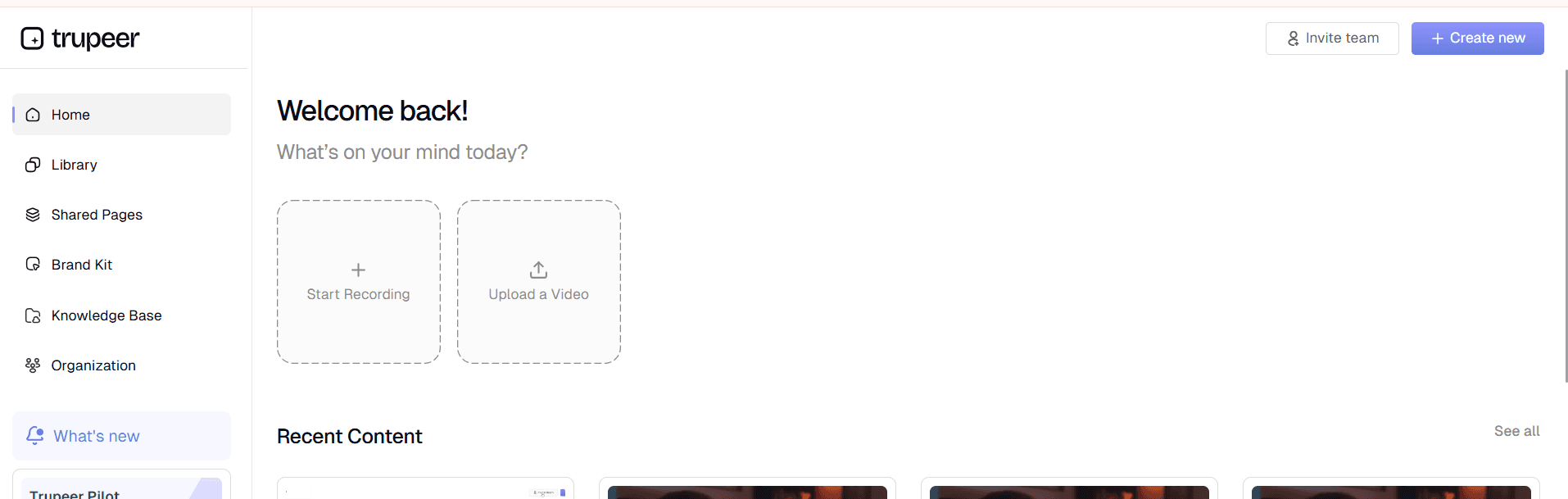
步骤 1:录制或上传你的内容
首先使用 Trupeer 内置屏幕录制器捕捉你的操作流程,或上传你希望转换为协作文档的现有录制。我们的 屏幕录制器 会自动优化录制质量,并为 AI 处理做好内容准备。无论你是在演示软件工作流、讲解复杂流程,还是带领团队了解新功能,这一步的初始捕捉都会成为你的协作文档的基础。
步骤 2:AI 处理与增强
录制完成后,Trupeer 的 AI 会自动处理内容:去除背景噪音、剔除填充词,并添加智能缩放效果以突出关键操作。AI 同时会分析视觉内容以理解工作流程,并开始生成结构化文档。该处理在后台进行,你仍可继续处理其他任务,因此整体体验极其高效。

步骤 3:自动生成文档
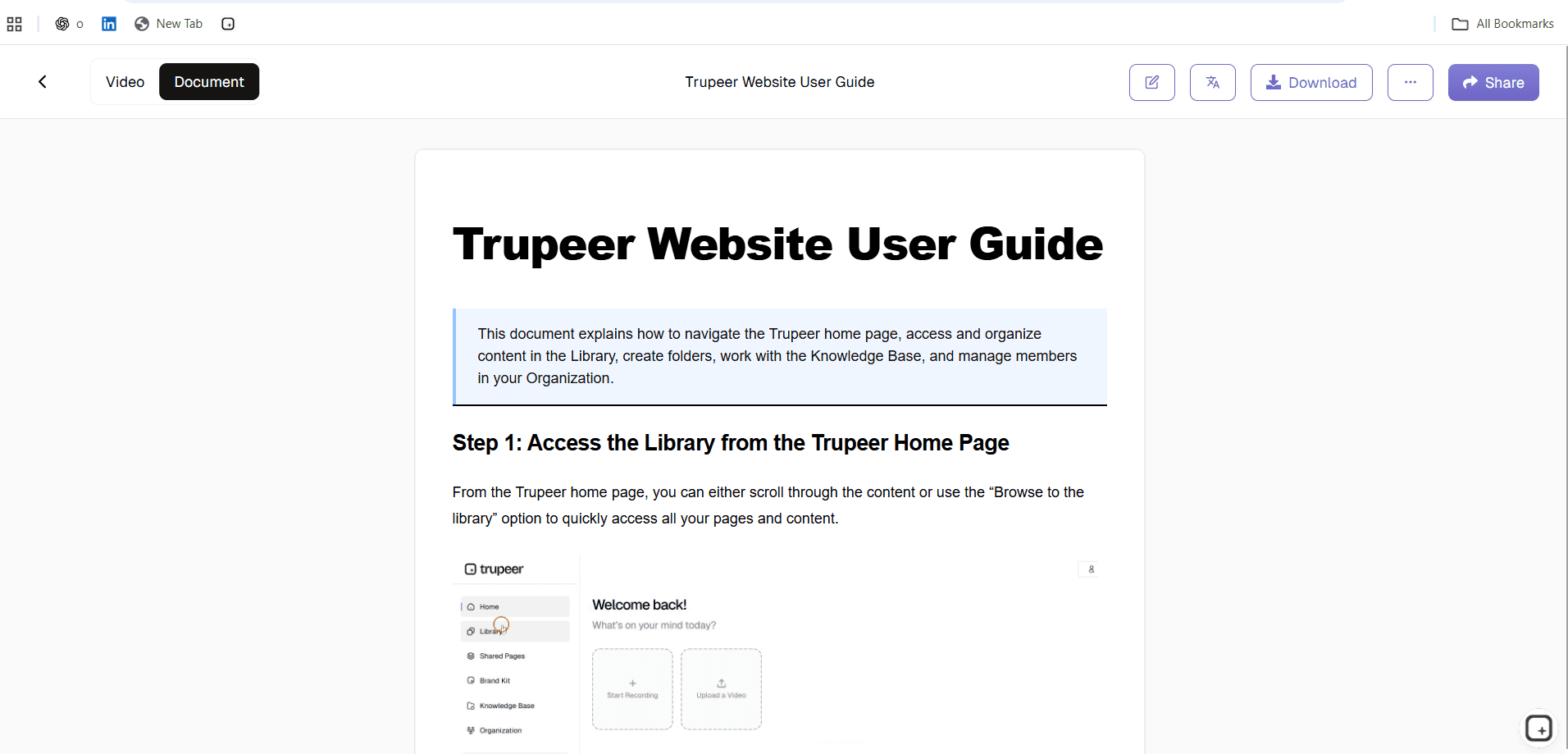
AI 会将你的屏幕录制转换为全面的书面文档,包含截图、逐步说明以及规范排版的各个章节。你可以应用已保存的 文档 模板,确保所有协作文档在格式与结构上保持一致。系统会智能地将复杂流程拆分为易于理解的章节,方便团队成员轻松阅读并贡献内容。
步骤 4:品牌定制与专业收尾
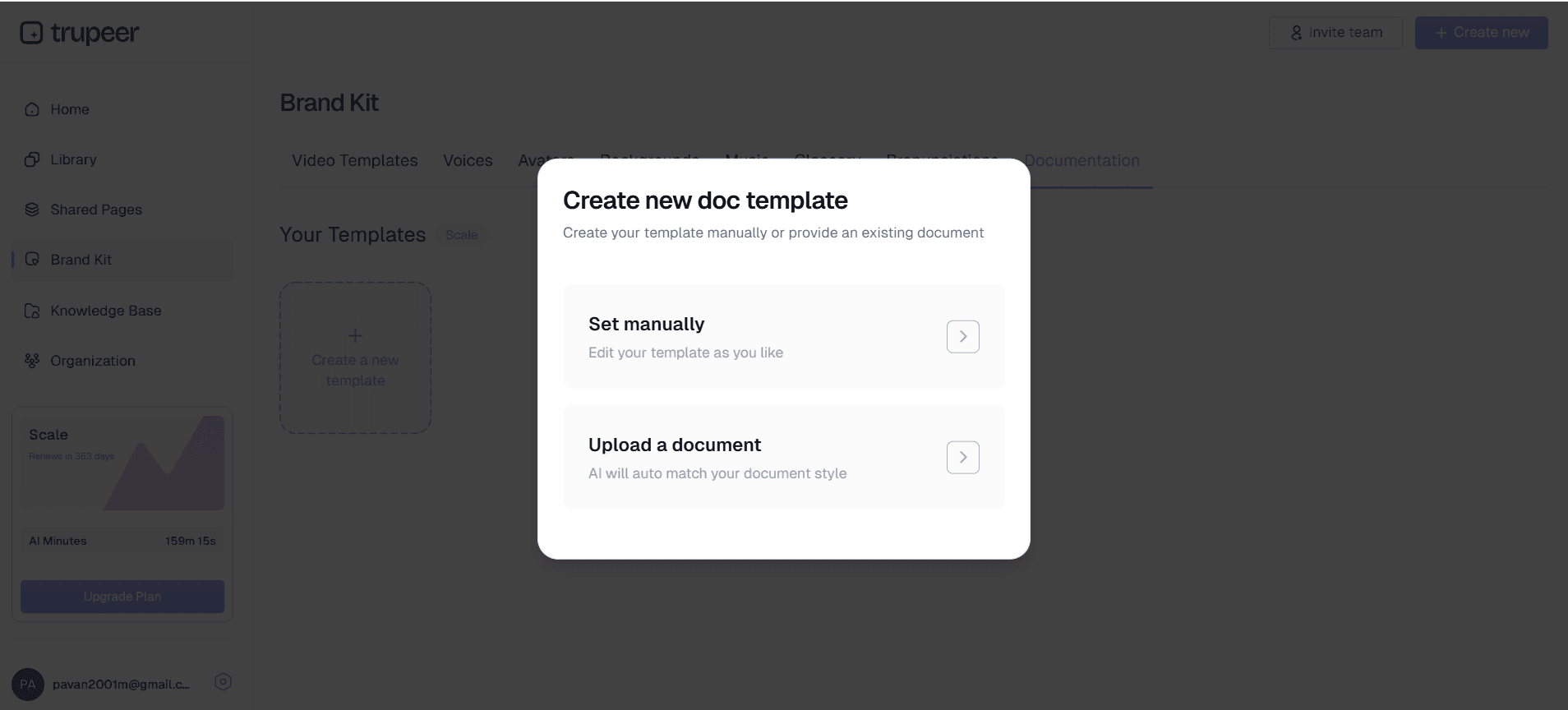
将你的 品牌套件 应用于视频与文档组件,确保所有协作素材拥有一致的视觉识别。内容包括公司配色、Logo、字体以及标准排版偏好。专业的呈现能提升可信度,并让协作文档对团队成员与外部相关方更具吸引力。
步骤 5:分享并启用协作
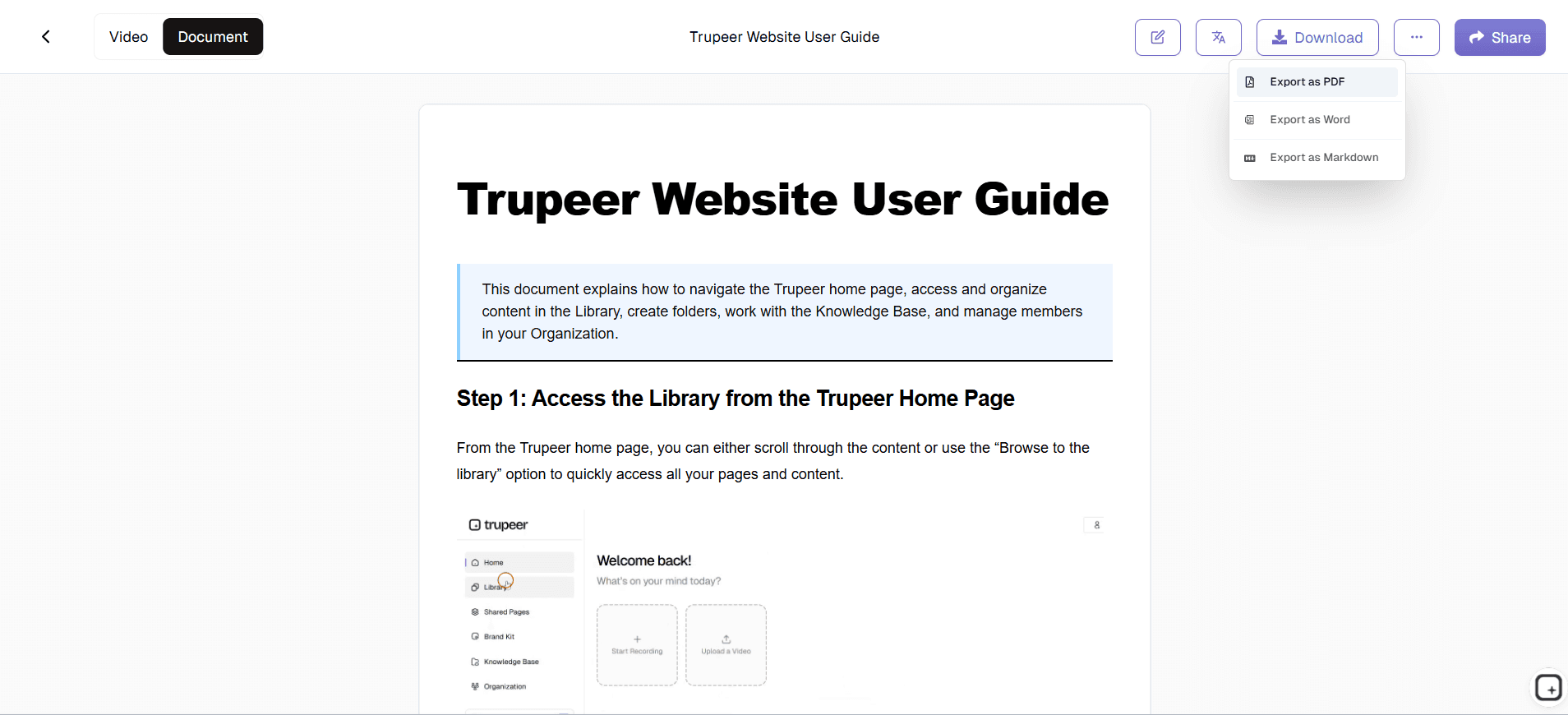
生成可分享链接或嵌入代码,让你的团队可立即访问文档。团队成员可以查看内容、添加评论、提出编辑建议,并在无需特殊软件或复杂权限管理的情况下补充更多见解。协作功能直接内置于平台之中,使分布式团队也能高效协同工作。
核心功能与能力
Trupeer 的在线文档协作平台提供一整套全面功能,旨在简化团队共同创建、分享与维护文档的方式。这些能力覆盖协作文档需求的全流程:从最初创建到持续维护与更新。
AI 驱动的内容生成:平台会自动将屏幕录制转换为结构化文档,省去耗时的手动编写与排版流程。该功能可与我们的 AI 视频编辑器 无缝集成:在文档生成过程中增强视频的视觉组件。团队可以从简单的屏幕录制开始,最终获得可立即投入协作的专业文档。
基于模板的一致性:保存并重复使用文档模板,确保所有协作文档在格式、样式与结构上保持一致。该功能让团队成员无论由谁创建原始内容,都能始终清楚信息在哪里、以及如何高效贡献。
实时协作工具:多个团队成员可同时访问、编辑并对文档发表评论,而无需担心版本控制问题。平台会记录所有变更与贡献,便于查看是谁在何时添加了哪些信息。这种透明度提升责任感,让协作编辑更顺畅且无冲突。
多格式输出:可从单次录制同时生成视频与书面文档,让团队能在不同场景中灵活选择最合适的格式。有些成员偏好通过视频进行视觉学习,而另一些成员则需要书面参考以便快速查找。我们的平台无需额外增加内容创作者的工作量,即可同时满足这两种偏好。
通过翻译实现全球可访问性:使用我们的 翻译 功能,可自动将协作文档转换为多种语言,让国际团队也能轻松访问。对于拥有分布式员工或全球客户群、需要在不同地区保持一致文档的组织而言,这项能力尤其有价值。
集成能力:连接团队已在使用的热门办公与协作工具与平台,包括知识库、项目管理系统以及沟通平台。集成可避免在多个工具之间频繁切换,并确保协作文档能无缝融入现有工作流。
为什么要使用在线文档协作?
通过 Trupeer 进行在线文档协作,能带来颠覆性的收益,直击团队在创建与维护共享文档时最常见的痛点。这些优势会随着时间持续累积:带来更高效的工作流、更好的知识沉淀,以及在所有项目与计划中更紧密的团队一致性。
显著节省时间:传统文档创建可能需要数小时甚至数天,尤其当多个团队成员都需要贡献各自的专业知识时。Trupeer 的方式可通过从屏幕录制自动生成完整文档,将所需时间最多减少 90%。团队可以同时创建 AI 屏幕录制器及配套文档,最大化每一分钟内容创作的价值。
提升知识沉淀能力:当团队成员离职或更换岗位时,他们的专业知识往往也会随之流失。在线文档协作确保关键知识以可访问、可搜索的格式被记录下来,并始终对整个团队保持可用。视觉与书面内容的结合让复杂流程更易理解与记忆,从而降低新成员的学习门槛。
提高一致性与质量:标准化模板与自动排版消除了手动创建文档中常见的风格与结构差异。无论由谁创建或贡献内容,每一份协作文档都能保持专业质量,并符合你们组织的标准。这种一致性让信息在不同项目与部门中更容易查找与使用。
降低培训与入职成本:新成员可访问全面且最新的文档,其中既包含视觉演示,也包含书面说明。这种自助式方式减少了资深成员在培训活动中需要投入的时间,同时确保新员工获得关于流程与操作的统一、详尽信息。
更好的远程团队协同:分布式团队往往在知识共享与流程对齐方面面临挑战。在线文档协作提供一个集中位置,让远程团队成员能获取同样高质量的信息、贡献他们的专业知识,并与不断演进的流程保持同步。平台的协作功能可跨时区与地域边界无缝协同。
通过效率提升实现可衡量的投资回报:组织通常能通过减少文档时间、提升流程合规性以及加快知识传递,迅速看到投资回报。平台的分析功能有助于追踪使用模式,并识别最有价值的协作文档,使团队能将精力集中在能带来最大影响的内容上。
谁可以使用在线文档协作?
Trupeer 的在线文档协作平台服务于多类用户群体,每个群体在创建、分享与维护协作文档方面都有各自的需求。平台的灵活性可适配不同的工作方式、技术水平与组织要求,同时在所有场景中保持易用性。
内容创作者与市场团队:市场人员使用该平台创建 文档生成器 所需的材料,这些材料需要来自多个利益相关方的输入。他们可以录制产品演示,自动生成配套文档,然后与销售团队、产品经理和设计师协作,优化信息表达并确保准确性。通过集成品牌套件来维持品牌一致性的能力,使这种协作对市场工作流尤其有价值。
培训与发展专家:L&D 团队借助在线文档协作创建全面的培训资料,将视觉演示与详细书面说明结合起来。他们可以只录制一次培训课程,然后与主题专家合作,用额外的见解、技巧与背景信息来增强自动生成的文档。这种协作方式确保培训资料始终保持最新且内容完整,同时减轻对单个培训讲师的负担。
产品与工程团队:技术团队使用该平台记录复杂流程、API 工作流以及需要多个工程师输入的系统配置。他们可以录制技术演示,并自动生成 技术文档,随后团队成员可用代码片段、故障排查建议和实施备注对其进一步完善。随着系统演进与团队成员发现新见解,协作功能有助于保持文档准确性。
销售与客户成功团队:销售团队通过录制产品演示并协作开发配套文档,来创建 AI 视频编辑器相关材料,以解答客户常见问题与异议。客户成功团队采用类似方式创建帮助资源,并可基于客户反馈与支持互动持续改进内部团队使用的内容。
中小企业所有者与创业者:资源受限的组织可从平台的高效性中获益:无需专门的技术写作人员,也能创建专业文档。企业所有者可以录制自身流程,并与团队成员协作,开发全面的运营文档、标准操作程序以及培训资料,帮助企业实现更有效的规模化发展。
教育机构与企业培训师:教育工作者使用在线文档协作创建课程资料,让内容受益于多种视角与专业领域。他们可以录制讲座或演示,然后与同事甚至学生协作,用额外资源、示例与解释性内容来增强自动生成的文档。
使用在线文档协作的最佳实践
要最大化在线文档协作的价值,需要采用策略性方法:充分发挥平台优势,同时建立能鼓励团队持续参与的工作流。以下最佳实践基于大量用户反馈总结而来,代表了实现可持续协作文档成功的最有效方式。
建立清晰的文档标准:在启动协作项目之前,明确你们组织对文档结构、语气与细节程度的标准。创建并保存反映这些标准的模板,确保所有团队成员从一致的基础开始。前期在标准化上的投入会在你的协作文档库不断壮大、并对整个组织变得更有价值时持续带来回报。
为最大协作价值规划录制内容:当你创建将成为协作文档的屏幕录制时,不要只考虑眼前的演示,还要思考团队成员可能还需要补充哪些信息。以便于生成详细文档的节奏进行录制,并加入对思考过程的口头解释,帮助同事理解特定步骤或决策背后的原因。
落实定期审阅与更新周期:建立定期审阅协作文档的机制,以确保流程变化后文档仍保持准确与相关性。为不同文档区域指定具体团队成员负责,并使用平台的协作功能追踪何时需要更新。定期维护可防止文档过时,并持续保持其作为团队资源的价值。
发挥跨职能协作的优势:鼓励来自不同部门的团队成员为协作文档贡献他们的视角。A AI 屏幕录制器代表可能会基于客户常见问题为技术文档补充有价值的背景信息,而销售团队成员则可以通过竞争定位洞察来增强产品文档。这种知识的交叉融合会带来更全面、更有价值的资源。
使用分析数据指导改进工作:关注哪些协作文档获得最多的浏览、评论与贡献,以识别你们最有价值的内容。将改进精力集中在这些高影响力资源上,并利用使用模式来指导关于新增文档创建的决策。平台的分析功能帮助优化你们团队在协作文档方面的投入,以获得最大的组织收益。
探索相关工具
为什么选择 Trupeer 进行在线文档协作
即时文档生成
利用 AI 技术自动将屏幕录制转换为专业的协作文档
实时团队协作
多个团队成员可以同时编辑、评论并做出贡献,而不会发生冲突
品牌一致性工具
在团队之间应用自定义模板和品牌套件,实现专业且一致的文档
如何使用 Trupeer 的在线文档协作工具
步骤 1
录制或上传您的内容
第 2 步
AI 生成专业文档
步骤 3
与团队共享并协作
常见问题
Trupeer 的在线文档协作如何运作?
录制您的屏幕或上传视频,Trupeer 的 AI 会自动生成专业文档,供您的团队立即协作。团队成员可以添加评论、进行编辑,并实时提供见解。
多个团队成员可以同时处理同一份文档吗?
是的,Trupeer 支持实时协作,多个用户可以访问、编辑和评论文档,而不会发生版本控制冲突。所有更改都会被跟踪,并归属于特定贡献者。
我可以导出哪些格式用于在线文档协作?
您可以导出视频和书面文档两种格式,通过链接分享,或直接嵌入网站和知识库中。该平台支持多种输出格式,以满足您团队的协作偏好。
我如何在协作文档之间保持一致性?
使用 Trupeer 的文档模板和品牌套件,确保所有协作文档都符合您组织的格式、样式和视觉识别标准,无论是谁创建或贡献内容。
在线文档协作对敏感信息安全吗?
是的,Trupeer 提供企业级安全功能,包括访问控制、权限管理和安全共享选项,以保护敏感的协作文档,并确保只有经授权的团队成员才能参与贡献。



