Get started for free
免费开始
Trupeer's beginner-friendly video editor helps first-time creators produce professional training videos with zero editing experience. Using AI-powered screen recording and automatic editing, beginners create polished training content that looks like it was made by a professional.
Designed for people who have never edited a video before.
AI handles trimming, transitions, zoom effects, and audio cleanup.
Simple interface with no complex timelines or technical controls.
Automatically generate written process guides from your recordings.
Professional results from your very first training video.
What Is Trupeer's Beginner-Friendly Video Editor for Training Videos?
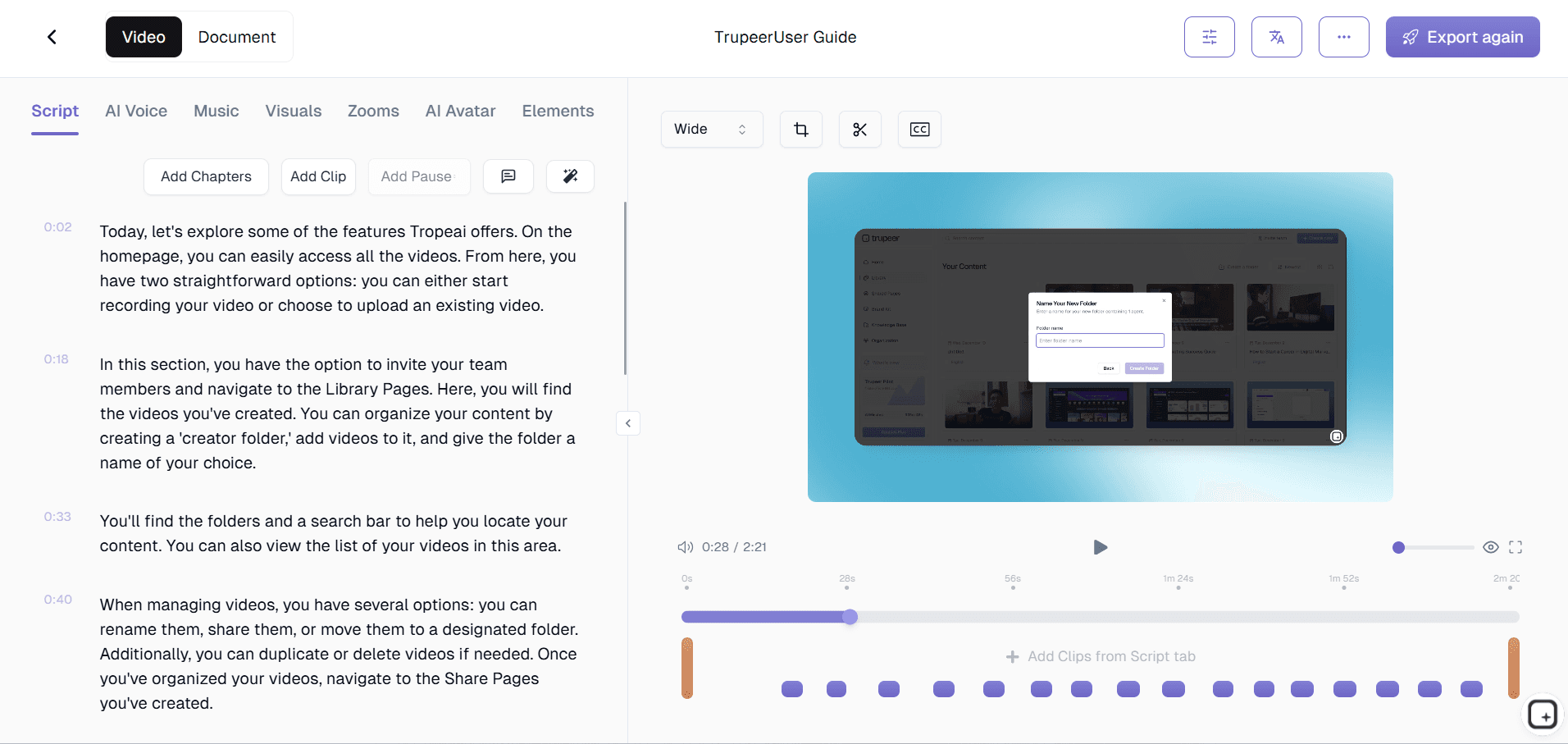
Trupeer is a video editor designed from the ground up for beginners who need to create training videos. Unlike complex editors like Premiere Pro or Final Cut, Trupeer eliminates timelines, keyframes, and technical jargon. You record your screen, and the AI automatically produces an edited training video with professional zoom effects, clean audio, and smooth transitions. The interface guides you through each step so you always know what to do next.
How Does Beginner-Friendly Video Editor for Training Videos Work?
Getting started with Beginner-Friendly Video Editor for Training Videos takes just a few minutes.
Step 1: Record or Upload
Start a screen recording directly in your browser, or upload an existing video.

Step 2: AI Processing
The AI analyzes your recording, removes filler words, adds zoom effects, and generates video automatically.

Step 3: Customize and Share
Edit the output, apply your brand kit, and share via link or embed on your website. Updates are just as easy.

Key Features of Trupeer's Beginner-Friendly Video Editor for Training Videos
Guided Editing Workflow: Trupeer walks beginners through the editing process step by step rather than dropping them into a blank timeline. Each screen tells you exactly what to do next, from reviewing AI edits to adding your brand elements. There are no hidden menus, obscure keyboard shortcuts, or technical settings to configure.
One-Click AI Enhancement: A single click triggers Trupeer's full AI editing suite: filler word removal, pause trimming, zoom effect generation, audio normalization, and transition smoothing. Beginners do not need to understand what each of these editing steps involves.
Visual Drag-and-Drop Editor: When beginners want to make manual adjustments, Trupeer provides a visual editor where sections appear as cards you can drag to reorder, click to trim, or tap to delete. No timeline scrubbing, no frame-by-frame navigation, and no technical editing vocabulary required. The interface behaves like rearranging slides in a presentation.
Built-In Templates for Training Content: Choose from training video templates that set the right pacing, intro style, and structure for different types of content. Templates guide beginners toward professional results by pre-configuring settings that experienced editors would set manually. Select a template, record your content, and the AI applies the template's style automatically.
Why Choose Trupeer's Beginner-Friendly Video Editor for Training Videos?
Built for First-Time Editors: Every feature, interface element, and workflow is designed for people creating their first training video. Complexity is hidden, not just simplified.
Professional Results Immediately: Your first training video looks like your fiftieth. AI editing eliminates the learning curve that normally separates beginner and professional output.
No Technical Prerequisites: You do not need to understand resolution, bitrate, codecs, timelines, or keyframes. Trupeer handles every technical detail behind the scenes.
Grows With You: Start with fully automatic AI editing and gradually explore manual adjustments as you gain confidence. The editor adapts to your skill level.
Beginner-Friendly Video Editor for Training Videos for Internal Teams
1. Enable any team member to create training videos regardless of technical skill. Managers, analysts, and operations staff produce professional training content without video editing experience.
2. Eliminate the training content bottleneck. When creating a training video requires professional editing skills, content gets delayed. A beginner-friendly editor removes that barrier entirely.
3. Increase the volume of training content your organization produces. More people creating videos means more processes documented, more knowledge captured, and better institutional memory.
4. Reduce training costs by removing the need for professional video editing services. Internal teams handle their own training video production from start to finish.
Beginner-Friendly Video Editor for SaaS Teams
1. Let customer success managers create training videos for their accounts. CSMs know their customers best and can produce targeted training content without waiting for the marketing team.
2. Empower product teams to create feature training videos on release day. No video editing backlog means training content ships when features ship.
3. Build a comprehensive help center video library without a dedicated video team. Any team member can contribute professional training videos using the beginner-friendly editor.
4. Create personalized training videos for enterprise customers. Account managers record custom walkthroughs and the AI editor produces polished videos they can share confidently.
Beginner-Friendly Video Editor for Startups
1. Create professional training content from day one without hiring a video editor. Startups need training videos for customers and team members but cannot afford production staff.
2. Let anyone on the founding team produce training videos. Engineers, designers, and business leads all create polished content without learning complex editing software.
3. Iterate on training content as quickly as your product evolves. When anyone can edit training videos, updates happen in minutes instead of being added to a production backlog.
4. Present a professional image to customers with polished training videos. First impressions matter for startups, and AI-edited training videos look as good as those from established companies.
Beginner-Friendly Video Editor for Enterprises
1. Deploy a training video creation tool that requires no IT training or onboarding. Enterprise teams adopt Trupeer immediately because the learning curve is effectively zero.
2. Scale training video production across departments without scaling your creative team. Thousands of employees can create professional training content independently.
3. Maintain consistent training video quality across the organization. AI editing and brand kits ensure professional output regardless of the creator's experience level.
4. Reduce the cost per training video dramatically. When beginners produce professional results, the per-video cost drops because you eliminate editing labor from the equation.
Beginner-Friendly Video Editor for Remote Teams
1. Give every remote team member the ability to create training videos. Distributed teams cannot always tap a colleague for editing help. A beginner-friendly tool means everyone is self-sufficient.
2. Build async training libraries that remote teams create collaboratively. Team members in different time zones contribute training videos independently, all meeting the same quality standard.
3. Replace synchronous training with polished async video content. Remote teams benefit most from well-edited training videos because they reduce the need for live meetings.
4. Onboard remote hires with professional training videos created by their future colleagues. Peers create authentic, well-edited training content without needing production skills.
Beginner-Friendly Video Editor for Developers
1. Let developers focus on teaching, not editing. Developers have deep technical knowledge but rarely have video editing skills. The beginner-friendly editor lets them share expertise without a learning curve.
2. Create technical onboarding videos that new developers can follow. Senior engineers record coding walkthroughs and the AI produces clear, edited training videos for the team.
3. Document complex technical processes with polished video content. Architecture decisions, debugging approaches, and deployment processes become training videos any developer can create.
4. Build a developer knowledge base with video content from across the team. When creating training videos is easy, more developers contribute, and institutional knowledge grows faster.
Beginner-Friendly Video Editor for Onboarding & Support Teams
1. Create onboarding video sequences without video production experience. HR managers and team leads produce professional training content for new hires using the beginner-friendly editor.
2. Build customer support video tutorials that anyone on the team can create. Support agents record solutions and the AI editor produces professional content for your help center.
3. Update onboarding materials instantly when processes change. Because editing is simple, training content stays current without depending on a production team's availability.
4. Scale your training program by enabling more content creators. When creating videos is beginner-friendly, your training library grows faster and covers more topics.
Get started for free
免费开始
Guided Workflow
Step-by-step interface that tells you exactly what to do next
One-Click Editing
AI applies professional edits with a single button press
No Skills Required
Professional results from your very first training video
Get started for free
免费开始
步骤 1
Click record in the Trupeer Chrome extension
第二步
Walk through the process while talking through steps
步骤 3
Let AI edit your video and share the result
常见问题
Trupeer's AI automatically detects and removes common mistakes like long pauses, repeated steps, and verbal stumbles. You do not need to record a perfect take because the AI cleans up errors for you.
相关工具
Get started for free
免费开始