
使用此模板
Most SOPs describe only the happy path, which is why teams look for an SOP template with exceptions: the invoice matches, the customer has an account, the system is up. Real work isn't like that. People open an SOP when something is unusual, and that's exactly where most procedures go quiet. An SOP template with exceptions fixes that by giving every procedure a dedicated section for what can go wrong, how to recognise it, what to do and who decides.
This free SOP template with exceptions gives you a complete standard operating procedure structure plus an exception-handling table you can fill in for any process. Use it for finance, HR, IT, customer service and operations procedures, or anywhere mistakes in unusual cases are costly. Copy the full structure below, see a filled-in example, or open it in Trupeer and customize it in minutes.
What is an SOP template with exceptions?
An SOP template with exceptions is a standard operating procedure template that includes a dedicated section for exceptions: the situations where the normal steps don't apply. For each exception, it records how to recognise it, what action to take, who has authority to decide, the time limit for acting and how the outcome is recorded.
It keeps the standard SOP sections, such as purpose, scope, roles and procedure steps, and adds the part most SOPs leave out. For a broader collection of formats, see our guide to standard operating procedure templates.
Why do SOPs need an exception-handling section?
Exceptions are where errors happen. The happy path is usually learned quickly; unusual cases cause most mistakes, rework and risk.
Exceptions are where knowledge hides. Experienced people know how to handle them, but that knowledge is rarely written down.
Inconsistent handling creates risk. Without a rule, two people handle the same exception in two different ways.
Auditors look for it. Controls depend on knowing who can approve an exception and how it's recorded.
Automation and AI agents need it. An automated process or agent can only handle exceptions that are written as clear rules.
Who uses an SOP template with exceptions?
Process owners who need one approved way of handling unusual cases across teams and sites.
Finance and shared services teams, where exceptions such as variances, duplicates and bank detail changes carry real financial risk.
HR operations, where special cases such as leavers, cross-border moves and sensitive requests need clear decision rights.
IT and service desks, where system errors and access exceptions need defined escalation paths.
Customer service teams, where refunds, complaints and vulnerable-customer cases need consistent handling.
Quality, risk and compliance teams, who need evidence of how exceptions are approved and recorded.
Automation and AI teams, who need exceptions written as rules before a process can be automated.
Preview the SOP template with exceptions
The template opens with document control, purpose and scope, then roles and responsibilities and the prerequisites for the task. The procedure follows as numbered steps, each with an owner and an expected result. The exception-handling section is a table with one row per exception: trigger, action, decision owner, time limit, escalation and record. The template closes with controls, related documents and revision history. Every section is editable, so you can add exceptions, rename columns or adapt the format to your process.
How to customize this template in Trupeer
Step 1: Open the Templates Section
Go to the Templates section from the main navigation.

Step 2: Select and Open a Template
Click on any template you want to work with to open it.
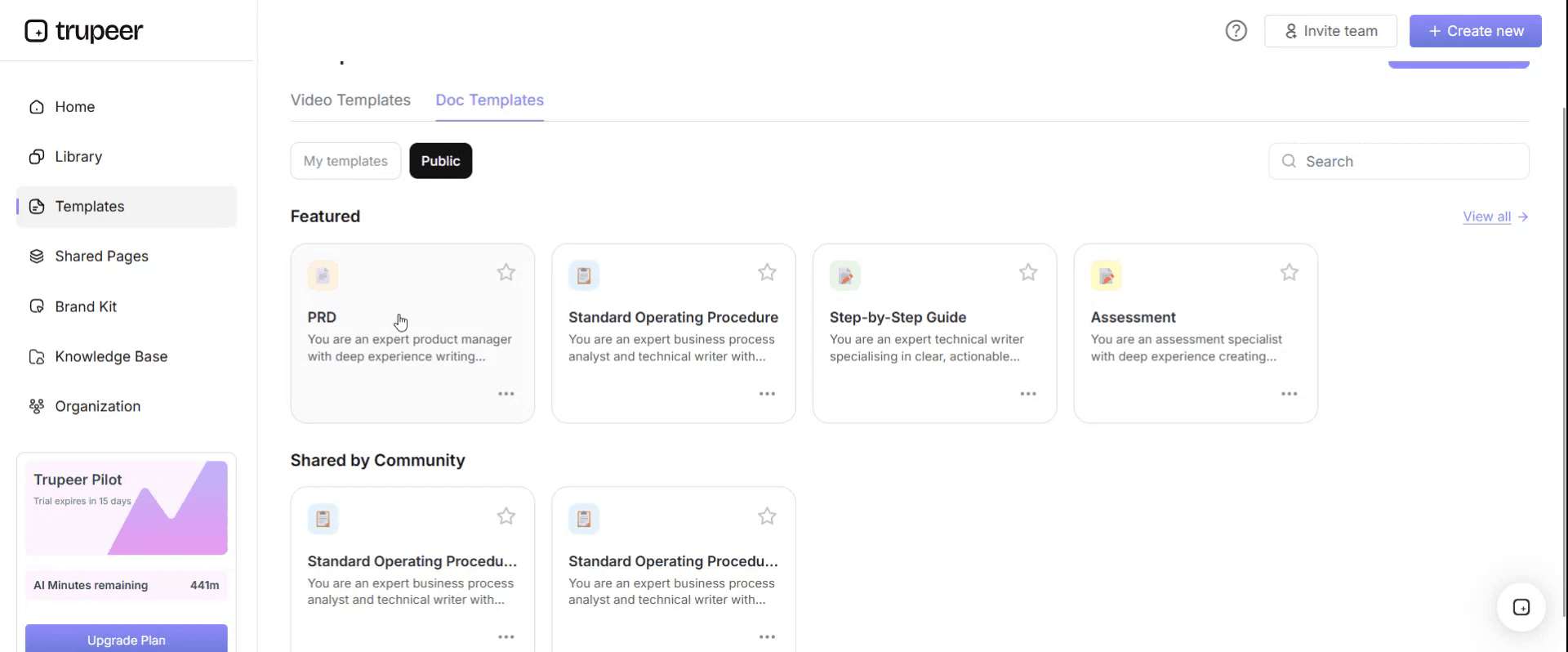
Step 3: Expand the Template View
If needed, expand the template view to see the full layout and details clearly.

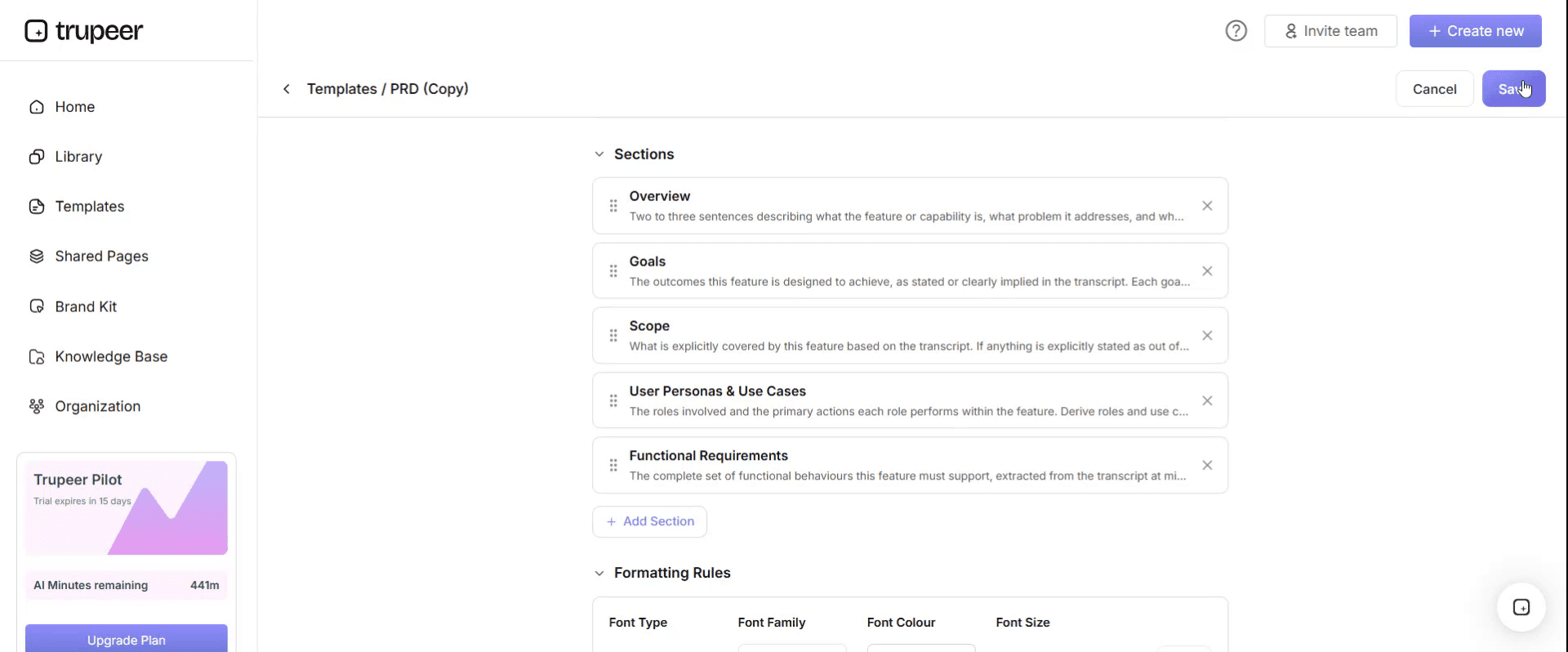
Step 4: Edit the Template
Click on Edit to start modifying the selected template.

Within the editor, you can:
Add new sections
Define or update formatting rules
Add a logo and adjust its position and related settings
Step 5: Save Your Customized Template
After making all necessary changes, click Save to store the updated template as your own.
Step 6: Preview and Fine-Tune the Template
When you want to see how your customized template looks, open the Preview.

From the preview screen, you can continue to make adjustments directly if needed, ensuring the template appears exactly as you want.
With an SOP template with exceptions you can:
Handle unusual cases consistently: Every team member follows the same rule for the same exception.
Capture expert knowledge: Write down how experienced people handle the cases that aren't in the manual.
Make decision rights clear: Name who can approve, override or escalate each exception.
Support audits and controls: Show how exceptions are recognised, approved and recorded.
Prepare for automation and AI: Turn exceptions into clear rules that systems and agents can follow.
What an SOP template with exceptions must contain
Section | What it covers |
|---|---|
Document control | SOP ID, version, owner, approver, effective date and next review date |
Purpose | Why the procedure exists and the outcome it produces |
Scope | Which teams, systems and cases it covers, and what it excludes |
Roles and responsibilities | Who performs, approves and is consulted on each part |
Definitions | Terms and abbreviations used in the procedure |
Prerequisites | Access, inputs and documents needed before starting |
Procedure | Numbered steps with owner and expected result |
Exception handling | Trigger, action, decision owner, time limit, escalation and record for each exception |
Controls | Checks, approvals and segregation of duties |
Related documents | Policies, forms, work instructions and training videos |
Revision history | What changed, when and who approved it |
Free SOP template with exceptions: the structure to copy
Copy the structure below into your own document, or open it in Trupeer and customize it.
1. Document control. SOP ID: [ID]. Version: [x.x]. Owner: [role]. Approver: [role]. Effective date: [date]. Next review: [date].
2. Purpose. This SOP defines how [team] performs [process] so that [outcome] is achieved consistently and exceptions are handled correctly.
3. Scope. Applies to [teams, sites, systems]. Excludes [out-of-scope cases, with a reference to the SOP that covers them].
4. Roles and responsibilities.
Role | Responsibility |
|---|---|
[Performer, e.g. AP clerk] | Performs the procedure and identifies exceptions |
[Reviewer, e.g. team lead] | Decides on exceptions within their authority |
[Approver, e.g. process owner] | Approves exceptions above the team lead's limit and owns the SOP |
[Specialist, e.g. compliance] | Advises on regulatory or risk-related exceptions |
5. Definitions. [Term]: [definition]. Exception: any case where a step cannot be completed as written, or where a defined trigger applies.
6. Prerequisites. [System access], [input documents], [reference data or tolerances].
7. Procedure.
Step | Action | Owner | Expected result |
|---|---|---|---|
1 | [Action] | [Role] | [Result] |
2 | [Action] | [Role] | [Result] |
3 | [Action] | [Role] | [Result] |
If any step can't be completed as written, stop and check the exception-handling table before continuing.
8. Exception handling.
Exception | How to recognise it | Action | Decision owner | Time limit | Escalate to | Record |
|---|---|---|---|---|---|---|
[Exception 1] | [Trigger or condition] | [Handle, hold or stop, and how] | [Role] | [e.g. same day] | [Role] | [Where and what to record] |
[Exception 2] | [Trigger or condition] | [Action] | [Role] | [Time limit] | [Role] | [Record] |
Anything not listed | The case doesn't match the procedure or any listed exception | Stop and escalate; do not improvise | [Team lead] | [e.g. 4 hours] | [Process owner] | [Log the case so the SOP can be updated] |
9. Controls. [Approval limits], [reviews], [segregation of duties], [reconciliations].
10. Related documents. [Policy], [work instructions], [forms], [training video link].
11. Revision history. Version, date, change summary, author and approver.
How to write the exception-handling section
Step 1: Find the real exceptions
List the cases where people currently deviate from the steps. Look at support tickets, audit findings, rework logs and questions new hires ask, and record experienced people doing the process so the exceptions they handle become visible.
Step 2: Classify each exception
Decide whether each exception should be handled within the procedure, put on hold pending a decision, or stopped and escalated. Anything involving money leaving the business, personal data or legal risk usually belongs in the stop-and-escalate group.
Step 3: Write a clear trigger
Describe how to recognise the exception in terms anyone can check, such as "invoice total differs from the PO by more than the tolerance in the reference table", not "the invoice looks wrong".
Step 4: Name the decision owner and time limit
For every exception, name the role that can decide and how quickly the decision must be made, so cases don't sit unresolved.
Step 5: Define the record
State where the exception and its outcome are recorded, so you can audit decisions and spot recurring problems.
Step 6: Add a catch-all row
Always include a final row for cases that don't match anything: stop, escalate and log the case so the SOP can be updated.
Step 7: Review exceptions regularly
Review the exception log at each SOP review. Frequent exceptions may point to a process fix, a new rule or a training gap. Keep versions controlled; see SOP version control.
What types of exceptions should an SOP cover?
Type | Examples |
|---|---|
Missing or incomplete input | Missing purchase order, incomplete form, missing approval |
Data mismatch | Amounts, quantities or details that don't match the system |
Threshold or limit | Values above an approval limit or outside a tolerance |
System issue | System unavailable, error message, integration failure |
Timing | Deadline missed, cut-off passed, urgent request |
Policy or legal | Request that conflicts with policy, regulation or contract terms |
Risk or fraud indicators | Changed bank details, unusual patterns, duplicate requests |
Customer or employee special case | Vulnerable customer, leaver, cross-border case |
SOP with exceptions example: vendor invoice processing
Here's how the exception-handling table might look for an accounts payable invoice SOP. The values are illustrative.
Exception | How to recognise it | Action | Decision owner | Time limit | Escalate to | Record |
|---|---|---|---|---|---|---|
Duplicate invoice | Same supplier and invoice number already posted | Do not post; reject to supplier | AP clerk | Same day | AP lead | Note in invoice log |
No goods receipt | PO exists but no receipt recorded | Hold; ask the buyer to confirm receipt | Buyer | 3 working days | Procurement lead | Hold reason in system |
Price variance above tolerance | Price differs from PO beyond the tolerance table | Hold; send to buyer with variance details | Buyer | 2 working days | AP lead | Variance note |
Bank details changed | Bank details on invoice differ from vendor master | Stop; do not pay; verify with supplier through a known contact | AP lead | Before next payment run | Finance controller | Verification record |
Not covered above | Case doesn't match any row | Stop and escalate | AP lead | 4 hours | Process owner | Exception log |
For the full procedure this example comes from, see the AP invoice processing SOP guide.
Formats, and which to use for exception handling
The procedure and the exceptions don't always suit the same format, so pick the one that matches how the exception is handled.
Step-by-step with an exception table is right for most procedures: a linear set of steps, plus a table of exceptions people check when a step can't be completed. This is the format the structure above uses.
Decision tree is right when handling an exception depends on a sequence of checks, such as diagnosing why a payment failed. Draw the branches rather than forcing them into a numbered list.
Checklist is right for confirming that all exception conditions have been checked before a case is closed, such as a pre-payment run review. Pair it with the procedure rather than replacing it.
Exception log in a spreadsheet is right for recording and analysing exceptions over time. Keep the rules in the SOP and the log in the spreadsheet, so the rules stay controlled and the log stays easy to filter.
Exception handling by department
Department | Typical exceptions to document |
|---|---|
Finance and accounts payable | Duplicate invoices, missing receipts, price variances, changed bank details, late approvals |
HR operations | Retroactive pay changes, leavers with outstanding loans, cross-border moves, sensitive cases |
IT and service desk | Access requests outside policy, failed changes, outages, security alerts |
Customer service | Refunds above limit, complaints, vulnerable customers, disputed charges |
Procurement | Single-source purchases, urgent orders, suppliers not yet approved |
Operations and logistics | Damaged goods, stock discrepancies, missed cut-offs, carrier failures |
Department-specific SOP templates already cover the procedures; add this exception table to them. For HR procedures, start with the HR SOP template.
Who approves exceptions, and who approves the SOP
Two kinds of authority need to be clear. The first is who can decide on each exception, which belongs in the exception table and should match your approval limits. The second is who approves the SOP itself, usually the process owner, with sign-off from risk or compliance where exceptions carry regulatory or financial risk. Record both in the document control and roles sections, and make sure the people named actually hold that authority in your delegation of authority. A RACI matrix template helps make these roles explicit across a set of SOPs.
Exception handling in an SOP vs a work instruction vs an escalation process
An SOP defines the overall procedure, including which exceptions exist and who decides on them. A work instruction gives screen-level detail for a single task, and may show how to record an exception in a system; see the work instructions template. An escalation process defines how issues move up the organisation in general. The exception-handling section sits inside the SOP and links to both where needed.
Best practices for exception handling in SOPs
Start from evidence, such as tickets, audit findings and recordings, not from what people remember.
Keep the number of exceptions manageable. If an exception happens constantly, it may belong in the main procedure.
Make high-risk exceptions conservative: stop and escalate rather than handle locally.
Link each exception to a video or work instruction showing how to record it in the system.
Train people on the exceptions, not just the happy path, especially new hires.
Track exception volumes and use them to improve the process.
Common mistakes to avoid
Writing "use judgement" instead of a clear rule or a named decision owner.
Listing exceptions without triggers, so people can't tell when one applies.
No catch-all row, so unusual cases get improvised.
No time limits, so held cases sit for weeks.
No record, so recurring exceptions are never spotted or fixed.
Never reviewing the exception log, so the SOP falls behind reality.
SOP with exceptions checklist
Document control is complete, with owner and review date.
Every procedure step has an owner and expected result.
Each exception has a trigger, action, decision owner, time limit, escalation and record.
High-risk exceptions stop and escalate.
A catch-all row covers anything not listed.
Controls and approval limits are stated.
Related documents and training videos are linked.
The exception log is reviewed at every SOP review.
If you plan to hand procedures to AI agents, the exception table converts directly into guardrails; see how to turn SOPs into AI agent skills.
Capture exceptions on video while they happen
Exceptions are hard to write down from memory and easy to show. Ask experienced team members to record themselves handling real cases, including the unusual ones, and turn each recording into a step-by-step SOP and video with Trupeer's SOP creator. Add the exceptions they handle to the table, link the videos from each row and publish everything in one searchable library.
Genpact used this recording-first approach for a company-wide Workday rollout, turning recorded process sessions and SME walkthroughs into more than 500 training collaterals across 20 workstreams in five languages, for 140,000 employees in 40 countries, in 3 months instead of 12. Read the Genpact customer story.
Need a simpler format without the exception table? Start with the free SOP template.
Download the free SOP template with exceptions
Open the template in Trupeer, apply your brand kit, fill in your steps and exceptions, and share it with your team. Get the free SOP template with exception handling.
Related templates
Frequently Asked Questions
What is an SOP template with exceptions?
It's a standard operating procedure template with a dedicated section for exceptions, recording how to recognise each one, what to do, who decides, the time limit, where to escalate and how to record it.
What should the exception-handling section of an SOP include?
For each exception: the trigger, the action, the decision owner, a time limit, the escalation point and where the outcome is recorded, plus a catch-all row for anything not listed.
How do you identify exceptions for an SOP?
Review support tickets, audit findings, rework logs and new hire questions, and record experienced people doing the process to see the unusual cases they handle.
What's the difference between an exception and an error?
An exception is a case the normal steps don't cover, such as a missing purchase order. An error is a mistake in carrying out the steps. The SOP should define how to handle both, but exceptions need their own decision rules.
Is there an SOP template with exceptions in Word?
Yes. Word suits this template because it combines tables, such as the exception-handling table, with narrative sections. Open it in Trupeer, customize it and export it in the format you need.
Is there an SOP template with exceptions in Google Docs?
Yes. Copy the structure into Google Docs, or customize it in Trupeer and export it for your team's workspace.
Can I use Excel for the exception-handling table?
Yes. Some teams keep the exception table in a spreadsheet so they can filter by type or owner, and link it from the SOP. Keep one version as the master.
How often should SOP exceptions be reviewed?
At every SOP review, at least annually, and sooner if the exception log shows new or frequent cases. For a more detailed general SOP format, use the standard operating procedure template.
Is there a free SOP template with exceptions in PDF?
Yes. Customize the template in Trupeer and export it as a PDF for read-only distribution, while keeping the editable version as the master.
Is this SOP template with exceptions free to download?
Yes. Sign up free to open the template in Trupeer, customize it and export it.
How many exceptions should an SOP include?
As many as genuinely occur, but most procedures work best with a focused list of the most common and highest-risk cases, plus a catch-all row. If the list grows very long, consider splitting the procedure.
Can AI create an SOP with exceptions from a recording?
Yes. Record an experienced person handling real cases, and Trupeer turns the recording into a step-by-step SOP and video. Review the draft and add the exception table from the cases shown and from your ticket and audit history


