
Използвайте този шаблон
ERP projects spend months on design, build and testing, then give end user training a few weeks at the end. The result is familiar: users sit through generic classroom sessions, go live unsure of their own tasks, and flood the support desk in the first month. Training isn't an afterthought in an ERP programme; it's how the new system starts paying back. An ERP end user training plan template gives that work the same structure and discipline as the rest of the project.
This free ERP end user training plan template covers everything from training needs analysis and role-based curricula to content production, the delivery schedule, readiness checks and post-go-live support, with variants for SAP S/4HANA, Oracle, Workday, Microsoft Dynamics 365 and NetSuite. Copy the structure below, adapt it to your system, or open it in Trupeer and customize it for your programme.
What is an ERP end user training plan template?
An ERP end user training plan template is a ready-made plan for preparing everyone who will use a new or upgraded ERP system. It sets out who needs training, what each role must be able to do, which training content and formats will be used, when training happens relative to go-live, who delivers it, how readiness is measured and how users are supported afterwards.
It sits inside your wider change plan and focuses specifically on end users. For a general training plan format you can use for any programme, see the free training plan template.
Why does an ERP rollout need an end user training plan?
ERP changes how people work, not just which screens they use. Training must cover new processes, roles and approvals.
Different roles need different training. A buyer, an AP clerk and an approver use the system in very different ways.
Timing is critical. Train too early and people forget; too late and they go live unprepared.
Content must match your configured system, not the vendor's demo.
Readiness needs to be measured, so go-live decisions are based on evidence.
Training doesn't end at go-live. Hypercare, new hires and system updates all need content.
Who uses an ERP end user training plan template?
ERP training leads and change managers who plan and run end user training.
ERP programme managers who need training milestones in the project plan.
Process owners and super users who help design and deliver training.
Implementation partners delivering training as part of the programme.
L&D teams who own training standards and the LMS.
HR and finance leaders whose teams are most affected by the new ERP.
Preview the ERP end user training plan template
The template opens with a training plan summary: system, scope, go-live date, training lead and sign-off. A stakeholder and role analysis follows, then role-based learning paths, the training content plan, delivery methods and a training schedule tied to project milestones. Readiness measures, go-live support and post-go-live training complete the plan, followed by risks and a RACI. A system variants section highlights what to adapt for SAP S/4HANA, Oracle, Workday, Microsoft Dynamics 365 and NetSuite. Every section is editable, so you can add roles, change formats or adjust the schedule to your programme.
How to customize this template in Trupeer
Step 1: Open the Templates Section
Go to the Templates section from the main navigation.

Step 2: Select and Open a Template
Click on any template you want to work with to open it.
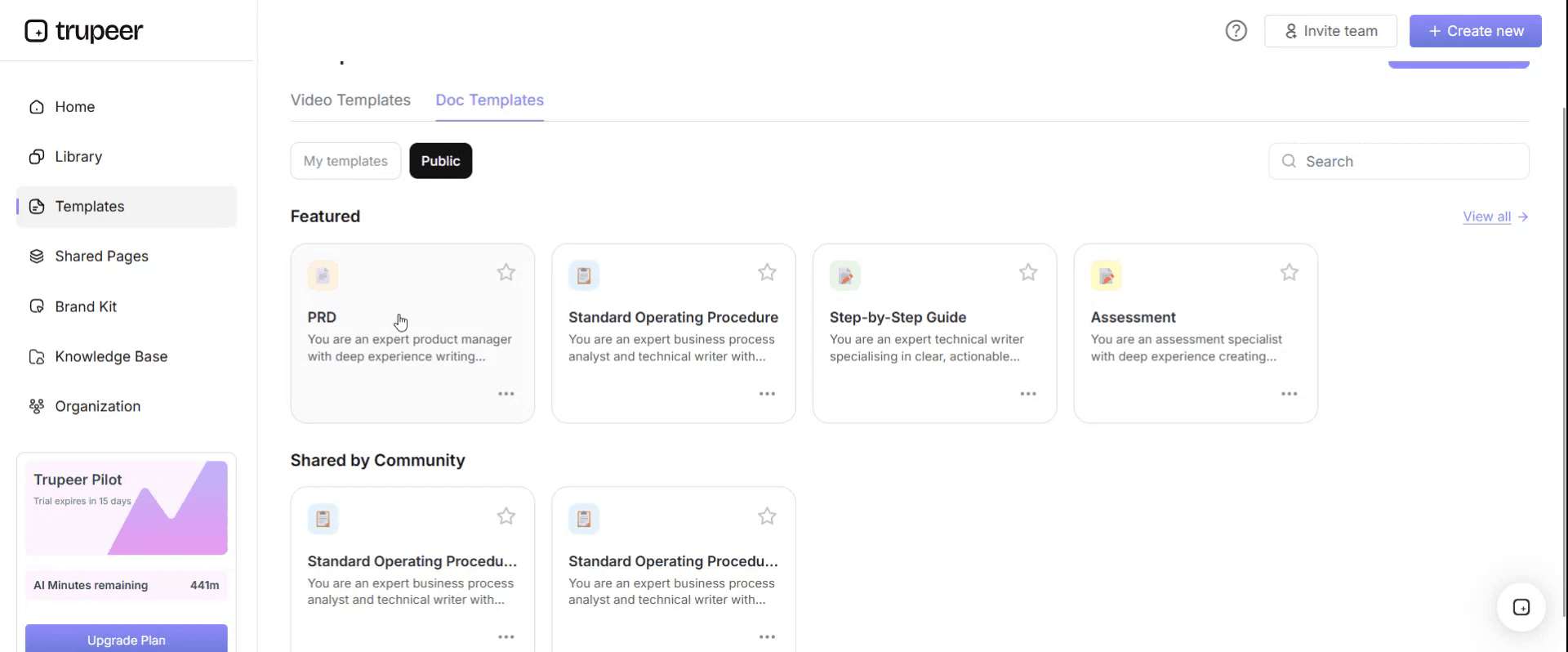
Step 3: Expand the Template View
If needed, expand the template view to see the full layout and details clearly.

Step 4: Edit the Template
Click on Edit to start modifying the selected template.

Within the editor, you can:
Add new sections
Define or update formatting rules
Add a logo and adjust its position and related settings
Step 5: Save Your Customized Template
After making all necessary changes, click Save to store the updated template as your own.
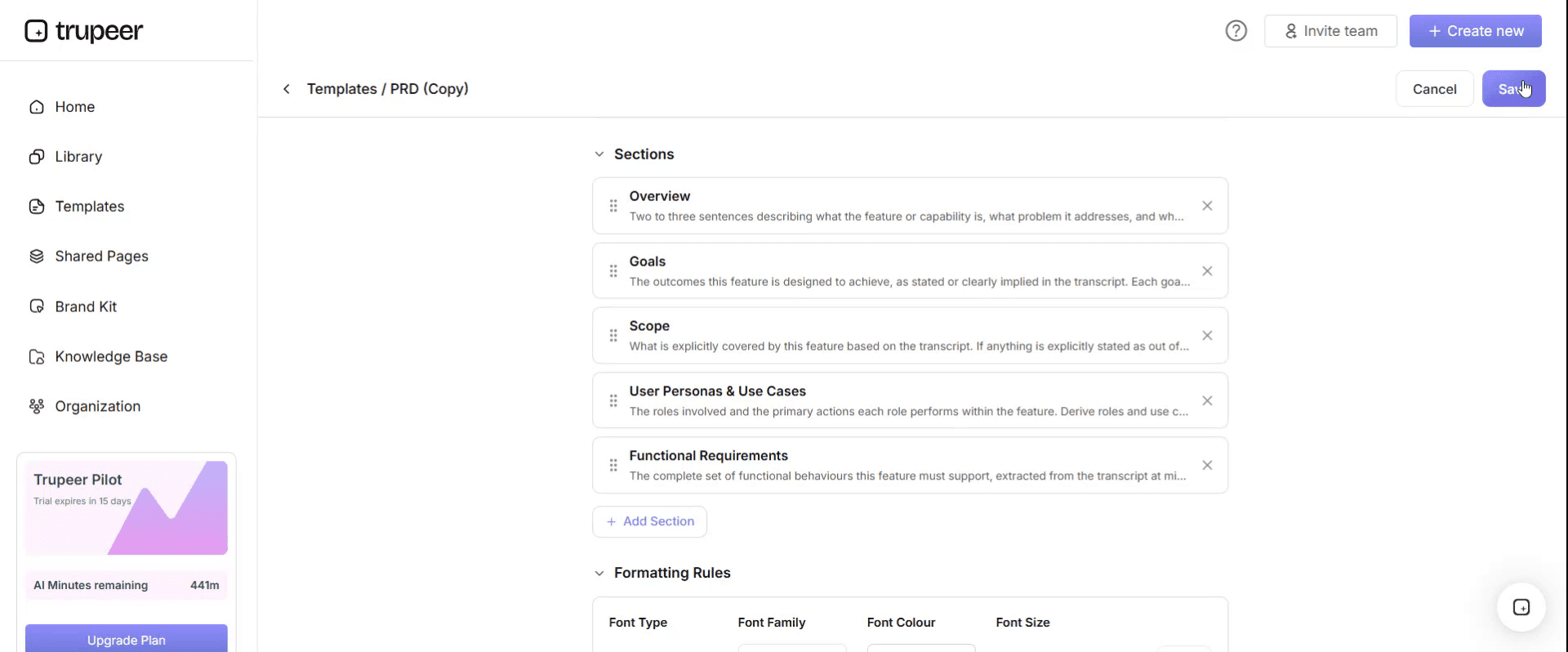
Step 6: Preview and Fine-Tune the Template
When you want to see how your customized template looks, open the Preview.

From the preview screen, you can continue to make adjustments directly if needed, ensuring the template appears exactly as you want.
With an ERP end user training plan template you can:
Train every role on what they actually do: Role-based learning paths instead of generic system tours.
Time training to go-live: A schedule tied to build, test and cutover milestones.
Produce content on time: A content plan with owners and deadlines.
Prove readiness: Measures that show who's ready before go-live.
Support users after go-live: Plans for hypercare, new hires and system updates.
What an ERP end user training plan template must contain
Section | What it covers |
|---|---|
Plan summary | System, scope, go-live date, training lead and approval |
Training objectives | What users must be able to do by go-live |
Stakeholder and role analysis | Roles, numbers, locations, languages and impact level |
Training needs analysis | Tasks per role and the gap between current and future skills |
Role-based learning paths | The courses, videos and guides each role completes |
Content plan | Content to produce, format, owner and due date |
Delivery methods | Instructor-led, virtual, self-paced, hands-on practice, floor support |
Training schedule | Train-the-trainer, super users, end users, tied to project milestones |
Training environment and data | Sandbox system, training data and access |
Readiness measures | Completion, proficiency checks and readiness sign-off |
Go-live and hypercare support | Super users, help channels and quick references |
Post-go-live training | New hires, refreshers and updates after each release |
Risks and RACI | Training risks, mitigations and responsibilities |
Free ERP end user training plan template: the structure to copy
Copy the structure below into your own document, or open it in Trupeer and customize it.
1. Plan summary. System: [ERP and modules]. Scope: [entities, sites, processes]. Go-live date: [date]. Training lead: [name]. Approved by: [programme sponsor, date].
2. Training objectives. By go-live, every user can complete the tasks for their role in [ERP] without help, follow the new processes and controls, and find help when they need it.
3. Stakeholder and role analysis.
Role | Number of users | Locations and languages | Impact | Key tasks |
|---|---|---|---|---|
[AP clerk] | [number] | [sites, languages] | High | [Invoice entry, matching, payment proposals] |
[Buyer] | [number] | [sites, languages] | High | [Requisitions to POs, supplier management] |
[Approver or manager] | [number] | [sites, languages] | Medium | [Approvals, reports] |
[Occasional user] | [number] | [sites, languages] | Low | [Requests, self-service tasks] |
4. Training needs analysis. For each role, list the tasks in the new system, mark which are new, changed or unchanged, and note the skills gap.
5. Role-based learning paths.
Role | Learning path | Format | Duration |
|---|---|---|---|
[AP clerk] | [Navigation basics, invoice entry, matching, exceptions, payment runs] | [Videos, hands-on lab, quick references] | [hours] |
[Approver] | [Approvals and reporting] | [Short videos, quick reference] | [minutes] |
6. Content plan.
Content item | Role | Format | Owner | Due |
|---|---|---|---|---|
[Create a purchase order] | [Buyer] | [Video and step-by-step guide] | [Super user] | [date] |
[Approve an invoice] | [Approver] | [Two-minute video] | [Training team] | [date] |
7. Delivery methods. [Instructor-led sessions for high-impact roles, self-paced videos and guides for all roles, hands-on practice in the training environment, floor support at go-live.]
8. Training schedule. Train-the-trainer: [dates]. Super user training: [dates]. End user training: [dates, ideally in the final weeks before go-live]. Refresher sessions: [dates after go-live].
9. Training environment and data. Sandbox: [environment]. Training data: [realistic data set]. User access: [how and when].
10. Readiness measures. Training completion by role: [target]. Proficiency checks passed: [target]. Readiness sign-off by: [process owners, date].
11. Go-live and hypercare support. Super users on site or on call for [weeks]. Help channels: [channels]. Quick references and help links in the system. Daily review of support questions.
12. Post-go-live training. New hire training path, refreshers for common errors and update training after each system release.
13. Risks and RACI. [Risks such as late build, unavailable trainers or low attendance, with mitigations, and a RACI for training activities.]
Training timeline by project phase
Project phase | Training activities |
|---|---|
Design | Role analysis, training needs analysis, training strategy and plan approved |
Build | Content plan; record and produce content as the system stabilises; set up the training environment |
Test | Validate content during testing; collect FAQs; train trainers and super users |
Before go-live | End user training, proficiency checks, readiness sign-off |
Go-live | Floor support, quick references, help channels, daily issue review |
Hypercare | New FAQs and short videos weekly; refreshers where errors persist |
After go-live | New hire training, update training after each release, adoption reviews |
ERP end user training plan: system variants
The structure above works for any ERP. These are the main things to adapt for common systems.
ERP system | What to adapt in the training plan |
|---|---|
SAP S/4HANA | Train by Fiori role and app, not by transaction; plan for changes between ECC and S/4HANA for existing users; align with SAP Activate phases |
Oracle Fusion Cloud ERP | Plan update training into the calendar, because the cloud service is updated on a regular schedule; train by role and job |
Workday | Train by business process and role, including managers and employees for self-service; plan for Workday's twice-yearly feature releases |
Microsoft Dynamics 365 | Train by workspace and role; cover integration with Microsoft tools users already know; plan for regular service updates |
NetSuite | Train by role and saved search or dashboard; cover customisations clearly; plan for regular release updates |
For SAP, see what to create in SAP Fiori end user training materials.
ERP end user training plan example
Here's how a mid-size company might summarise its plan for a finance and procurement ERP rollout. The details are illustrative.
Element | Summary |
|---|---|
Scope | Finance and procurement modules, two entities, about 400 users |
Roles | AP clerks, AR clerks, buyers, approvers, finance controllers, occasional requesters |
Learning paths | Six role-based paths, each mostly short videos and step-by-step guides recorded in the configured system |
Delivery | Hands-on sessions for high-impact roles, self-paced paths for everyone else |
Schedule | Super users trained during system testing; end users trained in the final three weeks before go-live |
Readiness | Completion and a short task-based check for every high-impact role before go-live |
Support | One super user per team for the first month; weekly FAQ videos during hypercare |
The plan is approved by the programme sponsor and reviewed at each project stage gate.
How to train different ERP user groups
Not every user needs the same depth of training. Plan each group separately:
User group | What they need | Best formats |
|---|---|---|
Power users and super users | Deep knowledge of processes, exceptions and troubleshooting | Hands-on workshops, full process walkthroughs, access to the project team |
Daily transactional users | Confidence in every task they perform, including exceptions | Role-based learning paths, short task videos, hands-on practice |
Managers and approvers | Approvals, dashboards and reports | Two-minute videos and one-page guides |
Occasional users | The one or two tasks they do, such as raising a request | Short videos and help links in the system |
Executives | What changes in reporting and decisions | Briefings and dashboard walkthroughs |
Who owns the ERP end user training plan?
A named training lead owns the plan, reports progress to the programme manager and escalates risks, such as late build or low attendance. Process owners approve the content and readiness for their areas. Super users help produce and deliver training and support colleagues at go-live. The implementation partner, if there is one, supports content and delivery under the training lead's direction. After go-live, ownership moves to the team that runs the system, so training keeps pace with changes.
Readiness measures
Training completion by role, team and site.
Proficiency checks for high-impact roles, using real tasks in the training environment.
Confidence ratings from short surveys before go-live.
Super user coverage for every team and site.
Readiness sign-off by process owners.
After go-live, track adoption, support tickets and time to proficiency; see end user adoption metrics that matter.
How to build ERP training content from recordings
List the tasks for each role from the training needs analysis.
Record super users or key users doing each task in the configured system, once the build is stable.
Generate step-by-step guides and narrated videos with Trupeer, one per task.
Package content by role into learning paths and publish it in one searchable place.
Translate content for every language in scope.
Update content after each change request and system release by editing the script or replacing a single step; see how to keep training documentation current after go-live.
Best practices for training ERP end users
Train by role and task, not by module or menu.
Use your configured system and realistic data, never generic demos.
Train super users first, so help is close at hand; see how to run a super user training program.
Train end users close to go-live, with self-paced content they can revisit.
Measure readiness, don't assume it from attendance.
Plan for after go-live, including new hires and updates.
Common mistakes to avoid
Starting training planning too late in the programme.
Generic training content that doesn't match your processes or configuration.
One long classroom session instead of role-based, task-sized content.
No training environment, so users can't practise.
Ending training at go-live, when most questions arrive.
ERP end user training plan checklist
Plan summary, objectives and approval are in place.
Every role is analysed, with tasks, users, locations and languages.
Role-based learning paths are defined.
The content plan has owners and due dates tied to project milestones.
The training environment and data are ready.
Super users are trained before end users.
Readiness measures and sign-off are agreed.
Go-live, hypercare and post-go-live training are planned.
How Trupeer helps you deliver your ERP end user training plan
ERP training challenge | How Trupeer helps |
|---|---|
Content takes months to produce | Record each task once in the configured system, and Trupeer turns it into a step-by-step guide and narrated video |
Content goes out of date after build changes | Update videos by editing the script, and replace a single step instead of re-recording |
Users work in many languages | Translate guides and videos from one source into 65+ languages |
Users can't find help after go-live | Publish every guide and video in one searchable knowledge base, linked from the ERP |
SAP teams need content fast | Trupeer's SAP training video generator turns SAP recordings into training videos |
Genpact used this recording-first approach for a company-wide Workday rollout, turning recorded process sessions into more than 500 training collaterals across 20 workstreams in five languages, for 140,000 employees in 40 countries, in 3 months instead of 12. Read the Genpact customer story.
For the content bundle new system users need, see the post-implementation training pack.
Download the free ERP end user training plan template
Open the template in Trupeer, apply your brand kit, add your roles, learning paths and schedule, and share it with your programme team. Get the free ERP end user training plan template.
Related templates
Frequently Asked Questions
What is an ERP end user training plan template?
It's a ready-made plan for training everyone who will use a new or upgraded ERP system, covering role analysis, learning paths, content, delivery, schedule, readiness measures and post-go-live support.
What should an ERP training plan include?
A plan summary, objectives, role analysis, training needs analysis, role-based learning paths, a content plan, delivery methods, a schedule tied to project milestones, the training environment, readiness measures, go-live support, post-go-live training, risks and a RACI.
When should ERP end user training start?
Plan it during design, produce content during build and test, train super users during testing and train end users in the final weeks before go-live, so the training is fresh when they start using the system.
How long does ERP end user training take?
It depends on the role. High-impact roles may need several hours of hands-on training, while occasional users may need only a few short videos. Role-based learning paths keep training as short as possible for each person.
How do you measure ERP training readiness?
Track completion by role, run task-based proficiency checks for high-impact roles, ask users how confident they feel and get process owners to sign off readiness before go-live.
Does the template work for SAP, Oracle, Workday, Dynamics and NetSuite?
Yes. The structure works for any ERP, and the system variants section shows what to adapt for SAP S/4HANA, Oracle, Workday, Microsoft Dynamics 365 and NetSuite.
What training formats work best for ERP end users?
A mix of short task videos, step-by-step guides, hands-on practice in a training environment and quick references, supported by super users at go-live.
Is there an ERP training plan template in Word or Excel?
Yes. Keep the plan in Word and the content plan, schedule and readiness tracker in Excel if you prefer. Open the template in Trupeer, customize it and export it in the format you need.
Is there an ERP end user training plan template PDF?
Yes. Export the approved plan as a PDF for distribution, and keep the editable version as the master.
Is the ERP end user training plan template free?
Yes. Sign up free to open the template in Trupeer, customize it and export it.
How do you keep ERP training current after go-live?
Assign owners to each piece of content, review it after every change request and system release, and update videos by editing the script rather than re-recording.
Can I create ERP training content from screen recordings?
Yes. Record key users doing each task in your configured ERP, and Trupeer turns the recordings into step-by-step guides and narrated videos you can package by role.

Understand how work happens.
Carry it into your next transition.
Start Free Trial
Book a Demo
Случаи на употреба
Solutions
конкуренти

