استخدم هذا القالب
توثيق البرمجيات الجيد يعزز الاعتماد، ويقلل عبء الدعم، ويساعد المطورين على التكامل بشكل أسرع. مع Trupeer، يمكنك توفير ساعات في كتابة مستندات البرمجيات من خلال البدء بقالب مجاني لتوثيق البرمجيات، وتخصيصه وفقًا لـ إرشادات علامتك التجارية، وتحويل المحتوى التقني الطويل إلى جولات فيديو توضيحية تجذب كل جمهور.
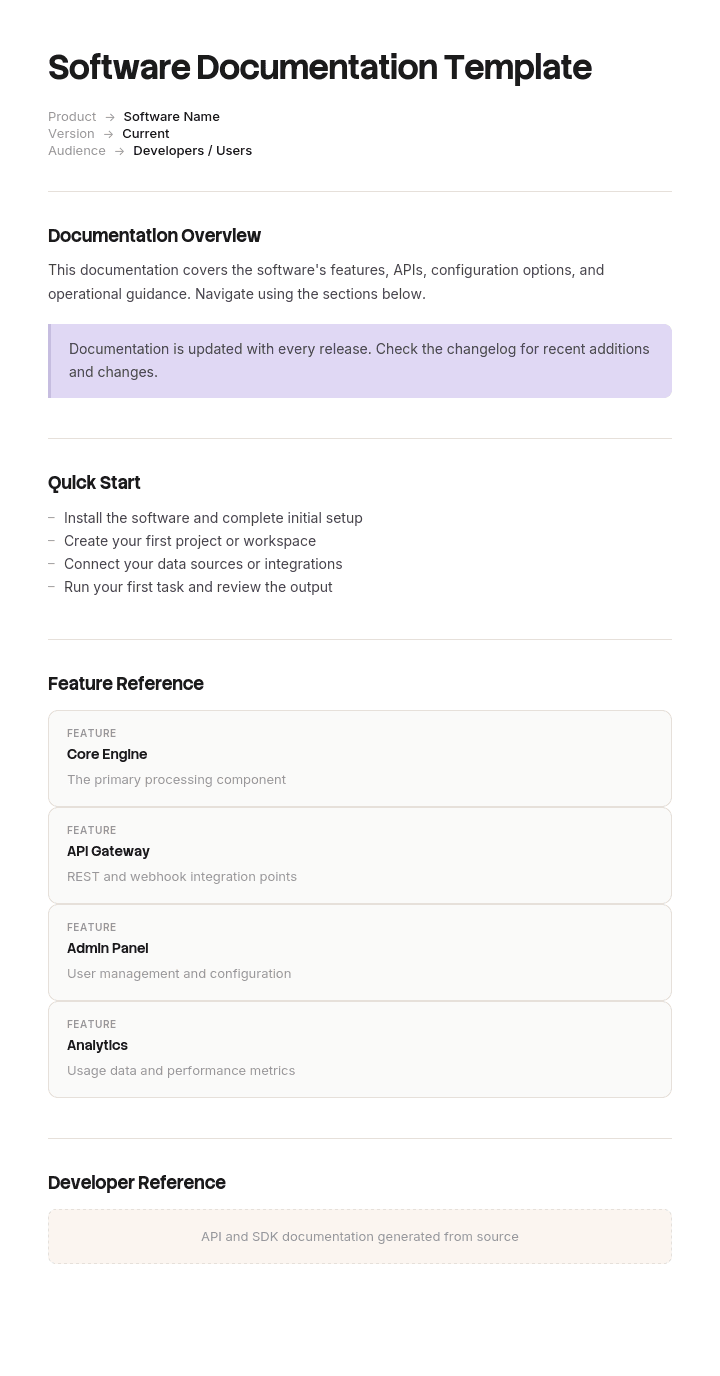
يوفّر قالب توثيق البرمجيات هذا إطارًا منظّمًا لالتقاط نظرة عامة على المنتج، والبدء، وتوثيق الميزات، ومراجع واجهات برمجة التطبيقات، وأدلة التكامل، واستكشاف الأخطاء وإصلاحها، وملاحظات الإصدار. أنشئ جولات فيديو توضيحية بالذكاء الاصطناعي، وترجم إلى أكثر من 65 لغة بنقرة واحدة للمستخدمين والمطورين حول العالم.
كيفية تخصيص هذا القالب في Trupeer
الخطوة 1: افتح قسم القوالب
انتقل إلى قسم القوالب من شريط التنقل الرئيسي.

الخطوة 2: اختر قالبًا وافتحه
انقر على أي قالب تريد العمل عليه لفتحه.

الخطوة 3: وسّع عرض القالب
إذا لزم الأمر، وسّع عرض القالب لرؤية التخطيط الكامل والتفاصيل بوضوح.

الخطوة 4: حرّر القالب
انقر على تحرير لبدء تعديل القالب المحدد.

داخل المحرر، يمكنك:
إضافة أقسام جديدة
تحديد قواعد التنسيق أو تحديثها
إضافة شعار وضبط موضعه والإعدادات المرتبطة به
الخطوة 5: احفظ القالب المخصص
بعد إجراء جميع التغييرات اللازمة، انقر على حفظ لتخزين القالب المحدّث كقالبك الخاص.

الخطوة 6: عاين القالب واضبطه بدقة
عندما تريد رؤية شكل القالب المخصص، افتح المعاينة.

من شاشة المعاينة، يمكنك متابعة إجراء التعديلات مباشرةً إذا لزم الأمر، مع التأكد من أن القالب يظهر تمامًا كما تريد.
باستخدام قالب توثيق البرمجيات يمكنك:
توفير ساعات في الكتابة: تجاوز الصفحة البيضاء ببنية مصممة لمستندات البرمجيات.
تغطية جميع الفئات: أقسام للمستخدمين النهائيين، والمشرفين، والمطورين، وفرق الدعم.
الحفاظ على هوية علامتك التجارية: طبّق شعارك وخطوطك وألوانك باستخدام مجموعة العلامة التجارية من Trupeer.
تقليل عبء الدعم: المستندات الواضحة تساعد المستخدمين والمطورين على خدمة أنفسهم.
التحديث بسهولة: حرّر مرة واحدة وسيعيد Trupeer إنشاء الفيديو تلقائيًا.
الوصول إلى المستخدمين حول العالم: ترجم مستندات البرمجيات إلى أكثر من 65 لغة بنقرة واحدة.
توثيق البرمجيات الجيد هو الفرق بين منتج يتم تبنّيه وآخر يتم التخلي عنه. استخدم هذا القالب لجعل مستنداتك واضحة، مكتملة، وسهلة الاستيعاب.
الأسئلة الشائعة
ما هو توثيق البرمجيات؟
توثيق البرمجيات هو مجموعة المحتوى المكتوب والمرئي ومحتوى الفيديو الذي يشرح كيفية عمل منتج برمجي - ويشمل أدلة المستخدم، ومستندات الإدارة، ومراجع واجهات برمجة التطبيقات، وأدلة التكامل، واستكشاف الأخطاء وإصلاحها، وملاحظات الإصدار. وهو يخدم المستخدمين النهائيين، والمطورين، والمشرفين، وفرق الدعم.
ما هي الأنواع الرئيسية لتوثيق البرمجيات؟
الأنواع الرئيسية هي: توثيق المستخدم (أدلة المستخدم النهائي، والأسئلة الشائعة، والدروس التعليمية)، وتوثيق الإدارة (الإعداد، وإدارة المستخدمين)، وتوثيق المطورين (واجهات برمجة التطبيقات، وSDKs، وأدلة التكامل)، وتوثيق النظام (البنية، والنشر)، وتوثيق العمليات (ملاحظات الإصدار، وسجلات التغييرات).
ماذا يجب أن يتضمن توثيق البرمجيات؟
تتضمن مجموعة توثيق البرمجيات الكاملة دليل البدء، وجولات شرح الميزات، وأدلة الإعداد والإدارة، ومراجع واجهات برمجة التطبيقات مع أمثلة برمجية، وأدلة التكامل، ونصائح استكشاف الأخطاء وإصلاحها، والأسئلة الشائعة، وملاحظات الإصدار، وسجل التغييرات.
كيف تكتب توثيق برمجيات جيدًا؟
ابدأ بالجمهور - ما الذي يحتاجون إلى فعله، وبأي ترتيب؟ استخدم لغة بسيطة وأقسامًا قصيرة. أضف أمثلة برمجية، ولقطات شاشة، وفيديو لزيادة الوضوح. اختبر المستندات مع مستخدمين ومطورين حقيقيين. حدّثها مع كل إصدار - فالمستندات القديمة أسوأ من عدم وجود مستندات.
لماذا توثيق البرمجيات مهم؟
توثيق البرمجيات يعزز التبنّي، ويقلل تذاكر الدعم، ويساعد المطورين على التكامل بشكل أسرع، ويدعم الامتثال، ويحمي المعرفة المؤسسية. الشركات التي تمتلك توثيقًا قويًا تشهد باستمرار معدلات أعلى لتبنّي المنتج وتكاليف دعم أقل من الشركات التي لا تمتلكه.

