
Użyj tego szablonu
An S/4HANA go-live succeeds or fails over a few days. Months of design, build and testing come down to a cutover weekend in which legacy transactions are frozen, data is loaded and checked, interfaces are switched, users are given access and the business restarts on the new system. Miss one task, run two in the wrong order or skip a validation, and the first week of the new system is spent fixing what should have been caught. An S/4HANA cutover plan template gives that weekend a precise, rehearsed sequence.
This free S/4HANA cutover plan template covers the cutover strategy, roles, timeline, the hour-by-hour cutover runbook, data migration and validation, go/no-go criteria, the rollback plan, communication and hypercare, with notes for greenfield and brownfield approaches. Copy the structure below, adapt it to your programme, or open it in Trupeer and customize it.
What is an S/4HANA cutover plan template?
An S/4HANA cutover plan template is a ready-made plan for moving a business from its legacy system to SAP S/4HANA. It sets out every activity needed between the final preparations and go-live, in sequence, with owners, durations, dependencies and checkpoints: freezing legacy activity, closing open periods, migrating and reconciling data, moving configuration, switching interfaces, provisioning users, confirming readiness and restarting business operations.
A good S/4HANA cutover plan template also defines how decisions are made during the cutover, especially the go/no-go decision and the conditions for rolling back, and how users are prepared for their first days on the new system.
Why does an S/4HANA go-live need a detailed cutover plan?
Hundreds of tasks must run in the right order, across technical, data and business teams.
The business is frozen during the cutover, so every hour of delay has a cost.
Data must be complete and reconciled before anyone transacts in the new system.
Interfaces and third parties must switch at the right moment.
Decisions must be fast and clear, especially go/no-go and rollback.
Rehearsals depend on it. Mock cutovers only work when there's a detailed plan to rehearse.
Who uses an S/4HANA cutover plan template?
Cutover managers and leads who own and run the cutover.
SAP programme managers who need the cutover in the overall plan.
Technical and Basis teams handling system builds, transports and conversion.
Data migration leads responsible for loads, validations and reconciliations.
Business process owners and key users who validate data and confirm readiness.
Change, training and support leads preparing users and hypercare.
System integrators delivering the implementation.
Preview the S/4HANA cutover plan template
The template opens with a cutover summary: scope, approach, go-live date, cutover window and decision makers. Roles and contacts follow, then a timeline from preparation through hypercare. The core is the cutover runbook: a sequenced task list with IDs, owners, start and end times, dependencies and status. Separate sections cover data migration and validation, go/no-go criteria, the rollback plan, communication and hypercare. Every section is editable, so you can add tasks, adjust timings or split the runbook by workstream.
How to customize this template in Trupeer
Step 1: Open the Templates Section
Go to the Templates section from the main navigation.

Step 2: Select and Open a Template
Click on any template you want to work with to open it.
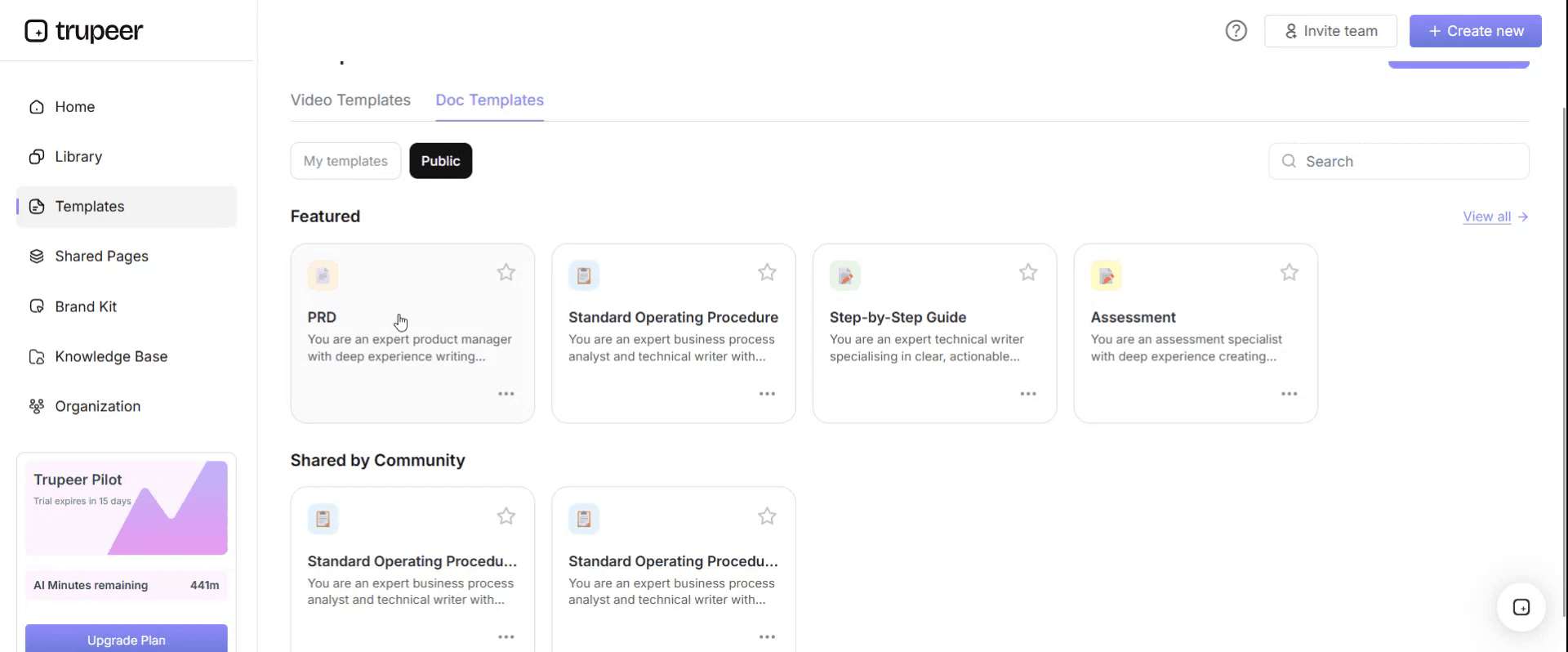
Step 3: Expand the Template View
If needed, expand the template view to see the full layout and details clearly.

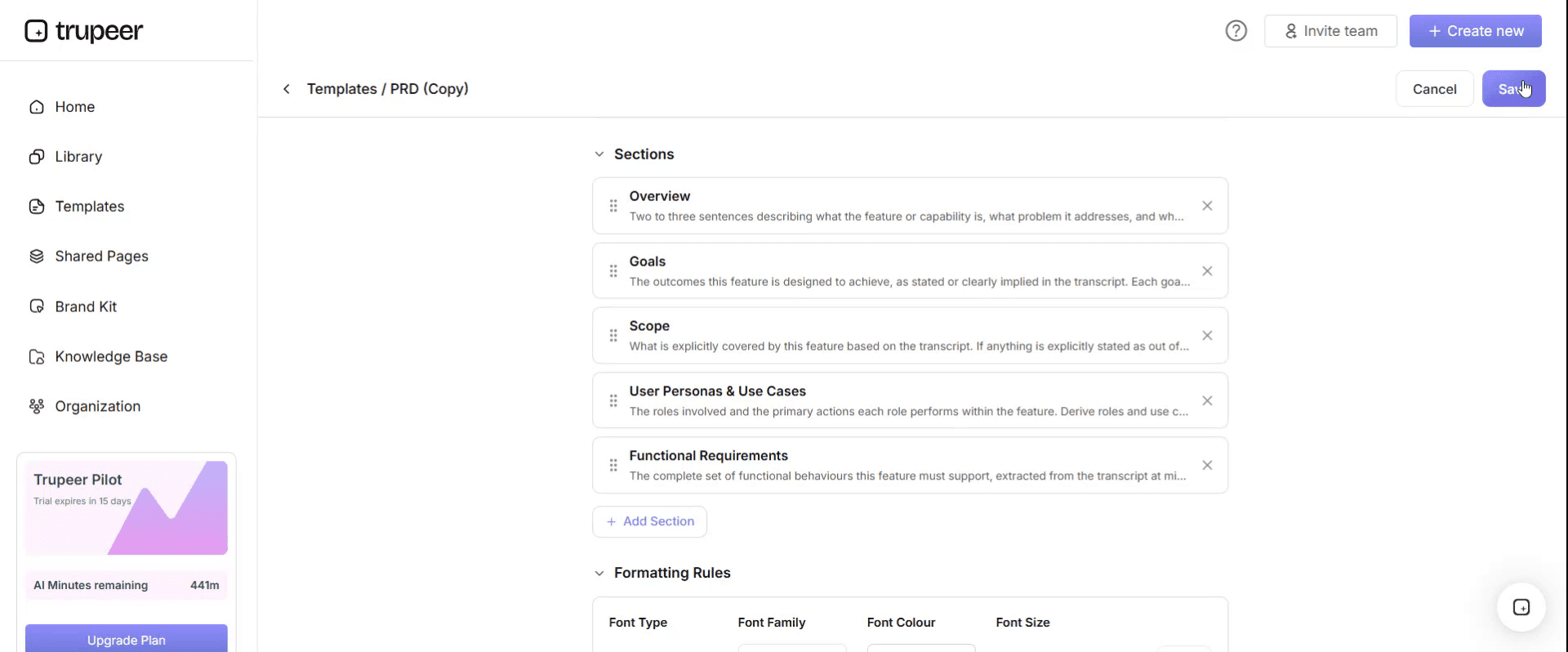
Step 4: Edit the Template
Click on Edit to start modifying the selected template.

Within the editor, you can:
Add new sections
Define or update formatting rules
Add a logo and adjust its position and related settings
Step 5: Save Your Customized Template
After making all necessary changes, click Save to store the updated template as your own.
Step 6: Preview and Fine-Tune the Template
When you want to see how your customized template looks, open the Preview.

From the preview screen, you can continue to make adjustments directly if needed, ensuring the template appears exactly as you want.
With an S/4HANA cutover plan template you can:
Sequence every task, with owners, timings and dependencies.
Rehearse the cutover in mock runs and improve timings each time.
Make go/no-go decisions on evidence, using agreed criteria.
Know exactly when and how to roll back if something goes wrong.
Prepare users and support for the first days on S/4HANA.
What an S/4HANA cutover plan template must contain
Section | What it covers |
|---|---|
Cutover summary | Scope, approach, go-live date, cutover window, decision makers |
Roles and contacts | Cutover manager, technical, data, business and support leads, with contact details and shifts |
Timeline | Preparation, mock cutovers, freeze, cutover weekend, go-live and hypercare |
Cutover runbook | Sequenced tasks with IDs, owners, durations, dependencies and status |
Business freeze | What stops in legacy, when, and how urgent transactions are handled |
Data migration and validation | Load sequence, validation checks, reconciliations and sign-offs |
Interfaces and integrations | When each interface is stopped, switched and restarted |
Users and access | Role provisioning, legacy access removal, first-login checks |
Go/no-go criteria | Conditions to proceed, who decides and when |
Rollback plan | Point of no return, rollback triggers, steps and owners |
Communication plan | Messages to users, customers, suppliers and leaders |
Hypercare | Support model, war room, issue triage and exit criteria |
Free S/4HANA cutover plan template: the structure to copy
Copy the structure below into your own document and spreadsheet, or open it in Trupeer and customize it.
1. Cutover summary. Programme: [name]. Scope: [company codes, plants, processes]. Approach: [greenfield, brownfield or selective]. Go-live date: [date]. Cutover window: [start and end, with time zone]. Go/no-go decision makers: [names and roles].
2. Roles and contacts.
Role | Name | Responsibility | Shift and contact |
|---|---|---|---|
Cutover manager | [Name] | Runs the runbook, tracks status, escalates | [Shift, phone] |
Technical lead | [Name] | System, transports, conversion, performance | [Shift, phone] |
Data migration lead | [Name] | Loads, validations, reconciliations | [Shift, phone] |
Business lead | [Name] | Business freeze, validation sign-offs, readiness | [Shift, phone] |
Interface lead | [Name] | Interface stop, switch and restart | [Shift, phone] |
Support lead | [Name] | Hypercare and war room | [Shift, phone] |
3. Timeline. Mock cutover 1: [dates]. Mock cutover 2: [dates]. Final rehearsal: [dates]. Business freeze starts: [date and time]. Cutover window: [dates]. Go-live: [date and time]. Hypercare: [weeks].
4. Cutover runbook.
ID | Task | Workstream | Owner | Planned start | Duration | Depends on | Status |
|---|---|---|---|---|---|---|---|
CO-001 | [Task] | [Technical, data, business, interfaces] | [Owner] | [Date, time] | [Hours] | [IDs] | [Not started, running, done, blocked] |
5. Business freeze. Legacy transactions stopped: [list]. Freeze start: [time]. Urgent transactions during freeze: [manual process and how they're posted later].
6. Data migration and validation. Load sequence: [objects in order]. For each object: load method, validation checks, reconciliation report, business sign-off owner and status.
7. Interfaces. For each interface: stop time, switch steps, restart time, test and owner.
8. Users and access. Role provisioning complete by: [time]. Legacy access removed or set to read-only: [time]. First-login checks: [who and how].
9. Go/no-go criteria. See the checklist below. Decision meeting: [time]. Decision makers: [names].
10. Rollback plan. Point of no return: [task ID and time]. Rollback triggers: [conditions]. Rollback steps and owners: [summary or link].
11. Communication. Messages before, during and after cutover to users, customers, suppliers, banks and leaders, with owners and times.
12. Hypercare. War room hours, issue triage, priority definitions, daily reviews and exit criteria.
S/4HANA cutover runbook example
Here's part of a cutover runbook for a finance and procurement go-live. Times and tasks are illustrative.
ID | Task | Owner | Start | Duration | Depends on |
|---|---|---|---|---|---|
CO-010 | Business freeze starts in legacy: stop new POs and invoice posting | Business lead | Fri 18:00 | – | – |
CO-020 | Final legacy period-end tasks and balance reports | Finance lead | Fri 18:00 | 4 h | CO-010 |
CO-030 | Stop inbound and outbound interfaces | Interface lead | Fri 20:00 | 1 h | CO-010 |
CO-040 | Load master data: suppliers, customers, materials | Data lead | Fri 22:00 | 6 h | CO-030 |
CO-050 | Validate master data loads and business sign-off | Business lead | Sat 04:00 | 3 h | CO-040 |
CO-060 | Load open items: open POs, open AP and AR items | Data lead | Sat 07:00 | 5 h | CO-050 |
CO-070 | Load general ledger balances and reconcile to legacy | Finance lead | Sat 12:00 | 6 h | CO-060 |
CO-080 | Provision user roles and run access checks | Security lead | Sat 14:00 | 4 h | – |
CO-090 | Switch and test interfaces | Interface lead | Sat 18:00 | 4 h | CO-070 |
CO-100 | Business smoke tests on key transactions | Key users | Sun 08:00 | 4 h | CO-090 |
CO-110 | Go/no-go decision | Steering committee | Sun 14:00 | 1 h | CO-100 |
CO-120 | Open system to users and start hypercare | Cutover manager | Mon 06:00 | – | CO-110 |
S/4HANA go/no-go criteria
Area | Criterion |
|---|---|
Data | All planned loads complete; reconciliations within agreed tolerance; business sign-off received |
System | Production system stable; performance checks passed; transports complete |
Interfaces | All critical interfaces switched and tested end to end |
Business validation | Smoke tests on critical transactions passed |
Users | Roles provisioned and tested; training completed for critical roles |
Support | Hypercare team, war room and escalation paths in place |
Open issues | No open critical defects; workarounds agreed for any high-priority issues |
Rollback | Rollback plan confirmed and still possible if needed |
Greenfield vs brownfield: what changes in the cutover plan?
Greenfield (new implementation) | Brownfield (system conversion) | |
|---|---|---|
Data | Master data, open items and balances migrated into a new system, often with the SAP S/4HANA Migration Cockpit | Data converted in place as part of the technical conversion |
Main cutover risk | Data load completeness, quality and reconciliation | Technical downtime, conversion steps and post-conversion activities |
Downtime | Driven by load and validation volumes | Driven by the technical conversion, often run with SAP's Software Update Manager |
Business validation | Reconcile migrated data against legacy | Check converted data and changed processes |
User impact | New processes and screens for most users | Changed processes and new Fiori apps where adopted |
For the wider choice between approaches, see S/4HANA greenfield vs brownfield.
S/4HANA cutover plan for RISE with SAP and multi-wave rollouts
Many S/4HANA programmes go live in waves, by region, company code or business unit, and many run on RISE with SAP. Both change the cutover plan:
Waves: keep one master runbook and copy it for each wave, adjusting scope, data volumes and interfaces. Run a lessons-learned review after each wave and update the master before the next.
Coexistence: plan how legacy and S/4HANA will run side by side between waves, including intercompany transactions and interfaces.
RISE with SAP: confirm which cutover tasks SAP or the hosting partner performs and which your team owns, and add their contacts and handoff points to the runbook.
Change management: each wave brings a new group of users, so the communication and training plan repeats too; see RISE with SAP change management.
How to run mock cutovers
Run at least two mock cutovers in a production-like environment, using the full runbook.
Time every task, and update durations and dependencies from the actual timings.
Rehearse data loads with production-sized volumes, and run every validation and reconciliation.
Rehearse the go/no-go meeting and a rollback decision.
Log every issue, fix the cause and add any missing tasks.
Freeze the runbook after the final rehearsal, with change control for any later edits.
How to prepare users for the first days after cutover
Technical cutover is only half of go-live. Users need to know what changes on Monday morning: how to log in, where their tasks now live, how to handle transactions held during the freeze and where to get help. Plan short, task-specific guides and videos for the first transactions each role will perform, and make them available before go-live. For how to build these, see how to create ERP cutover training videos for go-live day.
For the full training approach, use the ERP end user training plan template.
Hypercare after an S/4HANA go-live
Run a war room with functional, technical and data experts for the first weeks.
Triage issues by priority, with clear definitions and response times.
Hold daily reviews of open issues, ticket themes and business performance.
Publish short fixes and how-to videos for repeated questions.
Agree hypercare exit criteria, such as stable ticket volumes and completed period-end close.
For the first close on the new system, use the month-end close checklist template.
Common S/4HANA cutover mistakes
Too few rehearsals, so timings and dependencies are guesses.
Underestimating data validation, leaving reconciliation until the last hours.
No clear point of no return, so rollback decisions come too late.
Unclear business freeze rules, so transactions are lost or duplicated.
Interfaces switched without end-to-end tests.
Users unprepared for Monday morning, flooding hypercare with avoidable questions.
S/4HANA cutover plan checklist
Scope, approach, cutover window and decision makers are agreed.
Roles, shifts and contacts are confirmed.
The runbook lists every task with owner, timing and dependencies.
At least two mock cutovers have been run and timings updated.
Data loads, validations and reconciliations have owners and sign-offs.
Interfaces have stop, switch and restart steps.
Go/no-go criteria and the rollback plan are agreed.
Communication and hypercare are planned.
Users have task-specific guides for their first days.
How Trupeer helps you prepare for S/4HANA cutover
Cutover challenge | How Trupeer helps |
|---|---|
Cutover tasks are known by a few technical experts | Record each task during mock cutovers, and Trupeer turns it into a step-by-step guide and video for the runbook |
Users don't know what changes on Monday | Record the first transactions each role will perform in S/4HANA and share short videos before go-live |
Training must be ready in many languages | Translate guides and videos from one source into 65+ languages |
Content changes after the final rehearsal | Update videos by editing the script, and replace a single step instead of re-recording |
SAP training content is needed fast | Trupeer's SAP training video generator turns SAP recordings into training videos |
Genpact used Trupeer's recording-first approach for a company-wide Workday rollout, turning recorded process sessions into more than 500 training collaterals across 20 workstreams in five languages, for 140,000 employees in 40 countries, in 3 months instead of 12. Read the Genpact customer story.
Download the free S/4HANA cutover plan template
Open the template in Trupeer, add your runbook tasks, owners and timings, and share it with your cutover team. Get the free S/4HANA cutover plan template.
Related templates
Frequently Asked Questions
What is an S/4HANA cutover plan template?
It's a ready-made plan for moving from a legacy system to SAP S/4HANA, covering the cutover runbook, roles, timeline, business freeze, data migration and validation, interfaces, user access, go/no-go criteria, rollback, communication and hypercare.
What should an S/4HANA cutover plan include?
A cutover summary, roles and contacts, timeline, sequenced runbook, business freeze rules, data migration and validation steps, interface steps, user access, go/no-go criteria, rollback plan, communication plan and hypercare plan.
How long does an S/4HANA cutover take?
It depends on the approach, data volumes and number of systems. Mock cutovers give the real duration; plan the cutover window from rehearsal timings, with contingency.
How many mock cutovers should you run?
At least two in a production-like environment, plus a final rehearsal, updating timings and tasks after each one.
What are typical go/no-go criteria?
Completed and reconciled data loads with business sign-off, a stable production system, tested interfaces, passed smoke tests, provisioned users, hypercare readiness, no open critical defects and a confirmed rollback plan.
What's a point of no return in a cutover?
It's the task after which rolling back to the legacy system is no longer practical. The rollback decision must be made before it.
How does a brownfield cutover differ from greenfield?
Greenfield cutovers focus on migrating and reconciling data into a new system. Brownfield cutovers focus on the technical conversion of the existing system, its downtime and the post-conversion activities.
Is there an S/4HANA cutover plan template in Excel?
Yes. The runbook works best in Excel or a cutover tool, with filters for owner, status and workstream. Customize the template in Trupeer and export it, or copy the structure into Excel.
Is there an S/4HANA cutover plan template in Word or PDF?
Yes. Keep the strategy, go/no-go criteria, rollback plan and communication plan in Word, and export a PDF of the approved plan for sign-off.
Is the S/4HANA cutover plan template free?
Yes. Sign up free to open the template in Trupeer, customize it and export it.
Who owns the S/4HANA cutover plan?
The cutover manager owns and runs it, with technical, data, business, interface and support leads owning their tasks, and the steering committee making the go/no-go decision.
How do you prepare users for go-live after cutover?
Give each role short guides and videos for the first transactions they'll perform, explain how transactions held during the freeze will be handled, and make support channels clear before go-live.


