Trupeer Blog
Podsumuj

Your team has spent years writing SOPs: how to process an invoice, onboard a supplier, reset a user's access, handle a refund. Now AI agents are arriving in every operations team, and they need instructions too. The good news is that you don't have to start from scratch. A well-written SOP already contains most of what an agent needs to do a task reliably: the purpose, the steps, the rules and, crucially, the exceptions.
This guide to going from SOP to AI agent skills shows how to turn SOPs into skills using the SKILL.md format. You'll see what an agent skill is, how each part of an SOP maps to a skill, how to turn the exceptions section into guardrails, a worked example, a step-by-step method and the governance you need before letting an agent run a business process.
What is an AI agent skill?
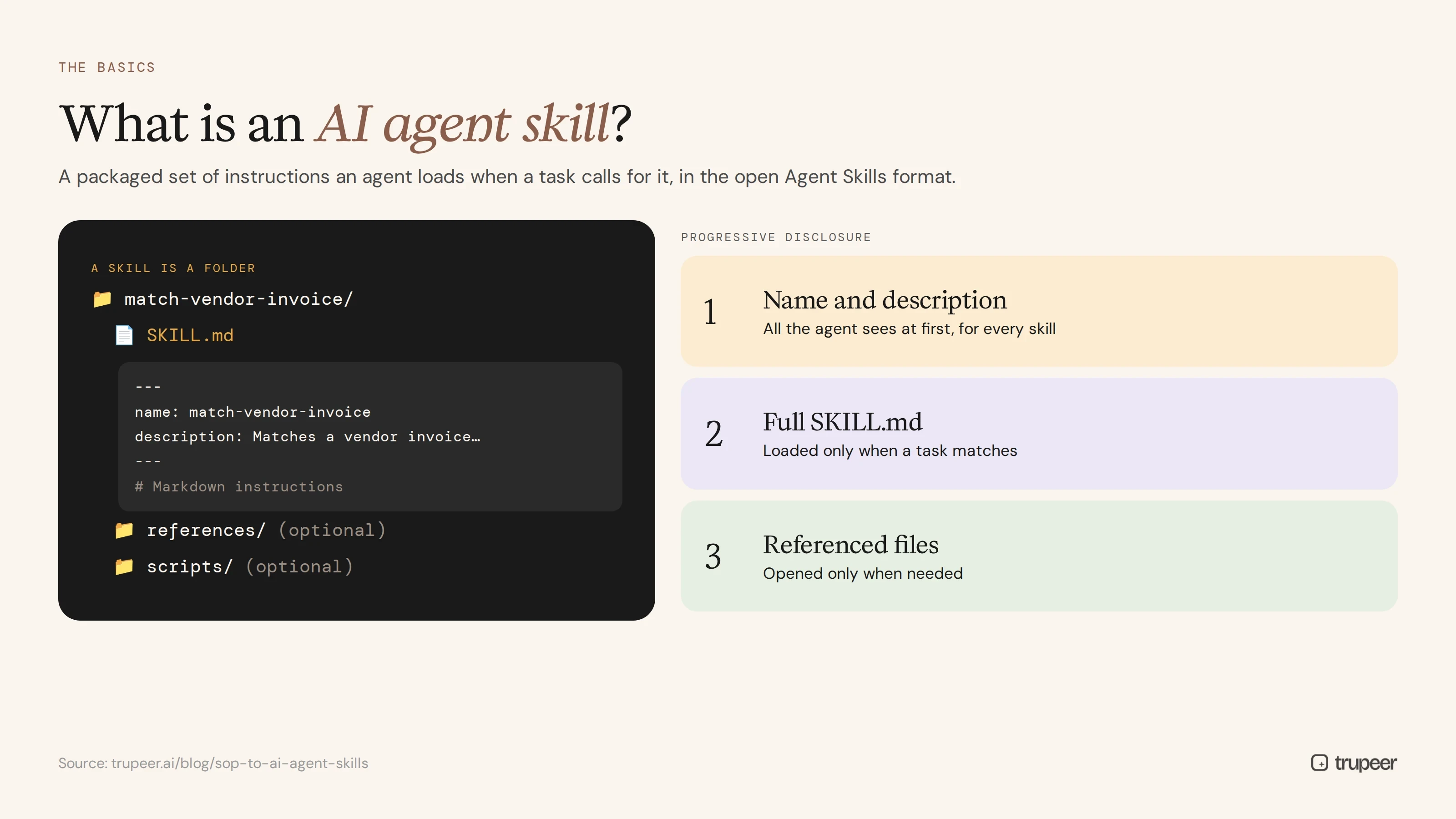
An AI agent skill is a packaged set of instructions an AI agent can load when a task calls for it. In the open Agent Skills format, a skill is a folder that contains a SKILL.md file, plus optional scripts, reference documents and other assets. The SKILL.md file starts with YAML frontmatter, where only two fields are required: name and description. The rest of the file is plain markdown instructions.
Skills use progressive disclosure. An agent first sees only each skill's name and description, loads the full SKILL.md when a task matches, and opens any referenced files only when it needs them. That keeps large skill libraries efficient. The format was originally developed by Anthropic and released as an open standard in December 2025, and it's now supported by many agent platforms.
Why do SOPs make good AI agent skills?
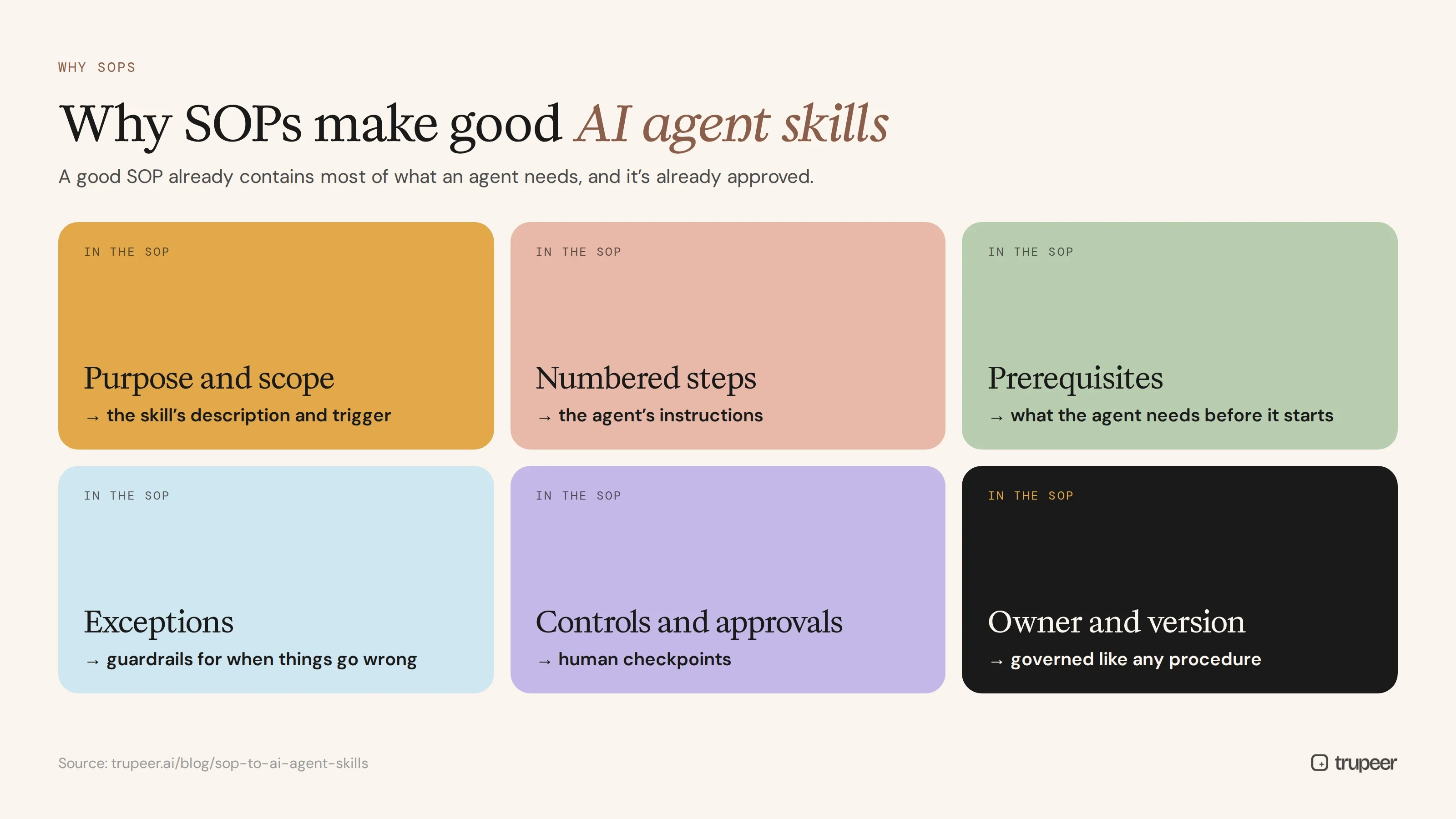
SOPs and agent skills have a lot in common. Both describe how to do a specific task, step by step, under defined rules. A good SOP already provides:
A clear purpose and scope, which becomes the skill's description and its trigger.
Numbered steps, which become the agent's instructions.
Prerequisites, which tell the agent what it needs before it starts.
Exceptions, which become guardrails: what to do, or not do, when something goes wrong.
Controls and approvals, which become checkpoints where a human must decide.
An owner and a version, which keep the skill governed like any other procedure.
Turning SOPs into AI agent skills reuses work your organisation has already approved, rather than writing new, untested prompts. If your SOPs are long, break them into task-sized pieces first; see how to break SOPs into knowledge articles.
SOP to AI agent skills: how does each SOP section map to SKILL.md?
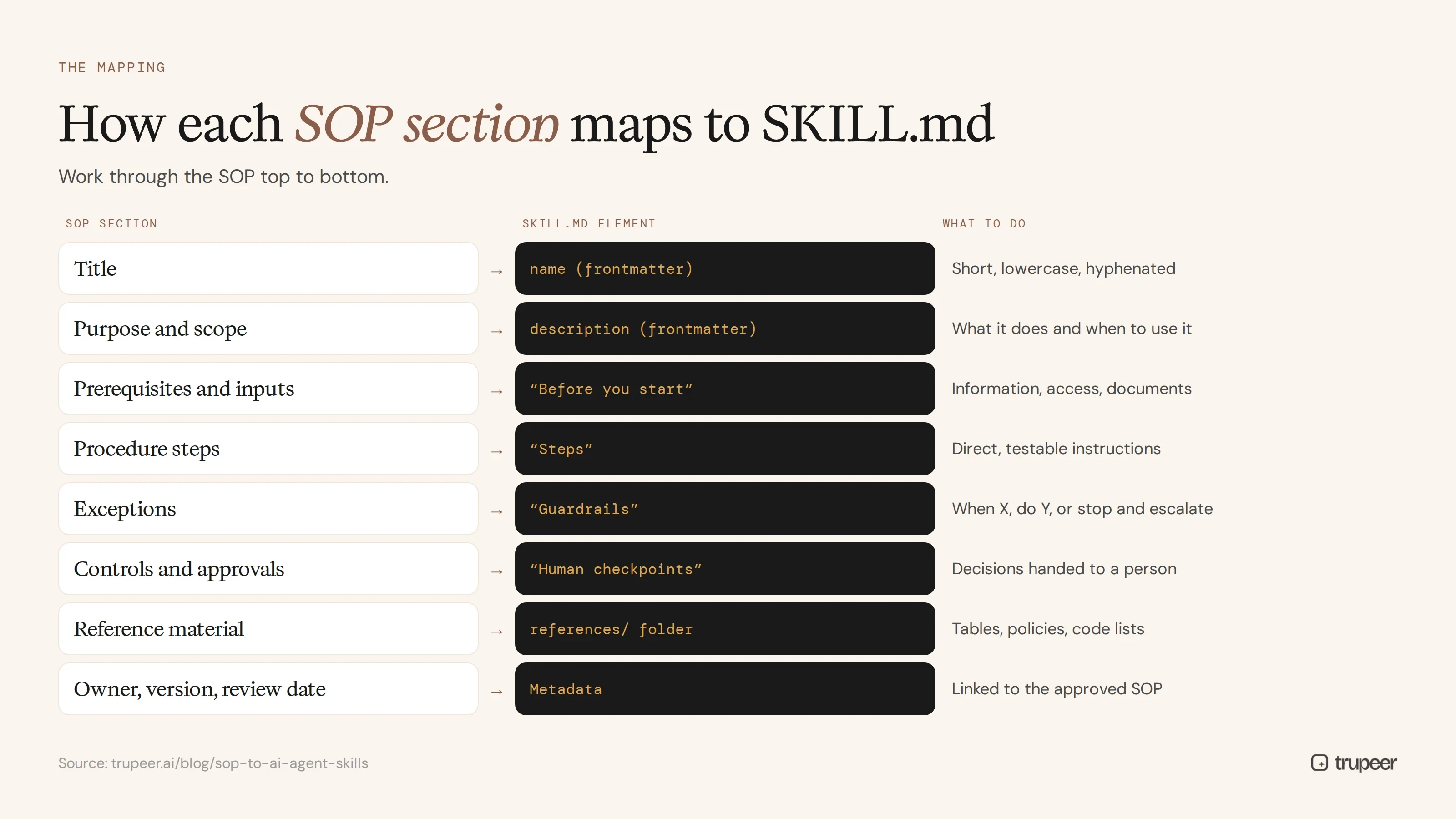
SOP section | SKILL.md element | What to do |
|---|---|---|
Title |
| Use a short, lowercase, hyphenated name, such as |
Purpose and scope |
| Say what the skill does and when to use it, in one or two sentences |
Prerequisites and inputs | "Before you start" section | List the information, access and documents the agent needs |
Procedure steps | "Steps" section | Rewrite each step as a direct, testable instruction |
Exceptions | "Guardrails" section | Turn each exception into a rule: when X, do Y, or stop and escalate |
Controls and approvals | "Human checkpoints" section | Name the decisions the agent must hand to a person |
Reference material | Files in a | Move long tables, policies and code lists out of |
Owner, version, review date | Comments or a metadata section | Keep the skill linked to the approved SOP version |
How do you turn SOP exceptions into agent guardrails?
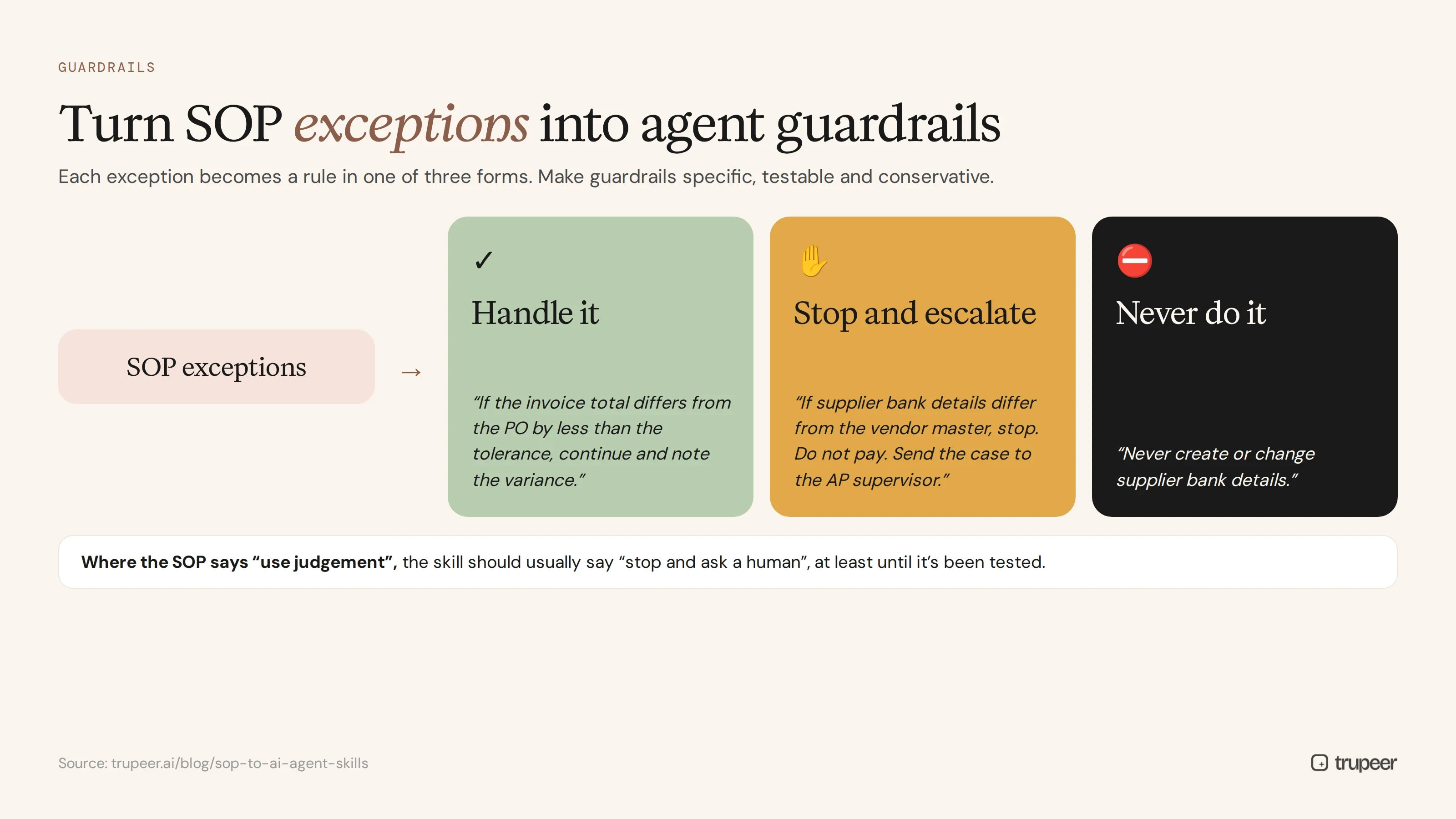
The exceptions section is the most valuable part of an SOP for an agent. It's where your experienced people have written down what goes wrong and what to do about it. For an agent, those exceptions become guardrails, and each one should become a rule in one of three forms:
Handle it: "If the invoice total differs from the PO by less than the tolerance, continue and note the variance."
Stop and escalate: "If the supplier's bank details differ from the vendor master, stop. Do not pay. Send the case to the AP supervisor."
Never do it: "Never create or change supplier bank details."
Good guardrails are specific, testable and conservative. Where the SOP says "use judgement", the skill should usually say "stop and ask a human", at least until the agent has been tested on real cases. Add guardrails the SOP takes for granted too: which systems the agent may use, what data it must not expose and which actions can't be undone.
Example: turning an invoice SOP into a skill
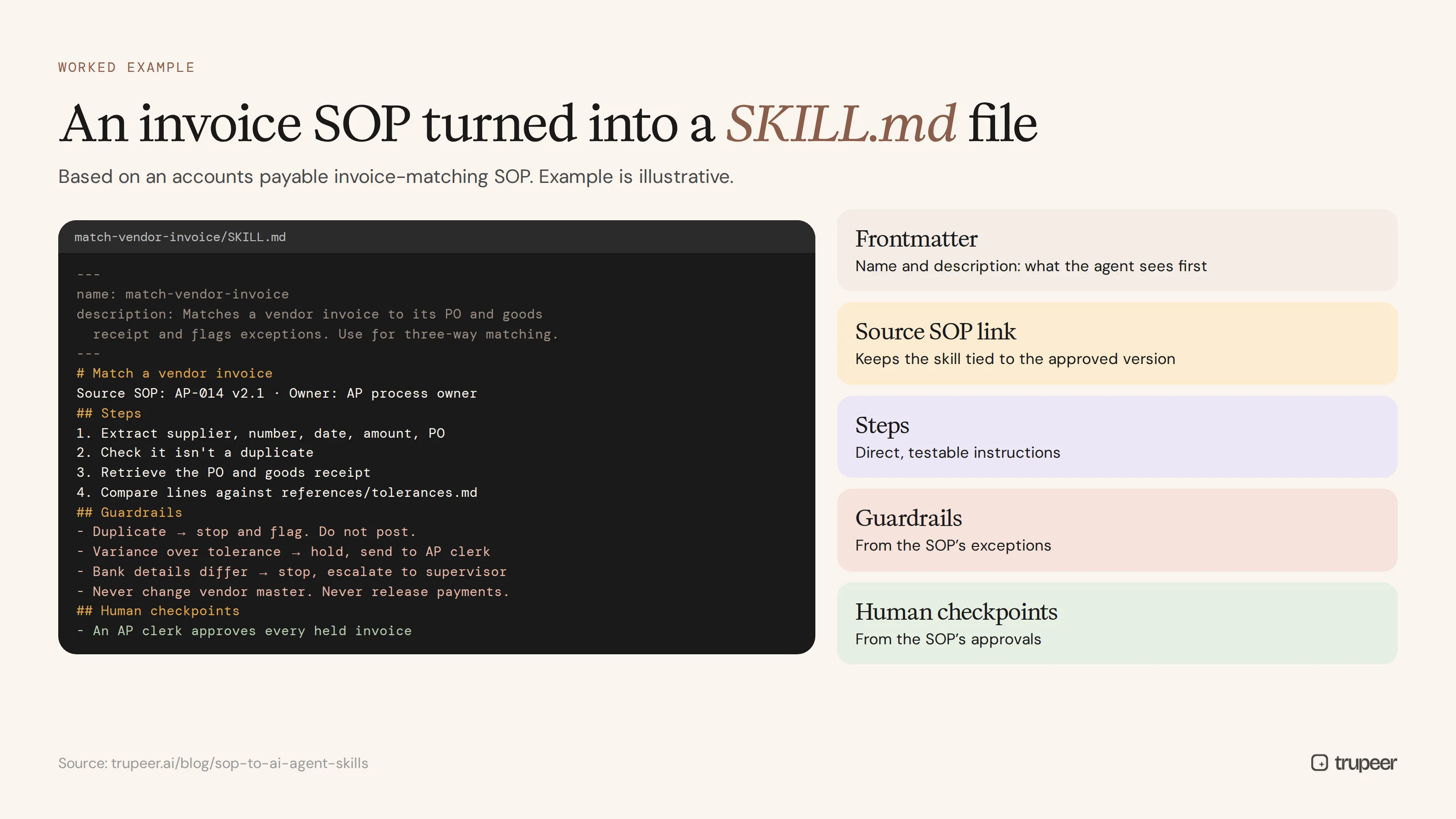
Here's a simplified example based on an accounts payable invoice SOP. The SOP covers matching vendor invoices to purchase orders, with exceptions for price variances, missing receipts and bank detail changes.
The example is illustrative; adapt the steps, tolerances and checkpoints to your own SOP and systems. For the full SOP this is based on, see the AP invoice processing SOP guide.
How do you turn SOPs into AI agent skills, step by step?
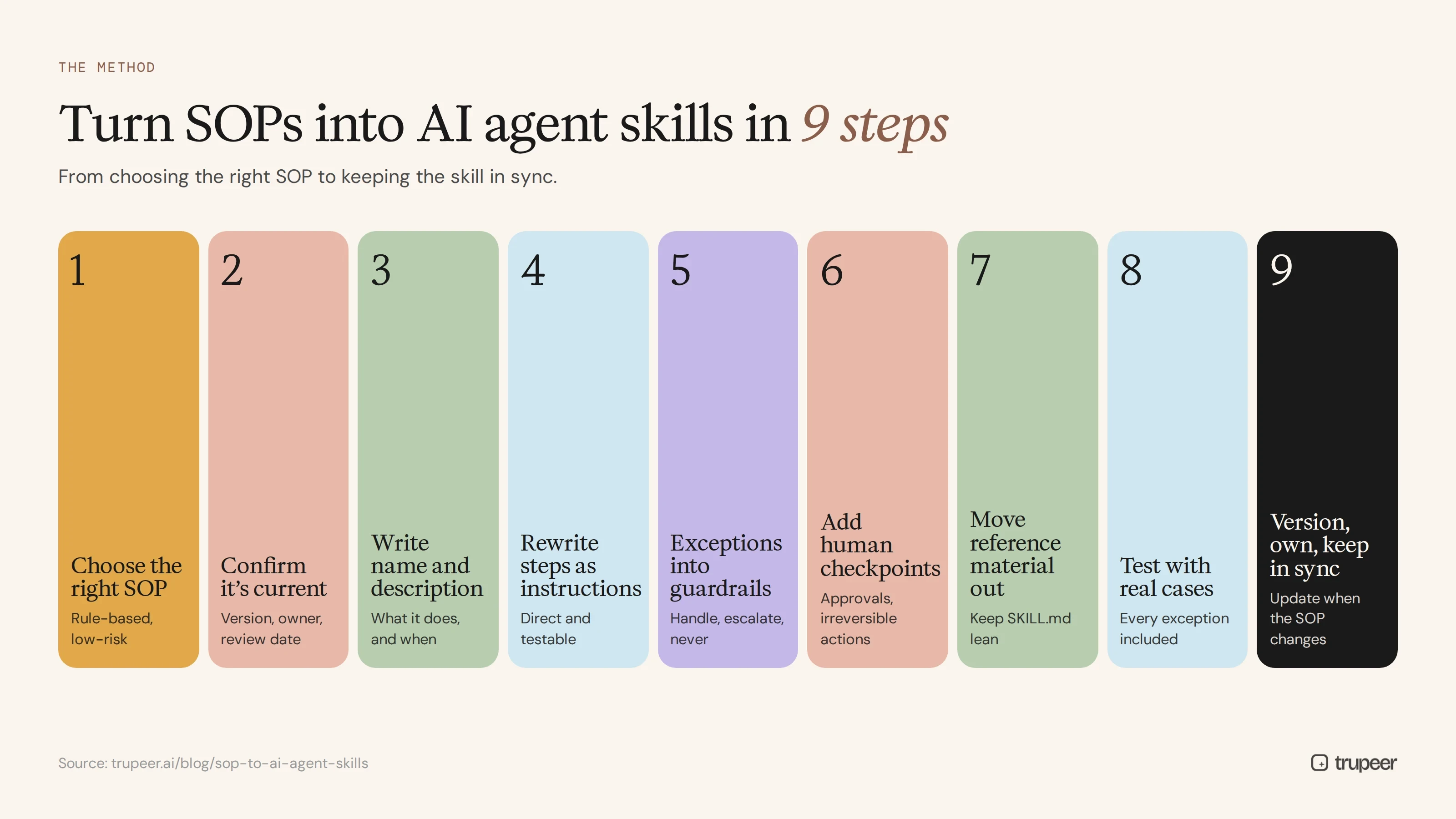
Step 1: Choose the right SOP
Start with an approved, current, rule-based SOP for a task with clear inputs and outputs, a manageable number of exceptions and a low cost of mistakes. High-volume, well-understood tasks are good first candidates; see how to identify automation opportunities in documented processes.
Step 2: Confirm the SOP is current
An agent will follow outdated steps without hesitation. Check the SOP's version, owner and review date before you convert it, and correct anything that no longer matches the system; see SOP version control.
Step 3: Write the name and description
Give the skill a clear name and a description that says what it does and when to use it. The description is what the agent sees first, so it decides whether the skill is used at the right time.
Step 4: Rewrite the steps as instructions
Turn each SOP step into a direct instruction the agent can follow and you can test. Remove screen-by-screen detail the agent doesn't need, and keep the decisions and rules it does. SOPs written in a consistent SOP template are much easier to convert, because every procedure has the same sections in the same order.
Step 5: Convert exceptions into guardrails
Work through the exceptions section line by line, turning each one into a handle, stop-and-escalate or never-do rule.
Step 6: Add human checkpoints
Mark every approval, irreversible action and judgement call as a point where the agent must hand over to a person.
Step 7: Move long reference material out
Keep SKILL.md focused. Put policies, code lists and tolerance tables in separate reference files the agent opens only when needed.
Step 8: Test with real cases
Run the skill against realistic examples, including every exception in the SOP, and compare the agent's results with what an experienced person would do.
Step 9: Version, own and keep in sync
Link each skill to its source SOP and version, assign an owner and update the skill whenever the SOP changes.
Where does Trupeer fit?
Turning SOPs into AI agent skills works best when the SOP itself is accurate, current and complete, including the exceptions. Trupeer helps at both ends:


Capture the real procedure: record an experienced person doing the task with Trupeer's AI screen recorder, narrating the rules and exceptions, and Trupeer turns the recording into a step-by-step SOP.
Generate documents in the structure you need: Trupeer's Skills feature bundles custom instructions, formatting rules and document structure into a reusable asset you apply to a recording. You can set one up to produce output that follows the SKILL.md structure, then export it as Markdown.
Keep it current: when the process changes, update the recording or SOP and regenerate the output, so the agent skill and the human SOP stay in step.
What governance do agent skills need?
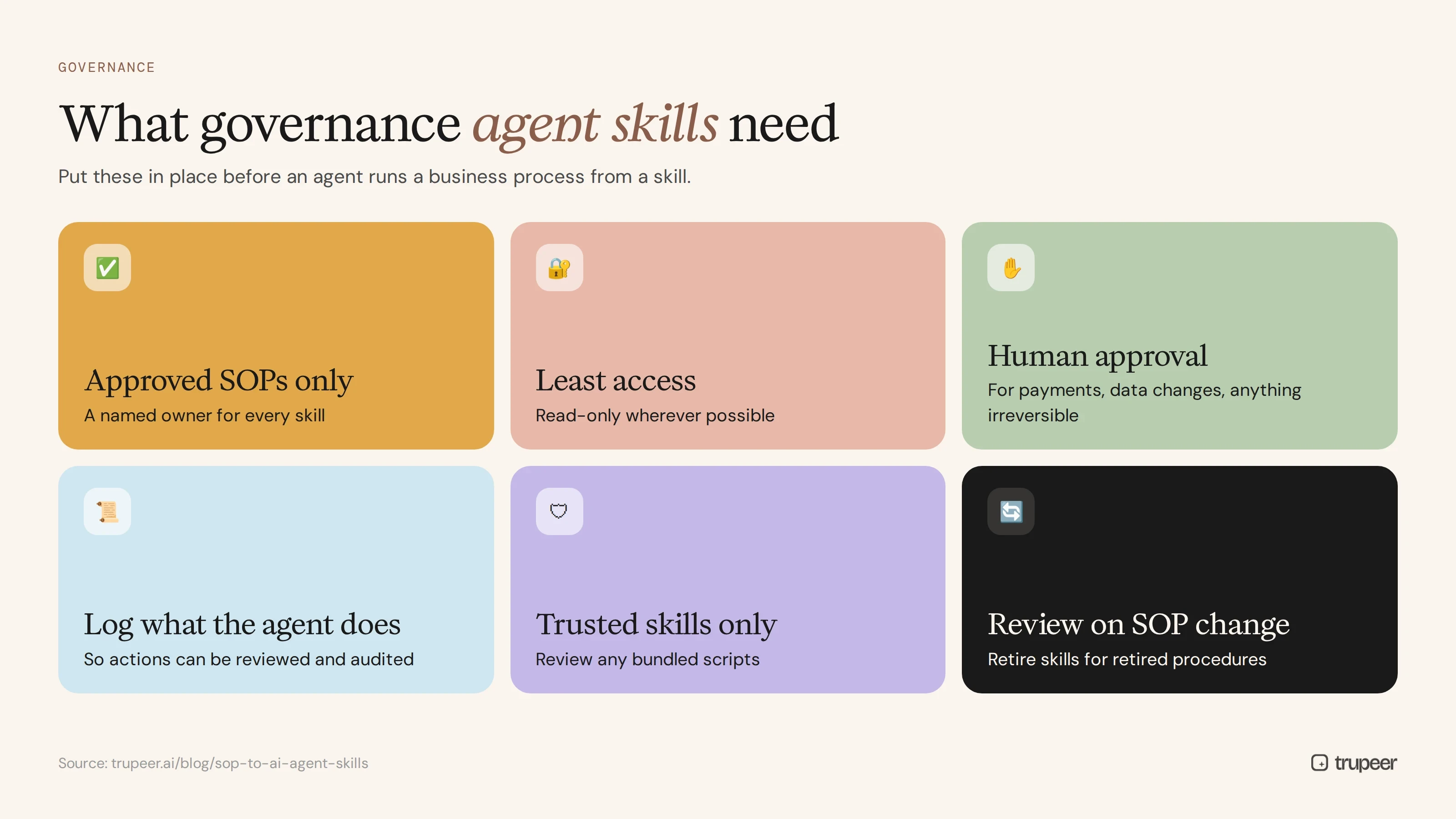
Before an agent runs a business process from a skill, put basic governance in place:
Use approved SOPs only, with a named owner for every skill.
Give agents the least access they need, with read-only access wherever possible.
Require human approval for payments, data changes and anything irreversible.
Log what the agent does, so actions can be reviewed and audited.
Install only trusted skills, and review any scripts bundled with them.
Review skills when SOPs change, and retire skills for retired procedures.
For how agents access your knowledge more broadly, see how to integrate your video knowledge base with AI agents via MCP.
Common mistakes when turning SOPs into agent skills
Converting outdated SOPs, so the agent follows steps that no longer work.
Dropping the exceptions, leaving the agent with only the happy path.
Vague descriptions, so the skill is used at the wrong time or not at all.
Putting everything in one file, instead of keeping
SKILL.mdlean and moving reference material out.Skipping human checkpoints for approvals and irreversible actions.
No owner, so the skill and the SOP drift apart.
SOP to AI agent skills checklist
The SOP is approved, current and owned.
The skill has a clear name and a description that says what and when.
Steps are rewritten as direct, testable instructions.
Every exception is a guardrail: handle, stop and escalate, or never do.
Approvals and irreversible actions are human checkpoints.
Long reference material sits in separate files.
The skill has been tested on real cases, including exceptions.
The skill links to its source SOP version and has an owner.
Frequently asked questions
What is a SKILL.md file?
It's the core file of an AI agent skill. It starts with YAML frontmatter containing at least a name and a description, followed by markdown instructions the agent follows when the skill is triggered.
How do you turn an SOP into an AI agent skill?
Map the SOP's title to the skill name, its purpose to the description, its steps to instructions, its exceptions to guardrails and its approvals to human checkpoints, then test the skill and keep it in sync with the SOP.
Why are SOP exceptions important for agent skills?
Exceptions describe what goes wrong and how to handle it. Turned into guardrails, they tell the agent when to continue, when to stop and escalate, and what it must never do.
Which SOPs should be turned into agent skills first?
Approved, current, rule-based SOPs for high-volume tasks with clear inputs and outputs, manageable exceptions and a low cost of mistakes.
Do AI agent skills replace SOPs?
No. The SOP remains the approved procedure for people and auditors. The skill is a version of it written for an agent, and the two should be kept in sync.
Can agent skills include scripts?
Yes. Skills can bundle scripts and other files alongside SKILL.md, but review any bundled code carefully and give agents only the access they need.
How do you keep agent skills up to date?
Link each skill to its source SOP version, assign an owner, and update the skill whenever the SOP or the underlying system changes.
How does Trupeer help create agent skills from SOPs?
Trupeer turns recordings into accurate SOPs, and its Skills feature lets you apply reusable instructions and formatting to recordings, so you can generate output in the structure you need and export it as Markdown.
Turn your best SOPs into skills your agents can run
Your SOPs already capture how work should be done, including what to do when things go wrong. Turn the right ones into AI agent skills, with guardrails from their exceptions and humans at the key decisions, and keep both in step as processes change. Start free with Trupeer.
Powiązane blogi



