
Použijte tuto šablonu
Payroll is the one process every employee notices when it goes wrong. A missed overtime claim, a starter paid late, a leaver paid twice or a tax code entered incorrectly erodes trust quickly, and fixing it after the payment run is slow and awkward. Most payroll errors don't come from complex calculations; they come from late inputs, unclear cut-offs and steps that depend on one person's memory. A payroll SOP template gives your team one documented way to run every pay cycle.
This free payroll SOP template covers the full payroll cycle, from collecting inputs and validating changes to calculating, reviewing, approving, paying and reconciling, with a payroll calendar, an exception-handling table and the controls auditors expect. Copy the structure below, see a filled-in example, or open it in Trupeer and customize it for your organisation.
What is a payroll SOP template?
A payroll SOP template is a ready-made standard operating procedure for running payroll. It sets out who does what, in what order and by when, from receiving starter, leaver and change inputs to calculating pay, reviewing variances, approving the payroll, making payments, filing statutory returns and reconciling to the general ledger. A good payroll SOP template also covers exceptions, such as late changes, off-cycle payments and overpayments, and the controls that protect employees and the business.
Payroll sits inside the wider employee lifecycle, so this SOP works alongside your hire to retire SOP template.
Why does payroll need an SOP?
Employees depend on it. Late or wrong pay affects people's lives and their trust in the organisation.
Deadlines are fixed. Pay dates, bank cut-offs and statutory filing dates don't move.
Inputs come from many places. HR, managers, time systems and benefits providers all feed payroll.
Errors are costly to fix. Overpayments, underpayments and filing errors take time and goodwill to correct.
Payroll is a fraud target. Fake employees and changed bank details are known risks.
Knowledge is often held by one or two people. A documented procedure protects the business when they're away.
Who uses a payroll SOP template?
Payroll specialists and managers who run each pay cycle.
HR operations teams who send starter, leaver and change inputs.
Finance teams who approve payroll funding and reconcile payroll to the ledger.
People managers who approve overtime, timesheets and allowances.
Shared services and outsourced payroll providers running payroll for several entities or clients.
HRIS teams implementing or upgrading payroll systems.
Auditors reviewing payroll controls.
Preview the payroll SOP template
The template opens with document control, purpose and scope, then a roles table for payroll, HR, managers, finance and treasury. A payroll calendar sets the input cut-offs, review, approval, payment and filing dates. The procedure covers the payroll cycle in eight stages, each with numbered steps, owners and expected results. An exception-handling table sets out what to do with late changes, off-cycle payments, overpayments and suspicious bank changes. The template closes with controls, KPIs, records and revision history. Every section is editable, so you can add your payroll system's steps, pay groups and country-specific requirements.
How to customize this template in Trupeer
Step 1: Open the Templates Section
Go to the Templates section from the main navigation.

Step 2: Select and Open a Template
Click on any template you want to work with to open it.
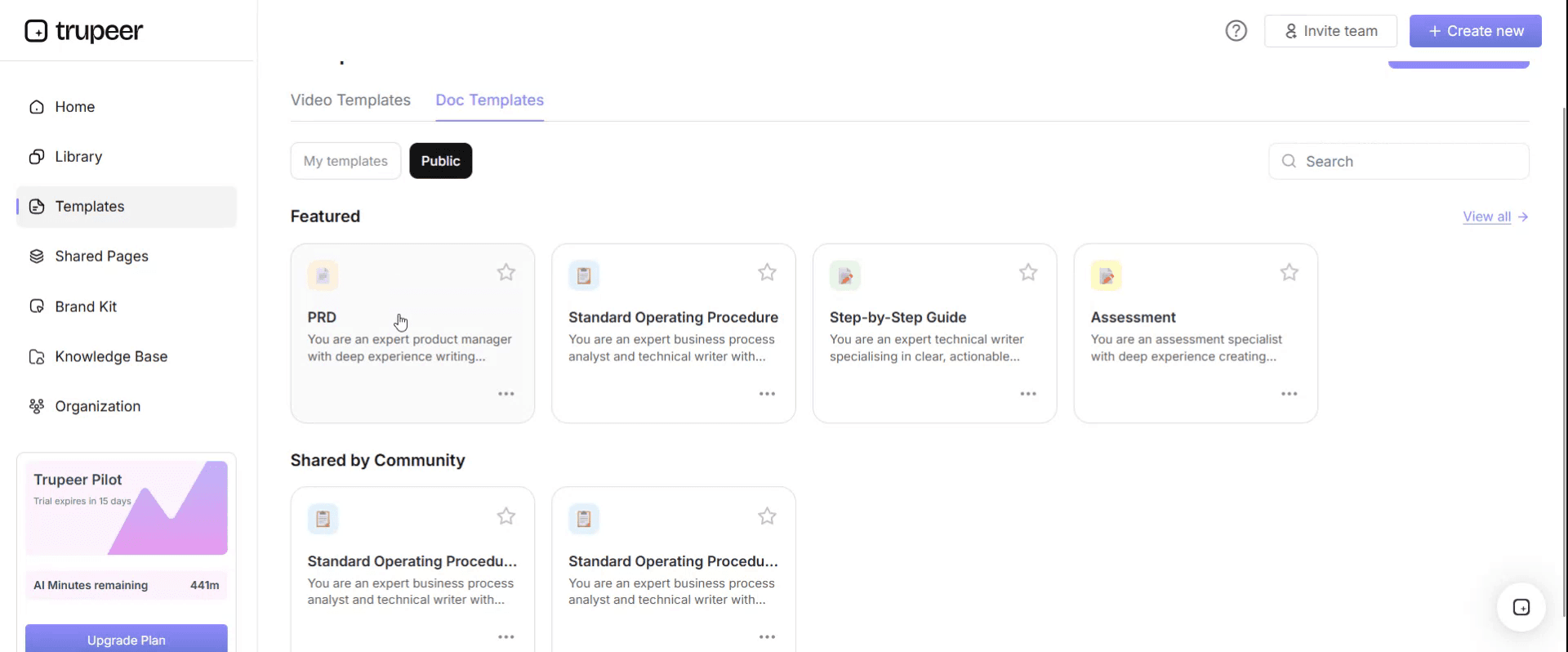
Step 3: Expand the Template View
If needed, expand the template view to see the full layout and details clearly.

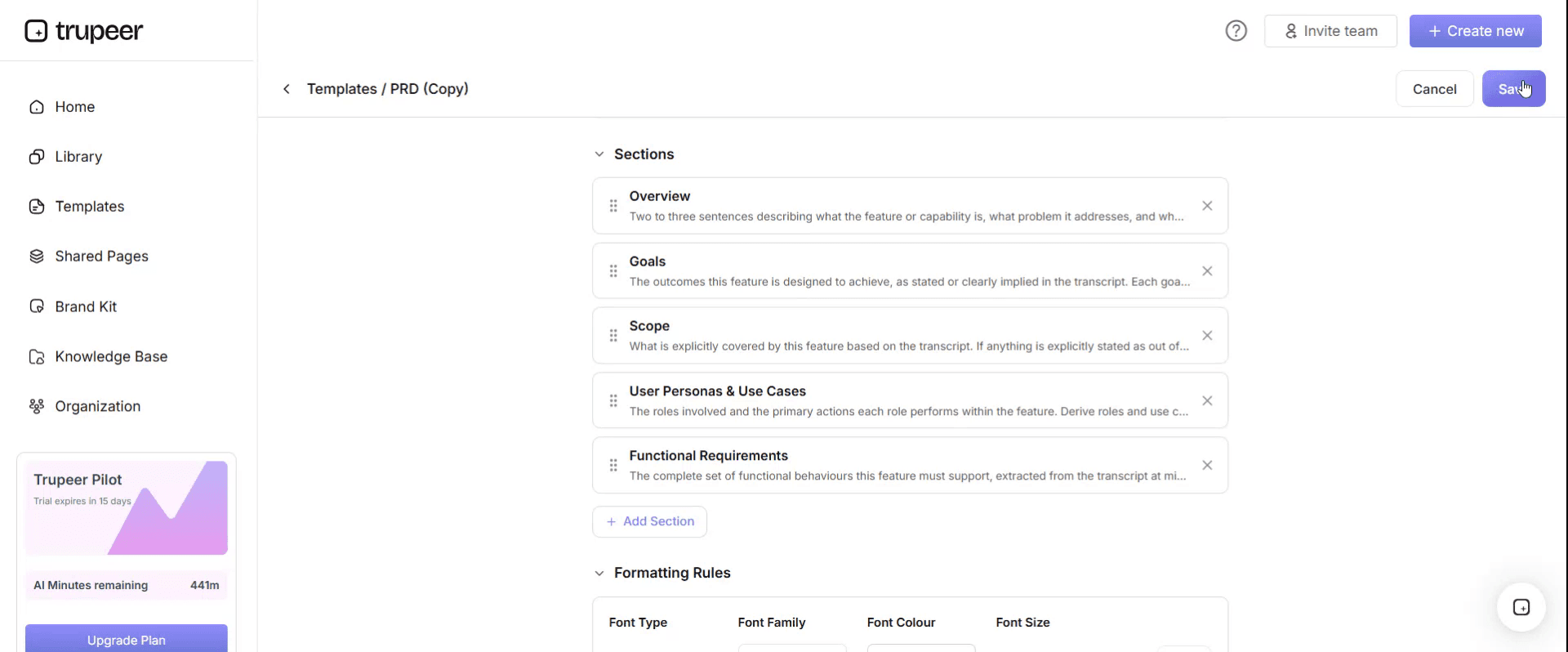
Step 4: Edit the Template
Click on Edit to start modifying the selected template.

Within the editor, you can:
Add new sections
Define or update formatting rules
Add a logo and adjust its position and related settings
Step 5: Save Your Customized Template
After making all necessary changes, click Save to store the updated template as your own.
Step 6: Preview and Fine-Tune the Template
When you want to see how your customized template looks, open the Preview.

From the preview screen, you can continue to make adjustments directly if needed, ensuring the template appears exactly as you want.
With a payroll SOP template you can:
Run every pay cycle the same way: One procedure, one calendar and clear owners.
Get inputs on time: Clear cut-offs for HR, managers and time systems.
Catch errors before payment: Structured variance checks and reviews.
Protect against fraud: Controls on new employees and bank detail changes.
Pass audits with less effort: Show approvals, reconciliations and an audit trail.
What a payroll SOP template must contain
Section | What it covers |
|---|---|
Document control | SOP ID, version, owner, approver, effective and review dates |
Purpose and scope | Entities, pay groups, pay frequencies and systems covered |
Roles and responsibilities | Payroll, HR, managers, finance, treasury |
Payroll calendar | Input cut-offs, processing, review, approval, payment and filing dates |
Inputs | Starters, leavers, changes, time and attendance, overtime, benefits and deductions |
Validation | Checking inputs are complete, approved and correct |
Calculation and review | Running payroll, variance checks and exception reports |
Approval and payment | Approving the payroll and releasing payments |
Statutory filings | Tax and social security submissions and payments |
Reconciliation | Reconciling payroll to the general ledger and bank |
Exceptions | Late changes, off-cycle payments, overpayments, bank changes |
Controls, KPIs and records | Segregation of duties, metrics and records retained |
Free payroll SOP template: the structure to copy
Copy the structure below into your own document, or open it in Trupeer and customize it.
1. Document control. SOP ID: [PAY-001]. Version: [x.x]. Owner: [Payroll manager]. Approver: [Finance or HR director]. Effective date: [date]. Next review: [date].
2. Purpose. This SOP defines how [Company] runs payroll for each pay cycle, so employees are paid accurately and on time, statutory obligations are met and payroll controls are applied consistently.
3. Scope. Applies to [pay groups and frequencies] for [entities] processed in [payroll system]. Excludes [contractor payments and expenses, covered by separate SOPs].
4. Roles and responsibilities.
Role | Responsibility |
|---|---|
Payroll specialist | Collects and validates inputs, runs payroll, prepares reports |
Payroll manager | Reviews variances and exceptions, signs off the payroll |
HR operations | Submits approved starter, leaver and change inputs by the cut-off |
People managers | Approve timesheets, overtime and allowances by the cut-off |
Finance | Approves payroll funding and reconciles payroll to the ledger |
Treasury | Releases payroll payments |
Payroll or HR director | Owns payroll controls and approves this SOP |
5. Payroll calendar. For each pay cycle: input cut-off [date and time], payroll processing [dates], review and approval [date], payment file to bank [date and time], pay date [date], statutory filing deadline [date].
6. Procedure.
Stage 1: Collect inputs. Receive starter, leaver and change forms from HR, approved time and overtime from managers or the time system, and benefit and deduction changes, all through [approved channels] by the cut-off.
Stage 2: Validate inputs. Check every input is complete, approved by the right person and supported by documents. For starters, confirm the employee record, right to work, tax details and bank details. For leavers, confirm the leaving date and final pay elements.
Stage 3: Update the payroll system. Enter validated changes in [payroll system]. A second person checks a sample, and every bank detail change, before processing.
Stage 4: Run and review payroll. Run the payroll calculation and review the variance report against the previous period. Investigate changes above [threshold or percentage], new starters, leavers and unusual payments.
Stage 5: Approve the payroll. The payroll manager signs off the payroll and summary reports. Finance approves the funding.
Stage 6: Pay employees. Send the payment file to the bank by the bank cut-off. Treasury approves and releases payments. Publish payslips on the pay date.
Stage 7: File and pay statutory deductions. Submit tax and social security filings and payments by their deadlines, and keep confirmation receipts.
Stage 8: Reconcile and close. Reconcile payroll to the general ledger and bank, post payroll journals, file reports and archive the pay cycle records.
7. Exception handling.
Exception | How to recognise it | Action | Decision owner | Time limit | Escalate to |
|---|---|---|---|---|---|
Late change | Input received after the cut-off | Process next cycle, or as an off-cycle payment if the employee would otherwise be unpaid or significantly underpaid | Payroll manager | Same day | Payroll or HR director |
Unapproved input | Change without the required approval | Do not process; return for approval | Payroll specialist | Before processing | Payroll manager |
Off-cycle payment request | Payment needed outside the normal run | Follow the off-cycle procedure with extra approval | Payroll manager | [Per policy] | Finance |
Overpayment found | Employee paid more than due | Confirm the amount; agree recovery with the employee in line with policy and law | Payroll manager | [5 working days] | HR |
Underpayment found | Employee paid less than due | Correct as soon as possible, by off-cycle payment if significant | Payroll manager | [Per policy] | Payroll or HR director |
Bank details changed by email | Change request outside the approved channel | Do not change; verify through a known contact or employee self-service | Payroll specialist | Before processing | Payroll manager |
Large variance | Pay differs from last period above the threshold | Investigate and document before approval | Payroll specialist | Before approval | Payroll manager |
Not covered above | Case doesn't match any row | Stop and escalate; do not improvise | Payroll manager | [4 hours] | Payroll or HR director |
8. Controls. People who add employees or change bank details can't approve the payroll. Every starter, leaver and bank change is checked by a second person. Variance reports are reviewed every cycle. Payroll is reconciled to the ledger and bank every cycle. Access to the payroll system is reviewed [quarterly].
9. KPIs. Payroll accuracy, on-time payment, late inputs, off-cycle payments, overpayments and underpayments, and statutory filings on time.
10. Records. Inputs and approvals, variance reports, sign-offs, payment files, filings and reconciliations, retained for [period, per local requirements].
11. Revision history. Version, date, change summary, author and approver.
Payroll SOP example: a monthly payroll calendar
Here's how a monthly payroll calendar might look for a company paying on the last working day of the month. The timings are illustrative; set your own based on your pay date, bank and statutory deadlines.
Working day before pay date | Task | Owner |
|---|---|---|
Day -10 | Input cut-off for starters, leavers and changes | HR operations |
Day -9 | Cut-off for approved time, overtime and allowances | People managers |
Day -8 to -7 | Validate inputs and update the payroll system | Payroll specialist |
Day -6 | First payroll run and variance review | Payroll specialist |
Day -5 | Corrections and final run | Payroll specialist |
Day -4 | Payroll sign-off and funding approval | Payroll manager and finance |
Day -3 | Payment file to the bank | Treasury |
Pay date | Employees paid; payslips published | Payroll |
After pay date | Statutory filings, journals and reconciliation | Payroll and finance |
Running payroll in more than one country
If you pay employees in several countries, keep one payroll SOP template for the shared structure and add a country section for each payroll. Each country section should cover:
The payroll provider or system used, and who owns the relationship.
Local pay calendar and cut-offs, including public holidays that move the pay date.
Statutory deductions and filings, with deadlines and the authority they go to.
Local data and record-keeping rules, including how long payroll records must be kept.
Country-specific exceptions, such as rules on recovering overpayments.
Keep the shared controls, such as segregation of duties, variance review and reconciliation, the same everywhere, so the group finance team can review every payroll the same way.
Payroll controls to build into the SOP
Control | Why it matters |
|---|---|
Segregation of duties | Stops one person from adding an employee and paying them |
Second check on starters, leavers and bank changes | Catches errors and fraudulent changes |
Input cut-offs and approvals | Ensures only approved, complete changes are processed |
Variance review every cycle | Catches errors before payment |
Dual approval of payment release | Protects against unauthorised payments |
Reconciliation to ledger and bank | Confirms payroll is complete and accurate |
Regular access reviews | Limits who can change payroll data |
Payroll SOP KPIs
Payroll accuracy: payslips without errors as a share of all payslips.
On-time payment: pay cycles paid on the pay date.
Late inputs: changes received after the cut-off.
Off-cycle payments: number and reasons, as a signal of input problems.
Overpayments and underpayments: number and value.
Statutory filings on time: filings submitted by their deadline.
Set your own targets and baseline them before you change the process.
How to create your payroll SOP from recordings
Choose a task, such as processing a starter, running the variance report or creating the payment file.
Record the payroll specialist who does it best in your payroll system, narrating each check and decision.
Generate the SOP and video with Trupeer, then add your cut-offs, thresholds and approval rules.
Fill in the exception table from real cases and audit findings.
Get approval from the payroll manager and payroll or HR director.
Publish and train, and update the SOP whenever your payroll system, pay rules or legislation change; see SOP version control.
If you run payroll in Workday, see how teams build Workday payroll training videos for finance teams.
Formats for a payroll SOP
Step-by-step with an exception table suits the payroll run and most payroll tasks. This is the format the template above uses.
Calendar suits cut-offs and deadlines for every pay cycle.
Checklist suits pay cycle sign-off, so every review and approval is completed before payment.
Spreadsheet suits the variance log, off-cycle payment log and KPIs, kept alongside the SOP.
Best practices for payroll SOPs
Publish the payroll calendar for the whole year, so HR and managers know every cut-off.
Accept inputs only through approved channels, never informal emails.
Review variances every cycle, with clear thresholds for investigation.
Treat bank detail changes as high risk, with verification and a second check.
Keep country-specific rules in separate sections where you run payroll in several countries.
Review the SOP after every legislation change, system upgrade and audit.
Common mistakes to avoid
Accepting changes after the cut-off without a clear exception rule.
One person adding employees and approving payroll.
Skipping variance review when the payroll "looks normal".
Changing bank details from an email without verification.
Never updating the SOP when legislation or systems change.
Payroll SOP checklist
Document control is complete, with owner and review date.
Roles cover payroll, HR, managers, finance and treasury.
The payroll calendar sets every cut-off and deadline.
Every stage from inputs to reconciliation has numbered steps.
The exception table covers late changes, off-cycle payments, overpayments, underpayments and bank changes.
Segregation of duties, second checks and approvals are defined.
KPIs and records are specified.
Videos are linked for key payroll tasks.
How Trupeer helps you build and maintain your payroll SOP
Payroll SOP challenge | How Trupeer helps |
|---|---|
Payroll steps are known by one or two people | Record them during a real pay cycle, and Trupeer's SOP creator turns each recording into a step-by-step SOP and video |
Cover during holidays and absence is risky | Anyone can follow the recorded steps for the variance review or payment file |
Payroll teams work across countries | Translate SOPs and videos from one source into 65+ languages |
The payroll system or legislation changes | Update videos by editing the script, and replace a single step instead of re-recording |
HR and managers send inputs incorrectly | Short videos show exactly how to submit a starter, change or timesheet |
Genpact used this recording-first approach for a company-wide Workday rollout, turning recorded process sessions into more than 500 training collaterals across 20 workstreams in five languages, for 140,000 employees in 40 countries, in 3 months instead of 12. Read the Genpact customer story.
Download the free payroll SOP template
Open the template in Trupeer, apply your brand kit, add your payroll calendar, system steps and approval rules, and share it with your payroll, HR and finance teams. Get the free payroll SOP template.
Related templates
Month-end close checklist template
Frequently Asked Questions
What is a payroll SOP template?
It's a ready-made standard operating procedure for running payroll, covering roles, the payroll calendar, inputs, validation, calculation and review, approval, payment, statutory filings, reconciliation, exceptions and controls.
What should a payroll SOP include?
Document control, purpose and scope, roles, a payroll calendar, steps for each stage of the pay cycle, an exception-handling table, controls, KPIs, records and revision history.
What are the steps in the payroll process?
Collect inputs, validate them, update the payroll system, run and review payroll, approve it, pay employees, file and pay statutory deductions, and reconcile and close.
How do you handle late payroll changes?
Set a clear cut-off and an exception rule: late changes go into the next cycle unless the employee would otherwise be unpaid or significantly underpaid, in which case an approved off-cycle payment is made.
What controls should a payroll SOP include?
Segregation of duties, second checks on starters, leavers and bank changes, input approvals and cut-offs, variance review, dual approval of payments, reconciliations and access reviews.
How do you prevent payroll fraud?
Separate who adds employees from who approves payroll, verify every bank detail change, review new starters and variances every cycle, and reconcile payroll to the bank and ledger.
Is there a payroll SOP template in Word?
Yes. Word suits the payroll SOP because it combines tables, such as roles, the calendar and exceptions, with step-by-step procedures. Open the template in Trupeer, customize it and export it in the format you need.
Is there a payroll SOP template in Excel?
The SOP works best as a document, but many teams keep the payroll calendar, variance log and KPIs in Excel alongside it.
Is there a payroll SOP template PDF?
Yes. Export the customized SOP as a PDF for read-only distribution, and keep the editable version as the master.
Is the payroll SOP template free?
Yes. Sign up free to open the template in Trupeer, customize it and export it.
How often should a payroll SOP be reviewed?
At least annually, and whenever legislation, tax rules, your payroll system or your pay policies change, or after an audit finding.
Can I create a payroll SOP from a screen recording?
Yes. Record your payroll team running each step in your payroll system, and Trupeer turns the recordings into step-by-step SOPs and videos you can review, approve and publish.


