4.8/5
برنامج مجاني لعرض فيديوهات التدريب مع دليل
أنشئ مقاطع فيديو تدريبية تأتي مع أدلة مدمجة خطوة بخطوة. يتم إنشاء الفيديو والتوثيق معًا من تسجيل واحد.
جرّبه مجانًا

برنامج Trupeer لإنشاء فيديوهات التدريب مع دليل يوفّر لك فيديو تدريب احترافي ودليل مكتوب شامل خطوة بخطوة من تسجيل شاشة واحد لتسجيل الشاشة. سجّل أي سير عمل مرة واحدة، وسيقوم الذكاء الاصطناعي بتوليد محتوى تدريبي بصيغتين - فيديو مُحرّر باحتراف مع تأثيرات تكبير وترجمات، بالإضافة إلى دليل مكتوب مفصل مع لقطات شاشة مُعلّمة.
سجّل مرة واحدة واحصل تلقائيًا على فيديو تدريب ودليل مكتوب.
يقوم الذكاء الاصطناعي بتوليد لقطات شاشة مُعلّمة ونص خطوة بخطوة من تسجيلك.
يبقى الفيديو والدليل متزامنين، ليختار المتعلمون الصيغة التي يفضلونها.
تضمن حزمة الهوية البصرية اتساق الأسلوب عبر جميع فيديوهات التدريب والأدلة.
شارك أو تضمين أو صدّر كلا الصيغتين لأي منصة تدريب أو نظام إدارة تعلم (LMS).
ما هو برنامج Trupeer لإنشاء فيديوهات التدريب مع دليل؟
حل برنامج Trupeer لفيديوهات التدريب مع دليل مشكلة أساسية في محتوى التدريب: يفضّل المتعلمون صيغًا مختلفة. يتعلم بعض الأشخاص بشكل أفضل عبر مشاهدة الفيديوهات، بينما يفضّل آخرون قراءة تعليمات خطوة بخطوة مع لقطات شاشة. تقليديًا، كان تقديم الصيغتين يتطلب إنشاء المحتوى مرتين - تسجيل فيديو ثم كتابة دليل بشكل منفصل. يلغي Trupeer هذا التكرار عبر توليد المخرجات الاثنين من جلسة تسجيل واحدة. ينتج الذكاء الاصطناعي في الوقت نفسه فيديو تدريب مُحكمًا ودليلًا مكتوبًا شاملًا، بحيث يغطي كلا الشكلين المحتوى نفسه وبالدقة نفسها، ويبقيهما متزامنين عند تحديث مادة المصدر.
كيف يعمل برنامج فيديوهات التدريب مع دليل؟
بدء استخدام برنامج فيديوهات التدريب مع دليل يستغرق بضع دقائق فقط.
الخطوة 1: سجّل أو ارفع
ابدأ تسجيل شاشة مباشرة داخل متصفحك، أو ارفع فيديو موجودًا.

الخطوة 2: معالجة الذكاء الاصطناعي
يحلل الذكاء الاصطناعي تسجيلك، ويزيل الكلمات الحشو، ويضيف تأثيرات تكبير، ثم يولّد الفيديو تلقائيًا.
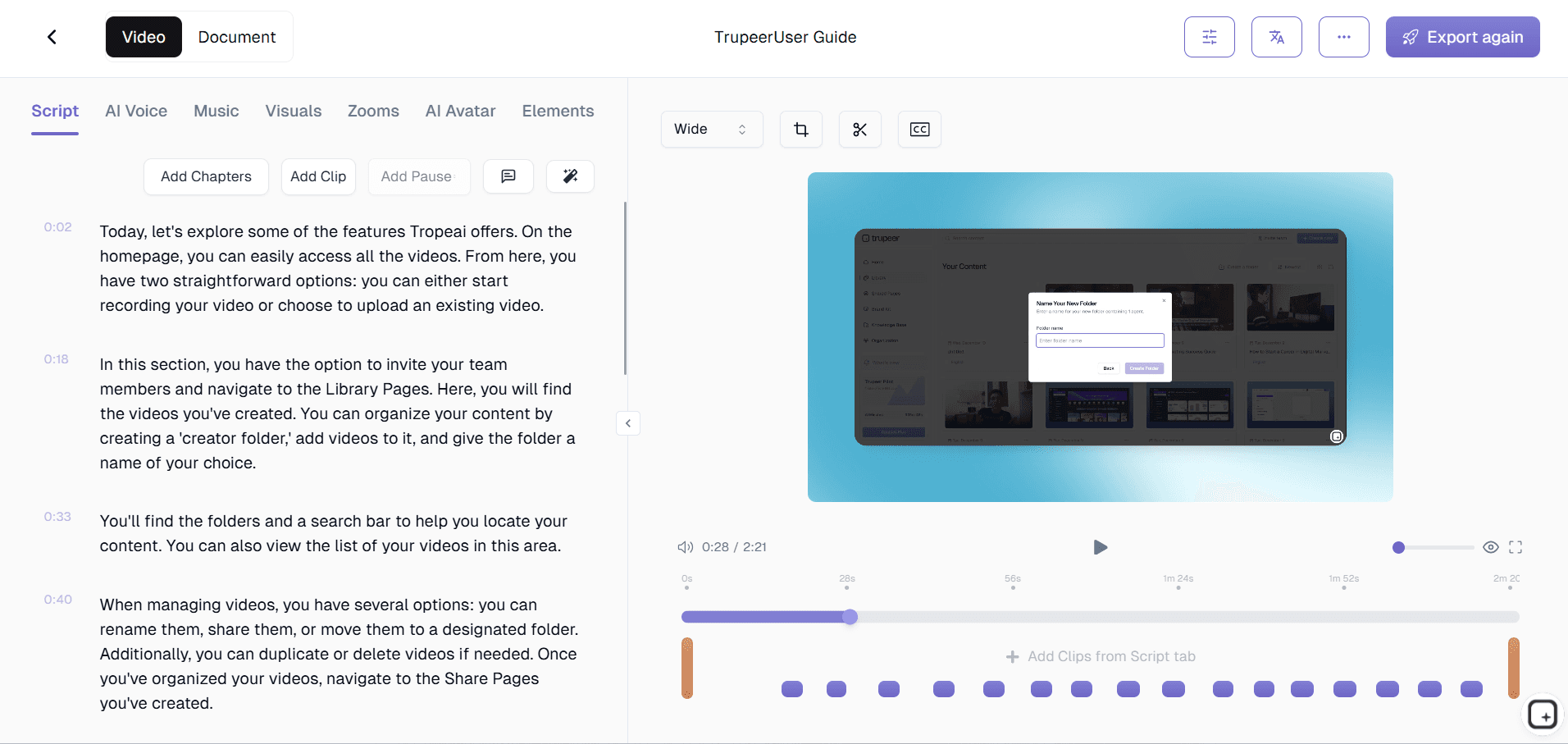
الخطوة 3: تخصيص ومشاركة
حرّر المخرجات، وطبّق حزمة الهوية البصرية الخاصة بك، ثم شارك عبر رابط أو تضمين على موقعك الإلكتروني. تكون التحديثات سهلة بنفس القدر.

أبرز المزايا في برنامج Trupeer لإنشاء فيديوهات التدريب مع دليل
مخرجات مزدوجة متزامنة من البداية: ينتج كل تسجيل تلقائيًا فيديو تدريب مُحكمًا ودليلًا مكتوبًا شاملًا. يستخرج الذكاء الاصطناعي المحتوى الأمثل لكل صيغة - صور ديناميكية للفيديو، ولقطات شاشة دقيقة ونص خطوة للدليل - لضمان أن تكون كل مخرجات مصممة خصيصًا لوسيطها، بدل أن تكون مجرد نسخة لاحقة.
اختيار ذكي للّقطات: يحدد الذكاء الاصطناعي أكثر إطار إفادة في كل خطوة من سير العمل ويستخرجه كلقطة شاشة عالية الدقة للدليل المكتوب. تلتقط كل لقطة الشاشة الحالة الدقيقة للشاشة التي يحتاج المتعلمون رؤيتها، مع تعليقات توضيحية تبرز عناصر واجهة المستخدم والأزرار وحقول النماذج ذات الصلة.
توليد نص خطوة بخطوة: يراقب الذكاء الاصطناعي أفعالك ويولّد تعليمات مكتوبة واضحة ومختصرة لكل خطوة في سير العمل. يلتقط النص ما يجب النقر عليه، وما يجب كتابته، وما يجب تحديده، وما المتوقع في كل مرحلة، ليُنتج دليلًا مكتوبًا يمكن لأي شخص اتباعه دون الحاجة لمشاهدة الفيديو على الإطلاق.
تبديل مرن لصيغ التعلم: يمكن للمتعلمون التبديل بسلاسة بين الفيديو والدليل المكتوب لأي خطوة. إذا كانوا يشاهدون الفيديو ويرغبون بالرجوع إلى النص الدقيق لقيمة إعداد، فسيجدون الدليل المكتوب هناك مباشرة.
لماذا تختار برنامج Trupeer لإنشاء فيديوهات التدريب مع دليل؟
خدمة كل متعلم: يتعلم بعض الأشخاص عبر المشاهدة، بينما يتعلم آخرون عبر القراءة. يضمن إنتاج الصيغتين من تسجيل واحد وصول محتوى التدريب إلى كل فئة بفعالية دون إنشاء المحتوى مرتين.
وفّر ضعف الوقت: يتطلب إنشاء محتوى التدريب التقليدي سير عمل منفصل لإنتاج الفيديو وكتابة التوثيق. يلغي Trupeer هذا التكرار بالكامل، ما يقلل جهد إنشاء المحتوى بأكثر من النصف.
حافظ على التزامن المثالي: عندما يوجد محتوى التدريب بأكثر من صيغة، يصبح الحفاظ على توافقها تحديًا مستمرًا. تؤدي التحديثات المتزامنة من تسجيل مصدر واحد إلى حل هذه المشكلة بشكل دائم.
زيادة فائدة المحتوى إلى أقصى حد: يعمل فيديو التدريب بشكل ممتاز في سياقات التدريب المباشر ومنصات نظام إدارة التعلم (LMS). يعمل الدليل المكتوب للرجوع السريع، ومواد الطباعة، وقواعد المعرفة القابلة للبحث. معًا، يغطيان كل سيناريوهات تقديم التدريب.
برنامج فيديوهات التدريب مع دليل للفرق الداخلية
1. زوّد كل فرد في الفريق بصيغة التعلم المفضلة لديه دون أي عمل إضافي من صانعي المحتوى. يشاهد المتعلمون البصريون فيديو التدريب، بينما يتبع الزملاء المهتمون بالتفاصيل الدليل المكتوب، ويحصل الجميع على تعليمات دقيقة ومتطابقة.
2. أنشئ مواد مرجعية تظل مفيدة حتى بعد انتهاء التدريب الأولي. يعود الموظفون إلى الدليل المكتوب للبحث السريع بعد أشهر، بينما يخدم الفيديو كوسيلة لتحديث شامل عندما يحتاجون للرجوع إلى سير العمل الكامل.
3. قلّل العبء على أعضاء الفريق الأكبر سنًا الذين يجيبون حاليًا عن الأسئلة نفسها بشكل متكرر. يوفّر فيديو تدريب مع دليل مرافق موردًا ذاتيًا للزملاء لفهم الصورة الكبيرة والعثور على التفاصيل المحددة.
4. ابنِ مكتبات تدريب شاملة بكفاءة. تعني المخرجات بصيغتين أن مكتبة التدريب لديك أكثر فائدة بمقدار الضعف من كل جلسة تسجيل، وتخدم حالات استخدام وسيناريوهات تعلم أكثر دون جهد إنتاج إضافي.
برنامج فيديوهات التدريب مع دليل لفرق SaaS
1. أنشئ محتوى تثقيف العملاء الذي يخدم مسارات الخدمة الذاتية والتوجيهية. يشارك مديرو نجاح العملاء الفيديو أثناء المكالمات، بينما يرجع العملاء إلى الدليل المكتوب بشكل مستقل بعد ذلك.
2. ابنِ محتوى مركز المساعدة الذي يلبي تفضيلات المستخدمين المختلفة في الوقت نفسه. يبحث بعض العملاء عن تعليمات مكتوبة، بينما يبحث آخرون عن شروحات فيديو. يحقق المحتوى بصيغتين كلا الهدفين للجمهورين من خلال جهد إنشاء محتوى واحد.
3. حافظ على تزامن توثيق المنتج وفيديوهات التدريب مع تطور الميزات. عند تحديث منتجك، يؤدي إعادة التسجيل إلى تحديث كل من شرح الفيديو والتوثيق المكتوب في إجراء واحد.
4. زوّد فرق الدعم بمواد مرجعية بصيغتين لاستكشاف الأخطاء وإصلاحها. يشاهد الوكلاء الفيديو لفهم السياق الكامل لسير العمل، ثم يرجعون إلى الدليل المكتوب للخطوات المحددة عند مساعدة العملاء في الوقت الفعلي.
برنامج فيديوهات التدريب مع دليل للشركات الناشئة
1. تعظيم المخرجات من كل جلسة إنشاء محتوى. تعمل الشركات الناشئة بموارد محدودة، والحصول على فيديو تدريب ودليل مكتوب من كل جلسة تسجيل يضاعف قيمة كل دقيقة تُصرف في إنشاء المحتوى.
2. ابنِ برنامج تدريب احترافي أسرع من المنافسين الذين ينشئون فيديو ومحتوى مكتوبًا بشكل منفصل. تمنح المخرجات بصيغتين الشركات الناشئة مكتبات تدريب شاملة في جزء صغير من الوقت الذي تتطلبه الأساليب التقليدية.
3. خدم قواعد عملاء متنوعة بمحتوى تدريب مرن من حيث الصيغة. يفضّل بعض العملاء دروس الفيديو، بينما يحتاج آخرون إلى أدلة قابلة للطباعة. يعالج المحتوى بصيغتين كلا الأمرين دون أن تضطر الشركات الناشئة للاختيار بين صيغة أو الاستثمار في إنشاء الصيغتين بشكل منفصل.
4. أنشئ عروضًا جاهزة للمستثمرين للمنتج مع مواد مكتوبة مرافقة. يوضح الفيديو منتجك بصريًا، بينما يوفر الدليل المكتوب التوثيق التفصيلي الذي تطلبه عادةً فرق تقييم المؤسسات خلال العناية الواجبة.
برنامج فيديوهات التدريب مع دليل للمؤسسات
1. استوفِ متطلبات تقديم التدريب المتنوعة عبر المؤسسة من خلال سير عمل واحد لإنشاء المحتوى. تفضّل الأقسام والأدوار والمناطق المختلفة صيغ تدريب مختلفة، وتخدم المخرجات بصيغتين الجميع دون تكرار جهد الإنتاج.
2. استوفِ متطلبات الامتثال التي تشترط وجود مواد تدريب مرئية وتوثيقًا إجرائيًا مكتوبًا. غالبًا ما يطلب المدققون كلا الصيغتين، وتضمن المخرجات المتزامنة بصيغتين أنها تتطابق دائمًا دون الحاجة للتحقق اليدوي.
3. قلّل تكاليف إنتاج مواد التدريب عبر إلغاء سير عمل الفيديو والتوثيق المنفصلين. تقوم فرق التعلم والتطوير (L&D) في المؤسسات التي كانت تدير مسارات إنتاج متوازية بدمجها في عملية واحدة أكثر كفاءة.
4. دعم متطلبات الوصول عبر توفير محتوى التدريب بأكثر من صيغة. تخدم الأدلة المكتوبة مع لقطات الشاشة الموظفين الذين لا يمكنهم الوصول إلى محتوى الفيديو، ما يضمن أن مواد التدريب تلبي معايير الوصول المعتمدة لدى المؤسسة.
برنامج فيديوهات التدريب مع دليل للفرق عن بُعد
1. زوّد الموظفين عن بُعد بمحتوى تدريب يعمل في أي ظروف للاتصال بالإنترنت. يقوم أعضاء الفريق ذوو الاتصال القوي ببث الفيديو؛ بينما يتبع من يعملون في بيئات اتصال منخفضة الدليل المكتوب مع لقطات الشاشة بدلًا من ذلك.
2. أنشئ محتوى تدريب غير متزامن (async) يراعي سرعات تعلم مختلفة. يتصفح المتعلمون السريعون الدليل المكتوب، بينما من يحتاجون إلى سياق أكبر يشاهدون الفيديو الكامل. يصل الجميع إلى الفهم نفسه دون فرض وتيرة واحدة.
3. ابنِ مواد مرجعية تدريب قابلة للبحث إلى جانب الدروس المرئية. يمكن لأعضاء الفريق عن بُعد البحث في نص الدليل المكتوب عن مصطلحات أو خطوات محددة، وهو ما لا يدعمه محتوى تدريب الفيديو فقط بشكل فعال.
4. فعّل الوصول إلى التدريب دون اتصال عبر أدلة مكتوبة قابلة للتنزيل. يمكن للموظفين عن بُعد في المناطق ذات الإنترنت غير الموثوق تنزيل أدلة التدريب المكتوبة والرجوع إليها دون الحاجة إلى اتصال مستمر.
برنامج فيديوهات التدريب مع دليل للمطورين
1. أنشئ محتوى تدريبًا تقنيًا يعمل لكل من التعلم الأولي والرجوع المستمر. يشاهد المطورون الفيديو عند تعلم سير عمل جديد لأول مرة، ثم يضعون الدليل المكتوب كعلامة للرجوع السريع عندما يحتاجون إلى تكرار خطوات محددة بعد أسابيع.
2. أنشئ تدريبًا على شرح الكود مع توثيق مكتوب مطابق يتضمن الأوامر الدقيقة وقيم الإعدادات ومقتطفات الكود. يحافظ الدليل المكتوب على نص جاهز للنسخ واللصق لا يمكن أن يقدمه الفيديو وحده.
3. ابنِ مواد تدريب على Runbook تخدم سياقات التعلم والعمليات معًا. يتعلم مهندسو المناوبة الإجراءات عبر مشاهدة الفيديو أثناء التدريب، ثم يتبعون الخطوات المرقمة في الدليل المكتوب أثناء الحوادث الفعلية عندما تكون السرعة مهمة.
4. حافظ على تزامن توثيق واجهات برمجة التطبيقات (API) والتكاملات إلى جانب دروس الفيديو. عندما تتغير نقاط نهاية API أو عمليات التكامل، يؤدي إعادة التسجيل إلى تحديث العرض المرئي والمرجع التقني المكتوب في الوقت نفسه.
برنامج فيديوهات التدريب مع دليل لفرق الإعداد & الدعم
1. أنشئ مناهج إعداد تستوعب كل أنماط التعلم دون جهد إنتاج إضافي. يختار الموظفون الجدد أدلة الفيديو أو الأدلة المكتوبة حسب تفضيلهم الشخصي، ويعرف مديرو الإعداد أن كلا الصيغتين تقدمان محتوى متطابقًا.
2. ابنِ قواعد معرفة لفريق الدعم بمحتوى تدريب بصيغتين. يرجع الوكلاء إلى الدليل المكتوب أثناء تفاعلات العملاء المباشرة للحصول على إجابات سريعة، ويشاهدون فيديو التدريب خلال وقت تعلم مخصص لفهم أعمق.
3. أنتج محتوى تدريب موجهًا للعملاء في كلا الصيغتين لزيادة تبني الخدمة الذاتية. يجد العملاء الذين يفضلون الفيديو ذلك في مركز المساعدة إلى جانب العملاء الذين يفضلون الأدلة المكتوبة، ما يقلل تذاكر الدعم من كلا شريحي الجمهور.
4. حافظ على تزامن مواد إعداد التدريب والدعم بشكل مثالي. عند تغيير العمليات، يؤدي إعادة تسجيل واحدة إلى تحديث كل من فيديو التدريب والدليل المكتوب، ما يلغي الانحراف الذي يحدث عندما تُدار هذه الصيغ بشكل منفصل.
لماذا تختار الفرق Trupeer للتدريب بالفيديو مع الأدلة الإرشادية
مخرجان
احصل على فيديو تدريبي ودليل مكتوب من تسجيل واحد
متزامن دائمًا
حدّث مرة واحدة، وسيعكس كلٌّ من الفيديو والدليل التغييرات
خدمة كل متعلم
يحصل كلٌّ من المتعلمين البصريين والمتعلمين النصيين على التنسيق الذي يفضلونه
كيفية إنشاء مقاطع فيديو تدريبية مع الأدلة
الخطوة 1
سجّل سير عملك باستخدام مسجل الشاشة المستند إلى المتصفح
الخطوة 2
يقوم الذكاء الاصطناعي بإنشاء فيديو مصقول ودليل مكتوب في الوقت نفسه
الخطوة 3
قم بوضع العلامة التجارية ومشاركة كلا التنسيقين معًا أو بشكل منفصل
الأسئلة الشائعة
لماذا أحتاج إلى كلٍّ من فيديو ودليل مكتوب؟
يتلقى المتعلمون المعلومات بطرق مختلفة. يتعلم بعض الأشخاص بسرعة أكبر من خلال المشاهدة، بينما يفضل آخرون قراءة التعليمات خطوة بخطوة. إن توفير الصيغتين من تسجيل واحد يضمن أن يصل محتوى التدريب الخاص بك بفعالية إلى كل فرد من الجمهور.
هل يظل الفيديو والدليل متزامنين عندما أجري تحديثات؟
نعم. عندما تعيد تسجيل جزء من سير عمل التدريب الخاص بك، يتم تحديث كلٍ من الفيديو والدليل المكتوب معًا تلقائيًا. تضمن آلية التحديث المتزامن هذه ألا يبتعد التنسيقان عن التوافق.
هل يمكنني مشاركة الدليل المكتوب بشكل منفصل عن الفيديو؟
نعم. يعمل كلا التنسيقين بشكل مستقل. يمكنك مشاركة الفيديو في نظام إدارة التعلم الخاص بك وتوزيع الدليل المكتوب كمرجع قابل للطباعة، أو تضمينه في الويكي الخاص بك، أو إدراجه في حزم الانضمام - فكل تنسيق يعمل بمفرده.
ماذا يتضمن الدليل المكتوب؟
يتضمن الدليل المكتوب المُولَّد بالذكاء الاصطناعي خطوات مرقمة مع تعليمات واضحة لكل إجراء، ولقطات شاشة مشروحة تُظهر بالضبط كيف تبدو الشاشة في كل مرحلة، وعناصر واجهة مستخدم مميزة توضح أين تنقر أو تكتب.
هل يمكنني تخصيص تنسيق الدليل المكتوب؟
نعم. يمكنك تطبيق مجموعة العلامة التجارية الخاصة بك لتنسيق الدليل باستخدام ألوان وشعار مؤسستك. كما يمكن تحرير محتوى الدليل بعد إنشائه لإضافة سياق إضافي أو ملاحظات أو روابط قبل مشاركته مع فريقك.


Understand how work happens.
Carry it into your next transition.
Start Free Trial
Book a Demo
حالات الاستخدام
المنافسون

