4.8/5
برنامج مجاني لتحرير الفيديو بسهولة لعمل فيديوهات التدريب
حرّر مقاطع الفيديو التدريبية في دقائق، لا في ساعات. أدوات بسيطة، نتائج احترافية، ومن دون أي منحنى تعلّم.
جرّب مجانًا

برنامج سهل لتحرير الفيديوهات التدريبية يزيل تعقيدات ما بعد الإنتاج، بحيث يمكن لأي شخص في فريقك تعديل التسجيلات الخام وتحويلها إلى محتوى تدريبي واضح واحترافي. لا خبرة بالخط الزمني، ولا مصطلحات التأثيرات - فقط اسحب واقصِ وانشر. النسخة الواقعية ممن يناسبه هذا. قائد نجاح العملاء في شركة SaaS يحتاج إلى تسليم فيديو تدريبي مدته 5 دقائق يشرح للمستخدمين الجدد كيفية إعداد لوحة التحكم. التسجيل موجود. محرر الفيديو غير موجود. قائد نجاح العملاء لا يريد تعلم Premiere Pro، ولا يريد تنزيل Camtasia، ولا يريد قضاء 4 ساعات على محرر الخط الزمني لإنتاج فيديو مدته 5 دقائق. كان الخيار التقليدي إما: إرسال تسجيل Loom الخام مع كل «أم» و«آه» كما هي، أو الانتظار ثلاثة أسابيع حتى يركّبه محرر مستقل. أدوات التحرير السهلة للفيديوهات التدريبية تعالج هذه المفاضلة. الذكاء الاصطناعي يتولى التنظيف الروتيني. أدوات السحب والإفلات تتولى التعديلات اليدوية. يتم تسليم فيديو تدريبي مدته 5 دقائق في نفس فترة بعد الظهر التي تم تسجيله فيها.
واجهة سحب وإفلات يمكن لأي شخص استخدامها - بدون الحاجة لخلفية في تحرير الفيديو
قصّ وتقسيم ودمج بنقرة واحدة لتنظيف التسجيلات خلال دقائق
إضافة تراكبات نصية ومربعات تنبيه ومؤشرات خطوات باستخدام أدوات بسيطة بنقطة ونقرة
ترجمات وتعليقات توضيحية (Captions) وفصول يتم إنشاؤها تلقائيًا توفر ساعات من العمل اليدوي
تصدير مباشر إلى نظام إدارة التعلم (LMS) أو منصة الفيديو أو رابط قابل للمشاركة
ما هو برنامج التحرير السهل للفيديوهات التدريبية؟
برنامج التحرير السهل للفيديوهات التدريبية هو محرر مبسّط مصمم للأشخاص الذين يحتاجون إلى إنتاج محتوى تعليمي لكن لا يملكون - ولا يريدون - مهارات احترافية في تحرير الفيديو. يزيل التعقيد الساحق لأدوات مثل Premiere Pro وFinal Cut Pro، ويستبدل الجداول الزمنية متعددة المسارات ولوحات التأثيرات المئات بواجهة نظيفة وبديهية تركز على ما يهم في التدريب: قص فترات الصمت الميت، وإضافة تراكبات النص، وتسليط الضوء على الخطوات الأساسية، وإدراج فواصل الفصول، والتصدير بالصيغة المناسبة. تقسيم الفئة يستحق الفهم. من جهة: محررو الفيديو المحترفون (Premiere Pro وFinal Cut وDaVinci Resolve). لديهم كل قوة التحرير لكنهم يفترضون أنك محرر فيديو أو أنك مستعد لتصبح واحدًا. منحنى التعلم يمتد 20-40 ساعة من التدريب قبل أن يتمكن شخص ما من إنتاج مخرجات فيديو تدريبي بكفاءة. ومن الجهة الأخرى: مسجلو الشاشة الخام (Loom، مسجل macOS). هذه تلتقط بشكل نظيف لكنها تسلم التسجيل كما هو. الفئة الوسطى: أدوات التحرير السهلة المصممة لغير المحررين هي المكان الذي تعيش فيه الفرق التي تنتج فيديوهات تدريبية بشكل منتظم فعليًا. Trupeer تقع في هذه الفئة الوسطى، كما تُنشئ دليلًا مكتوبًا مطابقًا من نفس التسجيل. Camtasia في أوضاع التحرير التلقائي الأحدث تغطي نطاقًا مشابهًا. وكذلك ScreenPal في بعض الإعدادات. الاختلاف يعتمد على اختيارات ميزات محددة: مقدار التحرير الذي يتم أتمتته بواسطة الذكاء الاصطناعي مقابل ما يتم يدوياً، وما إذا كان سيتم إنشاء دليل مكتوب إلى جانب الفيديو، وكيفية عمل حزمة العلامة التجارية والترجمة.
كيف يعمل برنامج التحرير السهل للفيديوهات التدريبية؟
بدء استخدام برنامج التحرير السهل للفيديوهات التدريبية يستغرق بضع دقائق فقط.
الخطوة 1: سجّل أو ارفع
ابدأ تسجيل شاشة مباشرة داخل متصفحك، أو ارفع فيديو موجودًا.

الخطوة 2: معالجة بالذكاء الاصطناعي
يقوم الذكاء الاصطناعي بتحليل تسجيلك، وإزالة الكلمات الحشوية، وإضافة تأثيرات التكبير/التصغير، ثم يولد الفيديو تلقائيًا.
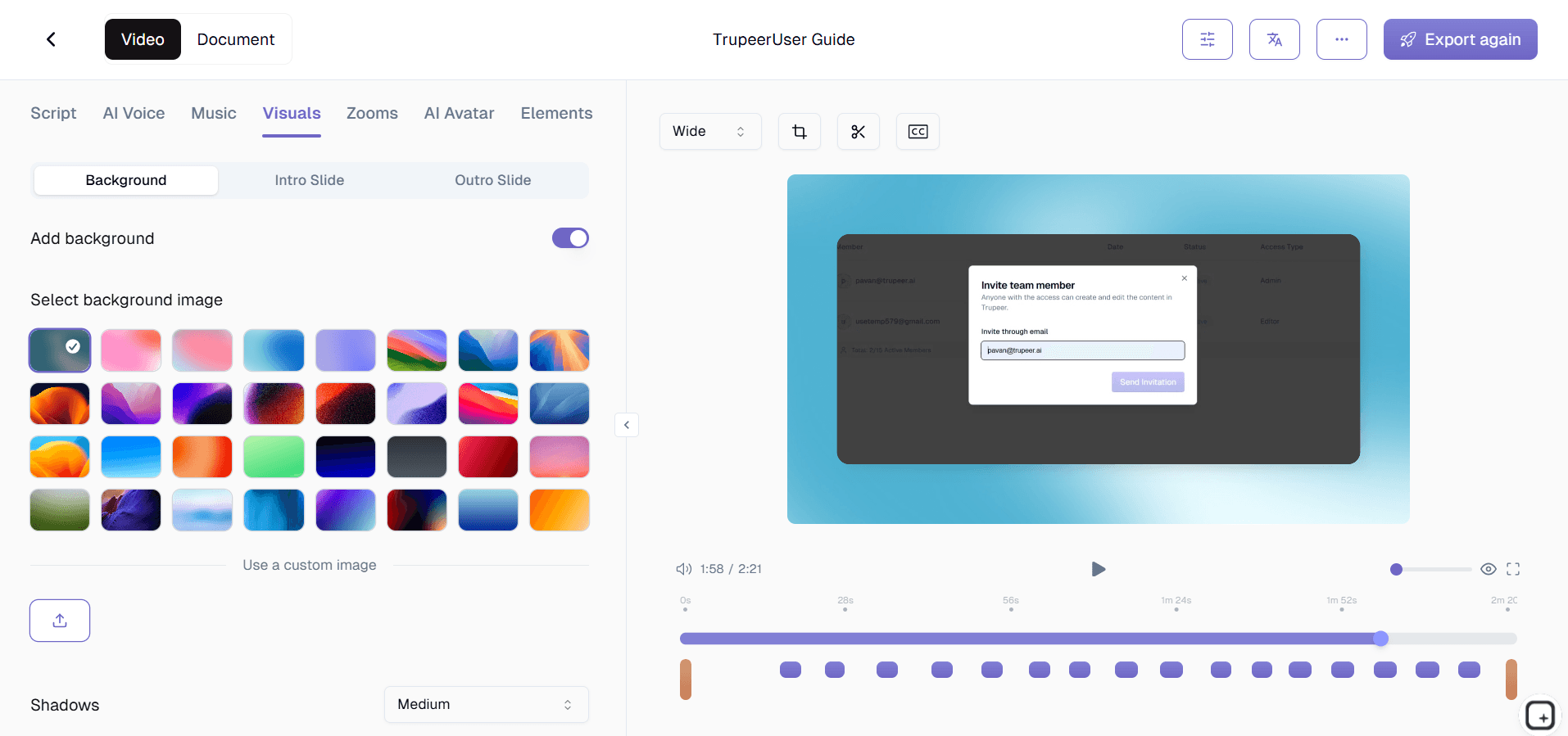
الخطوة 3: تخصيص ومشاركة
حرّر المخرجات، وطبّق حزمة العلامة التجارية الخاصة بك، ثم شارك عبر رابط أو تضمين على موقعك الإلكتروني. التحديثات سهلة بنفس القدر.

أهم ميزات برنامج التحرير السهل للفيديوهات التدريبية
مقص بصري للسحب والإفلات: انسَ اختصارات لوحة المفاتيح وأكواد الوقت الدقيقة. يتيح لك المقص البصري الإمساك بحواف أي مقطع وسحبها لإزالة الأجزاء غير المرغوبة. تعرض شاشة الموجة الصوتية صوتك، ما يجعل من السهل تحديد المقاطع وقصّها مثل التوقفات، والسعال، والبدايات المتعثرة، والانحرافات عن الموضوع دون الحاجة لأي معرفة تقنية في التحرير. ماذا يعني فعليًا «بدون أكواد وقت». يعمل المقص بالطريقة التي يتوقعها شخص لم يستخدم محرر فيديو من قبل. أمسك بمقبض البداية، واسحب إلى اليمين لقص بداية فترة الصمت. أمسك بمقبض النهاية، واسحب إلى اليسار لقص الجزء اللاحق «حسنًا هذا كل شيء وداعًا». تم. معظم فيديوهات التدريب تحتاج إلى هذا النوع من القص في 80% من التسجيل: قص أول 30 ثانية عندما كنت تنتظر تحميل شاشتك، وقص الانحراف العشوائي في المنتصف عندما تشتت انتباهك، وقص الخاتمة غير المريحة. يتولى المقص البصري التعامل مع الثلاثة في أقل من 90 ثانية إجمالاً.
تقسيم وحذف بنقرة واحدة: ضع مؤشر التشغيل في أي نقطة داخل التسجيل ثم انقر مرة واحدة لتقسيم المقطع إلى جزأين. احذف الجزء غير المرغوب بنقرة أخرى. الاستخدام الواقعي. في منتصف تسجيل تدريبك، نبح كلبك. أو دخل طفلك. أو رن هاتفك. سير العمل القديم: أعد تسجيل الفيديو بالكامل، أو افتح Premiere، وانتقل إلى الخط الزمني، وابحث عن المكان، وتعلم أداة التقسيم، واحذف المقطع، وتَمنَّ أن القص لن يكون مزعجًا. سير العمل الجديد: مرّر حتى النباح، وانقر تقسيم، وانقر حذف. تختفي 30 ثانية من الانقطاع. يستمر فيديو التدريب بالتدفق. إجمالي الوقت المستغرق في التعديل: أقل من 30 ثانية.
تراكبات نص وتعليقات تنبيه بنقطة ونقرة: أضف تسميات نصية ومربعات تنبيه ومؤشرات خطوات مرقمة ومستطيلات مميزة عبر النقر مباشرة على معاينة الفيديو. ضعها بصريًا، واكتب نصك، وحدد متى تظهر ومتى تختفي، وانتهيت. لا لوحة طبقات، ولا تحريك بمفاتيح (Keyframes)، ولا خط زمني للتأثيرات - فقط انقر وانقر واكتب. أين يهم هذا تحديدًا في التدريب. يحتاج المتدرب الذي يشاهد الفيديو إلى معرفة أي زر ينقر في الخطوة الثالثة. يقول التعليق الصوتي «انقر زر التصدير» لكن لقطة الشاشة تُظهر 11 زرًا. الطريقة القديمة: أوقف الفيديو، وانظر عن قرب، وتَمنَّ. الطريقة الجديدة: يتيح لك المحرر النقر مباشرة على زر التصدير داخل المعاينة، وإسقاط تنبيه مرقم «3» عليه، وتحديد وقت ظهوره، وانتهيت. هكذا يتبع المتدرب العنصر الصحيح دون الحاجة لفهم واجهة المستخدم بالكامل. ثلاث تنبيهات على فيديو مدته 5 دقائق تستغرق تقريبًا 90 ثانية لإضافتها. العائد في الوضوح كبير.
اكتشاف الفصول تلقائيًا: تحلل البرمجية تسجيلك لتحديد نقاط التوقف الطبيعية - فترات صمت ممتدة، تبديل التطبيقات، وإشارات السرد - ثم تقترح تلقائيًا علامات الفصول. اقبلها أو عدّلها أو أضف فصولك الخاصة خلال ثوانٍ. النتيجة هي جدول محتويات قابل للتنقل يسمح للمتعلمين بالانتقال إلى أي جزء دون الحاجة للتمرير عبر الفيديو بالكامل. لماذا تهم الفصول في التدريب تحديدًا. يفتح المتدرب فيديو تدريب مدته 12 دقيقة بحثًا عن الخطوة المحددة التي تعثر عندها. بدون فصول، يقوم بالتمرير عبر الخط الزمني محاولًا العثور عليها. مع الفصول التي يتم إنشاؤها تلقائيًا وجدول المحتويات داخل مشغل الفيديو، ينقر مباشرة على الخطوة ويحصل على الإجابة خلال 30 ثانية. يعمل الاكتشاف التلقائي على نقاط التوقف الطبيعية (فترات صمت طويلة، تبديل التطبيقات، إشارات السرد مثل «التالي» أو «الآن سنبدأ»). في معظم تسجيلات التدريب، يلتقط الذكاء الاصطناعي نقاط التوقف الصحيحة في المحاولة الأولى. يتيح لك المحرر تعديل العلامات إذا لزم الأمر قبل النشر.
لماذا تختار برنامج التحرير السهل للفيديوهات التدريبية؟
يمكن لأي شخص التحرير: إذا كنت تستطيع استخدام معالج النصوص، يمكنك تحرير فيديوهات التدريب باستخدام هذه البرمجية. تم تصميم الواجهة بالكامل للأشخاص غير المحررين الذين يحتاجون إلى نتائج احترافية بدون مجموعة مهارات احترافية. اختبار محدد لمعرفة ما إذا كان محرر الفيديو «سهلًا» فعلًا. إذا كانت وثائق المساعدة للمحرر أطول من وثائق المساعدة الخاصة بـ Microsoft Word، فهذا يعني أن المحرر ليس سهلًا. إذا كان فهم كيفية إضافة تراكب نص واحد يتطلب مشاهدة برنامج تعليمي أولاً، فهذا يعني أن المحرر ليس سهلًا. نمط «نقطة ونقرة + سحب وإفلات» هو الأساس لـ «يمكن لأي شخص استخدامه». يمر محرر Trupeer بهذا الاختبار لمعظم تعديلات فيديوهات التدريب الشائعة: قص، تقسيم، إضافة تنبيه نصي، إضافة ترجمات، وتصدير. التعديلات الأكثر تعقيدًا (مزج صوت متعدد المسارات، تصحيح ألوان متقدم) غير مدعومة - وهذه هي المفاضلة مقابل أن يكون قابلاً للاستخدام خلال 10 دقائق من قبل غير محرر.
بالدقائق وليس بالساعات: تتطلب معظم فيديوهات التدريب قصًا فقط، وبعض تراكبات النص، وترجمات. تجعل هذه البرمجية هذه المهام تستغرق من 5 إلى 10 دقائق، بدلًا من ساعة أو أكثر المطلوبة من محرري الاستخدام العام. الحساب يستحق أن يكون واضحًا. فيديو تدريبي نموذجي مدته 8 دقائق والذي قد يستغرق 90-120 دقيقة في Premiere Pro (بما في ذلك القص، والتنبيهات، والترجمات، والتصدير) يستغرق 8-12 دقيقة في محرر سهل مصمم لمحتوى التدريب. وعند تكرار ذلك عبر فريق يسلم 4 فيديوهات تدريبية شهريًا، فهذا يعني استعادة 8-10 ساعات من وقت المحرر شهريًا. أو بشكل أكثر واقعية: 4 فيديوهات تدريبية يتم تسليمها فعليًا بدلًا من أن تعلق في قائمة انتظار التحرير. المخرجات ليست قابلة للمقارنة مع العمل المصقول من الدرجة التجارية الذي يمكن لمحرر كبير إنتاجه في Premiere. لكنها قابلة للمقارنة مع العمل الذي تحتاجه معظم فيديوهات التدريب الداخلية فعليًا.
جودة مخرجات ثابتة: القوالب والإعدادات المسبقة تضمن أن كل فيديو تدريبي يبدو ويُسمع بشكل احترافي، بغض النظر عن الشخص في فريقك الذي قام بالتحرير. لم تعد الجودة تعتمد على مهارة التحرير. النمط الذي يكسر معظم إنتاج فيديوهات التدريب اللامركزي. خمسة أشخاص مختلفون يسجلون فيديوهات تدريبية خلال العام. كل واحد لديه أسلوبه الخاص في المقدمة والخاتمة والتنبيهات والعلامة التجارية. بعض الفيديوهات تبدأ مباشرة. أخرى لديها شريحة مقدمة مدتها 30 ثانية. بعضها ينتهي بنداء لاتخاذ إجراء (CTA). بعضها يتوقف فقط في منتصف الجملة. العميل (أو الموظف الجديد) الذي يشاهد ثلاثة فيديوهات من نفس الشركة يحصل على ثلاث تجارب مختلفة. القوالب وحزم العلامة التجارية تُصلح ذلك تلقائيًا دون الحاجة إلى أن يتعلم أي شخص تصميمًا جرافيكيًا. لذلك، تبدو 20 فيديو تدريبي يتم تسليمها خلال العام وكأنها صدرت من نفس الشركة. لا من اختيارات تحرير فردية لخمسة أشخاص مختلفين.
لا تدريب مطلوب لاستخدام برنامج التحرير الخاص بالتدريب: المفارقة في الحاجة إلى دورة تدريبية لاستخدام محرر فيديو التدريب الخاص بك ليست خافية على أحد. يمكن استخدام هذه البرمجية خلال دقائق من فتحها لأول مرة. المفارقة تستحق التوقف عندها للحظة. معظم الفرق التي تحتاج إلى تسليم فيديوهات تدريبية كانت قد أجرت بالفعل نقاشًا حول «هل نحتاج فقط إلى توظيف محرر فيديو أم نتعلم استخدام Adobe Premiere؟». الإجابة نادرًا ما تكون مُرضية. توظيف محرر يزيد تكلفة عدد الموظفين. تعلم Premiere يستغرق أسابيع من التدريب لا يملك الفريق وقتًا لها. الخيار الثالث: محرر يمكن لغير المحرر استخدامه فعليًا خلال 10 دقائق، وهذا ما يجعل الحساب مناسبًا لمعظم عمليات التدريب الداخلية. خبراء المجال الموجودون لدى الفريق يتولون تحرير المحتوى الذي تم تسجيله بالفعل. لا موظف جديد. لا برنامج تدريب جديد. العمل فقط يتم تسليمه.
برنامج التحرير السهل للفيديوهات التدريبية للفرق الداخلية
1. تمكّن الفرق الداخلية خبراء المجال من تحرير تسجيلات التدريب الخاصة بهم دون انتظار دور في قائمة فريق إنتاج الفيديو - ما يتيح ديمقراطية إنشاء المحتوى عبر المؤسسة.
2. يقوم قادة الفريق بتحرير تسجيلات تحديثات العملية الأسبوعية إلى مقاطع تدريبية موجزة باستخدام سير عمل القص والتقسيم، لتقديم محتوى مركز يراه الموظفون فعليًا بدلًا من تجاهله.
3. تقوم فرق العمليات بتحرير تسجيلات سير عمل متعددة الخطوات عبر إضافة تراكبات تنبيه مرقمة عند كل نقطة قرار، وتحويل لقطات الشاشة العشوائية إلى أدلة إجرائية واضحة.
4. تستخدم فرق الموارد البشرية قوالب مقدمة وخاتمة بعلامة تجارية لتمنح كل فيديو تعريفي مظهرًا ثابتًا واحترافيًا يعكس معايير وثقافة الشركة. أنشئ توثيقًا مكتوبًا مكملًا عبر أداة دليل عملية Trupeer.
برنامج التحرير السهل للفيديوهات التدريبية لفرق SaaS
1. تقوم فرق نجاح العملاء في SaaS بتحرير تسجيلات العرض الخام للمنتج إلى فيديوهات تدريبية مصقولة يرسلونها للمستخدمين الجدد أثناء الإعداد الأولي، مما يدفع نحو وقت أسرع لتحقيق القيمة.
2. تقوم فرق المنتج بتحرير تسجيلات عرض ميزات النسخة التجريبية إلى محتوى تدريبي للمستخدمين ذوي الوصول المبكر، مع إضافة تعليقات تنبيه تُبرز عناصر واجهة المستخدم الجديدة والتغييرات في سير العمل.
3. تقوم فرق التسويق بإعادة توظيف تسجيلات الويبنار عبر قص أقسام الأسئلة والأجوبة، وإضافة علامات الفصول، وتصدير مقاطع تدريبية مركزة لحملات البريد الإلكتروني وصفحات الهبوط.
4. يقوم مديرو الدعم بتحرير جلسات حل المشكلات المسجلة إلى فيديوهات مساعدة موجهة للعملاء، وإزالة التعليقات الداخلية وإضافة تراكبات نصية خطوة بخطوة لزيادة الوضوح. سجّل مواد المصدر عبر مسجل شاشة Trupeer.
برنامج التحرير السهل للفيديوهات التدريبية للشركات الناشئة
1. تستخدم الشركات الناشئة التي لا تملك ميزانية لإنتاج الفيديوهات برامج تحرير سهلة لإنتاج محتوى تدريبي يبدو احترافيًا بما يكفي لمشاركته مع العملاء من المؤسسات والمستثمرين.
2. يقوم المؤسسون غير التقنيين بتحرير فيديوهات تدريب المنتج الخاصة بهم باستخدام واجهة السحب والإفلات، مع تجنب تكلفة وتأخير الاستعانة بمحرر فيديو مستقل.
3. تقوم فرق الموارد البشرية في الشركات الناشئة بتحرير فيديوهات الثقافة والإعداد الأولي داخليًا، باستخدام القوالب للحفاظ على اتساق بصري حتى مع مساهمة أعضاء فريق مختلفين بالمحتوى كل شهر.
4. تقوم فرق النمو بتحرير تسجيلات جولات التجارب بسرعة إلى محتوى تدريبي للموظفين الجدد في التسويق، مع الحفاظ على توافق الفريق حول المنهجيات أثناء التوسع السريع.
برنامج التحرير السهل للفيديوهات التدريبية للمؤسسات
1. تقوم فرق التعلم والتطوير (L&D) في المؤسسات بنشر برامج التحرير السهلة لمئات المساهمين في المحتوى عبر الأقسام، ما يتيح إنتاج فيديوهات تدريبية لامركزيًا دون التضحية بمعايير الجودة.
2. تستخدم فرق التدريب العالمية القوالب والإعدادات المسبقة لضمان أن فيديوهات التدريب التي يتم إنتاجها في مكاتب حول العالم تشترك في نفس العلامة التجارية وبنية المحتوى ومعايير الجودة.
3. تقوم فرق الامتثال في المؤسسات بتحرير تسجيلات التدريب لإدراج نقاط إقرار إلزامية وإخلاءات قانونية وإشارات تنظيمية مطلوبة لمطابقة التدقيق.
4. تقوم فرق تدريب تقنية المعلومات بتحرير جولات انتقال الأنظمة إلى وحدات تدريبية خطوة بخطوة مع فصول يتم إنشاؤها تلقائيًا، ما يمكّن الموظفين من العثور على المساعدة التي يحتاجونها بالضبط أثناء فترات الانتقال.
برنامج التحرير السهل للفيديوهات التدريبية للفرق عن بُعد
1. يقوم المساهمون عن بُعد بتسجيل محتوى التدريب الخام في المنزل ورفعه إلى محرر السحابة، حيث يقوم قادة الفريق بقصّه وإضافة التعليقات عليه ونشره - دون الحاجة لتسليم وجاهي.
2. ميزة التنظيف الذكي للصوت ضرورية للفرق عن بُعد، إذ تحول السرد المسجل في بيئات منزلية مزدحمة إلى صوت نظيف واحترافي لا يشتت المتعلمين.
3. يقوم المديرون عن بُعد بتحرير فيديوهات الإرشاد القصيرة لأعضاء الفريق الأفراد، مع إضافة تعليقات تنبيه تشير إلى مناطق محددة للتحسين في سير العمل المسجل.
4. تحافظ فرق التدريب الموزعة على مساحة عمل تحرير مشتركة يمكن للمساهمين من أي موقع الوصول إليها وتحريرها ونشر فيديوهات التدريب باستخدام نفس القوالب وأصول العلامة التجارية.
برنامج التحرير السهل للفيديوهات التدريبية للمطورين
1. يستخدم المطورون الذين يفضلون كتابة الكود بدلًا من تعلم Premiere Pro هذه البرمجية لتحرير بسرعة دروسهم التعليمية المسجلة على الشاشة، وجولاتهم التقنية، وفيديوهات التوثيق.
2. تقوم فرق DevRel بتحرير تسجيلات عروض المؤتمرات إلى مقاطع تدريبية مركزة، مع إضافة علامات الفصول وقص أسئلة وأجوبة الجمهور لإنشاء محتوى تعليمي دائم.
3. يقوم مديرو الهندسة بتحرير تسجيلات الإعداد الأولي للمطورين الجدد، مع إضافة تراكبات نصية تُبرز هياكل المستودع الأساسية واتفاقيات التسمية وأوامر النشر.
4. يقوم معلمو التطوير بتحرير تسجيلات جلسات البرمجة الحية عبر قص الانحرافات الخاصة بتصحيح الأخطاء وإضافة تعليقات تنبيه تشرح قرارات الكود في كل خطوة.
برنامج التحرير السهل للفيديوهات التدريبية لفرق الإعداد والدعم
1. يقوم منسقو الإعداد الأولي بتحرير تسجيلات التدريب الخام إلى وحدات منظمة باستخدام الفصول التلقائية وتراكبات النص، لإنشاء منهج تدريبي احترافي دون أي تدريب على تحرير الفيديو.
2. تقوم فرق الدعم بتحرير تسجيلات شرح الحلول خلال دقائق، عبر قص فترات التوقف وإضافة أرقام خطوات حتى يتمكن العملاء من المتابعة بشكل مستقل دون الحاجة للتواصل مع الدعم مرة أخرى.
3. تقوم فرق نجاح العملاء بتحرير فيديوهات إعداد أولي مخصصة للحسابات الرئيسية، مع إضافة اسم العميل وتنبيهات خاصة بحالات الاستخدام وعلامات فصول ذات صلة لتجربة «خدمة مميزة».
4. يستخدم مسؤولو التدريب التصدير على دفعات لتحديث وإعادة توزيع فيديوهات التدريب التي تم تحريرها عبر المؤسسة كلما تغيرت العمليات، مع الحفاظ على مكتبة كاملة محدثة بأقل مجهود. ابدأ تسجيل محتوى المصدر عبر مسجل شاشة Trupeer.
النمط المشترك عبر هذه الفئات: إنتاج فيديوهات التدريب نادرًا ما يكون الوظيفة الأساسية لأي شخص، لكن فيديوهات التدريب يجب أن تُسلَّم. قائد نجاح العملاء لديه عملاء لدعمهم. أخصائي الموارد البشرية لديه موظفين لإعدادهم. فريق DevRel لديه مؤتمرات لتشغيلها. أخصائي التعلم والتطوير لديه منهجية لتصميمها. إضافة «أن تصبح محرر فيديو» إلى أي من هذه الوظائف ليست خيارًا واقعيًا. أدوات التحرير السهلة المصممة خصيصًا لعمل فيديوهات التدريب تزيل شرط مهارة التحرير من المعادلة. لذلك يتوقف الأشخاص المؤهلون لإنشاء محتوى التدريب (لأنهم يعرفون المحتوى) عن التعثر بسبب أدوات التحرير. معظم الفرق التي تتبنى هذا النمط تنتج المزيد من فيديوهات التدريب في الشهر الأول أكثر مما سلمته في الربع السابق.
متى يناسب برنامج التحرير السهل للفيديوهات التدريبية، ومتى لا يناسب
يجدر أن نكون صريحين بشأن أين يناسب هذا النوع من الأدوات. يتولى برنامج التحرير السهل للفيديوهات التدريبية مهام إنتاج فيديوهات التدريب الروتينية: القص، والتقسيم، وإضافة تراكبات النص، وتطبيق تنسيق العلامة التجارية، وإنشاء الترجمات، والتصدير بصيغ قياسية. بالنسبة لمعظم فيديوهات التدريب الداخلية، وجولات الإعداد الأولي للعملاء، ومحتوى التدريب الإجرائي، فهذا يكفي. المخرجات تبدو احترافية، وتُسلَّم بسرعة، وتُقرأ كعمل كفؤ من منظور المتدرب.
الفقرة الأداة ليست مصممة لمحتوى يحتاج إلى ما بعد إنتاج بدرجة البث. فيديو سرد متعدد الكاميرات. تحرير فيديو كليب موسيقي. أفلام علامات تجارية بدرجة تسويق مع رسوم متحركة مخصصة. تصحيح ألوان سينمائي. كل هذه تحتاج إلى محرر فيديو حقيقي (Premiere Pro أو Final Cut أو DaVinci Resolve) ومحرر فيديو حقيقي يقوم بذلك. لذلك تستخدم الفرق التي تسلم محتوى تدريبي أدوات تحرير سهلة للمهام ذات الحجم الكبير، وتستعين إما بمحرر فيديو أو تستثمر في تدريب Premiere للقطع النادرة عالية القيمة الإنتاجية (فيديو التدريب على مستوى الإدارة الذي يُعرض في اجتماع الكل، وفيديو المنتج بدرجة تسويق، وملخص الكلمة الرئيسية في المؤتمر). يوفر التقسيم توفيرًا كافيًا في مهام الحجم الكبير لتبرير كلا النهجين.
سؤال نطاق مختلف يستحق المعالجة: الدورات المعبأة بـ SCORM مع اختبارات مدمجة وسيناريوهات تفرعية وتتبع تقدم المتعلم ليست فيديوهات تدريبية. إنها دورات. الأدوات المناسبة لذلك هي منصات تأليف الدورات مثل Articulate Storyline أو iSpring أو Adobe Captivate. Trupeer لا يستبدل تلك الأدوات لحالة استخدام دورة SCORM. بالنسبة للفرق التي يكون تدريبها في الغالب عبارة عن جولات برامج مسجلة على الشاشة (وهو ما يشكل معظم التدريب الداخلي لدى معظم شركات SaaS B2B)، فإن محرر Trupeer ومخرجات MP4 هما الشكل الصحيح. أما بالنسبة للفرق التي يجب أن يكون تدريبها دورات SCORM رسمية، فإن المحرر هو طبقة غير مناسبة للبدء بها في السلسلة.
تُبنى إضافة متصفح مسجل الشاشة هذه على Screenity، التي تم إنشاؤها في الأصل بواسطة Alyssa X وتم إصدارها بترخيص GNU GPLv3، مع تحسينات طورتها فريق Trupeer. الكود المصدري متاح هنا: https://github.com/trupeer-ai/trupeer-chrome-capture.
الميزات الرئيسية
تشذيب بسيط
أداة قصّ مرئية بالسحب والإفلات تزيل الأخطاء وتُحكِم الإيقاع خلال ثوانٍ.
التسميات التوضيحية التلقائية
يُنشئ الذكاء الاصطناعي تسميات توضيحية ونصوصًا دقيقة بنقرة واحدة - لا حاجة إلى التوقيت اليدوي.
قوالب العلامة التجارية
إن المقاطع الافتتاحية والختامية والطبقات المتراكبة المتسقة تجعل كل فيديو تدريبي يبدو احترافيًا.
كيف يعمل
الخطوة 1
اسحب تسجيل الشاشة الخام أو الفيديو
الخطوة 2
ينشئ الفيديو تلقائيًا
الخطوة 3
التصدير بنقرة واحدة
الأسئلة الشائعة
هل أحتاج إلى خبرة في تحرير الفيديو لاستخدام هذا البرنامج؟
أبداً. تم تصميم واجهة السحب والإفلات، وأداة القص المرئية، وأدوات النقر لتناسب الأشخاص الذين ليس لديهم أي خلفية في التحرير. إذا كنت تستطيع استخدام برامج المكتب الأساسية، فيمكنك تحرير مقاطع الفيديو التدريبية باستخدام هذه الأداة.
كم من الوقت يستغرق تحرير فيديو تدريبي؟
يمكن تعديل معظم مقاطع الفيديو التدريبية في غضون 5 إلى 15 دقيقة. تتولى الأدوات المبسطة القصّ، وتراكبات النص، والترجمات، والفصول دون التعقيد الذي يجعل برامج التحرير متعددة الأغراض تستغرق وقتًا طويلًا.
هل يمكنني إنشاء التسميات التوضيحية تلقائيًا؟
نعم. تقوم ميزة الترجمة التلقائية بالذكاء الاصطناعي بنقرة واحدة بتفريغ سردك إلى نص، وإضافة علامات الترقيم، ومزامنة التسميات التوضيحية مع الخط الزمني للصوت. يمكنك مراجعة النص وتحريره في واجهة نصية بسيطة قبل النشر.
هل يدعم البرنامج تنسيقات التصدير الخاصة بنظام إدارة التعلم (LMS)؟
نعم. تتضمن إعدادات التصدير المسبقة التكوين تنسيقات SCORM وxAPI للتكامل المباشر مع نظام إدارة التعلم (LMS)، بالإضافة إلى MP4 وروابط قابلة للمشاركة وأكواد تضمين لقنوات التوزيع غير التابعة لنظام LMS.
هل يمكن لعدة أعضاء في الفريق استخدام القوالب نفسها وأصول العلامة التجارية نفسها؟
بالتأكيد. تضمن مكتبات القوالب المشتركة أن ينتج كل مساهم مقاطع فيديو تدريبية بعلامة تجارية متسقة، ومقدمات، وخواتيم، وأسلوب بصري متناسق - بغض النظر عن مستوى مهارته في التحرير.


Understand how work happens.
Carry it into your next transition.
Start Free Trial
Book a Demo
حالات الاستخدام
المنافسون

