Trupeer Blog
Ringkas

Imagine you've just launched a B2B SaaS product that promises to change how businesses handle their operations. You're confident in its potential, but how do you showcase its value to potential clients? This is where a strategic YouTube channel comes into play. By using screen recordings, you can effectively demonstrate your product's features and benefits, providing clear and engaging content that speaks to your audience's needs. According to a recent study,
88% of people say they've been convinced to buy a product or service by watching a brand's video.
Creating a YouTube channel focused on your SaaS product isn't just about visibility; it's a way to drive real engagement and, ultimately, sales.
Building this channel requires a clear strategy. It's not just about uploading videos; it's about crafting content that resonates with your target audience and guides them through the customer journey. You'll need to focus on creating valuable, informative content that positions your product as a solution to their problems. This task can be daunting, especially when considering the technical aspects of video creation. However, by focusing on product video creation, you can effectively communicate your product's unique features and benefits, making it easier for potential customers to see its value. A well-crafted YouTube channel can serve as a powerful tool in your marketing arsenal, driving traffic, generating leads, and ultimately boosting your bottom line.
Why does a YouTube channel strategy for a B2B SaaS product with screen recordings matter?
In the competitive world of B2B SaaS, standing out is crucial. A YouTube channel focused on screen recordings offers a unique opportunity to showcase your product's capabilities in a way that text and static images simply can't match. This approach allows potential customers to see your product in action, providing a clear understanding of how it can address their specific needs. By including screen recordings in your product marketing workflow, you're offering a transparent view of your product, which builds trust with your audience and enhances your brand's credibility.
Also, a well-executed YouTube strategy can significantly enhance your product marketing efforts. It's not just about attracting views; it's about creating content that converts viewers into leads and ultimately, paying customers. Video content is highly engaging and can effectively capture the attention of decision-makers who are often inundated with marketing messages. By using screen recordings, you can demonstrate the practical applications of your SaaS product, making it easier for potential customers to visualize its benefits and ROI. This visual approach is particularly effective in industries where complex software solutions require detailed explanations and demonstrations to convey their full value.
What are the benefits of a YouTube channel strategy for a B2B SaaS product with screen recordings?
Implementing a YouTube channel strategy for your B2B SaaS product brings multiple advantages. Each benefit offers a tangible outcome that can enhance your marketing efforts. When SOPs come into the same conversation, a Scribe alternatives comparison helps clarify the scope.
Enhanced Brand Visibility. A dedicated YouTube channel increases your product's visibility, reaching a wider audience and generating more leads. This platform has over two billion users, offering an unparalleled opportunity to connect with potential customers.
Educating Potential Customers. Screen recordings provide a detailed look at your product's features, helping educate potential buyers on how your solution fits their needs. This can lead to more informed purchasing decisions and a shorter sales cycle.
Improved Customer Engagement. Video content is more engaging than text, keeping viewers' attention longer and encouraging interaction. This engagement can lead to higher conversion rates, as prospects are more likely to act when they feel a connection to your brand.
Cost-Effective Marketing. Creating videos is often cheaper than traditional marketing methods, especially when using platforms like an AI video platform that automates many production aspects. This efficiency allows you to allocate resources to other critical areas of your business.
Building Trust and Credibility. Showing your product in action through screen recordings builds trust with your audience. They can see firsthand how your solution works, which can reassure them of its quality and effectiveness.
Staying Competitive. In the fast-evolving SaaS market, staying ahead means continuously innovating your marketing approaches. A YouTube channel helps you announce SaaS product updates and keep your audience informed, maintaining your position as a leader in your field.
Which Trupeer features help you build a YouTube channel for a B2B SaaS product with screen recordings?
Trupeer offers several features that can simplify the creation and management of a YouTube channel for your SaaS product. These tools ensure your content is professional, engaging, and effective in reaching your target audience.
AI screen recording with auto-zoom and click detection
This feature allows you to create high-quality screen recordings that highlight your product's key features. The auto-zoom capability ensures viewers focus on the most critical parts of the screen, while click detection makes it clear what actions are being taken. This combination creates a smooth viewing experience that clearly communicates the product's functionality. By using this feature, your recordings become more engaging and informative, helping potential customers understand how your product can solve their problems.
Automatic filler-word removal
One of the challenges with recording videos is maintaining a professional tone. The automatic filler-word removal feature ensures your videos are polished by eliminating unnecessary "ums" and "ahs" that can distract viewers. This functionality not only saves time in editing but also enhances the overall quality of your content, making it more appealing to your audience. This is especially beneficial for product demonstrations where clarity and conciseness are crucial.
AI voiceover in 65+ natural voices
With Trupeer's AI voiceover feature, you have access to over 65+ natural voices, allowing you to choose a tone that best fits your brand. This feature supports multiple languages and accents, making your content more accessible to a global audience. The adjustable pace and tone ensure your message is delivered clearly, enhancing the viewer's understanding and retention. This capability is particularly useful for creating tutorial videos or explainer videos where a clear, engaging voiceover can significantly impact viewer engagement.
Automatic SOP generation from any recording
Creating standard operating procedures (SOPs) can be time-consuming, but Trupeer simplifies this process with its automatic SOP generation feature. By generating SOPs directly from your recordings, you can quickly produce documentation that's ready for review and distribution. This feature is invaluable for teams that need to maintain consistent processes and training materials. also, this capability can be integrated into your YouTube strategy, providing viewers with detailed SOPs alongside your video content, enhancing their learning experience.
AI translation into 40+ languages with lip-sync
Reaching a global audience is essential for many SaaS products, and Trupeer's AI translation feature makes it easier than ever. With translation into over 40 languages, paired with lip-sync technology, your videos can be localized for different markets without losing their professional quality. This feature helps you tap into international markets, expanding your reach and potential customer base. Including multilingual content on your YouTube channel can significantly boost your product's appeal and accessibility, making it a crucial component of a successful global marketing strategy. Use the youtube video translator tool for smooth integration.
How do you build a YouTube channel for a B2B SaaS product with screen recordings step by step with Trupeer?
How do you build a YouTube channel for a B2B SaaS product with screen recordings step by step with Trupeer?
Step 1: Start a Screen Recording
To begin, open Trupeer's browser-based recorder. No installation is required, making it easy and quick to get started. Click the "Record" button and select the screen area you wish to capture. Trupeer's AI screen recording with auto-zoom and click detection will handle the rest, automatically focusing on important actions and clicks. This ensures that your viewers can easily follow along without missing crucial details. Typically, setting up the recording takes less than a minute, and the tool will highlight key features of your SaaS product effortlessly.

Step 2: Edit Your Recording
Once the recording is complete, you'll move into the editing phase. Trupeer provides automatic filler-word removal, which eliminates unnecessary pauses and "ums" to maintain a professional tone. Simply upload your recording to the Trupeer platform, and it will automatically clean up your audio. This process takes just a few minutes, and you can further refine the video by trimming or rearranging clips. The end result is a polished video that clearly communicates your message without distractions.
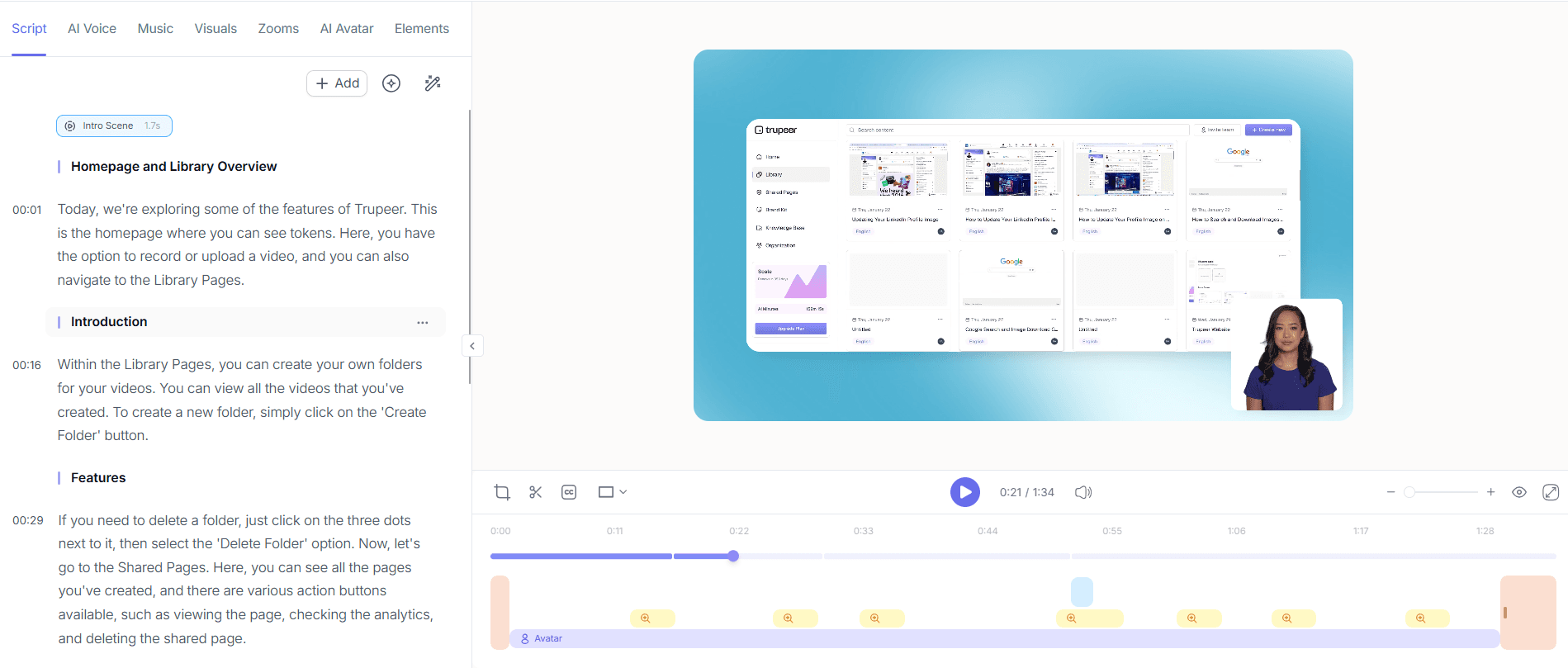
Step 3: Add AI Voiceover
Enhance your video with Trupeer's AI voiceover feature, which offers over 65+ natural voices. Choose a voice that aligns with your brand's tone and language. To implement this, navigate to the voiceover options within the editing suite, select your preferred voice, and adjust the pace and tone as needed. This feature ensures that your video is engaging and accessible to a diverse audience. The AI voiceover can be generated within minutes, providing a smooth and professional narration for your screen recordings.

Step 4: Generate SOP Documentation
With your video finalized, use Trupeer's automatic SOP generation to create detailed documentation. This feature extracts key actions from your video and formats them into a comprehensive SOP. Access this tool from the documentation section of the platform. The generated SOP is immediately edit-ready, allowing you to make quick adjustments before exporting it in formats like HTML or PDF. This step not only enhances your YouTube content but also provides additional resources for viewers who prefer written instructions.

Step 5: Translate for a Global Audience
To reach international markets, use Trupeer’s AI translation into 40+ languages. This feature, accessible from the translation menu, allows you to select target languages and apply them to your video. Trupeer’s lip-sync technology ensures that translations are synchronized with the visuals, maintaining the video's professional quality. This process is typically completed within a few hours, depending on the video length, making your content accessible to a worldwide audience and expanding your potential customer base significantly.

Step 6: Publish and Distribute
Finally, publish your video on YouTube and distribute it across platforms. Use Trupeer's AI-searchable knowledge base to create deep links within your video, directing viewers to specific sections. This functionality is found in the distribution settings, where you can also manage shared pages and custom-domain hosting. By embedding video widgets for in-app guidance, you ensure your content is easily accessible wherever your audience interacts with your brand. The publication process takes just a few minutes, and with strategic distribution, you maximize your video’s reach and impact.

What tips help you build a YouTube channel for a B2B SaaS product with screen recordings?
Building a successful YouTube channel for your B2B SaaS product involves strategic planning and execution. Here are practical tips to enhance your content and engagement.
Consistent Branding. Use Trupeer's brand kits to maintain a consistent visual style across all videos. This reinforces brand recognition and trust.
Engaging Thumbnails. Design eye-catching thumbnails that accurately represent your video's content. This increases click-through rates and viewer interest.
Clear Call-to-Actions. Include direct call-to-actions in your videos to guide viewers towards desired actions, such as visiting your website or signing up for a trial.
Optimize Video Descriptions. Write detailed video descriptions with keywords that improve searchability and provide additional context to viewers.
Use Chapters. Implement auto chapters and segments to help viewers navigate long videos, enhancing user experience and retention.
use Analytics. Regularly review viewer engagement analytics to understand what content resonates best and adjust your strategy accordingly.
Collaborate with Influencers. Partner with industry influencers to broaden your reach and credibility within your niche.
Teams weighing tools often start with a Loom alternatives comparison before standardizing on a workflow.
Frequently asked questions
How can I create professional screen recordings without technical skills?
Trupeer simplifies the process with its AI-powered screen recording. You don't need technical expertise to create high-quality videos. The browser-based recorder is intuitive, allowing you to capture your screen with ease. Features like auto-zoom and click detection focus on important actions automatically. This ensures your recordings are clear and engaging, effectively conveying your product's benefits without requiring extensive video production knowledge.
What tools can help translate my videos for international audiences?
Trupeer's AI translation feature is ideal for localizing video content. It supports translation into over 40 languages, ensuring your videos are accessible to a global audience. The platform uses advanced lip-sync technology to maintain the quality of your videos across different languages. By using a reliable video translation platform, you can expand your SaaS product's reach without compromising on quality or professionalism.
How do I engage viewers with my SaaS product videos?
Engagement hinges on clarity and relevance. Start by using Trupeer’s AI voiceover to create professional narrations that captivate viewers. Incorporate call-to-actions within your videos to prompt interaction, such as visiting your website or subscribing to your channel. also, use viewer engagement analytics to identify which content performs best and tailor future videos to align with audience preferences, ensuring higher engagement rates.
Does Trupeer offer solutions for creating SOPs from video content?
Yes, Trupeer offers automatic SOP generation from video recordings. This feature extracts and formats key steps from your video into a detailed SOP. It's especially useful for creating training materials and documentation quickly. The generated SOPs are edit-ready and can be exported in various formats like PDF or HTML, facilitating easy distribution and access for your audience and team members.
Is it possible to integrate my video content with other platforms for broader distribution?
Trupeer supports integration with various platforms to enhance distribution. Use embeddable video widgets to include your content on different websites or applications. This feature, combined with custom-domain hosting and shared portals, ensures your videos reach a wider audience. Such integrations allow you to use existing channels and platforms, boosting visibility and engagement for your SaaS product.
Related Blogs


