Use this template
SAP users rarely need another training course. What they need is the right answer at the moment they're stuck: which field takes the cost centre, what the tolerance is, why the invoice is blocked, which app to use when the PO has changed. That's what a job aid does. An SAP job aid template gives you a one-page format for exactly that, built around the SAP task, screen and decision where users actually go wrong.
This free SAP job aid template gives you a proven way to choose the right type of job aid, a one-page structure to copy, a filled-in SAP example and guidance on where to put job aids so people use them. It works for SAP S/4HANA Fiori apps and SAP GUI transactions alike, and you can generate a job aid from a recording of the task instead of writing it from scratch.
What is an SAP job aid template?
An SAP job aid template is a ready-made, one-page format for a quick reference that helps someone complete a specific SAP task correctly while they're doing it. It names the task, the app or transaction, when to use it, the steps or decisions that matter, the field values or codes people forget, and what to do if the job aid doesn't cover the case. It's not a training course or a full procedure; it's the support people use at the point of work.
A job aid sits between training and the full SOP. For the general format you can use for any system, this same page works as a job aid template for non-SAP tasks too.
How is an SAP job aid different from training and SOPs?
Training | SOP or work instruction | SAP job aid | |
|---|---|---|---|
Purpose | Build skills before the task | Define the whole procedure | Support the task while it's being done |
Length | Hours | Several pages | One page or a short video |
When used | Before go-live or onboarding | When learning or checking the full process | At the moment of doing the task |
Content | Concepts, practice, context | Every step, role, control and exception | Only the steps, decisions or values people get wrong |
Write a job aid when trained people still make the same mistake on a familiar SAP task. Write an SOP when the whole process needs defining; see the work instructions template for step-level procedures.
Why most SAP job aids fail before a word is written
Most job aids are chosen by format: a flowchart, a checklist, a cheat sheet with screenshots of every screen. They look polished and change nothing, because the format was picked before anyone found out how users actually go wrong.
The missing step is diagnosis. Before choosing a format, look at the last twenty errors, tickets or "how do I…" questions for that SAP task and sort them by what the person didn't have at the moment they went wrong. That usually takes less than an hour, using support tickets, blocked document reports or a conversation with super users, and the answer chooses the format for you.
How to choose the right SAP job aid format
What goes wrong in SAP | What you hear | The job aid that fixes it | What it must contain |
|---|---|---|---|
Sequence: steps missed or done out of order | "I always forget to check the PO history first" | Step card | Numbered actions, one per line, with the expected result beside each |
Choice: wrong option picked from several | "Which document type do I use for this?" | Decision table | Conditions on the left, the exact value or action on the right |
Recall: item forgotten under pressure | "I forgot to release the blocked invoice before the run" | Checklist | Short items with a clear trigger for when to run it |
Recognition: can't tell right from wrong | "How do I know this posting is correct?" | Annotated example | A correct and an incorrect screen side by side, with the difference marked |
Value: knows the action, not the code | "What's the tax code for this supplier?" | Reference card | Codes, thresholds, tolerances and contacts, and nothing else |
A flowchart is usually a decision table drawn less clearly. Use one only when the task genuinely loops back or rejoins in a way a table can't show.
Preview the SAP job aid template
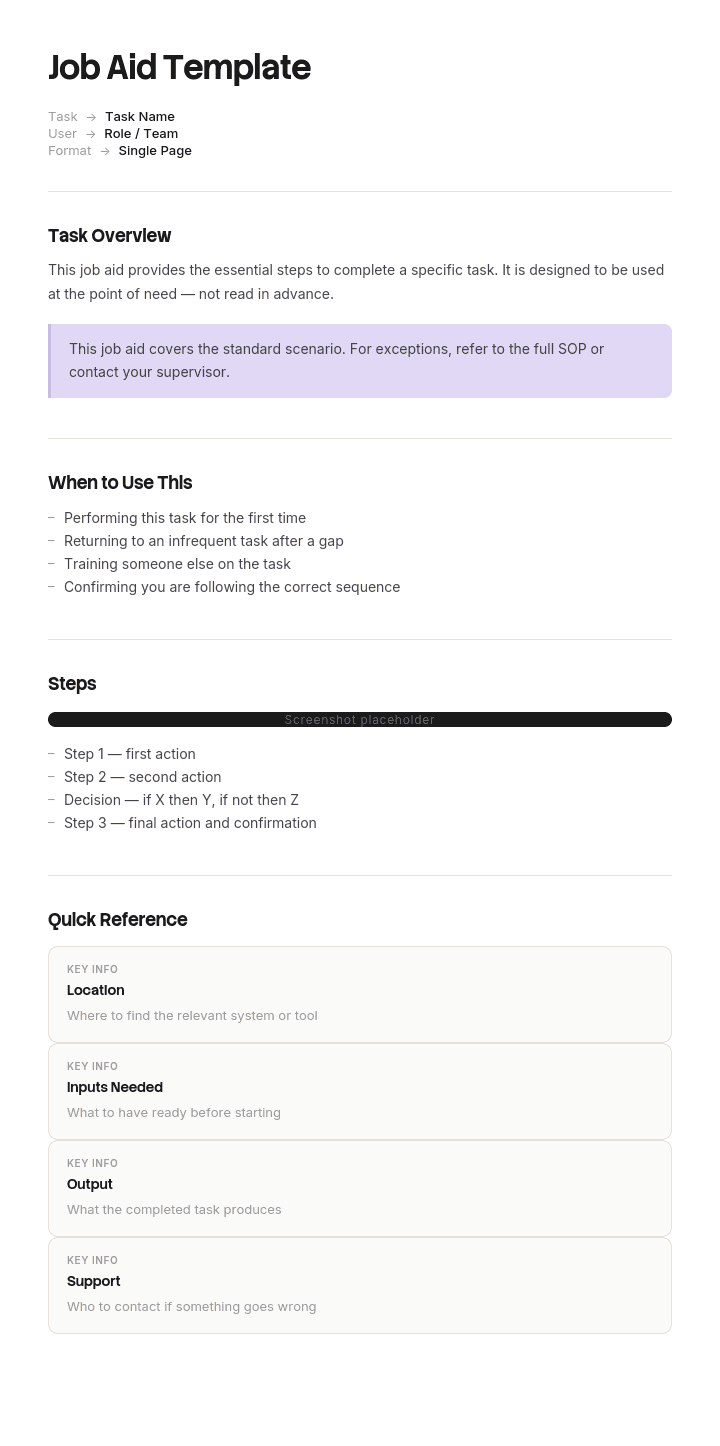
The template fits on one page. It opens with the task title, the SAP app or transaction, the role and the trigger for using it. The main area holds the job aid itself: a step card, decision table, checklist, annotated example or reference card, chosen using the diagnosis above. It closes with what to do if the job aid doesn't cover the case, a link to the full procedure, a link to a short video and the owner and last-checked date. Every section is editable, so you can switch the aid type or add your own SAP fields and codes.
How to customize this template in Trupeer
Step 1: Open the Templates Section
Go to the Templates section from the main navigation.

Step 2: Select and Open a Template
Click on any template you want to work with to open it.

Step 3: Expand the Template View
If needed, expand the template view to see the full layout and details clearly.

Step 4: Edit the Template
Click on Edit to start modifying the selected template.

Within the editor, you can:
Add new sections
Define or update formatting rules
Add a logo and adjust its position and related settings
Step 5: Save Your Customized Template
After making all necessary changes, click Save to store the updated template as your own.

Step 6: Preview and Fine-Tune the Template
When you want to see how your customized template looks, open the Preview.

From the preview screen, you can continue to make adjustments directly if needed, ensuring the template appears exactly as you want.
With an SAP job aid template you can:
Fix the exact step users get wrong: Target the error, not the whole process.
Support Fiori and SAP GUI tasks: Name the app or transaction, the fields and the values that matter.
Cut repeat tickets: Answer the same "how do I…" question once.
Keep job aids current: Every aid has an owner and a last-checked date.
Generate job aids from recordings: Record the task once and get a draft job aid and video.
Free SAP job aid template: the structure to copy
Copy this into your own document, or open it in Trupeer and customize it. It fits on one side of a page, and it should stay that way.
Field | What to enter |
|---|---|
Task title | Written as the task, such as "Post a supplier invoice with a price variance", not "Invoice guidance" |
SAP app or transaction | Fiori app name and ID, or SAP GUI transaction code |
Role | Who does this task |
Use this when | The trigger, in one line |
The job aid | Step card, decision table, checklist, annotated example or reference card |
Key fields and values | Only the fields and values people get wrong |
If this doesn't cover it | Who to ask and how, such as a super user or the support channel |
Full procedure | One link to the SOP or work instruction |
Video | One link to a short video of the task |
Owner and last checked | A name and the date someone last confirmed it still works in the system |
If your filled version runs to a second page, you've written a procedure. Move it to an SOP and keep the job aid to the part people get wrong.
SAP job aid example: posting a supplier invoice with a variance
Here's a filled-in SAP job aid for an accounts payable task. The details are illustrative; use your own system configuration, tolerances and contacts.
Task title. Post a supplier invoice when the price differs from the PO.
SAP app or transaction. Fiori app "Create Supplier Invoice", or transaction MIRO in SAP GUI.
Role. AP clerk.
Use this when. The invoice price doesn't match the purchase order price.
The job aid (decision table).
If the price difference is… | Then… |
|---|---|
Within tolerance | Post the invoice as normal; the system accepts the variance |
Above tolerance and the buyer has confirmed the new price | Post the invoice; it will be blocked for payment; ask the buyer to approve the release |
Above tolerance and the buyer hasn't confirmed | Park the invoice, add a note with the variance and send it to the buyer |
A duplicate of an invoice already posted | Don't post; reject it to the supplier |
Key fields and values. Tolerance: [your price tolerance]. Payment block reason for price variance: [your code].
If this doesn't cover it. Ask your team's super user, or post in [support channel].
Full procedure. [Link to the AP invoice processing SOP]. Video. [Link to the two-minute video].
Owner and last checked. [AP process owner], [date].
Where to put job aids so people use them
A job aid buried in a shared drive is just another document. Put it where the SAP task happens:
Link it from the Fiori launchpad or the relevant app, where your configuration allows it.
Pin it in the team's chat channel where people ask how to do the task.
Attach it to the support ticket category that the task generates.
Keep one master copy in your knowledge base, and link to it from everywhere else.
Two locations are fine; two versions are not. Update the master and every link stays current.
How to create a job aid step by step
Pick the task with the most errors, tickets or repeat questions.
Diagnose the failure using the last twenty errors or questions: sequence, choice, recall, recognition or value.
Choose the job aid type that matches the failure.
Record the task in SAP with someone who does it well, narrating the decision points.
Generate the draft with Trupeer's job aid generator, then cut it down to the part people get wrong.
Test it with a new user doing the real task.
Publish it where the task happens, with an owner and last-checked date.
Measure the error or ticket rate before and after.
SAP job aid examples for common tasks
SAP task | Best job aid type | What it covers |
|---|---|---|
Create a purchase order | Step card | The steps people skip, such as account assignment |
Choose the right document type | Decision table | Which document type to use in which situation |
Release blocked invoices before a payment run | Checklist | The checks to run before the run |
Check a posting is correct | Annotated example | A correct and an incorrect document, side by side |
Find tax codes, cost centres or tolerances | Reference card | The values people look up most |
Approve a request in My Inbox | Step card or short video | The approval steps for occasional users |
For the full range of SAP training content, see what to create in SAP Fiori end user training materials.
How do SAP job aids improve performance?
They reduce errors on the specific step that produces them, and they shorten the time new users take to reach acceptable quality in SAP. Both effects can be measured if you record the error or ticket rate for the task before you publish the aid, which is also the discipline that stops you building the wrong one.
What job aids don't do is raise general SAP skills. Their gains are narrow by design, which is why five job aids aimed at five known failure points usually do more than forty that try to cover everything.
SAP job aids, SAP Enable Now and recording-based tools
Many SAP teams already use SAP Enable Now to author simulations and in-app help. Job aids complement it: a simulation teaches a task, while a job aid supports someone doing it. Whichever tool you use, the same rules apply: diagnose the failure first, keep the aid to one page or a short video, and keep it current after every release. If you're comparing authoring tools, see our guide to SAP Enable Now competitors.
Which format to use
Word or a document suits step cards, decision tables and annotated examples.
Excel suits reference cards with codes and values people search or filter.
PowerPoint suits printed or wall-mounted aids with large visuals.
Short video suits tasks where seeing the screen matters more than reading steps, especially for occasional users.
PDF suits a read-only copy to pin or print, with the editable master kept in your knowledge base.
How to review and retire job aids
Recheck every job aid after each SAP release or configuration change affecting the task.
Look at the error or ticket rate for the task; if it hasn't fallen, the aid isn't working.
Retire job aids for tasks that have changed, been automated or no longer cause errors.
Update the last-checked date only after someone has confirmed the aid against the live system.
What to leave out
Screenshots of every screen, when only one field causes the problem.
Background and explanations, which belong in training.
Steps nobody gets wrong.
Rare cases, which belong in the SOP; point to it instead.
Version numbers nobody reads; use an owner and last-checked date.
How Trupeer helps you create SAP job aids at scale
SAP job aid challenge | How Trupeer helps |
|---|---|
Writing job aids by hand takes too long | Record the task once in SAP, and Trupeer generates a draft job aid with screenshots and a short video |
Job aids go out of date after SAP releases | Update by editing the script, or replace a single step instead of re-recording |
Users work in many languages | Translate job aids and videos from one source into 65+ languages |
Job aids are scattered across drives | Publish them in one searchable knowledge base and link to them from where the work happens |
SAP training content is needed fast | Trupeer's SAP training video generator turns SAP recordings into training videos |
Large BPOs use this approach to produce job aids for hundreds of processes; see how Genpact-style BPOs create job aids for 300+ processes using AI video tools.
Genpact used Trupeer for a company-wide Workday rollout, turning recorded process sessions into more than 500 training collaterals across 20 workstreams in five languages, for 140,000 employees in 40 countries, in 3 months instead of 12. Read the Genpact customer story.
Download the free SAP job aid template
Sign up to open the SAP job aid template in Trupeer, generate job aids from your own SAP recordings and get the full results as editable job aids and videos. Get the free SAP job aid template.
Related templates
ERP end user training plan template
Frequently Asked Questions
What is an SAP job aid template?
It's a ready-made, one-page format for a quick reference that helps someone complete a specific SAP task correctly while doing it, covering the task, app or transaction, trigger, the steps or decisions people get wrong, key values and where to get help.
What's the difference between an SAP job aid and an SAP training manual?
A training manual builds skills before the task and covers concepts and practice. A job aid supports the task while it's being done and covers only what people get wrong.
How long should an SAP job aid be?
One page or a short video. If it runs longer, it's a procedure and belongs in an SOP or work instruction.
Which type of job aid should I use?
Choose by how people fail: a step card for missed steps, a decision table for wrong choices, a checklist for forgotten items, an annotated example for recognising errors and a reference card for codes and values.
Does the template work for SAP Fiori and SAP GUI?
Yes. Name the Fiori app or the SAP GUI transaction code in the template, and include only the fields and values that matter for the task.
Can I generate an SAP job aid from a recording?
Yes. Record the task in SAP, and Trupeer's job aid generator creates a draft job aid with screenshots and a short video, which you then cut down to the steps people get wrong.
Is there a free SAP job aid template in Word?
Yes. Word suits step cards, decision tables and annotated examples. Open the template in Trupeer, customize it and export it in the format you need.
Is there an SAP job aid template in Excel or PowerPoint?
Yes. Excel suits reference cards with codes and values, and PowerPoint suits printed or wall-mounted aids. Customize the template in Trupeer and export it.
Is there an SAP job aid template PDF?
Yes. Export the job aid as a PDF to pin or print, and keep the editable master in your knowledge base.
Can I use this as a general job aid template?
Yes. The structure and the method for choosing the job aid type work for any system or task, not just SAP.
Who should write SAP job aids?
Super users or process owners who know where users go wrong, with support from the training team, and ideally tested by a new user before publishing.
How often should SAP job aids be reviewed?
After every SAP release or configuration change that affects the task, and whenever the error or ticket rate for the task stops falling.


