Verwenden Sie diese Vorlage
Montageanweisungen sind der Unterschied zwischen gleichbleibender Qualität und wiederkehrender Nacharbeit. Mit Trupeer können Sie sich beim Erstellen von Montageanweisungen Stunden sparen, indem Sie mit einer kostenlosen Vorlage für Montageanweisungen starten, sie mit Ihren Brand-Richtlinien anpassen und schriftliche Anweisungen in Video-Übersichten umwandeln, die Bediener direkt an der Linie ansehen können.
Eine Montageanweisung hat eine Aufgabe: Ein geschulter Bediener soll das Teil korrekt zusammenbauen können, ohne jemanden fragen zu müssen. Wenn sie jemanden fragen müssen, ist die Anweisung fehlgeschlagen.
Generische Vorlagen verfehlen, was die Montage wirklich braucht. Teilenummern, Spezifikationen für Verbindungselemente, Drehmomentwerte, Werkzeuge und Vorrichtungen, Abhängigkeiten in der Reihenfolge sowie der Prüfpunk, der den Fehler abfängt, bevor er die nächste Station erreicht. Diese kostenlose Vorlage für Montageanweisungen enthält all diese Felder.
Aufbau einer Montage-Station
Der Schritt ist die Einheit, die zählt. Wenn dieser Block stimmt, baut sich das Dokument quasi von selbst.
Element | Beispiel |
|---|---|
Schrittnummer | 4 von 11 |
Aktion | Halterung am Gehäuse anpassen und Verbindungselemente anziehen |
Teile | BRK-2214 x1, M6x20 Schraube PN-0451 x4, Unterlegscheibe PN-0088 x4 |
Werkzeuge und Vorrichtungen | Drehmomentschlüssel 5 bis 25 Nm, Vorrichtung FX-08 |
Spezifikation | 12 Nm ±1, diagonal in Reihenfolge anziehen |
Visuell | Foto oder Clip mit Verbindungselement-Reihenfolge |
Qualitätsprüfung | Spalt unter 0,5 mm an beiden Kontaktflächen prüfen |
Wenn es nicht klappt | Lösen, Halterung neu einsetzen, erneut mit Drehmoment anziehen. Nicht mehr als 2 Versuche, dann für Nacharbeit kennzeichnen |
Zeit | 90 Sekunden |
Eine Aktion pro Schritt. Wenn ein Schritt „und dann“ enthält, teilen Sie ihn. Die häufigste Fehlerquelle an jeder Linie ist ein Schritt, der still zwei Vorgänge enthielt – von denen einer der Bediener gelernt hat zu überspringen.
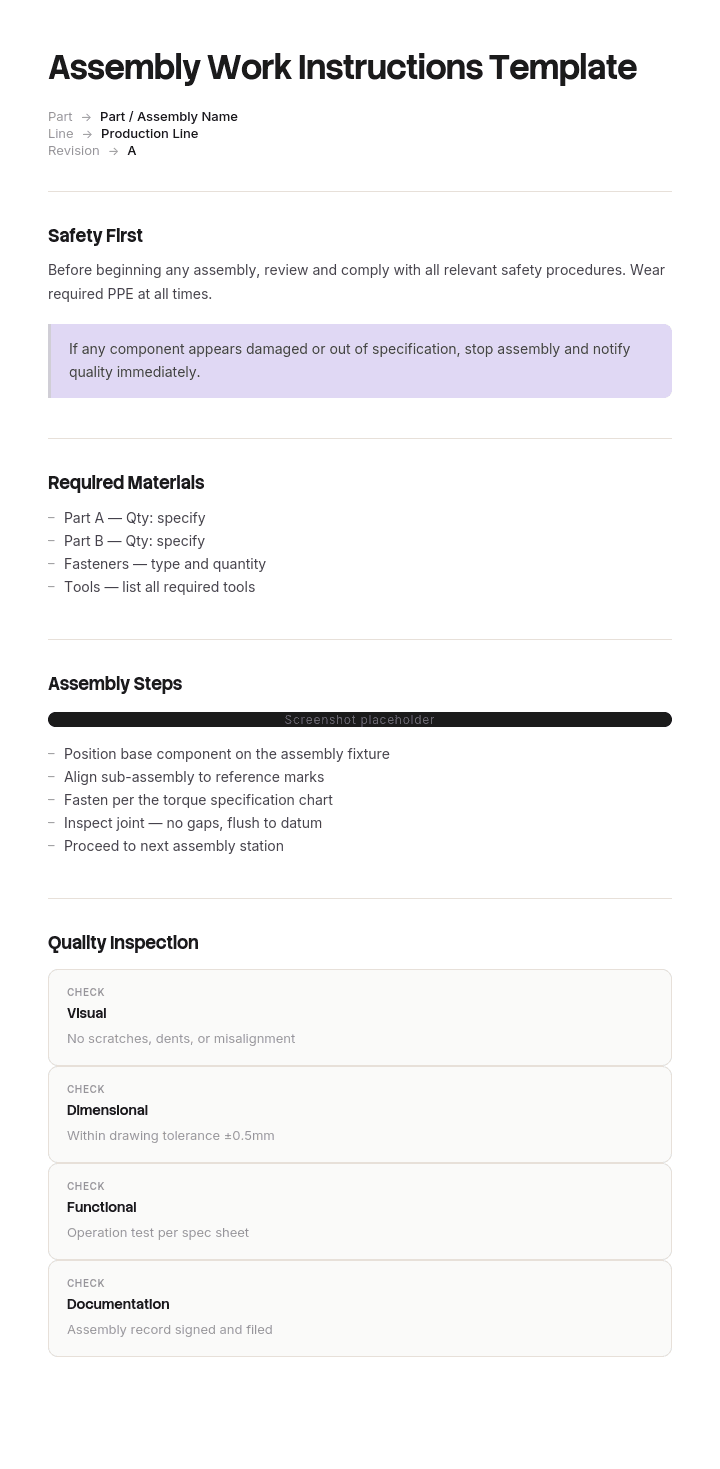
Die Vorlage für Montageanweisungen
Kopfblock, einmal pro Dokument ausgefüllt:
Feld | Eingeben |
|---|---|
Dokumentnummer und Revision | WI-0142, Rev C |
Montagename und Teilenummer | Pumpen-Unterbaugruppe, PN-77120 |
Arbeitsplatz oder Zelle | Zelle 3, Station 2 |
Gesamte Zykluszeit | 14 Minuten |
Erstellt von und Datum | Name, Datum |
Freigegeben von und Datum | Name, Datum |
Zugehörige Zeichnung oder Stückliste | DWG-77120-A, BOM Rev 4 |
PSA erforderlich | Schutzbrille, schnittfeste Handschuhe |
Sicherheits- und ESD-Hinweise | ESD-Handgelenkband erforderlich an Station 2 |
Schrittblock, pro Schritt wiederholt: Schrittnummer, Aktion, Teile, Werkzeuge und Vorrichtungen, Spezifikation, visuell, Qualitätsprüfung, Maßnahme bei Fehler, Zeit.
Freigabe-Block, am Ende ausgefüllt: Name des Bedieners, Menge gebaut, Datum, Ergebnis der Erstbemusterungsprüfung, Unterschrift des Prüfers, notierte Abweichungen.
So passen Sie diese Vorlage in Trupeer an
Schritt 1: Öffnen Sie den Bereich „Vorlagen“
Wechseln Sie im Hauptmenü zum Bereich „Vorlagen“.

Schritt 2: Vorlage auswählen und öffnen
Klicken Sie auf eine beliebige Vorlage, mit der Sie arbeiten möchten, um sie zu öffnen.

Schritt 3: Vorlagenansicht erweitern
Wenn nötig, erweitern Sie die Vorlagenansicht, um das vollständige Layout und die Details klar zu sehen.

Schritt 4: Vorlage bearbeiten
Klicken Sie auf „Bearbeiten“, um mit der Anpassung der ausgewählten Vorlage zu beginnen.

Im Editor können Sie:
Neue Abschnitte hinzufügen
Formatierungsregeln definieren oder aktualisieren
Ein Logo hinzufügen und Position sowie zugehörige Einstellungen anpassen
Schritt 5: Speichern Sie Ihre angepasste Vorlage
Nachdem Sie alle notwendigen Änderungen vorgenommen haben, klicken Sie auf „Speichern“, um die aktualisierte Vorlage als Ihre eigene zu sichern.

Schritt 6: Vorschau ansehen und Vorlage feinjustieren
Wenn Sie sehen möchten, wie Ihre angepasste Vorlage aussieht, öffnen Sie die Vorschau.

Ausgehend vom Vorschau-Bildschirm können Sie bei Bedarf weiterhin direkt Anpassungen vornehmen, damit die Vorlage genau so erscheint, wie Sie es möchten.
Beispiel für eine ausgefüllte Montageanweisung
WI-0142 Rev C. Pumpen-Unterbaugruppe PN-77120. Zelle 3, Station 2. Zykluszeit 14 Minuten. PSA: Schutzbrille, schnittfeste Handschuhe.
# | Aktion | Teile und Werkzeuge | Spez. | Qualitätsprüfung | Zeit |
|---|---|---|---|---|---|
1 | Gehäuse in die Vorrichtung laden, Zentrierstift nach hinten ausrichten | HSG-7712, Vorrichtung FX-08 | Stift vollständig eingesetzt, kein Spiel | Gehäuse hebt sich nicht, wenn es angeklopft wird | 30s |
2 | Lager in die Bohrung des Gehäuses einpressen | BRG-3390, Arborpresse, Arbor AR-12 | Bis zur Schulter pressen, 2 bis 4 kN | Lager bündig zur Stirnfläche der Bohrung | 60s |
3 | Welle durch das Lager führen, drehen zum Prüfen | SHF-5510 | Dreht frei per Hand, keine Verklemmen | Freie Rotation, kein Axialspiel über 0,1 mm | 45s |
4 | Halterung anpassen, 4 Verbindungselemente diagonal anziehen | BRK-2214, M6x20 PN-0451 x4, Drehmomentschlüssel | 12 Nm ±1 | Spalt unter 0,5 mm an beiden Flächen, Lackmarkierung an jedem Verbindungselement | 90s |
5 | Dichtung einbauen, Lippe nach innen ausgerichtet | SEAL-1180, Dichtungstreiber SD-04 | Bündig eingesetzt, Lippe unbeschädigt | Visuell: Lippenorientierung korrekt, keine Kerben | 45s |
6 | Laufrad einbauen, Sicherungsmutter mit Drehmoment anziehen | IMP-4402, Mutter PN-0620, Drehmomentschlüssel | 18 Nm ±1 | Laufrad berührt das Gehäuse nicht, wenn es gedreht wird | 75s |
7 | Abdeckung montieren, 6 Verbindungselemente im Sternmuster anziehen | COV-8890, M5x16 PN-0433 x6 | 8 Nm ±0,5, Sternreihenfolge | Alle 6 Lackmarkierungen gesetzt, Abdeckung gleichmäßig aufgesetzt | 120s |
8 | Dichtheitsprüfung bei 2 bar für 30 Sekunden | Prüfstand TR-02 | Kein Druckabfall über 0,05 bar | Ergebnis Pass/Fail auf Prüfstands-Ausdruck dokumentiert | 60s |
9 | Etikett mit Teilenummer und Seriennummer anbringen | Etikett LBL-7712, Drucker P-3 | Etikett quadratisch, gut lesbar, Seriennummer erfasst | Seriennummer stimmt mit dem Fertigungsprotokoll überein | 30s |
10 | Fertigungsprotokoll erfassen und Prüfstands-Ausdruck anheften | Fertigungsprotokollblatt | Alle Felder vollständig | Unterschrift des Prüfers | 45s |
11 | Übergabe an Station 3 in rückführbarer Transportbox | Transportbox RT-14 | Max. 6 pro Box, Trennwände eingesetzt | Kein Kontakt des Bauteils | 30s |
Freigabe: Bediener, Menge, Datum, Ergebnis der Erstbemusterungsprüfung, Prüfer, Abweichungen.
Beachten Sie, dass jeder Schritt eine Spezifikation, eine Prüfung und eine Zeit hat. Diese drei machen daraus eine Arbeitsanweisung. Ohne sie ist es nur eine Beschreibung der Aufgabe.
Was eine Vorlage für Arbeitsanweisungen enthalten muss
Dokumentnummer und Revision. Bediener müssen erkennen können, ob sie die aktuelle Version in der Hand haben. Unkontrollierte Revisionen sind der häufigste Audit-Befund.
Geltungsbereich und Teilenummer. Welche Montage, welche Variante, welche Station.
PSA und Sicherheitshinweise. Vor Schritt eins, nicht mitten drin versteckt.
Liste der Werkzeuge und Vorrichtungen. Einschließlich kalibrierungsabhängiger Werkzeuge anhand der ID.
Stückliste mit Teilenummern. Nur Beschreibungen führen zu Fehlern mit dem falschen Teil.
Eine Aktion pro Schritt, in Reihenfolge.
Spezifikationen mit Toleranzen. „Fest anziehen“ ist keine Spezifikation. „12 Nm ±1“ ist eine.
Pro Schritt eine visuelle Darstellung. Montage ist räumlich. Text allein kann die Ausrichtung nicht vermitteln.
Qualitätsprüfpunkte. Was zu prüfen ist und was die Bestehensbedingung ist.
Maßnahmen bei Fehler. Was der Bediener tut, wenn die Prüfung fehlschlägt, damit er nicht improvisiert.
Zykluszeit pro Schritt. Für die Linienausbalancierung und um Abweichungen zu erkennen.
Freigabe und Unterschrift. Wer es erstellt hat, wer es freigegeben hat, wer es gebaut hat.
Arbeitsanweisungen vs. SOPs vs. Prozessdokumente
Diese drei Begriffe werden oft synonym verwendet und liegen auf unterschiedlichen Ebenen.
Arbeitsanweisung | Standard Operating Procedure | Prozessdokument | |
|---|---|---|---|
Geltungsbereich | Eine Aufgabe an einer Station | Ein vollständiges Verfahren über Rollen hinweg | Wie die Arbeit über eine Funktion hinweg abläuft |
Detailgrad | Jede Aktion, Spezifikation und Toleranz | Schritte und Verantwortlichkeiten | Höhere Ebene, oft ein Diagramm |
Zielgruppe | Der Bediener, der die Aufgabe ausführt | Das Team, das das Verfahren durchführt | Manager und Auditoren |
Antworten | Ganz genau: Wie mache ich das? | Wer macht was, in welcher Reihenfolge | Wie funktioniert diese Funktion |
Länge | Eine oder zwei Seiten pro Aufgabe | Zwei bis zehn Seiten | Variiert |
Beispiel | Die Abdeckungs-Schrauben im Sternmuster mit 8 Nm anziehen | Das vollständige Verfahren zum Aufbau der Unterbaugruppe | Der Fertigungsprozess von Wareneingang bis Versand |
Die praktische Regel: Eine SOP sagt Ihnen, dass das Verfahren einen Drehmoment-Schritt hat. Die Arbeitsanweisung sagt Ihnen, dass es 8 Nm im Sternmuster sind, und zeigt Ihnen das Muster. Wenn Sie anfangen, Toleranzen in eine SOP zu schreiben, schreiben Sie eine Arbeitsanweisung.
Standardisierte Arbeitsanweisungen, manchmal auch standardisierte Arbeitsanweisungen genannt, sind die Lean-Manufacturing-Version desselben Dokuments – mit Zykluszeit und Taktzeit als erstklassige Felder.
So schreiben Sie Montageanweisungen in acht Schritten
Beobachten Sie den Job, den jemand macht, der darin gut ist. Nicht den Prozess, wie er dokumentiert ist. Den Prozess, wie er tatsächlich ausgeführt wird. Der Unterschied zeigt Ihnen, wo Ihre Verbesserungen ansetzen.
Halten Sie alles fest, während Sie zuschauen. Sie werden sich die Handorientierung in Schritt vier nicht merken – und auch der Bediener nicht, für den Sie schreiben.
Zerlegen Sie ihn in einzelne Aktionen. Jeweils ein Verb. Wenn ein Schritt „und“ braucht, sind es zwei Schritte.
Holen Sie Spezifikationen aus der Zeichnung, nicht aus dem Gedächtnis. Drehmomentwerte, Toleranzen und Teilenummern stammen aus kontrollierten Dokumenten.
Fügen Sie zu jedem Schritt eine visuelle Darstellung hinzu. Fotografieren oder clippen Sie das tatsächliche Teil an der tatsächlichen Station – in der Ausrichtung, in der der Bediener es sieht.
Schreiben Sie die Qualitätsprüfung und die Bestehensbedingung. Schreiben Sie danach auf, was passiert, wenn es fehlschlägt.
Lassen Sie einen neuen Bediener es anhand Ihres Entwurfs bauen. Jede Frage, die sie stellen, markiert einen Schritt, der neu geschrieben werden muss. Das ist der einzige echte Test.
Versionieren, freigeben und an der Station ablegen. Eine Anweisung in einem freigegebenen Laufwerk ist nicht am Ort des Einsatzes.
Warum visuelle Arbeitsanweisungen in der Montage wichtiger sind
Eine Handbewegung lässt sich nicht in einem Satz beschreiben. Ausrichtung, Reihenfolge, wie viel Kraft, in welche Richtung die Dichtlippe zeigt. Text kann das alles nicht gut abbilden – deshalb ist die Montage der stärkste Anwendungsfall für visuelle Arbeitsanweisungen in jeder Dokumentationsart.
Fehler sinken dort, wo die Ausrichtung gezeigt statt beschrieben wird. Dichtungen, Dichtungen und Anschlüsse, die verkehrt herum montiert werden, sind der klassische Fehler bei reinem Text.
Die Trainingszeit sinkt. Neue Bediener erreichen die Standard-Zykluszeit schneller, wenn sie zuschauen statt lesen.
Sprache wird nicht mehr zum Hindernis. Ein Foto der korrekten Reihenfolge der Verbindungselemente wird in jeder Sprache gleich verstanden.
Mehrdeutigkeit hat keinen Ort zum Verstecken. Ein geschriebener Schritt kann auf zwei Arten gelesen werden. Ein Clip nicht.
Die praktische Version: Fotografieren oder zeichnen Sie den Schritt an der Station auf, annotieren Sie das Teil und die Richtung und platzieren Sie die visuelle Darstellung neben dem Schritt – statt im Anhang.
Digital oder Papier auf dem Shopfloor
Papier gewinnt auf manchen Linien immer noch – und es lohnt sich, ehrlich zu sagen, warum.
Papier funktioniert, wenn an der Station kein Bildschirm vorhanden ist, die Umgebung für Geräte feindlich ist, die Montage selten geändert wird oder der Bediener es bevorzugt. Die echten Kosten liegen in der Revisionskontrolle. Sobald sich eine Revision ändert, wird jede gedruckte Kopie an jeder Station zur Haftung, und der Audit-Befund schreibt sich quasi von selbst.
Digital funktioniert, wenn Revisionen häufig sind, Sie die gleiche Anweisung in mehreren Sprachen benötigen, Sie möchten, dass Abschluss und Zykluszeit automatisch erfasst werden, oder die Anweisung Video enthält. Die Kosten sind Hardware und die Gewohnheitsänderung.
Die meisten Hersteller landen am Ende in einem Hybrid-Modell: Digital als kontrollierte Master-Version, gedruckte Kopien an Stationen, die sie benötigen – mit einem Druckdatum und einer Revisionsnummer, damit ein veraltetes Blatt auf einen Blick sichtbar ist.
Barrierefreiheit und mehrsprachige Anweisungen
Zwei Dinge, die oft übersprungen werden und auf einer gemischten Linie echte Probleme verursachen.
Barrierefreiheit. Verlassen Sie sich nicht nur auf Farben, um eine Warnung zu signalisieren, da Rot-Grün-Farbschwäche etwa einen von zwölf Männern betrifft. Verwenden Sie eine ausreichend große Schrift, die sich unter der Beleuchtung im Werk aus Armlänge lesen lässt. Nutzen Sie einfache Sprache und kurze Sätze. Stellen Sie die Anweisung in mehr als einem Modus bereit, sodass ein visueller Schritt auch für alle beschrieben wird, die einen Screenreader nutzen.
Sprache. Wenn Ihre Linie in mehr als einer Sprache läuft, sind übersetzte Arbeitsanweisungen eher ein Sicherheits- als ein Komfortthema. Ein Bediener, der Anweisungen in seiner zweiten Sprache befolgt, arbeitet langsamer und macht mehr Fehler – und wird das nicht immer sagen. Ihre Anweisungen in die Sprachen zu übersetzen, die tatsächlich vor Ort gesprochen werden, ist eine der günstigsten Qualitätsverbesserungen, und genau das macht papierbasierte Dokumentation so teuer.
Weitere Vorlagen für Arbeitsanweisungen
Vorlage | Wofür verwenden | Felder, die unverzichtbar werden |
|---|---|---|
Vorlage für Standard-Arbeitsanweisungen | Lean-Manufacturing-Standardarbeit | Zykluszeit, Taktzeit, Arbeitsreihenfolge, WIP |
Vorlage für visuelle Arbeitsanweisungen | Jede räumliche oder manuelle Aufgabe | Bild pro Schritt, Annotationen, Hinweise zur Ausrichtung |
Vorlage für Fertigungs-Arbeitsanweisungen | Zerspanung, Umformen, Nachbearbeitung | Maschine, Programmnummer, Rüsten, Prüfungen im Prozess |
Vorlage für Sicherheits-Arbeitsanweisungen | Sichere Arbeitsmethoden | Gefahr, Kontrolle, PSA, Freigabe, Notfallmaßnahme |
Vorlage für Qualitäts-Arbeitsanweisungen | Prüfung und Test | Stichprobengröße, Messmittel, Toleranz, Entscheidung |
Vorlage für ISO 9001-Arbeitsanweisungen | Auditierte Qualitätssysteme | Dokumentenkontrolle, Revisionshistorie, Freigabe, Trainingsnachweis |
Vorlage für digitale Arbeitsanweisungen | Anweisungen an der Station auf Basis eines Bildschirms | Erfassung des Abschlusses, Revisions-Push, eingebettetes Video |
Vorlage für Engineering-Arbeitsanweisungen | Prototyp- und NPI-Bauten | Zeichnungsrevision, Abweichungsprotokoll, Engineering-Freigabe |
Vorlage für Produktions-Arbeitsanweisungen | Linien- und Zellenoperationen | Station, Rüstwechsel, Linienausbalancierung |
Vorlage für Projekt-Arbeitsanweisungen | Einmalige oder Baustellenarbeiten | Bedingungen vor Ort, Freigaben, Abhängigkeiten in der Reihenfolge |
Vorlage für Bau-Arbeitsanweisungen | Gewerke vor Ort | Method Statement, Baustellenrisiko, Prüfhaltepunkte |
All diese Vorlagen liegen unter dem Hub „[work instructions templates]“, falls Sie eine andere benötigen.
ISO 9001- und Audit-Anforderungen
ISO 9001 schreibt kein bestimmtes Format für Arbeitsanweisungen vor. Was gefordert wird, ist die Kontrolle dokumentierter Informationen – in der Praxis bedeutet das, dass ein Auditor vier Dinge prüft.
Revisionskontrolle. Jedes Dokument ist nummeriert und revisionsmarkiert, veraltete Versionen werden von der Fläche entfernt.
Freigabe. Nachweis, dass eine sachkundige Person die Anweisung vor der Nutzung genehmigt hat.
Verfügbarkeit am Ort des Einsatzes. Die Anweisung muss dort sein, wo die Arbeit stattfindet.
Trainingsnachweise. Nachweis, dass Bediener mit der aktuellen Revision geschult wurden – nicht mit einer überholten.
Der Block für die Revisionshistorie und die Freigabefelder in dieser Vorlage existieren genau dafür. Der häufigste Befund ist nicht eine schlecht geschriebene Anweisung – sondern eine korrekte Anweisung in Rev C, während an der Station noch Rev B hängt.
Häufige Fehler
Unklare Spezifikationen. „Sicher anziehen“ lässt sich weder prüfen noch in einem Audit verteidigen.
Keine visuelle Darstellung. Die größte Ursache für Ausrichtungsfehler in der Montage.
Mehrere Aktionen in einem Schritt. Der versteckte Vorgang ist der, der übersprungen wird.
Aus der Zeichnung statt vom Arbeitsplatz geschrieben. Das erzeugt Anweisungen, die technisch korrekt und physikalisch unmöglich sind.
Kein Fehlerpfad. Bediener improvisieren, wenn eine Prüfung fehlschlägt – und genau dort entsteht Variation.
Veraltete Revisionen auf der Fläche. Korrektes Dokument, falsche Version, gleicher Defekt.
Keine Zykluszeit. Sie verlieren die Fähigkeit, die Linie auszugleichen oder Abweichungen zu erkennen.
Nie mit einem neuen Bediener getestet. Der Autor denkt immer, es sei klar.
Kostenlose Vorlage für Montageanweisungen herunterladen
Kostenlos, editierbar und druckbar, ohne Wasserzeichen.
Format | Am besten für |
|---|---|
Word (.docx) | Anweisungen schreiben und überarbeiten, drucken für die Station |
Excel (.xlsx) | Schritt-für-Schritt-Raster, Summen der Zykluszeit, Standard-Work-Sheets |
Druckbares PDF | Kontrollierte Kopien am Arbeitsplatz |
Google Docs | Gemeinsame Überprüfung vor der Freigabe |
Google Sheets | Live-Standard-Work- und Linienausgleichs-Tabellen |
Machen Sie aus einem Build mit Trupeer AI eine Anweisung
Erfassen Sie die Montage einmal, und Trupeer AI erstellt die schriftliche Arbeitsanweisung sowie eine kommentierte Video-Übersicht aus demselben Durchlauf – mit den Schritten in der Reihenfolge, in der sie tatsächlich passiert sind, statt in der Reihenfolge, an die sich jemand erinnert hat. Wenden Sie Ihren Brand Kit an, damit jedes Dokument zu Ihrem Qualitätssystem passt. Das Setup finden Sie in der Vorlagenanleitung.
Lösen Sie danach das Sprachproblem richtig. Übersetzen Sie es in 65+ Sprachen, damit jeder Bediener die Anweisung in seiner eigenen Sprache liest, und speichern Sie das Set in Ihrer Knowledge Base als kontrollierte Master-Version. Nutzen Sie dieselben Aufnahmen für das Training von Bedienern, statt Trainingsmaterial zweimal zu schreiben.
Erfassen. Dokumentieren. Übersetzen. Trupeer.
Mit einer Vorlage für Montageanweisungen können Sie:
Stunden bei der Dokumentation sparen: Überspringen Sie die leere Seite mit einer Struktur, die für Montageaufgaben gebaut ist.
Defekte reduzieren: Klare visuelle Anweisungen senken Montagefehler deutlich.
Im Brand bleiben: Setzen Sie Ihr Logo, Ihre Schriftarten und Farben mit dem Brand Kit von Trupeer um.
Bediener schneller schulen: Kombinieren Sie Anweisungen mit Video-Übersichten direkt an der Linie.
Über Standorte hinweg standardisieren: Nutzen Sie dieselben Anweisungen an jedem Standort und in jeder Schicht.
Globale Teams erreichen: Übersetzen Sie Montageanweisungen in 65+ Sprachen mit einem Klick.
Gute Montageanweisungen machen komplexe Montagen zu gleichbleibenden, fehlerfreien Abläufen. Nutzen Sie diese Vorlage, um jede Montage klar und visuell zu erfassen.
Häufig gestellte Fragen
Was sind Montageanweisungen?
Montageanweisungen sind Schritt-für-Schritt-Anleitungen, die Bediener dabei unterstützen, ein Produkt korrekt zu bauen oder zu montieren. Sie enthalten Teile, Werkzeuge, Reihenfolge, Drehmomentspezifikationen, Qualitätsprüfungen und Sicherheitsanforderungen – typischerweise unterstützt durch visuelle Darstellungen oder Video zur besseren Verständlichkeit.
Was sollten Montageanweisungen enthalten?
Effektive Montageanweisungen enthalten den Namen und die Revision des Teils, Teile und Stückliste, die erforderlichen Werkzeuge, die Montage-Reihenfolge (nummerierte Schritte), Drehmoment- oder Befestigungsspezifikationen, Qualitätsprüfpunkte, Sicherheitsvorkehrungen, häufige Fehler, die es zu vermeiden gilt, sowie eine abschließende Checkliste für die Endprüfung.
Was ist der Unterschied zwischen Montageanweisungen und einer SOP?
Eine SOP beschreibt einen breiteren Prozess – einschließlich Rollen, Geltungsbereich und Qualitätsstandards. Montageanweisungen sind aufgabenbezogen – sie konzentrieren sich auf die exakten Schritte, um ein bestimmtes Produkt zu montieren. Montageanweisungen befinden sich häufig innerhalb einer SOP für den breiteren Fertigungsprozess.
Warum sind visuelle Darstellungen in Montageanweisungen wichtig?
Visuelle Darstellungen – Fotos, Explosionsdiagramme oder Video – verbessern die Montagegenauigkeit deutlich. Sie helfen Bedienern zu sehen, wie jedes Teil aussieht, wohin es gehört und wie es zusammenpasst. Visuelle Darstellungen überbrücken außerdem Sprachbarrieren und reduzieren die Abhängigkeit von Text in mehrsprachigen Teams.
Wie erstellen Sie Montageanweisungen?
Beginnen Sie damit, die Montage zu beobachten, die von einem erfahrenen Bediener durchgeführt wird. Erfassen Sie die Stückliste, die Werkzeuge und die Reihenfolge. Fügen Sie für jeden Schritt Fotos oder Video hinzu. Legen Sie Drehmomentwerte und Qualitätsprüfungen fest. Testen Sie die Anweisungen mit einem weniger erfahrenen Bediener und verfeinern Sie sie basierend darauf, wo er hängen bleibt.

