Trupeer Blog
Shrnout

More articles won't fix a broken internal knowledge base. I've seen companies publish hundreds of pages, add another search box, and still leave employees asking the same questions in Slack because the core problem isn't content volume. It's cross-system discovery, source ownership, and maintenance.
A useful company wiki should help a sales engineer find the current sandbox procedure, help support follow an approved escalation path, and help product marketing confirm which pricing guidance is still valid. That means treating documentation as an operating system for organizational knowledge, not as a digital filing cabinet.
Table of Contents
Why Most Internal Knowledge Bases Fail
An internal knowledge base fails when it becomes a static document graveyard instead of a governed layer that helps people discover and validate information across the tools they already use.
APQC research puts the productivity cost in concrete terms. Knowledge workers spend an average of 8.2 hours per week looking for, recreating, or duplicating information. That includes 2.8 hours looking for or requesting information, 1.7 hours identifying colleagues with relevant expertise, 2.0 hours recreating work that already exists, and 1.7 hours repeating information or updates for others, according to APQC's research on knowledge management productivity.
The issue gets more interesting when you compare search access with search quality. APQC reports that workers with enterprise search spend approximately 0.7 hours per week looking for or requesting information, about 2.1 fewer hours than the reported average. Search matters, but only when it reaches authoritative material and makes the answer reusable.

The repository is rarely the real problem
I've noticed that employees often move between several systems daily to answer one straightforward question. A 2025 survey of employees at companies with 5,000 or more workers found that employees move between about four systems daily to locate information, while one-quarter still don't know where to look for answers. Frustration with inadequate tools rose from 28% in 2022 to 40% in 2025, according to the Coveo report covered by SiliconANGLE.
Adding another wiki or generic AI chatbot doesn't automatically solve that fragmentation. If the new tool has no source map, permission model, freshness signal, or escalation path, it can make employees choose between even more conflicting answers.
A sales engineer might search for the latest pricing exception policy across Slack, Notion, and an intranet. The information exists, but one document is obsolete, the Slack thread has no owner, and the intranet page uses “commercial accommodation” instead of “pricing exception.” A large repository won't help unless the system identifies the right source and shows why the answer is trustworthy.
Practical rule: Store durable procedures in a governed knowledge layer, but connect that layer to the systems where current decisions, expertise, and operational evidence already live.
The historical shift is important. Knowledge management moved from static document storage toward search, governance, reuse, and source-aware retrieval. The IDC and McKinsey findings summarized in this enterprise search ROI analysis helped establish internal documentation as a productivity system rather than an optional communications channel.
If you ask me, a smaller collection of owned, searchable procedures connected to operational systems will outperform a massive company wiki with weak ownership. The goal isn't to publish everything. The goal is to make the right answer findable, current, and safe to reuse. For a practical distinction between a repository and a working knowledge system, this guide to what a knowledge base is is a useful starting point.
How Different Teams Use Company Wikis
A company wiki creates value when it captures the recurring workflows each team performs, not when every department is forced into the same documentation template.
In my work, product marketing, sales engineering, customer success, learning and development, and IT all need different types of internal knowledge. Product marketing needs launch assets and positioning context. Sales engineers need reliable technical procedures. Support needs decision trees that work under pressure. L&D needs structured learning paths, while IT needs controlled runbooks and change records.

Match the knowledge model to the job
I usually start with the question, “What does this person need to do next?” That produces better documentation than asking which department owns the page.
Product marketing needs launch checklists, competitive battle cards, approved messaging, packaging changes, and links to evidence behind claims. A release note alone isn't enough if sales needs to know what changed, which audience is affected, and what language is approved.
Sales engineering needs sandbox setup instructions, integration prerequisites, security responses, architecture diagrams, and objection handling. These pages should expose dependencies early. A procedure that omits required permissions creates more internal questions than it answers.
Customer success and support need troubleshooting macros, escalation criteria, product behavior notes, and customer-facing explanation templates. Their pages should distinguish standard resolution from exceptional cases.
Learning and development needs onboarding paths, role-based curricula, practice exercises, and assessment guidance. A link dump isn't a learning experience.
IT and operations need access procedures, incident runbooks, change-management workflows, and ownership details. These documents should make the safe action obvious and the risky action difficult.
Every core procedure should answer five operational questions:
What triggers the workflow?
What inputs or permissions are required?
What exact steps should the employee follow?
What exceptions require escalation?
Who owns and reviews the procedure?
A support representative once had to handle a shipment that required fish-quarantine checks and special packaging. Without documented operational know-how, the representative would have needed to find a veteran colleague and reproduce the process from memory. With an internal wiki containing the quarantine procedure and packaging manual, the representative could follow the approved workflow and escalate only unusual cases. Chenfu reported a 20% improvement in customer-service levels and business productivity after introducing an internal wiki for this kind of know-how, as described in this account of the knowledge-sharing implementation.
A useful article isn't a summary of what a team knows. It's a safe path through a task that someone else must complete.
The same principle applies to professional services teams, where reusable expertise often sits in project files and individual work habits. A professional services knowledge base framework offers useful context for turning firm knowledge into repeatable assets.
Designing Information Architecture for Findability
Employees search for outcomes, not org charts. “Reset SSO,” “approve a refund,” and “create a sandbox account” describe work they need to complete. “IT documentation,” “Finance policies,” and “Solutions Architecture” describe ownership, but rarely point directly to the answer.
A departmental wiki organizes knowledge around reporting lines. A searchable knowledge hub organizes it around user intent, then connects the relevant procedures across systems. One tested comparison found that reorganizing content around user tasks increased the number of tasks completed within three clicks from 4 of 12 to all 12, while median navigation distance fell from 4.5 clicks to 2.5. Labels improved from matching task language in 4 of 12 cases to all 12, according to this information-architecture comparison for knowledge bases.
Use task language before ownership language
Department-Centric Title | Task-Centric Title | User Intent |
|---|---|---|
IT Access Management | Reset SSO Access | Restore access without opening an avoidable ticket |
Finance Policies | Approve a Customer Refund | Complete the approval workflow correctly |
Solutions Architecture | Create a Sandbox Account | Prepare a technical demo environment |
Product Operations | Publish a Release Note | Communicate a product change using the approved process |
Customer Support | Escalate a Billing Issue | Route an unusual case with the right evidence |
Build the architecture in layers. The top level should reflect common jobs to be done, such as “Manage access,” “Support customers,” “Prepare a demo,” and “Launch a product.” Each task page should connect prerequisites, related procedures, templates, system links, and escalation routes.
A sales engineer searching for “create a sandbox account” should reach the procedure directly, rather than opening an IT department page and searching again. The page can still identify IT as the owner. Ownership belongs in metadata and governance, not as the only route to the answer.
Validate the structure with behavior
Approve an information architecture only after testing it with real queries from new hires, support agents, sales engineers, and managers. Workshop feedback often rewards tidy categories that do not match how employees describe urgent work.
Name pages with the words employees use, including synonyms and common abbreviations.
Group related tasks together, while keeping the primary action close to the top.
Link prerequisites and next steps, so users do not restart their search between systems.
Track click depth and completion, especially for high-frequency workflows.
Review failed queries, because terminology gaps often appear in search logs before anyone reports a problem. For a practical guide to designing a knowledge base search experience that works, use query patterns to improve labels, redirects, and missing content.
Structure also determines whether employees can find information across tools. Site-structure principles can help teams choose the right site architecture when balancing hierarchy, hubs, and cross-links. Apply the same logic to an employee documentation system, and point each page to the authoritative source when the actual workflow lives in a ticketing tool, CRM, identity platform, or code repository.
A company wiki earns trust when the same answer is reachable through task navigation, a keyword query, or a contextual link from another procedure. Those paths should converge on one maintained source, rather than creating copied pages that drift apart. When one discovery route fails, the others should still lead employees to the current answer.
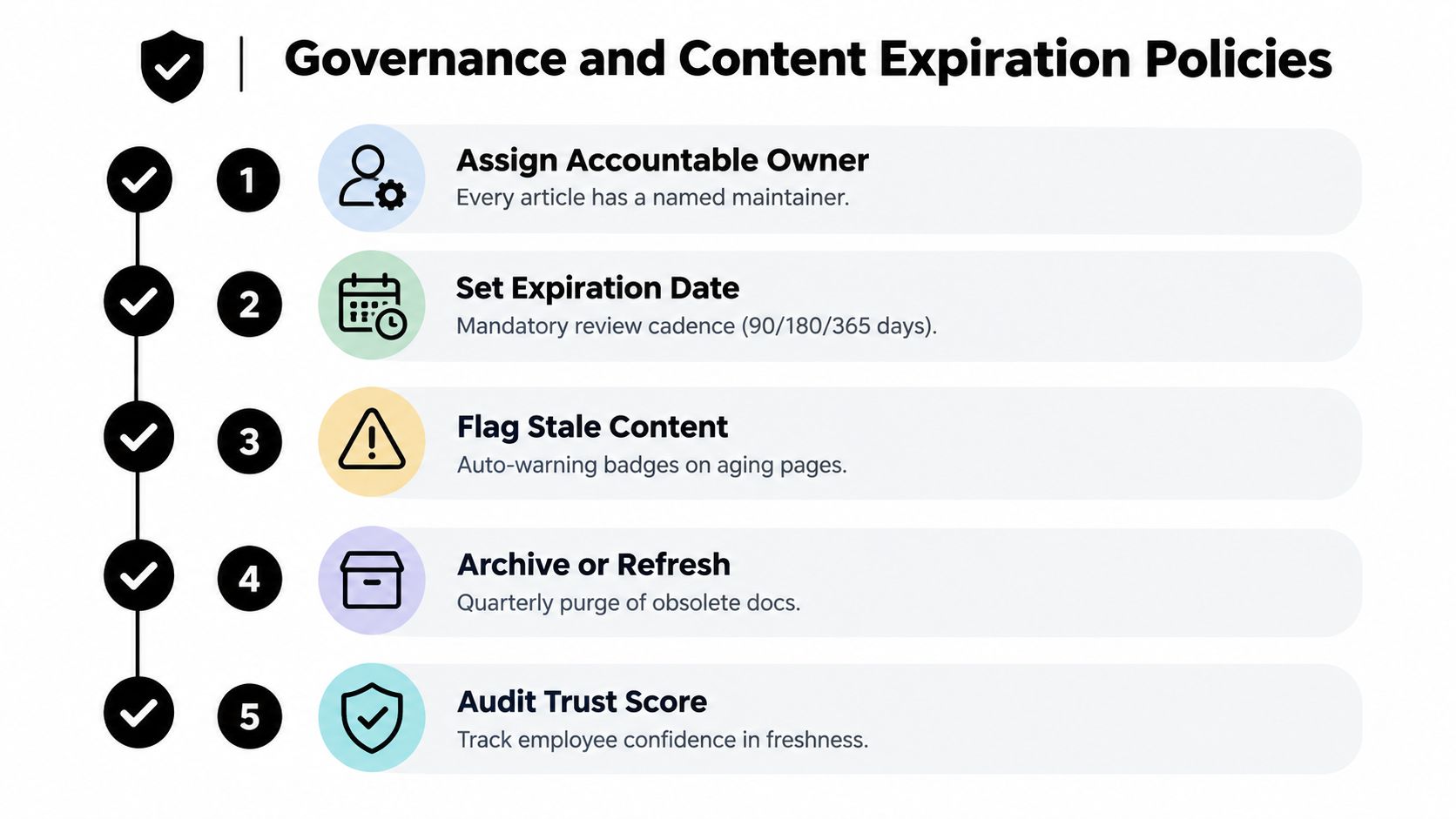
Governance and Content Expiration Policies
An internal knowledge base needs a lifecycle. Every critical article should have a named owner, a review-by date, an evidence field, and a clear action when the content expires.
I've seen teams celebrate publication volume while ignoring maintenance. That creates a dangerous illusion of progress. Employees open an article, follow an obsolete instruction, lose confidence, and return to private Slack messages or personal notes. Once that habit takes hold, even accurate pages become harder to discover because the organization has shifted back to tribal knowledge.
Make ownership visible
For every important article, I assign:
An accountable owner: A person or role responsible for accuracy, not just the department that originally wrote the page.
A review-by date: A visible deadline tied to the rate at which the subject changes.
An evidence field: The product decision, policy, ticket, release record, or source that supports the guidance.
A content status: Draft, approved, under review, superseded, or archived.
An expiry action: Refresh, replace, or remove the article when the review date passes.
The cadence should reflect risk. A stable onboarding explanation can tolerate a different review rhythm from a pricing guide, access procedure, or incident runbook. The point isn't to force every page through an identical calendar. It's to prevent important content from aging invisibly.
A 2026 enterprise-wiki statistics roundup reports that 47.2% of published internal wiki pages become unmaintained within 18 months, while only 21.8% of companies enforce mandatory content-expiration or audit dates, according to the reported enterprise wiki governance figures. Those numbers point to a governance gap, not a writing problem.
Connect maintenance to operational signals
A pricing guide may look current until packaging changes. A product marketing owner should receive a review trigger when a release changes the plan structure, not months later when a sales representative notices a contradiction.
I prefer a dashboard that flags high-traffic pages with overdue reviews, duplicate instructions, unresolved feedback, and repeated follow-up questions. An article that attracts heavy use deserves more attention than a rarely visited historical note, especially when the subject affects customers, access, revenue operations, or compliance.
Governance principle: Freshness is part of accuracy. A page without an owner or review trigger is incomplete, even if the writing is excellent.
Version control matters too. Teams need to see what changed, why it changed, and which earlier instruction it replaced. A practical SOP version-control workflow can help teams make procedural changes auditable without turning every update into a bureaucratic project.
Measuring Search Quality and Success Metrics
Search quality should be an operating metric, not a vague user-experience aspiration. I look at whether employees find and click the right article, whether important queries return nothing, and whether high-value content stays within its review commitment.
A governance benchmark recommends a search-success rate between 70% and 85%, keeping zero-result queries below 5% to 10%, and reviewing more than 80% of top articles within the organization's freshness service-level agreement, as outlined in this company wiki governance playbook.
Turn search failures into a backlog
Search analytics reveal problems that content audits miss. Suppose employees repeatedly type “expense reimbursement,” but the approved article is titled “employee disbursement policy.” The content exists, yet the knowledge system fails because the title, synonyms, and metadata don't connect employee language to the official terminology.
I review search behavior monthly and sort failures into categories:
Terminology gap: The answer exists under different language.
Coverage gap: No reliable article exists.
Permission problem: The right content exists but isn't visible to the right role.
Ranking problem: A less authoritative page appears first.
Freshness problem: The result is technically relevant but no longer accurate.
Each category needs a different fix. Adding an alias won't solve an undocumented workflow. Publishing a new article won't solve a permissions error. Rewriting a title won't solve an obsolete procedure.
For leadership, I connect search metrics to operational outcomes without pretending that one dashboard number explains everything. Search success indicates findability. Zero-result queries indicate coverage and vocabulary gaps. Review compliance indicates whether employees can trust what they find. Together, these measures show whether the internal documentation system is becoming dependable.
A useful metrics model for IT and operations teams is available in this guide to knowledge-base metrics that prove ROI to leadership. The essential habit is simple: review the data, assign an owner to the largest failure pattern, and check whether the change improved the next month's behavior.
Choosing the Right Tooling and AI Workflows
The right internal knowledge base tool reduces the friction between doing work and documenting how to do it. For enterprise SaaS teams, I evaluate security, permissions, search, integrations, authoring speed, and maintenance together. A polished editor can't compensate for weak access controls, and powerful AI can't compensate for stale source material.
Manual documentation is usually the bottleneck. The person who knows the workflow is busy performing it, while the person assigned to document it lacks the context to capture every exception. Screen recording and AI-assisted authoring can close that gap by turning a real demonstration into a video walkthrough, structured SOP, screenshots, and searchable steps.
Evaluate the capture-to-reuse workflow
I ask tooling vendors and internal teams to demonstrate the complete path, not just the editor:
Capture: Can an expert record a process while speaking naturally?
Structure: Can the system turn that recording into headings, steps, screenshots, and chapters?
Discovery: Can employees search article text and video transcripts?
Access: Does the platform support SSO, SCIM, granular permissions, and restricted workspaces?
Trust: Can reviewers see sources, versions, owners, and updates?
Deployment: Does it support enterprise security expectations such as ISO 27001, SOC 2, and GDPR compliance?
Reuse: Can the same source become an SOP, onboarding manual, customer education asset, or product video?

In my work, the best workflow starts with the operational expert, not a documentation specialist. A sales enablement leader can record the process for creating a sandbox account, explain the common failure points, and let an AI documentation platform produce a first draft. The leader then checks permissions, terminology, and exceptions instead of manually formatting every screenshot.
Trupeer turns screen recordings into product videos, written documentation, and searchable step-by-step guides with screenshots, annotations, headings, and chapters. It can support internal visibility controls and enterprise identity requirements, so teams can keep restricted procedures separate from broadly shared material. For teams comparing options, this overview of knowledge base software provides useful context on the wider category.
AI should accelerate capture and maintenance, not rewrite company policy without oversight. I want a human approval step for material changes, visible provenance, and a clear way to mark an article as superseded. The tool earns trust when it makes governance easier, not when it hides uncertainty behind a confident answer.
Frequently Asked Questions About Internal Knowledge Bases
What is the difference between a company wiki and a knowledge management system?
I treat a company wiki as a place to create and browse internal pages. A broader knowledge management system also handles search across sources, permissions, ownership, review cycles, analytics, and reuse. A screen recording workflow can help create the SOP, video, and searchable article that the wider system needs.
How do I get employees to use documentation instead of asking in Slack?
I start with the questions employees already ask in Slack and publish task-based answers using their language. Short walkthroughs created from real screen recordings can make the documentation easier to consume, while links from tickets, onboarding checklists, and support workflows bring the answer into the employee's existing work.
How should I handle sensitive information in a shared repository?
I separate public-to-the-company guidance from restricted procedures and assign access by role, workspace, or team. I also require an owner and review date for sensitive pages, then test retrieval with representative user permissions so the system doesn't expose information to the wrong audience.
Can AI keep internal documentation updated automatically?
I use AI to identify likely changes, draft revisions, extract steps from recordings, and highlight conflicting sources. I still require a human to approve policy and process changes, because an automated rewrite should never become the company's official answer without anyone noticing.
How quickly can I launch a minimum viable knowledge base?
I launch with a narrow set of high-frequency workflows rather than trying to document the whole business. Start with the questions that create repeated tickets, onboarding delays, or avoidable escalations, then add owners, search analytics, and review dates before expanding the collection.
Trupeer Inc. turns simple screen recordings into structured SOPs, polished documentation, and studio-quality product videos for internal knowledge workflows. Visit Trupeer Inc. to see how your teams can capture real processes once and make them easier to find, learn, and maintain.



