4.8/5
AI Document Generator
Create structured documents with AI from your content or a screen recording. Editable sections, steps, screenshots and formatting.
Try Trupeer free

Trupeer is an AI document generator that turns screen recordings, existing recordings and supported source content into structured, editable documents with steps and screenshots. It also works in reverse: the document to video tool turns existing documents into narrated videos. What comes back is a draft with ordered sections, a screenshot for each action where the source is a recording, and consistent formatting, ready to review, export and share.
What Is an AI Document Generator?
Software that produces a structured document from source material you provide, rather than from a blank page. You supply the substance; the tool handles the structure, the formatting and, where the source is a recording, the screenshots.
The distinction that matters when comparing tools is what they accept as input and what they produce as output. Some work only from a prompt. Some work only from a recorded workflow. What you need depends on whether the content already exists somewhere or only in someone's head.
What Can an AI Document Generator Create?
Document type | Example |
|---|---|
Process documents | SOPs and work instructions |
Guides | Step-by-step user and internal guides |
Training documents | Onboarding and enablement material |
Product documentation | Feature and workflow documentation |
The documents Trupeer produces best are procedural: anything with steps, an order, and screens worth showing. For a document that is mostly argument or narrative, a general writing tool is the closer fit.
Inputs and Outputs
What you can start from:
A screen recording captured in your browser
An existing recording or video you upload
Your own content and instructions describing what the document should cover
What you get back:
A structured document with ordered sections and steps
Screenshots captured per step, where the source is a recording
Consistent formatting applied across the document
An editable draft rather than a finished file
Export to PDF or Word, or share by link
How the AI Document Generator Works
Step 1: Add your content or record a workflow
Record the process in your browser, upload a recording you already have, or supply the content the document should be built from.
Step 2: Generate the document
AI structures the source into ordered sections and steps, capturing a screenshot for each action where the input is a recording, and applies consistent formatting.

Step 3: Edit, export and share
Change text and formatting, insert or replace images, use find-and-replace across the document, then export to PDF or Word or share it directly.
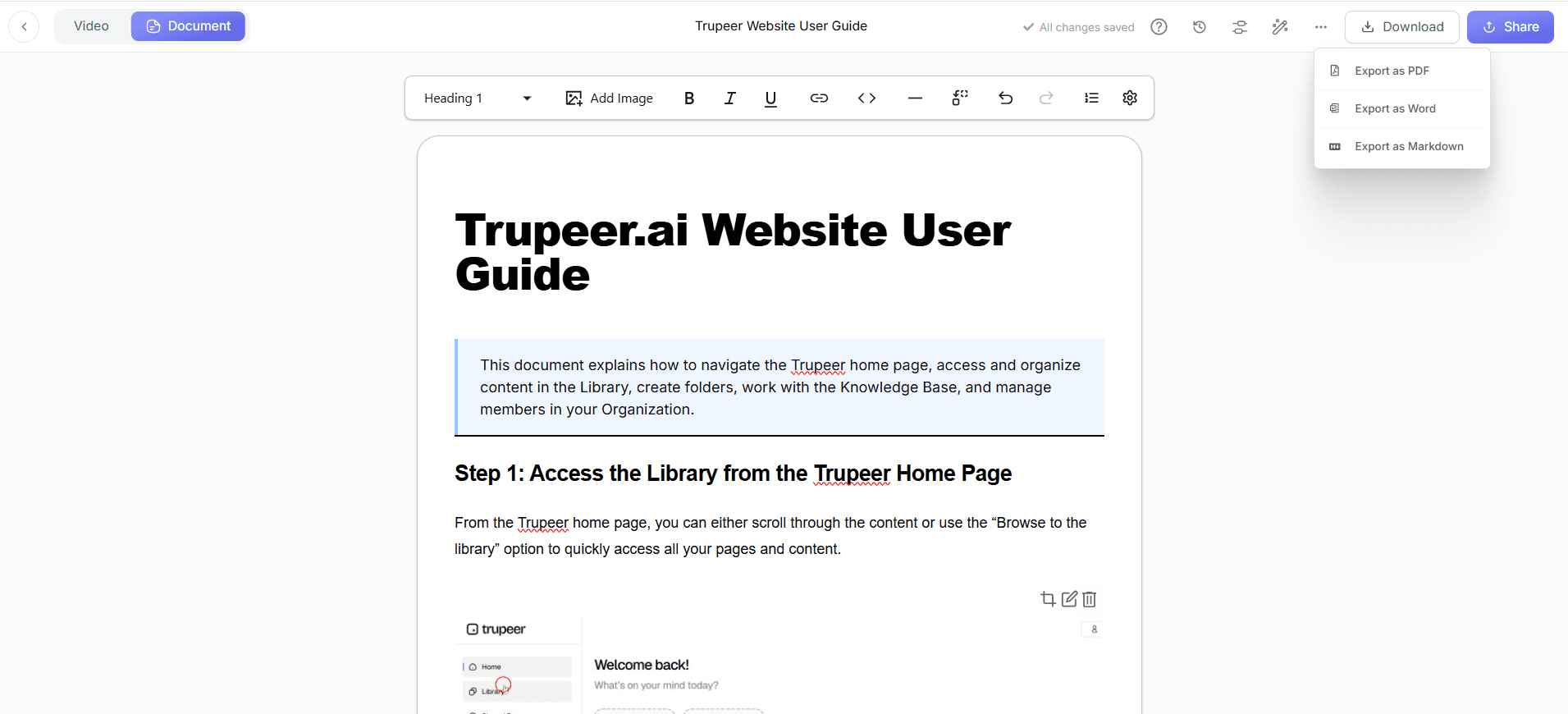
What an AI-Generated Document Looks Like
Input: a six-minute recording of a product workflow.
Output: a twelve-step guide with a screenshot for each step, organised into sections, editable before it goes anywhere.
Input: your own notes describing a process.
Output: a structured document with headings and ordered steps, ready to edit and expand.
In both cases the draft is a starting point. What it cannot contain is anything you did not supply: the reasoning behind a step, the thresholds, the approvals and the exceptions still need adding.
Why Use Trupeer as an AI Document Generator?
A recorded workflow can be the input:
the substance comes from the process being performed, not from someone describing it afterwardsStep structure applied automatically:
ordered steps and sections rather than a block of generated text to reorganiseScreenshots from the recorded actions:
captured per step, then croppable, annotatable and blurrable for anything sensitiveEditable output:
change text and formatting, insert or replace images, and use find-and-replace across the documentWord and PDF export:
for documents that need to exist as a file rather than a linkShareable output:
share by link so readers see the current version rather than a copy
Generating a Word Document
Some people looking for an AI document generator specifically want a Word file at the end, usually because the document will be edited further, sent to someone outside the company, or filed somewhere that expects .docx.
Trupeer produces the document in the editor first, then exports to Word or PDF. That order matters: you review and correct the draft before it becomes a file, rather than generating a .docx and then fixing it in Word, where the screenshots and structure are harder to change.
Pick the format by what happens next. Word if the document will keep being edited or needs to fit a template your team already uses. PDF if it is final and should not change. A share link if people will read it rather than edit it, since that version stays current when you update the source.
AI Document Generator vs AI Documentation Generator
The terms get used interchangeably and mean different things.
AI document generator | AI documentation generator |
|---|---|
Creates documents from different inputs | Creates procedural and knowledge documentation |
Broader range of document types | Focused on guides and processes |
Can start from supplied content or a recording | Usually starts from a workflow or recording |
General document creation | Documentation creation specifically |
If your need is specifically procedural documentation, the AI documentation generator is the narrower page. For software workflows see the AI software documentation generator, and for product features the AI product documentation tool.
AI Generation vs Writing It Yourself
Structure: applied automatically rather than decided document by document, so output is consistent across authors
Screenshots: captured from the workflow rather than taken and cropped one at a time, which can be one of the more time-consuming parts of writing a procedural document by hand
First draft: generated from what you supply, so the work becomes editing rather than starting from nothing
Substance: unchanged. Whatever you do not supply will not appear, and nothing generated is correct because it reads well
Review: unchanged, and still necessary before anything is published
What to Look for in an AI Document Generator
Six things worth checking before committing, in roughly the order they decide the outcome.
What it accepts as input:
one of the biggest differences between tools. A generator that only takes a prompt cannot document a workflow that exists on screen, and one that only takes a recording cannot help with a document you are writing from scratchWhether it produces structure or prose:
ordered sections and steps are useful; a wall of generated text usually needs reorganising before it is usableScreenshots:
whether they are captured from the source or have to be added by hand afterwards. For procedural documents this can be one of the more time-consuming partsHow editable the output is:
you will be correcting the draft, so how easily you can reorder, rewrite and replace images matters more than how good the first version looksExport formats:
whether you get the file type your process actually needs, not just a share linkWhat happens on the second version:
most evaluations test creating one document and never test updating it, which is where the recurring cost sits
What This Does Not Do
It does not decide what should be documented, verify that what you supplied is correct, or replace the judgement of somebody who knows the subject. A generated draft reads confidently whether or not it is right, which is why the review step matters more than it feels like it should.
For checking a draft before it publishes, see AI documentation accuracy.
Create Your First Document
Record a workflow or add your content, generate the document, then edit and export it. Try Trupeer free.
Key features
Structured output
Ordered sections and steps with consistent formatting applied across the document, rather than a wall of generated text.
Screenshots from the workflow
Where the source is a recording, a screenshot is captured per step and can be cropped, annotated or blurred.
Editable and exportable
Change text, formatting and images, use find-and-replace, then export to PDF or Word or share by link.
How to generate a document
Step 1
Record a workflow in your browser, upload a recording, or supply the content the document should be built from.
Step 2
AI structures it into ordered sections and steps, with a screenshot per step where the source is a recording.
Step 3
Edit the text and images, then export to PDF or Word or share the document directly.
Frequently Asked Questions
What is an AI document generator?
Software that produces a structured document from source material you provide, handling the sections, formatting and, where the source is a recording, the screenshots.
How does an AI document generator work?
You supply the source, AI structures it into ordered sections and steps, and you get back an editable draft rather than a finished file. You then review, correct and export it.
Can Trupeer create documents from screen recordings?
Yes. Record the workflow in your browser or upload an existing recording, and the steps and screenshots are generated from it.
Can I generate a Word document with AI?
The document is generated in the editor first, then exported to Word or PDF. That order lets you correct the draft before it becomes a file, rather than fixing structure and screenshots inside Word.
What types of documents can Trupeer create?
Procedural documents work best: SOPs and work instructions, step-by-step guides, training material and product documentation.
More Tools



