Trupeer Blog
Podsumuj

Imagine a solutions team tasked with producing consistent, high-quality demo videos. The goal is to showcase products effectively and engage prospects, but the team faces challenges. They need a simplified workflow to manage repetitive tasks, from recording to editing, while ensuring every video aligns with brand standards. A poorly structured workflow can lead to inefficiencies, missed deadlines, and inconsistent output. According to recent data,
companies that optimize their demo video production processes report a 30% increase in sales conversion rates.
This statistic highlights the significant impact a well-organized workflow can have. Solutions teams need a structured approach that uses the right tools to produce compelling demo videos at scale. The right workflow not only enhances productivity but also ensures every demo video is polished and brand-compliant. Solutions teams, sales engineers, and presales professionals are all stakeholders who benefit from an efficient demo video production process. This guide provides a roadmap for teams looking to refine their processes and deliver results that drive business success. For more insights on video production strategies, explore training video production.
Why does a demo production workflow matter?
In a competitive business environment, the ability to deliver clear, engaging, and informative demo videos is crucial. Demo videos serve as a primary tool for communicating a product's value proposition to potential clients. Without a structured workflow, teams may struggle with inconsistencies in video quality, content relevance, and delivery timelines. This can lead to reduced engagement and missed sales opportunities. A well-defined demo production workflow aligns all team members with clear processes and expectations, reducing errors and enhancing collaboration. It ensures that every video produced meets the company's standards and effectively conveys the desired message.
The importance of a simplified demo production workflow extends beyond just video quality. It impacts team efficiency and overall business outcomes. With a structured workflow, teams can automate repetitive tasks, allowing them to focus on creativity and strategic initiatives. This not only improves the quality of the videos but also increases the team's capacity to produce more content in less time. A cohesive workflow also facilitates better communication between stakeholders, ensuring that the final product aligns with sales objectives and customer expectations. By integrating a systematic approach, companies can enhance their pre sales workflow, resulting in higher conversion rates and satisfied customers.
What are the benefits of a demo production workflow?
Implementing a structured demo production workflow offers several advantages. Here’s how it can transform your solutions team's output and efficiency.
Consistency in Quality. A defined workflow ensures that every demo video maintains high-quality standards. This consistency builds trust with prospects and enhances brand reputation.
Increased Efficiency. simplifying processes reduces time spent on repetitive tasks, allowing teams to focus on creating impactful content. This efficiency can lead to a 40% reduction in production time.
Enhanced Collaboration. Clear workflows improve communication among team members, ensuring everyone is aligned on objectives and deliverables. This leads to smoother project execution.
Scalability. As demand for demo videos increases, a structured workflow allows teams to scale their production capabilities without sacrificing quality. This scalability is vital for growing businesses.
Improved Engagement. Well-produced videos that align with audience expectations result in higher engagement rates. A structured workflow ensures content is relevant and compelling, driving viewer interaction.
Data-Driven Insights. By integrating analytics into the workflow, teams can gather insights on video performance, allowing for continuous improvement. This data-centric approach enhances strategic decision-making.
Teams weighing tools often start with a Loom alternatives comparison before standardizing on a workflow.
For more on how to make impactful demos, read about how to make a product demo video using AI tools.
Which Trupeer features help you set up a demo production workflow?
Trupeer offers a range of features that can significantly enhance your demo video production workflow. These capabilities provide solutions teams with the tools they need to produce high-quality video content efficiently.
AI Screen Recording with Auto-Zoom and Click Detection
This feature allows you to capture your screen with precision. Trupeer's AI automatically detects clicks and zooms in on relevant areas, ensuring the focus remains on important elements. This capability is especially useful for demos that require detailed walkthroughs of software interfaces. By eliminating the need for manual adjustments, the recording process becomes smooth and efficient. The result is a polished video that clearly communicates your message without requiring extensive editing. For those interested in exploring different video-making tools, Trupeer's product demo video maker offers solid options.
Automatic Filler-Word Removal
Trupeer's editing capabilities include automatic removal of filler words like "um" and "ah," as well as long pauses. This feature is crucial for maintaining a professional tone throughout your demo video. It saves time in the editing process and enhances the overall quality of the content by ensuring a smooth and uninterrupted delivery. By reducing distractions, your audience can focus on the key messages, improving comprehension and engagement.
AI Voiceover in 65+ Natural Voices
With Trupeer, you can enhance your demo videos with AI-generated voiceovers. Choose from over 65+ natural voices and adjust the pace and tone to suit your content. This feature is ideal for creating a consistent audio experience across all your videos. It also allows for quick adaptations to different languages, expanding your reach to a global audience. The flexibility of AI voiceover ensures that your videos resonate with diverse audiences, improving accessibility and engagement.
Automatic SOP Generation from Any Recording
Trupeer's automatic SOP generation feature simplifies the creation of standard operating procedures from your demo recordings. This capability is invaluable for teams that need to document processes and ensure consistency in execution. The generated SOPs are edit-ready and exportable in multiple formats, making them easy to distribute and implement. This feature not only saves time but also provides a reliable reference for training and onboarding new team members. For those looking to enhance their documentation processes, Trupeer's auto-generated documentation offers a comprehensive solution.
AI-Searchable Knowledge Base
Trupeer’s AI-searchable knowledge base indexes every recording with timestamp-level deep links, making it easy to locate specific information within your demo videos. This feature enhances accessibility and efficiency, allowing team members and clients to quickly find the content they need. By integrating this capability into your workflow, you can improve knowledge sharing and collaboration across your organization. The searchable knowledge base supports your team in staying informed and making data-driven decisions. For more on organizing video content, explore Trupeer's video knowledge base.
How do you set up a demo production workflow step by step with Trupeer?
Step 1: Record Your Screen
Start by using Trupeer's AI screen recording to capture your demo. Open the browser-based recorder and select the screen or window you wish to record. Trupeer will automatically zoom in on actions, such as clicks and text input, ensuring that important details are highlighted. This feature is particularly useful for software demonstrations where precision is key. The recording process is straightforward and requires no additional installations, saving time and reducing technical barriers. Once you're done, Trupeer generates a high-quality video file ready for editing. The entire process typically takes no longer than the length of your demo.

Step 2: Edit Your Recording
After capturing your demo, proceed to the editing phase. Use Trupeer's automatic filler-word removal to clean up the audio. This feature eliminates unnecessary pauses and hesitations, resulting in a professional and smooth audio track. You can also adjust the AI-generated voiceover to match the pace and tone of your video, ensuring consistency across different segments. The editing tools are intuitive and can be accessed directly from the Trupeer dashboard. This step usually takes about 15-20 minutes, depending on the length of your video. To explore more about video editing, ai/tools/product-demo-video-recording-editing-tool">product demo video recording editing tool.
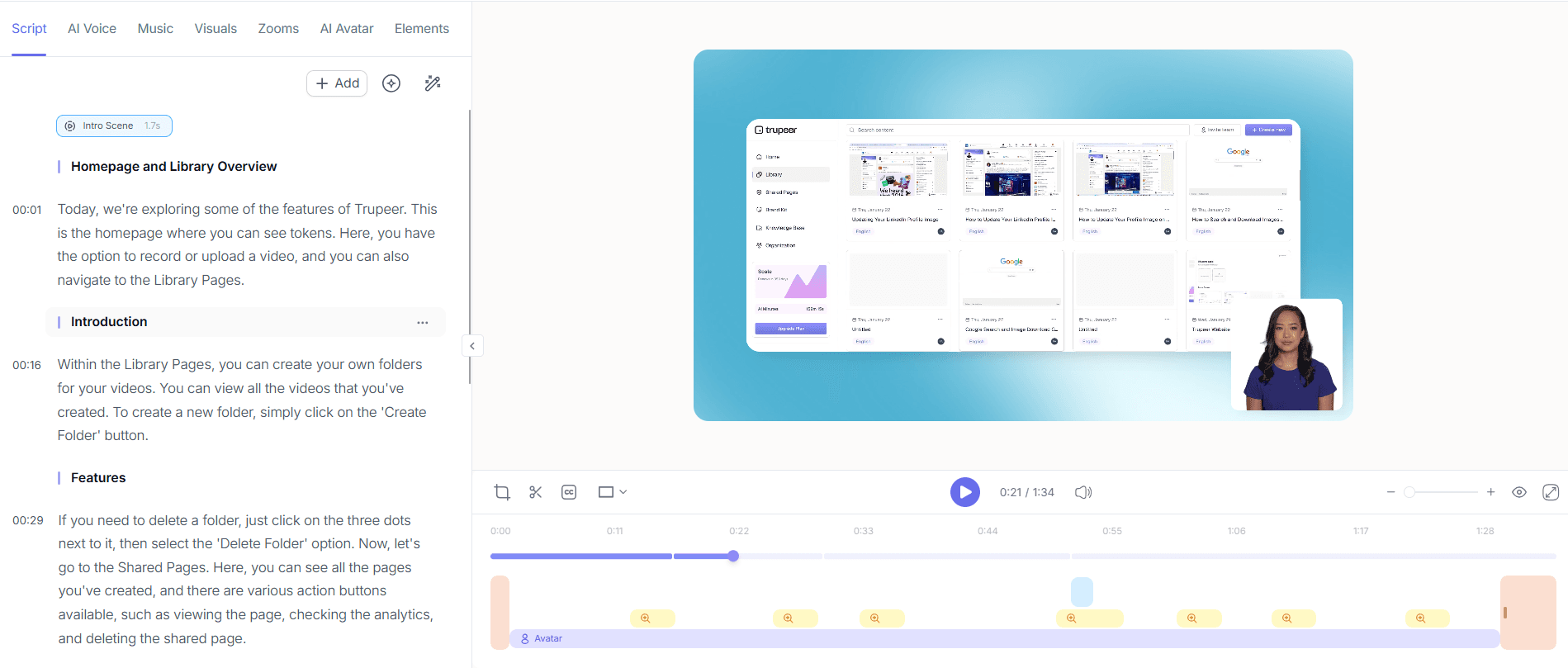
Step 3: Add AI Voiceover
Enhance your demo video by adding an AI voiceover. Trupeer offers over 65+ natural voices, allowing you to choose one that best fits your brand's style. You can also clone your own voice for a personalized touch. Simply upload a short sample, and Trupeer will generate a voiceover that matches your pacing and tone preferences. This feature is essential for maintaining a consistent audio experience, especially if your team produces multiple videos. The voiceover can be adjusted in real time, making it easy to tweak and perfect. Depending on your customization needs, this step takes approximately 10 minutes.

Step 4: Generate SOPs
Trupeer enables automatic SOP generation from your demo recordings. This feature is invaluable for creating detailed documentation that aligns with your video content. Once your video is ready, navigate to the SOP generation tool and select the recording. Trupeer automatically transcribes the content and structures it into an editable document. This step is crucial for teams that require standardized procedures for training and onboarding. The generated SOPs are exportable in formats like PDF and HTML, making them versatile for various applications. This process typically takes less than 5 minutes, providing a quick and efficient way to document your workflow.

Step 5: Localize Your Video
To reach a broader audience, use Trupeer's AI translation feature. This tool allows you to translate your demo video into over 40 languages, complete with lip-sync and dubbing options. Simply upload your video and select the target languages. Trupeer handles the rest, ensuring that your content is accessible to non-English speaking audiences. This feature is particularly beneficial for companies looking to expand their global presence. The translation process is fast, typically taking less than 10 minutes per language. This capability enhances your video's reach and ensures that your message resonates across different cultures. Teams ship this workflow end-to-end using Trupeer's AI video platform, which turns raw recordings into polished output without an editor.

Step 6: Distribute and Analyze
After finalizing your demo video, it's time to distribute it. Trupeer offers multiple distribution options, including embeddable video widgets and custom-domain hosting with SSO. These features ensure that your content is easily accessible to your audience. Once your video is live, use Trupeer's viewer engagement analytics to track performance. Analyze metrics such as drop-off rates and heatmaps to gain insights into viewer behavior. This data helps you refine future content and optimize engagement strategies. The distribution and analysis processes are integrated into Trupeer's platform, allowing for smooth management of your video assets.

What tips help you set up a demo production workflow?
Creating an efficient demo production workflow involves strategic planning and the right tools. Here are some tips to enhance your process and ensure high-quality output.
Define Clear Objectives. Start each project by setting specific goals for your demo video. This focus ensures that all content aligns with your strategic objectives.
Standardize Tools. Use a consistent set of tools like a demo maker tool to maintain quality across all videos. This standardization reduces learning curves and improves efficiency.
Schedule Regular Reviews. Implement a review process to catch errors and gather feedback. Regular evaluations improve content quality and ensure alignment with project goals.
use Automation. Automate repetitive tasks such as editing and transcription. Automation saves time and allows your team to focus on more creative aspects of production.
Track Performance Metrics. Use analytics to monitor viewer engagement and identify areas for improvement. Data-driven insights lead to better strategic decisions.
build Collaboration. Encourage open communication among team members. Collaborative environments enhance creativity and result in more cohesive videos.
Stay Updated with Trends. Regularly update your knowledge of industry trends and incorporate new techniques. This adaptability keeps your content fresh and relevant.
When SOPs come into the same conversation, a Scribe alternatives comparison helps clarify the scope.
Frequently asked questions
How can I ensure my demo video is engaging?
To create an engaging demo video, focus on clarity, relevance, and storytelling. Start by defining what your audience needs to know and structure your content to highlight these key points. Use Trupeer's AI screen recording to ensure visual clarity and maintain focus on essential elements. Incorporate interactive elements, such as clickable links or embedded quizzes, to increase viewer participation. also, monitor viewer engagement metrics using Trupeer's analytics to identify what resonates with your audience. These insights allow you to refine your approach and keep your content compelling.
What is the best way to distribute demo videos?
The best way to distribute demo videos is through multiple channels to maximize reach and engagement. Trupeer provides various distribution options, including custom-domain hosting and embeddable widgets, which ensure your content is accessible across platforms. Sharing your videos on social media, email campaigns, and company websites can increase visibility. Use Trupeer's viewer engagement analytics to track how audiences interact with your video on different platforms. This data helps you identify the most effective channels for your content, enabling you to focus your efforts where they have the greatest impact.
Why use AI for demo video production?
AI enhances demo video production by automating repetitive tasks, improving efficiency, and ensuring consistency. Trupeer's AI capabilities simplify processes like screen recording, editing, and voiceover production, reducing the time and effort required for each step. AI-driven tools also enhance the quality of your videos by providing features like automatic filler-word removal and AI voiceovers. By using AI, your team can focus on creative aspects of production, resulting in higher-quality content. AI also enables data-driven decisions, helping you optimize your workflow for better results.
Can Trupeer translate my demo videos?
Yes, Trupeer can translate your demo videos into over 40 languages using its AI translation feature. This capability includes lip-sync and dubbing options, ensuring that your content is accessible to a global audience. Simply select the desired languages and Trupeer will handle the translation process. This feature is particularly beneficial for companies looking to expand their international presence. By making your videos available in multiple languages, you can reach a broader audience and enhance engagement. For more on translation capabilities, explore Trupeer's video localization tool.
Does Trupeer support SOP generation?
Yes, Trupeer supports automatic SOP generation from your demo recordings. This feature is invaluable for teams needing to document processes and maintain consistency. Once your video is complete, Trupeer transcribes the content and structures it into an editable SOP. The document can be exported in formats like PDF and HTML, making it easy to distribute and implement across your organization. This capability simplifies the creation of reliable training materials, aiding in onboarding and ensuring that all team members follow standardized procedures. This process is typically quick, taking just a few minutes to complete.
Powiązane blogi


