Trupeer Blog
Shrnout

Imagine you're a product manager overseeing a knowledge base filled with countless hours of video tutorials and instructional content. You've invested heavily in creating this resource, believing it would ease the onboarding process for new hires and help existing team members quickly find solutions to their problems. But despite its potential, your team struggles to locate specific information within these videos. Traditional keyword search often falls short. It misses the context, returning irrelevant results or none at all. According to a study,
80% of users abandon their search if they don’t find the right information within the first few attempts.
This scenario underscores the need for a better solution. Semantic search might be the answer. It understands intent and context, potentially transforming how your team interacts with your video knowledge base. By using this technology, you can significantly improve the efficiency and accuracy of information retrieval, making your knowledge base a truly valuable asset. For a deeper understanding, look at some of the best knowledge base examples to see how others have successfully implemented this strategy.
Why does understanding semantic vs keyword search in a video knowledge base matter?
Understanding the difference between semantic and keyword search in a video knowledge base is crucial for businesses striving to enhance their information retrieval processes. A video knowledge base can be an invaluable asset, but only if users can efficiently find the information they need. Traditional keyword search relies heavily on exact matches of search terms with tags or metadata, which can often lead to inaccurate or incomplete results. This can cause frustration and inefficiency, especially in environments where quick access to information is critical. In contrast, semantic search interprets the context and intent behind a user's query, returning results that are relevant even if the exact keywords aren't present. This capability is particularly beneficial in a customer success workflow, where timely and accurate information can make a significant difference in resolving customer issues.
For stakeholders like product managers and customer support teams, the stakes are high. Ineffective search capabilities can result in longer resolution times, decreased customer satisfaction, and ultimately, higher churn rates. By integrating semantic search, organizations can significantly reduce these risks. It enables users to locate the precise information they need, leading to faster problem-solving and increased productivity. also, it enhances the user experience by delivering more accurate results, which can improve employee satisfaction and retention. These improvements not only benefit the immediate users but also have a ripple effect across the organization, simplifying operations and supporting strategic goals.
What are the benefits of implementing semantic search in your video knowledge base?
By incorporating semantic search into your video knowledge base, you open up a range of benefits that can enhance its utility and efficiency.
Improved Query Understanding. Semantic search can interpret the intent behind a query, delivering results even when exact keywords aren't used. This capability ensures users find the information they need quickly and accurately, enhancing their ability to use the knowledge base one.
Contextual Relevance. Unlike keyword search, semantic search considers the context of the query, returning results that truly match the user's needs. This leads to more relevant outcomes, saving users time and reducing frustration in finding applicable content.
Enhanced User Engagement. By providing more accurate search results, users are more likely to engage with the content. This increased engagement can lead to better learning outcomes and more efficient use of the AI video platform.
Reduction in Search Abandonment. With traditional keyword search, users often abandon their searches due to irrelevant results. Semantic search reduces this by delivering more precise results, thus lowering the abandonment rate and improving user satisfaction.
Scalability. As your video knowledge base grows, semantic search scales efficiently, maintaining performance and accuracy. This ensures that even with a large and expanding database, users can still retrieve information quickly and effectively.
Increased Productivity. By reducing the time spent searching for information, employees can focus more on their core tasks. This boost in productivity can directly impact the bottom line, making the investment in semantic search worthwhile.
Which Trupeer features help you implement semantic search in your video knowledge base?
Trupeer offers several features that enhance the implementation of semantic search in a video knowledge base, ensuring users can efficiently and accurately retrieve the information they need.
AI-searchable knowledge base
Trupeer's AI-searchable knowledge base is designed to transform how users interact with video content. By indexing every recording with timestamp-level deep links, users can jump directly to the relevant section of a video, bypassing irrelevant content. This feature goes beyond traditional keyword search by understanding the context of queries, which improves the accuracy and relevance of search results. For organizations managing extensive video libraries, this ability is a big shift, significantly enhancing user experience and productivity. The integration of AI ensures the knowledge base remains efficient even as it scales with more content.
Auto chapters and segment detection
Trupeer's auto chapters and segment detection feature automatically breaks down videos into logical segments. This means that users searching for specific topics can immediately access the relevant part of a video without having to manually skim through the entire content. This feature supports the semantic search initiative by providing structured and easily navigable content, which is crucial for users needing quick answers. By facilitating this level of detail, Trupeer ensures that users spend less time searching and more time engaging with valuable insights.
Automatic SOP generation
The auto-generated documentation feature by Trupeer allows for the creation of structured documentation directly from video content. This capability is particularly useful in environments where standard operating procedures (SOPs) are vital. By converting videos into text-based SOPs, Trupeer makes it easier to search for and reference specific procedures. This not only supports semantic search efforts by providing additional metadata but also enhances the utility of your knowledge base by offering multiple formats of the same content.
AI translation into 40+ languages
Trupeer's AI translation feature supports the globalization of your video knowledge base by providing translations in over 40 languages with lip-sync capabilities. This feature ensures that language barriers do not hinder access to information. By expanding the reach of your content, you can ensure that international teams or clients can engage with the material in their native language. This broadens the utility of your knowledge base and supports global operations, making it a more inclusive tool for diverse teams.
Viewer engagement analytics
Understanding how users interact with your video content is crucial for continuous improvement. Trupeer provides detailed viewer engagement analytics, including drop-off rates and heatmaps. This data helps you identify which parts of your videos are most engaging and which might need improvement. By using these insights, you can refine your content strategy to better meet user needs, ultimately enhancing the effectiveness of your semantic search efforts. With these analytics, you can ensure that your knowledge base remains a valuable resource within your organization.
How do you implement semantic search in a video knowledge base step by step with Trupeer?
Step 1: Record Your Video Content
Begin by using Trupeer's AI screen recording feature. This tool offers auto-zoom and click detection to make sure all relevant actions are captured clearly without manual intervention. You simply click "Record" in the browser-based recorder, which requires no installation, making it perfect for quick setup. Once your recording is complete, the video is automatically saved to your Trupeer library. This process usually takes as long as your video duration, plus a few minutes for processing. Edge cases include ensuring your internet connection is stable to avoid lags. Trupeer's silent screen recording with automatic AI narration is another option if you wish to add voiceovers post-capture, enhancing accessibility for viewers who prefer audio guides.

Step 2: Enhance and Edit Your Content
After recording, navigate to the editing interface within Trupeer. Here, you can use automatic filler-word removal to eliminate unnecessary pauses and fillers from your video. This feature operates with AI, so you just need to click "Edit" and select "Remove Fillers." The process is quick, taking a few minutes depending on video length. Trupeer also offers AI voiceover capabilities in 65+ natural voices, allowing you to adjust pace and tone to suit your audience. You can clone voices from a short sample for consistency across multiple videos. This editing step ensures your content is polished, professional, and ready for distribution.

Step 3: Generate Chapters and Segments
Trupeer automates the creation of chapters and segments once your video is edited. By selecting "Auto Chapters" in the dashboard, the AI identifies logical breaks in the content, creating easily navigable segments. This step is crucial for semantic search, as it allows users to jump directly to relevant sections. The feature works within minutes, providing you a structured outline of your video. In some cases, you may manually adjust these chapters if the automatic detection doesn't perfectly match your expectations. This functionality enhances the searchability and user-friendliness of your video knowledge base.
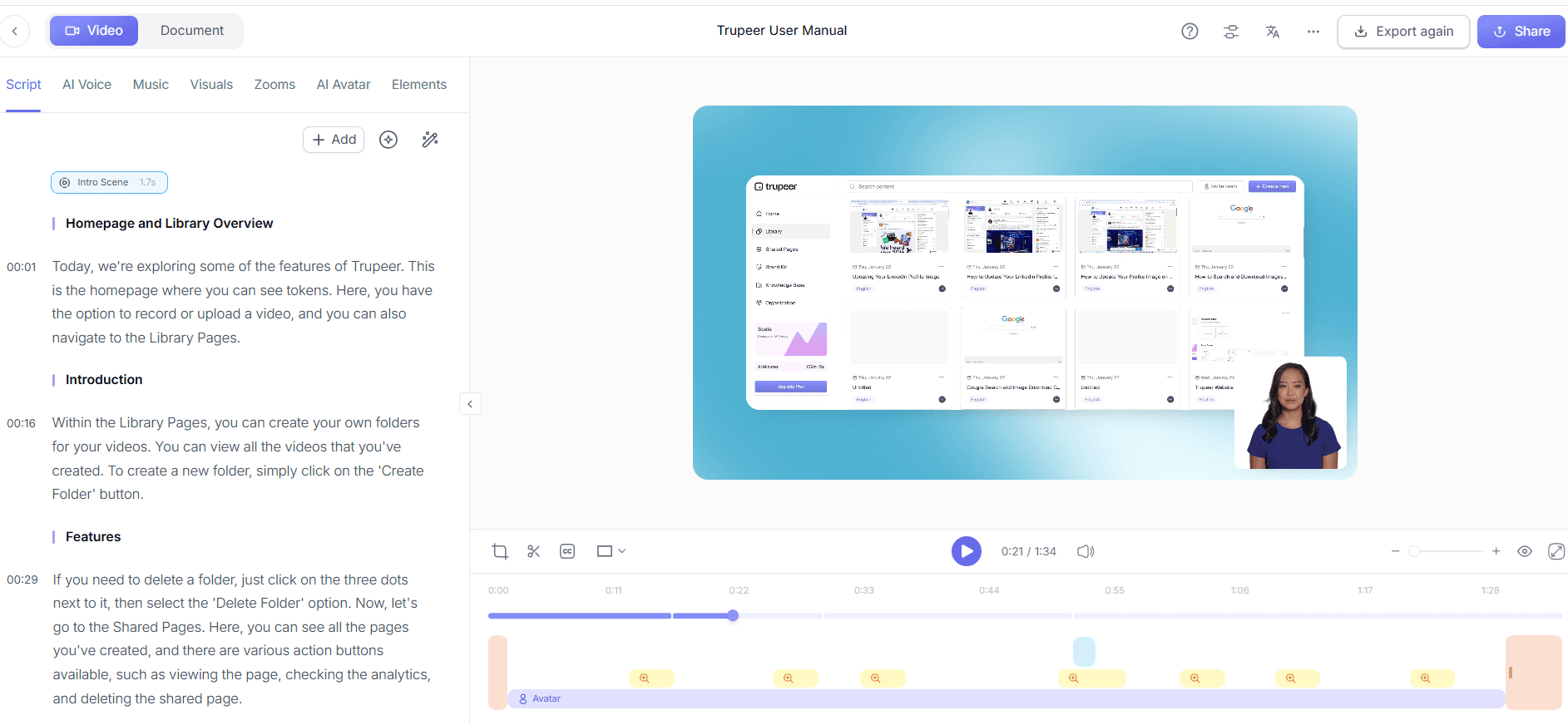
Step 4: Translate and Localize Content
To ensure your knowledge base is accessible to a global audience, use Trupeer's AI translation feature. Click on "Translate" under your video settings to choose from over 40 languages. The AI not only translates the content but also syncs lip movements, making the videos look natural in any language. This process can take a few hours depending on the video's length and complexity. Localization is key to expanding the reach of your knowledge base, allowing non-English speaking users to benefit from your content. This step is essential for organizations with international teams or customers.

Step 5: Integrate into Your Knowledge Base
With your video content ready, integrate it into Trupeer’s internal knowledge base wiki software. This step involves uploading the video and attaching metadata for enhanced search capabilities. Trupeer’s AI automatically creates an index of key topics and timestamps, making the content easily searchable. This integration ensures that users can perform semantic searches, retrieving information based on context and intent rather than just keywords. Setup typically takes a few minutes per video, simplifying the process of building a comprehensive and intuitive video library.

Step 6: Monitor and Analyze Engagement
After deployment, use Trupeer's engagement analytics to understand how users interact with your content. By selecting the "Analytics" tab, you'll access data on viewer drop-offs, heatmaps, and engagement rates. This information helps identify which parts of your videos are most effective and which may need improvement. Regularly reviewing these analytics allows you to refine your content strategy, ensuring your knowledge base remains relevant and useful. These insights are vital for maintaining a high-quality resource that meets user needs and supports continuous improvement.

What tips help you implement semantic search in a video knowledge base?
Implementing semantic search in your video knowledge base can be challenging, but with the right strategies, you can maximize its effectiveness and efficiency. Here are seven practical tips to help you get the most out of your semantic search integration:
Optimize Metadata. Ensure that your videos have detailed metadata, including tags, descriptions, and keywords to enhance search accuracy.
Regular Content Updates. Keep your video content up-to-date to ensure relevance and accuracy, which supports better search results.
Use Consistent Terminology. Consistent use of terminology across videos aids the AI in understanding and indexing content effectively.
use User Feedback. Collect and analyze user feedback to identify search issues and opportunities for improvement.
Train Users. Provide training sessions on how to use the semantic search features to ensure they get the best results.
Monitor Search Trends. Pay attention to what users are searching for to adjust your content strategy and meet their needs.
Consider Alternatives. Evaluate Scribe alternative comparison tools to ensure Trupeer is the best fit for your needs.
Teams weighing tools often start with a Loom alternatives comparison before standardizing on a workflow.
Frequently asked questions
How does semantic search improve information retrieval in a video knowledge base?
Semantic search enhances information retrieval by understanding the intent and context behind a user's query. Unlike keyword search, which relies on exact matches, semantic search interprets the meaning of the query, providing more relevant and accurate results. This capability is particularly beneficial in a video knowledge base where traditional search methods often struggle to pinpoint specific moments within extensive video content. By delivering precise results, semantic search improves user satisfaction and operational efficiency, ensuring users find the information they need quickly and reliably.
What are the differences between semantic search and keyword search?
Semantic search and keyword search differ primarily in their approach to query interpretation. Keyword search focuses on finding exact matches for search terms within the content or metadata. In contrast, semantic search analyzes the context and intent behind a query, offering results based on meaning rather than mere word matches. This difference allows semantic search to provide more subtle and accurate results, particularly in complex data sets like video knowledge bases where context is key to understanding the content. The ability to grasp intent makes semantic search more effective for users seeking specific information within broad or unstructured data.
Can Trupeer support multiple languages in a video knowledge base?
Yes, Trupeer supports multiple languages in a video knowledge base through its AI translation feature. This capability offers translations into over 40 languages, complete with lip-sync to ensure natural visual presentation. This feature is crucial for organizations with diverse, global teams, allowing them to access video content in their preferred language. By facilitating multilingual support, Trupeer broadens the accessibility and usability of your video knowledge base, building a more inclusive environment for users worldwide. The video translation platform ensures content remains relevant across different linguistic audiences.
Does video length affect the efficiency of semantic search?
Video length can influence the efficiency of semantic search but not its effectiveness. Longer videos might take more time to process for indexing and segment identification, which could slightly delay the availability of the content for search. However, once indexed, the quality of semantic search results remains high, as the system uses context to locate relevant segments. Trupeer's technology is designed to handle extensive video content efficiently, ensuring that users can still retrieve information quickly, regardless of video length.
Is it possible to integrate Trupeer with existing knowledge base systems?
Yes, Trupeer can be integrated with existing knowledge base systems, enhancing their functionality with advanced video and search capabilities. This integration allows organizations to use their current infrastructure while upgrading their search and content management processes. Trupeer’s flexible platform supports various integrations, enabling a smooth transition and enhanced user experience. By incorporating Trupeer into your existing systems, you can optimize your knowledge base’s performance, ensuring users have access to a comprehensive, efficient, and effective information resource.
Související blogy


