Trupeer Blog
Shrnout

Imagine this: you're about to launch a new feature that's going to change the way your customers interact with your product. The stakes are high, and you need to make a quick, lasting impact. A feature release video is your best tool. In under two minutes, you have to showcase the feature's capabilities, benefits, and practical applications. The challenge is making it concise yet effective.
Studies show that 60% of viewers stop watching a video after two minutes, making every second count.
This means you've got to nail the messaging and execution to ensure your audience walks away informed and excited. For teams, marketers, or product managers, crafting this type of video isn't just a task, it's an art. With the right tools, such as AI video editing, you can create engaging videos without a full production team. This guide is designed to help you understand exactly what to include in your feature release video, using the best practices and tools available today. Teams weighing tools often start with a Loom alternatives comparison before standardizing on a workflow.
Why does creating a 2-minute feature release video matter?
Producing a succinct yet comprehensive feature release video is crucial for several reasons. First, it directly impacts customer engagement and product adoption. A well-crafted video can increase understanding and enthusiasm for a new feature, leading to quicker adoption and usage. This is especially vital in customer education workflows, where clarity and excitement can make or break the introduction of a new tool. Second, videos are a highly shareable form of content. They can spread through social channels and emails, expanding your reach beyond the immediate audience.
Also, feature release videos serve as an efficient communication tool internally. Teams across departments can use the video to understand the new feature's functionality and benefits, ensuring consistent messaging. This is particularly important for sales teams who need to pitch the new feature to potential clients. With a customer education use case, the stakes are high; if the feature isn't communicated well, it may be underutilized or misunderstood, negating its potential benefits. In short, these videos can be a linchpin for successful product launches, ensuring that both customers and internal stakeholders are on the same page.
What are the benefits of creating a 2-minute feature release video?
A concise feature release video offers numerous advantages that can substantially benefit your business and its stakeholders.
Enhanced Engagement. Short videos are more likely to be watched in full, increasing the chances that your audience will absorb the information. This is particularly true in video prospecting where attention spans are limited.
Clear Communication. Videos can distill complex information into easily digestible segments, making it easier for viewers to understand and remember key points.
Brand Consistency. Using a video generation platform ensures that all your videos have a consistent look and feel, reinforcing your brand identity.
Wider Reach. Videos are highly shareable, allowing your content to reach a broader audience through social media and other channels.
Cost-Effective. With tools like AI video editing, you can create high-quality videos without the need for expensive equipment or a large production team.
Increased Conversion. Videos can effectively drive action, whether it's encouraging a product demo sign-up or prompting a purchase, leading to higher conversion rates.
Trupeer also ships a convert voice to ai video in minutes that handles this step without extra setup.
Which Trupeer features help you create a 2-minute feature release video?
Trupeer offers a suite of capabilities that make crafting a feature release video both efficient and effective. Here’s how some of these features can raise your video production process.
AI Screen Recording with Auto-Zoom and Click Detection
Trupeer's AI screen recording feature automatically detects and highlights user interactions, such as clicks and navigation paths. This allows you to create a smooth flow that focuses on the main actions within your software, capturing attention where it matters most. The auto-zoom feature ensures that viewers can clearly see the elements being demonstrated, eliminating the need for post-production adjustments. This functionality is especially beneficial for tech companies launching complex software updates, where clear visual guidance can significantly enhance user comprehension.
Silent Screen Recording with Automatic AI Narration
For those who prefer not to record live audio, Trupeer's silent screen recording paired with automatic AI narration is a big shift. The AI generates a professional voiceover that matches the pace of your recording. This means you can focus on capturing the on-screen actions without worrying about real-time narration. It's particularly useful for non-native speakers or those who need to produce content in multiple languages. Combine this with Trupeer's AI video translation capabilities, and you can effortlessly reach a global audience.
AI Avatars / Talking-Head Video
Engagement can be further enhanced using Trupeer's AI avatars, which provide a human touch to your videos. Choose from a stock library or create a custom avatar that aligns with your brand. This feature is perfect for adding an introductory or closing message, providing a personal connection with your audience. It’s particularly effective for brands looking to maintain a consistent presenter without the need for a live actor, saving both time and resources.
Automatic SOP Generation from Any Recording
Turning your feature release video into a comprehensive SOP (Standard Operating Procedure) document is smooth with Trupeer. This feature allows you to generate edit-ready SOPs directly from your recordings, ensuring that your team and customers can access detailed instructions alongside the video content. It’s a powerful tool for any AI documentation platform, enabling a smoother transition from video to written guides.
AI-Searchable Knowledge Base
Once your video is complete, Trupeer's AI-searchable knowledge base ensures that it's easily accessible and searchable by your team and customers. This feature indexes every recording with timestamp-level deep links, allowing users to jump directly to relevant sections. It’s an invaluable asset for ongoing customer support and training, reducing the time spent searching for specific information within video content.
How do you create a 2-minute feature release video step by step with Trupeer?
Step 1: Start with AI Screen Recording
Begin your video creation by using Trupeer's AI screen recording feature. Open the Trupeer browser-based recorder or desktop app, choose the screen you wish to capture, and start recording. The AI auto-zoom and click detection will automatically focus on key interactions, ensuring that your viewers don't miss important details. This step typically takes about 10 minutes, depending on the feature complexity. If you're demonstrating a software update, make sure all relevant actions are captured. The auto-zoom will ensure that any text or small details are legible. If necessary, do a couple of trial runs to familiarize yourself with the flow before proceeding to the next step.

Step 2: Edit with Automatic Filler-Word Removal
Once your recording is complete, upload it to Trupeer's editing platform. Use the automatic filler-word removal feature to clean up your audio. This function will eliminate unnecessary "um"s, "ah"s, and long pauses without manual editing. Click on the "Edit" button and select "Remove Filler Words" from the menu. This process usually takes less than 5 minutes, simplifying your audio for a polished finish. If your recording includes complex terminology, review the edited version to ensure that no essential words are inadvertently removed. This step ensures clarity and professionalism in your final video, making it more engaging for audiences.

Step 3: Add AI Voiceover
Next, incorporate an AI voiceover to narrate your video effectively. From the editing options, select "Voiceover," and choose from over 65+ natural voices. Adjust the pace and tone to match your brand's style. This can be particularly useful if you didn't record your own voice or if you want to create videos in multiple languages. The AI voiceover can be generated in about 10 minutes. If you have a preferred voice style, Trupeer allows for voice cloning from a short sample, ensuring consistency across different videos. This step enhances the professional quality of your video and caters to a diverse audience.

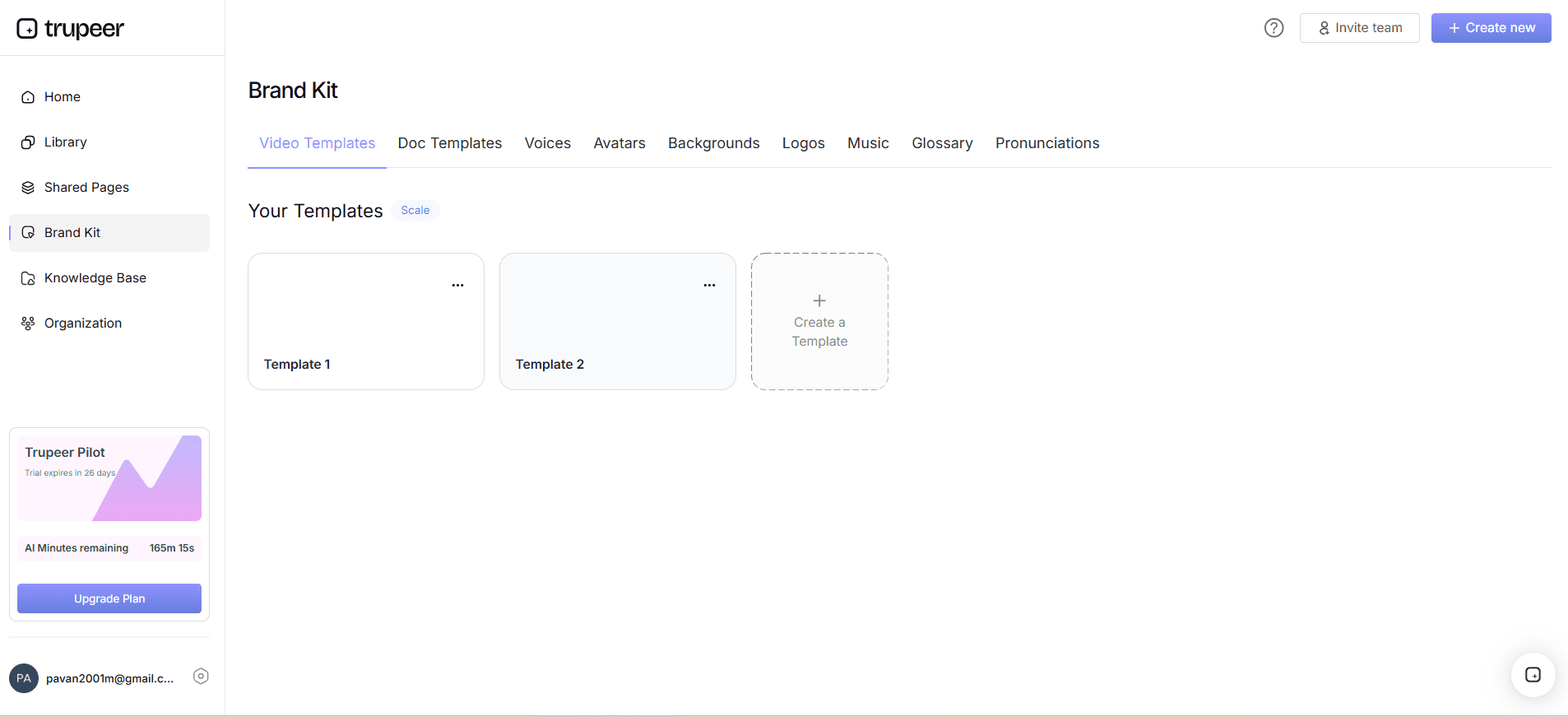
Step 4: Use Brand Kits for Visual Consistency
To maintain a cohesive visual style, apply your brand kits during the editing phase. Navigate to the "Brand Kits" section and upload your logos, color schemes, and fonts. Trupeer's brand kits and branded templates will automatically adjust your video’s visual elements to match your brand guidelines. This step takes approximately 5 minutes, providing a smooth look that reinforces brand identity. Ensure that your branding elements are up-to-date and consistent with your current marketing materials. This not only enhances recognition but also builds trust with your audience by presenting a professional, polished appearance.
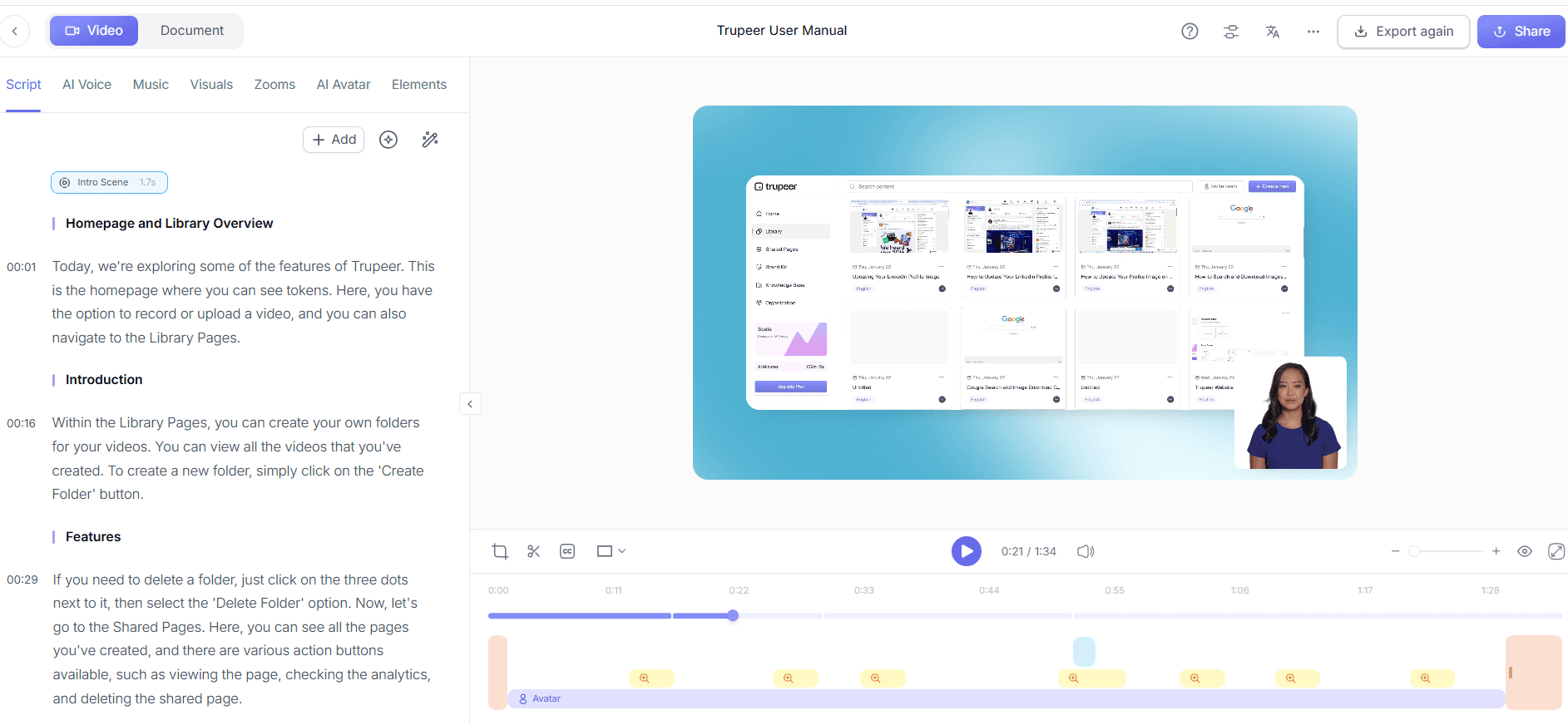
Step 5: Generate Auto Chapters and Segments
After editing, use Trupeer's auto chapters and segment detection to break your video into digestible parts. In the "Chapters" tab, click on "Auto-Generate Chapters." The AI will analyze your content and create logical breaks, making it easier for viewers to navigate. This feature is especially useful for longer recordings that need to be condensed into shorter segments. It takes about 3 minutes to generate, and you can review and adjust the chapters as needed. This step enhances viewer engagement by allowing them to find specific sections quickly, accommodating their viewing preferences.
Step 6: Distribute with AI-Searchable Knowledge Base
Finally, distribute your video using Trupeer's AI-searchable knowledge base. Upload your video to the platform, where it becomes indexed and easily searchable with timestamp deep links. This feature ensures that team members and customers can access the video and jump to relevant sections quickly. The setup process is straightforward and takes around 5 minutes. Ensure that your video is appropriately tagged and categorized for best searchability. This distribution method not only increases accessibility but also supports ongoing training and customer support efforts by making the content readily available.

What tips help you create a 2-minute feature release video?
Creating a concise and impactful feature release video requires strategic planning and execution. Here are some tactical tips to help you craft an effective video that captivates your audience and conveys the necessary information efficiently.
Plan Your Script. Outline your main points and objectives before recording. A clear script ensures your video stays within the two-minute mark while covering all essential information.
Focus on Key Features. Highlight no more than three core features. This keeps the video focused and ensures that viewers remember the most important aspects of the release.
Use Visual Aids. Incorporate graphics and text overlays to reinforce key messages. Visual aids can make complex information more digestible and memorable for viewers.
Engage with AI Avatars. Adding a talking-head segment using a customized avatar can increase viewer engagement and add a personal touch to your video content.
Test Different Voiceovers. Experiment with various AI voiceovers to find the one that best matches your brand's tone and audience preferences.
Optimize for Mobile. Ensure your video is viewable on all devices, as a significant portion of your audience may watch it on their smartphones.
Review and Revise. Before finalizing, test the video with a small audience to gather feedback. This step can help identify areas for improvement and ensure your message is clear.
Frequently asked questions
How do I choose the right AI voice for my video?
Selecting the right AI voice depends on your brand's tone and target audience. Trupeer offers over 65+ natural voices, each with adjustable pace and tone. Start by considering the demographic of your audience. A younger audience might prefer a more energetic voice, while a professional setting might require a more formal tone. Use Trupeer's voice cloning feature to create a consistent voice if you plan to produce multiple videos. This ensures your brand voice remains recognizable and aligns with your overall marketing strategy, providing a smooth auditory experience for viewers.
What should I include in my video script?
Your script should be concise and focus on the most impactful elements of your feature. Start with a brief introduction to hook your audience, then clearly outline the key features and benefits. Use plain language and avoid jargon unless it's necessary for your specific audience. End with a strong call to action, encouraging viewers to explore more about your product. A well-structured script will keep your video under two minutes while ensuring that all necessary information is communicated effectively, maximizing viewer retention and engagement.
Why is branding important in feature release videos?
Branding is crucial because it reinforces your brand identity and builds trust with your audience. Consistent branding elements like logos, color schemes, and fonts create a professional appearance and make your videos easily recognizable. Trupeer's brand kits simplify this process by automatically applying your branding to each video. This not only enhances your company's image but also ensures that your messaging aligns with your overall marketing strategy. Effective branding can differentiate your product in a competitive market, making it more memorable to potential customers.
Can Trupeer handle multi-language video production?
Yes, Trupeer is equipped to support multi-language video production. Its AI voiceover and translation capabilities allow you to create videos in over 40 languages with lip-sync accuracy. This feature is particularly beneficial for companies with a global audience, as it enables them to reach non-English speaking customers effectively. By using Trupeer's AI video translation tools, you can ensure that your message is accurately conveyed across different languages and cultural contexts, broadening your product's appeal and accessibility.
Does Trupeer offer analytics for video performance?
Absolutely, Trupeer provides comprehensive viewer engagement analytics, including drop-off rates and heatmaps. These analytics help you understand how your audience interacts with your video, allowing you to make data-driven improvements for future releases. By analyzing viewer behavior, you can identify which parts of the video are most engaging and which sections may need refinement. This feedback loop is invaluable for optimizing your video content strategy, ensuring that each release effectively captures and retains audience attention, ultimately enhancing your product's market performance. When SOPs come into the same conversation, a Scribe alternatives comparison helps clarify the scope.


